

React
React
1. 创建React+TS的项目
1. npm install -g create-react-app
2. create-react-app my-app --template typescript
3.yarn add antd
4.yarn add axios
5.yarn add nprogress @types/nprogress
6.yarn add react-router-dom @types/react-router-dom@5.2.0
2. 安装扩展程序:
1. Chinese
2. ES7
3. TypeScript Importer
3. 目录结构:src
4. 组件声明和使用:
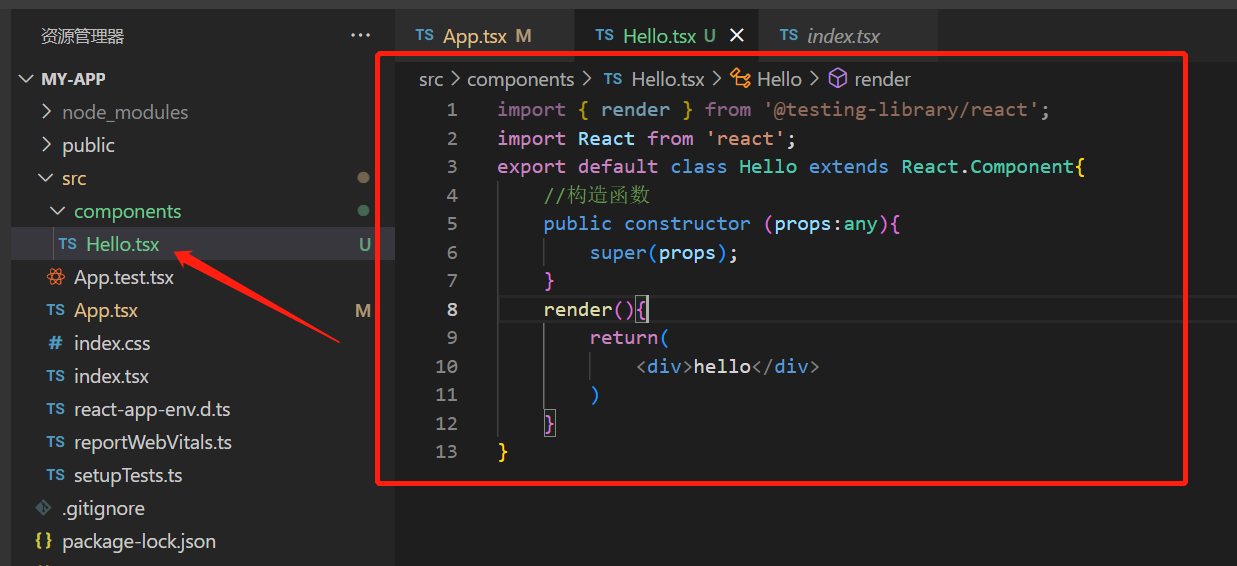
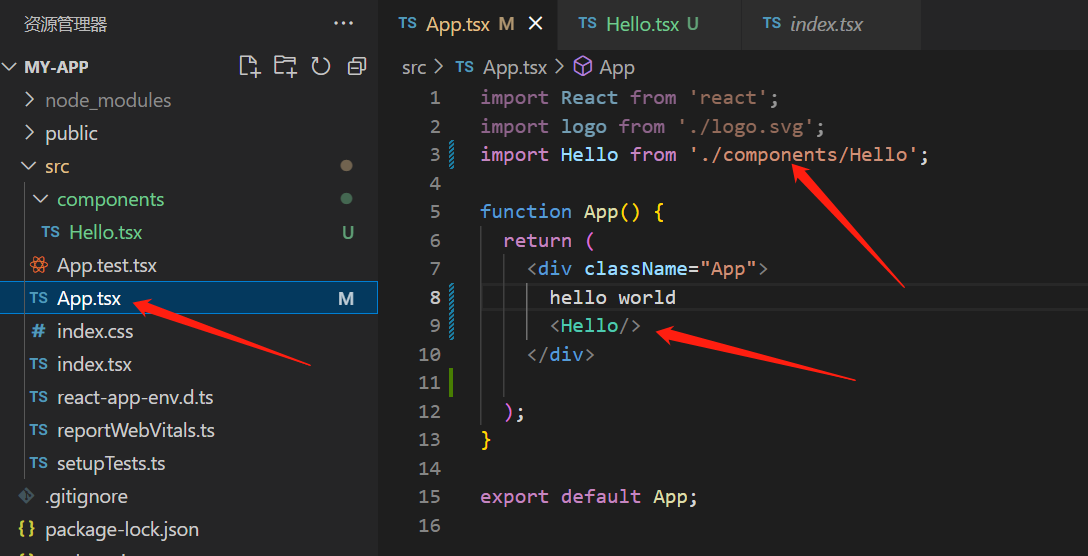
Code:
// 声明:
import { render } from '@testing-library/react';
import React from 'react';
export default class Hello extends React.Component{
    //构造函数
    public constructor (props:any){
        super(props);
    }
    render(){
        return(
            <div>hello</div>
        )
    }
}

//使用
import Hello from './components/Hello';

function App() {
  return (
    <div className="App">
      hello world
      <Hello/>
    </div>

  );
}

export default App;
5. 数据传递: 先定义接口和数据类型=》使用
import { render } from '@testing-library/react';
import React from 'react';

interface Iprops{
    title:string,
    age:number,
    work?:string //可选参数
}

export default class Hello extends React.Component<Iprops>{
    //构造函数
    public constructor (props:any){
        super(props);
    }
    render(){
        const{title,age}=this.props;
        return(
            <div>hello:{this.props.title}{this.props.age}
            <div>hello:{title}{age}</div>
            </div>

        )
    }
}
传参:
import React from 'react';
import logo from './logo.svg';
import Hello from './components/Hello';

function App() {
  return (
    <div className="App">
      hello world
      <Hello title='测试标题' age={20}/>
    </div>

  );
}
export default App;
5. 状态管理:
import { render } from '@testing-library/react';
import React from 'react';

interface Iprops{
    title:string,
    age:number,
    work?:string //可选参数
}
// 状态管理: 第一步
interface Istatus{
    count:number
}
                                             // 状态管理: 第二步
export default class Hello extends React.Component<Iprops,Istatus>{
    //构造函数
    public constructor (props:Iprops){
        super(props);
        // 状态管理: 第三步  开始
        this.state={
            count:1000
        }
        this.clickHandler=this.clickHandler.bind(this);
    }
    public clickHandler(){
        console.log(this);
        this.setState({
            count:2000
        })
    }
    //状态管理: 结束
    render(){
        const{title,age}=this.props;
        return(
            <div>hello:{this.props.title}{this.props.age}
            <div>hello:{title}{age}</div>
            <div>状态:{this.state.count}</div>
            {/* 状态管理 */}
            <button onClick={this.clickHandler}>按钮</button>
            </div>

        )
    }
}
6. 事件管理: Hello.tsx调用APP.tsx中的事件
import { render } from '@testing-library/react';
import React from 'react';

interface Iprops{
    title:string,
    age:number,
    onmyclick:any,
    work?:string //可选参数
}
// 状态管理: 第一步
interface Istatus{
    count:number
}
                                             // 状态管理: 第二步
export default class Hello extends React.Component<Iprops,Istatus>{
    //构造函数
    public constructor (props:Iprops){
        super(props);
        // 状态管理: 第三步  开始
        this.state={
            count:1000
        }
        this.clickHandler=this.clickHandler.bind(this);
        this.clickSendmsg=this.clickSendmsg.bind(this);
    }
    public clickHandler(){
        console.log(this);
        this.setState({
            count:2000
        })
    }
    public clickSendmsg(){
        this.props.onmyclick(1232132);
    }
    //状态管理: 结束
    render(){
        const{title,age}=this.props;
        return(
            <div>hello:{this.props.title}{this.props.age}
            <div>hello:{title}{age}</div>
            <div>状态:{this.state.count}</div>
            {/* 状态管理 */}
            <button onClick={this.clickHandler}>按钮</button>
            <button onClick={this.clickSendmsg}>send msg</button>
            </div>

        )
    }
}
import React from 'react';
import logo from './logo.svg';
import Hello from './components/Hello';

class App extends React.Component{

  public Myclickhandler(data:string){
    console.log(data)
  }

public render() {
    return (
      <div className="App">
        hello world
        <Hello title='测试标题' age={20} onmyclick={this.Myclickhandler}/>
      </div>
    );
  }
}
export default App;
7. 条件和列表渲染
import React, { Component } from 'react'
import ListViue from '../components/ListViue'
interface Istatus{
    dataInfo:[]
}
export default class List extends Component<{},Istatus> {
    public constructor(props:any){
        super(props)
        this.state={
            dataInfo:[]
        }
    }
    public componentDidMount(){
        fetch("http://localhost:5000/WeatherForecast/get")
        .then(res=>res.json())
        .then(data=>{
            this.setState({
                dataInfo: data
            })
        })
    }
  render() {
    return (
      <div>
        {
            this.state.dataInfo.length>0
            ?
             <div>
                {this.state.dataInfo.map((element,index)=>{
                    return <ListViue key={index} data={element}/>
                })}
             </div>
            :
            <div>没有数据</div>
        }
      </div>
    )
  }
}
ListViue.tsx
import React, { Component } from 'react'

interface Ipropss{
    data:{
        date:string,
        temperature:number,
        temperatureF:number,
        summary:string
    }
}
export default class ListViue extends Component<Ipropss> {
  render() {
    return (
      <div>
        {this.props.data.date}<br />
        {this.props.data.temperature} <br />
        {this.props.data.temperatureF}<br />
        {this.props.data.summary}
      </div>
    )
  }
}
7. 路由配置: npm add react-router-dom @types/react-router-dom
注意:现在默认使用的是6版本的会出现语法不兼容的问题:解决: npm i react-router-dom@5.2.0

 浙公网安备 33010602011771号