


【UNIAPP】websocte实现,功能:指定房间聊天,匿名进入 功能,文字与图片
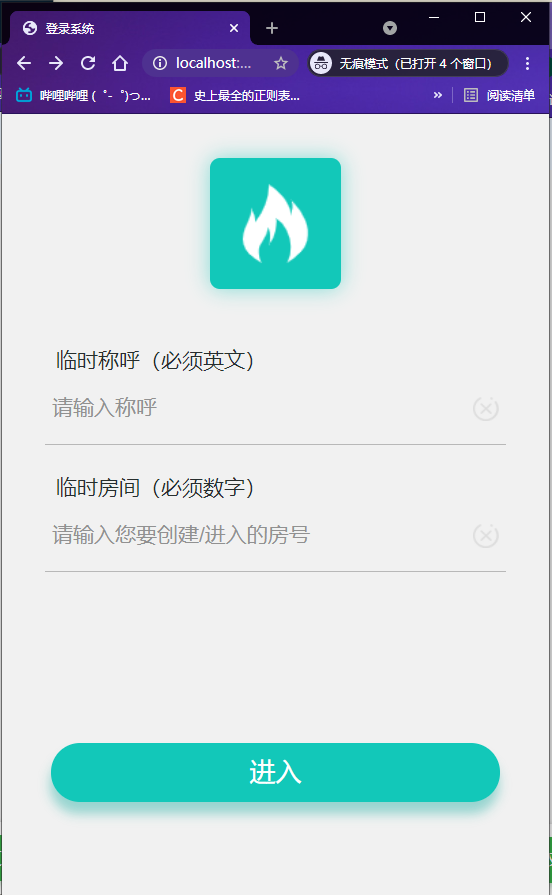
1:index.vue
<template>
    <view class="sun-index">
        <view class="sun-logo-box">
            <view class="sun-logo">
                <image class="sun-icon-img" src="@/static/imgs/fire_white.png" />
            </view>
        </view>

        <view class="sun-login-box">
            <view class="sun-label">
                <!-- <image style="width: 28rpx;height:39rpx;" src="@/static/imgs/mobile_icon.png"/> -->
                <text class="label-text">临时称呼(必须英文)</text>
            </view>
            <view class="sun-input-box">
                <input v-model="UserName" type="text" placeholder="请输入称呼" placeholder-class="placeholder-class" />
                <image class="close-icon" src="@/static/imgs/close_icon.png" />
            </view>
        </view>
        <view class="sun-login-box">
            <view class="sun-label">
                <!-- <image style="width: 29rpx;height:37rpx;" src="@/static/imgs/pwd_icon.png"/> -->
                <text class="label-text">临时房间(必须数字)</text>
            </view>
            <view class="sun-input-box">
                <input v-model="RoomId" type="text" placeholder="请输入您要创建/进入的房号" placeholder-class="placeholder-class" />
                <image class="close-icon" src="@/static/imgs/close_icon.png" />
            </view>
        </view>

        <view class="login-btn-box">
            <view class="login-btn" @click="handleSubmit">进入</view>
        </view>

    </view>
</template>


<script>
    /* 导入 */
    import config from "@/common/config.js";

    export default {
        data() {
            return {
                UserName: '',
                RoomId: '',

            }
        },
        onLoad() {

        },
        methods: {


            // 先检测重复名字  再进行跳转
            handleSubmit() {

                var isLetter = /^[a-zA-Z]+$/;
                var isNumber = /^[0-9]+$/;

                if (this.UserName === "" || this.RoomId === "" || isLetter.test(this.UserName) == false || isNumber.test(
                        this.RoomId) == false) {
                    alert("请输入正确的格式")
                } else {
                    sessionStorage.setItem('token', this.UserName + "/" + this.RoomId);


                    uni.request({
                        url: config.ipConfig + '/api/websocket/check',
                        method: "POST",
                        header: {
                            'content-type': 'application/x-www-form-urlencoded'
                        },
                        data: {
                            username: this.UserName,
                            room_id: this.RoomId
                        },
                        success: (ret) => {
                            if (ret.data.code == 200) {

                                uni.navigateTo({
                                    url: '/pages/chat/chat'
                                })

                            } else {
                                alert("该房间已存在该名称")

                            };
                        },
                        fail: (data, code) => {
                            console.log('fail' + JSON.stringify(data));
                        },

                    })

                }


            },


        }
    }
</script>

<style scoped>
    .sun-logo-box {
        display: flex;
        justify-content: center;
        align-items: center;
        width: 750rpx;
        height: 300rpx;
    }

    .sun-logo {
        display: flex;
        justify-content: center;
        align-items: center;
        width: 180rpx;
        height: 180rpx;
        border-radius: 15rpx;
        background-color: #12C8B9;
        box-shadow: 0rpx 0rpx 30rpx rgba(18, 200, 185, 0.5);
    }

    .close-icon {
        width: 36rpx;
        height: 34rpx;
    }

    .sun-icon-img {
        width: 120rpx;
        height: 120rpx;
    }

    .sun-login-box {
        padding: 20rpx 60rpx;
    }

    .sun-label {
        display: flex;
        align-items: center;
    }

    .label-text {
        margin-left: 16rpx;
        font-weight: 500;
        color: #272e2d;
        font-size: 30rpx;
    }

    .sun-input-box {
        display: flex;
        align-items: center;
        height: 100rpx;
        border-bottom: 1rpx solid #b8b8b8;
        padding: 0px 10rpx;
    }

    .sun-input-box input {
        flex: 1;
    }

    .placeholder-class {
        font-size: 30rpx;
        color: #919191;
    }

    .sun-tip {
        display: flex;
        justify-content: space-between;
        padding: 0rpx 68rpx;
    }

    .sun-tip-text {
        color: #30C6B3;
    }

    .login-btn-box {
        position: absolute;
        bottom: 129rpx;
        left: 0;
        width: 750rpx;
        padding: 50rpx 68rpx 0rpx;
    }

    .login-btn {
        height: 82rpx;
        border-radius: 41rpx;
        background-color: #12C8B9;
        box-shadow: -1px 12px 11px 0px rgba(16, 170, 157, 0.4);
        text-align: center;
        line-height: 82rpx;
        font-size: 36rpx;
        font-weight: 500;
        color: #fff;
    }
</style>
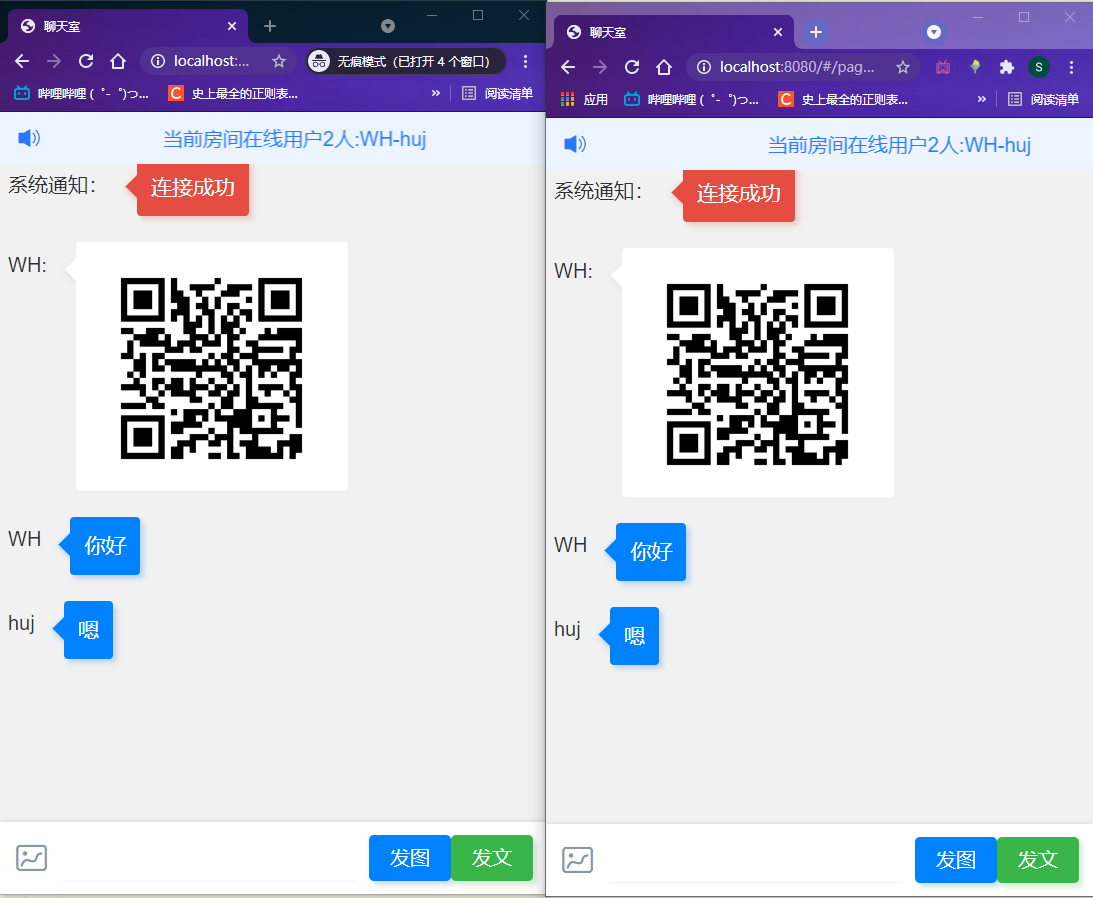
2:chat.vue
<template>
    <view>

        <!-- 在线人数 -->
        <u-notice-bar type="primary" :list="list" :speed="100" style="position: fixed;z-index: 9999;width: 100%;"></u-notice-bar>

        <view style="width: 100%;height: 35px;"></view>
        <!-- 消息列表 -->
        <view class="cu-chat">

            <view class="cu-item" v-for="item in chat" style="padding: 12px 8px 14px;">
                <view style="margin-top: 11px;">{{ item.user }}</view>
                <view class="main">
                    <view class="content bg-blue shadow">
                        <text>{{ item.text }}</text>
                    </view>
                </view>
            </view>

        </view>


        <!-- 输入框 -->
        <view class="cu-bar foot input">

            <!-- 选图片 -->
            <view class="action">
                <view class="cuIcon-pic text-grey" @click="chooseImage()"></view>
            </view>

            <!-- 输入内容 -->
            <input class="solid-bottom" :adjust-position="false" :focus="false" maxlength="300" v-model="text"
                cursor-spacing="10"></input>

            <!-- 按钮 -->
            <button class="cu-btn bg-blue shadow" @click="sendPicture">发图</button>
            <button class="cu-btn bg-green shadow" @click="send">发文</button>

        </view>


    </view>
</template>

<script>
    import config from "@/common/config.js"
    import $ from '@/static/js/jquery-3.5.1.min.js'

    export default {

        data() {
            return {
                list: [], // 在线用户

                url: config.ipWebsocket,
                socket: "",
                base: "",
                text: "",
                chat: [], // 聊天内容
                userList: "",
                is_base: false,


            }
        },

        onLoad() {
            this.init()
        },


        methods: {

            // 渲染消息
            getMessage(msg) {

                // console.log("发送消息",msg.data.split("#")[0])
                // 在线人数
                if (msg.data.split("#")[0] === "1") {
                    // console.log(msg.data.split("#")[0])
                    this.list = ["当前房间在线用户" + msg.data.split("#")[2] + "人:" + msg.data.split("#")[1]]
                }

                // 在线内容
                if (msg.data.split("#")[0] === "2"){
                    if (msg.data.split("#")[2].length >= 500) {

                        // 图片
                        var user = msg.data.split("#")[1] + ":"
                        var src = msg.data.split("#")[2]

                        /* 消息 */
                        var $ele = ("<view class=\"cu-item\" style=\"padding: 12px 8px 14px;\">\n" +
                            "\t<view style=\"margin-top: 12px;\"> " + user + "</view>\n" +
                            "\t<view class=\"main\">\n" +
                            "\t<view class=\"content shadow\" style=\"min-height: 24px;\">\n" +
                            "\t<image src=" + src + "></image>\n" +
                            "\t</view>\n" +
                            "\t</view>\n" +
                            "\t</view>")

                        $(".cu-chat").append($ele)

                        uni.pageScrollTo({
                             duration:500, // 毫秒
                             scrollTop:9999 // 位置
                        })


                    } else {


                        // 文本
                        // console.log("mes", msg.data)
                        var user = msg.data.split("#")[1]
                        var txt = msg.data.split("#")[2]

                        //
                        var data = {"user":user,"text":txt}
                        this.chat.push(data)

                        // console.log(this.chat)

                        uni.pageScrollTo({
                             duration:500, // 毫秒
                             scrollTop:9999 // 位置
                        })


                        // this.chat.push(msg.data.split("#")[1] + ":" + msg.data.split("#")[2])
                    }

                }
            },

            // 发送图片
            sendPicture() {
                // console.log(this.base.length)
                if (this.base.length != 0) {
                    this.socket.send(this.base)

                    this.base = ""
                } else {
                    alert("点击左侧图片后再点此按钮发送")
                }

            },

            // 发送消息
            send() {
                if (this.text.length != 0) {
                    this.socket.send(this.text)
                    this.text = ""
                } else {
                    alert("输入内容后再点此按钮发送")
                }

            },

            open() {
                // this.chat.push("socket连接成功")
                // console.log("连接成功")

                /* 消息 */
                var $ele = ("<view class=\"cu-item\" style=\"padding: 12px 8px 14px;\">\n" +
                    "\t<view style=\"margin-top: 12px;\"> " + "系统通知:" + "</view>\n" +
                    "\t<view class=\"main\">\n" +
                    "\t<view class=\"content bg-red shadow\" style=\"min-height: 24px;\">\n" +
                    "\t<text>" + "连接成功" + "</text>\n" +
                    "\t</view>\n" +
                    "\t</view>\n" +
                    "\t</view>")
                $(".cu-chat").append($ele)

            },

            close() {

                var that = this
                that.socket.close()
            },

            error() {

                uni.navigateTo({
                    url: '/pages/index/index'
                })
            },

            destroyed() {
                // 销毁监听
                this.socket.onclose = this.close
            },


            // 初始化 这里的坑最多
            init() {
                    // 实例化socket
                    this.socket = new WebSocket(this.url + sessionStorage.getItem('token') + "/")

                    // 监听socket连接
                    this.socket.onopen = this.open
                    // 监听socket错误信息
                    this.socket.onerror = this.error
                    // 监听socket消息
                    this.socket.onmessage = this.getMessage
            },


            //传入图片路径,返回base64
            getBase64(img) {

                function getBase64Image(img, width, height) { //width、height调用时传入具体像素值,控制大小 ,不传则默认图像大小
                    var canvas = document.createElement("canvas");
                    canvas.width = width ? width : img.width;
                    canvas.height = height ? height : img.height;
                    var ctx = canvas.getContext("2d");
                    ctx.drawImage(img, 0, 0, canvas.width, canvas.height);
                    var dataURL = canvas.toDataURL();
                    return dataURL;
                }
                var image = new Image();
                image.crossOrigin = '';
                image.src = img;
                var deferred = $.Deferred();
                if (img) {
                    image.onload = function() {
                        deferred.resolve(getBase64Image(image)); //将base64传给done上传处理
                    }
                    return deferred.promise();
                }
            },


            /* 选择照片  转换为base64 */
            chooseImage() {
                var that = this
                uni.chooseImage({
                    count: 1, //默认9
                    sizeType: ['original', 'compressed'], //可以指定是原图还是压缩图,默认二者都有
                    sourceType: ['album', 'camera'], //从相册选择
                    success: function(res) {

                        // 获取到图片地址
                        var src = res.tempFilePaths[0]
                        // 将图片转换成base64
                        that.getBase64(src).then(function(base64) {
                            that.base = base64


                        }, function(err) {
                            console.log(err)
                        })


                    }
                });
            },


        }
    }
</script>

<style>
    page {
        padding-bottom: 100upx;
    }

    .content {
        min-height: 24px;
    }
</style>
3:后端主要实现文件:
#!/usr/bin/env python
# -*- coding:utf-8 -*-
from channels.generic.websocket import WebsocketConsumer
from channels.generic.websocket import AsyncWebsocketConsumer
from channels.exceptions import StopConsumer
from asgiref.sync import async_to_sync

# 导入redis配置
import redis
from utils.redis_cli import Pool


class ChatConsumer(WebsocketConsumer):

    # 服务端接收连接,像客户端发送一个加密字符串
    def websocket_connect(self, message):

        # 固定获取参数格式   self.scope 所有前端来的请求参数
        username  = self.scope['url_route']['kwargs'].get("username")
        room_id  = self.scope['url_route']['kwargs'].get("room_id")

        # self.channel_name 生成随机字符串ID 代表的是连接的自己
        async_to_sync(self.channel_layer.group_add)(room_id, self.channel_name)

        # 连接
        self.accept()

        sr = redis.Redis(connection_pool=Pool)
        res = sr.hget(room_id,"room")
        # print("res",res)

        if res == None:
            # 如果没有有用户在这个房间
            sr.hset(room_id,"room",username)
            user_list = username
        else:
            if username in res.split("-"):
                user_list = res
            else:
                # 如果房间已经存在用户 那么就增加用户组
                user_list = res + "-" + username

        sr.hset(room_id,"room",user_list)
        # 有人进入改房间 刷新存在时间
        sr.expire(room_id, 3600)

        # 发消息  更新一次在线人数
        async_to_sync(self.channel_layer.group_send)(room_id, {
            'type': 'make.first',
            'message': "1#" + user_list + "#{}".format(len(user_list.split("-"))),
        })

        # # 针对群体发消息
        # async_to_sync(self.channel_layer.group_send)(room_id, {
        #     'type': 'make.send',
        #     'message': "2#" + "系统通知" + "#" + "{}进入了房间".format(username)
        # })


    # 客户端向服务端发送消息,此方法被触发
    def websocket_receive(self, text_data=None, bytes_data=None,):
        """
            :param text_data['text']: 接收到的消息
        """

        username = self.scope['url_route']['kwargs'].get("username")
        room_id = self.scope['url_route']['kwargs'].get("room_id")


        # 针对群体发消息
        async_to_sync(self.channel_layer.group_send)(room_id, {
            'type': 'make.send',
            'message': "2#" + username + "#" +  text_data['text']
        })


    # 断开连接
    def websocket_disconnect(self, message):

        # print('客户端断开连接了')

        username = self.scope['url_route']['kwargs'].get("username")

        room_id = self.scope['url_route']['kwargs'].get("room_id")


        # 踢出群
        async_to_sync(self.channel_layer.group_discard)(room_id, self.channel_name)

        # 先取出redis里面的这个房间的用户
        sr = redis.Redis(connection_pool=Pool)
        res = sr.hget(room_id,"room")
        res_list = res.split("-")

        # 获取改房间用户组,移除退出的用户 移除空格
        try:
            res_list.remove(username)
        except:
            pass
        for i in res_list:
            if i == '':
                res_list.remove(i)


        # print("res_list",res_list)
        # 整理剩下的用户 填入redis
        if len(res_list) == 0:
            sr.expire(room_id, 1)


        user_list = ""
        if len(res_list) == 1:
            user_list = res_list[0]

        else:
            for user in res_list:
                user_list = user + "-" + user_list
            user_list = user_list[0:-1]


        # 传入redis
        sr = redis.Redis(connection_pool=Pool)
        sr.hset(room_id,"room", user_list)

        # print("发送信息",user_list)

        # 发消息  这里面是可以定义自己发送的内容
        async_to_sync(self.channel_layer.group_send)(room_id, {
            'type': 'make.first',
            'message': "1#" + user_list + "#{}".format(len(user_list.split("-"))),
        })

        # # 针对群体发消息
        # async_to_sync(self.channel_layer.group_send)(room_id, {
        #     'type': 'make.send',
        #     'message': "2#" + "系统通知" + "#" + "{}离开了房间".format(username)
        # })


        raise StopConsumer()


    # 发消息内容
    def make_first(self, event):
        # event储存着上面定义的内容
        message = event['message']
        self.send(message)

    # 回复群里的消息    event相当于是text_data
    def make_send(self, event):
        print("sssss")
        message = event['message']
        self.send(message)
Python全栈(后端、数据分析、脚本、爬虫、EXE客户端) / 前端(WEB,移动,H5) / Linux / SpringBoot / 机器学习

 浙公网安备 33010602011771号