
go集成nacos
一. nacos介绍及安装
1. 官网
https://nacos.io/zh-cn/docs/quick-start.html
二.集成go
1.官网地址
https://github.com/nacos-group/nacos-sdk-go
2. 使用
package main

import (
	"OldPackageTest/nacos_test/config"
	"encoding/json"
	"fmt"
	"github.com/nacos-group/nacos-sdk-go/clients"
	"github.com/nacos-group/nacos-sdk-go/common/constant"
	"github.com/nacos-group/nacos-sdk-go/vo"
	"time"
)

func main() {
	sc := []constant.ServerConfig{
		{
			IpAddr: "127.0.0.1",
			Port:   8848,
		},
	}

	cc := constant.ClientConfig{
		NamespaceId:         "92e0d4cc-d03c-4d66-8530-dd598501ad29", // 如果需要支持多namespace,我们可以场景多个client,它们有不同的NamespaceId
		TimeoutMs:           5000,
		NotLoadCacheAtStart: true,
		LogDir:              "tmp/nacos/log",
		CacheDir:            "tmp/nacos/cache",
		RotateTime:          "1h",
		MaxAge:              3,
		LogLevel:            "debug",
	}

	configClient, err := clients.CreateConfigClient(map[string]interface{}{
		"serverConfigs": sc,
		"clientConfig":  cc,
	})
	if err != nil {
		panic(err)
	}

	content, err := configClient.GetConfig(vo.ConfigParam{
		DataId: "user-web.yaml",
		Group:  "dev"})

	if err != nil {
		panic(err)
	}
	//读取配置
	fmt.Println(content)

	//fmt.Println(content) //字符串 - yaml
	serverConfig := config.ServerConfig{}
	//想要将一个json字符串转换成struct,需要去设置这个struct的tag
	json.Unmarshal([]byte(content), &serverConfig)
	fmt.Println(serverConfig)

	//监听配置文件的变化
	err = configClient.ListenConfig(vo.ConfigParam{
		DataId: "user-web.yaml",
		Group:  "dev",
		OnChange: func(namespace, group, dataId, data string) {
			fmt.Println("配置文件变化")
			fmt.Println("group:" + group + ", dataId:" + dataId + ", data:" + data)
		},
	})
	time.Sleep(3000 * time.Second)

}
三.service集成nacos
1. 如何将yaml映射成struct结构体
在上述测试中可以看出,读取的时候返回的数据类型为字符串类型,那如何映射成go 的结构体呢
解决方案: go语言本身支持将json的字符串反射成结构体
在线转换测试地址:https://json2yaml.com/convert-yaml-to-json
在nacos上创建json的数据格式相关的配置文件
{
  "name": "user-web",
  "port": 8021,
  "user_srv": {
    "host": "127.0.0.1",
    "port": 50051,
    "name": "user-srv"
  },
  "jwt": {
    "key": "fx4Xg7YPud$jji$y3XCCsReQcvMuZim^"
  },
  "sms": {
    "key": "",
    "secrect": "",
    "expire": 30
  },
  "redis": {
    "host": "127.0.0.1",
    "port": 6379
  },
  "consul": {
    "host": "127.0.0.1",
    "port": 8500
  }
}
详细配置信息如下
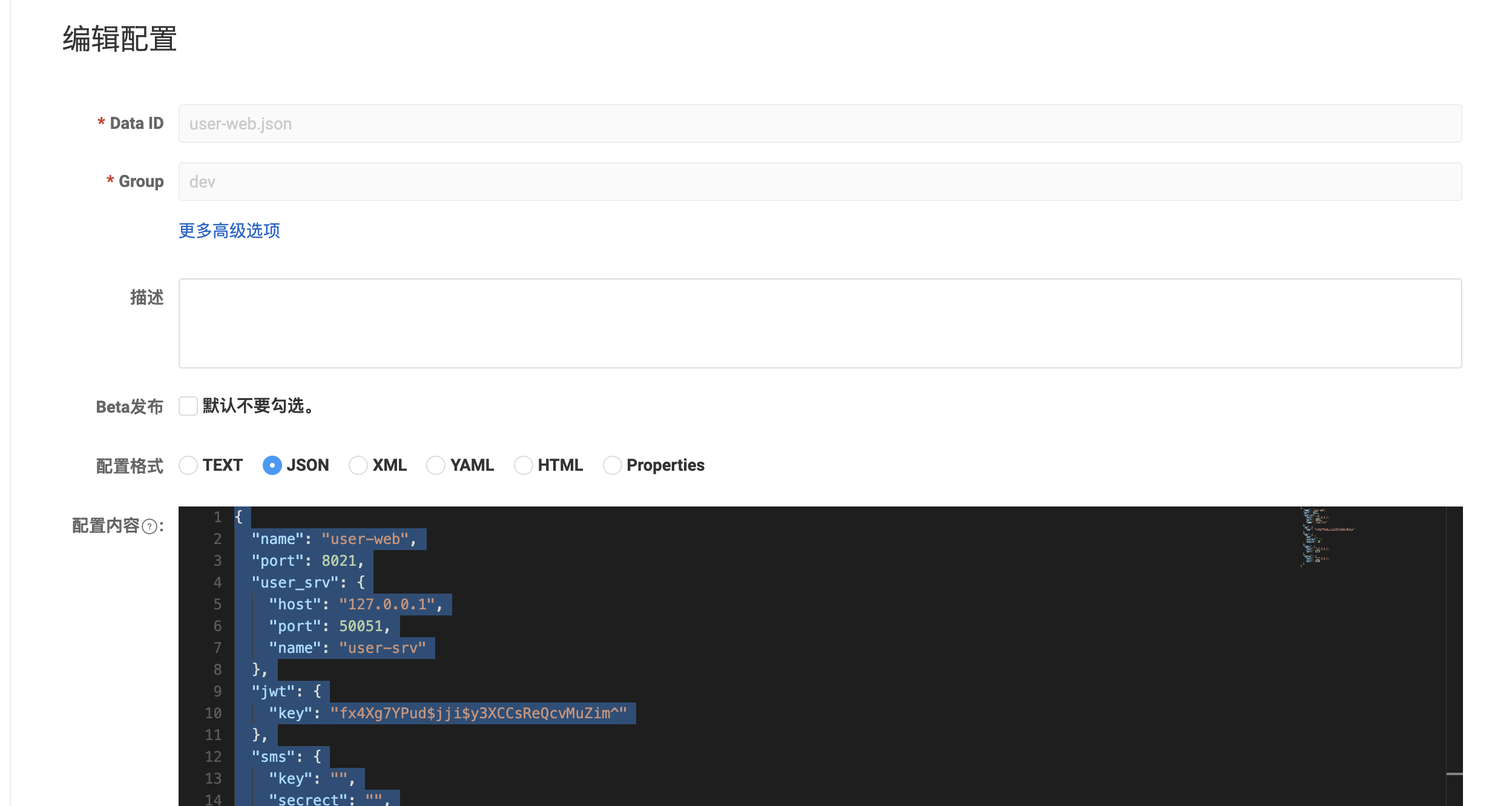
相关代码
package main

import (
	"OldPackageTest/nacos_test/config"
	"encoding/json"
	"fmt"
	"github.com/nacos-group/nacos-sdk-go/clients"
	"github.com/nacos-group/nacos-sdk-go/common/constant"
	"github.com/nacos-group/nacos-sdk-go/vo"
)

func main() {
	sc := []constant.ServerConfig{
		{
			IpAddr: "127.0.0.1",
			Port:   8848,
		},
	}

	cc := constant.ClientConfig{
		NamespaceId:         "92e0d4cc-d03c-4d66-8530-dd598501ad29", // 如果需要支持多namespace,我们可以场景多个client,它们有不同的NamespaceId
		TimeoutMs:           5000,
		NotLoadCacheAtStart: true,
		LogDir:              "tmp/nacos/log",
		CacheDir:            "tmp/nacos/cache",
		RotateTime:          "1h",
		MaxAge:              3,
		LogLevel:            "debug",
	}

	configClient, err := clients.CreateConfigClient(map[string]interface{}{
		"serverConfigs": sc,
		"clientConfig":  cc,
	})
	if err != nil {
		panic(err)
	}

	content, err := configClient.GetConfig(vo.ConfigParam{
		DataId: "user-web.json",
		Group:  "dev"})

	if err != nil {
		panic(err)
	}
	//读取配置
	//fmt.Println(content)

	//fmt.Println(content) //字符串 - yaml
	serverConfig := config.ServerConfig{}
	//想要将一个json字符串转换成struct,需要去设置这个struct的tag
	json.Unmarshal([]byte(content), &serverConfig)
	fmt.Println(serverConfig)

	//监听配置文件的变化
	//err = configClient.ListenConfig(vo.ConfigParam{
	//	DataId: "user-web.json",
	//	Group:  "dev",
	//	OnChange: func(namespace, group, dataId, data string) {
	//		fmt.Println("配置文件变化")
	//		fmt.Println("group:" + group + ", dataId:" + dataId + ", data:" + data)
	//	},
	//})
	//time.Sleep(3000 * time.Second)

}
config配置文件中添加
json:"xxx"
package config

type UserSrvConfig struct {
	Host string `mapstructure:"host" json:"host"`
	Port int    `mapstructure:"port" json:"port"`
	Name string `mapstructure:"name" json:"name"`
}

type ServerConfig struct {
	Name         string        `mapstructure:"name" json:"name"`
	Port         int           `mapstructure:"port" json:"port"`
	UserSrvInfo  UserSrvConfig `mapstructure:"user_srv" json:"user_srv"`
	JWTInfo      JWTConfig     `mapstructure:"jwt" json:"jwt"`
	AliSmsConfig AliSmsConfig  `mapstructure:"sms" json:"nsmsame"`
	RedisConfig  RedisConfig   `mapstructure:"redis" json:"redis"`
	ConsulInfo   ConsulConfig  `mapstructure:"consul" json:"consul"`
}

type JWTConfig struct {
	SigningKey string `mapstructure:"key" json:"key"`
}

type AliSmsConfig struct {
	ApiKey     string `mapstructure:"key" json:"key"`
	ApiSecrect string `mapstructure:"secrect" json:"secrect"`
}

type RedisConfig struct {
	Host   string `mapstructure:"host" json:"host"`
	Port   int    `mapstructure:"port" json:"port"`
	Expire int    `mapstructure:"expire" json:"expire"`
}

type ConsulConfig struct {
	Host string `mapstructure:"host" json:"host"`
	Port int    `mapstructure:"port" json:"port"`
}

type Nacos struct {
	Host      string `mapstructure:"host" json:"host"`
	Port      uint64 `mapstructure:"port" json:"port"`
	User      string `mapstructure:"user" json:"user"`
	Password  string `mapstructure:"password" json:"password"`
	NameSpace string `mapstructure:"namespace" json:"namespace"`
	DataId    string `mapstructure:"dataid" json:"dataid"`
	Group     string `mapstructure:"group" json:"group"`
}
2. 在项目中使用
1. 更改config的配置信息
user-web/config/config.go文件添加json:"xxx"以供json解析使用
package config

type UserSrvConfig struct {
	Host string `mapstructure:"host" json:"host"`
	Port int    `mapstructure:"port" json:"port"`
	Name string `mapstructure:"name" json:"name"`
}

type ServerConfig struct {
	Name         string        `mapstructure:"name" json:"name"`
	Port         int           `mapstructure:"port" json:"port"`
	UserSrvInfo  UserSrvConfig `mapstructure:"user_srv" json:"user_srv"`
	JWTInfo      JWTConfig     `mapstructure:"jwt" json:"jwt"`
	AliSmsConfig AliSmsConfig  `mapstructure:"sms" json:"nsmsame"`
	RedisConfig  RedisConfig   `mapstructure:"redis" json:"redis"`
	ConsulInfo   ConsulConfig  `mapstructure:"consul" json:"consul"`
}

type JWTConfig struct {
	SigningKey string `mapstructure:"key" json:"key"`
}

type AliSmsConfig struct {
	ApiKey     string `mapstructure:"key" json:"key"`
	ApiSecrect string `mapstructure:"secrect" json:"secrect"`
}

type RedisConfig struct {
	Host   string `mapstructure:"host" json:"host"`
	Port   int    `mapstructure:"port" json:"port"`
	Expire int    `mapstructure:"expire" json:"expire"`
}

type ConsulConfig struct {
	Host string `mapstructure:"host" json:"host"`
	Port int    `mapstructure:"port" json:"port"`
}
2.增加nacos的结构体配置
type Nacos struct {
	Host      string `mapstructure:"host" json:"host"`
	Port      uint64 `mapstructure:"port" json:"port"`
	User      string `mapstructure:"user" json:"user"`
	Password  string `mapstructure:"password" json:"password"`
	NameSpace string `mapstructure:"namespace" json:"namespace"`
	DataId    string `mapstructure:"dataid" json:"dataid"`
	Group     string `mapstructure:"group" json:"group"`
}
3.增加yaml的相关nacos的配置
在config-debug.yaml中增加nacos的相关配置信息
#nacos:
host: '127.0.0.1'
port: 8848
namespace: '92e0d4cc-d03c-4d66-8530-dd598501ad29'
user: 'nacos'
password: 'nacos'
dataid: 'user-web.json'
group: 'dev'
以上就完成了配置的配置,接下来就是对配置的读取
4.配置读取
在initialize/config.go中,更新InitConfig函数,将原来的读取本地的配置文件,更改为读取nacos的配置,并把配置映射给结构体及全局&global.ServerConfig变量
package initialize

import (
	"encoding/json"
	"fmt"
	"github.com/nacos-group/nacos-sdk-go/clients"
	"github.com/nacos-group/nacos-sdk-go/common/constant"
	"github.com/nacos-group/nacos-sdk-go/vo"
	"github.com/spf13/viper"
	"go.uber.org/zap"
	"mxshop-api/user-web/global"
)

func GetEnvInfo(env string) bool {
	viper.AutomaticEnv()
	return viper.GetBool(env)
	//刚才设置的环境变量 想要生效 我们必须得重启goland
}

//func InitConfig() {
//读取本地配置文件时候的配置
//	fmt.Println(GetEnvInfo("MXSHOP_DEBUG"))
//	//配置环境变量
//	debug := GetEnvInfo("MXSHOP_DEBUG")
//	configFilePrefix := "config"
//	configFileName := fmt.Sprintf("user-web/%s-pro.yaml", configFilePrefix)
//	if debug {
//		configFileName = fmt.Sprintf("user-web/%s-debug.yaml", configFilePrefix)
//	}
//
//	v := viper.New()
//	//文件的路径如何设置
//	v.SetConfigFile(configFileName)
//	if err := v.ReadInConfig(); err != nil {
//		panic(err)
//	}
//	if err := v.Unmarshal(global.ServerConfig); err != nil {
//		panic(err)
//	}
//	zap.S().Infof("配置文件:&v", configFileName)
//
//	zap.S().Infof("配置信息:&v", global.ServerConfig)
//
//	//viper的功能 - 动态监控变化
//	v.WatchConfig()
//	v.OnConfigChange(func(e fsnotify.Event) {
//		zap.S().Infof("配置产生变化:&v", e.Name)
//
//		fmt.Println("config file channed: ", e.Name)
//		_ = v.ReadInConfig()
//		_ = v.Unmarshal(&global.ServerConfig)
//		zap.S().Infof("配置信息:&v", global.ServerConfig)
//	})
//}

func InitConfig() {
	//读取nacos的配置
	fmt.Println(GetEnvInfo("MXSHOP_DEBUG"))
	//配置环境变量
	debug := GetEnvInfo("MXSHOP_DEBUG")
	configFilePrefix := "config"
	configFileName := fmt.Sprintf("user-web/%s-pro.yaml", configFilePrefix)
	if debug {
		configFileName = fmt.Sprintf("user-web/%s-debug.yaml", configFilePrefix)
	}

	v := viper.New()
	//文件的路径如何设置
	v.SetConfigFile(configFileName)
	if err := v.ReadInConfig(); err != nil {
		panic(err)
	}
	if err := v.Unmarshal(global.NacosConfig); err != nil {
		panic(err)
	}
	zap.S().Infof("配置信息:&v", global.NacosConfig)

	//	从nacos中读取配置信息
	sc := []constant.ServerConfig{
		{
			IpAddr: global.NacosConfig.Host,
			Port:   global.NacosConfig.Port,
		},
	}

	cc := constant.ClientConfig{
		NamespaceId:         global.NacosConfig.NameSpace, // 如果需要支持多namespace,我们可以场景多个client,它们有不同的NamespaceId
		TimeoutMs:           5000,
		NotLoadCacheAtStart: true,
		LogDir:              "tmp/nacos/log",
		CacheDir:            "tmp/nacos/cache",
		LogLevel:            "debug",
	}

	configClient, err := clients.CreateConfigClient(map[string]interface{}{
		"serverConfigs": sc,
		"clientConfig":  cc,
	})
	if err != nil {
		panic(err)
	}

	content, err := configClient.GetConfig(vo.ConfigParam{
		DataId: global.NacosConfig.DataId,
		Group:  global.NacosConfig.Group})

	if err != nil {
		panic(err)
	}
	//读取配置
	//fmt.Println(content)

	//fmt.Println(content) //字符串 - yaml
	//想要将一个json字符串转换成struct,需要去设置这个struct的tag
	err = json.Unmarshal([]byte(content), &global.ServerConfig)
	if err != nil {
		zap.S().Fatalf("服务nacos配置失败:%s", err.Error())
	}
	fmt.Println(&global.ServerConfig)
}

 浙公网安备 33010602011771号