java如何写别接口给人调用(WebService)-XXOO
转载:https://blog.csdn.net/qq_35731570/article/details/69937457
前言
计算机语言分类有很多,如C、C++、C#、Java、PHP、Python等等,她们有各自的特性及擅长的领域,但她们各自又不是全能的。在一个稍微大型一点的项目都会用到多种语言共同完成,那么这些编程语言如何进行通信呢。什么意思呢,就是比如说我Java写的一个方法,其他编程语言要怎么去调用呢?这就是本文要探讨的问题了。
一般来说,方法层面的编程语言通信用的是网络接口形式,只暴露出形参和结果供别人调用。接口一般分为接口定义者和接口调用者,定义者可以规定接收参数的类型及返回形式,而接口定义者则只能完全按照接口定义者规定的参数进行访问。就叫是我们所说的webService(网络服务)。
以前的做法是利用XML作接口格式定义,然后通过Http做通讯和请求,如大名鼎鼎的SOAP,其实现在也是的,只不过现在流行RestFul风格的Rest接口形式,但用的还是XML+HTTP,那这两者有啥区别呢?最大的区别就是SOAP返回的主要是XML格式,有时还需要附带一些辅助文件,而Rest则还可以返回JSON类型的字符串,减少了很多繁乱的XML标签。
由于这篇文章之前是转载的,比较乱,在这里说声抱歉!!!!!
现在重新写一下,见谅。
一、接口给外部调用(举例)
1.我们的CURD暴露到Controller层,让前端调用。外部项目调用一般通过HttpClient/OkHttp等直接调用。这种方式是比较多的。
2.WebService
3.服务间调用(注册中心等等)
......
这里就以WebService示例,服务端如何暴露接口,客户端如何调用。
二、WebService
1.定义
WebService是一种远程调用技术,也叫XML Web Service WebService,是一种可以接收从Internet或者Internet上的其他系统中传递过来的请求,轻量级的独立的通信技术。是通过SOAP在Web上提供的软件服务,使用WSDL文件进行说明,并通过UDDI进行注册。
SOAP:全名为(Simple Object Access Protocol)简单对象存取协议。是XML Web Service的通信协议。当用户通过UDDI找到你的WSDL描述文档后,他可以通过SOAP调用你建立的Web服务中的一个或多个操作。SOAP是XML 文档形式的调用方法的规范,他可以支持不同的底层接口,像HTTP/HTTPS或者SMTP。
XML:(Extensible Markup Language)扩展型可标记语言。面向短期的临时数据处理、面向万维网(WWW), 是SAOP的基础。
WSDL:(Web Services Description Language)WSDL是用于说明一组SOAP消息以及如何交换这些消息 的XML文档。
2.实现方式
2.1.Jdk方式
1.服务端 定义接口类 接口实现类 发布类
2.main方法运行(发布)
3.cmd 命令 执行 wsimport -s 生成文件路径 -keep 你的wsdl Url
wsimport -s D:\YlDream\WorkSpace\springbootDevelop\springboot-test\src\client -keep http://localhost:8019/api_server/webservice?wsdl
4.客户端调用
WebService服务端
定义WebService 接口
package com.yl.springboottest.api.webservice.server;

import javax.jws.WebMethod;
import javax.jws.WebService;

/**
 * 描述: 定义WebService 接口
 *
 * @WebService 表示此类是一个元数据注释(JSR 181) 关于JSR181本文不做涉及
 * @WebMethod 表示表示此方法是要被发布出去的方法,
 * 仅支持在使用@WebService注解标注的类中使用@WebMethod注解
 *
 * @author: yanglin
 * @Date: 2020-11-19-10:19
 * @Version: 1.0
 */
@WebService
public interface IWebService {

    @WebMethod
    String firstWebServiceApi(String name);
}
WebService 接口实现
package com.yl.springboottest.api.webservice.server;

import lombok.extern.slf4j.Slf4j;

import javax.jws.WebService;

/**
 * 描述: WebService 接口实现
 *
 * @author: yanglin
 * @Date: 2020-11-19-10:19
 * @Version: 1.0
 */
@Slf4j
@WebService
public class WebServiceImpl implements IWebService{

    @Override
    public String firstWebServiceApi(String name) {
        name = "你好,"+name+",这是我的第一个WebService";
        log.info("firstWebServiceApi start {}", name);
        return name;
    }
}
WebService 服务端发布
三种发布方式
1.main方法运行(测试)
2.使用ServletContextListener监听器发布WebService
3.使用Servlet发布WebService
package com.yl.springboottest.api.webservice.server;

import lombok.extern.slf4j.Slf4j;

import javax.xml.ws.Endpoint;

/**
 * 描述: WebService 操作 服务端
 * 1.main方法运行(测试)
 * @author: yanglin
 * @Date: 2020-11-19-10:15
 * @Version: 1.0
 */
@Slf4j
public class WebServiceServerT1 {


    public static void main(String[] args) {
        /**
         * 1.定义一个WebService的发布地址(暴露出来,让外界访问)
         */
        String webAddress = "http://localhost:8019/api_server/webservice";

        /**
         * 2.使用Endpoint类提供的publish方法发布WebService,发布时确保端口没有被占用
         */
        Endpoint.publish(webAddress, new WebServiceImpl());
        log.info("WebService 发布成功,URL= {}", webAddress+"?wsdl");

    }
}
package com.yl.springboottest.api.webservice.server;

import lombok.extern.slf4j.Slf4j;

import javax.servlet.ServletContextEvent;
import javax.servlet.ServletContextListener;
import javax.servlet.annotation.WebListener;
import javax.xml.ws.Endpoint;

/**
 * 描述: 2.用于发布WebService的监听器
 * 使用Servlet3.0提供的@WebListener注解将实现了ServletContextListener接口的
 * WebServicePublishListener类标注为一个Listener
 *
 * @author: yanglin
 * @Date: 2020-11-19-10:52
 * @Version: 1.0
 */
@Slf4j
@WebListener
public class WebServicePublishListener implements ServletContextListener {

    @Override
    public void contextDestroyed(ServletContextEvent sce) {
        log.info("contextDestroyed start ");
    }

    @Override
    public void contextInitialized(ServletContextEvent sce) {
        /**
         * 1.定义一个WebService的发布地址(暴露出来,让外界访问)
         */
        String webAddress = "http://localhost:8019/api_server/webservice";

        /**
         * 2.使用Endpoint类提供的publish方法发布WebService,发布时确保端口没有被占用
         */
        Endpoint.publish(webAddress, new WebServiceImpl());
        log.info("WebServicePublishListener WebService 发布成功,URL= {}", webAddress+"?wsdl");
    }
}
package com.yl.springboottest.api.webservice.server;

import lombok.extern.slf4j.Slf4j;

import javax.servlet.ServletException;
import javax.servlet.annotation.WebServlet;
import javax.servlet.http.HttpServlet;
import javax.xml.ws.Endpoint;

/**
 * 描述: 3.用于发布WebService的Servlet
 *
 * 使用Servlet3.0提供的@WebServlet注解将继承HttpServlet类的普通Java类标注为一个Servlet
 *
 * 将value属性设置为空字符串,这样WebServicePublishServlet就不提供对外访问的路径
 * loadOnStartup属性设置 WebServicePublishServlet的初始化时机
 *
 * @author: yanglin
 * @Date: 2020-11-19-10:55
 * @Version: 1.0
 */
@Slf4j
@WebServlet(value = "", loadOnStartup = 0)
public class WebServicePublishServlet extends HttpServlet {

    /**
     * 在WebServicePublishServlet初始化时发布WebService
     * @throws ServletException
     */
    @Override
    public void init() throws ServletException {
        /**
         * 1.定义一个WebService的发布地址(暴露出来,让外界访问)
         */
        String webAddress = "http://localhost:8019/api_server/webservice";

        /**
         * 2.使用Endpoint类提供的publish方法发布WebService,发布时确保端口没有被占用
         */
        Endpoint.publish(webAddress, new WebServiceImpl());
        log.info("WebServicePublishServlet WebService 发布成功,URL= {}", webAddress+"?wsdl");
    }
}
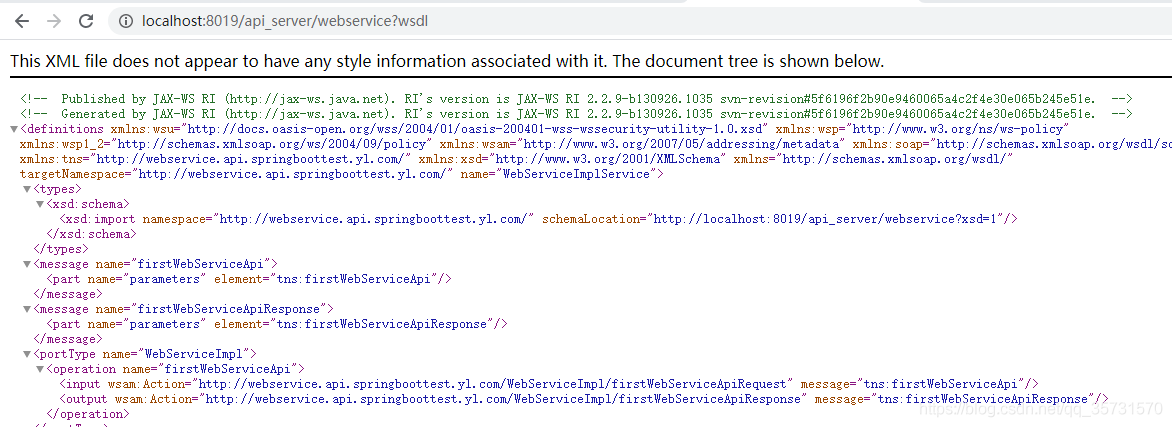
main方法启动成功(监听器/Servlet则是项目启动成功),访问定义的地址
http://localhost:8019/api_server/webservice?wsdl
一定要记得加?wsdl
WebService客户端
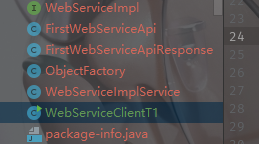
通过wsdl生成对应的客户端文件,复制到项目所在目录

新建测试类-客户端调用
package com.yl.springboottest.api.webservice.client;

import lombok.extern.slf4j.Slf4j;

/**
 * 描述: WebService 操作 客户端 直接调用
 *
 * @author: yanglin
 * @Date: 2020-11-19-10:45
 * @Version: 1.0
 */
@Slf4j
public class WebServiceClientT1 {

    public static void main(String[] args) {
        WebServiceImplService factory = new WebServiceImplService();
        WebServiceImpl serviceImpl = factory.getWebServiceImplPort();
        String result = serviceImpl.firstWebServiceApi("张三");
        log.info("WebServiceClientT1 result {}", result);

    }
}
2.2.CXF方式操作WebService
maven pom
        <dependency>
            <groupId>org.apache.cxf</groupId>
            <artifactId>cxf-spring-boot-starter-jaxws</artifactId>
            <version>3.2.5</version>
        </dependency>
        <dependency>
            <groupId>org.apache.cxf</groupId>
            <artifactId>cxf-core</artifactId>
            <version>3.2.5</version>
        </dependency>
        <dependency>
            <groupId>org.apache.cxf</groupId>
            <artifactId>cxf-rt-frontend-jaxws</artifactId>
            <version>3.2.5</version>
        </dependency>
        <dependency>
            <groupId>org.apache.cxf</groupId>
            <artifactId>cxf-rt-transports-http</artifactId>
            <version>3.2.5</version>
        </dependency>
        <dependency>
            <groupId>org.apache.cxf</groupId>
            <artifactId>cxf-rt-transports-http-jetty</artifactId>
            <version>3.2.5</version>
        </dependency>
Cxf服务端
package com.yl.springboottest.api.webservice.server.cxf;


import javax.jws.WebMethod;
import javax.jws.WebService;

/**
 * 描述: CXF 方式操作WebService
 *
 * @author: yanglin
 * @Date: 2020-11-19-11:02
 * @Version: 1.0
 */
@WebService(targetNamespace = "http://yldream.com/" ,name = "cxfPortType")
public interface ICXFWebService {

    /**
     * 获取全部用户信息
     */
    @WebMethod(operationName = "getCxfApi")
    String cxfWebServiceApi(String name);
}
package com.yl.springboottest.api.webservice.server.cxf;

import lombok.extern.slf4j.Slf4j;
import org.springframework.stereotype.Service;

import javax.jws.WebService;

/**
 * 描述: XF 方式操作WebService
 *
 * @author: yanglin
 * @Date: 2020-11-19-11:05
 * @Version: 1.0
 */
@Slf4j
@Service
@WebService(
        targetNamespace = "http://yldream.com/", //wsdl命名空间
        name = "cxfPortType",                 //portType名称 客户端生成代码时 为接口名称
        serviceName = "cxfWebService",           //服务name名称
        portName = "cxfPortName",             //port名称
        endpointInterface = "com.yl.springboottest.api.webservice.server.cxf.ICXFWebService")//指定发布webservcie的接口类,此类也需要接入@WebService注解

public class CXFWebServiceImpl implements ICXFWebService{

    @Override
    public String cxfWebServiceApi(String name) {
        name = "你好,"+name+",这是我的第一个WebService";
        log.info("cxfWebServiceApi start {}", name);
        return name;
    }
}
package com.yl.springboottest.api.webservice.server.cxf;

import org.apache.cxf.Bus;
import org.apache.cxf.bus.spring.SpringBus;
import org.apache.cxf.jaxws.EndpointImpl;
import org.apache.cxf.transport.servlet.CXFServlet;
import org.springframework.boot.web.servlet.ServletRegistrationBean;
import org.springframework.context.annotation.Bean;
import org.springframework.context.annotation.Configuration;

import javax.xml.ws.Endpoint;

/**
 * 描述: springboot cxf 操作WebService
 *
 * 配置成功,URL访问  http://localhost:8019/api_server/api?wsdl
 *
 * @author: yanglin
 * @Date: 2020-11-19-11:07
 * @Version: 1.0
 */
@Configuration
public class CxfWebServiceConfig {

    /**
     * 这里需要注意  由于springmvc 的核心类 为DispatcherServlet
     * 此处若不重命名此bean的话 原本的mvc就被覆盖了。可查看配置类:DispatcherServletAutoConfiguration
     * 一种方法是修改方法名称 或者指定bean名称
     * 这里需要注意 若beanName命名不是 cxfServletRegistration 时,会创建两个CXFServlet的。
     * 具体可查看下自动配置类:Declaration org.apache.cxf.spring.boot.autoconfigure.CxfAutoConfiguration
     * 也可以不设置此bean 直接通过配置项 cxf.path 来修改访问路径的
     * @return
     */
    @Bean("cxfServletRegistration")
    public ServletRegistrationBean dispatcherServlet(){

        return new ServletRegistrationBean(new CXFServlet(),"/api_server/*");
    }
    /**
     * 申明业务处理类 当然也可以直接 在实现类上标注 @Service
     */
    @Bean
    public ICXFWebService cxfService() {
        return new CXFWebServiceImpl();
    }

    /**
     * 非必要项
     * @return
     */
    @Bean(name = Bus.DEFAULT_BUS_ID)
    public SpringBus springBus() {
        SpringBus springBus = new SpringBus();
        return springBus;
    }

    /**
     * 发布endpoint
     * @return
     */
    @Bean
    public Endpoint endpoint1( ) {
        EndpointImpl endpoint = new EndpointImpl(springBus(), cxfService());
        // 发布地址
        endpoint.publish("/api");
        return endpoint;
    }
}
启动项目,访问URL http://localhost:8019/api_server/api?wsdl
Cxf客户端
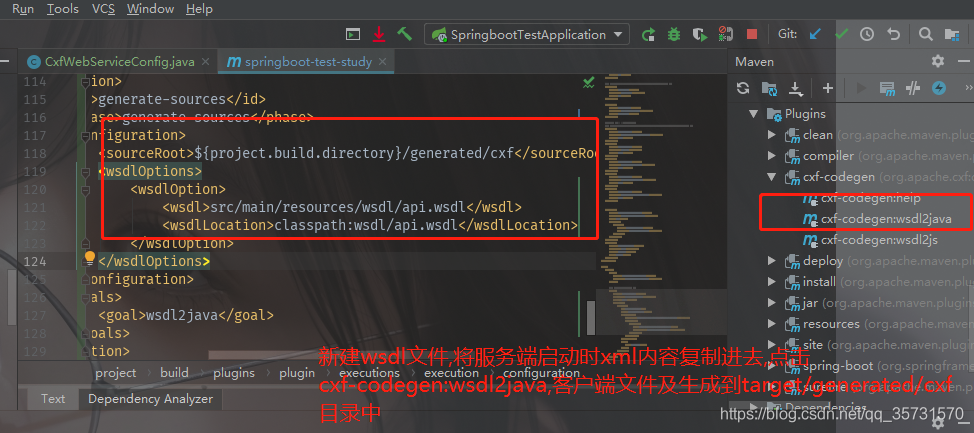
通过cxf-codegen-plugin插件生成客户端文件
<dependency>
            <groupId>org.apache.cxf</groupId>
            <artifactId>cxf-spring-boot-starter-jaxws</artifactId>
            <version>3.2.5</version>
        </dependency>
        <dependency>
            <groupId>org.apache.cxf</groupId>
            <artifactId>cxf-core</artifactId>
            <version>3.2.5</version>
        </dependency>
        <dependency>
            <groupId>org.apache.cxf</groupId>
            <artifactId>cxf-rt-frontend-jaxws</artifactId>
            <version>3.2.5</version>
        </dependency>
        <dependency>
            <groupId>org.apache.cxf</groupId>
            <artifactId>cxf-rt-transports-http</artifactId>
            <version>3.2.5</version>
        </dependency>
        <dependency>
            <groupId>org.apache.cxf</groupId>
            <artifactId>cxf-rt-transports-http-jetty</artifactId>
            <version>3.2.5</version>
        </dependency>


<!-- cxf-codegen-plugin -->
            <plugin>
                <groupId>org.apache.cxf</groupId>
                <artifactId>cxf-codegen-plugin</artifactId>
                <version>3.2.5</version>
                <executions>
                    <execution>
                        <id>generate-sources</id>
                        <phase>generate-sources</phase>
                        <configuration>
                            <sourceRoot>${project.build.directory}/generated/cxf</sourceRoot>
                            <wsdlOptions>
                                <wsdlOption>
                                    <wsdl>src/main/resources/wsdl/api.wsdl</wsdl>
                                    <wsdlLocation>classpath:wsdl/api.wsdl</wsdlLocation>
                                </wsdlOption>
                            </wsdlOptions>
                        </configuration>
                        <goals>
                            <goal>wsdl2java</goal>
                        </goals>
                    </execution>
                </executions>
            </plugin>
客户端调用代码
package com.yl.springboottest.api.webservice.client.cxf;

import lombok.extern.slf4j.Slf4j;
import org.apache.cxf.endpoint.Client;
import org.apache.cxf.jaxws.endpoint.dynamic.JaxWsDynamicClientFactory;

/**
 * 描述: CXF 方式Client调用WebService 直接调用
 *
 * @author: yanglin
 * @Date: 2020-11-19-13:11
 * @Version: 1.0
 */
@Slf4j
public class CXFWebServiceClientT1 {

    public static void main(String[] args) {
        // 动态调用
        JaxWsDynamicClientFactory dcflient = JaxWsDynamicClientFactory.newInstance();

        Client client=dcflient.createClient("http://localhost:8019/api_server/api?wsdl");
        try{
            Object[] objects = client.invoke("getCxfApi","ylDream");
            log.info("CXFWebServiceClientT1 getCxfApi 调用结果:{}", objects[0].toString());
        }catch (Exception e){
            e.printStackTrace();
        }
    }
}
调用结果

以上,如果有需要源码可以私信或评论,谢谢!


 浙公网安备 33010602011771号