
vscode配置latex workshop后,无法使用xelatex编译的解决方案
本人环境配置:
TexLive 2024
Latex Workshop v9.20.1
vscode 1.84.2
设备名称 DESKTOP-T1QIM41
处理器 11th Gen Intel(R) Core(TM) i5-1135G7 @ 2.40GHz 2.42 GHz
机带 RAM 16.0 GB (15.6 GB 可用)
系统类型 64 位操作系统, 基于 x64 的处理器
笔和触控 没有可用于此显示器的笔或触控输入
windows规格:
版本 Windows 10 企业版
版本号 22H2
安装日期 2023/9/28
操作系统内部版本 19045.3448
体验 Windows Feature Experience Pack 1000.19044.1000.0
1. 添加编译链
安装完vscode的latex workshop和texlive后,默认的编译链只有pdflatex -> bibtex -> pdflatex * 2,该配置项在latex-workshop.latex.recipes中。我照猫画虎弄了一个xelatex -> bibtex -> xelatex * 2,配置项如下:
{
            "name": "xelatex -> bibtex -> xelatex * 2",
            "tools": [
                "xelatex",
                "bibtex",
                "xelatex",
                "xelatex"
            ]
}
2. 添加/修改编译工具配置
但是会报错,说什么Does the executable exist?但是本人在cmd中是可以执行xelatex命令的,经过一番研究发现,原来是需要在latex-workshop.latex.tools中配置xelatex对应执行的命令,也就是上面的tools中的xelatex没有定义。因此,在latex-workshop.latex.tools中添加一项:
{
            "name": "xelatex",
            "command": "xelatex",
            "args": [
                "-synctex=1",
                "-interaction=nonstopmode",
                "-file-line-error",
                "%DOC%"
            ],
            "env": {}
}
然后还需要修改:
{
            "name": "latexmk",
            "command": "latexmk",
            "args": [
                "-xelatex",
                "-synctex=1",
                "-interaction=nonstopmode",
                "-file-line-error",
                "-pdf",
                "-outdir=%OUTDIR%",
                "%DOC%"
            ],
            "env": {}
}
在参数中添加了"-xelatex"。
如此炮制完成后便OK了。
如何修改?
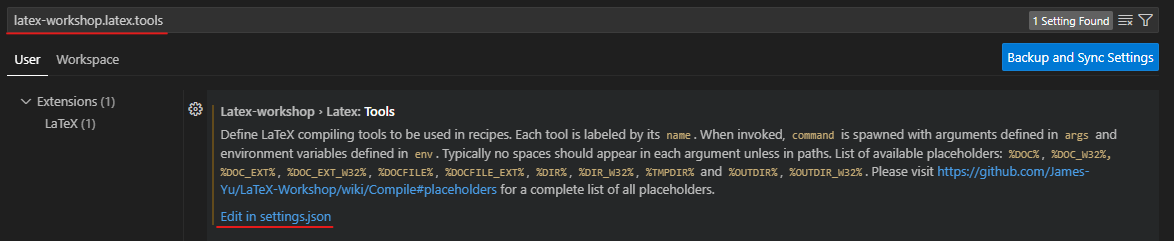
按下打开vscode settings,搜索对应的配置项ID,即latex-workshop.latex.recipes和latex-workshop.latex.tools,点击Edit in settings.json即可。
最后,附上一份可以正常使用的settings.json文件片段:
点击查看代码
    "latex-workshop.latex.autoBuild.run": "never",
    "latex-workshop.latex.autoClean.run": "onFailed",
    "latex-workshop.latex.recipes": [
        {
            "name": "xelatex -> bibtex -> xelatex * 2",
            "tools": [
                "xelatex",
                "bibtex",
                "xelatex",
                "xelatex"
            ]
        },
        {
            "name": "latexmk",
            "tools": [
                "latexmk"
            ]
        },
        {
            "name": "latexmk (latexmkrc)",
            "tools": [
                "latexmk_rconly"
            ]
        },
        {
            "name": "latexmk (lualatex)",
            "tools": [
                "lualatexmk"
            ]
        },
        {
            "name": "latexmk (xelatex)",
            "tools": [
                "xelatexmk"
            ]
        },
        {
            "name": "pdflatex -> bibtex -> pdflatex * 2",
            "tools": [
                "pdflatex",
                "bibtex",
                "pdflatex",
                "pdflatex"
            ]
        },
        {
            "name": "Compile Rnw files",
            "tools": [
                "rnw2tex",
                "latexmk"
            ]
        },
        {
            "name": "Compile Jnw files",
            "tools": [
                "jnw2tex",
                "latexmk"
            ]
        },
        {
            "name": "Compile Pnw files",
            "tools": [
                "pnw2tex",
                "latexmk"
            ]
        },
        {
            "name": "tectonic",
            "tools": [
                "tectonic"
            ]
        }
    ],
    "latex-workshop.latex.tools": [
        {
            "name": "xelatex",
            "command": "xelatex",
            "args": [
                "-synctex=1",
                "-interaction=nonstopmode",
                "-file-line-error",
                "%DOC%"
            ],
            "env": {}
        },
        {
            "name": "latexmk",
            "command": "latexmk",
            "args": [
                "-xelatex",
                "-synctex=1",
                "-interaction=nonstopmode",
                "-file-line-error",
                "-pdf",
                "-outdir=%OUTDIR%",
                "%DOC%"
            ],
            "env": {}
        },
        {
            "name": "lualatexmk",
            "command": "latexmk",
            "args": [
                "-synctex=1",
                "-interaction=nonstopmode",
                "-file-line-error",
                "-lualatex",
                "-outdir=%OUTDIR%",
                "%DOC%"
            ],
            "env": {}
        },
        {
            "name": "xelatexmk",
            "command": "latexmk",
            "args": [
                "-synctex=1",
                "-interaction=nonstopmode",
                "-file-line-error",
                "-xelatex",
                "-outdir=%OUTDIR%",
                "%DOC%"
            ],
            "env": {}
        },
        {
            "name": "latexmk_rconly",
            "command": "latexmk",
            "args": [
                "%DOC%"
            ],
            "env": {}
        },
        {
            "name": "pdflatex",
            "command": "pdflatex",
            "args": [
                "-synctex=1",
                "-interaction=nonstopmode",
                "-file-line-error",
                "%DOC%"
            ],
            "env": {}
        },
        {
            "name": "bibtex",
            "command": "bibtex",
            "args": [
                "%DOCFILE%"
            ],
            "env": {}
        },
        {
            "name": "rnw2tex",
            "command": "Rscript",
            "args": [
                "-e",
                "knitr::opts_knit$set(concordance = TRUE); knitr::knit('%DOCFILE_EXT%')"
            ],
            "env": {}
        },
        {
            "name": "jnw2tex",
            "command": "julia",
            "args": [
                "-e",
                "using Weave; weave(\"%DOC_EXT%\", doctype=\"tex\")"
            ],
            "env": {}
        },
        {
            "name": "jnw2texminted",
            "command": "julia",
            "args": [
                "-e",
                "using Weave; weave(\"%DOC_EXT%\", doctype=\"texminted\")"
            ],
            "env": {}
        },
        {
            "name": "pnw2tex",
            "command": "pweave",
            "args": [
                "-f",
                "tex",
                "%DOC_EXT%"
            ],
            "env": {}
        },
        {
            "name": "pnw2texminted",
            "command": "pweave",
            "args": [
                "-f",
                "texminted",
                "%DOC_EXT%"
            ],
            "env": {}
        },
        {
            "name": "tectonic",
            "command": "tectonic",
            "args": [
                "--synctex",
                "--keep-logs",
                "%DOC%.tex"
            ],
            "env": {}
        }
    ]

 浙公网安备 33010602011771号