
《四则运算》-----》王晓蒙
一、需求分析
提高小学生的算术能力,锻炼学生100以内的加减乘除。每一次测试10道题,最后给出分数。
二、设计思路
总体的设计根据spring+mybatis+springMvc,流程就是根据下面的图
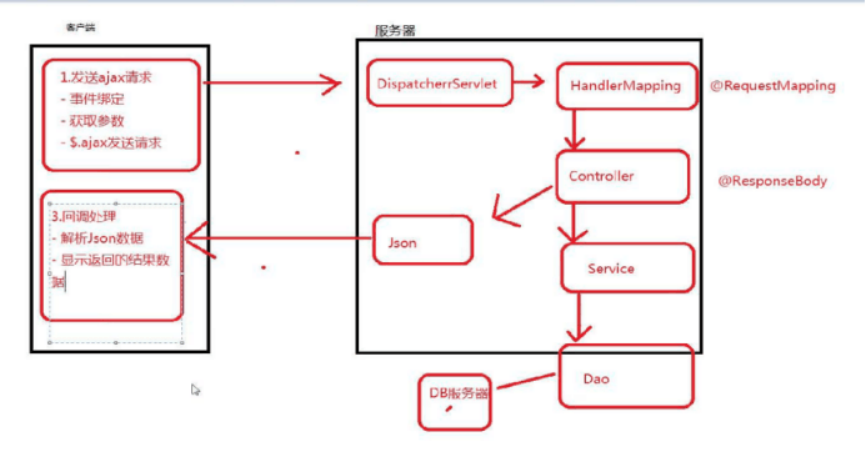
三、数据库的设计
1.student表:账号ID,账号,密码
create database four_operations;
use four_operations;
create table student
(sid int primary key auto_increment,
name varchar(20) not null,
pwd varchar(15) not null );
四、编码
整体
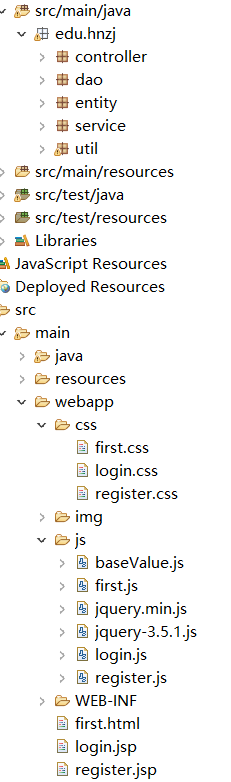
dao层
import edu.hnzj.entity.Student;

public interface StudentDao {
    public Student findByName(String name);
    public void save(Student s);
}
controller
import javax.annotation.Resource;

import org.springframework.stereotype.Controller;
import org.springframework.web.bind.annotation.RequestMapping;
import org.springframework.web.bind.annotation.ResponseBody;
import edu.hnzj.entity.Student;
import edu.hnzj.service.StudentService;
import edu.hnzj.util.JsonResult;

@Controller
@RequestMapping("/student")
public class StudentLoginController {

    @Resource
    private StudentService studentService;

    @RequestMapping("/login.do")
    @ResponseBody
    public JsonResult<Student> execute(String name,String pwd){
        JsonResult<Student> result=studentService.checkLogin(name, pwd);
        return result;
    }

}
entity
package edu.hnzj.entity;

public class Student {
    private Integer sId;
    private String name;
    private String pwd;
    public Integer getsId() {
        return sId;
    }
    public void setsId(Integer sId) {
        this.sId = sId;
    }
    public String getName() {
        return name;
    }
    public void setName(String name) {
        this.name = name;
    }
    public String getPwd() {
        return pwd;
    }
    public void setPwd(String pwd) {
        this.pwd = pwd;
    }

    @Override
    public String toString() {
        return "Student [sId=" + sId + ", name=" + name + ", pwd=" + pwd + "]";
    }


}
service
package edu.hnzj.service;

import edu.hnzj.entity.Student;
import edu.hnzj.util.JsonResult;

public interface StudentService {
    public JsonResult<Student> checkLogin(String name,String pwd);
}
package edu.hnzj.service;

import javax.annotation.Resource;

import org.springframework.stereotype.Service;

import edu.hnzj.dao.StudentDao;
import edu.hnzj.entity.Student;
import edu.hnzj.util.JsonResult;

@Service("studentService")
public class StudentServiceImpl implements StudentService{


    @Resource
    private StudentDao studentDao;
    public JsonResult<Student> checkLogin(String name, String pwd) {

        //接收结果数据
        JsonResult<Student> result = new JsonResult<Student>();
        //根据用参数查询用户信息
        Student student = studentDao.findByName(name);

        if(student == null) {
            result.setStatus(1);
            result.setMsg("账号不存在");
            return result;
        }
        if(!student.getPwd().equals(pwd)) {
            result.setStatus(2);
            result.setMsg("密码错误");
            return result;
        }

        result.setStatus(0);
        result.setData(student);
        return result;
    }

}
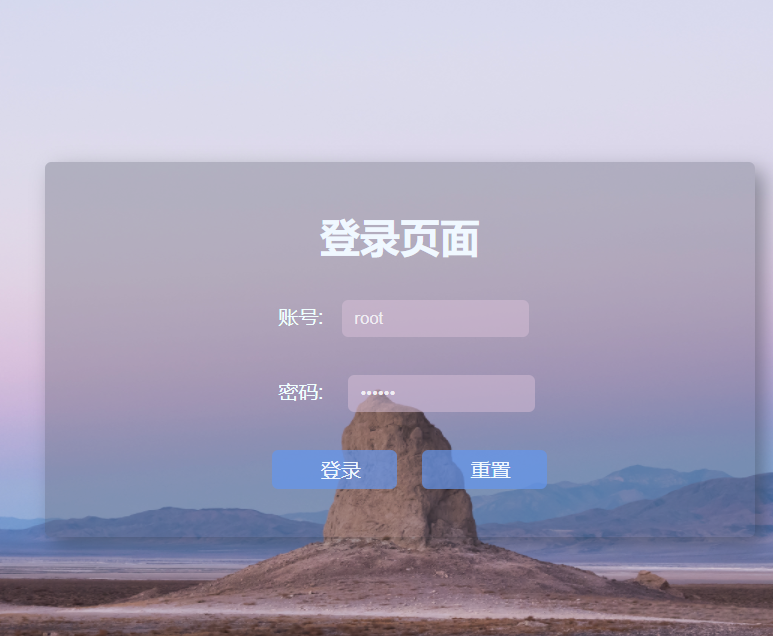
login.jsp
<%@ page language="java" contentType="text/html; charset=UTF-8"
    pageEncoding="UTF-8"%>
<!DOCTYPE html>
<html lang="en">
<head>
<meta charset="UTF-8">
<title>login</title>
<link rel="stylesheet" type="text/css" href="css/login.css" />
<script type="text/javascript" src="js/jquery-3.5.1.js"></script>
<script type="text/javascript" src="js/baseValue.js"></script>
<script type="text/javascript" src="js/login.js"></script>
<script type="text/javascript">
    $(function() {
        $("#login").click(studentlogin);
    })
</script>
</head>
<body background="img/Desert.jpg">
    <div id="loginDiv">
        <form action="" id="form">
            <h1 style="text-align: center; color: aliceblue;">登录页面</h1>
            <p>
                账号:<input id="username" name="username" type="text">
                <span id="name_span"></span>
            </p>
            <p>
                密码: <input id="password"  name="username" type="password">
                <span id="password_span"></span>
            </p>
            <div style="text-align: center; margin-top: 30px;">
                <input type="button" class="button" value="登录" id="login"> <input
                    type="reset" class="button" value="重置">
            </div>
        </form>
    </div>

</body>
</html>
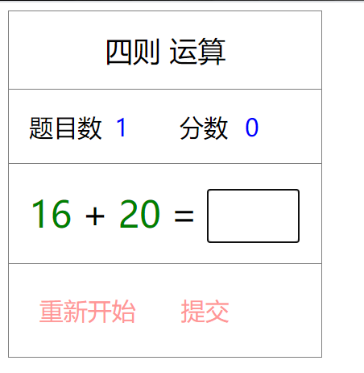
first.html首页,登录成功后,答题的页面
<!DOCTYPE html>
<html>
<head>
<meta charset="UTF-8">
<title>Insert title here</title>
<link rel="stylesheet" type="text/css" href="css/first.css" />
<script type="text/javascript" src="js/first.js"></script>
</head>
<body onload="initPage();">
    <div class="panel bigtitle">四则 运算</div>
    <div class="panel">
        <div class="subjecttitle">题目数</div>
        <div class="subjectcount" id="subjectcount">10</div>
        <div class="scoretitle">分数</div>
        <div class="scorecount" id="scorecount">90</div>
    </div>
    <div class="panel">
        <div class="number" id="number1">28</div>
        <div class="calatype" id="calatype">+</div>
        <div class="number" id="number2">49</div>
        <div class="assert">=</div>
        <div class="inputresult">
            <input type="text" id="inputresult" class="inputtext" />
        </div>
    </div>
    <div class="panel buttons">
        <div class="onebutton restartbtn" onclick="initPage();">重新开始</div>
        <div class="onebutton restartbtn" onclick="checkResult();">提交</div>
    </div>
</body>
</html>
每个功能都是按照上面的流程。
五、单元测试
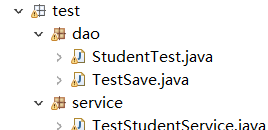
测试包


六、个人开发流程
|
|
预估时间(h) |
实际时间(h) |
|
计划 |
1 |
1 |
|
开发 分析需求 |
15 |
20.4 |
|
生成设计文档 |
0.5 |
0.5 |
|
设计复审 |
0.5 |
0.5 |
|
代码规范 |
0.1 |
0.1 |
|
具体设计 |
0.5 |
0.8 |
|
具体编码 |
10 |
15 |
|
代码复审 |
0.4 |
0.4 |
|
测试 |
1.5 |
1.5 |
|
记录用时 |
0.1 |
0.1 |
|
测试报告 |
0.2 |
0.2 |
|
计算工作量 |
0.2 |
0.2 |
|
事后总结 |
0.2 |
0.3 |
|
提出过程改进计划 |
0.1 |
0.2 |
七、总结
在整个开发过程中,才发现自己的能力不够的。没做好计划,在制作的过程中就像女娲补天一眼,错误是一个接着一个。技术难题之前学习的知识,都忘的差不多在整个开发的过程中也是很不容易,仓仓促促只完成计划中的一部分,剩下的一部分努力完成。

 浙公网安备 33010602011771号