
Qt托盘消息通知(③托盘消息列表)
实现思路
- 创建消息窗口:使用
QWidget或QDialog来创建一个显示消息的窗口。 - 使用
QListWidget:在消息窗口中使用QListWidget来动态显示消息。 - 添加滑块:如果消息数量超过5条,使用
QScrollArea来实现滑动功能。 - 更新消息列表:每次接收到新的消息时更新消息列表。
完整代码示例
以下是如何在之前的托盘图标基础上实现消息列表功能的完整代码:
main.cpp
#include <QApplication>
#include <QSystemTrayIcon>
#include <QMenu>
#include <QAction>
#include <QWidget>
#include <QTimer>
#include <QIcon>
#include <QCursor>
#include <QListView>
#include <QAbstractListModel>
#include <QVBoxLayout>
#include <QScrollBar>

class MessageModel : public QAbstractListModel {

public:
    MessageModel(QObject *parent = nullptr) : QAbstractListModel(parent) {}

    void addMessage(const QString &message) {
        beginInsertRows(QModelIndex(), rowCount(), rowCount());
        messages.append(message);
        endInsertRows();
    }

    int rowCount(const QModelIndex &parent = QModelIndex()) const override {
        Q_UNUSED(parent);
        return messages.size();
    }

    QVariant data(const QModelIndex &index, int role = Qt::DisplayRole) const override {
        if (!index.isValid() || index.row() < 0 || index.row() >= messages.size())
            return QVariant();
        if (role == Qt::DisplayRole) {
            return messages.at(index.row());
        }
        return QVariant();
    }

private:
    QStringList messages;
};

class TrayApp : public QWidget {

public:
    TrayApp() {
        trayIcon = new QSystemTrayIcon(QIcon(":/Image/QQ图标.png"), this);
        trayIcon->setToolTip("消息托盘");

        // 创建菜单
        QMenu *menu = new QMenu();
        QAction *exitAction = menu->addAction("退出");
        connect(exitAction, &QAction::triggered, qApp, &QApplication::quit);
        trayIcon->setContextMenu(menu);
        trayIcon->show();

        // 消息模型
        model = new MessageModel(this);
        view = new QListView();
        view->setModel(model);
        view->setVerticalScrollBarPolicy(Qt::ScrollBarAsNeeded); // 显示滚动条
        view->setFrameShape(QFrame::NoFrame); // 去掉边框

        // 安装事件过滤器以监测鼠标进入和离开事件
        view->installEventFilter(this);

        // 定时器,模拟新消息
        messageTimer = new QTimer(this);
        connect(messageTimer, &QTimer::timeout, this, &TrayApp::simulateNewMessage);
        messageTimer->start(5000); // 每5秒模拟一次新消息

        // 闪烁定时器
        flashTimer = new QTimer(this);
        connect(flashTimer, &QTimer::timeout, this, &TrayApp::toggleIcon);

        // 定时器检测鼠标位置
        mousePositionTimer = new QTimer(this);
        connect(mousePositionTimer, &QTimer::timeout, this, &TrayApp::checkMousePosition);
        mousePositionTimer->start(100); // 每100毫秒检查一次鼠标位置
    }

protected:
    bool eventFilter(QObject *obj, QEvent *event) override {
        if (obj == view) {
            if (event->type() == QEvent::Enter) {
                view->show(); // 鼠标进入列表时显示
            } else if (event->type() == QEvent::Leave) {
                view->hide(); // 鼠标离开列表时隐藏
            }
        }
        return QWidget::eventFilter(obj, event);
    }

private slots:
    void simulateNewMessage() {
        QString sender = "用户" + QString::number(model->rowCount() + 1);
        model->addMessage(sender); // 添加新消息
        trayIcon->showMessage("新消息", "您有一条新消息!", QSystemTrayIcon::Information);

        // 启动闪烁定时器
        flashTimer->start(500); // 每500毫秒切换一次图标
    }

    void toggleIcon() {
        static bool isFlashing = false;
        if (isFlashing) {
            trayIcon->setIcon(QIcon(":/Image/QQ图标.png")); // 正常图标
        } else {
            trayIcon->setIcon(QIcon(":/Image/QQ图标-未登录.png")); // 闪烁图标
        }
        isFlashing = !isFlashing;
    }

    void checkMousePosition() {
        QPoint cursorPos = QCursor::pos(); // 获取鼠标位置
        QRect trayRect = trayIcon->geometry(); // 获取托盘图标的几何形状
        if (trayRect.contains(cursorPos)) {
            // 计算列表的高度
            int itemHeight = view->sizeHintForRow(0); // 获取每个列表项的高度
            int height = qMin(model->rowCount() * itemHeight, 5 * itemHeight); // 最大高度为5条消息的高度

            view->setFixedHeight(height); // 设置列表固定高度
            view->setWindowFlags(Qt::Tool | Qt::FramelessWindowHint); // 设置窗口样式
            view->move(trayRect.x(), trayRect.y() - height); // 显示在托盘上方
            view->show();
        } else {
            if (!view->underMouse()) {
                view->hide(); // 隐藏消息列表
            }
        }
    }

private:
    QSystemTrayIcon *trayIcon;
    QTimer *flashTimer;
    QTimer *messageTimer;
    QTimer *mousePositionTimer;
    MessageModel *model;
    QListView *view;
};

int main(int argc, char *argv[]) {
    QApplication app(argc, argv);
    app.setQuitOnLastWindowClosed(false);

    TrayApp trayApp; // 创建托盘应用实例
    return app.exec();
}
代码说明
- 消息窗口:
MessageWindow继承自QWidget,用来显示消息。- 使用
QListWidget来显示消息内容,并限制其高度,使其能够在超出5条后
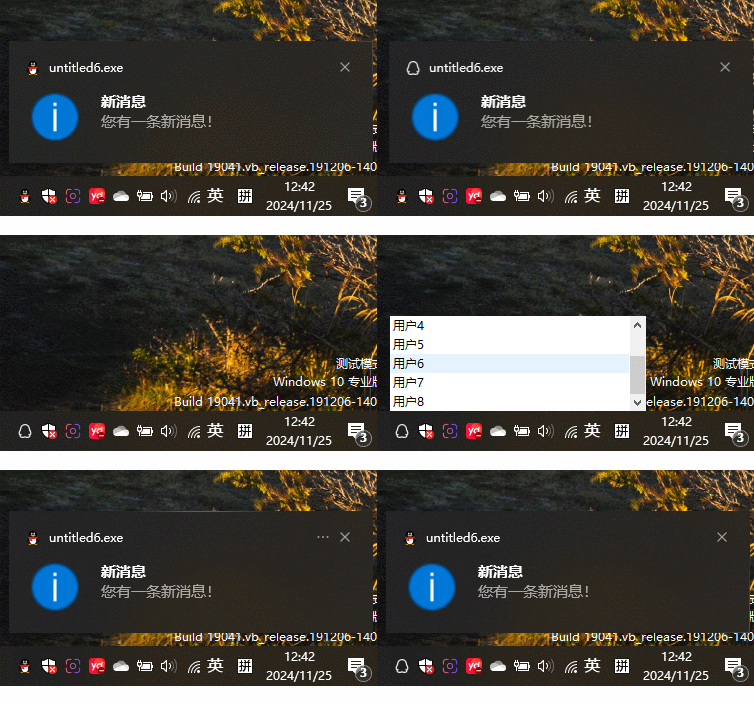
代码效果展示

 浙公网安备 33010602011771号