
🤫
1. 你的任务时间是如何得来的?
思路:
① 注册直接使用http请求即可。
接口: /register
头部: json
请求体:
{
    "password": "密码",
    "phone_number": "手机号"
}
响应结果:
{
    "err_code": 0,
    "err_msg": "注册成功",
    "account":  账号
}
② 登录[
1.使用http请求验证并获取账号和Token
2.使用账号和Token连接到WebSocket进行保持连接
3.登录成功使用 WebSocket 向其他好友端进行群发在线通知。
]
http请求验证并返回账号
接口: /login
头部: json
请求体:
{
    "account": "账号或手机号",
    "password": "密码"
}
响应结果:
{
    "err_code": 0,
    "err_msg": "登录成功",
    "account": 账号
}
WebSocket 将账号上线消息转发给所有好友
格式: json
消息体:
{
    "message_type":LOGIN
    "account": "账号"
}

注意:LOGIN 是一个宏,方便代码同步的。
③ 查询用户信息使用http获取匹配用户列表。
接口: /user_search
头部: json
请求体:
{
    "text": "账号或昵称"
}
响应结果:
{
    "err_code": 0,
    "err_msg": "查询成功",
    "user_info": [            --- 注意:这是列表 ---
        {
            "id": 1,
            "account": 10000,
            "phone_number": 18708540624,
            "nickname": "张伟",
            "avatar": "上班族男.png",
            "signature": "小时候没吃的。"
        }
    ]
}
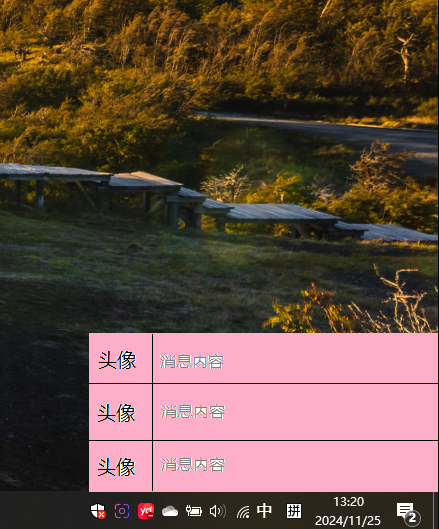
④ 添加好友请求 -> http 发送给后台 -> 后台将消息插入好友请求表 -> 后台通过WebSocket 发给用户 -> 用户端显示在右下角托盘消息列表。
4.1 通过http 请求搜索好友,以及获取分组表
4.2 通过http 给后台发送好友添加请求【好友账号,请求消息内容,成功添加后存放的分组】 ---- > 后台通过WebSokcet 发给用户
接口: /friend_requests/send
头部: json
请求体:
{
    "sender_account":"自己账号",
    "receiver_account":"对方账号",
    "message":"添加好友消息内容",
    "group_id":"分组id",
    "nickname":"好友昵称"
}
响应结果:
{
    "err_code": 0,
    "err_msg": "好友请求已发送",
    "request_id": 请求表的记录id
}
WebSocket 将账号上线消息转发给所有好友
格式: json
消息体:
{
    "message_type":ADD_FRIEND_REQUEST
    "message": {
        "request_id": 1,
        "sender_id": 1,
        "message": "我想添加你为好友,我是小王",
        "status": "pending",
        "created_at": "2024-11-16T02:42:25.000Z",
        "sender_nickname": "张伟",
        "sender_avatar": null
   }
}

注意:ADD_FRIEND_REQUEST 是一个宏,方便代码同步的。
⑤ 获取好友请求列表直接http请求即可。
接口: /friend_requests/get
头部: json
请求体:
{
    "account":"自己的账号"
}
响应结果:
{
    "err_code": 0,
    "err_msg": "获取好友请求成功",
    "friend_requests": [
        {
            "request_id": 1,
            "sender_id": 1,
            "message": "我想添加你为好友,我是小王",
            "status": "pending",
            "created_at": "2024-11-16T02:42:25.000Z",
            "sender_nickname": "张伟",
            "sender_avatar": null
        },
        {
            "request_id": 2,
            "sender_id": 2,
            "message": "我想添加你为好友,我是小王",
            "status": "pending",
            "created_at": "2024-11-16T02:45:14.000Z",
            "sender_nickname": "张三",
            "sender_avatar": null
        }
    ]
}
⑥ 同意添加请求 -> http 发送给后台 -> 后台将好友关系添加到好友表 -> 后台通过WebSocket 发给用户 -> 用户端显示在右下角托盘消息列表【同意或拒绝】消息。
接口: /friend_requests/get
头部: json
请求体:
{
    "request_id": "1",
    "group_id": "4",
    "nickname": "小王"
}
响应结果:
{
    "err_code": 0,
    "err_msg": "好友请求已被处理"
}
或者拒绝好友请求
接口: /friend_requests/decline
头部: json
请求体:
{
    "request_id": "2"
}
响应结果:
{
    "err_code": 0,
    "err_msg": "好友请求已拒绝"
}
最后发送WebSocket通知用户
需要做 聊天消息显示框,好友请求框
#include <QApplication>
#include <QSystemTrayIcon>
#include <QMenu>
#include <QAction>
#include <QWidget>
#include <QTimer>
#include <QIcon>
#include <QCursor>
#include <QListView>
#include <QAbstractListModel>
#include <QVBoxLayout>
#include <QScrollBar>
class TrayApp : public QWidget {
public:
    QWidget *w;
    TrayApp() {
        trayIcon = new QSystemTrayIcon(QIcon(":/Image/QQ图标.png"), this);
        trayIcon->setToolTip("消息托盘");

        // 创建菜单
        QMenu *menu = new QMenu();
        QAction *exitAction = menu->addAction("退出");
        connect(exitAction, &QAction::triggered, qApp, &QApplication::quit);
        trayIcon->setContextMenu(menu);
        trayIcon->show();

        w = new QWidget;
        w->resize(400,100);
        w->installEventFilter(this);

        // 定时器检测鼠标位置
        mousePositionTimer = new QTimer(this);
        connect(mousePositionTimer, &QTimer::timeout, this, &TrayApp::checkMousePosition);
        mousePositionTimer->start(100); // 每100毫秒检查一次鼠标位置
    }

protected:
    bool eventFilter(QObject *obj, QEvent *event) override {
        if (obj == w) {
            if (event->type() == QEvent::Enter) {
                w->show(); // 鼠标进入列表时显示
            } else if (event->type() == QEvent::Leave) {
                w->hide(); // 鼠标离开列表时隐藏
            }
        }
        return QWidget::eventFilter(obj, event);
    }

public slots:
    void checkMousePosition() {
        QPoint cursorPos = QCursor::pos();      // 获取鼠标位置
        QRect trayRect = trayIcon->geometry();  // 获取托盘图标的几何形状
        if (trayRect.contains(cursorPos)) {
            int height = w->height();
            w->setWindowFlags(Qt::Tool | Qt::FramelessWindowHint);   // 设置窗口样式
            w->move(trayRect.x(), trayRect.y() - height);            // 显示在托盘上方
            w->show();
        } else {
            if (!w->underMouse()) {
                w->hide(); // 隐藏消息列表
            }
        }
    }

private:
    QSystemTrayIcon *trayIcon;
    QTimer *mousePositionTimer;
};

int main(int argc, char *argv[]) {
    QApplication app(argc, argv);
    app.setQuitOnLastWindowClosed(false);

    TrayApp trayApp; // 创建托盘应用实例
    return app.exec();
}

 浙公网安备 33010602011771号