
【转载】资产收集工具推荐
转载来源:https://mp.weixin.qq.com/s/_bXPdEjL7_sqk6U6RPojww
子域名收集
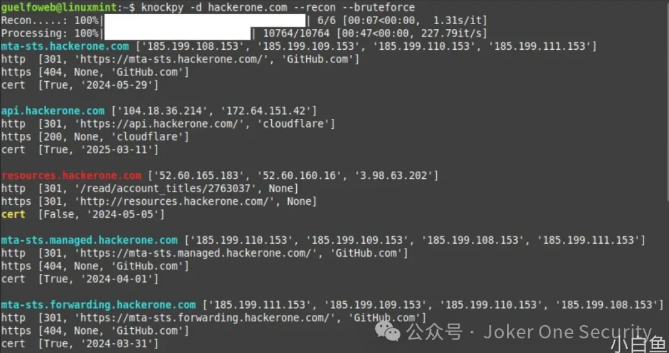
1. KNOCK
https://github.com/guelfoweb/knock
使用方法
knockpy -d domain.com --recon --bruteforce
使用:KNOCKPY [-h] [-d DOMAIN] [-f FILE] [-v][——dns dns][——useragent useragent]
[—timeout timeout][—threads threads][—recon][—bruteforce]
[—json-output][—list][—report report]

knockpy v.7.0.1 -子域扫描
https://github.com/guelfoweb/knock

选项:
-h,——help显示帮助信息并退出
-d DOMAIN,——DOMAIN域
要分析的领域
-f FILE,——FILE文件域列表
-v,——version显示程序的版本号并退出
——dns dns自定义dns
——useragent useragent
自定义useragent
——timeout timeout自定义超时
——threads自定义线程
——recon子域侦察
——bruteforce子域
要导入的wordlist文件
——bruteforce选项必需
——wildcard测试通配符并退出
——json显示json格式的输出
——save FOLDER保存报表的文件夹
——report report显示保存的报表
2. subfinder
https://github.com/projectdiscovery/subfinder
使用方法
subfinder -d 域名 -v
3. github-subdomains
https://github.com/gwen001/github-subdomains
使用方法
github-subdomains -d 域名
4. Sudomy
https://github.com/screetsec/Sudomy
使用方法
sudomy -d hackerone.com
5. ksubdomain
https://github.com/boy-hack/ksubdomain
使用方法
./ksubdomain enum -h # 查看枚举模式帮助,可简写 ksubdomain e

USAGE:
   ksubdomain enum [command options] [arguments...]

OPTIONS:
   --domain value, -d value         域名
   --band value, -b value           宽带的下行速度,可以5M,5K,5G (default: "3m")
   --resolvers value, -r value      dns服务器,默认会使用内置dns
   --output value, -o value         输出文件名
   --output-type value, --oy value  输出文件类型: json, txt, csv (default: "txt")
   --silent                         使用后屏幕将仅输出域名 (default: false)
   --retry value                    重试次数,当为-1时将一直重试 (default: 3)
   --timeout value                  超时时间 (default: 6)
   --stdin                          接受stdin输入 (default: false)
   --not-print, --np                不打印域名结果 (default: false)
   --eth value, -e value            指定网卡名称
   --wild-filter-mode value         泛解析过滤模式[从最终结果过滤泛解析域名]: basic(基础), advanced(高级), none(不过滤) (default: "none")
   --predict                        启用预测域名模式 (default: false)
   --filename value, -f value       字典路径
   --ns                             读取域名ns记录并加入到ns解析器中 (default: false)
   --help, -h                       show help (default: false)

# 示例:
# 枚举多个域名
./ksubdomain e -d example.com -d hacker.com

# 从文件读取字典枚举,保存为 output.txt
./ksubdomain e -f sub.dict -o output.txt

# 从标准输入读取域名,带宽限制为 10M
cat domains.txt | ./ksubdomain e --stdin -b 10M

# 启用预测模式枚举域名,泛解析过滤,保存为csv
./ksubdomain e -d example.com --predict --wild-filter-mode advanced --oy csv -o output.csv
6. scilla
https://github.com/edoardottt/scilla
使用方法
DNS 枚举:

scilla dns -target example.com
scilla dns -oj output -target example.com
scilla dns -oh output -target example.com
scilla dns -ot output -target example.com
scilla dns -plain -target example.com
子域枚举:

scilla subdomain -target example.com
scilla subdomain -w wordlist.txt -target example.com
scilla subdomain -oj output -target example.com
scilla subdomain -oh output -target example.com
scilla subdomain -ot output -target example.com
scilla subdomain -i 400 -target example.com
scilla subdomain -i 4** -target example.com
scilla subdomain -c -target example.com
scilla subdomain -db -target example.com
scilla subdomain -plain -target example.com
scilla subdomain -db -no-check -target example.com
scilla subdomain -db -vt -target example.com
scilla subdomain -db -bw -target example.com
scilla subdomain -ua "CustomUA" -target example.com
scilla subdomain -rua -target example.com
scilla subdomain -dns 8.8.8.8 -target example.com
scilla subdomain -alive -target example.com
目录枚举:

scilla dir -target example.com
scilla dir -w wordlist.txt -target example.com
scilla dir -oj output -target example.com
scilla dir -oh output -target example.com
scilla dir -ot output -target example.com
scilla dir -i 500,401 -target example.com
scilla dir -i 5**,401 -target example.com
scilla dir -c -target example.com
scilla dir -plain -target example.com
scilla dir -nr -target example.com
scilla dir -ua "CustomUA" -target example.com
scilla dir -rua -target example.com
端口枚举:

默认(所有端口,因此 1-65635)scilla port -target example.com
指定端口范围scilla port -p 20-90 -target example.com
指定起始端口(直到最后一个)scilla port -p 20- -target example.com
指定结束端口(从第一个端口开始)scilla port -p -90 -target example.com
指定单个端口scilla port -p 80 -target example.com
指定输出格式 (json)scilla port -oj output -target example.com
指定输出格式 (html)scilla port -oh output -target example.com
指定输出格式 (txt)scilla port -ot output -target example.com
指定多个端口scilla port -p 21,25,80 -target example.com
指定公共端口scilla port -common -target example.com
仅打印结果scilla port -plain -target example.com
目录扫描
1. dirmap
https://github.com/H4ckForJob/dirmap
使用方法
python3 dirmap.py -i https://target.com -lcf
2. dirsearch
https://github.com/maurosoria/dirsearch
使用方法
dirsearch -u 域名
3. cansina
https://github.com/deibit/cansina
cansina -u <site_url> -p <payload_file>
端口扫描
1. scanless
https://github.com/vesche/scanless
使用方法
选项:

-h,——help显示帮助信息并退出

-v,——version显示当前版本

-t TARGET,——TARGET TARGET

要扫描的IP或域名

-s SCANNER,——SCANNER SCANNER

要使用的扫描器(默认值:yougetsignal)

-r,——random使用随机扫描器

-l,——list列出扫描程序

-使用所有的扫描仪

-d,——debug调试模式(cli模式关闭并显示网络错误)
2. masscan
https://github.com/robertdavidgraham/masscan
使用方法
masscan -p80,8000-8100 10.0.0.0/8 2603:3001:2d00:da00::/112
3. RustScan
https://github.com/bee-san/RustScan
使用方法
rustscan -a 192.168.5.1

 浙公网安备 33010602011771号