
netcore webapi网关项目swagger页面动态显隐
在实际开发过程中,我们会遇到这么一个问题:
通常我们前后端分离开发,后端为前端提供一个swagger页面,做两者的对接联调,但是上线后,我们网关swagger是暴露在公网上的,即使我们已经在页面上增加了认证功能
但是我们还是不想把接口信息数据暴露出去,想在生产环境上隐藏,但是后端开发有个诉求:希望能够在生产环境出问题了的时候,使用swagger页面进行调试。
所以,我们希望能够在生产环境动态显示隐藏swagger页面
1.通过配置文件开关控制
可以使用远程配置文件,上面增加一个开发项,如果上了k8s,直接在k8s 的config map里面配置即可
2.通过filter去拦截
不同于java,java可以使用serverlet自带的authorization filter过滤器可以满足每次请求网关域名时进行拦截判断,netcore的五大过滤器中也包含authorization filter,但是这个过滤器在单纯请求网关域名时是触发不到的
这里参考五大过滤器模型:
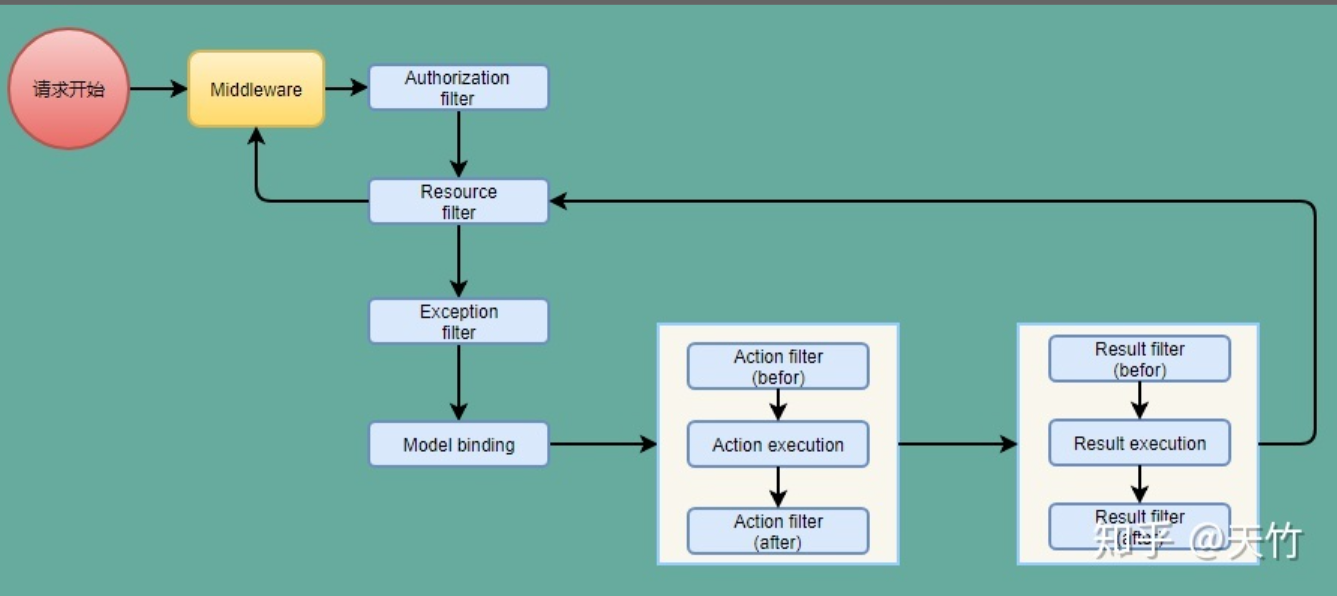
既然优先级最高的authorization filter都拦截不到,那么找优先级更高的,那就是middleware了
PS:使用interceptor也可以拦截请求,不过也是方法级别的(参考netcore里面的动态代理实现AOP)
3.自定义middleware
 public class HttpContextMiddleware
    {
        private readonly RequestDelegate _next;
        public HttpContextMiddleware(RequestDelegate next)
        {
            _next = next;
        }
        public async Task Invoke(HttpContext context)
        {
            IConfigurationManager config = (IConfigurationManager)context.Request.HttpContext.RequestServices.GetService(typeof(IConfigurationManager));

            string enableSwagger = config.GetConfig("application:enable-swagger");
            if (enableSwagger == "false")
            {
                return;
            }
            await _next(context);
        }
    }

    public static class MiddlewareExtensions
    {
        public static IApplicationBuilder UseHttpContextMiddleware(this IApplicationBuilder builder)
        {
            return builder.UseMiddleware<HttpContextMiddleware>();
        }
    }
然后在startup里面调用即可
 public async void Configure(IApplicationBuilder app, IHostingEnvironment env, ILoggerFactory loggerFactory)
        {
            if (env.IsDevelopment())
            {
                app.UseDeveloperExceptionPage();
            }
            app.UseHttpContextMiddleware(); //引入自定义的HtppContextMiddleware中间件

            app.ConfigureCors();

            app.UseStaticFiles();

            app.UseSwagger();

            app.UseMvc();

            await app.UseOcelotByConfiguration();
        }
这样,当我们的配置文件中false的时候,打开站点则是白页;设置为其他值true时则是显示swagger信息

 浙公网安备 33010602011771号