
微信小程序 - Request | 路由跳转 | 本地存储
Request
wx.request相当于发送ajax请求
参数
| 属性 | 类型 | 默认值 | 必填 | 说明 |
|---|---|---|---|---|
| url | string | 是 | 开发者服务器接口地址 | |
| data | string/object/ArrayBuffer | 否 | 请求的参数 | |
| header | Object | 否 | 设置请求的 header,header 中不能设置 Referer。content-type 默认为 application/json |
|
| method | string | GET | 否 | HTTP 请求方法 |
| dataType | string | json | 否 | 返回的数据格式 |
| responseType | string | text | 否 | 响应的数据类型 |
| success | function | 否 | 接口调用成功的回调函数 | |
| fail | function | 否 | 接口调用失败的回调函数 | |
| complete | function | 否 | 接口调用结束的回调函数(调用成功、失败都会执行 |
object.dataType 的合法值
| 值 | 说明 |
|---|---|
| json | 返回的数据为 JSON,返回后会对返回的数据进行一次 JSON.parse |
| 其他 | 不对返回的内容进行 JSON.parse |
object.success 回调函数
参数
Object res
| 属性 | 类型 | 说明 |
|---|---|---|
| data | string/Object/Arraybuffer | 开发者服务器返回的数据 |
| statusCode | number | 开发者服务器返回的 HTTP 状态码 |
| header | Object | 开发者服务器返回的 HTTP Response Header |
eg:
小程序:
test.wxml
<!--request-->
<button bind:tap='req'>点击</button>
test.js
Page({
  req:function(){
    wx.request({
      url: 'http://127.0.0.1:8000/test/',  // 路径
      data:{'name':'xionger'},  // 数据
      method:'POST',  // 请求方式
      header: { "content-type": "application/json"},  // 请求头
      // 回调函数
      success:function(res){
        console.log(res)  // 回调数据
      }
    })
  },
后端 django
urls.py
url(r'^test/', views.Test.as_view()),
views.py
from rest_framework.views import APIView
from rest_framework.response import Response
class Test(APIView):
    def post(self, request):
        request_data = request.data
        print(request_data)
        return Response({'code':200, 'msg': 'ok'})
小程序路由跳转
wx.switchTab
1.跳转到 tabBar 页面,并关闭其他所有非 tabBar 页面
2.不能携带数据
这里的tabBar是底下的导航栏指定的页面,
参数
| 属性 | 类型 | 默认值 | 必填 | 说明 |
|---|---|---|---|---|
| url | string | 是 | 需要跳转的 tabBar 页面的路径(需在 app.json 的 tabBar字段定义的页面),路径后不能带参数。 | |
| success | function | 否 | 接口调用成功的回调函数 | |
| fail | function | 否 | 接口调用失败的回调函数 | |
| complete | function | 否 | 接口调用结束的回调函数(调用成功、失败都会执行 |
eg:
test.wxml
<button bind:tap="click">switchTab</button>
test.js
Page({
click:function(){
    //必须是tabBar页面,不能携带参数
    wx.switchTab({
      url: '/pages/index/index',  // tabBar中的页面路径
    })
  },
})
wx.reLaunch
1.关闭所有页面,打开到应用内的某个页面
2.跳转url中可携带拼接数据
参数
| 属性 | 类型 | 默认值 | 必填 | 说明 |
|---|---|---|---|---|
| url | string | 是 | 需要跳转的应用内页面路径,路径后可以带参数。参数与路径之间使用?分隔,参数键与参数值用=相连,不同参数用&分隔;如 'path?key=value&key2=value2' | |
| success | function | 否 | 接口调用成功的回调函数 | |
| fail | function | 否 | 接口调用失败的回调函数 | |
| complete | function | 否 | 接口调用结束的回调函数(调用成功、失败都会执行) |
eg
test.js
click:function(){
var name = "123";
    wx.reLaunch({
     url: "/pages/test3/test3?name="+name
  })
}
wx.redirectTo
1.关闭当前页面,跳转到应用内的某个页面。但是不允许跳转到 tabbar 页面。
2.跳转url中可携带拼接数据
参数
| 属性 | 类型 | 默认值 | 必填 | 说明 |
|---|---|---|---|---|
| url | string | 是 | 需要跳转的应用内非 tabBar 的页面的路径, 路径后可以带参数。参数与路径之间使用 ? 分隔,参数键与参数值用 = 相连,不同参数用 & 分隔;如 'path?key=value&key2=value2' |
|
| success | function | 否 | 接口调用成功的回调函数 | |
| fail | function | 否 | 接口调用失败的回调函数 | |
| complete | function | 否 | 接口调用结束的回调函数(调用成功、失败都会执行) |
eg
test.js
wx.redirectTo({
  url: 'test?id=1'
})
wx.navigateTo
1.保留当前页面,跳转到应用内的某个页面。但是不能跳到 tabbar 页面。使用 wx.navigateBack 可以返回到原页面。
小程序中页面栈最多十层
2.跳转url中可携带拼接数据
参数
| 属性 | 类型 | 默认值 | 必填 | 说明 |
|---|---|---|---|---|
| url | string | 是 | 需要跳转的应用内非 tabBar 的页面的路径, 路径后可以带参数。参数与路径之间使用 ? 分隔,参数键与参数值用 = 相连,不同参数用 & 分隔;如 'path?key=value&key2=value2' |
|
| success | function | 否 | 接口调用成功的回调函数 | |
| fail | function | 否 | 接口调用失败的回调函数 | |
| complete | function | 否 | 接口调用结束的回调函数(调用成功、失败都会执行) |
eg
click:function(){
    //必须是tabBar页面,可携带数据
    wx.navigateTo({
      url: "/pages/test3/test3?name=haha"
    })
  },
补充
test.exml
<navigator url="/pages/test2/test2" >跳转到新页面</navigator>
存储数据到本地以及本地获取数
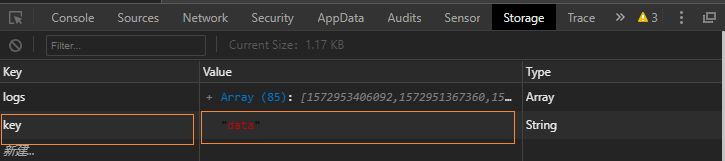
wx.setStorageSync 同步存储
test.wxml
<!--本地存储-->
<button bind:tap="cun">存</button>

<button bind:tap="qu">取</button>
test.js
Page({
cun: function () {
    wx.setStorageSync('key', 'data')
  },
 qu: function () {
    console.log(wx.getStorageSync('key'))
    wx.clearStorageSync("key")  // 删除本地存储的key值

  },
})
wx.setStorage 异步存储
| 属性 | 类型 | 默认值 | 必填 | 说明 |
|---|---|---|---|---|
| key | string | 是 | 本地缓存中指定的 key | |
| data | any | 是 | 需要存储的内容。只支持原生类型、Date、及能够通过JSON.stringify序列化的对象。 |
|
| success | function | 否 | 接口调用成功的回调函数 | |
| fail | function | 否 | 接口调用失败的回调函数 | |
| complete | function | 否 | 接口调用结束的回调函数(调用成功、失败都会执行) |
示例代码
wx.setStorage({
  key: 'key',
  data: 'value'
})

try {
  wx.setStorageSync('key', 'value')
} catch (e) { }
上面的两个就是一个是同步的一个是异步的,还是有区别的,想用哪一个看你的业务来定
注 : 摘自 小猿取经

 浙公网安备 33010602011771号