

mybatis
此笔记为学习秦疆老师课程而作
mybatis是一款优秀的持久层框架
Mybatis本是apache的一个开源项目iBatis,
2013年11月迁移到Github
Github:
mybatis文档路径:
1第一个mybatis程序
思路:搭建环境-->导入mybatis-->编写代码-->测试
1.1搭建环境
create table `user`(
`id`int(20) not null primary key,
`name`varchar(30) default null,
`pwd`varchar(30) default null
)engine=innodb default charset=utf8;
insert into `user`(id,name,pwd) values
('1','吱吱','123456'),
('2','御姐','122456'),
('3','嘿嘿','144356')
新建项目
1.新建一个普通的maven项目
2.删除src项目
3.导入maven依赖
1.2创建一个模块
编写mybatis的核心配置文件
编写mybatis工具类
package com.hjf.utils;
import org.apache.ibatis.io.Resources;
import org.apache.ibatis.session.SqlSession;
import org.apache.ibatis.session.SqlSessionFactory;
import org.apache.ibatis.session.SqlSessionFactoryBuilder;
import java.io.IOException;
import java.io.InputStream;
//SqlSessionFactory -->SqlSession
public class MybatisUtils {
private static SqlSessionFactory sqlSessionFactory;
static {
try {
// 使用mybatis第一步;获取SqlSessionFactory对象
String resource = "mybatis-config.xml";
InputStream inputStream = Resources.getResourceAsStream(resource);
sqlSessionFactory = new SqlSessionFactoryBuilder().build(inputStream);
} catch (IOException e) {
e.printStackTrace();
}
}
//既然有了 SqlSessionFactory,顾名思义,我们可以从中获得 SqlSession 的实例
//SqlSession 提供了在数据库执行 SQL 命令所需的所有方法。
// 你可以通过 SqlSession 实例来直接执行已映射的 SQL 语句。
public static SqlSession getSqlSession(){
return sqlSessionFactory.openSession();
}
}
1.3编写代码
1.实体类
package com.hjf.pojo;
//实体类
public class User {
private int id;
private String name;
private String pwd;
public User() {
}
public User(int id, String name, String pwd) {
this.id = id;
this.name = name;
this.pwd = pwd;
}
2.Dao接口
public interface UserDao {
    List<User> getUserList();
}
3.接口实现类由原来的UserDaoImpl转变为一个Mapper配置文件
1.4测试
注意点:
org.apache.ibatis.binding.BindingException: Type interface com.hjf.dao.UserDao is not known to the MapperRegistry.
需要加上核心配置文件中的注册mappers
<!--    每一个Mapper.xml都需要在Mybatis核心配置文件中注册-->
    <mappers>
        <mapper resource="com/hjf/dao/UserMapper.xml"/>
    </mappers>
还有一个一定会遇到的错误
maven由于他的约定大于配置,我们之后可能会遇到我们写的配置文件,无法被导出或生效的问题
java.lang.ExceptionInInitializerError
解决方法
1.将UserMapper.xml手动放在target\test-classes\com\hjf\dao路径下
2有两种写法,在pom.xml中加入以下配置
2.1
<!--在build中配置resources,来防止我们资源导出失败的问题-->
<build>
        <resources>
            <resource>
                <directory>src/main/resources</directory>
                <includes>
                    <include>**/*.properties</include>
                    <include>**/*.xml</include>
                </includes>
                <filtering>true</filtering>
            </resource>
            <resource>
                <directory>src/main/java</directory>
                <includes>
                    <include>**/*.properties</include>
                    <include>**/*.xml</include>
                </includes>
                <filtering>true</filtering>
            </resource>
        </resources>
    </build>
2.2
<!--在build中配置resources,来防止我们资源导出失败的问题-->
    <build>
        <resources>
            <resource>
                <directory>src/main/resources</directory>
                <excludes>
                    <exclude>**/*.properties</exclude>
                    <exclude>**/*.xml</exclude>
                </excludes>
                <filtering>false</filtering>
            </resource>
            <resource>
                <directory>src/main/java</directory>
                <includes>
                    <include>**/*.properties</include>
                    <include>**/*.xml</include>
                </includes>
                <filtering>false</filtering>
            </resource>
        </resources>
    </build>
junit测试
 @Test
    public void test(){
//        第一步:获得SqlSession对象
        SqlSession sqlSession = MybatisUtils.getSqlSession();
//        执行SQL,拿到UserDao
//        方式一:getMapper
        UserDao mapper = sqlSession.getMapper(UserDao.class);
        List<User> userList = mapper.getUserList();
        for (User user : userList) {
            System.out.println(user);
        }
//        关闭sqlSession
        sqlSession.close();
    }
可能会遇到的问题:
配置文件没有注册
绑定接口错误
方法名不对
返回类型不对
maven导出资源问题
上述已有解决方案
<!--官方推荐代码改善方式,但知道就行-->
@Test
    public void test(){
//        第一步:获得SqlSession对象
        SqlSession sqlSession = MybatisUtils.getSqlSession();

        try {
//            执行SQL,拿到UserDao
//        方式一:getMapper
            UserDao mapper = sqlSession.getMapper(UserDao.class);
            List<User> userList = mapper.getUserList();
//        方式二:不推荐,且老方式
//        List<User> userList = sqlSession.selectList("com.hjf.dao.UserDao.getUserList");
            for (User user : userList) {
                System.out.println(user);
            }
        }catch (Exception e){
            e.printStackTrace();

        }finally {
            //        关闭sqlSession
            sqlSession.close();

        }

    }
2.CRUD
1.namespace
namespace中的包名要和接口中一致
2.select
<mapper namespace="com.hjf.dao.UserMapper">
    <select id="getUserList" resultType="com.hjf.pojo.User">
        select * from mybatis.user;
    </select>
</mapper>
id:就是对应的namespace中接口中的方法名
resultType:sql语句执行的返回值
parameterType:参数类型
1.编写接口
//    根据id查询用户
    User getUserById(int id);
2编写对应的Mapper.xml中的sql语句
<select id="getUserById" parameterType="int" resultType="com.hjf.pojo.User">
        select * from mybatis.user where id = #{id}
</select>
3测试
 @Test
    public void getUserById(){
        SqlSession sqlSession = MybatisUtils.getSqlSession();

        UserMapper mapper = sqlSession.getMapper(UserMapper.class);
        User user = mapper.getUserById(1);
        System.out.println(user);

        sqlSession.close();
    }
<!--注:增删改需要提交事务-->
sqlSession.commit();
3.insert
4.update
5.delete
public interface UserMapper {
//    查询全部用户
    List<User> getUserList();
//    根据id查询用户
    User getUserById(int id);
//    insert一个用户
    int addUser(User user);
//    修改用户
    int UpdateUser(User user);
//    删除用户
    int deleteUser(int id);
}
 <insert id="addUser" parameterType="com.hjf.pojo.User">
        insert into mybatis.user (id,name,pwd) value (#{id},#{name},#{pwd});
    </insert>

    <update id="UpdateUser" parameterType="com.hjf.pojo.User">
        update mybatis.user
        set name =#{name},pwd=#{pwd}
        where id=#{id};
    </update>

    <delete id="deleteUser" parameterType="com.hjf.pojo.User">
        delete from mybatis.user where id=#{id};
    </delete>
//    增删改需提交事务
    @Test
    public void addUser(){
        SqlSession sqlSession = MybatisUtils.getSqlSession();

        UserMapper mapper = sqlSession.getMapper(UserMapper.class);
        mapper.addUser(new User(4,"菲菲","1233433"));

//        提交事务
        sqlSession.commit();
        sqlSession.close();
    }
    @Test
    public void UpdateUser(){
        SqlSession sqlSession = MybatisUtils.getSqlSession();

        UserMapper mapper = sqlSession.getMapper(UserMapper.class);
        mapper.UpdateUser(new User(4,"飞飞","1223121"));

        //        提交事务
        sqlSession.commit();
        sqlSession.close();
    }

    @Test
    public void deleteUser(){
        SqlSession sqlSession = MybatisUtils.getSqlSession();
        UserMapper mapper = sqlSession.getMapper(UserMapper.class);

        mapper.deleteUser(3);

        sqlSession.commit();
        sqlSession.close();
    }
6.万能map
假设,我们的实体类,或者数据库中的表,字数或者参数过多,我们应当考虑使用map
//    万能map
    int addUser1(Map<String,Object> map);
<!--传递map的key-->
    <insert id="addUser1" parameterType="map">
        insert into mybatis.user (id,name) value (#{userid},#{username});
    </insert>
 @Test
    public void addUser1(){
        SqlSession sqlSession = MybatisUtils.getSqlSession();
        UserMapper mapper = sqlSession.getMapper(UserMapper.class);

        Map<String, Object> map = new HashMap<>();
        map.put("userid",5);
        map.put("username","果果");

        mapper.addUser1(map);

        sqlSession.commit();
        sqlSession.close();
    }
2
User getUserById2(Map<String,Object> map);
<select id="getUserById2" parameterType="map" resultType="com.hjf.pojo.User">
        select * from mybatis.user where id = #{id} and name =#{name};
    </select>
  @Test
    public void getUserById2(){
        SqlSession sqlSession = MybatisUtils.getSqlSession();

        UserMapper mapper = sqlSession.getMapper(UserMapper.class);

        Map<String, Object> map = new HashMap<>();
        map.put("id",1);
        map.put("name","吱吱");
        User user = mapper.getUserById2(map);
        System.out.println(user);
        sqlSession.close();
    }
Map传递参数,直接在sql中取出key即可 parameterType="map"
对象传递参数,直接在sql中取对象的属性即可 parameterType="Object"
只有一个基本类型参数的情况下,可以直接在sql中取到
多个参数用map,或者注解
7.模糊查询
怎么写?
1.Java代码执行的时候,传递通配符% %
List<User> userList = mapper.getUserLike("%果%");
2在sql拼接中使用通配符
select * from user where name like "%"#{value}"%";
3.配置解析
1.核心配置文件
mybatis-config.xml
MyBatis 的配置文件包含了会深深影响 MyBatis 行为的设置和属性信息。 配置文档的顶层结构如下:
configuration(配置)
properties(属性)
settings(设置)
typeAliases(类型别名)
typeHandlers(类型处理器)
objectFactory(对象工厂)
plugins(插件)
environments(环境配置)
   environment(环境变量)
     transactionManager(事务管理器)
     dataSource(数据源)
databaseIdProvider(数据库厂商标识)
mappers(映射器)
2.环境配置(environments)
MyBatis 可以配置成适应多种环境
不过要记住:尽管可以配置多个环境,但每个 SqlSessionFactory 实例只能选择一种环境
学会使用配置多套运行环境,即多个 environment
Mybatis默认的事务管理器就是JDBC,连接池:POOLED
在 MyBatis 中有两种类型的事务管理器(也就是 type="[JDBC|MANAGED]")
有三种内建的数据源类型(也就是 type="[UNPOOLED|POOLED|JNDI]")
3.属性(properties)
我们可以通过properties属性来实现引用配置文件
这些属性可以在外部进行配置,并可以进行动态替换。你既可以在典型的 Java 属性文件【db.properties】中配置这些属性,也可以在 properties 元素的子元素中设置
编写一个配置文件
一、db.properties
driver=com.mysql.jdbc.Driver
url=jdbc:mysql://localhost:3306/mybatis?					useSSL=true&useUnicode=true&characterEncoding=UTF-8
username=root
password=hjf
二、在核心配置文件中引入
<!--    引入外部配置文件-->
    <properties resource="db.properties">
        <property name="username" value="root"/>
        <property name="password" value="34343"/>
    </properties>
1.可以直接引入外部文件
2.可以在其中添加一些属性配置
3.若两个文件有同一个字段,有限使用外部配置文件的!
位置不能随便放,放错便会错误,并提示顺序应如下:
The content of element type "configuration" must match "(properties?,settings?,typeAliases?,typeHandlers?,objectFactory?,objectWrapperFactory?,reflectorFactory?,plugins?,environments?,databaseIdProvider?,mappers?)".
<!--在XML中所有的标签都有其特定的顺序-->
4.类型别名(typeAliases)
类型别名可为 Java 类型设置一个缩写名字
意在降低冗余的全限定类名书写
1.
<!--    可以给实体类起别名-->
    <typeAliases>
        <typeAlias type="com.hjf.pojo.User" alias="User"/>
    </typeAliases>
也可以指定一个包名,MyBatis 会在包名下面搜索需要的 Java Bean,比如:
在没有注解的情况下,会使用 Bean 的首字母小写的非限定类名来作为它的别名(也可以大写)
2.
<!--    可以给实体类起别名-->
    <typeAliases>
        <package name="com.hjf.pojo"/>
    </typeAliases>
在实体类比较少的时候,使用第一种方式
若实体类比较多,则建议使用第二种
第一种可以自定义别名,第二种则不行(使用注解可以为其起别名)
//实体类
@Alias("love")
public class User {
    private int id;
    private String name;
    private String pwd;
<select id="getUserList" resultType="love">
        select * from mybatis.user;
    </select>
一些为常见的 Java 类型内建的类型别名。它们都是不区分大小写的,注意,为了应对原始类型的命名重复,采取了特殊的命名风格
5.设置
这是 MyBatis 中极为重要的调整设置,它们会改变 MyBatis 的运行时行为


6.其他配置
-
-
-
通用mapper
7.映射器(mappers)
MapperRegistry:注册绑定我们的mapper文件
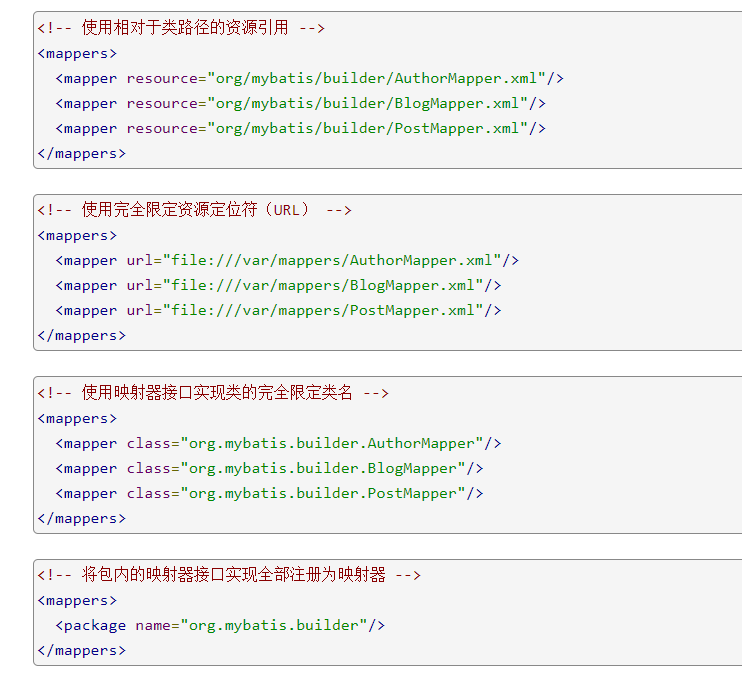
方式一:【推荐使用】
<!--    每一个Mapper.xml都需要在Mybatis核心配置文件中注册-->
    <mappers>
        <mapper resource="com/hjf/dao/UserMapper.xml"/>
    </mappers>
方式二:使用class文件绑定注册
<!--    每一个Mapper.xml都需要在Mybatis核心配置文件中注册-->
    <mappers>
        <mapper class="com.hjf.dao.UserMapper"/>
    </mappers>
注意:
接口和他的Mapper配置文件必须同名
接口和他的Mapper配置文件必须在同一个包下
方式三:使用扫描包进行注入绑定
<!--    每一个Mapper.xml都需要在Mybatis核心配置文件中注册-->
    <mappers>
        <package name="com.hjf.dao"/>
    </mappers>
注意:
接口和他的Mapper配置文件必须同名
接口和他的Mapper配置文件必须在同一个包下
8.生命周期和作用域(Scope)
不同作用域和生命周期类别是至关重要的,因为错误的使用会导致非常严重的并发问题
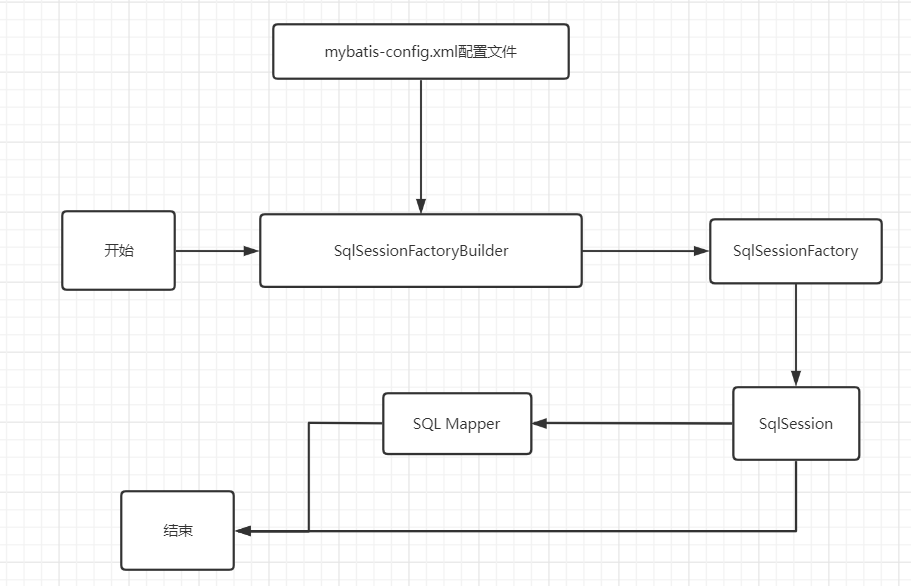
SqlSessionFactoryBuilder:
一旦创建了 SqlSessionFactory,就不再需要它了
局部变量
SqlSessionFactory:
说白了可以想象为: 数据库连接池
SqlSessionFactory 一旦被创建就应该在应用的运行期间一直存在, 没有任何理由丢弃它或重新创建另一个实例
多次重建 SqlSessionFactory 被视为一种代码“坏习惯
因此 SqlSessionFactory 的最佳作用域是应用作用域
最简单的就是使用单例模式或者静态单例模式。
SqlSession
连接到连接池的一个请求
SqlSession 的实例不是线程安全的,因此是不能被共享的,所以它的最佳的作用域是请求或方法作用域
用完之后需要赶紧关闭,否则资源会被占用
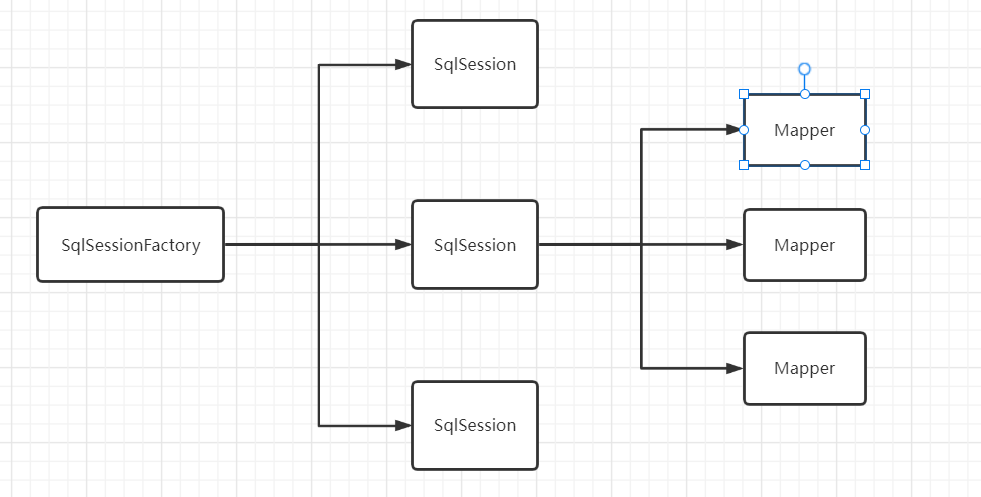
这里面的每一个Mapper,就代表一个具体的业务
4.解决属性名和字段名不一致的问题
1.问题
数据库中的字段
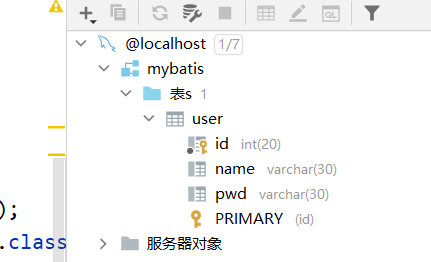
新建一个项目,拷贝之前的,测试实体类不一致的情况
//实体类
public class User {
    private int id;
    private String name;
    private String password;
测试出现问题
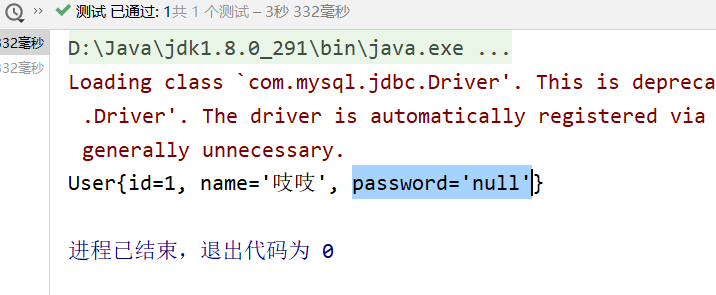
//   select * from mybatis.user where id = #{id};
//    类型处理器
//   select id,name,pwd from mybatis.user where id = #{id};
解决方法:
1.起别名
<select id="getUserById" parameterType="int" resultType="com.hjf.pojo.User">
        select id,name,pwd as password from mybatis.user where id = #{id};
</select>
2.resultMap
结果集映射
id  name  pwd
id  name  password
    <resultMap id="UserMap" type="User">
<!--       column数据库中的字段,property实体类中的属性 -->
        <result column="id" property="id"/>
        <result column="name" property="name"/>
        <result column="pwd" property="password"/>
    </resultMap>

    <select id="getUserById" resultMap="UserMap">
        select * from mybatis.user where id = #{id};
    </select>
resultMap 元素是 MyBatis 中最重要最强大的元素
ResultMap 的设计思想是,对简单的语句做到零配置,对于复杂一点的语句,只需要描述语句之间的关系就行了
ResultMap 的优秀之处——你完全可以不用显式地配置它们
如果这个世界总是这么简单就好了。
5.日志
5.1日志工厂
如果一个数据库操作,出现了异常,我们需要排错,日志就是最好的助手
曾经:sout、debug
现在:日志工厂

-
SLF4J
-
LOG4J 【掌握】
-
LOG4J2
-
JDK_LOGGING
-
COMMONS_LOGGING
-
STDOUT_LOGGING 【掌握】
-
NO_LOGGING
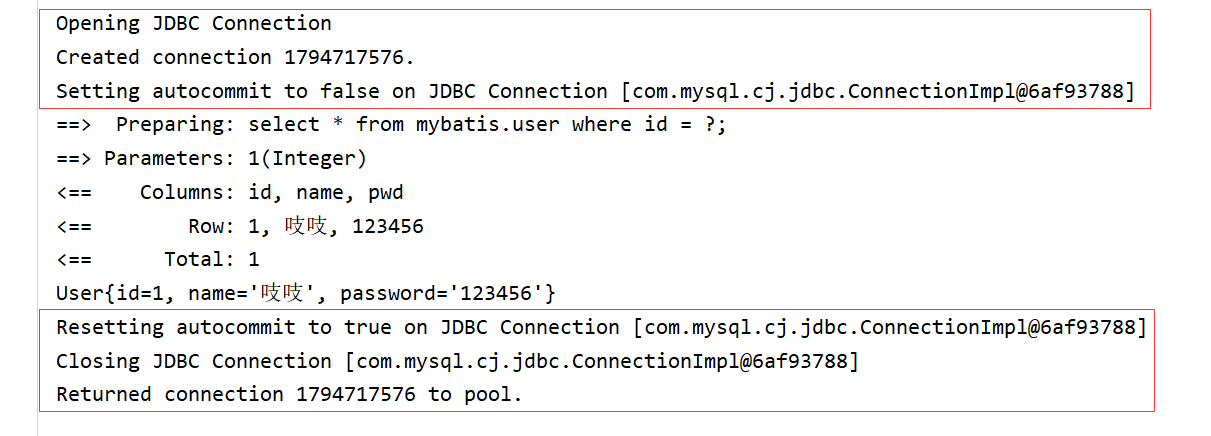
在mybatis中具体使用那一个日志实现,在设置中设定
STDOUT_LOGGING标准日志输出
在mybatis核心配置文件中,配置我们的日志
<settings>
<!--标准的日志工厂实现-->
        <setting name="logImpl" value="STDOUT_LOGGING"/>
</settings>
5.2LOG4J
什么是LOG4J?
-
Log4j是
-
我们也可以控制每一条日志的输出格式
-
通过定义每一条日志信息的级别,我们能够更加细致地控制日志的生成过程
-
可以通过一个
1.先导入log4j的包
pom
<!-- https://mvnrepository.com/artifact/log4j/log4j -->
        <dependency>
            <groupId>log4j</groupId>
            <artifactId>log4j</artifactId>
            <version>1.2.17</version>
        </dependency>
2.log4j.properties
#将等级为DEBUG的日志信息输出到console和file这两个目的地,console和file的定义在下面的代码
log4j.rootLogger=DEBUG,console,file

#控制台输出的相关设置
log4j.appender.console = org.apache.log4j.ConsoleAppender
log4j.appender.console.Target = System.out
log4j.appender.console.Threshold=DEBUG
log4j.appender.console.layout = org.apache.log4j.PatternLayout
log4j.appender.console.layout.ConversionPattern=[%c]-%m%n

#文件输出的相关设置
log4j.appender.file = org.apache.log4j.RollingFileAppender
log4j.appender.file.File=./log/huang.log
log4j.appender.file.MaxFileSize=10mb
log4j.appender.file.Threshold=DEBUG
log4j.appender.file.layout=org.apache.log4j.PatternLayout
log4j.appender.file.layout.ConversionPattern=[%p][%d{yy-MM-dd}][%c]%m%n

#日志输出级别
log4j.logger.org.mybatis=DEBUG
log4j.logger.java.sql=DEBUG
log4j.logger.java.sql.Statement=DEBUG
log4j.logger.java.sql.ResultSet=DEBUG
log4j.logger.java.sql.PreparedStatement=DEBUG
3.配置log4j为日志的实现
 <settings>
<!--标准的日志工厂实现-->
<!--        <setting name="logImpl" value="STDOUT_LOGGING"/>-->
        <setting name="logImpl" value="LOG4J"/>
 </settings>
4.Log4j的使用
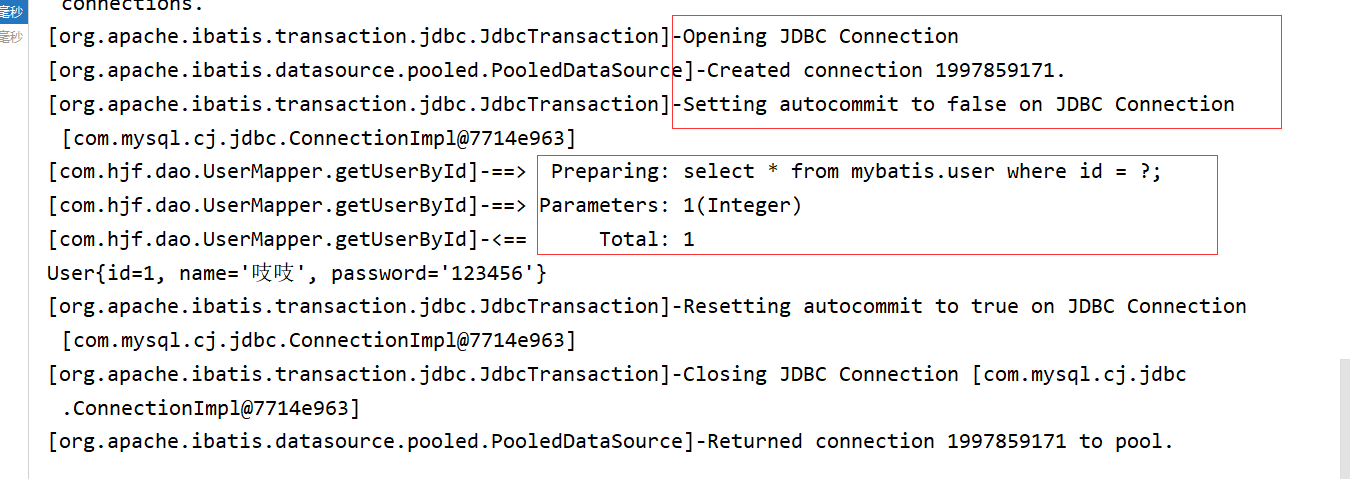
简单使用
-
在要使用Log4j的类中,导入包 import org.apache.log4j.Logger;
-
日志对象,参数为当前类的class
static Logger logger = Logger.getLogger(UserDaoTest.class);
-
日志级别
logger.info("info:进入了testlog4j");
logger.debug("info:进入了testlog4j");
logger.error("info:进入了testlog4j");
6.分页
-
减少数据的处理量
6.1使用limit分页
select * from user limit 3,3;#{从第四个开始,每三个为一页大小}
select * from user limit 5;#{0,5}
使用mybatis实现分页,核心SQL
-
接口
//分页
List<User> getUserByLimit(Map<String,Integer> map); -
Mapper.xml
<!--    分页-->
    <select id="getUserByLimit" parameterType="map" resultMap="UserMap">
        select * from mybatis.user limit #{startIndex},#{pageSize}
</select> -
测试
@Test
public void getUserByLimit(){
    SqlSession sqlSession = MybatisUtils.getSqlSession();

    UserMapper mapper = sqlSession.getMapper(UserMapper.class);
    HashMap<String, Integer> map = new HashMap<>();
    map.put("startIndex",0);
    map.put("pageSize",3);
    List<User> userList = mapper.getUserByLimit(map);
    for (User user : userList) {
        System.out.println(user);
    }

    sqlSession.close();
}
6.2RowBounds分页
不再使用SQL实现分页
-
接口
//分页2
List<User> getUserByRowBounds(); -
mapper.xml
 <!--    分页2-->
    <select id="getUserByRowBounds" resultMap="UserMap">
        select * from mybatis.user
    </select>
-
测试
@Test
    public void getUserByRowBounds(){
        SqlSession sqlSession = MybatisUtils.getSqlSession();
//      RowBounds实现
        RowBounds rowBounds = new RowBounds(2, 4);


//        通过Java代码层面实现分页
        List<User> userList = sqlSession.selectList("com.hjf.dao.UserMapper.getUserByRowBounds",null,rowBounds);
        for (User user : userList) {
            System.out.println(user);
        }
        sqlSession.close();
    }
6.3分页插件
了解即可
7.使用注解开发
面向接口编程 ”本质解耦“
在一个[面向对象](https://baike.baidu.com/item/面向对象)的系统中,系统的各种功能是由许许多多的不同对象协作完成的。在这种情况下,各个对象内部是如何实现自己的,对[系统设计](https://baike.baidu.com/item/系统设计)人员来讲就不那么重要了;而各个对象之间的协作关系则成为系统设计的关键。小到不同类之间的通信,大到各模块之间的交互,在系统设计之初都是要着重考虑的,这也是系统设计的主要工作内容。面向接口编程就是指按照这种思想来编程。
1.关于接口的理解。
-
接口从更深层次的理解,应是定义(规范,约束)与实现(名实分离的原则)的分离。
-
接口的本身反映了系统设计人员对系统的抽象理解。
接口应有两类:
-
第一类是对一个个体的抽象,它可对应为一个抽象体(abstract class);
-
第二类是对一个个体某一方面的抽象,即形成一个抽象面(interface);
一个体有可能有多个抽象面。
抽象体与抽象面是有区别的。
2.设计接口的另一个不可忽视的因素是接口所处的环境(context,environment),系统论的观点:环境是系统要素所处的空间与外部影响因素的总和。任何接口都是在一定的环境中产生的。因此环境的定义及环境的变化对接口的影响是不容忽视的,脱离原先的环境,所有的接口将失去原有的意义。
3.按照组件的开发模型(3C),它们三者相辅相成,各司一面,浑然一体,缺一不可。
-
[面向对象](https://baike.baidu.com/item/面向对象)是指,我们考虑问题时,以对象为单位,考虑它的属性及方法
-
[面向过程](https://baike.baidu.com/item/面向过程)是指,我们考虑问题时,以一个具体的流程(事务过程)为单位,考虑它的实现
-
接口设计与非接口设计是针对复用技术而言的,与面向对象(过程)不是一个问题
使用注解开发
- 注解在接口上实现
public interface UserMapper {
    @Select("select * from user")
    List<User> getUsers();
}
- 需要在核心配置文件中绑定接口
<!--    绑定接口-->
    <mappers>
        <mapper class="com.hjf.dao.UserMapper"/>
    </mappers>
- 测试
@Test
    public void test(){
        SqlSession sqlSession = MybatisUtils.getSqlSession();
//        底层主要应用反射
        UserMapper mapper = sqlSession.getMapper(UserMapper.class);
        List<User> users = mapper.getUsers();
        for (User user : users) {
            System.out.println(user);
        }
        sqlSession.close();
    }
本质:反射机制实现
底层:动态代理
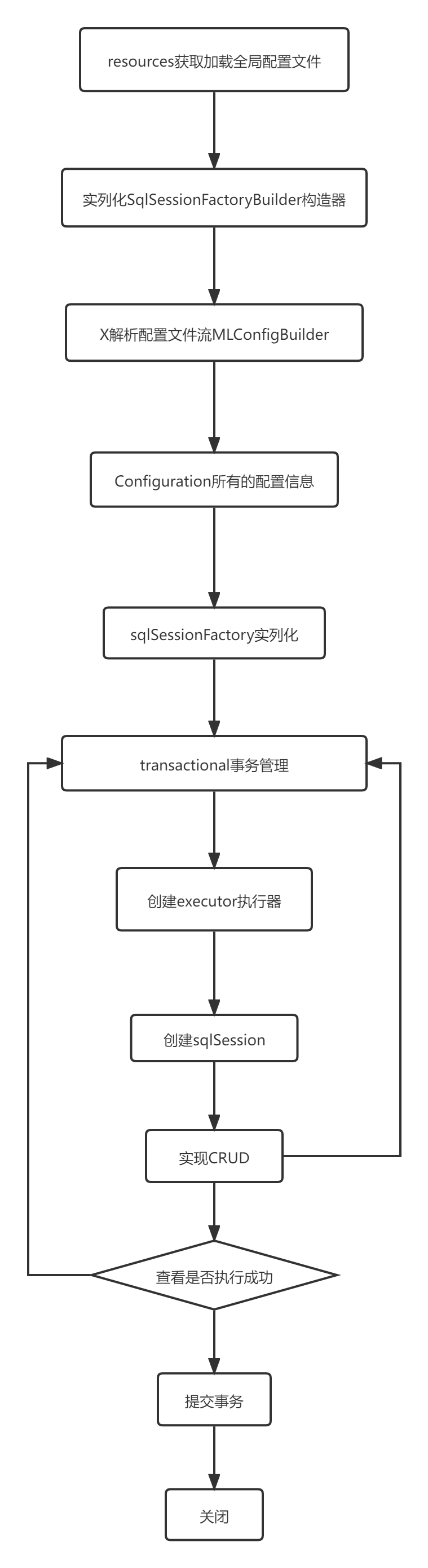
mybatis详细的执行流程
CRUD
我们可以在工具类创建的时候实现自动提交事务
 public static SqlSession getSqlSession(){

        return sqlSessionFactory.openSession(true);
    }
编写接口,增加注解
public interface UserMapper {
    @Select("select * from user")
    List<User> getUsers();


//    方法存在多个参数,所有的参数前面必须加上:@Param("id/xxx")注解
    @Select("select * from user where id=#{id}")
    User getUserByID(@Param("id") int id);

//    应用对象不需要写:@Param("id/xxx")注解
    @Insert("insert into user(id,name,pwd) values (#{id},#{name},#{password})")
    int addUser(User user);

    @Update("update user set name=#{name},pwd=#{password} where id=#{id}")
    int updateUser(User user);

    @Delete("delete from user where id=#{uid}")
    int deleteUser(@Param("uid") int id);
}
测试类
 @Test
    public void test(){
        SqlSession sqlSession = MybatisUtils.getSqlSession();
//        底层主要应用反射
        UserMapper mapper = sqlSession.getMapper(UserMapper.class);
        /*List<User> users = mapper.getUsers();
        for (User user : users) {
            System.out.println(user);
        }*/
//        User userByID = mapper.getUserByID(4);
//        System.out.println(userByID);
//        mapper.addUser(new User(7,"哈哈","1234454"));
//        mapper.updateUser(new User(7,"唔","12344"));
        mapper.deleteUser(7);
        sqlSession.close();
    }
关于@Param("id/xxx")注解
- 基本类型的参数或者string类型,需要加上
- 引用类型不需要
- 若只有一个基本类型,可以忽略,但建议都加上
- 我们在SQL中引用的就是我们这里的 @Param("id/xxx") 中设定的属性名
#{} ${}区别
8.Lombok【不建议使用,取舍看自己】
Project Lombok is a java library that automatically plugs into your editor and build tools, spicing up your java.
Never write another getter or equals method again, with one annotation your class has a fully featured builder, Automate your logging variables, and much more.
- java library
- automatically plugs
- editor and build tools
- annotation your class
使用步骤:
-
在idea中安装Lombok插件
-
在项目中导入Lombok的jar包
<dependency>
      <groupId>org.projectlombok</groupId>
      <artifactId>lombok</artifactId>
      <version>1.18.22</version>
</dependency>
- 在实体类上加注解即可
//实体类
@Data
@AllArgsConstructor
@NoArgsConstructor
public class User {
    private int id;
    private String name;
    private String password;

}
@Getter and @Setter
@FieldNameConstants
@ToString
@EqualsAndHashCode
@AllArgsConstructor, @RequiredArgsConstructor and @NoArgsConstructor
@Log, @Log4j, @Log4j2, @Slf4j, @XSlf4j, @CommonsLog, @JBossLog, @Flogger, @CustomLog
@Data
@Builder
@SuperBuilder
@Singular
@Delegate
@Value
@Accessors
@Wither
@With
@SneakyThrows
@val
@var
experimental @var
@UtilityClass
Lombok config system
目的:偷懒
使实体类变为以下这样
public class User {
    private int id;
    private String name;
    private String password;
}
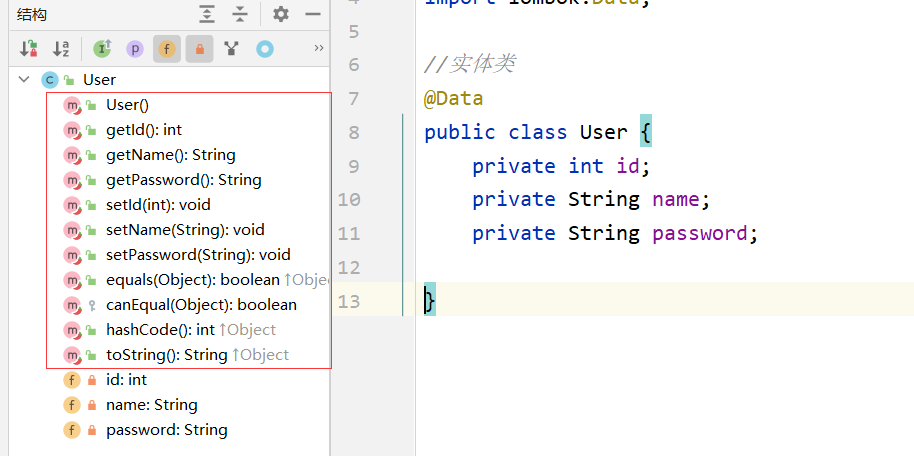
说明:
@Data:无参构造,get,set,tostring,hashcode,equals
@AllArgsConstructor
@NoArgsConstructor
@EqualsAndHashCode
@ToString
9.多对一
-
如:多个学生,对应一个老师
-
对学生而言 关联 多个学生,关联一个老师【多对一】
-
对于老师而言 集合 一个老师,有很多学生【一对多】
测试环境搭建
- 新建实体类teacher,student,并写其getter,setter,tostring,无参与有参构造 或着导入Lombok
public class Student {
    private int id;
    private String name;

//  该学生需要关联一个老师
    private Teacher teacher;
public class Teacher {
    private int id;
    private String name;
- 建立Mapper接口
- 建立Mapper.xml
- 核心配置文件中注册绑定Mapper接口或文件【方式多种,随心选择】
- 测试查询是否成功
注:可能会出现一些问题
- 无效绑定状态(没有找到)
解决方法:resources下的文件目录需要一层一层的建立
- 建议在 resultType 中写全路径名,不要直接写student(虽然也行)
resultType="com.hjf.pojo.Student"
按照查询嵌套处理(子查询)
<mapper namespace="com.hjf.dao.StudentMapper">
    <!--方式一:
        1.查询所有的学生信息
        2.根据查询出来的学生的tid,寻找对应的老师 像子查询-->
    <select id="getStudent" resultMap="StudentTeacher">
        select * from student
    </select>
    <resultMap id="StudentTeacher" type="Student">
        <result property="id" column="id"/>
        <result property="name" column="name"/>
        <!--复杂的属性,需要单独处理 对象:association 集合:collection-->
        <association property="teacher" column="tid" javaType="Teacher" select="getTeacher"/>

    </resultMap>
    <select id="getTeacher" resultType="com.hjf.pojo.Teacher">
        select * from teacher where id =#{id}
    </select>

</mapper>
按照结果嵌套处理(联表查询)
<!--方式二:按照结果嵌套处理-->
    <select id="getStudent2" resultMap="StudentTeacher2">
        select s.id sid,s.name sname,t.name tname
        from student s,teacher t
        where s.tid=t.id
    </select>
    <resultMap id="StudentTeacher2" type="Student">
        <result property="id" column="sid"/>
        <result property="name" column="sname"/>
        <association property="teacher" javaType="Teacher">
            <result property="name" column="tname"/>
        </association>
    </resultMap>
回顾MySQL多对一查询方式:
- 子查询
- 联表查询
10.一对多
如:一个老师拥有多个学生
对于老师而言,就是一对多
搭建环境,和之前一样
实体类
public class Student {
    private int id;
    private String name;
    private int tid ;
public class Teacher {
    private int id;
    private String name;

//  一个老师拥有多个学生
    private List<Student> students;
按照结果嵌套处理
<select id="getTeacher" resultMap="TeacherStudent">
        select s.id sid,s.name sname,t.name tname,t.id tid
        from student s,teacher t
        where s.tid=t.id and t.id=#{tid}
    </select>
    <resultMap id="TeacherStudent" type="Teacher">
        <result property="id" column="tid"/>
        <result property="name" column="tname"/>
        <!--javaType="" 指定属性的类型
            集合中的泛型信息,使用oftype获取-->
        <collection property="students" ofType="Student">
            <result property="id" column="sid"/>
            <result property="name" column="sname"/>
            <result property="tid" column="tid"/>
        </collection>
    </resultMap>
按照查询嵌套处理
 <select id="getTeacher2" resultMap="TeacherStudent2">
        select * from teacher where id =#{tid}
    </select>

    <resultMap id="TeacherStudent2" type="Teacher">
        <collection property="students" javaType="ArrayList" ofType="Student" select="getStudentByTeacherId" column="id"/>
    </resultMap>

    <select id="getStudentByTeacherId" resultType="Student">
        select *
        from student
        where tid =#{tid};
    </select>
小结
-
关联:association【多对一】
-
集合:collection【一对多】
-
javaType & ofType
- javaType 用来指定实体类中属性的类型
- ofType 用来指定映射到 List 或 集合 中的pojo类型,泛型中的约束类型
注意:
- 保证SQL的可读性
- 注意一对多和多对一中,属性名和字段的问题
- 若问题不好排查错误,可以使用日志,建议log4j
面试高频
- MySQL引擎
- InnoDB底层原理
- 索引
- 索引优化
11.动态SQL
什么是动态SQL:动态SQL就是根据不同的条件生成不同的SQL语句
如果你之前用过 JSTL 或任何基于类 XML 语言的文本处理器,你对动态 SQL 元素可能会感觉似曾相识。在 MyBatis 之前的版本中,需要花时间了解大量的元素。借助功能强大的基于 OGNL 的表达式,MyBatis 3 替换了之前的大部分元素,大大精简了元素种类,现在要学习的元素种类比原来的一半还要少。

if
choose (when, otherwise)
trim (where, set)
foreach
搭建环境
create table blog (
	id varchar(50) not null comment '博客id',
	title varchar (100) not null comment '博客标题',
	author varchar (30) not null comment '博客作者',
	create_time datetime not null comment '创建时间',
	views int (30) not null comment '浏览量'
) engine=innodb default charset=utf8
创建一个基础工程
- 导包 pom下
<dependencies>
        <dependency>
            <groupId>org.projectlombok</groupId>
            <artifactId>lombok</artifactId>
            <version>1.18.22</version>
        </dependency>
    </dependencies>
- 编写配置文件
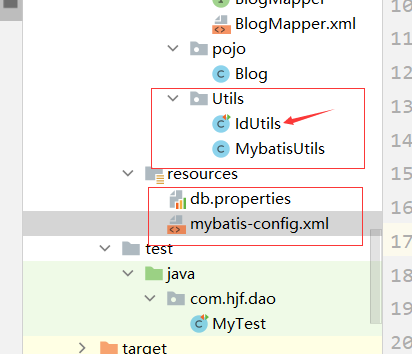
新加了IdUtils 类
//@SuppressWarnings("")/*作用:抑制警告*/
public class IdUtils {
    public static String getId(){
        return UUID.randomUUID().toString().replaceAll("-","");
    }
    @Test
    public void test(){
        System.out.println(IdUtils.getId());
    }
}
- 编写实体类
@Data
public class Blog {
    private int id;
    private String title;
    private String author;
    private Date createTime;
    private int views;
}
- 编写实体类对应的Mapper接口和Mapper.xml文件
//插入数据
    int addBlog(Blog blog);
    <insert id="addBlog" parameterType="blog">
        insert into blog(id,title,author,create_time,views) values (#{id},#{title},#{author},#{createTime},#{views})
    </insert>
- 测试
 @Test
    public void addInitBlog(){
        SqlSession sqlSession = MybatisUtils.getSqlSession();
        BlogMapper mapper = sqlSession.getMapper(BlogMapper.class);

        Blog blog = new Blog();
        blog.setId(IdUtils.getId());
        blog.setTitle("mybatis如此简单");
        blog.setAuthor("狂神说");
        blog.setCreateTime(new Date());
        blog.setViews(9999);

        mapper.addBlog(blog);

        blog.setId(IdUtils.getId());
        blog.setTitle("Java如此简单");
        mapper.addBlog(blog);

        blog.setId(IdUtils.getId());
        blog.setTitle("Spring如此简单");
        mapper.addBlog(blog);

        blog.setId(IdUtils.getId());
        blog.setTitle("微服务如此简单");
        mapper.addBlog(blog);

        sqlSession.close();
    }
需要注意
<!--        是否开启驼峰命名自动映射-->
        <setting name="mapUnderscoreToCamelCase" value="true"/>
注:当出现以下错误时说明需要加上 resultType='' ''
A query was run and no Result Maps were found for the Mapped Statement 'com.hjf.dao.BlogMapper.queryBlogIf'. It's likely that neither a Result Type nor a Result Map was specified.
if
//    查询博客
    List<Blog> queryBlogIf(Map map);
@Test
    public void queryBlogIf(){
        SqlSession sqlSession = MybatisUtils.getSqlSession();
        BlogMapper mapper = sqlSession.getMapper(BlogMapper.class);

        HashMap map = new HashMap();
//        map.put("title","Java如此简单");
        map.put("author","狂神说");
        List<Blog> blogs = mapper.queryBlogIf(map);
        for (Blog blog : blogs) {
            System.out.println(blog);
        }
        sqlSession.close();
    }
 <select id="queryBlogIf" parameterType="map" resultType="blog">
        select * from blog where 1=1
        <if test="title != null">
            and title = #{title}
        </if>
        <if test="author != null">
            and author = #{author}
        </if>
    </select>
choose、when、otherwise
有时候,我们不想使用所有的条件,而只是想从多个条件中选择一个使用。针对这种情况,MyBatis 提供了 choose 元素,它有点像 Java 中的 switch 语句
策略变为:传入了 “title” 就按 “title” 查找,传入了 “author” 就按 “author” 查找的情形。若两者都没有传入,就返回标记为 featured 的 BLOG(这可能是管理员认为,与其返回大量的无意义随机 Blog,还不如返回一些由管理员精选的 Blog)。
    <select id="queryBlogChoose" parameterType="map" resultType="blog">
        select * from blog
        <where>
            <choose>
                <when test="title != null">
                    title = #{title}
                </when>
                <when test="author != null">
                    and author = #{author}
                </when>
                <otherwise>
                    and views = #{views}
                </otherwise>
            </choose>
        </where>
    </select>
 @Test
    public void queryBlogIf(){
        SqlSession sqlSession = MybatisUtils.getSqlSession();
        BlogMapper mapper = sqlSession.getMapper(BlogMapper.class);

        HashMap map = new HashMap();
//        map.put("title","Java如此简单");
        map.put("author","狂神说");
       /* List<Blog> blogs = mapper.queryBlogIf(map);
        for (Blog blog : blogs) {
            System.out.println(blog);
        }*/
        map.put("views",9999);
        List<Blog> blogs = mapper.queryBlogChoose(map);
        for (Blog blog : blogs) {
            System.out.println(blog);
        }
        sqlSession.close();
trim、where、set
where 元素只会在子元素返回任何内容的情况下才插入 “WHERE” 子句。而且,若子句的开头为 “AND” 或 “OR”,where 元素也会将它们去除。
<select id="queryBlogIf" parameterType="map" resultType="blog">
        select * from blog
        <where>
        <if test="title != null">
            and title = #{title}
        </if>
        <if test="author != null">
            and author = #{author}
        </if>
        </where>
</select>
用于动态更新语句的类似解决方案叫做 set。set 元素可以用于动态包含需要更新的列,忽略其它不更新的列
这个例子中,set 元素会动态地在行首插入 SET 关键字,并会删掉额外的逗号(这些逗号是在使用条件语句给列赋值时引入的)
    <update id="updateBlog" parameterType="map">
        update blog
        <set>
            <if test="title != null">
                title = #{title},
            </if>
            <if test="author">
                author = #{author},
            </if>
        </set>
        where id = #{id}
    </update>
 @Test
    public void queryBlogIf(){
        SqlSession sqlSession = MybatisUtils.getSqlSession();
        BlogMapper mapper = sqlSession.getMapper(BlogMapper.class);

        HashMap map = new HashMap();
        map.put("title","Java如此简单2");
        map.put("author","狂神说");
        map.put("id","6eba1aa7ddb64c7e9ea1ed8ca3426fc4");
       /* List<Blog> blogs = mapper.queryBlogIf(map);
        for (Blog blog : blogs) {
            System.out.println(blog);
        }*/
//        map.put("views",9999);
        mapper.updateBlog(map);

        sqlSession.close();
    }
prefixOverrides 属性会忽略通过管道符分隔的文本序列(注意此例中的空格是必要的)。上述例子会移除所有 prefixOverrides 属性中指定的内容,并且插入 prefix 属性中指定的内容。
<trim prefix="" prefixOverrides="" suffix="" suffixOverrides="">

        </trim>
所谓的动态SQL,本质还是SQL语句,只是我们可以在SQL层面,去执行逻辑代码
if where when choose set等
SQL片段
有的时候,我们可能会将一些功能的部分抽取出来,方便复用!
- 使用SQL标签抽取公共的部分
- 在需要使用的地方使用include标签引用即可
上述的if中的例子可以改为如下:
 <sql id="if-title-author">
        <if test="title != null">
            and title = #{title}
        </if>
        <if test="author != null">
            and author = #{author}
        </if>
    </sql>

    <select id="queryBlogIf" parameterType="map" resultType="blog">
        select * from blog
        <where>
            <include refid="if-title-author"></include>
        </where>
    </select>
sql 注意事项:
- 最好基于单表来定义SQL片段
- 不要存在where标签(否则代码复用效率变差)
Foreach
select * from user where 1=1 and
<foreach item="id" index="index" collection="ids"
      open="(" separator="or" close=")">
        #{id}
  </foreach>
(id=1 or id=2 or id=3)
动态 SQL 的另一个常见使用场景是对集合进行遍历(尤其是在构建 IN 条件语句的时候)。比如:
<select id="selectPostIn" resultType="domain.blog.Post">
  SELECT *
  FROM POST P
  WHERE ID in
  <foreach item="item" index="index" collection="list"
      open="(" separator="," close=")">
        #{item}
  </foreach>
</select>
foreach 元素的功能非常强大,它允许你指定一个集合,声明可以在元素体内使用的集合项(item)和索引(index)变量。它也允许你指定开头与结尾的字符串以及集合项迭代之间的分隔符。这个元素也不会错误地添加多余的分隔符,看它多智能!
- 你可以将任何可迭代对象(如 List、Set 等)、Map 对象或者数组对象作为集合参数传递给 foreach。
- 当使用可迭代对象或者数组时,index 是当前迭代的序号,item 的值是本次迭代获取到的元素。当使用 Map 对象(或者 Map.Entry 对象的集合)时,index 是键,item 是值。
//    查询1,2,3号记录的博客
    List<Blog> queryBlogForeach(Map map);
    <!--    select * from blog where 1=1 and (id=1 or id=2 or id=3)
            我们现在传递一个万能的map,这个map中可以存在一个集合-->
    <select id="queryBlogForeach" parameterType="map" resultType="blog">
        select * from blog
        <where>
            <foreach collection="ids" item="id" open="(" close=")" separator="or">
                id = #{id}
            </foreach>
        </where>
    </select>
 @Test
    public void queryBlogForeach(){
        SqlSession sqlSession = MybatisUtils.getSqlSession();
        BlogMapper mapper = sqlSession.getMapper(BlogMapper.class);

        HashMap map = new HashMap();
        ArrayList<Integer> ids = new ArrayList<>();

        ids.add(2);
        ids.add(1);
        ids.add(3);
        map.put("ids",ids);
        List<Blog> blogs = mapper.queryBlogForeach(map);

        for (Blog blog : blogs) {
            System.out.println(blog);
        }
        sqlSession.close();
    }
动态SQL就是在拼接SQL语句,我们只要保证SQL的正确性,按照SQL的格式,去排列组合就OK了
建议:
- 先在Mysql中写出完整的SQL,再对应的去修改成为我们的动态SQL实现通用即可
12.缓存
12.1 简介
查询:      连接数据库       耗资源
     一次查询的结果,给他暂存到一个可以直接取到的地方!-->内存:即缓存

我们再次查询相同数据的时候,直接走缓存,就不用走数据库连接了
- 什么是缓存【Cache】?
- 存在内存中的临时数据
- 将用户经常查询的数据放在缓存(内存)中,用户去查询数据就不用从磁盘上(关系型数据库数据文件)查询,从缓存中查询,从而提高查询效率,解决了高并发系统的性能问题
- 为什么使用缓存?
- 减少和数据库的交互次数,减少系统开销,提高系统效率
- 什么样的数据能使用缓存?
- 经常查询并且不经常改变的数据
用户访问服务器                服务器              数据库
    				会遇到读写问题(并发)	  (读写分离,主从复制)
12.2mybatis缓存
-
MyBatis 内置了一个强大的事务性查询缓存机制,它可以非常方便地配置和定制
-
mybatis系统中默认定义了两级缓存:一级缓存和二级缓存
- 默认情况下,只有一级缓存开启 (sqlsession级别的缓存;也称为本地缓存)
- 二级缓存需要手动开启和配置,它是基于namespace(接口/mapper)级别的缓存
- 为了提高扩展性,mybatis定义了缓存接口Cache。我们可以通过实现Cache接口来自定义二级缓存
12.3、一级缓存
- 一级缓存也叫本地缓存: sqlsession
- 与数据库同一次会话期间查询到的数据会放到本地缓存中
- 若以后需要获取相同的数据,直接从缓存中拿,没必要再去连接数据库
测试步骤:
- 开启日志
  <settings>
  <!--标准的日志工厂实现-->
          <setting name="logImpl" value="STDOUT_LOGGING"/>
    </settings>
- 测试在一个session中查询两次相同记录
 @Test
    public void test(){
        SqlSession sqlSession = MybatisUtils.getSqlSession();
        UserMapper mapper = sqlSession.getMapper(UserMapper.class);
        User user = mapper.queryUserById(1);
        System.out.println(user);

        System.out.println("==================================");
        User user2 = mapper.queryUserById(1);
        System.out.println(user2);

        System.out.println(user==user2);
        sqlSession.close();
    }
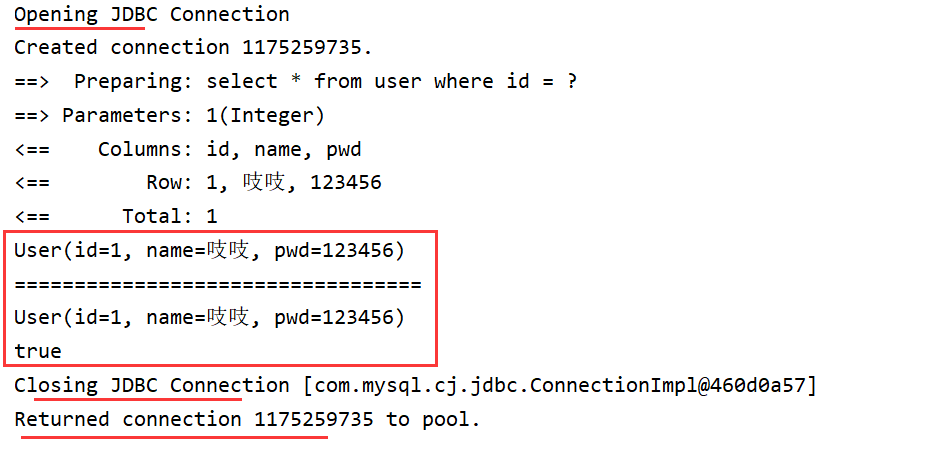
- 查看日志输出
缓存失效的情况:
- 查询不同的id
- 增删改操作,可能会改变原来的数据,所以必定会刷新缓存
Opening JDBC Connection
Created connection 1175259735.
==>  Preparing: select * from user where id = ?
==> Parameters: 1(Integer)
<==    Columns: id, name, pwd
<==        Row: 1, 吱吱, 123456
<==      Total: 1
User(id=1, name=吱吱, pwd=123456)
==>  Preparing: update user set name =?,pwd =? where id =?;
==> Parameters: 姐姐(String), 1244455(String), 2(Integer)
<==    Updates: 1
==================================
==>  Preparing: select * from user where id = ?
==> Parameters: 1(Integer)
<==    Columns: id, name, pwd
<==        Row: 1, 吱吱, 123456
<==      Total: 1
User(id=1, name=吱吱, pwd=123456)
false
Closing JDBC Connection [com.mysql.cj.jdbc.ConnectionImpl@460d0a57]
Returned connection 1175259735 to pool.
- 查询不同的Mapper.xml
- 手动清理缓存
 @Test
    public void test(){
        SqlSession sqlSession = MybatisUtils.getSqlSession();
        UserMapper mapper = sqlSession.getMapper(UserMapper.class);
        User user = mapper.queryUserById(1);
        System.out.println(user);

//        mapper.updateUser(new User(2,"姐姐","1244455"));

        sqlSession.clearCache();/*手动清理缓存*/

        System.out.println("==================================");
        User user2 = mapper.queryUserById(1);
        System.out.println(user2);

        System.out.println(user==user2);
        sqlSession.close();
    }
小结:一级缓存默认是开启的,只在一次sqlsession中有效,也就是拿到连接到关闭连接这个区间段
一级缓存就是一个map
12.4、二级缓存
要启用全局的二级缓存,只需要在你的 SQL 映射文件中添加一行:
<cache/>
- 二级缓存也叫全局缓存,一级缓存作用域太低,所以诞生了二级缓存
- 基于namespace级别的缓存,一个名称空间,对应一个二级缓存
- 工作机制
- 一个会话查询一条数据,这个数据就会被放在当前会话的一级缓存中;
- 若当前会话关闭了,这个会话对应的一级缓存就没了,但我们的要求是:会话关闭了,一级缓存中的数据被保存到二级缓存中
- 新的会话查询信息,就可以从二级缓存中获取内容
- 不同的mapper查出的数据会放在自己对应的缓存(map)中
步骤:
- 开启全局缓存
<!-- 全局性地显示开启或关闭所有映射器配置文件中已配置的任何缓存。-->
        <setting name="cacheEnabled" value="true"/>
- 在要使用二级缓存的Mapper中开启
<!--    在当前Mapper.xml中使用二级缓存-->
    <cache/>
也可以自定义参数
<cache
  eviction="FIFO"
  flushInterval="60000"
  size="512"
  readOnly="true"/>
-
测试
-
问题:我们需要将实体类序列化,否则会报错
Caused by: java.io.NotSerializableException: com.hjf.pojo.User解决:
public class User implements Serializable {
    private int id;
    private String name;
    private String pwd;
}
-
小结:
- 只要开启了二级缓存,在同一个Mapper下就有效
- 所有的数据都会先放在一级缓存中
- 只有当会话提交,或者关闭的时候,才会提交到二级缓存中
12.5缓存原理
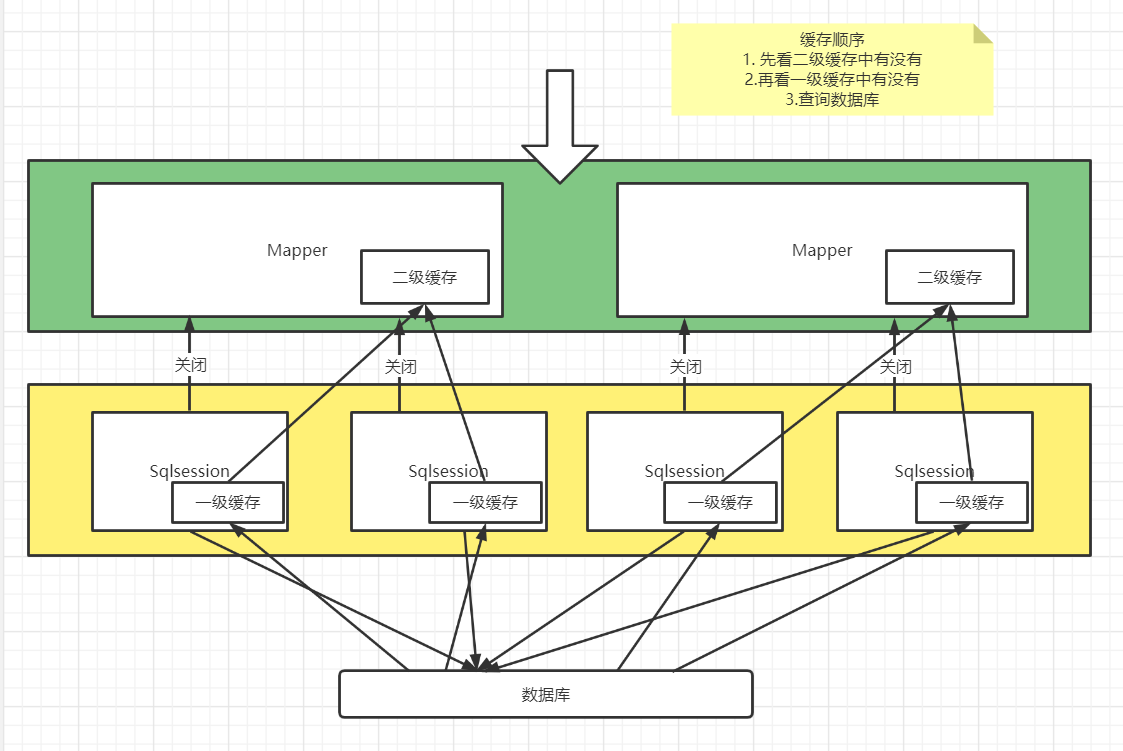
 查找中可定义是否使用缓存    useCache="true"
<select id="queryUserById" resultType="user" useCache="true">
    </select>
增删改中可定义是否刷新缓存   flushCache="false"
<update id="updateUser" parameterType="user" flushCache="false">
    </update>
测试
 @Test
    public void test(){
        SqlSession sqlSession = MybatisUtils.getSqlSession();
        SqlSession sqlSession2 = MybatisUtils.getSqlSession();

        UserMapper mapper = sqlSession.getMapper(UserMapper.class);
        User user = mapper.queryUserById(1);
        System.out.println(user);
        sqlSession.close();

        System.out.println("=======================");
        UserMapper mapper2 = sqlSession2.getMapper(UserMapper.class);
        User user2 = mapper2.queryUserById(1);
        System.out.println(user2);

        System.out.println("=======================");
        User user3 = mapper2.queryUserById(2);
        System.out.println(user3);

        sqlSession2.close();
    }
结果
Opening JDBC Connection
Created connection 487694075.
==>  Preparing: select * from user where id = ?
==> Parameters: 1(Integer)
<==    Columns: id, name, pwd
<==        Row: 1, 吱吱, 123456
<==      Total: 1
User(id=1, name=吱吱, pwd=123456)
Closing JDBC Connection [com.mysql.cj.jdbc.ConnectionImpl@1d119efb]
Returned connection 487694075 to pool.
=======================
As you are using functionality that deserializes object streams, it is recommended to define the JEP-290 serial filter. Please refer to https://docs.oracle.com/pls/topic/lookup?ctx=javase15&id=GUID-8296D8E8-2B93-4B9A-856E-0A65AF9B8C66
Cache Hit Ratio [com.hjf.dao.UserMapper]: 0.5
User(id=1, name=吱吱, pwd=123456)
=======================
Cache Hit Ratio [com.hjf.dao.UserMapper]: 0.3333333333333333
Opening JDBC Connection
Checked out connection 487694075 from pool.
==>  Preparing: select * from user where id = ?
==> Parameters: 2(Integer)
<==    Columns: id, name, pwd
<==        Row: 2, 姐姐, 1244455
<==      Total: 1
User(id=2, name=姐姐, pwd=1244455)
Closing JDBC Connection [com.mysql.cj.jdbc.ConnectionImpl@1d119efb]
Returned connection 487694075 to pool.
12.6自定义缓存-ehcache
Ehcache是一种广泛使用的开源Java分布式缓存。主要面向通用缓存,Java EE和轻量级容器,
是Hibernate中默认的CacheProvider
1、Hibernate与MyBatis对比
1.1 相同点
Hibernate与MyBatis都可以是通过SessionFactoryBuider由XML配置文件生成SessionFactory,然后由SessionFactory 生成Session,最后由Session来开启执行事务和SQL语句。

其中SessionFactoryBuider,SessionFactory,Session的生命周期都是差不多的。Hibernate和MyBatis都支持JDBC和JTA事务处理。

7.2 不同点
(1)hibernate是全自动,而mybatis是半自动

hibernate完全可以通过对象关系模型实现对数据库的操作,拥有完整的JavaBean对象与数据库的映射结构来自动生成sql。而mybatis仅有基本的字段映射,对象数据以及对象实际关系仍然需要通过手写sql来实现和管理。
(2)hibernate数据库移植性远大于mybatis

hibernate通过它强大的映射结构和hql语言,大大降低了对象与数据库(Oracle、MySQL等)的耦合性,而mybatis由于需要手写sql,因此与数据库的耦合性直接取决于程序员写sql的方法,如果sql不具通用性而用了很多某数据库特性的sql语句的话,移植性也会随之降低很多,成本很高。
(3)hibernate拥有完整的日志系统,mybatis则欠缺一些

hibernate日志系统非常健全,涉及广泛,包括:sql记录、关系异常、优化警告、缓存提示、脏数据警告等;而mybatis则除了基本记录功能外,功能薄弱很多。
(4)mybatis相比hibernate需要关心很多细节

hibernate配置要比mybatis复杂的多,学习成本也比mybatis高。但也正因为mybatis使用简单,才导致它要比hibernate关心很多技术细节。mybatis由于不用考虑很多细节,开发模式上与传统jdbc区别很小,因此很容易上手并开发项目,但忽略细节会导致项目前期bug较多,因而开发出相对稳定的软件很慢,而开发出软件却很快。hibernate则正好与之相反。但是如果使用hibernate很熟练的话,实际上开发效率丝毫不差于甚至超越mybatis。
(5)sql直接优化上,mybatis要比hibernate方便很多

由于mybatis的sql都是写在xml里,因此优化sql比hibernate方便很多。而hibernate的sql很多都是自动生成的,无法直接维护sql;虽有hql,但功能还是不及sql强大,见到报表等变态需求时,hql也歇菜,也就是说hql是有局限的;hibernate虽然也支持原生sql,但开发模式上却与orm不同,需要转换思维,因此使用上不是非常方便。总之写sql的灵活度上hibernate不及mybatis。
(6)缓存机制上,hibernate要比mybatis更好一些

MyBatis的二级缓存配置都是在每个具体的表-对象映射中进行详细配置,这样针对不同的表可以自定义不同的缓存机制。并且Mybatis可以在命名空间中共享相同的缓存配置和实例,通过Cache-ref来实现。

而Hibernate对查询对象有着良好的管理机制,用户无需关心SQL。所以在使用二级缓存时如果出现脏数据,系统会报出错误并提示。
2、总结
(1)两者相同点
Hibernate和Mybatis的二级缓存除了采用系统默认的缓存机制外,都可以通过实现你自己的缓存或为其他第三方缓存方案,创建适配器来完全覆盖缓存行为。

(2)两者不同点
Hibernate的二级缓存配置在SessionFactory生成的配置文件中进行详细配置,然后再在具体的表-对象映射中配置是那种缓存。而MyBatis在使用二级缓存时需要特别小心。如果不能完全确定数据更新操作的波及范围,避免Cache的盲目使用。否则,脏数据的出现会给系统的正常运行带来很大的隐患。

(3)举个形象的比喻
MyBatis:机械工具,使用方便,拿来就用,但工作还是要自己来作,不过工具是活的,怎么使由我决定。(小巧、方便、高效、简单、直接、半自动)

Hibernate:智能机器人,但研发它(学习、熟练度)的成本很高,工作都可以摆脱他了,但仅限于它能做的事。(强大、方便、高效、复杂、绕弯子、全自动)
使用
要在程序中使用ehcache,先要导包
<!-- https://mvnrepository.com/artifact/org.mybatis.caches/mybatis-ehcache -->
<dependency>
            <groupId>org.mybatis.caches</groupId>
            <artifactId>mybatis-ehcache</artifactId>
            <version>1.2.1</version>
        </dependency>
在mapper中指定使用我们的ehcache缓存实现!
不用太过深究
目前我们用Redis数据库来做缓存 K-V

 浙公网安备 33010602011771号