
作业5
## MySQL主从复制
### 1、如果主节点已经运行了一段时间,且有大量数据时,新增一个slave,如何配置并启动新增slave节点
- **思路步骤:**
- 通过备份恢复数据至从服务器
- 复制起始位置为备份时,二进制日志文件及其POS
- **环境准备:**
```bash
mysql-master: 10.0.0.8
slave-server: 10.0.0.18
newslave-server: 10.0.0.28
```
![image-20201017112922414]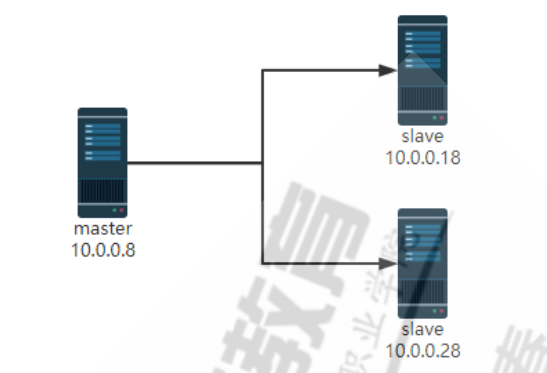
- **操作步骤:**
1. 新建主从复制
```mysql
1、主节点10.0.0.8:
[root@master ~]#dnf -y install mariadb-server
[root@master ~]#vim /etc/my.cnf.d/mariadb-server.cnf
[mysqld]
server-id=8
log-bin
[root@master profile.d]#systemctl restart mariadb
[root@master profile.d]#mysql
Welcome to the MariaDB monitor. Commands end with ; or \g.
Your MariaDB connection id is 9
Server version: 10.3.17-MariaDB-log MariaDB Server
Copyright (c) 2000, 2018, Oracle, MariaDB Corporation Ab and others.
Type 'help;' or '\h' for help. Type '\c' to clear the current input statement.
MariaDB [(none)]>
#查看二进制文件和位置
MariaDB [(none)]> show master logs;
+--------------------+-----------+
| Log_name | File_size |
+--------------------+-----------+
| mariadb-bin.000001 | 28212 |
| mariadb-bin.000002 | 344 |
+--------------------+-----------+
2 rows in set (0.001 sec)
#创建复制用户
MariaDB [(none)]> grant replication slave on *.* to repluser@'10.0.0.%'identified by '123456';
2、从节点:
[root@salve ~]#dnf -y install mariadb-server
[root@salve ~]#vim /etc/my.cnf.d/mariadb-server.cnf
[mysqld]
server-id=18
log-bin
read-only
[root@slave ~]#systemctl restart mariadb
[root@salve ~]#mysql
Welcome to the MariaDB monitor. Commands end with ; or \g.
Your MariaDB connection id is 9
Server version: 10.3.17-MariaDB-log MariaDB Server
Copyright (c) 2000, 2018, Oracle, MariaDB Corporation Ab and others.
Type 'help;' or '\h' for help. Type '\c' to clear the current input statement.
MariaDB [(none)]> change master to master_host='10.0.0.8', master_user='repluser', master_password='123456', master_port=3306, master_log_file='mariadb-bin.000002',master_log_pos=344;
Query OK, 0 rows affected (0.009 sec)
MariaDB [(none)]> start slave;
Query OK, 0 rows affected (0.004 sec)
MariaDB [(none)]> show slave status\G
*************************** 1. row ***************************
Slave_IO_State: Waiting for master to send event
Master_Host: 10.0.0.8
Master_User: repluser
Master_Port: 3306
Connect_Retry: 60
Master_Log_File: mariadb-bin.000002
Read_Master_Log_Pos: 540
Relay_Log_File: mariadb-relay-bin.000002
Relay_Log_Pos: 753
Relay_Master_Log_File: mariadb-bin.000002
Slave_IO_Running: Yes
Slave_SQL_Running: Yes
Replicate_Do_DB:
Replicate_Ignore_DB:
Replicate_Do_Table:
Replicate_Ignore_Table:
Replicate_Wild_Do_Table:
Replicate_Wild_Ignore_Table:
Last_Errno: 0
Last_Error:
Skip_Counter: 0
Exec_Master_Log_Pos: 540
Relay_Log_Space: 1064
Until_Condition: None
Until_Log_File:
Until_Log_Pos: 0
Master_SSL_Allowed: No
Master_SSL_CA_File:
Master_SSL_CA_Path:
Master_SSL_Cert:
Master_SSL_Cipher:
Master_SSL_Key:
Seconds_Behind_Master: 0 #复制延迟时间,比较重要的一个监控数据
Master_SSL_Verify_Server_Cert: No
Last_IO_Errno: 0
Last_IO_Error:
Last_SQL_Errno: 0
Last_SQL_Error:
Replicate_Ignore_Server_Ids:
Master_Server_Id: 8
Master_SSL_Crl:
Master_SSL_Crlpath:
Using_Gtid: No
Gtid_IO_Pos:
Replicate_Do_Domain_Ids:
Replicate_Ignore_Domain_Ids:
Parallel_Mode: conservative
SQL_Delay: 0
SQL_Remaining_Delay: NULL
Slave_SQL_Running_State: Slave has read all relay log; waiting for the slave I/O thread to update it
Slave_DDL_Groups: 1
Slave_Non_Transactional_Groups: 0
Slave_Transactional_Groups: 0
1 row in set (0.000 sec)
```
2. 主服务器运行一段时间后,有大量数据,新增从节点服务器
```mysql
1、在主服务器完全备份
[root@master ~]#mkdir /backup
[root@master ~]#mysqldump -A -F --single-transaction --master-data=1 > /backup/fullbackup_`date +%F_%T`.sql
root@master ~]#ll /backup
total 480
-rw-r--r--. 1 root root 487931 Oct 17 15:28 fullbackup_2020-10-17_15:28:10.sql
[root@master ~]#scp /backup/fullbackup_2020-10-17_15\:28\:10.sql 10.0.0.28:/data
#建议优化主和从节点服务器的性能
MariaDB [(none)]> set global sync_binlog=0;
Query OK, 0 rows affected (0.000 sec)
MariaDB [(none)]> set global innodb_flush_log_at_trx_commit=2;
Query OK, 0 rows affected (0.000 sec)
2、将完全备份还原到新的从节点
[root@newsalve ~]#dnf -y install mariadb-server
[root@newsalve ~]#vim /etc/my.cnf.d/mariadb-server.cnf
[mysqld]
server-id=28
log-bin
read-only
[root@newsalve ~]#systemctl restart mariadb
#配置从节点,从完全备份的位置之后开始复制
[root@newsalve ~]#grep '^CHANGE MASTER' /data/fullbackup_2020-10-17_15\:28\:10.sql
CHANGE MASTER TO MASTER_LOG_FILE='mariadb-bin.000004', MASTER_LOG_POS=389;
[root@newsalve ~]#vim /data/fullbackup_2020-10-17_15\:28\:10.sq
CHANGE MASTER TO
MASTER_HOST='10.0.0.8',
MASTER_USER='repluser',
MASTER_PASSWORD='123456',
MASTER_PORT=3306,
MASTER_LOG_FILE='mariadb-bin.000004',
MASTER_LOG_POS=389;
[root@newsalve ~]#mysql < /data/fullbackup_2020-10-17_15\:28\:10.sql
[root@newsalve ~]#mysql
MariaDB [(none)]> start slave;
MariaDB [(none)]> show slave status\G
*************************** 1. row ***************************
Slave_IO_State: Waiting for master to send event
Master_Host: 10.0.0.8
Master_User: repluser
Master_Port: 3306
Connect_Retry: 60
Master_Log_File: mariadb-bin.000004
Read_Master_Log_Pos: 389
Relay_Log_File: mariadb-relay-bin.000002
Relay_Log_Pos: 557
Relay_Master_Log_File: mariadb-bin.000004
Slave_IO_Running: Yes
Slave_SQL_Running: Yes
Replicate_Do_DB:
Replicate_Ignore_DB:
Replicate_Do_Table:
Replicate_Ignore_Table:
Replicate_Wild_Do_Table:
Replicate_Wild_Ignore_Table:
Last_Errno: 0
Last_Error:
Skip_Counter: 0
Exec_Master_Log_Pos: 389
Relay_Log_Space: 868
Until_Condition: None
Until_Log_File:
Until_Log_Pos: 0
Master_SSL_Allowed: No
Master_SSL_CA_File:
Master_SSL_CA_Path:
Master_SSL_Cert:
Master_SSL_Cipher:
Master_SSL_Key:
Seconds_Behind_Master: 0
Master_SSL_Verify_Server_Cert: No
Last_IO_Errno: 0
Last_IO_Error:
Last_SQL_Errno: 0
Last_SQL_Error:
Replicate_Ignore_Server_Ids:
Master_Server_Id: 8
Master_SSL_Crl:
Master_SSL_Crlpath:
Using_Gtid: No
Gtid_IO_Pos:
Replicate_Do_Domain_Ids:
Replicate_Ignore_Domain_Ids:
Parallel_Mode: conservative
SQL_Delay: 0
SQL_Remaining_Delay: NULL
Slave_SQL_Running_State: Slave has read all relay log; waiting for the slave I/O thread to update it
Slave_DDL_Groups: 0
Slave_Non_Transactional_Groups: 0
Slave_Transactional_Groups: 0
1 row in set (0.001 sec)
```
### 2、当master服务器宕机,提升一个slave成为新的master
1. **找到哪个从节点的数据库是最新,让它成为新master**
```bash
[root@salve ~]#cat /var/lib/mysql/relay-log.info
5
./mariadb-relay-bin.000006
690
mariadb-bin.000004
389
0
0
[root@newsalve ~]#cat /var/lib/mysql/relay-log.info
5
./mariadb-relay-bin.000002
557
mariadb-bin.000004
389
0
上面两个从节点在相同状态点389,可以任选一个作为新master
```
2. **新master修改配置文件,关闭read-only配置**
这里选择10.0.0.18为新master
```bash
[root@slave ~]#vim /etc/my.cnf.d/mariadb-server.cnf
[mysqld]
server-id=18
read-only=OFF
log-bin=/data/mysql/logbin/mysql-bin
```
3. **在新master上清除旧的master复制信息并完全备份**
```mysql
#清除旧的master复制信息
[root@salve ~]#mysql
MariaDB [(none)]> set global read_only=off;
Query OK, 0 rows affected (0.001 sec)
MariaDB [(none)]> stop slave;
Query OK, 0 rows affected (0.005 sec)
MariaDB [(none)]> reset slave all;
Query OK, 0 rows affected (0.001 sec)
#在新master上完全备份
[root@salve ~]#mysql
MariaDB [(none)]> show master logs;
+--------------------+-----------+
| Log_name | File_size |
+--------------------+-----------+
| mariadb-bin.000001 | 28210 |
| mariadb-bin.000002 | 344 |
+--------------------+-----------+
2 rows in set (0.001 sec)
[root@salve ~]#mysqldump -A --single-transaction --master-data=1 -F > allbackup.sql
[root@salve ~]#scp allbackup.sql 10.0.0.28:/root
```
3. **分析旧的master 的二进制日志,将未同步到至新master的二进制日志导出来,恢复到新master,尽可能恢复数据**
因为此实验两从节点都是最新状态,故无需此步
4. **其它所有 slave 重新还原数据库,指向新的master**
```mysql
[root@newsalve ~]#vim allbackup.sql
CHANGE MASTER TO
MASTER_HOST='10.0.0.18',
MASTER_USER='repluser',
MASTER_PASSWORD='123456',
MASTER_PORT=3306,
MASTER_LOG_FILE='mariadb-bin.000003',
MASTER_LOG_POS=389;
[root@newsalve ~]#mysql
MariaDB [(none)]> stop slave;
Query OK, 0 rows affected (0.007 sec)
MariaDB [(none)]> reset slave all;
Query OK, 0 rows affected (0.002 sec)
MariaDB [(none)]> set sql_log_bin=off;
Query OK, 0 rows affected (0.001 sec)
MariaDB [(none)]> source allbackup.sql;
MariaDB [(none)]>set sql_log_bin=on;
MariaDB [(none)]>start slave;
MariaDB [mysql]> show slave status\G
*************************** 1. row ***************************
Slave_IO_State: Waiting for master to send event
Master_Host: 10.0.0.18
Master_User: repluser
Master_Port: 3306
Connect_Retry: 60
Master_Log_File: mariadb-bin.000003
Read_Master_Log_Pos: 389
Relay_Log_File: mariadb-relay-bin.000002
Relay_Log_Pos: 557
Relay_Master_Log_File: mariadb-bin.000003
Slave_IO_Running: Yes
Slave_SQL_Running: Yes
Replicate_Do_DB:
Replicate_Ignore_DB:
Replicate_Do_Table:
Replicate_Ignore_Table:
Replicate_Wild_Do_Table:
Replicate_Wild_Ignore_Table:
Last_Errno: 0
Last_Error:
Skip_Counter: 0
Exec_Master_Log_Pos: 389
Relay_Log_Space: 868
Until_Condition: None
Until_Log_File:
Until_Log_Pos: 0
Master_SSL_Allowed: No
Master_SSL_CA_File:
Master_SSL_CA_Path:
Master_SSL_Cert:
Master_SSL_Cipher:
Master_SSL_Key:
Seconds_Behind_Master: 0
Master_SSL_Verify_Server_Cert: No
Last_IO_Errno: 0
Last_IO_Error:
Last_SQL_Errno: 0
Last_SQL_Error:
Replicate_Ignore_Server_Ids:
Master_Server_Id: 18
Master_SSL_Crl:
Master_SSL_Crlpath:
Using_Gtid: No
Gtid_IO_Pos:
Replicate_Do_Domain_Ids:
Replicate_Ignore_Domain_Ids:
Parallel_Mode: conservative
SQL_Delay: 0
SQL_Remaining_Delay: NULL
Slave_SQL_Running_State: Slave has read all relay log; waiting for the slave I/O thread to update it
Slave_DDL_Groups: 0
Slave_Non_Transactional_Groups: 0
Slave_Transactional_Groups: 0
1 row in set (0.001 sec)
```
## MySQL集群
### 3、通过 MHA 0.58 搭建一个数据库集群结构
**说明: mha4mysql-manager-0.58-0.el7.centos.noarch.rpm ,支持MySQL 5.7 ,但和CentOS8版本上的Mariadb -10.3.17不兼容**

![image-20201017183253070]
#### (1)在管理节点上安装两个包mha4mysql-manager和mha4mysql-node
```bash
[root@mha-manager ~]#yum -y install mha4mysql-manager-0.58-0.el7.centos.noarch.rpm
[root@mha-manager ~]#yum -y install mha4mysql-node-0.58-0.el7.centos.noarch.rpm
```
#### (2) 在所有MySQL服务器上安装mha4mysql-node包
```bash
[root@master ~]#yum -y install mha4mysql-node-0.58-0.el7.centos.noarch.rpm
[root@slave1 ~]#yum -y install mha4mysql-node-0.58-0.el7.centos.noarch.rpm
[root@slave2 ~]#yum -y install mha4mysql-node-0.58-0.el7.centos.noarch.rpm
```
#### (3) 在所有节点实现相互之间ssh key验证
```bash
[root@mha-manager ~]#ssh-keygen
[root@mha-manager ~]#ssh-copy-id 127.0.0.1
[root@mha-manager ~]#rsync -av .ssh 10.0.0.8:/root/
[root@mha-manager ~]#rsync -av .ssh 10.0.0.18:/root/
[root@mha-manager ~]#rsync -av .ssh 10.0.0.28:/root/
```
#### (4) 在管理节点建立配置文件
```bash
[root@mha-manager ~]#mkdir /etc/mastermha/
[root@mha-manager ~]#vim /etc/mastermha/app1.cnf
[server default]
user=mhauser
#用于远程连接MySQL所有节点的用户,需要有管理员的权限
password=magedu
manager_workdir=/data/mastermha/app1/
#目录会自动生成,无需手动创建
manager_log=/data/mastermha/app1/manager.log
remote_workdir=/data/mastermha/app1/
ssh_user=root
#用于实现远程ssh基于KEY的连接,访问二进制日志
repl_user=repluser
#主从复制的用户信息
repl_password=magedu
ping_interval=1
#健康性检查的时间间隔
master_ip_failover_script=/usr/local/bin/master_ip_failover
#切换VIP的perl脚本
report_script=/usr/local/bin/sendmail.sh
#当执行报警脚本
check_repl_delay=0
#默认如果slave中从库落后主库relaylog超过100M,主库不会选择这个从库为新的master,因为这个从库进行恢复需要很长的时间.通过这个参数,mha触发主从切换的时候会忽略复制的延时,通过check_repl_delay=0这个参数,mha触发主从切换时会忽略复制的延时,对于设置candidate_master=1的从库非常有用,这样确保这个从库一定能成为最新的master
master_binlog_dir=/data/mysql/
#指定二进制日志存放的目录,mha4mysql-manager-0.58必须指定,之前版本不需要指定
[server1]
hostname=10.0.0.8
candidate_master=1
[server2]
hostname=10.0.0.18
candidate_master=1
#设置为优先候选master,即使不是集群中事件最新的slave,也会优先当master
[server3]
hostname=10.0.0.28
```
#### (5) 相关脚本
```bash
邮箱配置:
[root@mha-manager ~]#vim .mailrc
set from=1812237069@qq.com
set smtp=smtp.qq.com
set smtp-auth-user=1812237069@qq.com
set smtp-auth-password=ubptzzmlwhvbdhge
set smtp-auth=login
set ssl-verify=ignore
[root@mha-manager ~]#vim /usr/local/bin/sendmail.sh
echo "MySQL is down" | mail -s "MHA Warning" 18234019006@139.com
[root@mha-manager ~]#chmod +x /usr/local/bin/sendmail.sh
```
```bash
[root@mha-manager ~]#vim /usr/local/bin/master_ip_failover
#!/usr/bin/env perl
use strict;
use warnings FATAL => 'all';
use Getopt::Long;
my (
$command, $ssh_user, $orig_master_host, $orig_master_ip,
$orig_master_port, $new_master_host, $new_master_ip, $new_master_port
);
my $vip = '10.0.0.100/24'; #设置Virtual IP
my $gateway = '10.0.0.2'; #网关Gateway IP
my $interface = 'eth0'; #指定VIP所在网卡
my $key = "1";
my $ssh_start_vip = "/sbin/ifconfig $interface:$key $vip;/sbin/arping -I $interface -c 3 -s $vip $gateway >/dev/null 2>&1";
my $ssh_stop_vip = "/sbin/ifconfig $interface:$key down";
GetOptions(
'command=s' => \$command,
'ssh_user=s' => \$ssh_user,
'orig_master_host=s' => \$orig_master_host,
'orig_master_ip=s' => \$orig_master_ip,
'orig_master_port=i' => \$orig_master_port,
'new_master_host=s' => \$new_master_host,
'new_master_ip=s' => \$new_master_ip,
'new_master_port=i' => \$new_master_port,
);
exit &main();
sub main {
print "\n\nIN SCRIPT TEST====$ssh_stop_vip==$ssh_start_vip===\n\n";
if ( $command eq "stop" || $command eq "stopssh" ) {
# $orig_master_host, $orig_master_ip, $orig_master_port are passed.
# If you manage master ip address at global catalog database,
# invalidate orig_master_ip here.
my $exit_code = 1;
eval {
print "Disabling the VIP on old master: $orig_master_host \n";
&stop_vip();
$exit_code = 0;
};
if ($@) {
warn "Got Error: $@\n";
exit $exit_code;
}
exit $exit_code;
}
elsif ( $command eq "start" ) {
# all arguments are passed.
# If you manage master ip address at global catalog database,
# activate new_master_ip here.
# You can also grant write access (create user, set read_only=0, etc) here.
my $exit_code = 10;
eval {
print "Enabling the VIP - $vip on the new master - $new_master_host \n";
&start_vip();
$exit_code = 0;
};
if ($@) {
warn $@;
exit $exit_code;
}
exit $exit_code;
}
elsif ( $command eq "status" ) {
print "Checking the Status of the script.. OK \n";
`ssh $ssh_user\@$orig_master_host \" $ssh_start_vip \"`;
exit 0;
}
else {
&usage();
exit 1;
}
}
# A simple system call that enable the VIP on the new master
sub start_vip() {
`ssh $ssh_user\@$new_master_host \" $ssh_start_vip \"`;
}
# A simple system call that disable the VIP on the old_master
sub stop_vip() {
`ssh $ssh_user\@$orig_master_host \" $ssh_stop_vip \"`;
}
sub usage {
"Usage: master_ip_failover --command=start|stop|stopssh|status --orig_master_host=host --orig_master_ip=ip --orig_master_port=port --new_master_host=host --new_master_ip=ip --new_master_port=port\n";
}
[root@mha-manager ~]#chmod +x /usr/local/bin/master_ip_failover
```
#### (6) 实现master
```mysql
[root@master ~]#mkdir /data/mysql/
[root@master ~]#chown mysql.mysql /data/mysql/
[root@master ~]#vim /etc/my.cnf
[mysqld]
server_id=8
log-bin=/data/mysql/mysql-bin
general_log
[root@master ~]#mysql -uroot -pmagedu
mysql> show master logs;
+--------------------+-----------+
| Log_name | File_size |
+--------------------+-----------+
| centos8-bin.000001 | 177 |
| centos8-bin.000002 | 414 |
+--------------------+-----------+
2 rows in set (0.01 sec)
mysql> grant replication slave on *.* to repluser@'10.0.0.%' identified by 'magedu';
Query OK, 0 rows affected, 1 warning (0.01 sec)
mysql> grant all on *.* to mhauser@'10.0.0.%' identified by 'magedu';
Query OK, 0 rows affected, 1 warning (0.00 sec)
#配置VIP
[root@master ~]#ifconfig eth0:1 10.0.0.100/24
```
#### (7) 实现slave
```mysql
[root@slave1 ~]#mkdir /data/mysql
[root@slave1 ~]#chown mysql.mysql /data/mysql/
[root@slave1 ~]#vim /etc/my.cnf
[mysqld]
server_id=18 #不同节点此值各不相同
log-bin=/data/mysql/mysql-bin
read_only
relay_log_purge=0
skip_name_resolve=1 #禁止反向解析
[root@slave1 ~]#mysql -uroot -pmagedu
mysql> CHANGE MASTER TO
MASTER_HOST='10.0.0.8',
MASTER_USER='repluser',
MASTER_PASSWORD='magedu',
MASTER_PORT=3306,
MASTER_LOG_FILE='mysql-bin.000001',
MASTER_LOG_POS=154;
Query OK, 0 rows affected, 2 warnings (0.02 sec)
mysql> START SLAVE;
Query OK, 0 rows affected (0.01 sec)
slave2同理slave1配置
```
#### (8) 检查MHA环境
```bash
#检查环境
[root@mha-manager ~]#masterha_check_ssh --conf=/etc/mastermha/app1.cnf
[root@mha-manager ~]#masterha_check_repl --conf=/etc/mastermha/app1.cnf
#查看状态
[root@mha-manager ~]#masterha_check_status --conf=/etc/mastermha/app1.cnf
app1 is stopped(2:NOT_RUNNING).
```
#### (9) 启动MHA
```bash
#开启MHA,默认是前台运行
nohup masterha_manager --conf=/etc/mastermha/app1.cnf &> /dev/null
#查看状态
masterha_check_status --conf=/etc/mastermha/app1.cnf
```
范例:
```bash
[root@mha-manager ~]#masterha_manager --conf=/etc/mastermha/app1.cnf
Sat Oct 17 20:35:56 2020 - [warning] Global configuration file /etc/masterha_default.cnf not found. Skipping.
Sat Oct 17 20:35:56 2020 - [info] Reading application default configuration from /etc/mastermha/app1.cnf..
Sat Oct 17 20:35:56 2020 - [info] Reading server configuration from /etc/mastermha/app1.cnf..
#查看状态
[root@mha-manager ~]#masterha_check_status --conf=/etc/mastermha/app1.cnf
app1 (pid:4599) is running(0:PING_OK), master:10.0.0.8
```
### 4、实战案例:Percona XtraDB Cluster(PXC 5.7)
#### (1)环境准备
```bash
四台主机:
pxc1:10.0.0.7
pxc2:10.0.0.17
pxc3:10.0.0.27
pxc4:10.0.0.37
关闭防火墙和SELinux,保证时间同步
注意:如果已经安装MySQL,必须卸载
```
#### (2) 安装 Percona XtraDB Cluster 5.7
````bash
#此处使用清华大学yum源,官方源太慢了
[root@pxc1 ~]#vim /etc/yum.repos.d/pxc.repo
[percona]
name=percona_repo
baseurl = https://mirrors.tuna.tsinghua.edu.cn/percona/release/$releasever/RPMS/$basearch
enabled = 1
gpgcheck = 0
[root@pxc1 ~]#scp /etc/yum.repos.d/pxc.repo 10.0.0.17:/etc/yum.repos.d
[root@pxc1 ~]#scp /etc/yum.repos.d/pxc.repo 10.0.0.27:/etc/yum.repos.d
#在三个节点都安装好PXC 5.7
[root@pxc1 ~]#yum install -y Percona-XtraDB-Cluster-57
[root@pxc2 ~]#yum install -y Percona-XtraDB-Cluster-57
[root@pxc3 ~]#yum install -y Percona-XtraDB-Cluster-57
````
#### (3) 在各个节点上分别配置mysql及集群配置文件
/etc/my.cnf为主配置文件,当前版本中,其余的配置文件都放在/etc/percona-xtradb-cluster.conf.d目录里,包括mysqld.cnf,mysqld_safe.cnf,wsrep.cnf 三个文件
```bash
#主配置文件不需要修改
[root@pxc1 ~]#cat /etc/my.cnf
# The Percona XtraDB Cluster 5.7 configuration file.
...省略...
!includedir /etc/my.cnf.d/
!includedir /etc/percona-xtradb-cluster.conf.d/
[root@pxc1 ~]#ls /etc/my.cnf.d/
[root@pxc1 ~]#ls /etc/percona-xtradb-cluster.conf.d/
mysqld.cnf mysqld_safe.cnf wsrep.cnf
#下面配置文件不需要修改
[root@pxc1 ~]#cat /etc/percona-xtradb-cluster.conf.d/mysqld.cnf
# Template my.cnf for PXC
# Edit to your requirements.
[client]
socket=/var/lib/mysql/mysql.sock
[mysqld]
server-id=1
datadir=/var/lib/mysql
socket=/var/lib/mysql/mysql.sock
log-error=/var/log/mysqld.log
pid-file=/var/run/mysqld/mysqld.pid
log-bin
log_slave_updates
expire_logs_days=7
# Disabling symbolic-links is recommended to prevent assorted security risks
symbolic-links=0
#PXC的配置文件必须修改
[root@pxc1 ~]#vim /etc/percona-xtradb-cluster.conf.d/wsrep.cnf
[root@pxc1 ~]#grep -Ev "^#|^$" /etc/percona-xtradb-cluster.conf.d/wsrep.cnf
[mysqld]
wsrep_provider=/usr/lib64/galera3/libgalera_smm.so
wsrep_cluster_address=gcomm://10.0.0.7,10.0.0.17,10.0.0.27 #三个节点的IP
binlog_format=ROW
default_storage_engine=InnoDB
wsrep_slave_threads= 8
wsrep_log_conflicts
innodb_autoinc_lock_mode=2
wsrep_node_address=10.0.0.7 #各个节点,指定自已的IP
wsrep_cluster_name=pxc-cluster
wsrep_node_name=pxc-cluster-node-1 #各个节点,指定自已节点名称
pxc_strict_mode=ENFORCING
wsrep_sst_method=xtrabackup-v2
wsrep_sst_auth="sstuser:s3cretPass" #取消本行注释
[root@pxc2 ~]#vim /etc/percona-xtradb-cluster.conf.d/wsrep.cnf
[root@pxc2 ~]#grep -Ev "^#|^$" /etc/percona-xtradb-cluster.conf.d/wsrep.cnf
[mysqld]
wsrep_provider=/usr/lib64/galera3/libgalera_smm.so
wsrep_cluster_address=gcomm://10.0.0.7,10.0.0.17,10.0.0.27
binlog_format=ROW
default_storage_engine=InnoDB
wsrep_slave_threads= 8
wsrep_log_conflicts
innodb_autoinc_lock_mode=2
wsrep_node_address=10.0.0.17
wsrep_cluster_name=pxc-cluster
wsrep_node_name=pxc-cluster-node-2
pxc_strict_mode=ENFORCING
wsrep_sst_method=xtrabackup-v2
wsrep_sst_auth="sstuser:s3cretPass"
[root@pxc3 ~]#vim /etc/percona-xtradb-cluster.conf.d/wsrep.cnf
[root@pxc3 ~]#grep -Ev "^#|^$" /etc/percona-xtradb-cluster.conf.d/wsrep.cnf
[mysqld]
wsrep_provider=/usr/lib64/galera3/libgalera_smm.so
wsrep_cluster_address=gcomm://10.0.0.7,10.0.0.17,10.0.0.27
binlog_format=ROW
default_storage_engine=InnoDB
wsrep_slave_threads= 8
wsrep_log_conflicts
innodb_autoinc_lock_mode=2
wsrep_node_address=10.0.0.27
wsrep_cluster_name=pxc-cluster
wsrep_node_name=pxc-cluster-node-3
pxc_strict_mode=ENFORCING
wsrep_sst_method=xtrabackup-v2
wsrep_sst_auth="sstuser:s3cretPass"
```
**注意:尽管Galera Cluster不再需要通过binlog的形式进行同步,但还是建议在配置文件中开启二进制日志功能,原因是后期如果有新节点需要加入,老节点通过SST全量传输的方式向新节点传输数据,很可能会拖垮集群性能,所以让新节点先通过binlog方式完成同步后再加入集群会是一种更好的选择**
#### (4)启动PXC集群中第一个节点
``` mysql
1、启动第一个节点
[root@pxc1 ~]#systemctl start mysql@bootstrap.service
#查看端口4567和3306
[root@pxc1 ~]#ss -ntul
Netid State Recv-Q Send-Q Local Address:Port Peer Address:Port
tcp LISTEN 0 128 *:22 *:*
tcp LISTEN 0 128 *:4567 *:*
tcp LISTEN 0 100 127.0.0.1:25 *:*
tcp LISTEN 0 128 [::]:22 [::]:*
tcp LISTEN 0 100 [::1]:25 [::]:*
tcp LISTEN 0 80 [::]:3306 [::]:*
2、查看mysql的root密码并修改密码
[root@pxc1 ~]#grep "password" /var/log/mysqld.log
2020-10-18T08:32:17.036399Z 1 [Note] A temporary password is generated for root@localhost: N&9.()9ClbS)
#用密码登录并修改密码
[root@pxc1 ~]#mysql -uroot -p'N&9.()9ClbS)'
mysql>
#修改密码
mysql> alter user 'root'@'localhost' identified by 'magedu';
Query OK, 0 rows affected (0.01 sec)
3、创建用于节点间数据同步的用户并授权
#此用户必须与PXC配置文件wsrep.cnf中最后一行对应
mysql> CREATE USER 'sstuser'@'localhost' IDENTIFIED BY 's3cretPass';
Query OK, 0 rows affected (0.01 sec)
mysql> GRANT RELOAD, LOCK TABLES, PROCESS, REPLICATION CLIENT ON *.* TO 'sstuser'@'localhost';
Query OK, 0 rows affected (0.00 sec)
4、查看相关变量及相关状态变量
#重点关注内容
mysql> show status like 'wsrep%';
+----------------------------+--------------------------------------+
| Variable_name | Value |
+----------------------------+--------------------------------------+
| wsrep_local_state_uuid | aad2c02e-131c-11ea-9294-b2e80a6c08c4 |
| ... | ... |
| wsrep_local_state | 4 |
| wsrep_local_state_comment | Synced |
| ... | ... |
| wsrep_cluster_size | 1 |
| wsrep_cluster_status | Primary |
| wsrep_connected | ON |
| ... | ... |
| wsrep_ready | ON |
+----------------------------+--------------------------------------+
# wsrep_cluster_size :表示该Galera集群中只有一个节点
# wsrep_local_state_comment:状态为Synced(4),表示数据已同步完成(因为是第一个引导节点,无数据需要同步)。 如果状态是Joiner, 意味着 SST 没有完成. 只有所有节点状态是Synced,才可以加新节点
# wsrep_cluster_status为Primary,且已经完全连接并准备好
#查看相关变量
mysql> SHOW VARIABLES LIKE 'wsrep%'\G
*************************** 1. row ***************************
Variable_name: wsrep_OSU_method
Value: TOI
*************************** 2. row ***************************
Variable_name: wsrep_RSU_commit_timeout
Value: 5000
*************************** 3. row ***************************
Variable_name: wsrep_auto_increment_control
Value: ON
*************************** 4. row ***************************
Variable_name: wsrep_causal_reads
Value: OFF
*************************** 5. row ***************************
Variable_name: wsrep_certification_rules
Value: strict
*************************** 6. row ***************************
Variable_name: wsrep_certify_nonPK
Value: ON
*************************** 7. row ***************************
Variable_name: wsrep_cluster_address
Value: gcomm://10.0.0.7,10.0.0.17,10.0.0.27
*************************** 8. row ***************************
Variable_name: wsrep_cluster_name
Value: pxc-cluster
*************************** 9. row ***************************
Variable_name: wsrep_convert_LOCK_to_trx
Value: OFF
*************************** 10. row ***************************
Variable_name: wsrep_data_home_dir
Value: /var/lib/mysql/
*************************** 11. row ***************************
Variable_name: wsrep_dbug_option
Value:
*************************** 12. row ***************************
Variable_name: wsrep_debug
Value: OFF
*************************** 13. row ***************************
Variable_name: wsrep_desync
Value: OFF
*************************** 14. row ***************************
Variable_name: wsrep_dirty_reads
Value: OFF
*************************** 15. row ***************************
Variable_name: wsrep_drupal_282555_workaround
Value: OFF
*************************** 16. row ***************************
Variable_name: wsrep_forced_binlog_format
Value: NONE
*************************** 17. row ***************************
Variable_name: wsrep_load_data_splitting
Value: ON
*************************** 18. row ***************************
Variable_name: wsrep_log_conflicts
Value: ON
*************************** 19. row ***************************
Variable_name: wsrep_max_ws_rows
Value: 0
*************************** 20. row ***************************
Variable_name: wsrep_max_ws_size
Value: 2147483647
*************************** 21. row ***************************
Variable_name: wsrep_node_address
Value: 10.0.0.7
*************************** 22. row ***************************
Variable_name: wsrep_node_incoming_address
Value: AUTO
*************************** 23. row ***************************
Variable_name: wsrep_node_name
Value: pxc-cluster-node-1
*************************** 24. row ***************************
Variable_name: wsrep_notify_cmd
Value:
*************************** 25. row ***************************
Variable_name: wsrep_on
Value: ON
*************************** 26. row ***************************
Variable_name: wsrep_preordered
Value: OFF
*************************** 27. row ***************************
Variable_name: wsrep_provider
Value: /usr/lib64/galera3/libgalera_smm.so
*************************** 28. row ***************************
Variable_name: wsrep_provider_options
Value: base_dir = /var/lib/mysql/; base_host = 10.0.0.7; base_port = 4567; cert.log_conflicts = no; cert.optimistic_pa = yes; debug = no; evs.auto_evict = 0; evs.causal_keepalive_period = PT1S; evs.debug_log_mask = 0x1; evs.delay_margin = PT1S; evs.delayed_keep_period = PT30S; evs.inactive_check_period = PT0.5S; evs.inactive_timeout = PT15S; evs.info_log_mask = 0; evs.install_timeout = PT7.5S; evs.join_retrans_period = PT1S; evs.keepalive_period = PT1S; evs.max_install_timeouts = 3; evs.send_window = 10; evs.stats_report_period = PT1M; evs.suspect_timeout = PT5S; evs.use_aggregate = true; evs.user_send_window = 4; evs.version = 0; evs.view_forget_timeout = P1D; gcache.dir = /var/lib/mysql/; gcache.freeze_purge_at_seqno = -1; gcache.keep_pages_count = 0; gcache.keep_pages_size = 0; gcache.mem_size = 0; gcache.name = /var/lib/mysql//galera.cache; gcache.page_size = 128M; gcache.recover = no; gcache.size = 128M; gcomm.thread_prio = ; gcs.fc_debug = 0; gcs.fc_factor = 1; gcs.fc_limit = 100; gcs.fc_master_slave = no; gcs
*************************** 29. row ***************************
Variable_name: wsrep_recover
Value: OFF
*************************** 30. row ***************************
Variable_name: wsrep_reject_queries
Value: NONE
*************************** 31. row ***************************
Variable_name: wsrep_replicate_myisam
Value: OFF
*************************** 32. row ***************************
Variable_name: wsrep_restart_slave
Value: OFF
*************************** 33. row ***************************
Variable_name: wsrep_retry_autocommit
Value: 1
*************************** 34. row ***************************
Variable_name: wsrep_slave_FK_checks
Value: ON
*************************** 35. row ***************************
Variable_name: wsrep_slave_UK_checks
Value: OFF
*************************** 36. row ***************************
Variable_name: wsrep_slave_threads
Value: 8
*************************** 37. row ***************************
Variable_name: wsrep_sst_auth
Value: ********
*************************** 38. row ***************************
Variable_name: wsrep_sst_donor
Value:
*************************** 39. row ***************************
Variable_name: wsrep_sst_donor_rejects_queries
Value: OFF
*************************** 40. row ***************************
Variable_name: wsrep_sst_method
Value: xtrabackup-v2
*************************** 41. row ***************************
Variable_name: wsrep_sst_receive_address
Value: AUTO
*************************** 42. row ***************************
Variable_name: wsrep_start_position
Value: 00000000-0000-0000-0000-000000000000:-1
*************************** 43. row ***************************
Variable_name: wsrep_sync_wait
Value: 0
43 rows in set (0.00 sec)
mysql> SHOW VARIABLES LIKE 'wsrep%'\G
*************************** 1. row ***************************
Variable_name: wsrep_OSU_method
Value: TOI
*************************** 2. row ***************************
Variable_name: wsrep_RSU_commit_timeout
Value: 5000
*************************** 3. row ***************************
Variable_name: wsrep_auto_increment_control
Value: ON
*************************** 4. row ***************************
Variable_name: wsrep_causal_reads
Value: OFF
*************************** 5. row ***************************
Variable_name: wsrep_certification_rules
Value: strict
*************************** 6. row ***************************
Variable_name: wsrep_certify_nonPK
Value: ON
*************************** 7. row ***************************
Variable_name: wsrep_cluster_address
Value: gcomm://10.0.0.7,10.0.0.17,10.0.0.27
*************************** 8. row ***************************
Variable_name: wsrep_cluster_name
Value: pxc-cluster
*************************** 9. row ***************************
Variable_name: wsrep_convert_LOCK_to_trx
Value: OFF
*************************** 10. row ***************************
Variable_name: wsrep_data_home_dir
Value: /var/lib/mysql/
*************************** 11. row ***************************
Variable_name: wsrep_dbug_option
Value:
*************************** 12. row ***************************
Variable_name: wsrep_debug
Value: OFF
*************************** 13. row ***************************
Variable_name: wsrep_desync
Value: OFF
*************************** 14. row ***************************
Variable_name: wsrep_dirty_reads
Value: OFF
*************************** 15. row ***************************
Variable_name: wsrep_drupal_282555_workaround
Value: OFF
*************************** 16. row ***************************
Variable_name: wsrep_forced_binlog_format
Value: NONE
*************************** 17. row ***************************
Variable_name: wsrep_load_data_splitting
Value: ON
*************************** 18. row ***************************
Variable_name: wsrep_log_conflicts
Value: ON
*************************** 19. row ***************************
Variable_name: wsrep_max_ws_rows
Value: 0
*************************** 20. row ***************************
Variable_name: wsrep_max_ws_size
Value: 2147483647
*************************** 21. row ***************************
Variable_name: wsrep_node_address
Value: 10.0.0.7
*************************** 22. row ***************************
Variable_name: wsrep_node_incoming_address
Value: AUTO
*************************** 23. row ***************************
Variable_name: wsrep_node_name
Value: pxc-cluster-node-1
*************************** 24. row ***************************
Variable_name: wsrep_notify_cmd
Value:
*************************** 25. row ***************************
Variable_name: wsrep_on
Value: ON
*************************** 26. row ***************************
Variable_name: wsrep_preordered
Value: OFF
*************************** 27. row ***************************
Variable_name: wsrep_provider
Value: /usr/lib64/galera3/libgalera_smm.so
*************************** 28. row ***************************
Variable_name: wsrep_provider_options
Value: base_dir = /var/lib/mysql/; base_host = 10.0.0.7; base_port = 4567; cert.log_conflicts = no; cert.optimistic_pa = yes; debug = no; evs.auto_evict = 0; evs.causal_keepalive_period = PT1S; evs.debug_log_mask = 0x1; evs.delay_margin = PT1S; evs.delayed_keep_period = PT30S; evs.inactive_check_period = PT0.5S; evs.inactive_timeout = PT15S; evs.info_log_mask = 0; evs.install_timeout = PT7.5S; evs.join_retrans_period = PT1S; evs.keepalive_period = PT1S; evs.max_install_timeouts = 3; evs.send_window = 10; evs.stats_report_period = PT1M; evs.suspect_timeout = PT5S; evs.use_aggregate = true; evs.user_send_window = 4; evs.version = 0; evs.view_forget_timeout = P1D; gcache.dir = /var/lib/mysql/; gcache.freeze_purge_at_seqno = -1; gcache.keep_pages_count = 0; gcache.keep_pages_size = 0; gcache.mem_size = 0; gcache.name = /var/lib/mysql//galera.cache; gcache.page_size = 128M; gcache.recover = no; gcache.size = 128M; gcomm.thread_prio = ; gcs.fc_debug = 0; gcs.fc_factor = 1; gcs.fc_limit = 100; gcs.fc_master_slave = no; gcs
*************************** 29. row ***************************
Variable_name: wsrep_recover
Value: OFF
*************************** 30. row ***************************
Variable_name: wsrep_reject_queries
Value: NONE
*************************** 31. row ***************************
Variable_name: wsrep_replicate_myisam
Value: OFF
*************************** 32. row ***************************
Variable_name: wsrep_restart_slave
Value: OFF
*************************** 33. row ***************************
Variable_name: wsrep_retry_autocommit
Value: 1
*************************** 34. row ***************************
Variable_name: wsrep_slave_FK_checks
Value: ON
*************************** 35. row ***************************
Variable_name: wsrep_slave_UK_checks
Value: OFF
*************************** 36. row ***************************
Variable_name: wsrep_slave_threads
Value: 8
*************************** 37. row ***************************
Variable_name: wsrep_sst_auth
Value: ********
*************************** 38. row ***************************
Variable_name: wsrep_sst_donor
Value:
*************************** 39. row ***************************
Variable_name: wsrep_sst_donor_rejects_queries
Value: OFF
*************************** 40. row ***************************
Variable_name: wsrep_sst_method
Value: xtrabackup-v2
*************************** 41. row ***************************
Variable_name: wsrep_sst_receive_address
Value: AUTO
*************************** 42. row ***************************
Variable_name: wsrep_start_position
Value: 00000000-0000-0000-0000-000000000000:-1
*************************** 43. row ***************************
Variable_name: wsrep_sync_wait
Value: 0
43 rows in set (0.01 sec)
#查看相关状态变量
mysql> SHOW STATUS LIKE 'wsrep%';
+----------------------------------+--------------------------------------+
| Variable_name | Value |
+----------------------------------+--------------------------------------+
| wsrep_local_state_uuid | 73374028-111c-11eb-bed3-5767676d924c |
| wsrep_protocol_version | 9 |
| wsrep_last_applied | 3 |
| wsrep_last_committed | 3 |
| wsrep_replicated | 3 |
| wsrep_replicated_bytes | 760 |
| wsrep_repl_keys | 3 |
| wsrep_repl_keys_bytes | 96 |
| wsrep_repl_data_bytes | 464 |
| wsrep_repl_other_bytes | 0 |
| wsrep_received | 2 |
| wsrep_received_bytes | 150 |
| wsrep_local_commits | 0 |
| wsrep_local_cert_failures | 0 |
| wsrep_local_replays | 0 |
| wsrep_local_send_queue | 0 |
| wsrep_local_send_queue_max | 1 |
| wsrep_local_send_queue_min | 0 |
| wsrep_local_send_queue_avg | 0.000000 |
| wsrep_local_recv_queue | 0 |
| wsrep_local_recv_queue_max | 2 |
| wsrep_local_recv_queue_min | 0 |
| wsrep_local_recv_queue_avg | 0.500000 |
| wsrep_local_cached_downto | 1 |
| wsrep_flow_control_paused_ns | 0 |
| wsrep_flow_control_paused | 0.000000 |
| wsrep_flow_control_sent | 0 |
| wsrep_flow_control_recv | 0 |
| wsrep_flow_control_interval | [ 100, 100 ] |
| wsrep_flow_control_interval_low | 100 |
| wsrep_flow_control_interval_high | 100 |
| wsrep_flow_control_status | OFF |
| wsrep_cert_deps_distance | 1.000000 |
| wsrep_apply_oooe | 0.000000 |
| wsrep_apply_oool | 0.000000 |
| wsrep_apply_window | 1.000000 |
| wsrep_commit_oooe | 0.000000 |
| wsrep_commit_oool | 0.000000 |
| wsrep_commit_window | 1.000000 |
| wsrep_local_state | 4 |
| wsrep_local_state_comment | Synced |
| wsrep_cert_index_size | 1 |
| wsrep_cert_bucket_count | 22 |
| wsrep_gcache_pool_size | 2200 |
| wsrep_causal_reads | 0 |
| wsrep_cert_interval | 0.000000 |
| wsrep_open_transactions | 0 |
| wsrep_open_connections | 0 |
| wsrep_ist_receive_status | |
| wsrep_ist_receive_seqno_start | 0 |
| wsrep_ist_receive_seqno_current | 0 |
| wsrep_ist_receive_seqno_end | 0 |
| wsrep_incoming_addresses | 10.0.0.7:3306 |
| wsrep_cluster_weight | 1 |
| wsrep_desync_count | 0 |
| wsrep_evs_delayed | |
| wsrep_evs_evict_list | |
| wsrep_evs_repl_latency | 0/0/0/0/0 |
| wsrep_evs_state | OPERATIONAL |
| wsrep_gcomm_uuid | 7335ba50-111c-11eb-8833-76cf2fc1cd02 |
| wsrep_cluster_conf_id | 1 |
| wsrep_cluster_size | 1 |
| wsrep_cluster_state_uuid | 73374028-111c-11eb-bed3-5767676d924c |
| wsrep_cluster_status | Primary |
| wsrep_connected | ON |
| wsrep_local_bf_aborts | 0 |
| wsrep_local_index | 0 |
| wsrep_provider_name | Galera |
| wsrep_provider_vendor | Codership Oy <info@codership.com> |
| wsrep_provider_version | 3.45(ra60e019) |
| wsrep_ready | ON |
+----------------------------------+--------------------------------------+
71 rows in set (0.00 sec)
```
#### (5)启动PXC集群中其它所有节点
```bash
[root@pxc2 ~]#systemctl start mysql
[root@pxc3 ~]#systemctl start mysql
```
**注释:其他节点的MySQL密码自动与PXC节点1 同步,无需修改密码,用与同步数据的sstuser用户也会自动同不PXC1**
#### (6)查看集群状态,验证集群是否成功
```mysql
#在任意节点,查看集群状态
[root@pxc1 ~]#mysql -uroot -pmagedu
mysql> SHOW VARIABLES LIKE 'wsrep_node_name';
+-----------------+--------------------+
| Variable_name | Value |
+-----------------+--------------------+
| wsrep_node_name | pxc-cluster-node-1 |
+-----------------+--------------------+
1 row in set (0.00 sec)
mysql> SHOW VARIABLES LIKE 'wsrep_node_address';
+--------------------+----------+
| Variable_name | Value |
+--------------------+----------+
| wsrep_node_address | 10.0.0.7 |
+--------------------+----------+
1 row in set (0.01 sec)
mysql> SHOW VARIABLES LIKE 'wsrep_on';
+---------------+-------+
| Variable_name | Value |
+---------------+-------+
| wsrep_on | ON |
+---------------+-------+
1 row in set (0.00 sec)
mysql> SHOW STATUS LIKE 'wsrep_cluster_size';
+--------------------+-------+
| Variable_name | Value |
+--------------------+-------+
| wsrep_cluster_size | 3 |
+--------------------+-------+
1 row in set (0.00 sec)
#在任意节点查看数据库
mysql> show databases;
+--------------------+
| Database |
+--------------------+
| information_schema |
| mysql |
| performance_schema |
| sys |
+--------------------+
4 rows in set (0.00 sec)
#在任意节点创建数据库
mysql> create database testdb1;
Query OK, 1 row affected (0.01 sec)
mysql> show databases;
+--------------------+
| Database |
+--------------------+
| information_schema |
| mysql |
| performance_schema |
| sys |
| testdb1 |
+--------------------+
5 rows in set (0.00 sec)
#在任意其它节点验证数据是否同步
[root@pxc2 ~]#mysql -uroot -pmagedu
mysql> show databases;
+--------------------+
| Database |
+--------------------+
| information_schema |
| mysql |
| performance_schema |
| sys |
| testdb1 |
+--------------------+
5 rows in set (0.00 sec)
#利用Xshell软件,同时在三个节点创建数据库,在其中一个节点成功
mysql> create database testdb2;
Query OK, 1 row affected (0.01 sec)
#其他的节点显示错误,提示testdb2已经存在
mysql> create database testdb2;
ERROR 1007 (HY000): Can't create database 'testdb2'; database exists
```
#### (7)在PXC集群中加入节点
**一个节点加入到Galera集群有两种情况:**
- 新节点加入集群
- 暂时离组的成员再次加入集群
##### 1)新节点加入Galera集群
新节点加入集群时,需要从当前集群中选择一个Donor节点来同步数据,也就是所谓的state_snapshot_tranfer(SST)过程。SST同步数据的方式由选项wsrep_sst_method决定,一般选择的是xtrabackup。
必须注意,新节点加入Galera时,会删除新节点上所有已有数据,再通过xtrabackup(假设使用的是该方式)从Donor处完整备份所有数据进行恢复。所以,如果数据量很大,新节点加入过程会很慢。而且,在一个新节点成为Synced状态之前,不要同时加入其它新节点,否则很容易将集群压垮。如果是这种情况,可以考虑使用wsrep_sst_method=rsync来做增量同步,既然是增量同步,最好保证新节点上已经有一部分数据基础,否则和全量同步没什么区别,且这样会对Donor节点加上全局read only锁。
##### 2)旧节点加入Galera集群
如果旧节点加入Galera集群,说明这个节点在之前已经在Galera集群中呆过,有一部分数据基础,缺少的只是它离开集群时的数据。这时加入集群时,会采用IST(incremental snapshot transfer)传输机制,即使用增量传输。
但注意,这部分增量传输的数据源是Donor上缓存在GCache文件中的,这个文件有大小限制,如果缺失的数据范围超过已缓存的内容,则自动转为SST传输。如果旧节点上的数据和Donor上的数据不匹配(例如这个节点离组后人为修改了一点数据),则自动转为SST传输。
```bash
在PXC集群中再加一台新的主机PXC4:10.0.0.37
[root@pxc1 ~]#scp 10.0.0.7:/etc/yum.repos.d/pxc.repo /etc/yum.repos.d/
[root@pxc4 ~]#yum install -y Percona-XtraDB-Cluster-57
[root@pxc4 ~]#vim /etc/percona-xtradb-cluster.conf.d/wsrep.cnf
[root@pxc4 ~]#grep -Ev "^#|^$" /etc/percona-xtradb-cluster.conf.d/wsrep.cnf
[mysqld]
wsrep_provider=/usr/lib64/galera3/libgalera_smm.so
wsrep_cluster_address=gcomm://10.0.0.7,10.0.0.17,10.0.0.27,10.0.0.37
binlog_format=ROW
default_storage_engine=InnoDB
wsrep_slave_threads= 8
wsrep_log_conflicts
innodb_autoinc_lock_mode=2
wsrep_node_address=10.0.0.37
wsrep_cluster_name=pxc-cluster
wsrep_node_name=pxc-cluster-node-4
pxc_strict_mode=ENFORCING
wsrep_sst_method=xtrabackup-v2
wsrep_sst_auth="sstuser:s3cretPass"
[root@pxc4 ~]#systemctl start mysql
[root@pxc4 ~]#mysql -uroot -pmagedu
mysql> SHOW STATUS LIKE 'wsrep_cluster_size';
+--------------------+-------+
| Variable_name | Value |
+--------------------+-------+
| wsrep_cluster_size | 4 |
+--------------------+-------+
1 row in set (0.00 sec)
#将其它节点的配置文件加以修改,将10.0.0.37节点加入
[root@pxc1 ~]#vim /etc/percona-xtradb-cluster.conf.d/wsrep.cnf
wsrep_cluster_address=gcomm://10.0.0.7,10.0.0.17,10.0.0.27,10.0.0.37
[root@pxc2 ~]#vim /etc/percona-xtradb-cluster.conf.d/wsrep.cnf
[root@pxc3 ~]#vim /etc/percona-xtradb-cluster.conf.d/wsrep.cnf
```
#### (8)在PXC集群中修复故障节点
```bash
#在任意节点停止服务
[root@pxc4 ~]#systemctl stop mysql
#在其它任意节点查看wsrep_cluster_size变量少了一个节点
[root@pxc1 ~]#mysql -uroot -pmagedu
mysql> SHOW STATUS LIKE 'wsrep_cluster_size';
+--------------------+-------+
| Variable_name | Value |
+--------------------+-------+
| wsrep_cluster_size | 3 |
+--------------------+-------+
1 row in set (0.00 sec)
mysql> create database db1;
Query OK, 1 row affected (0.01 sec)
#在其它任意节点可看到数据已同步
mysql> show databases;
+--------------------+
| Database |
+--------------------+
| information_schema |
| db1 |
| mysql |
| performance_schema |
| sys |
| testdb1 |
| testdb2 |
| testdb3 |
+--------------------+
8 rows in set (0.00 sec)
#恢复服务,数据同步
[root@pxc4 ~]#systemctl start mysql
[root@pxc4 ~]#mysql -uroot -pmagedu
mysql> show databases;
+--------------------+
| Database |
+--------------------+
| information_schema |
| db1 |
| mysql |
| performance_schema |
| sys |
| testdb1 |
| testdb2 |
| testdb3 |
+--------------------+
8 rows in set (0.00 sec)
```
### 5、通过 ansible的playbook任务集部署二进制 mysql 8
##### (1) 安装ansible:
```bash
[root@ansible ~]#yum -y install ansible
[root@ansible ~]#ansible --version
ansible 2.9.14
config file = /etc/ansible/ansible.cfg
configured module search path = ['/root/.ansible/plugins/modules', '/usr/share/ansible/plugins/modules']
ansible python module location = /usr/lib/python3.6/site-packages/ansible
executable location = /usr/bin/ansible
python version = 3.6.8 (default, Apr 16 2020, 01:36:27) [GCC 8.3.1 20191121 (Red Hat 8.3.1-5)]
```
##### (2) 修改ansible配置文件
```bash
1.Ansible 的主配置文件 /etc/ansible/ansible.cfg ,其中大部分的配置内容无需进行修改
[defaults]
#inventory = /etc/ansible/hosts # 主机列表配置文件
#library = /usr/share/my_modules/ # 库文件存放目录
#remote_tmp = $HOME/.ansible/tmp #临时py命令文件存放在远程主机目录
#local_tmp = $HOME/.ansible/tmp # 本机的临时命令执行目录
#forks = 5 # 默认并发数
#sudo_user = root # 默认sudo 用户
#ask_sudo_pass = True #每次执行ansible命令是否询问ssh密码
#ask_pass = True
#remote_port = 22
#host_key_checking = False # 检查对应服务器的host_key,建议取消注释
#log_path=/var/log/ansible.log #日志文件,建议启用
#module_name = command #默认模块,可以修改为shell模块
2. inventory 主机清单文件(默认为 /etc/ansible/hosts)
[root@ansible ~]#vim /etc/ansible/hosts
[test]
10.0.0.18
[local-connection]
10.0.0.8 ansible_connection=local
[root@ansible ~]#ansible all --list-hosts
[WARNING]: Invalid characters were found in group names but not replaced, use -vvvv
to see details
hosts (2):
10.0.0.18
10.0.0.8
[root@ansible ~]#vim /etc/ssh/ssh_config
StrictHostKeyChecking no
```
##### (3) 实现ansible主机与远程主机之间的基Key验证
```bash
[root@ansible ~]#ssh-keygen
[root@ansible ~]#ssh-copy-id 127.0.0.1
[root@ansible ~]#ls .ssh
authorized_keys id_rsa id_rsa.pub known_hosts
[root@ansible ~]#rsync -av .ssh 10.0.0.18:/root/
Warning: Permanently added '10.0.0.18' (ECDSA) to the list of known hosts.
root@10.0.0.18's password:
sending incremental file list
.ssh/
.ssh/authorized_keys
.ssh/id_rsa
.ssh/id_rsa.pub
.ssh/known_hosts
sent 4,436 bytes received 96 bytes 1,294.86 bytes/sec
total size is 4,098 speedup is 0.90
```
#### (4)准备MySQ软件包
```bash
[root@ansible ~]#mkdir -p /data/ansible/files
将mysql包放到创建目录
[root@ansible ~]#ls -l /data/ansible/files/
total 473708
-rw-r--r-- 1 root root 485074552 Jul 30 16:48 mysql-8.0.19-linux-glibc2.12-x86_64.tar.xz
```
#### (5)准备相关文件
```bash
[root@ansible ~]#vim /data/ansible/files/my.cnf
[mysqld]
socket=/tmp/mysql.sock
user=mysql
symbolic-links=0
datadir=/data/mysql
innodb_file_per_table=1
log-bin
pid-file=/data/mysql/mysqld.pid
[client]
port=3306
socket=/tmp/mysql.sock
[mysqld_safe]
log-error=/var/log/mysqld.log
[root@ansible ~]#vim /data/ansible/files/secure_mysql.sh
#!/bin/bash
/usr/local/mysql/bin/mysql_secure_installation <<EOF
y
magedu
magedu
y
y
y
y
EOF
[root@ansible ~]#tree /data/ansible/files/
/data/ansible/files/
├── my.cnf
├── mysql-8.0.19-linux-glibc2.12-x86_64.tar.xz
└── secure_mysql.sh
0 directories, 3 files
[root@ansible ~]#vim /data/ansible/install_mysql.yml
---
# install mysql-8.0.19-linux-glibc2.12-x86_64.tar.xz
- hosts: test
remote_user: root
gather_facts: no
tasks:
- name: install packages
yum: name=libaio,perl-Data-Dumper,perl-Getopt-Long,autoconf,ncurses-compat-libs
- name: create mysql group
group: name=mysql gid=30
- name: create mysql user
user: name=mysql uid=306 group=mysql shell=/sbin/nologin system=yes create_home=no home=/data/mysql
- name: copy tar to remote host and file mode
unarchive: src=/data/ansible/files/mysql-8.0.19-linux-glibc2.12-x86_64.tar.xz dest=/usr/local/ owner=root group=root
- name: create linkfile /usr/local/mysql
file: src=/usr/local/mysql-8.0.19-linux-glibc2.12-x86_64 dest=/usr/local/mysql state=link
- name: data dir
shell: chdir=/usr/local/mysql/ ./bin/mysqld --initialize-insecure --user=mysql --datadir=/data/mysql
tags: data
- name: config my.cnf
copy: src=/data/ansible/files/my.cnf dest=/etc/my.cnf
- name: service script
shell: /bin/cp /usr/local/mysql/support-files/mysql.server /etc/init.d/mysqld
- name: enable service
shell: chkconfig --add mysqld;etc/init.d/mysqld start;chkconfig mysqld on
tags: service
- name: PATH variable
copy: content='PATH=/usr/local/mysql/bin:$PATH' dest=/etc/profile.d/mysql.sh
- name change password
shell : /usr/local/mysql/bin/mysqladmin password magedu
- name: secure script
script: /data/ansible/files/secure_mysql.sh
tags: script
```
##### (6) 语法检查
```bash
[root@ansible ~]#ansible-playbook /data/ansible/install_mysql.yml --syntax-check
[WARNING]: Invalid characters were found in group names but not replaced, use -vvvv to see details
playbook: /data/ansible/install_mysql.yml
```
##### (7) 利用ansible主机远程安装mysql-8.0.19
```bash
[root@ansible ~]#ansible-playbook /data/ansible/install_mysql.yml --limit 10.0.0.18
```
# 一、MHA功能介绍
MHA(Master HA)是一款开源的 MySQL 的高可用程序,它为 MySQL 主从复制架构提供了 automating master failover 功能。MHA 在监控到 master 节点故障时,会提升其中拥有最新数据的 slave 节点成为新的master 节点,在此期间,MHA 会通过于其它从节点获取额外信息来避免一致性方面的问题。MHA 还提供了 master 节点的在线切换功能,即按需切换 master/slave 节点。
# 二、实验环境
```bash
四台主机
10.0.0.47 centos7 MHA管理端
10.0.0.68 centos8 mysql5.7 master
10.0.0.58 centos8 mysql5.7 slave1
10.0.0.48 centos8 mysql5.7 slave2
```
# 三、实验步骤
## (1)管理端10.0.0.47安装两个包,提前将rpm包拷贝到服务器上
```bash
[root@Centos7 ~]# yum -y install mha4mysql-node-0.58-0.el7.centos.noarch.rpm
[root@Centos7 ~]# yum -y install mha4mysql-manager-0.58-0.el7.centos.noarch.rpm
```
## (2)所有节点安装 mha4mysql-node-0.58-0.el7.centos.noarch.rpm包
```bash
[root@centos8 ~]#yum -y install mha4mysql-node-0.58-0.el7.centos.noarch.rpm
```
## (3)在所有节点实现相互之间ssh key验证
```bash
[root@MHA-manager ~]# ssh-keygen
Generating public/private rsa key pair.
Enter file in which to save the key (/root/.ssh/id_rsa):
/root/.ssh/id_rsa already exists.
Overwrite (y/n)? y
Enter passphrase (empty for no passphrase):
Enter same passphrase again:
Your identification has been saved in /root/.ssh/id_rsa.
Your public key has been saved in /root/.ssh/id_rsa.pub.
The key fingerprint is:
SHA256:ZcqwWG++dnbfk8EInqznpWoOJTqpCx5n5eJl7BJW03U root@MHA-manager
The key's randomart image is:
+---[RSA 2048]----+
| |
| . E |
| + . + |
| = * + . |
| o.o.S.o o o |
| o+ ooo + . o |
| o.+.O .. . . o|
|. *.* . o+o.+ + |
| . +o. .+=++ .. o|
+----[SHA256]-----+
[root@MHA-manager ~]# ssh-copy-id 127.0.0.1
/usr/bin/ssh-copy-id: INFO: Source of key(s) to be installed: "/root/.ssh/id_rsa.pub"
The authenticity of host '127.0.0.1 (127.0.0.1)' can't be established.
ECDSA key fingerprint is SHA256:IHxJ9vqEMp/UwtZ034seLyuNP0D0By5u/O7iBCM2Cik.
ECDSA key fingerprint is MD5:72:b0:4c:7e:54:e3:92:e5:d0:05:ec:57:2c:7b:31:c3.
Are you sure you want to continue connecting (yes/no)? yes
/usr/bin/ssh-copy-id: INFO: attempting to log in with the new key(s), to filter out any that are already installed
/usr/bin/ssh-copy-id: INFO: 1 key(s) remain to be installed -- if you are prompted now it is to install the new keys
root@127.0.0.1's password:
Number of key(s) added: 1
Now try logging into the machine, with: "ssh '127.0.0.1'"
and check to make sure that only the key(s) you wanted were added.
[root@MHA-manager ~]# rsync -a .ssh 10.0.0.48:/root/
root@MHA-manager ~]# rsync -a .ssh 10.0.0.58:/root/
[root@MHA-manager ~]# rsync -a .ssh 10.0.0.68:/root/
```
## (4)在管理节点建立配置文件
```bash
[root@MHA-manager ~]# mkdir /etc/mastermha
[root@MHA-manager ~]# vim /etc/mastermha/app1.cnf
[server default]
user=mhauser #用于远程链接MySQL所有节点的用户,需要有管理员权限
password=123456
manager_workdir=/data/mastermha/app1/ #该目录会自动生成
manager_log=/data/mastermha/app1/manager.log
remote_workdir=/data/mastermha/app1/
ssh_user=root #用于实现远程ssh基于key验证的连接
repl_user=repluser #主从复制的用户
repl_password=magedu
ping_interval=1 #健康检查的时间间隔
master_ip_failover_script=/usr/local/bin/master_ip_failover #切换VIP的perl脚本
report_script=/usr/local/bin/sendmail.sh #报警脚本
check_repl_delay=0 #默认slave中从库落后主库relaylog超过100M,主库不会选择这个从库为新的master,因为这个从库>进行恢复需要很长的时间。通过这个参数,mha触发主从切换的时候会忽略复制的延时,对于设置candidate_master=1的从>库非常有用,确保这个从库一定能成为最新的master
master_binlog_dir=/data/mysql/ #指定二进制日志存放的目录,mha4mysql-manager-0.58版本必须指定,之前的不需要
[server1]
hostname=10.0.0.68
candidate_master=1
[server2]
hostname=10.0.0.58
candidate_master=1 #设置为优先候选master,即使不是集群中事件最新的slave,也会优先当
master
[server3]
hostname=10.0.0.48
```
在管理节点安装mailx软件包,准备.mailrc文件,准备两个相关脚本
```bash
[root@Centos7 ~]# yum -y install mailx.x86_64
[root@Centos7 ~]# cat .mailrc
set from=13593386981@139.com
set smtp=smtp.139.com
set smtp-auth-user=13593386981
set smtp-auth-password=GaoJinZhou00
set smtp-auth=login
set ssl-verify=ignore
[root@Centos7 ~]# chmod +x /usr/local/bin/sendmail.sh
[root@Centos7 ~]# cat /usr/local/bin/master_ip_failover
#!/usr/bin/env perl
use strict;
use warnings FATAL=> 'all';
use Getopt::Long;
my(
$command, $ssh_user, $orig_master_host, $orig_master_ip, $orig_master_port,$new_master_host, $new_master_ip, $new_master_port);
my $vip = '10.0.0.100/24';
my $gateway = '10.0.0.2';
my $interface = 'eth0';
my $key = "1";
my $ssh_start_vip = "/sbin/ifconfig $interface:$key $vip;/sbin/arping -I $interface -c 3 -s $vip $gateway > /dev/null 2&>1";
my $ssh_stop_vip = "/sbin/ifconfig $interface:$key down";
GetOptions(
'command=s' => \$command,
'ssh_user=s' => \$ssh_user,
'orig_master_host=s' => \$orig_master_host,
'orig_master_ip=s' => \$orig_master_ip,
'orig_master_port=i' => \$orig_master_port,
'new_master_host=s' => \$new_master_host,
'new_master_ip=s' => \$new_master_ip,
'new_master_port=i' => \$new_master_port,
);
exit &main();
sub main {
print "\n\nIN SCRIPT TEST====$ssh_stop_vip==$ssh_start_vip===\n\n";
if ( $command eq "stop" || $command eq "stopssh" ) {
# $orig_master_host,$orig_master_ip,$orig_master_port are passed.
# If you manage master ip address at global catalog database,
# invalidate orig_master_ip here.
my $exit_code = 1;
eval {
print "Disabling the VIP on old master: $orig_master_host \n";
$exit_code = 0;
};
if ($@) {
warn "Got Error: $@\n";
exit $exit_code;
}
exit $exit_code;
}
elsif ( $command eq "start" ) {
# all arguments are passed.
# If you manage master ip address at global catalog database,
# activate new_master_ip here,
# You can also grant write access (create user, set read_only=0, etc) here.
my $exit_code = 10;
eval {
print "Enabling the VIP - $vip on the new master - $new_master_host \n";
&start_vip();
$exit_code = 0;
};
if ($@) {
warn $@;
exit $exit_code;
}
exit $exit_code;
}
elsif ( $command eq "status" ) {
print "Checking the Status of the script.. OK \n";
`ssh $ssh_user\@$orig_master_host \" $ssh_start_vip \"`;
exit 0;
}
else {
&usage();
exit 1;
}
}
# A simple system call that enable the VIP on the new master
sub start_vip() {
`ssh $ssh_user\@$new_master_host \" $ssh_start_vip \"`;
}
# A simple system call that disable the VIP on the old master
sub stop_vip() {
`ssh $ssh_user\@$orig_master_host \" $ssh_stop_vip \"`;
}
sub usage {
"Usage: master_ip_failover --command=start|stop|stopssh|status --orig_master_host=host --orig_master_ip=ip --orig_master_port=port --new_master_host=host --new_master_ip=ip --new_master_port=port\n";
}
[root@Centos7 ~]# chmod +x /usr/local/bin/master_ip_failover
```
## (5)实现master节点
```bash
#修改配置文件
[root@master ~]#cat /etc/my.cnf
[mysqld]
server-id=1 #指定固定id
log-bin=/data/mysql/mysql-bin #开启二进制日志
skip_name_resolve=1 #禁止反向解析
datadir=/data/mysql
socket=/data/mysql/mysql.sock
log-error=/data/mysql/mysql.log
pid-file=/data/mysql/mysql.pid
[client]
socket=/data/mysql/mysql.sock
#启动服务进入数据库
#查看当前二进制日志位置
mysql> show master logs;
+------------------+-----------+
| Log_name | File_size |
+------------------+-----------+
| mysql-bin.000001 | 154 |
+------------------+-----------+
1 row in set (0.00 sec)
#创建复制所需账号,创建mha所需账号
mysql> grant replication slave on *.* to 'repluser'@'10.0.0.%' identified by '123456';
Query OK, 0 rows affected, 1 warning (0.04 sec)
mysql> grant all on *.* to mhauser@'10.0.0.%' identified by '123456';
Query OK, 0 rows affected, 1 warning (0.00 sec)
#配置VIP
[root@master ~]#ifconfig eth0:1 10.0.0.100/24
[root@master ~]#ip a
1: lo: <LOOPBACK,UP,LOWER_UP> mtu 65536 qdisc noqueue state UNKNOWN group default qlen 1000
link/loopback 00:00:00:00:00:00 brd 00:00:00:00:00:00
inet 127.0.0.1/8 scope host lo
valid_lft forever preferred_lft forever
inet6 ::1/128 scope host
valid_lft forever preferred_lft forever
2: eth0: <BROADCAST,MULTICAST,UP,LOWER_UP> mtu 1500 qdisc fq_codel state UP group default qlen 1000
link/ether 00:0c:29:10:2e:9d brd ff:ff:ff:ff:ff:ff
inet 10.0.0.68/24 brd 10.0.0.255 scope global noprefixroute eth0
valid_lft forever preferred_lft forever
inet 10.0.0.100/24 brd 10.0.0.255 scope global secondary eth0:1
valid_lft forever preferred_lft forever
inet6 fe80::20c:29ff:fe10:2e9d/64 scope link
valid_lft forever preferred_lft forever
```
## (6)实现slave1
```bash
#修改配置文件
[root@slave1 ~]#cat /etc/my.cnf
[mysqld]
server-id=2
log-bin=/data/mysql/mysql-bin #开启二进制日志
datadir=/data/mysql
read_only
relay_log_purge=0 #不清除中继日志
skip_name_resolve=1 #禁止反向解析
socket=/data/mysql/mysql.sock
log-error=/data/mysql/mysql.log
pid-file=/data/mysql/mysql.pid
[client]
socket=/data/mysql/mysql.sock
#进入数据库执行change master
mysql> CHANGE MASTER TO
-> MASTER_HOST='10.0.0.68',
-> MASTER_USER='repluser',
-> MASTER_PASSWORD='123456',
-> MASTER_PORT=3306,
-> MASTER_LOG_FILE='mysql-bin.000001', MASTER_LOG_POS=154;
Query OK, 0 rows affected, 2 warnings (0.04 sec)
mysql> start slave;
```
## (7)实现slave2
```bash
#修改配置文件
[root@slave2 ~]#cat /etc/my.cnf
[mysqld]
server-id=3
log-bin=/data/mysql/mysql-bin
read_only
relay_log_purge=0
skip_name_resolve=1
datadir=/data/mysql
socket=/data/mysql/mysql.sock
log-error=/data/mysql/mysql.log
pid-file=/data/mysql/mysql.pid
[client]
socket=/data/mysql/mysql.sock
#进入数据库执行change master
mysql> CHANGE MASTER TO
-> MASTER_HOST='10.0.0.68',
-> MASTER_USER='repluser',
-> MASTER_PASSWORD='123456',
-> MASTER_PORT=3306,
-> MASTER_LOG_FILE='mysql-bin.000001',
-> MASTER_LOG_POS=154;
Query OK, 0 rows affected, 2 warnings (0.05 sec)
mysql> start slave;
```
## (8)检查MHA环境
```bash
[root@MHA-manager ~]# masterha_check_ssh --conf=/etc/mastermha/app1.cnf
Sat Oct 17 11:03:38 2020 - [warning] Global configuration file /etc/masterha_default.cnf not found. Skipping.
Sat Oct 17 11:03:38 2020 - [info] Reading application default configuration from /etc/mastermha/app1.cnf..
Sat Oct 17 11:03:38 2020 - [info] Reading server configuration from /etc/mastermha/app1.cnf..
Sat Oct 17 11:03:38 2020 - [info] Starting SSH connection tests..
Sat Oct 17 11:03:39 2020 - [debug]
Sat Oct 17 11:03:38 2020 - [debug] Connecting via SSH from root@10.0.0.68(10.0.0.68:22) to root@10.0.0.58(10.0.0.58:22)..
Sat Oct 17 11:03:39 2020 - [debug] ok.
Sat Oct 17 11:03:39 2020 - [debug] Connecting via SSH from root@10.0.0.68(10.0.0.68:22) to root@10.0.0.48(10.0.0.48:22)..
Sat Oct 17 11:03:39 2020 - [debug] ok.
Sat Oct 17 11:03:40 2020 - [debug]
Sat Oct 17 11:03:38 2020 - [debug] Connecting via SSH from root@10.0.0.58(10.0.0.58:22) to root@10.0.0.68(10.0.0.68:22)..
Warning: Permanently added '10.0.0.68' (ECDSA) to the list of known hosts.
Sat Oct 17 11:03:39 2020 - [debug] ok.
Sat Oct 17 11:03:39 2020 - [debug] Connecting via SSH from root@10.0.0.58(10.0.0.58:22) to root@10.0.0.48(10.0.0.48:22)..
Sat Oct 17 11:03:40 2020 - [debug] ok.
Sat Oct 17 11:03:40 2020 - [debug]
Sat Oct 17 11:03:39 2020 - [debug] Connecting via SSH from root@10.0.0.48(10.0.0.48:22) to root@10.0.0.68(10.0.0.68:22)..
Warning: Permanently added '10.0.0.68' (ECDSA) to the list of known hosts.
Sat Oct 17 11:03:40 2020 - [debug] ok.
Sat Oct 17 11:03:40 2020 - [debug] Connecting via SSH from root@10.0.0.48(10.0.0.48:22) to root@10.0.0.58(10.0.0.58:22)..
Sat Oct 17 11:03:40 2020 - [debug] ok.
Sat Oct 17 11:03:40 2020 - [info] All SSH connection tests passed successfully.
[root@MHA-manager ~]# masterha_check_repl --conf=/etc/mastermha/app1.cnf
Sat Oct 17 11:44:20 2020 - [warning] Global configuration file /etc/masterha_default.cnf not found. Skipping.
Sat Oct 17 11:44:20 2020 - [info] Reading application default configuration from /etc/mastermha/app1.cnf..
Sat Oct 17 11:44:20 2020 - [info] Reading server configuration from /etc/mastermha/app1.cnf..
Sat Oct 17 11:44:20 2020 - [info] MHA::MasterMonitor version 0.58.
Sat Oct 17 11:44:21 2020 - [info] GTID failover mode = 0
Sat Oct 17 11:44:21 2020 - [info] Dead Servers:
Sat Oct 17 11:44:21 2020 - [info] Alive Servers:
Sat Oct 17 11:44:21 2020 - [info] 10.0.0.68(10.0.0.68:3306)
Sat Oct 17 11:44:21 2020 - [info] 10.0.0.58(10.0.0.58:3306)
Sat Oct 17 11:44:21 2020 - [info] 10.0.0.48(10.0.0.48:3306)
Sat Oct 17 11:44:21 2020 - [info] Alive Slaves:
Sat Oct 17 11:44:21 2020 - [info] 10.0.0.58(10.0.0.58:3306) Version=5.7.29-log (oldest major version between slaves) log-bin:enabled
Sat Oct 17 11:44:21 2020 - [info] Replicating from 10.0.0.68(10.0.0.68:3306)
Sat Oct 17 11:44:21 2020 - [info] Primary candidate for the new Master (candidate_master is set)
Sat Oct 17 11:44:21 2020 - [info] 10.0.0.48(10.0.0.48:3306) Version=5.7.29-log (oldest major version between slaves) log-bin:enabled
Sat Oct 17 11:44:21 2020 - [info] Replicating from 10.0.0.68(10.0.0.68:3306)
Sat Oct 17 11:44:21 2020 - [info] Current Alive Master: 10.0.0.68(10.0.0.68:3306)
Sat Oct 17 11:44:21 2020 - [info] Checking slave configurations..
Sat Oct 17 11:44:21 2020 - [info] Checking replication filtering settings..
Sat Oct 17 11:44:21 2020 - [info] binlog_do_db= , binlog_ignore_db=
Sat Oct 17 11:44:21 2020 - [info] Replication filtering check ok.
Sat Oct 17 11:44:21 2020 - [info] GTID (with auto-pos) is not supported
Sat Oct 17 11:44:21 2020 - [info] Starting SSH connection tests..
Sat Oct 17 11:44:24 2020 - [info] All SSH connection tests passed successfully.
Sat Oct 17 11:44:24 2020 - [info] Checking MHA Node version..
Sat Oct 17 11:44:25 2020 - [info] Version check ok.
Sat Oct 17 11:44:25 2020 - [info] Checking SSH publickey authentication settings on the current master..
Sat Oct 17 11:44:25 2020 - [info] HealthCheck: SSH to 10.0.0.68 is reachable.
Sat Oct 17 11:44:26 2020 - [info] Master MHA Node version is 0.58.
Sat Oct 17 11:44:26 2020 - [info] Checking recovery script configurations on 10.0.0.68(10.0.0.68:3306)..
Sat Oct 17 11:44:26 2020 - [info] Executing command: save_binary_logs --command=test --start_pos=4 --binlog_dir=/data/mysql/ --output_file=/data/mastermha/app1//save_binary_logs_test --manager_version=0.58 --start_file=mysql-bin.000001
Sat Oct 17 11:44:26 2020 - [info] Connecting to root@10.0.0.68(10.0.0.68:22)..
Creating /data/mastermha/app1 if not exists.. Creating directory /data/mastermha/app1.. done.
ok.
Checking output directory is accessible or not..
ok.
Binlog found at /data/mysql/, up to mysql-bin.000001
Sat Oct 17 11:44:26 2020 - [info] Binlog setting check done.
Sat Oct 17 11:44:26 2020 - [info] Checking SSH publickey authentication and checking recovery script configurations on all alive slave servers..
Sat Oct 17 11:44:26 2020 - [info] Executing command : apply_diff_relay_logs --command=test --slave_user='mhauser' --slave_host=10.0.0.58 --slave_ip=10.0.0.58 --slave_port=3306 --workdir=/data/mastermha/app1/ --target_version=5.7.29-log --manager_version=0.58 --relay_log_info=/data/mysql/relay-log.info --relay_dir=/data/mysql/ --slave_pass=xxx
Sat Oct 17 11:44:26 2020 - [info] Connecting to root@10.0.0.58(10.0.0.58:22)..
Creating directory /data/mastermha/app1/.. done.
Checking slave recovery environment settings..
Opening /data/mysql/relay-log.info ... ok.
Relay log found at /data/mysql, up to slave1-relay-bin.000002
Temporary relay log file is /data/mysql/slave1-relay-bin.000002
Checking if super_read_only is defined and turned on.. not present or turned off, ignoring.
Testing mysql connection and privileges..
mysql: [Warning] Using a password on the command line interface can be insecure.
done.
Testing mysqlbinlog output.. done.
Cleaning up test file(s).. done.
Sat Oct 17 11:44:27 2020 - [info] Executing command : apply_diff_relay_logs --command=test --slave_user='mhauser' --slave_host=10.0.0.48 --slave_ip=10.0.0.48 --slave_port=3306 --workdir=/data/mastermha/app1/ --target_version=5.7.29-log --manager_version=0.58 --relay_log_info=/data/mysql/relay-log.info --relay_dir=/data/mysql/ --slave_pass=xxx
Sat Oct 17 11:44:27 2020 - [info] Connecting to root@10.0.0.48(10.0.0.48:22)..
Creating directory /data/mastermha/app1/.. done.
Checking slave recovery environment settings..
Opening /data/mysql/relay-log.info ... ok.
Relay log found at /data/mysql, up to slave2-relay-bin.000002
Temporary relay log file is /data/mysql/slave2-relay-bin.000002
Checking if super_read_only is defined and turned on.. not present or turned off, ignoring.
Testing mysql connection and privileges..
mysql: [Warning] Using a password on the command line interface can be insecure.
done.
Testing mysqlbinlog output.. done.
Cleaning up test file(s).. done.
Sat Oct 17 11:44:27 2020 - [info] Slaves settings check done.
Sat Oct 17 11:44:27 2020 - [info]
10.0.0.68(10.0.0.68:3306) (current master)
+--10.0.0.58(10.0.0.58:3306)
+--10.0.0.48(10.0.0.48:3306)
Sat Oct 17 11:44:27 2020 - [info] Checking replication health on 10.0.0.58..
Sat Oct 17 11:44:27 2020 - [info] ok.
Sat Oct 17 11:44:27 2020 - [info] Checking replication health on 10.0.0.48..
Sat Oct 17 11:44:27 2020 - [info] ok.
Sat Oct 17 11:44:27 2020 - [info] Checking master_ip_failover_script status:
Sat Oct 17 11:44:27 2020 - [info] /usr/local/bin/master_ip_failover --command=status --ssh_user=root --orig_master_host=10.0.0.68 --orig_master_ip=10.0.0.68 --orig_master_port=3306
IN SCRIPT TEST====/sbin/ifconfig eth0:1 down==/sbin/ifconfig eth0:1 10.0.0.100/24;/sbin/arping -I eth0 -c 3 -s 10.0.0.100/24 10.0.0.2 > /dev/null 2&>1===
Checking the Status of the script.. OK
Sat Oct 17 11:44:28 2020 - [info] OK.
Sat Oct 17 11:44:28 2020 - [warning] shutdown_script is not defined.
Sat Oct 17 11:44:28 2020 - [info] Got exit code 0 (Not master dead).
MySQL Replication Health is OK.
```
查看MHA状态
```bash
[root@MHA-manager ~]# masterha_check_status --conf=/etc/mastermha/app1.cnf
app1 is stopped(2:NOT_RUNNING).
```
## (9)启动MHA
```bash
[root@MHA-manager ~]# nohup masterha_manager --conf=/etc/mastermha/app1.cnf &> /dev/null
[root@MHA-manager ~]# masterha_check_status --conf=/etc/mastermha/app1.cnf #主服务器状态
app1 (pid:24874) is running(0:PING_OK), master:10.0.0.68
```
## (10)模拟故障
```BASH
[root@master ~]#systemctl stop mysqld.service #停止主服务器
[root@MHA-manager ~]# nohup masterha_manager --conf=/etc/mastermha/app1.cnf &> /dev/null #当主节点关闭后会自动退出mha
[root@MHA-manager ~]#
[root@MHA-manager ~]# cat /data/mastermha/app1/manager.log #查看日志看VIP漂移到哪个节点 新主节点为10.0.0.58
Sat Oct 17 12:38:44 2020 - [info] Slave started.
Sat Oct 17 12:38:45 2020 - [info] End of log messages from 10.0.0.48.
Sat Oct 17 12:38:45 2020 - [info] -- Slave recovery on host 10.0.0.48(10.0.0.48:3306) succeeded.
Sat Oct 17 12:38:45 2020 - [info] All new slave servers recovered successfully.
Sat Oct 17 12:38:45 2020 - [info]
Sat Oct 17 12:38:45 2020 - [info] * Phase 5: New master cleanup phase..
Sat Oct 17 12:38:45 2020 - [info]
Sat Oct 17 12:38:45 2020 - [info] Resetting slave info on the new master..
Sat Oct 17 12:38:45 2020 - [info] 10.0.0.58: Resetting slave info succeeded.
Sat Oct 17 12:38:45 2020 - [info] Master failover to 10.0.0.58(10.0.0.58:3306) completed successfully.
Sat Oct 17 12:38:45 2020 - [info]
----- Failover Report -----
app1: MySQL Master failover 10.0.0.68(10.0.0.68:3306) to 10.0.0.58(10.0.0.58:3306) succeeded
Master 10.0.0.68(10.0.0.68:3306) is down!
Check MHA Manager logs at MHA-manager:/data/mastermha/app1/manager.log for details.
Started automated(non-interactive) failover.
Invalidated master IP address on 10.0.0.68(10.0.0.68:3306)
The latest slave 10.0.0.58(10.0.0.58:3306) has all relay logs for recovery.
Selected 10.0.0.58(10.0.0.58:3306) as a new master.
10.0.0.58(10.0.0.58:3306): OK: Applying all logs succeeded.
10.0.0.58(10.0.0.58:3306): OK: Activated master IP address.
10.0.0.48(10.0.0.48:3306): This host has the latest relay log events.
Generating relay diff files from the latest slave succeeded.
10.0.0.48(10.0.0.48:3306): OK: Applying all logs succeeded. Slave started, replicating from 10.0.0.58(10.0.0.58:3306)
10.0.0.58(10.0.0.58:3306): Resetting slave info succeeded.
Master failover to 10.0.0.58(10.0.0.58:3306) completed successfully.
Sat Oct 17 12:38:45 2020 - [info] Sending mail..
#在10.0.0.58查看VIP已经漂移到本机
[root@slave1 ~]#ip a
1: lo: <LOOPBACK,UP,LOWER_UP> mtu 65536 qdisc noqueue state UNKNOWN group default qlen 1000
link/loopback 00:00:00:00:00:00 brd 00:00:00:00:00:00
inet 127.0.0.1/8 scope host lo
valid_lft forever preferred_lft forever
inet6 ::1/128 scope host
valid_lft forever preferred_lft forever
2: eth0: <BROADCAST,MULTICAST,UP,LOWER_UP> mtu 1500 qdisc fq_codel state UP group default qlen 1000
link/ether 00:0c:29:02:7c:51 brd ff:ff:ff:ff:ff:ff
inet 10.0.0.58/24 brd 10.0.0.255 scope global noprefixroute eth0
valid_lft forever preferred_lft forever
inet 10.0.0.100/24 brd 10.0.0.255 scope global secondary eth0:1
valid_lft forever preferred_lft forever
inet6 fe80::20c:29ff:fe02:7c51/64 scope link noprefixroute
valid_lft forever preferred_lft forever
#如果需要再次开启mha需要删除以下文件
[root@MHA-manager ~]# ls /data/mastermha/app1/app1.failover.complete
```
收到邮件报警


 浙公网安备 33010602011771号