
Linux chkconfig命令
Linux chkconfig命令
Linux chkconfig命令用于检查,设置系统的各种服务。
这是Red Hat公司遵循GPL规则所开发的程序,它可查询操作系统在每一个执行等级中会执行哪些系统服务,其中包括各类常驻服务。
语法
chkconfig [--add][--del][--list][系统服务] 或 chkconfig [--level <等级代号>][系统服务][on/off/reset]
参数:
1 --add  增加所指定的系统服务,让chkconfig指令得以管理它,并同时在系统启动的叙述文件内增加相关数据。
2 --del  删除所指定的系统服务,不再由chkconfig指令管理,并同时在系统启动的叙述文件内删除相关数据。
3 --level<等级代号>  指定读系统服务要在哪一个执行等级中开启或关毕。
1 用法:   chkconfig [--list] [--type <type>] [name]
2          chkconfig --add <name>
3          chkconfig --del <name>
4          chkconfig --override <name>
5          chkconfig [--level <levels>] [--type <type>] <name> <on|off|reset|resetpriorities>
实例
列出chkconfig所知道的所有命令。
# chkconfig -list
开启服务。
1 # chkconfig telnet on //开启Telnet服务
2 # chkconfig --list //列出chkconfig所知道的所有的服务的情况
关闭服务
1 # chkconfig telnet off  //关闭Telnet服务
2 # chkconfig -list //列出chkconfig所知道的所有的服务的情况
chkconfig原理通俗理解
1 chkconfig 处理的命令类似于我们平时执行的    /etc/init.d/sshd restart这样的命令
2            每一个运行级别(0-6)对应一个   /etc/rc.d/rc3.d/  这样的 目录
[root@localhost ~]# chkconfig |grep sshd # 运行级别是2345的时候开启sshd服务

[root@localhost rc3.d]# ll /etc/rc.d/rc3.d/S55sshd #s表示start,s55表示开机启动的时候是第55个开启的服务

1 [root@localhost rc3.d]# grep 'chkconfig' /etc/init.d/sshd
2 # chkconfig: 2345 55 25        # 注释脚本里有默认的开启关闭的参数,这里开始是55
3  注:利用yum,rqm安装的服务,启动命令都会自动放在init.d下面,并且接受chkconfig管理

自定义启动服务
自己写chkconfig管理的脚本,放在/etc/init.d目录下
vim /etc/init.d/FTL
1 # chkconfig: 345 77 69
2 # description: FTL  is a protocol for secure remote shell access. \
3 # This serddvice starts up the OpenSSH server daemon.
4 .  /etc/init.d/functions
5     case  "$1"  in
6     start)
7         action "FTL Linux is  $1ing"/bin/true
8         ;;
9     esac
1 chmod +x /etc/init.d/FTL               # 增加执行权限
2 chkconfig --add FTL                    # 添加到启动服务
3 chkconfig --list FTL                   # 查看启动服务,显示默认的345级别开, 默认修改/etc/rc3.d/ /etc/rc5.d/

ll /etc/rc3.d/ | grep FTL # 默认第77个开启服务

/etc/init.d/FTL start # 因为文件写了一个可以开启的函数

1 chkconfig管理脚本的要求:
2         1.执行 /etc/init.d/FTL start 格式执行正常服务
3         2.脚本开头增加如下内容;
4             # chkconfig: 345 77 69     【345是启动级别,77是第77个启动程序,69是第69个关闭程序】
5             # description: FTL is Coming
6         3.chkconfig 是针对程序是否需要机器后开启
7            # /etc/init.d/FTL start   让程序当前运行
8         4.可以参考/etc/rc.d/rc3.d/下的文件去写
常用的命令展示
界面设置自启动服务
ntsysv
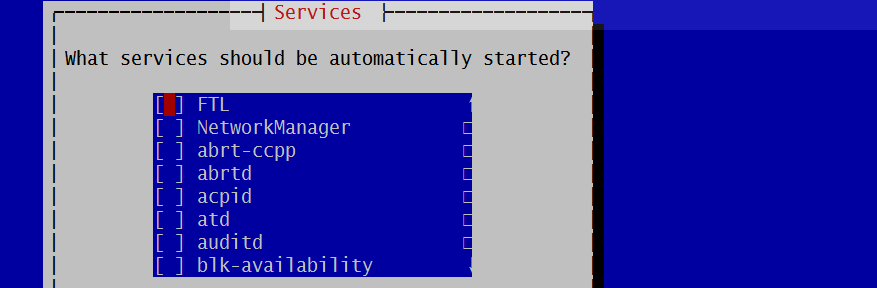
显示某个服务,例如sshd
[root@localhost ~]# chkconfig --list sshd

显示当前系统开启的服务
[root@localhost ~]# chkconfig | egrep 3:on

关闭某个服务
1 [root@localhost ~]# chkconfig --list|grep FTL
2 [root@localhost ~]# chkconfig FTL off
3 [root@localhost ~]# chkconfig --list|grep FTL
开启/关闭服务的3级别
1 [root@localhost ~]# chkconfig --list|grep FTL
2 [root@localhost ~]# chkconfig --level 3 FTL on          【开启3级别】
3 [root@localhost ~]# chkconfig --level 3 FTL off          【关闭3级别】

关闭我们不常用的服务【Linux服务最小原则】
1 chkconfig |grep 3:on | awk '{print $1}' | grep -Ev "sshd|network|crond|sysstat|rsyslog" | xargs -I{} chkconfig {} off
2             ==>for name in `chkconfig | grep 3:on |awk '{print $1}'` ; do chkconfig $name off; done;
3                  ==命令用反引号 tab键上
4              ==>chkconfig | awk '{print $1}' | grep -Ev "sshd|network|crond|sysstat|rsyslog" | sed -r 's#(.*)#chkconfig /1 off#g' | bash
5                  |bash 之前输出的只是字符串
6                  |bash 之后是将内容交给bash处理
7              ==>chkconfig | awk '{print $1}' | grep -Ev "sshd|network|crond|sysstat|rsyslog" | awk '{print "chkconfig " $1 " off" }' | bash
转载于:http://www.cnblogs.com/ftl1012/
备忘小记:
centos 6 系统服务启动脚本存放在/etc/init.d/目录下
centos 7 系统服务启动脚本存放在/usr/lib/systemd/system/目录下
==========================================CentOS 6 如何设置服务开机启动==================================
CentOS 6 如何设置服务开机启动:
1 [root@localhost ~]$ ls /etc/init.d/httpd     # /etc/init.d/目录下必须有启动脚本
2 [root@localhost ~]$ chkconfig --add httpd    # 添加服务,以便让chkconfig指令管理它
3 [root@localhost ~]$ chkconfig httpd on       # 设置开机运行该服务,默认是设置2345等级开机运行服务
1 [root@localhost ~]$ chkconfig --list                 # 列出所有被chkconfig管理的服务
2 [root@localhost ~]$ chkconfig --add httpd            # 添加指定的服务,让chkconfig指令管理它
3 [root@localhost ~]$ chkconfig --del httpd            # 删除指定的服务,不再让chkconfig指令管理它
4 [root@localhost ~]$ chkconfig httpd on               # 设置开机运行服务,需要先执行 --add 才能执行该命令
5 [root@localhost ~]$ chkconfig httpd off              # 设置开机不运行服务,需要先执行 --add 才能执行该命令
6 [root@localhost ~]$ chkconfig --level 35 httpd on    # 设置服务在等级3和5时开机运行服务,默认是设置2345等级开机运行服务
1 [root@localhost ~]$ chkconfig --list                                      # 等级0:关机
2 atop            0:off   1:off   2:off   3:off   4:off   5:off   6:off     # 等级1:单用户模式/救援模式
3 auditd          0:off   1:off   2:off   3:off   4:on    5:off   6:off     # 等级2:无网络连接的多用户命令行模式
4 crond           0:off   1:off   2:on    3:on    4:on    5:on    6:off     # 等级3:有网络连接的多用户命令行模式
5 ipset           0:off   1:off   2:on    3:on    4:on    5:on    6:off     # 等级4:不可用
6 iptables        0:off   1:off   2:off   3:off   4:on    5:off   6:off     # 等级5:带图形界面的多用户模式
7 mysql           0:off   1:off   2:on    3:on    4:on    5:on    6:off     # 等级6:重启

 浙公网安备 33010602011771号