
java excel导出
通用excel导出,可以基于web,也可以本地导出
1、需要的pom依赖
<dependency>
            <groupId>org.apache.poi</groupId>
            <artifactId>poi</artifactId>
            <version>3.10-FINAL</version>
        </dependency>
        <dependency>
            <groupId>org.apache.poi</groupId>
            <artifactId>poi-ooxml</artifactId>
            <version>3.10-FINAL</version>
        </dependency>
        <dependency>
            <groupId>org.slf4j</groupId>
            <artifactId>jcl-over-slf4j</artifactId>
            <version>1.7.25</version>
        </dependency>
        <dependency>
            <groupId>javax.servlet</groupId>
            <artifactId>javax.servlet-api</artifactId>
            <version>3.1.0</version>
        </dependency>
        <dependency>
            <groupId>cglib</groupId>
            <artifactId>cglib</artifactId>
            <version>3.2.4</version>
        </dependency>
2、AbstractExport 抽象类
package com.demo.excel;

import com.demo.util.DateUtils;
import com.demo.util.PropertyUtils;
import org.apache.commons.logging.Log;
import org.apache.commons.logging.LogFactory;
import org.apache.poi.hssf.usermodel.HSSFCellStyle;
import org.apache.poi.hssf.util.HSSFColor;
import org.apache.poi.ss.usermodel.IndexedColors;
import org.apache.poi.xssf.usermodel.*;

import javax.servlet.http.HttpServletResponse;
import java.io.FileOutputStream;
import java.io.IOException;
import java.io.OutputStream;
import java.text.SimpleDateFormat;
import java.util.ArrayList;
import java.util.Date;
import java.util.List;
import java.util.Map;

public abstract class AbstractExport {

    protected final static Log log = LogFactory.getLog(AbstractExport.class);

    //显示的导出表的标题
    protected String title;
    //导出表的列名
    protected String[] rowName;

    protected Map<String, String> nameMap;

    protected List<Object> dataList = new ArrayList<Object>();

    HttpServletResponse response;

    //构造方法,传入要导出的数据
    public AbstractExport(HttpServletResponse response, String title, String[] rowName, Map<String, String> nameMap, List<Object> dataList) {
        this.dataList = dataList;
        this.rowName = rowName;
        this.title = title;
        this.nameMap = nameMap;
        this.response = response;
    }

    /*
     * 导出数据
     * */
    public void export() throws Exception {
        try {
            XSSFWorkbook workbook = new XSSFWorkbook();
//            HSSFWorkbook workbook = new HSSFWorkbook();                        // 创建工作簿对象
//            HSSFSheet sheet = workbook.createSheet(title);                     // 创建工作表
            XSSFSheet sheet = workbook.createSheet(title);//页面创建方法
            // 产生表格标题行
//            HSSFRow rowm = sheet.createRow(0);
//            HSSFCell cellTiltle = rowm.createCell(0);
//            rowm.setHeight((short) (25 * 30)); //设置高度
//            //sheet样式定义【getColumnTopStyle()/getStyle()均为自定义方法 - 在下面  - 可扩展】
            XSSFCellStyle columnTopStyle = this.getColumnTopStyle(workbook);//获取列头样式对象
            XSSFCellStyle style = this.getStyle(workbook);  //单元格样式对象
//            sheet.addMergedRegion(new CellRangeAddress(0, 1, 0, (rowName.length - 1)));
//            cellTiltle.setCellStyle(columnTopStyle);
//            cellTiltle.setCellValue(title);
            // 定义所需列数
            int columnNum = rowName.length;
            XSSFRow rowRowName = sheet.createRow(0);                // 在索引2的位置创建行(最顶端的行开始的第二行)
            rowRowName.setHeight((short) (25 * 30)); //设置高度
            setExcelTitle(columnTopStyle, columnNum, rowRowName);
//            setExcelContent(sheet, style);
            setCustomExcelContent(sheet, style);
            setExcelWidth(sheet, columnNum);
            if (workbook != null) {
                try {
                    if (response != null) {
                        String fileName = "Excel-" + String.valueOf(System.currentTimeMillis()).substring(4, 13) + ".xlsx";
                        String headStr = "attachment; filename=\"" + fileName + "\"";
                        response.setContentType("APPLICATION/OCTET-STREAM");
                        response.setHeader("Content-Disposition", headStr);
                        OutputStream out = response.getOutputStream();
                        workbook.write(out);
                        out.flush();
                        out.close();
                    } else {
                        String fname = new SimpleDateFormat("yyyyMMddHHmmss").format(new Date()) + ".xlsx";
                        FileOutputStream out = new FileOutputStream("D:/data/" + fname);
                        workbook.write(out);
                        out.close();
                    }
                } catch (IOException e) {
                    e.printStackTrace();
                    log.error("export__error:", e);
                }
            }

        } catch (Exception e) {
            e.printStackTrace();
            log.error("export__error:", e);
        }

    }

    /***
     * 获取自定义列内容
     * @param sheet
     * @param style
     */
    protected abstract void setCustomExcelContent(XSSFSheet sheet, XSSFCellStyle style);

    private void setExcelWidth(XSSFSheet sheet, int columnNum) {
        //让列宽随着导出的列长自动适应
        for (int colNum = 0; colNum < columnNum; colNum++) {
            int columnWidth = sheet.getColumnWidth(colNum) / 256;
            for (int rowNum = 0; rowNum < sheet.getLastRowNum(); rowNum++) {
                XSSFRow currentRow;
                //当前行未被使用过
                if (sheet.getRow(rowNum) == null) {
                    currentRow = sheet.createRow(rowNum);
                } else {
                    currentRow = sheet.getRow(rowNum);
                }
                if (currentRow.getCell(colNum) != null) {
                    XSSFCell currentCell = currentRow.getCell(colNum);
                    if (currentCell.getCellType() == XSSFCell.CELL_TYPE_STRING) {
                        int length = currentCell.getStringCellValue().getBytes().length;
                        if (columnWidth < length) {
                            columnWidth = length;
                        }
                    }
                }
            }
            sheet.setColumnWidth(colNum, (columnWidth + 4) * 256);
//            if (colNum == 0) {
//                sheet.setColumnWidth(colNum, (columnWidth + 2) * 128);
//            } else {
//                sheet.setColumnWidth(colNum, (columnWidth + 4) * 256);
//            }
        }
    }


    private void setExcelTitle(XSSFCellStyle columnTopStyle, int columnNum, XSSFRow rowRowName) {
        // 将列头设置到sheet的单元格中
        for (int n = 0; n < columnNum; n++) {
            XSSFCell cellRowName = rowRowName.createCell(n);                //创建列头对应个数的单元格
            cellRowName.setCellType(XSSFCell.CELL_TYPE_STRING);                //设置列头单元格的数据类型
            XSSFRichTextString text = new XSSFRichTextString(rowName[n]);
            cellRowName.setCellValue(text);                                    //设置列头单元格的值
            cellRowName.setCellStyle(columnTopStyle);                        //设置列头单元格样式
        }
    }

    /*
     * 列头单元格样式
     */
    public XSSFCellStyle getColumnTopStyle(XSSFWorkbook workbook) {

        // 设置字体
        XSSFFont font = workbook.createFont();
        //设置字体大小
        font.setFontHeightInPoints((short) 11);
        //字体加粗
        font.setBoldweight(XSSFFont.BOLDWEIGHT_BOLD);
        //设置字体名字
        font.setFontName("Courier New");
        //设置样式;
        XSSFCellStyle style = workbook.createCellStyle();
        //设置底边框;
        style.setBorderBottom(XSSFCellStyle.BORDER_THIN);
        //设置底边框颜色;
        style.setBottomBorderColor(HSSFColor.BLACK.index);
        //设置左边框;
        style.setBorderLeft(HSSFCellStyle.BORDER_THIN);
        //设置左边框颜色;
        style.setLeftBorderColor(HSSFColor.BLACK.index);
        //设置右边框;
        style.setBorderRight(HSSFCellStyle.BORDER_THIN);
        //设置右边框颜色;
        style.setRightBorderColor(HSSFColor.BLACK.index);
        //设置顶边框;
        style.setBorderTop(HSSFCellStyle.BORDER_THIN);
        //设置顶边框颜色;
        style.setTopBorderColor(HSSFColor.BLACK.index);
        //在样式用应用设置的字体;
        style.setFont(font);
        //设置自动换行;
        style.setWrapText(false);
        //设置水平对齐的样式为居中对齐;
        style.setAlignment(HSSFCellStyle.ALIGN_CENTER);
        //设置垂直对齐的样式为居中对齐;
        style.setVerticalAlignment(HSSFCellStyle.VERTICAL_CENTER);

        //设置单元格背景颜色
        style.setFillForegroundColor(IndexedColors.PALE_BLUE.getIndex());
        style.setFillPattern(HSSFCellStyle.SOLID_FOREGROUND);

        return style;

    }

    /*
   * 列数据信息单元格样式
   */
    public XSSFCellStyle getStyle(XSSFWorkbook workbook) {
        // 设置字体
        XSSFFont font = workbook.createFont();
        //设置字体大小
        //font.setFontHeightInPoints((short)10);
        //字体加粗
        //font.setBoldweight(HSSFFont.BOLDWEIGHT_BOLD);
        //设置字体名字
        font.setFontName("Courier New");
        //设置样式;
        XSSFCellStyle style = workbook.createCellStyle();
        //设置底边框;
        style.setBorderBottom(HSSFCellStyle.BORDER_THIN);
        //设置底边框颜色;
        style.setBottomBorderColor(HSSFColor.BLACK.index);
        //设置左边框;
        style.setBorderLeft(HSSFCellStyle.BORDER_THIN);
        //设置左边框颜色;
        style.setLeftBorderColor(HSSFColor.BLACK.index);
        //设置右边框;
        style.setBorderRight(HSSFCellStyle.BORDER_THIN);
        //设置右边框颜色;
        style.setRightBorderColor(HSSFColor.BLACK.index);
        //设置顶边框;
        style.setBorderTop(HSSFCellStyle.BORDER_THIN);
        //设置顶边框颜色;
        style.setTopBorderColor(HSSFColor.BLACK.index);
        //在样式用应用设置的字体;
        style.setFont(font);
        //设置自动换行;
        style.setWrapText(false);
        //设置水平对齐的样式为居中对齐;
        style.setAlignment(HSSFCellStyle.ALIGN_CENTER);
        //设置垂直对齐的样式为居中对齐;
        style.setVerticalAlignment(HSSFCellStyle.VERTICAL_CENTER);

        return style;

    }

    /****
     * 默认excel内容填充
     * @param sheet
     * @param style
     */
    public void setDefaultExcelContent(XSSFSheet sheet, XSSFCellStyle style) {
        //将查询出的数据设置到sheet对应的单元格中
        if (dataList != null && dataList.size() > 0) {
            for (int i = 0; i < dataList.size(); i++) {
                Object obj = dataList.get(i);
//            Object[] obj = dataList.get(i);//遍历每个对象
//                HSSFRow row = sheet.createRow(i + 3);//创建所需的行数
                XSSFRow row = sheet.createRow(i + 1);//创建所需的行数
                row.setHeight((short) (25 * 20)); //设置高度
                for (int j = 0; j < rowName.length; j++) {
                    XSSFCell cell = null;   //设置单元格的数据类型
                    cell = row.createCell(j, XSSFCell.CELL_TYPE_STRING);
                    String name = rowName[j];
                    String key = nameMap.get(name);
                    try {
                        String value = getValueByName(obj, name);
                        cell.setCellValue(value);
                    } catch (Exception e) {
                        e.printStackTrace();
                    }
                    cell.setCellStyle(style);//设置单元格样式
                }
            }
        }
    }

    /***
     * 默认取值
     * @param obj
     * @param name
     * @return
     */
    public String getValueByName(Object obj, String name) {
        String value = "";
        String key = nameMap.get(name);
        try {
            Map map = PropertyUtils.beanToMap(obj);
//            log.info("getValueByName---map=" + map + "key =" + key);
            Object valueObj = map.get(key);
            if (valueObj instanceof java.util.Date) {
                Date d = (Date) valueObj;
                if (d != null) {
                    value = DateUtils.parseFormat(d, DateUtils.FORMAT9);
                }
            } else {
                value = String.valueOf(map.get(key));
            }
//            log.info("key="+key+"|"+value);
        } catch (Exception e) {
            log.error("getValueByName_____error:" + key, e);
        }
        return value;
    }

}
3、DefaultExport 默认实现类,这可以根据自己情况,自己实现
import org.apache.poi.xssf.usermodel.XSSFCellStyle;
import org.apache.poi.xssf.usermodel.XSSFSheet;

import javax.servlet.http.HttpServletResponse;
import java.util.List;
import java.util.Map;

public class DefaultExport extends AbstractExport {

    public DefaultExport(HttpServletResponse response, String title, String[] rowName, Map<String, String> nameMap, List<Object> dataList) {
        super(response, title, rowName, nameMap, dataList);
    }

    protected void setCustomExcelContent(XSSFSheet sheet, XSSFCellStyle style) {
        setDefaultExcelContent(sheet, style);
    }
}
3、工具类:PropertyUtils
package com.demo.util;
import net.sf.cglib.beans.BeanMap;

import java.util.HashMap;
import java.util.Map;

public class PropertyUtils {

    /**
     * 将对象装换为map
     *
     * @param bean
     * @return
     */
    public static <T> Map<String, Object> beanToMap(T bean) {
        Map<String, Object> map = new HashMap<String, Object>();
        if (bean != null) {
            BeanMap beanMap = BeanMap.create(bean);
            for (Object key : beanMap.keySet()) {
                map.put(key + "", beanMap.get(key));
            }
        }
        return map;
    }
}
DateUtils :
package com.demo.util;

import java.text.SimpleDateFormat;
import java.util.Date;

public class DateUtils {


    public static final String FORMAT9 = "yyyy-MM-dd HH:mm:ss";

    public static String parseFormat(Date now, String format) {
        SimpleDateFormat sdf = new SimpleDateFormat(format);
        String s = null;
        try {
            s = sdf.format(now);
        } catch (Exception e) {
            e.printStackTrace();
        }
        return s;
    }
}
Student:
package com.demo.bean;

public class Student {

    private String name;

    private int age;

    private int id;

    public Student() {
    }

    public Student(String name, int age, int id) {
        this.name = name;
        this.age = age;
        this.id = id;
    }

    public String getName() {
        return name;
    }

    public void setName(String name) {
        this.name = name;
    }

    public int getAge() {
        return age;
    }

    public void setAge(int age) {
        this.age = age;
    }

    public int getId() {
        return id;
    }

    public void setId(int id) {
        this.id = id;
    }
}
4、调用
package com.demo;

import com.demo.bean.Student;
import com.demo.excel.AbstractExport;
import com.demo.excel.DefaultExport;

import javax.servlet.http.HttpServletResponse;
import java.util.ArrayList;
import java.util.HashMap;
import java.util.List;
import java.util.Map;

public class Client {

    public static void export(HttpServletResponse response, String title, String[] rowName, Map<String, String> nameMap, List<Object> dataList) {
        AbstractExport ex = new DefaultExport(response, title, rowName, nameMap, dataList);
        try {
            ex.export();
        } catch (Exception e) {
            e.printStackTrace();
        }
    }

    private static List<Student> buildList() {
        int count = 5;
        List<Student> list = new ArrayList<Student>();
        for (int i = 0; i < count; i++) {
            Student s = new Student("demo" + i, i + 20, i + 1);
            list.add(s);
        }
        return list;
    }

    public static void main(String[] args) {
        String title = "学生信息";
        String[] rowsName = new String[]{"ID", "姓名", "年龄"};
        Map refMap = new HashMap();
        refMap.put("ID", "id");
        refMap.put("姓名", "name");
        refMap.put("年龄", "age");
        List list = buildList();
        export(null, title, rowsName, refMap, list);
    }

}
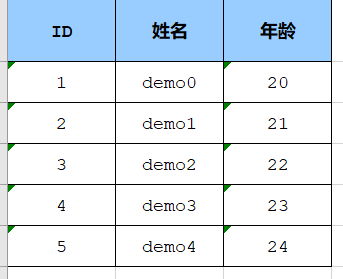
说明:这个也支持web导出,只需传入HttpServletResponse response 对象即可。效果图:

 浙公网安备 33010602011771号