
记不住的css样式
多行省略
//单行 需要固定宽
p{
  overflow: hidden; /*文本超出隐藏*/
  text-overflow: ellipsis; /*文本超出显示省略号*/
  white-space: nowrap; /*超出的空白区域不换行*/
}

// 3行 需要固定宽
p{
  overflow: hidden; /*文本超出隐藏*/
  display:-webkit-box; /*盒子模型微弹性伸缩模型*/
  -webkit-box-orient: vertical;/*伸缩盒子的子元素垂直排列*/
  -webkit-line-clamp: 3; /*文本显示3行*/
}
不可选中文本
.noselect {
  -webkit-touch-callout: none;
  -webkit-user-select: none;
  -khtml-user-select: none;
  -moz-user-select: none;
  -ms-user-select: none;
  user-select: none;
}
滚动条样式
.gun::-webkit-scrollbar {
  width: 10px;height: 10px; /*高宽分别对应横竖滚动条的尺寸*/
}
.gun::-webkit-scrollbar-thumb {
  border-radius: 10px;background-color: #bbb;
  // 条纹的滚动条
  //background-image: -webkit-linear-gradient(45deg, rgba(255, 255, 255, 0.2) 25%, transparent 25%, transparent 50%, rgba(255, 255, 255, 0.2) 50%, rgba(255, 255, 255, 0.2) 75%, transparent 75%, transparent);
}
.gun::-webkit-scrollbar-track {
  box-shadow: inset 0 0 5px rgba(0, 0, 0, 0.2); background: #ededed; border-radius: 10px;
}
不使用transform 绝对定位居中
.parent{ position: relative; }
.parent .child{ position: absolute; left: 0;  right: 0; top: 0; bottom: 0; margin: auto; }
文字缩进,超出长度后,减少缩进
文字较少时 文字较少时 文字较少时
文字较多时 文字较多时 文字较多时 文字较多时
// 使用flex的自动缩进
.align_mul { display: flex; width: 350px; white-space: nowrap;}
.align_mul::before { content: ""; display: block; width: 50px;}
文字右对齐
当文字宽度大于box宽时 即使是右对齐,文字依旧左边固定向右移动
// 文字长度大于盒子长度时, 默认向右移动,即使是右对齐
.align_right { width: 300px; text-align: right; white-space: nowrap; text-indent: -999px;}
img 去掉白边
img[src=""],img:not([src]){opacity:0;}
nth-child 伪类选择器
li:nth-child(n+4) // 第4个及后面所有
li:nth-child(-n+8) // 前8个
li:nth-last-child(-n+3) // 后三个
li:nth-last-child(n+5) // 倒数第5个及前面所有
li:nth-child(n+4):nth-child(-n+8)    选择器可以连用    选中第4-8个子元素。

// 针对的是元素  选中的是  每一个父元素下面的第二个子元素,并且第二个子元素的类名为title
.title:nth-child(2){ color: red;}
计算字符串长度
function getTextWidth (str = '') {
  const dom = document.createElement('span');
  dom.style.cssText = 'display:inline-block;position:absolute;opacity:0;z-index:-99999;left: 0;top: 0'
  dom.textContent = str;
  document.body.appendChild(dom);
  const width = dom.clientWidth;
  document.body.removeChild(dom);
  return width;
}
less scss
less 和 sass 是两种 css 预编译语言 ,最终都会被编译成 css 再使用。先有的 sass 后有的 scss scss 是sass的新版
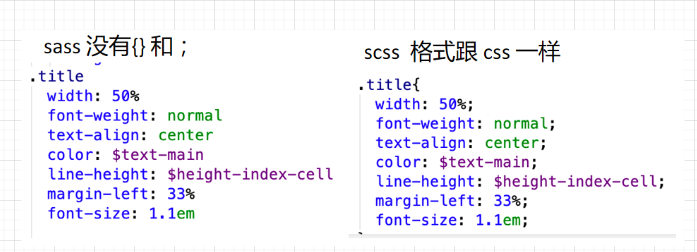 scss
scss
定义变量及变量使用
$width: 1px;
$width2: 2px;
$pos: bottom

.aa {
    width: $width;  // 常规使用
    border-#{$pos}: 1px solid red;  // 拼字符串
}
.bb {
    width: $width + $width2;  // 用于计算
}


:nth-child(n + #{(2 * $i - 1) * $num + 1})
:nth-child(#{$num * 2}n - #{$num})
nth 里面放的是 an + b  只能存在来两个未知数 和 一个符号 ab可以为负

 浙公网安备 33010602011771号