

《零基础入门学习Python》相关习题:第030讲-文件系统
OS模块(Operating System操作系统)
对于文件系统的访问来说,Python一般是提供OS模块来实现就可以了,我们所知道常用的操作系统有:Windows,Mac OS,Linux,UNIX等,这些操作系统底层由于文件系统的访问工作原理不同,因此你可能就要针对不同的系统来考虑使用哪些文件系统模块....这样的做法是非常不友好且麻烦的,因为这样就意味着当你的程序运行环境一改变,你就要相应的去修改大量的代码来应付。但是我们的Python是跨平台的,所以Python就有了这个OS模块。
有了OS模块,我们不需要关心什么操作系统下使用什么模块,OS模块会帮你选择正确的模块并调用。
os模块中关于文件/目录常用的函数使用方法
|
函数名 |
使用方法 |
| getcwd() | 返回当前工作目录 |
| chdir(path) | 改变工作目录 |
| listdir(path='.') | 列举指定目录中的文件名('.'表示当前目录,'..'表示上一级目录) |
| mkdir(path) | 创建单层目录,如该目录已存在抛出异常 |
| makedirs(path) | 递归创建多层目录,如该目录已存在抛出异常,注意:'E:\\a\\b'和'E:\\a\\c'并不会冲突 |
| remove(path) | 删除文件 |
| rmdir(path) | 删除单层目录,如该目录非空则抛出异常 |
| removedirs(path) | 递归删除目录,从子目录到父目录逐层尝试删除,遇到目录非空则抛出异常 |
| rename(old, new) | 将文件old重命名为new |
| system(command) | 运行系统的shell命令 |
| walk(top) | 遍历top路径以下所有的子目录,返回一个三元组:(路径, [包含目录], [包含文件])【具体实现方案请看:第30讲课后作业^_^】 |
|
以下是支持路径操作中常用到的一些定义,支持所有平台 |
|
| os.curdir | 指代当前目录('.') |
| os.pardir | 指代上一级目录('..') |
| os.sep | 输出操作系统特定的路径分隔符(Win下为'\\',Linux下为'/') |
| os.linesep | 当前平台使用的行终止符(Win下为'\r\n',Linux下为'\n') |
| os.name | 指代当前使用的操作系统(包括:'posix', 'nt', 'mac', 'os2', 'ce', 'java') |
os.path模块中关于路径常用的函数使用方法
|
函数名 |
使用方法 |
| basename(path) | 去掉目录路径,单独返回文件名 |
| dirname(path) | 去掉文件名,单独返回目录路径 |
| join(path1[, path2[, ...]]) | 将path1, path2各部分组合成一个路径名 |
| split(path) | 分割文件名与路径,返回(f_path, f_name)元组。如果完全使用目录,它也会将最后一个目录作为文件名分离,且不会判断文件或者目录是否存在 |
| splitext(path) | 分离文件名与扩展名,返回(f_name, f_extension)元组 |
| getsize(file) | 返回指定文件的尺寸,单位是字节 |
| getatime(file) | 返回指定文件最近的访问时间(浮点型秒数,可用time模块的gmtime()或localtime()函数换算) |
| getctime(file) | 返回指定文件的创建时间(浮点型秒数,可用time模块的gmtime()或localtime()函数换算) |
| getmtime(file) | 返回指定文件最新的修改时间(浮点型秒数,可用time模块的gmtime()或localtime()函数换算) |
|
以下为函数返回 True 或 False |
|
| exists(path) | 判断指定路径(目录或文件)是否存在 |
| isabs(path) | 判断指定路径是否为绝对路径 |
| isdir(path) | 判断指定路径是否存在且是一个目录 |
| isfile(path) | 判断指定路径是否存在且是一个文件 |
| islink(path) | 判断指定路径是否存在且是一个符号链接(在windows上即为快捷方式) |
| ismount(path) | 判断指定路径是否存在且是一个挂载点 |
| samefile(path1, paht2) | 判断path1和path2两个路径是否指向同一个文件 |
0. 编写一个程序,统计当前目录下每个文件类型的文件数,程序实现如图:
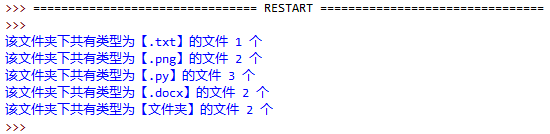
附上自己写的代码:
 1 # 作业题 0
 2 # 编写一个程序,统计当前目录下每个文件类型的文件数
 3 import os
 4 import os.path as p
 5
 6 dict_types = {}  # 存储所有类型及它们的数量
 7 all_file_list = os.listdir()  # 当前目录中所有文件
 8 count_dir = 1
 9
10 for i in all_file_list:
11     # 检测目录
12     if p.isdir(i) is True:
13         dict_types.update({'文件夹': count_dir})  # 注意 update(dict)中必须传入一个字典!!!!
14         count_dir += 1
15     # 检测有扩展名的文件
16     else:
17         (the_name, the_extension) = p.splitext(i)  # 类似字符串的split函数,可以自动分割文件名与扩展名
18         # 判断扩展名是否在字典中
19         if the_extension in dict_types:
20             file_type_count = dict_types.get(the_extension) + 1
21             dict_types.update({the_extension: file_type_count})
22         else:
23             dict_types.update({the_extension: 1})
24
25 # 注意学习掌握打印字典的方法!
26 for items in dict_types.keys():  # 这样的循环,items是字典的键名!
27     # 也可改写为:for items in dict_types.keys():
28     print('该文件夹下共有类型为[%s]的文件[%d]个' % (items, dict_types[items]))
1. 编写一个程序,用户输入文件名以及开始搜索的路径,搜索该文件是否存在。如遇到文件夹,则进入文件夹继续搜索,程序实现如图:
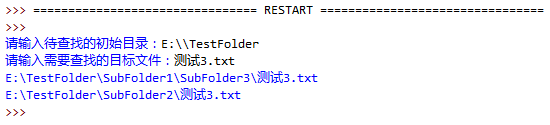
代码:
 1 # 编写一个程序,用户输入文件名以及开始搜索的路径,搜索该文件是否存在。如遇到文件夹,则进入文件夹继续搜索
 2 import os
 3 import os.path as p
 4 search_path = input('输入想要搜寻的目录:')
 5 search_file_name = input('输入想要搜寻的文件(如有扩展名也要输入):')
 6 result = []  # 查找结果放到这里
 7
 8 # 查找 这里运用了 walk函数,具体用法查阅上面的表格
 9 for i in os.walk(search_path):
10     (top_path, dir_included, file_included) = i
11     # 运算顺序 in优于 or,所以不能写成:if search_file_name in dir_included or file_included
12     if (search_file_name in dir_included) or (search_file_name in file_included):
13         result.append(top_path + '\\%s' % search_file_name)
14
15 # 打印
16 if not result:  # 空列表为 False
17     print('未查找到【%s】,可以尝试更换查找目录' % search_file_name)
18 else:
19     print('文件【%s】的目录为:' % search_file_name)
20     for i in result:
21         print(i)
2. (本题很重要!!!)
编写一个程序,用户输入开始搜索的路径,查找该路径下(包含子文件夹内)所有的视频格式文件(要求查找mp4 rmvb, avi的格式即可),并把创建一个文件(vedioList.txt)存放所有找到的文件的路径,程序实现如图:

两份代码
1.自己写的代码:
 1 import os
 2
 3
 4 # 函数定义
 5 def search_file(start_dir, target):
 6     for each_file in os.listdir(start_dir):
 7         # 由于 os.path.isdir()只能识别绝对目录,故提前将每个文件的绝对目录做好
 8         absolute_file_path = os.path.join(start_dir, each_file)  # join将目录与文件名连接
 9         ext = os.path.splitext(each_file)[1]  # 小技巧!splitext返回的是序列,用下标取得第二个也即扩展名
10         if ext in target:
11             video_list.append(absolute_file_path + os.linesep)  # 绝对路径再加上标准形式的换行符
12         if os.path.isdir(absolute_file_path):
13             # 因为 os.path.isdir()只能识别绝对目录,所以每次递归都要传入一个绝对路径!!!
14             search_file(absolute_file_path, target)  # 递归调用
15
16
17 start_dir = input('请输入待查找的初始目录:')
18 program_dir = os.getcwd()
19
20 target = ['.xml', '.txt']
21 video_list = []
22
23 # 函数调用
24 search_file(start_dir, target)
25
26 f = open(program_dir + os.sep + 'videoList.txt', 'w')
27 f.writelines(video_list)
28 f.close()
答案给出的代码:
 1 import os
 2
 3 def search_file(start_dir, target) :
 4     os.chdir(start_dir)
 5
 6     for each_file in os.listdir(os.curdir) :
 7         ext = os.path.splitext(each_file)[1]
 8         if ext in target :
 9             vedio_list.append(os.getcwd() + os.sep + each_file + os.linesep) # 使用os.sep是程序更标准
10         if os.path.isdir(each_file) :
11             search_file(each_file, target) # 递归调用
12             os.chdir(os.pardir) # 递归调用后切记返回上一层目录
13
14 start_dir = input('请输入待查找的初始目录:')
15 program_dir = os.getcwd()
16
17 target = ['.mp4', '.avi', '.rmvb']
18 vedio_list = []
19
20 search_file(start_dir, target)
21
22 f = open(program_dir + os.sep + 'vedioList.txt', 'w')
23 f.writelines(vedio_list)
24 f.close()
注意:
正如笔者在第一种代码的注释中所提到的:类似os.path.isdir(path)、os.path.isfile(path)这些函数,能够判别路径是否是目录/文件,但一定要注意,必须是待判断文件/目录的绝对路径才可以!!!(这一点也可以在函数的形参名是path中看出来)如果参数只给了文件名,则当待判断的文件/目录在当前工作目录的子目录下时则不管什么情况,函数都返回False!!!!
解决方法:
按照第一种代码给出的方法,我们可以利用os.path.join(path1, path2)函数将相对路径改为绝对路径,path1是该文件所在的目录,path2是该文件的文件名
按照第二种代码给出的方法,我们可以利用os.chdir(path)来改变当前工作目录,将待判断的文件/目录控制在当前工作目录中。但注意要在递归调用后将工作目录更改为上一层!

 浙公网安备 33010602011771号