
spark-submit使用
参考官网:https://spark.apache.org/docs/latest/submitting-applications.html
基本使用
基本命令格式:Linux 下多行命令分隔符使用 \ ,Windows Power Shell 使用 ` 进行换行
./bin/spark-submit \
  --class <main-class> \
  --master <master-url> \
  --deploy-mode <deploy-mode> \
  --conf <key>=<value> \
  ... # other options
  <application-jar> \
  [application-arguments]
常用的几个参数
- --class:Spark驱动程序的入口类
- --master:集群的master地址
- --deploy-mode:部署模式
- --conf:额外的配置选项,如果有多个配置,则应将多个配置作为单独的参数传递。(例如 --conf
= --conf = ) - <application-jar>:包含应用程序及其所有依赖项的打包jar文件的路径。该URL必须在您的集群内部全局可见,例如,所有节点上都存在的HDFS://路径或file://路径。
- [application-arguments]:可选,传递给主类中main方法的参数
示例:
./bin/spark-submit \
  --class org.apache.spark.examples.SparkPi \
  --master "local[8]" \
  /path/to/examples.jar \
  100
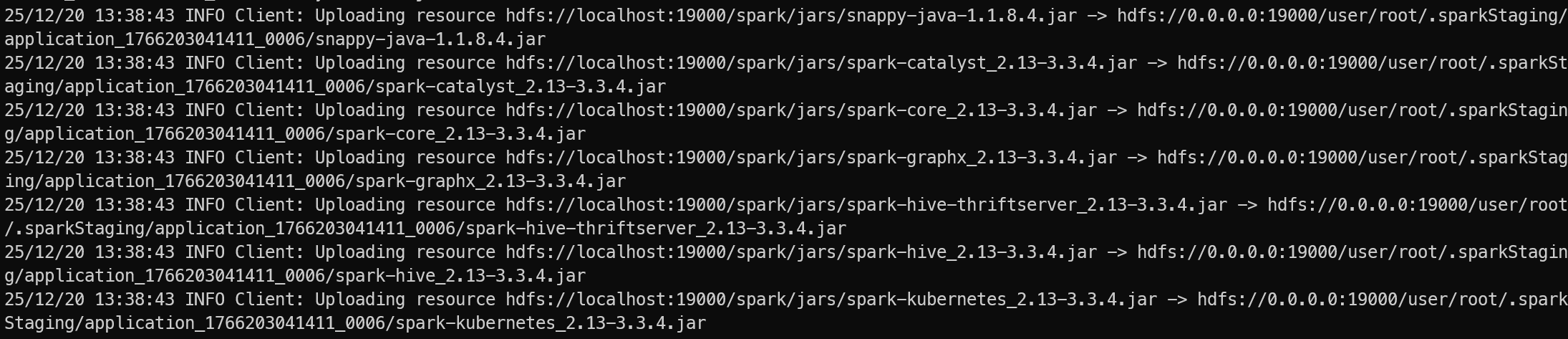
-deploy-mode
集群模式部署,会将jar包上传到 hdfs 上
--jars
在spark-submit中指定Classpath,最常用的方式是使用--jars参数分发单个或多个JAR包,或者通过--conf设置spark.driver.extraClassPath和spark.executor.extraClassPath来指定Driver和Executor的类路径。
# 使用--jar添加依赖
spark-submit --class <main-class> \
       --jars /path/to/dependency1.jar,/path/to/dependency2.jar <app-jar>
# 添加文件夹下所有JAR
spark-submit --jars $(echo /path/to/jars/*.jar | tr ' ' ',') <app-jar> [1]
# 使用 --conf 指定Classpath (适合依赖较多)
spark-submit \
  --conf "spark.driver.extraClassPath=/path/to/libs/*" \
  --conf "spark.executor.extraClassPath=/path/to/libs/*" \
  --class <main-class> <app-jar> [3]
--jars 会将JAR包分发到各节点的工作目录,但不会自动将其加入到JVM的系统类路径中。
若需确保依赖在Driver和Executor的Classpath中,使用 extraClassPath 更加稳妥。
常用参数
下面介绍下其他一些除--conf 之外的一些参数:
- --driver-memory: 指定分给driver的内存大小,例如1g
- --driver-cores: 指定要为驱动程序分配的核心数量
- --driver-class-path: 指定驱动程序的类路径
- --driver-java-options: 指定为驱动程序指定额外的java选项
- --driver-library-path: 指定驱动程序的库路径
--conf spark.driver.maxResultSize: 限制spark返回给驱动程序的结果的最大大小
--conf spark.driver.host: 指定驱动程序运行的主机名或IP地址
| 参数名称 | 参数说明 | 运行模式 |
|---|---|---|
| --master | master 的地址,提交任务到哪里执行,支持5种: spark://host:port, mesos://host:port, yarn, k8s://https://host:port local (Default: local[*]) | all |
| --deploy-mode | 在本地 (client) 启动 driver 或在 cluster 上启动,默认是 client | all |
| --class | 应用程序的主类,仅针对 java 或 scala 应用 | |
| --name | 应用程序名称 | all |
| --jars | 用逗号分隔的本地 jar 包,设置后,这些 jar 将包含在 driver 和 executor 的 classpath 下 | all |
| --packages | 包含在driver 和executor 的 classpath 中的 jar 的 maven 坐标 | all |
| --exclude-packages | 为了避免冲突 而指定不包含的 package | all |
| --repositories | 远程 repository | all |
| --file | 用逗号分隔的文件,这些文件被放在每个executor的工作目录,并通过SparkFiles.get(fileName)访问 | all |
| --conf PROP=VALUE | 指定 spark 配置属性的值, 例如 -conf spark.executor.extraJavaOptions="-XX:MaxPermSize=256m" | all |
| --properties-file | 加载的配置文件,默认为 conf/spark-defaults.conf | all |
| --driver-memory | Driver内存,默认 1024M | all |
| --driver-java-options | 传给 driver 的额外的 Java 选项 | all |
| --driver-library-path | 传给 driver 的额外的库路径 | all |
| --driver-class-path | 传给 driver 的额外的类路径 | all |
| --executor-memory | 每个 executor 的内存,默认是1G | all |
| --driver-cores | driver使用的cpu核数,默认为1 | yarn/standalone |
| --total-executor-cores | 所有 executor 总共的核数。 | mesos/standalone |
| --executor-core | 每个 executor 的核数。 | yarn/standalone |
| --num-executors | 启动的 executor 数量。默认为2 | yarn |
| --queue | 提交应用程序给哪个YARN的队列,默认是default队列 | yarn |
| --archives | 被每个executor提取到工作目录的档案列表,用逗号隔开 | yarn |
常用配置
参见:https://spark.apache.org/docs/latest/configuration.html
这些都是通过--conf指定的,不能直接通过spark-submit指定
spark.yarn.jars
配置jar包的目录
本地提交脚本
下面是一个Windows下的提交脚本,直接执行打包及提交操作,便于学习使用
@echo off
setlocal enabledelayedexpansion
chcp 65001
set MAIN_CLASS_NAME=%1

:: 检查主类名
IF "%MAIN_CLASS_NAME%"=="" (
@REM 第一个参数
    if not "%~1"=="" (
        set "MAIN_CLASS_NAME=%~1"
    ) else (
        echo ERROR: mainClassName is not set
        echo.
        echo Solutions:
        echo   1. set MAIN_CLASS_NAME=your.package.MainClass
        echo   2. %~nx0 your.package.MainClass
        exit /b 1
    )
)

REM 可配置参数
set PROJECT_ROOT=%~dp0
set MAVEN_OPTS=-DskipTests
set SPARK_MASTER=yarn
@REM 支持传参指定运行驱动类
set MAIN_CLASS=spark.SparkApplication
set APP_NAME=%MAIN_CLASS_NAME%

REM Spark History Server 配置
set SPARK_HISTORY_SERVER_ENABLED=true
set SPARK_EVENTLOG_ENABLED=true
set SPARK_EVENTLOG_DIR=hdfs://localhost:8020/spark-logs
set SPARK_HISTORY_FS_LOGDIR=hdfs://localhost:8020/spark-logs
set SPARK_HISTORY_UI_PORT=18080

REM Spark 其他配置
set SPARK_DRIVER_MEMORY=2g
set SPARK_EXECUTOR_MEMORY=2g
set SPARK_EXECUTOR_CORES=2
set SPARK_NUM_EXECUTORS=2

cd /d "%PROJECT_ROOT%"

REM 执行Maven打包
echo [步骤1] 执行Maven打包...
call mvn clean package %MAVEN_OPTS%

if %errorlevel% neq 0 (
    echo [错误] Maven打包失败,退出代码: %errorlevel%
    goto :error
)

REM 查找最新的jar包(排除sources和original包)
echo.
echo [步骤2] 查找生成的jar包...
set JAR_FILE=
for /f "delims=" %%i in ('dir /s /b /o-d target\*.jar') do (
    echo 找到文件: %%i
    echo %%i | findstr /v "sources" | findstr /v "original" >nul
    if !errorlevel! equ 0 (
        if not defined JAR_FILE (
            set JAR_FILE=%%i
            echo [选定] 使用jar包: !JAR_FILE!
        )
    )
)

if "%JAR_FILE%"=="" (
    echo [错误] 未找到可用的jar包!
    goto :error
)

REM 显示jar包信息
for %%I in ("%JAR_FILE%") do (
    set JAR_SIZE=%%~zI
    set JAR_DIR=%%~dpI
)
echo Jar包大小: %JAR_SIZE% 字节
echo Jar包目录: %JAR_DIR%

REM 构建Spark提交命令
echo.
echo [Step3] 构建Spark提交命令...

set SPARK_SUBMIT_CMD=spark-submit
set SPARK_SUBMIT_CMD=!SPARK_SUBMIT_CMD! --master %SPARK_MASTER%
set SPARK_SUBMIT_CMD=!SPARK_SUBMIT_CMD! --class %MAIN_CLASS%
set SPARK_SUBMIT_CMD=!SPARK_SUBMIT_CMD! --name "%APP_NAME%"

REM 添加资源配置
set SPARK_SUBMIT_CMD=!SPARK_SUBMIT_CMD! --driver-memory %SPARK_DRIVER_MEMORY%
set SPARK_SUBMIT_CMD=!SPARK_SUBMIT_CMD! --executor-memory %SPARK_EXECUTOR_MEMORY%
set SPARK_SUBMIT_CMD=!SPARK_SUBMIT_CMD! --executor-cores %SPARK_EXECUTOR_CORES%
set SPARK_SUBMIT_CMD=!SPARK_SUBMIT_CMD! --num-executors %SPARK_NUM_EXECUTORS%

REM 添加History Server配置
if "%SPARK_HISTORY_SERVER_ENABLED%"=="true" (
    echo [信息] 启用Spark History Server配置

    set SPARK_SUBMIT_CMD=!SPARK_SUBMIT_CMD! --conf spark.eventLog.enabled=%SPARK_EVENTLOG_ENABLED%
    set SPARK_SUBMIT_CMD=!SPARK_SUBMIT_CMD! --conf spark.eventLog.dir=%SPARK_EVENTLOG_DIR%
    set SPARK_SUBMIT_CMD=!SPARK_SUBMIT_CMD! --conf spark.history.fs.logDirectory=%SPARK_HISTORY_FS_LOGDIR%

    REM 其他有用的History Server相关配置
    set SPARK_SUBMIT_CMD=!SPARK_SUBMIT_CMD! --conf spark.history.ui.port=%SPARK_HISTORY_UI_PORT%
    set SPARK_SUBMIT_CMD=!SPARK_SUBMIT_CMD! --conf spark.history.fs.update.interval=10s
    set SPARK_SUBMIT_CMD=!SPARK_SUBMIT_CMD! --conf spark.history.retainedApplications=50
    set SPARK_SUBMIT_CMD=!SPARK_SUBMIT_CMD! --conf spark.history.fs.cleaner.enabled=true
    set SPARK_SUBMIT_CMD=!SPARK_SUBMIT_CMD! --conf spark.history.fs.cleaner.interval=1d
    set SPARK_SUBMIT_CMD=!SPARK_SUBMIT_CMD! --conf spark.history.fs.cleaner.maxAge=7d

    echo [信息] History Server UI地址: http://history-server-host:%SPARK_HISTORY_UI_PORT%
)

REM 添加JAR文件
set SPARK_SUBMIT_CMD=!SPARK_SUBMIT_CMD! "%JAR_FILE%" %MAIN_CLASS_NAME%

echo ====== !SPARK_SUBMIT_CMD!
!SPARK_SUBMIT_CMD!

 浙公网安备 33010602011771号