
用户授权(访问控制)
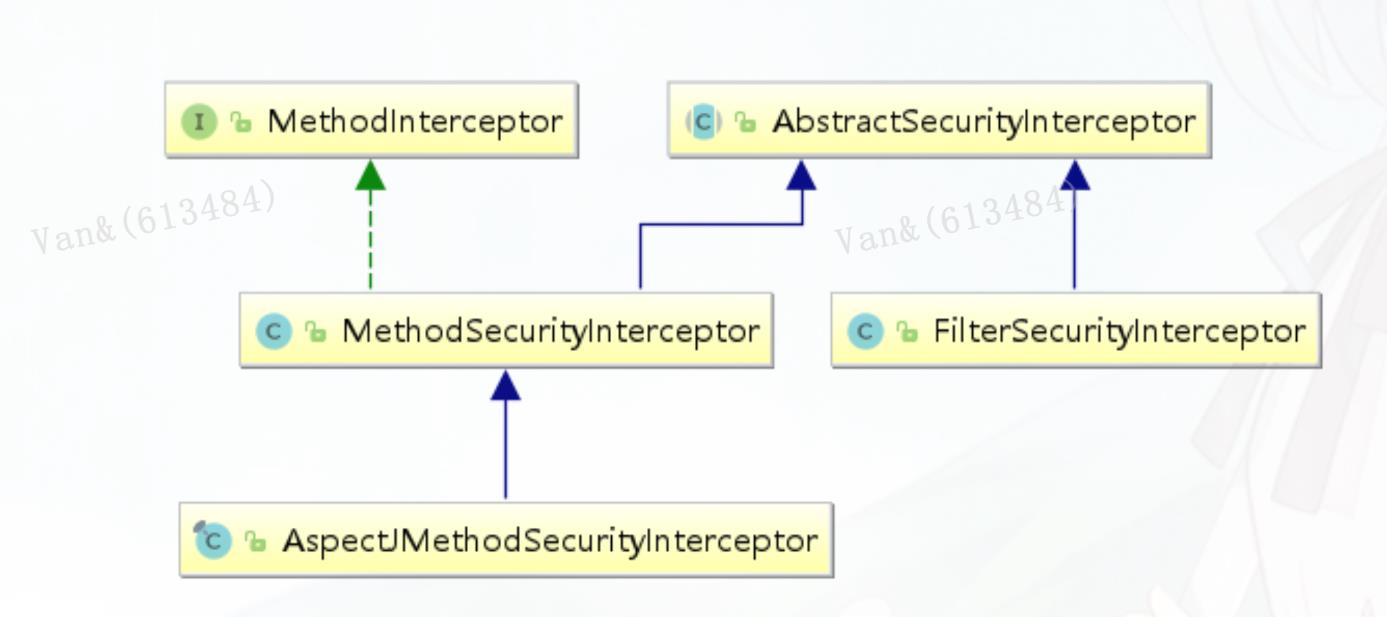
授权的方式包括 web授权和方法授权,web授权是通过 url拦截进行授权,方法授权是通过 方法拦截进行授权。他 们都会调用accessDecisionManager进行授权决策,若为web授权则拦截器为
FilterSecurityInterceptor;若为方 法授权则拦截器为MethodSecurityInterceptor。如果同时通过web授权和方法授权则先执行web授权,再执行方 法授权,最后决策通过,则允许访问资源,否则将禁止访
问。
web授权
Spring Security可以通过 http.authorizeRequests() 对web请求进行授权保护 ,Spring Security使用标准Filter建立了对web请求的拦截,最终实现对资源的授权访问。

http.authorizeRequests()
//设置哪些路径可以直接访问,不需要认证
.antMatchers("/user/login","/login.html").permitAll()
.anyRequest().authenticated(); //需要认证才能访问
访问控制的url匹配
在配置类中http.authorizeRequests() 主要是对url进行控制。配置顺序会影响之后授权的效果,越是具体的应该放在前面,越是笼统的应该放到后面。
anyRequest()
表示匹配所有的请求。一般情况下此方法都会使用,设置全部内容都需要进行认证,会放在最后。
antMatchers()
方法定义如下:
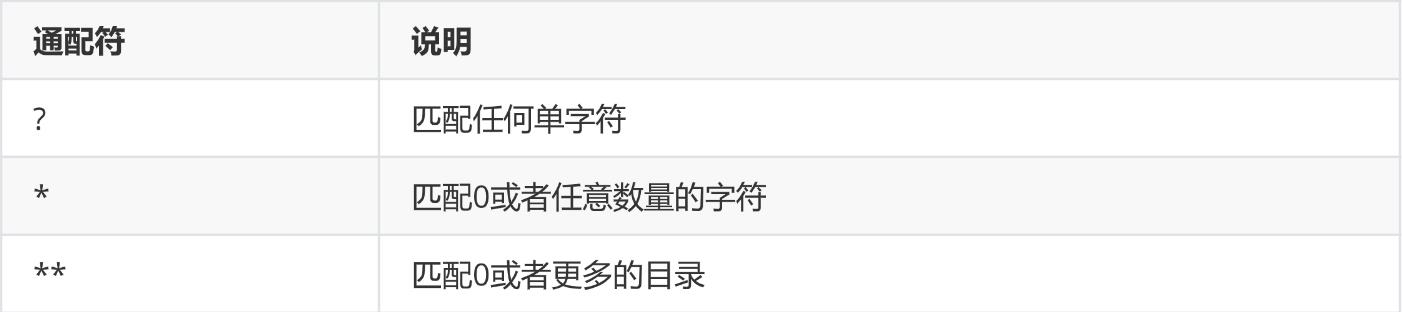
参数是不定向参数,每个参数是一个 ant 表达式,用于匹配 URL规则。
ANT通配符有三种:
.anyRequest().authenticated()
public C antMatchers(String... antPatterns)
在实际项目中经常需要放行所有静态资源:

// 放行 js和css 目录下所有的文件
.antMatchers("/js/**","/css/**").permitAll()
// 只要是.js 文件都放行
.antMatchers("/**/*.js").permitAll()
regexMatchers()
使用正则表达式进行匹配。
无论是 antMatchers() 还是 regexMatchers() 都具有两个参数的方法,其中第一个参数都是
HttpMethod ,表示请求方式,当设置了 HttpMethod 后表示只有设定的特定的请求方式才执行对应的
权限设置。
//所有以.js 结尾的文件都被放行
.regexMatchers( ".+[.]js").permitAll()
.antMatchers(HttpMethod.POST,"/admin/demo").permitAll()
.regexMatchers(HttpMethod.GET,".+[.]jpg").permitAll()
mvcMatchers()

适用于配置了 servletPath 的情况。 servletPath 就是所有的 URL 的统一前缀。在 SpringBoot 整合SpringMVC 的项目中可以在application.properties 中添加下面内容设置 ServletPath。
spring.mvc.servlet.path=/web

在 Spring Security 的配置类中配置 .servletPath() 是 mvcMatchers()返回值特有的方法,antMatchers()和 regexMatchers()没有这个方法。在 servletPath() 中配置了 servletPath 后,
mvcMatchers()直接写 SpringMVC 中@RequestMapping()中设置的路径即可。

如果不习惯使用 mvcMatchers()也可以使用 antMatchers(),下面代码和上面代码是等效的:

.mvcMatchers("/admin/demo").servletPath("/web").permitAll()
.antMatchers("/web/admin/demo").permitAll()
RequestMatcher接口
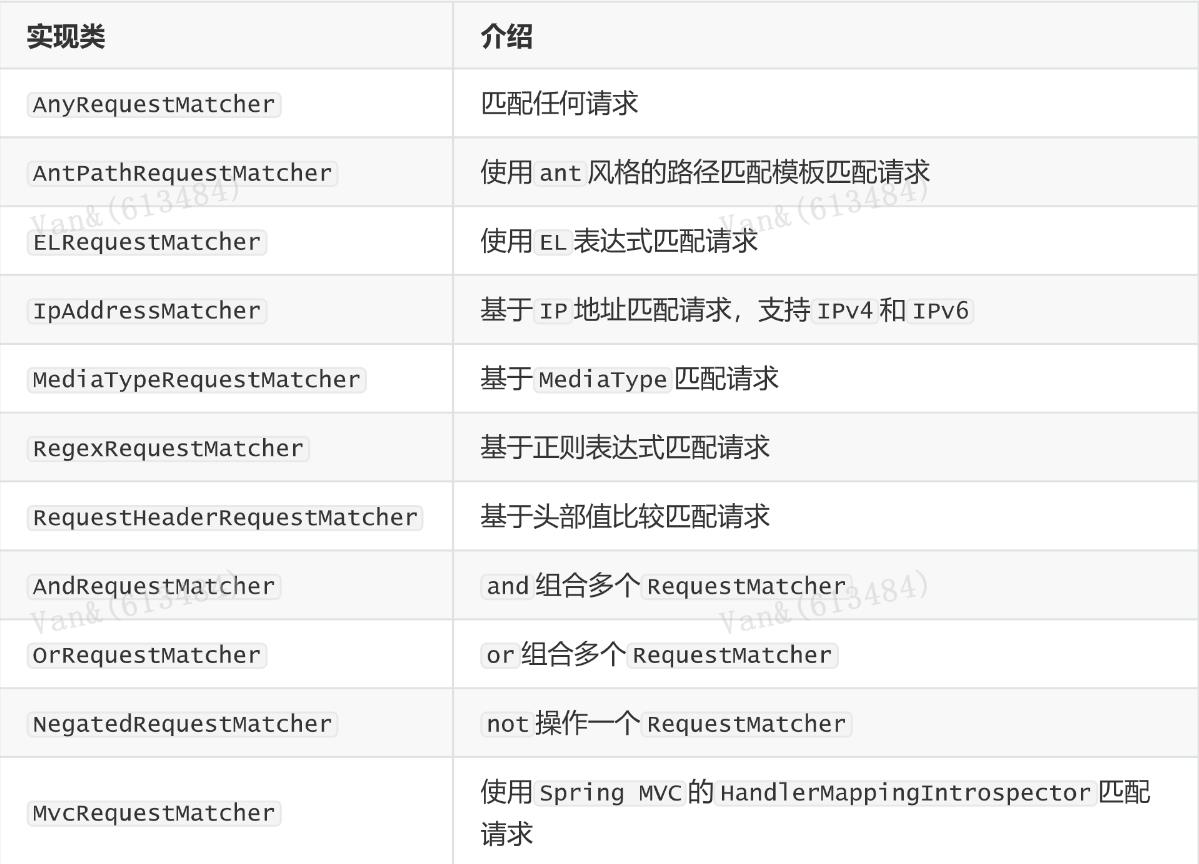
RequestMatcher 是 Spring Security Web 的一个概念模型接口,用于抽象建模对HttpServletRequest 请求的匹配器这一概念。 Spring Security 内置提供了一些 RequestMatcher
实现类:
内置的访问控制
【常用】 #permitAll() 方法,所有用户可访问。
【常用】 #denyAll() 方法,所有用户不可访问。
【常用】 #authenticated() 方法,登录用户可访问。
#anonymous() 方法,无需登录,即匿名用户可访问。
#rememberMe() 方法,通过 remember me登录的用户可访问。
#fullyAuthenticated() 方法,非 remember me 登录的用户可访问。
#hasIpAddress(String ipaddressExpression) 方法,来自指定 IP 表达式的用户可访问。
【常用】 #hasRole(String role) 方法, 拥有指定角色的用户可访问,角色将被增加 “ROLE_”前缀。
【常用】 #hasAnyRole(String... roles) 方法,拥有指定任一角色的用户可访问。
【常用】 #hasAuthority(String authority) 方法,拥有指定权限( authority )的用户可访问。
【常用】 #hasAuthority(String... authorities) 方法,拥有指定任一权限( authority )的用户可访问。
【最牛】 #access(String attribute) 方法,当 Spring EL 表达式的执行结果为 true 时,可以访问。
基于权限的访问控制
除了之前讲解的内置权限控制。Spring Security 中还支持很多其他权限控制。这些方法一般都用于用户
已经被认证后,判断用户是否具有特定的要求。
hasAuthority(String)
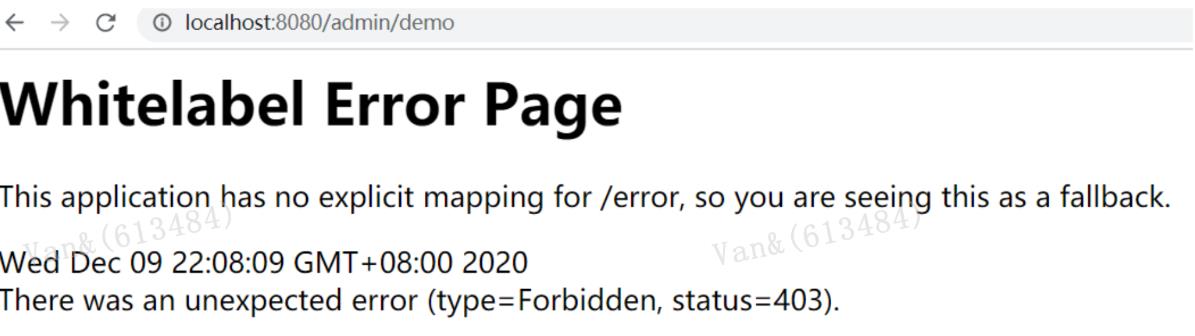
判断用户是否具有特定的权限,用户的权限是在自定义登录逻辑中创建 User 对象时指定的。权限名称大小写敏感,在配置类中通过 hasAuthority(“admin”)设置具有 admin 权限时才能访问。
否则报403错误
return new User("fox", pw,AuthorityUtils.commaSeparatedStringToAuthorityList("admin,user"));//admin,user就是用户的权限

.antMatchers("/admin/demo").hasAuthority("admin")
hasAnyAuthority(String ...)
如果用户具备给定权限中某一个,就允许访问。
.antMatchers("/admin/demo").hasAnyAuthority("admin","System")
基于角色的访问控制
hasRole(String)
如果用户具备给定角色就允许访问,否则出现 403。参数取值来源于自定义登录逻辑
UserDetailsService 实现类中创建 User 对象时给 User 赋予的授权。 在给用户赋予角色时角色需要以:
ROLE_开头 ,后面添加角色名称。例如:ROLE_admin 其中 admin是角 色名, ROLE_ 是固定的字符开头。

使用 hasRole()时参数也只写admin 即可,否则启动报错。
hasAnyRole(String ...)
如果用户具备给定角色的任意一个,就允许被访问 。
hasIpAddress(String)
如果请求是指定的 IP 就运行访问。 可以通过 request.getRemoteAddr() 获取 ip 地址。需要注意的是在
本机进行测试时 localhost 和 127.0.0.1 输出的 ip地址是不一样的。
自定义403处理方案
使用 Spring Security 时经常会看见 403(无权限)。Spring Security 支持自定义权限受限处理,需要
实现 AccessDeniedHandler接口
在配置类中设置访问受限后交个MyAccessDeniedHandler处理

return new User("fox", pw,AuthorityUtils.commaSeparatedStringToAuthorityList("ROLE_admin,user"));//给用户赋予admin角色
.antMatchers("/admin/demo").hasRole("admin")
// localhost --> getRemoteAddr: 0:0:0:0:0:0:0:1
.antMatchers("/admin/demo").hasIpAddress("127.0.0.1")

public class MyAccessDeniedHandler implements AccessDeniedHandler {
@Override
public void handle(HttpServletRequest request, HttpServletResponse response,
AccessDeniedException accessDeniedException) throws IOException,
ServletException {
response.setStatus(HttpServletResponse.SC_FORBIDDEN);
response.setHeader("Content-Type", "application/json;charset=utf-8");
PrintWriter out = response.getWriter();
out.write("{\"status\":\"error\",\"msg\":\"权限不足,请联系管理员!\"}");
out.flush();
out.close();
}
}

http.exceptionHandling()
.accessDeniedHandler(new MyAccessDeniedHandler());
基于表达式的访问控制
access(表达式)
之前学习的登录用户权限判断实际上底层实现都是调用access(表达式)
https://docs.spring.io/spring-security/site/docs/5.2.7.RELEASE/reference/htmlsingle/#tech-intro-access-control
表达式根对象的基类是SecurityExpressionRoot,提供了一些在web和方法安全性中都可用的通用表达式。
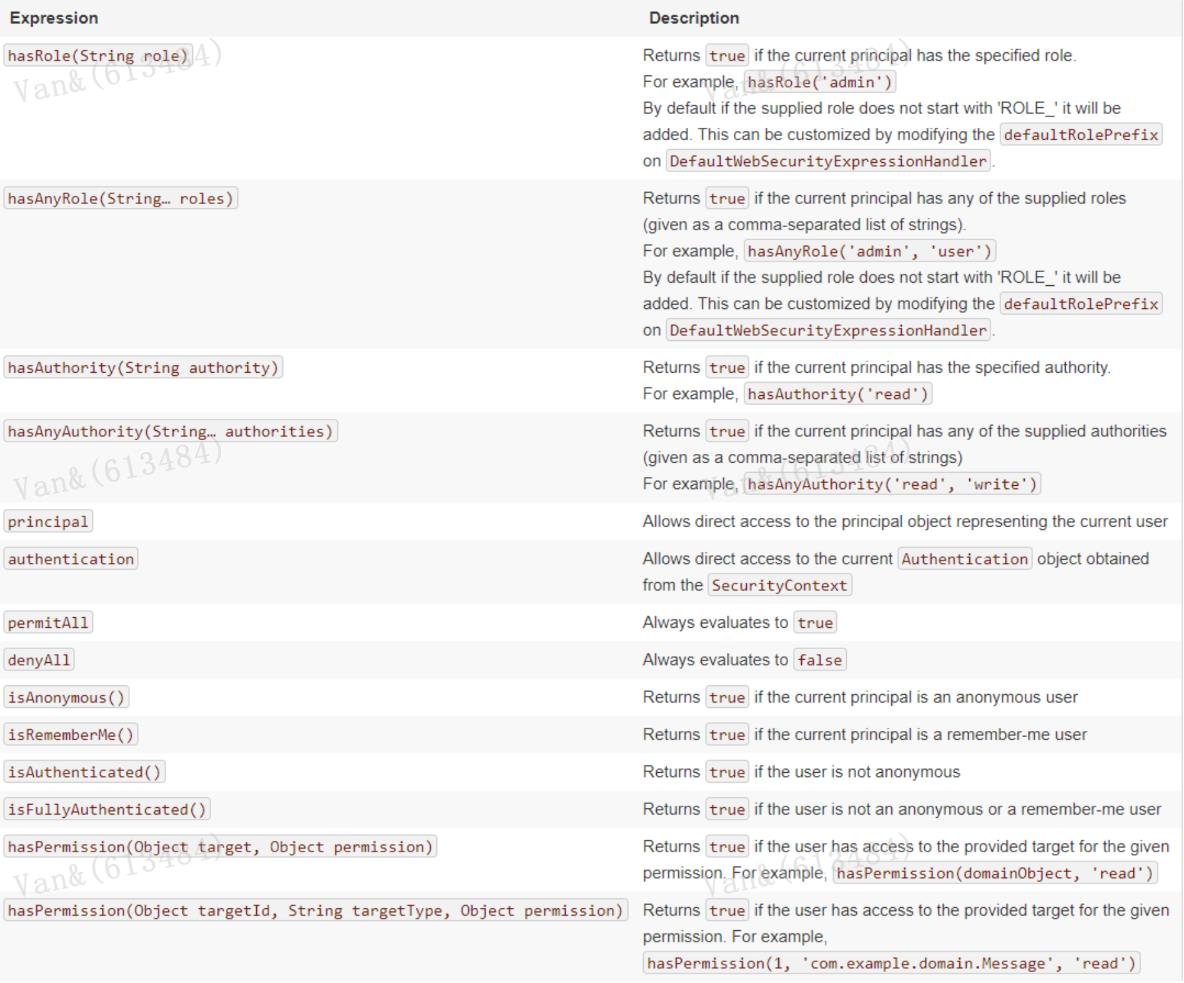
可以通过 access() 实现和之前学习的权限控制完成相同的功能。
.antMatchers("/user/login","/login.html").access("permitAll")
.antMatchers("/admin/demo").access("hasAuthority('System')")
自定义方法
判断登录用户是否具有访问当前 URL 的权限。
@Component
public class MySecurityExpression implements MySecurityExpressionOperations{
@Override
public boolean hasPermission(HttpServletRequest request, Authentication
authentication) {
// 获取主体
Object obj = authentication.getPrincipal();
if (obj instanceof UserDetails){
UserDetails userDetails = (UserDetails) obj;
//
String name = request.getParameter("name");
//获取权限
Collection<? extends GrantedAuthority> authorities =
userDetails.getAuthorities();
//判断name值是否在权限中
return authorities.contains(new SimpleGrantedAuthority(name));
}
return false;
}
在 access 中通过bean的beanName.方法(参数)的形式进行调用:
}
.anyRequest().access("@mySecurityExpression.hasPermission(request,authentication
)")
方法授权
基于注解的访问控制

Spring Security在方法的权限控制上支持三种类型的注解,JSR-250注解、@Secured注解和支持表达式的注解。这三种注解默认都是没有启用的,需要通过@EnableGlobalMethodSecurity来进行启用。
这些注解可以写到 Service 接口或方法上,也可以写到 Controller或 Controller 的方法上。通常情况下都是写在控制器方法上的,控制接口URL是否允许被访问。
JSR-250注解

@RolesAllowed
表示访问对应方法时所应该具有的角色。其可以标注在类上,也可以标注在方法上,当标注在类上时表示其中所有方法的执行都需要对应的角色,当标注在方法上表示执行该方法时所需要的角色,当方法和
类上都使用了@RolesAllowed进行标注,则方法上的@RolesAllowed将覆盖类上的@RolesAllowed,即方法上@RolesAllowed将对当前方法起作用。@RolesAllowed的值是由角色名称组成的数组。

@PermitAll
表示允许所有的角色进行访问,也就是说不进行权限控制。@PermitAll可以标注在方法上也可以标注在类上,当标注在方法上时则只对对应方法不进行权限控制,而标注在类上时表示对类里面所有的方法都
不进行权限控制。
(1)当@PermitAll标注在类上,而@RolesAllowed标注在方法上时则按照@RolesAllowed将覆盖@PermitAll,即需要@RolesAllowed对应的角色才能访问。
(2)当@RolesAllowed标注在类上,而@PermitAll标注在方法上时则对应的方法也是不进行权限控制的。
(3)当在类和方法上同时使用了@PermitAll和@RolesAllowed时先定义的将发生作用(这个没多大的实际意义,实际应用中不会有这样的定义)。

@DenyAll
是和PermitAll相反的,表示无论什么角色都不能访问。@DenyAll只能定义在方法上。你可能会有疑问使用@DenyAll标注的方法无论拥有什么权限都不能访问,那还定义它干啥呢?使用@DenyAll定义的方
法只是在我们的权限控制中不能访问,脱离了权限控制还是可以访问的。
开启注解 在启动类或者在配置类上添加 @EnableGlobalMethodSecurity(jsr250Enabled = true)

在controller方法上添加@RolesAllowed注解

@EnableGlobalMethodSecurity(jsr250Enabled = true)
public class SecurityConfig extends WebSecurityConfigurerAdapter {

修改配置类
@RolesAllowed({"ROLE_USER", "ROLE_ADMIN"})
//@PermitAll
@GetMapping("/demo")
public String demo() {
return
"spring security demo";
}

@Override
protected void configure(HttpSecurity http) throws Exception {
http.formLogin() //表单提交
.loginPage("/login.html") //自定义登录页面
.loginProcessingUrl("/user/login") //登录访问路径,必须和表单提交接口一样
.successHandler(new MyAuthenticationSuccessHandler("/main.html"))
.failureHandler(new MyAuthenticationFailureHandler("/error.html"))
//授权
.and().authorizeRequests()
//设置哪些路径可以直接访问,不需要认证
.antMatchers("/user/login","/login.html").permitAll()
.anyRequest().authenticated() //需要认证
.and().csrf().disable(); //关闭csrf防护
}
@Secured注解

@Secured是由Spring Security定义的用来支持方法权限控制的注解。它的使用也是需要启用对应的支持才会生效的。@Secured 是专门用于判断是否具有角色的,能写在方法或类上。参数要以 ROLE_开
头。

开启注解 在启动类或者在配置类上添加 @EnableGlobalMethodSecurity(securedEnabled = true)
在controller方法上添加@Secured 注解

@EnableGlobalMethodSecurity(securedEnabled = true)
public class SecurityConfig extends WebSecurityConfigurerAdapter {
@Secured("ROLE_ADMIN")
@GetMapping("/demo")
public String demo() {
return
"
spring security demo";
}
支持表达式的注解
Spring Security中定义了四个支持使用表达式的注解,分别是@PreAuthorize、@PostAuthorize、
@PreFilter和@PostFilter。其中前两者可以用来在方法调用前或者调用后进行权限检查,后两者可以用
来对集合类型的参数或者返回值进行过滤。
@EnableGlobalMethodSecurity(prePostEnabled = true)
public class SecurityConfig extends WebSecurityConfigurerAdapter {
使用@PreAuthorize和@PostAuthorize进行访问控制
@PreAuthorize可以用来控制一个方法是否能够被调用,执行之前先判断权限,大多情况下都是使用这
个注解。
@PostAuthorize可以在方法调用完之后进行权限检查
使用@PreFilter和@PostFilter进行过滤
使用@PreFilter和@PostFilter可以对集合类型的参数或返回值进行过滤。使用@PreFilter和@PostFilter
时,Spring Security将移除使对应表达式的结果为false的元素。
//@PreAuthorize("hasRole('ROLE_ADMIN')")
//@PreAuthorize("hasRole('ROLE_USER') or hasRole('ROLE_ADMIN')")
//限制只能查询Id小于10的用户
@PreAuthorize("#id<10")
@RequestMapping("/findById")
public User findById(long id) {
User user = new User();
user.setId(id);
return user;
}
// 限制只能查询自己的信息
@PreAuthorize("principal.username.equals(#username)")
@RequestMapping("/findByName")
public User findByName(String username) {
User user = new User();
user.setUsername(username);
return user;
}
//限制只能新增用户名称为abc的用户
@PreAuthorize("#user.username.equals('abc')")
@RequestMapping("/add")
public User add(User user) {
return user;
}
// 在方法find()调用完成后进行权限检查,如果返回值的id是偶数则表示校验通过,否则表示校验失败,将
抛出AccessDeniedException
@PostAuthorize("returnObject.id%2==0")
public User find(int id) {
User user = new User();
user.setId(id);
return user;
}
@PostFilter("filterObject.id%2==0")
public List<User> findAll() {
List<User> userList = new ArrayList<User>();
User user;
for (int i=0; i<10; i++) {
user = new User();
user.setId(i);
userList.add(user);
}
return userList;
}
@PreFilter(filterTarget="ids", value="filterObject%2==0")
public void delete(List<Integer> ids, List<String> usernames) {
}
授权原理
重写 #configure(HttpSecurity http) 方法,主要配置 URL 的权限控制调用 HttpSecurity#authorizeRequests() 方法,开始配置 URL 的权限控制。
修改 WebSecurityConfig配置类,增加 @EnableGlobalMethodSecurity 注解,开启对 Spring
Security 注解的方法,进行权限验证。

@Override
protected void configure(HttpSecurity http) throws Exception {
http
// 配置请求地址的权限
.authorizeRequests()
.antMatchers("/test/echo").permitAll() // 所有用户可访问
.antMatchers("/test/admin").hasRole("ADMIN") // 需要 ADMIN 角色
.antMatchers("/test/normal").access("hasRole('ROLE_NORMAL')") //
需要 NORMAL 角色。
// 任何请求,访问的用户都需要经过认证
.anyRequest().authenticated()
.and()
// 设置 Form 表单登录
//自定义登录页面,可以通过 #loginPage(String loginPage) 设置
.formLogin()
//
.loginPage("/login") // 登录 URL 地址
.permitAll() // 所有用户可访问
.and()
// 配置退出相关
.logout()
//
.logoutUrl("/logout") // 退出 URL 地址
.permitAll(); // 所有用户可访问
}

@Configuration
@EnableGlobalMethodSecurity(prePostEnabled = true)
public class SecurityConfig extends WebSecurityConfigurerAdapter {
@RestController
@RequestMapping("/demo")
public class DemoController {
@PermitAll
@GetMapping("/echo")
public String demo() {
return
"示例返回";
}
@GetMapping("/home")
public String home() {
return
"我是首页";
}
@PreAuthorize("hasRole('ROLE_ADMIN')")
@GetMapping("/admin")
public String admin() {
return
"我是管理员";
}
@PreAuthorize("hasRole('ROLE_NORMAL')")
@GetMapping("/normal")
public String normal() {
return
"我是普通用户";
}
}
授权流程
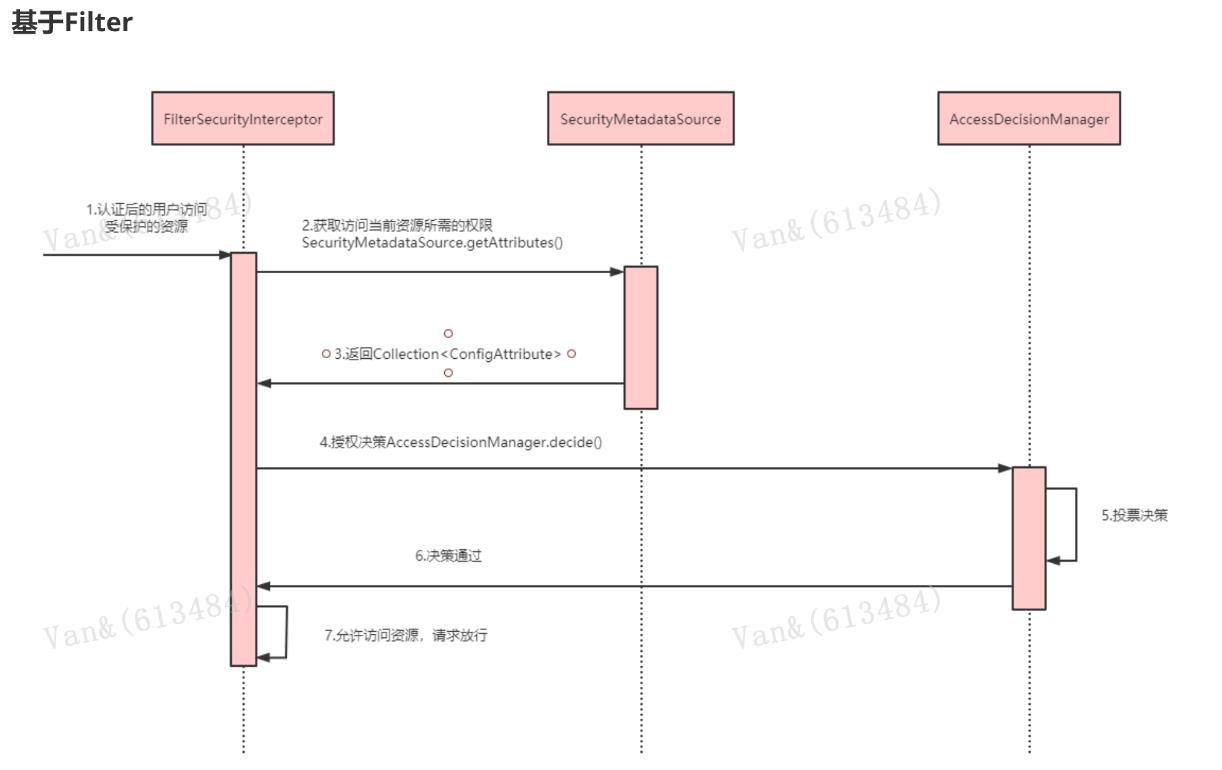
1. 拦截请求,已认证用户访问受保护的web资源将被SecurityFilterChain中的FilterSecurityInterceptor 的子 类拦截。
2. 获取资源访问策略,FilterSecurityInterceptor会从 SecurityMetadataSource 的子类DefaultFilterInvocationSecurityMetadataSource 获取要访问当前资源所需要的权限Collection 。
SecurityMetadataSource其实就是读取访问策略的抽象,而读取的内容,其实就是我们配置的访问规则
3. 最后,FilterSecurityInterceptor会调用 AccessDecisionManager 进行授权决策,若决策通过,则允许访问资 源,否则将禁止访问。
基于AOP

//MethodSecurityInterceptor#invoke
public Object invoke(MethodInvocation mi) throws Throwable {
InterceptorStatusToken token = super.beforeInvocation(mi);
Object result;
try {
result = mi.proceed();
}
finally {
super.finallyInvocation(token);
}
return super.afterInvocation(token, result);
}
相关接口
AccessDecisionManager
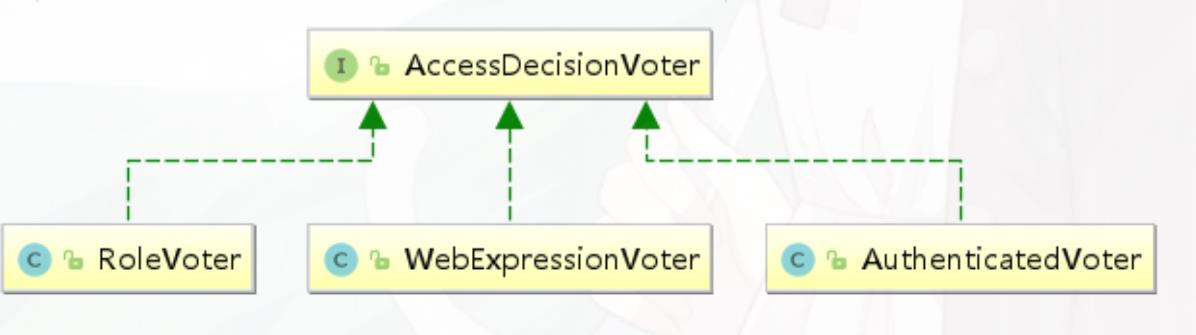
AccessDecisionManager采用投票的方式来确定是否能够访问受保护资源。 AccessDecisionManager
中包含的一系列AccessDecisionVoter将会被用来对Authentication是否有权访问受保护对象进行投票,
AccessDecisionManager根据投票结果,做出最终决策 。
public interface AccessDecisionManager {
// ~ Methods
//
================================================================================
========================
/**
*
用来鉴定当前用户是否有访问对应受保护资源的权限
*
authentication:要访问资源的访问者的身份
*
o
bject:要访问的受保护资源,web请求对应FilterInvocation
*
configAttributes:是受保护资源的访问策略,通过SecurityMetadataSource获取
*
/
void decide(Authentication authentication, Object object,
Collection<ConfigAttribute> configAttributes) throws
AccessDeniedException,
InsufficientAuthenticationException;
boolean supports(ConfigAttribute attribute);
boolean supports(Class<?> clazz);
}
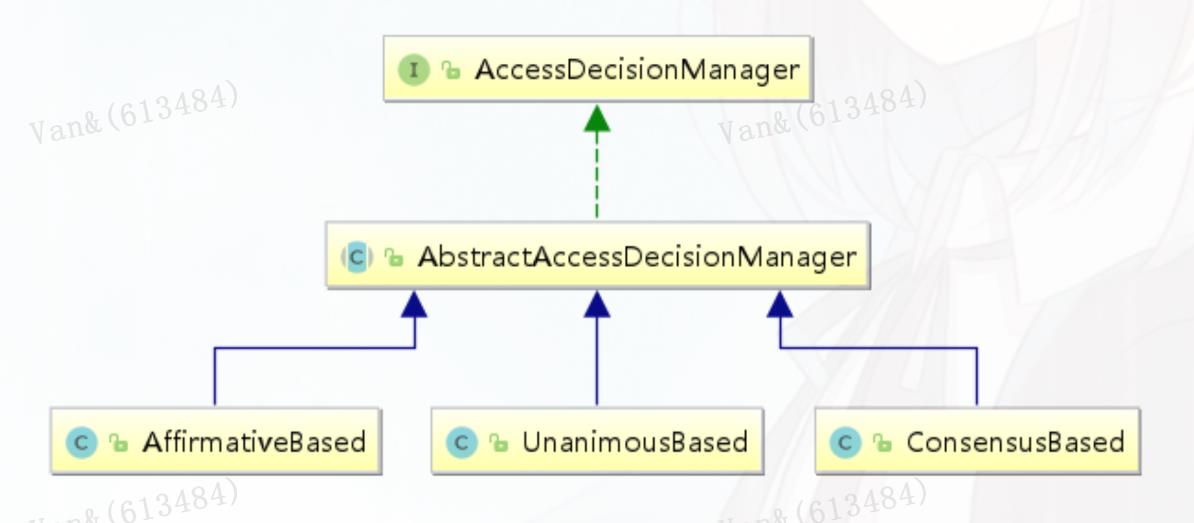
AffirmativeBased
AffirmativeBased的逻辑是:
(1)只要有AccessDecisionVoter的投票为ACCESS_GRANTED则同意用户进行访问;
(2)如果全部弃权也表示通过;
(3)如果没有一个人投赞成票,但是有人投反对票,则将抛出AccessDeniedException。

Spring security默认使用的是AffirmativeBased。

ConsensusBased
ConsensusBased的逻辑是:
(1)如果赞成票多于反对票则表示通过。
(2)反过来,如果反对票多于赞成票则将抛出AccessDeniedException。
(3)如果赞成票与反对票相同且不等于0,并且属性allowIfEqualGrantedDeniedDecisions的值为true,则表 示通过,否则将抛出异常AccessDeniedException。参数allowIfEqualGrantedDeniedDecisions的值默认为true。 (4)如果所
有的AccessDecisionVoter都弃权了,则将视参数allowIfAllAbstainDecisions的值而定,如果该值 为true则表示通过,否则将抛出异常AccessDeniedException。参数allowIfAllAbstainDecisions的值默认
为false。

UnanimousBased

UnanimousBased的逻辑与另外两种实现有点不一样,另外两种会一次性把受保护对象的配置属性全部传递 给AccessDecisionVoter进行投票,而UnanimousBased会一次只传递一个ConfigAttribute给
AccessDecisionVoter进行投票。这也就意味着如果我们的AccessDecisionVoter的逻辑是只要传递进来的 ConfigAttribute中有一个能够匹配则投赞成票,但是放到UnanimousBased中其投票结果就不一定
是赞成了。

UnanimousBased的逻辑具体来说是这样的:

(1)如果受保护对象配置的某一个ConfigAttribute被任意的AccessDecisionVoter反对了,则将抛出 AccessDeniedException。
(2)如果没有反对票,但是有赞成票,则表示通过。
(3)如果全部弃权了,则将视参数allowIfAllAbstainDecisions的值而定,true则通过,false则抛出 AccessDeniedException。

AccessDecisionVoter

public interface AccessDecisionVoter<S> {
int ACCESS_GRANTED = 1; //同意
int ACCESS_ABSTAIN = 0; //弃权
int ACCESS_DENIED = -1; //拒绝
boolean supports(ConfigAttribute attribute);
boolean supports(Class<?> clazz);
// 返回结果是AccessDecisionVoter中定义的三个常量之一
int vote(Authentication authentication, S object,
Collection<ConfigAttribute> attributes);
}
MethodSecurityInterceptor
Spring Security提供了两类AbstractSecurityInterceptor,基于AOP Alliance的MethodSecurityInterceptor,和基于Aspectj继承自MethodSecurityInterceptor的
AspectJMethodSecurityInterceptor

//MethodSecurityInterceptor#invoke
public Object invoke(MethodInvocation mi) throws Throwable {
InterceptorStatusToken token = super.beforeInvocation(mi);
Object result;
try {
result = mi.proceed();
}
finally {
super.finallyInvocation(token);
}
return super.afterInvocation(token, result);
}
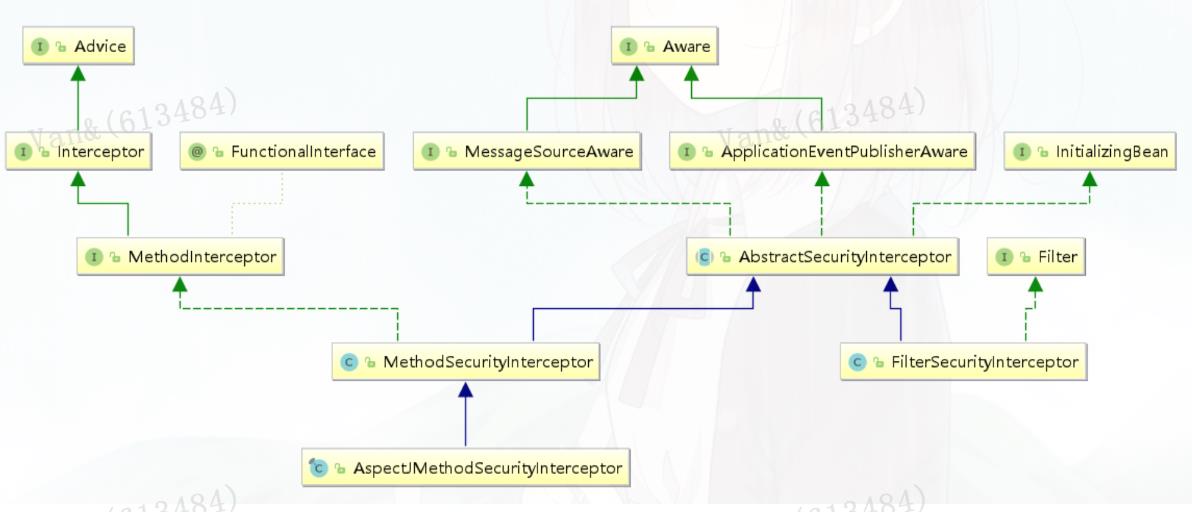
Spring Security实现原理
3.1 核心配置
@EnableWebSecurity

https://www.processon.com/view/link/5fa53783637689653d8af2f7

@Retention(value = java.lang.annotation.RetentionPolicy.RUNTIME)
@Target(value = { java.lang.annotation.ElementType.TYPE })
@Documented
@Import({ WebSecurityConfiguration.class,
SpringWebMvcImportSelector.class,
OAuth2ImportSelector.class })
@EnableGlobalAuthentication
@Configuration
public @interface EnableWebSecurity {
/**
* Controls debugging support for Spring Security. Default is false.
* @return if true, enables debug support with Spring Security
*
/
boolean debug() default false;
}
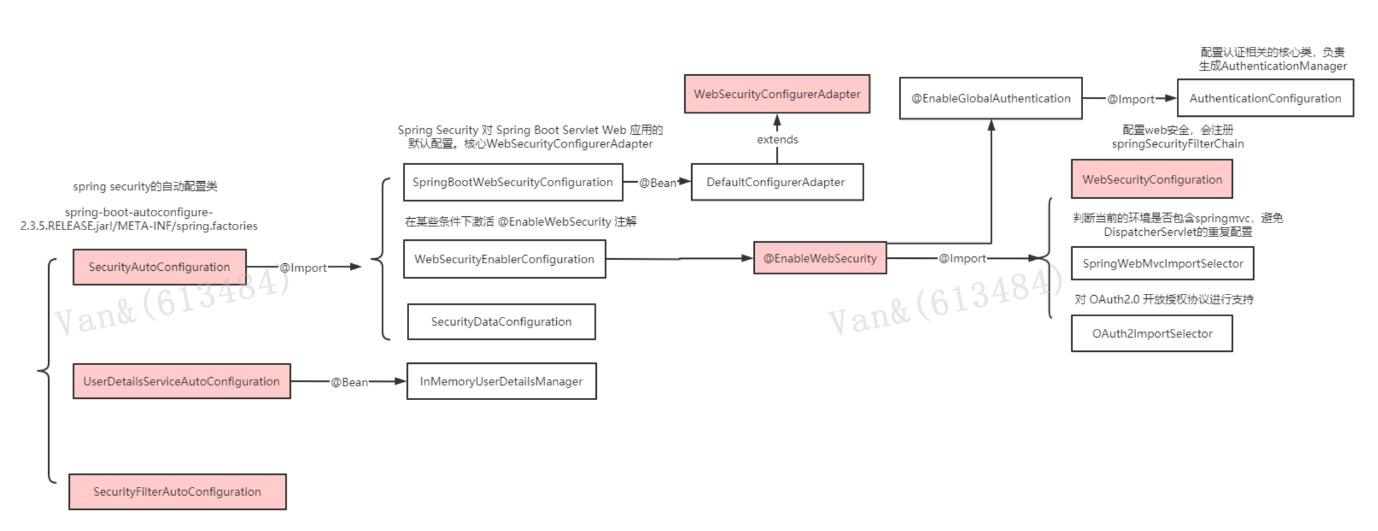
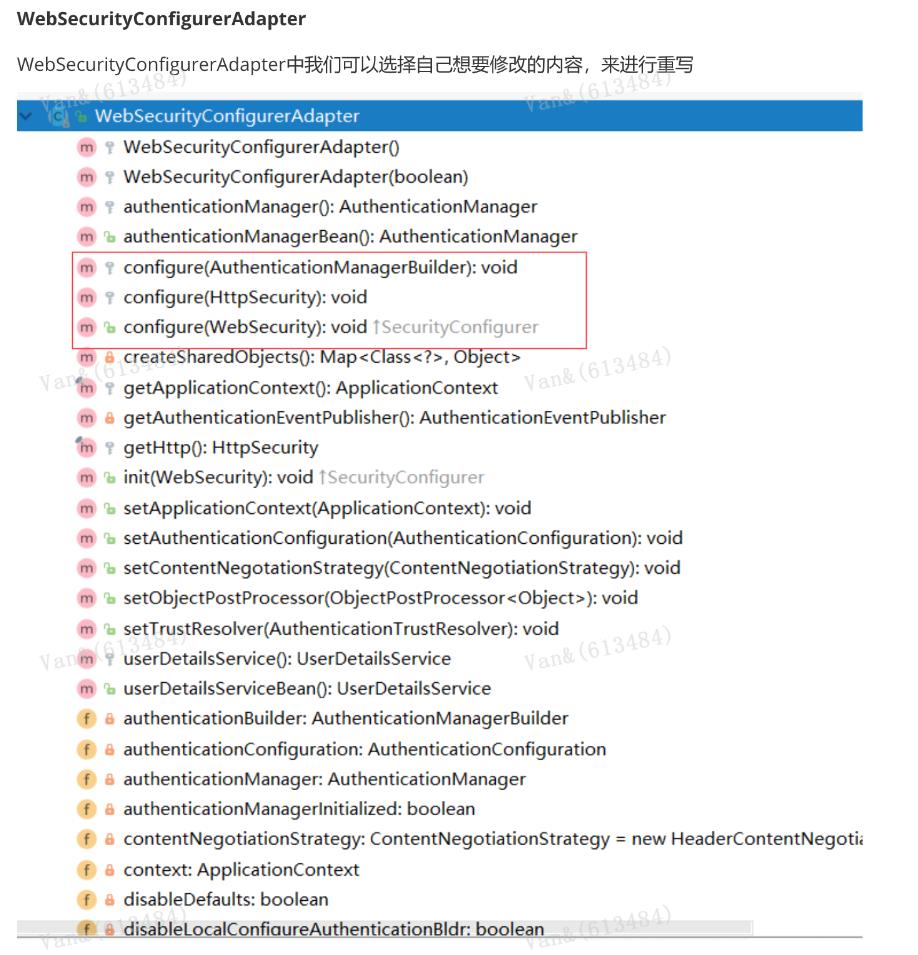
HttpSecurity
安全过滤器链配置
@Configuration
public class CustomWebSecurityConfig extends WebSecurityConfigurerAdapter {
@Override
protected void configure(HttpSecurity http) throws Exception {
http
.authorizeRequests()
.antMatchers("/resources/**", "/signup", "/about").permitAll()
.antMatchers("/admin/**").hasRole("ADMIN")
.antMatchers("/db/**").access("hasRole('ADMIN') and
hasRole('DBA')")
.anyRequest().authenticated()
.and()
.formLogin()
.usernameParameter("username")
.passwordParameter("password")
authorizeRequests()配置路径拦截,表明路径访问所对应的权限,角色,认证信息。
formLogin()对应表单认证相关的配置
logout()对应了注销相关的配置
httpBasic()可以配置basic登录
所有的http相关配置可以通过查看HttpSecurity的主要方法获取。
.failureForwardUrl("/login?error")
.loginPage("/login")
.permitAll()
.and()
.logout()
.logoutUrl("/logout")
.logoutSuccessUrl("/index")
.permitAll()
.and()
.httpBasic()
.disable();
}
}
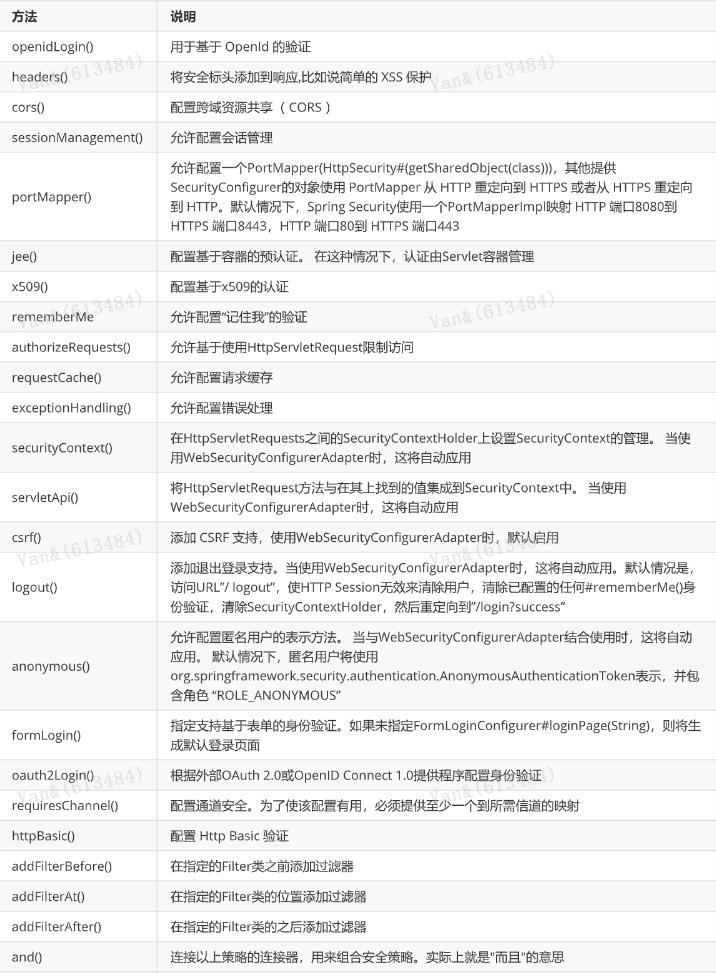
WebSecurity
核心过滤器配置
WebSecurity 基于Servlet Filter 用来配置 springSecurityFilterChain,而springSecurityFilterChain 又
被委托给了 Spring Security 核心过滤器DelegatingFilterProxy 。我们一般不会过多来自定义
WebSecurity , 使用较多的使其ignoring() 方法用来忽略 Spring Security 对静态资源的控制。
AuthenticationManagerBuilder
认证管理器配置
全局配置, 使用@Autowired注入的AuthenticationManagerBuilder是全局的身份认证器,作用域可以
跨越多个WebSecurityConfigurerAdapter。
public void configure(WebSecurity web) throws Exception {
web
.ignoring()
.antMatchers("/resources/**");
}
@Override
protected void configure(AuthenticationManagerBuilder auth) throws Exception {
auth
.inMemoryAuthentication()
.withUser("admin").password("admin").roles("USER");
}
@Autowired
public void configureGlobal(AuthenticationManagerBuilder auth) throws Exception
{
auth
.inMemoryAuthentication()
.withUser("admin").password("admin").roles("USER");
}
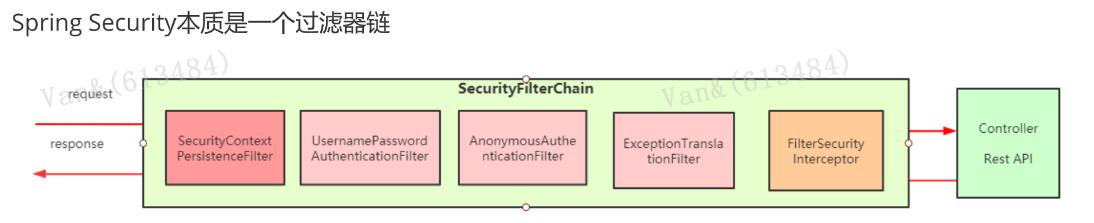
FilterChain
认证的调用栈
SecurityFilterChain
SecurityContextPersistenceFilter
两个主要职责:请求来临时,创建 SecurityContext 安全上下文信息,请求结束时清空
SecurityContextHolder。过滤器负责核心的处理流程,存储安全上下文和读取安全上下文的工作完全委
托给了HttpSessionSecurityContextRepository去处理
public interface SecurityFilterChain {
boolean matches(HttpServletRequest request);
List<Filter> getFilters();
}
//SecurityContextPersistenceFilter#doFilter
HttpRequestResponseHolder holder = new HttpRequestResponseHolder(request,
response);
//从Session中获取安全上下文信息,不存在创建一个新的SecurityContext
SecurityContext contextBeforeChainExecution = repo.loadContext(holder);
try {
//请求开始时,设置安全上下文信息
SecurityContextHolder.setContext(contextBeforeChainExecution);
chain.doFilter(holder.getRequest(), holder.getResponse());
}
finally {
//请求结束后,清空安全上下文信息
UsernamePasswordAuthenticationFilter
表单提交了username和password,被封装成token进行一系列的认证,便是主要通过这个过滤器完成
的,在表单认证的方法中,这是最最关键的过滤器。
SecurityContext contextAfterChainExecution = SecurityContextHolder
.
getContext();
// AbstractAuthenticationProcessingFilter#doFilter
Authentication authResult;
try {
// 调用UsernamePasswordAuthenticationFilter的attemptAuthentication方法
authResult = attemptAuthentication(request, response);
if (authResult == null) {
// return immediately as subclass has indicated that it hasn't completed
// authentication
//子类未完成认证,立刻返回
return;
}
sessionStrategy.onAuthentication(authResult, request, response);
}
catch (InternalAuthenticationServiceException failed) {
logger.error(
"
An internal error occurred while trying to authenticate the user.",
failed);
unsuccessfulAuthentication(request, response, failed);
return;
}
catch (AuthenticationException failed) {
// Authentication failed
unsuccessfulAuthentication(request, response, failed);
return;
}
// Authentication success
if (continueChainBeforeSuccessfulAuthentication) {
chain.doFilter(request, response);
}
successfulAuthentication(request, response, chain, authResult);
// UsernamePasswordAuthenticationFilter#attemptAuthentication
public Authentication attemptAuthentication(HttpServletRequest request,
HttpServletResponse response) throws AuthenticationException {
if (postOnly && !request.getMethod().equals("POST")) {
throw new AuthenticationServiceException(
"
Authentication method not supported: " +
request.getMethod());
}
ExceptionTranslationFilter
ExceptionTranslationFilter异常转换过滤器位于整个springSecurityFilterChain的后方,用来转换整个
链路中出现的异常。此过滤器本身不处理异常,而是将认证过程中出现的异常交给内部维护的一些类去
处理,一般处理两大类异常:AccessDeniedException访问异常和AuthenticationException认证异常。
FilterSecurityInterceptor
FilterSecurityInterceptor从SecurityContextHolder中获取Authentication对象,然后比对用户拥有的
权限和资源所需的权限。这是一个方法级的权限过滤器, 基本位于过滤链的最底部 。这个过滤器决定了
访问特定路径应该具备的权限,访问的用户的角色,权限是什么?访问的路径需要什么样的角色和权
限?这些判断和处理都是由该类进行的。
HeaderWriterFilter: 用来给http响应添加一些Header,比如X-Frame-Options, X-XSS-
Protection*,X-Content-Type-Options.
CsrfFilter:在spring4中被默认开启的一个过滤器,用于防止csrf攻击(跨站点请求伪造(Cross-
site request forgery))
LogoutFilter :处理注销的过滤器
RequestCacheAwareFilter: 内部维护了一个RequestCache,用于缓存request请求
SecurityContextHolderAwareRequestFilter :对ServletRequest进行了一次包装,使得request
具有更加丰富的API
SessionManagementFilter: 和session相关的过滤器,内部维护了一个
SessionAuthenticationStrategy,两者组合使用,常用来防止会话固定攻击保护( session-
fixation protection attack ),以及限制同一用户开启多个会话的数量
AnonymousAuthenticationFilter
匿名身份过滤器,spring security为了兼容未登录的访问,也走了一套认证流程,只不过是一个匿
名的身份。
String username = obtainUsername(request);
String password = obtainPassword(request);
if (username == null) {
username =
""
;
}
if (password == null) {
password = "";
}
username = username.trim();
//将认证信息封装成token, 当前认证状态是false
UsernamePasswordAuthenticationToken authRequest = new
UsernamePasswordAuthenticationToken(
username, password);
// Allow subclasses to set the "details" property
setDetails(request, authRequest);
// 通过AuthenticationManager去认证,并返回认证信息
return this.getAuthenticationManager().authenticate(authRequest);
}
3.3 主线源码分析
https://www.processon.com/view/link/5fa3ae25e401fd45d10296e1

 浙公网安备 33010602011771号