
Chap07-RedisManager
Chap07-RedisManager
概念
1. 数据库类型
1.1 基本概念
-
关系型数据库 - sql
-
操作数据必须要使用sql语句
-
数据存储在磁盘
-
存储的数据量大
-
举例:
- mysql
- oracle
- sqlite - 文件数据库
- sql server
-
-
非关系数据库 - nosql
-
操作不使用sql语句
-
数据默认存储在内存
-
速度快, 效率高
-
存储的数据量小
-
不需要数据库表
-
以键值对的方式存储的
-
-
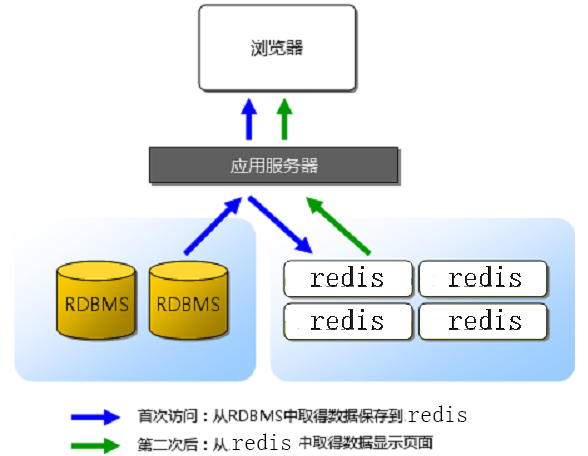
-
所有的数据默认存储在关系型数据库中客户端访问服务器, 有一些数据, 服务器需要频繁的查询数据
-
服务器首先将数据从关系型数据库中读出 -> 第一次
-
将数据写入到redis中
-
客户端第二次包含以后访问服务器
-
服务器从redis中直接读数据
-
-
-
what's redis
-
知道redis是什么?
-
非关系型数据库 也可以叫 内存数据库
-
能干什么?存储访问频率高的数据
-
共享内存
-
服务器端 -> redis
-
-
怎么使用?
- 常用的操作命令
- 各种数据类型 -> 会查
- redis的配置文件
- redis的数据持久化
- 写程序的时候如何对redis进行操作
- 客户端 -> 服务器
-
安装配置
sudo pacman -S redis
## 服务器 - 启动
redis-server ## 默认启动
redis-server confileName ## 根据配置文件启动
redis-server confFileName ## 根据配置文件的设置启动
## 客户端
redis-cli ## 默认连接本地, 绑定了6379默认端口的服务器
redis-cli -p 端口号
redis-cli -h IP地址 -p 端口 ## 连接远程主机的指定端口的redis
## 客户端的测试命令 - 测试连接
ping [MSG]
## 通过客户端关闭服务器
shutdown
Redis 基本知识
1. 数据组织形式
-
键值对
-
key: 必须是字符串 -"hello"
-
value:可选
-
String
-
List
-
Set
-
SortedSet
-
Hash
-
-
常用数据类型
-
String
-
字符串
-
List 类型
-
可以存放多个 string 类型
-
Set 类型
-
集合
-
不重复
-
数据无序
-
SortedSet
-
排序集合,集合中每个元素分为两部分
-
[ 分数,成员 ]->[ 66,"tom" ]
-
-
Hash 类型
-
类比 map
-
Qt->QHash,QMap
-
Map->红黑树
-
Hash->数组
-
2. 常用命令
- String 类型
key->string
value->string
## 设置一个键值对
SET key value
## 通过key获得value
GET key
## 同时设置一个或者多个key-value对
MSET key value [key value key value key value..]
## 同时查看多个key
MGET key [key key key...]
## 如果key值已经存在,需要将value添加到原value 的末尾
APPEND key value
## 返回hey中存储的字符串长度
STRLEN key
## 将key中存储的数字值减一,前提是value是数字字符串,如"12313123"
DECR key
## 将可以中存储的数字值加一
INCR key
## 将key减去一个值
DECRBY value
## 将key加上一个值
INCRBY value
- List 类型-存储多个字符串
key->string
value->List
## 将一个或者多个插入到列表的表头
LPUSH key value [value ...]
LPUSHX key value [value ...](当且仅当list存在)
## 将一个或者多个插入到列表的表尾
RPUSH key value [value ...]
RPUSHX key value [value ...](当且仅当list存在)
## 删除最左侧元素
LPOP key
## 删除最右侧元素
RPOP key
## 删除多个元素
LREM key count value
 - count > 0:从左到右删除与value相等的元素,数量为count个
 - count = 0:删除所有与value相等的元素
 - count < 0:从右到左删除与value相等的元素,数量为count个
## 遍历
LRANGE key start stop
    start:起始位置
    stop:结束位置(可以用-1反向)
## 通过下表得到对应位置的字符串
LINDEX key INDEX
## list中的字符串个数
LLEN key
- Set 类型
key->string
value->set类型("string","string1"...)
## 添加一个或者多个元素
SADD key number [ number ...]
## 遍历元素
SMEMBERS key
## 差集
SDIFF key [key ...]
SDIFFSTORE destination key [ key ...] ## 将结果保存到一个集合中
## 交集
SINTER key [key ...]
SINTERSTORE destination key [ key ...] ## 将结果保存到一个集合中
## 并集
SUNION key [key ...]
SUNIONSTORE destination key [ key ...] ## 将结果保存到一个集合中
## 随机删除一个元素
SPOP key
## 随机获取一个元素
SRANDMEMBER
- SortedSet 类型
key->String
value->sorted([score,member] [score,member],...)
## 添加元素
ZRANGE key score member [[score,member] [score,member]...]
## 遍历
ZRANGE key start stop [WITHSCORES] ->升序集合
ZREVRANGE key start stop [WITHSCORES] ->降序集合
## 指定分数区间内的个数
ZCOUNT key min max
## 获取指定成员的排名
ZRANK key value
## 移除掉有序集合key中的一个或者多个成员,不存在的成员会被忽略
ZREM key value1 value2
## 获取某个成员的分数
ZSCORE key value
- Hash 类型
key ->string
value -> hash ([key:value], [key:value], [key:value], ...)
## 添加数据
HSET key field value
## 取数据
HGET key field
## 批量插入键值对
HMSET key field value [field value ...]
## 批量取数据
HMGET key field [field ...]
## 删除键值对
HDEL key field [field ...]
## 获取所有键
HGETALL key
## 返回所有的的值
HVALS key
## 判断某个键存在否
HEXISTS field key
## 返回哈希表中的域的数量
HLEN key
- key 的常用操作命令
## 删除键值对
DEL key [key ...]
## 查看key值
KEYS pattern

查找所有符合给定模式 pattern 的 key 。
KEYS * 匹配数据库中所有 key 。
KEYS h?llo 匹配 hello , hallo 和 hxllo 等。
KEYS h*llo 匹配 hllo 和 heeeeello 等。
KEYS h[ae]llo 匹配 hello 和 hallo ,但不匹配 hillo

## 给key设置生存时长
EXPIRE key seconds
## 剩下的生存时间
TTY key
 - key 不存在返回-2
 - key 存在但是没有设置生存时间返回-1
 - 否则返回以秒为单位的时间
## 取消生存时长
PERSIST key
## key对应的value类型
TYPE key
## key是否存在
EXISTS key
3. 配置文件
配置文件是给redis服务器使用的
-
配置文件位置
- 从源码安装目录找 redis.conf
- pacman安装之后,redis已经alias为valkey(redis也可继续使用),配置文件/etc/valkey/valkey.conf
-
配置文件配置项
## redis服务器绑定谁之后, 谁就能访问redis服务器
## 任何客户端都能访问服务器, 需要注释该选项
bind 127.0.0.1 192.168.1.100
## 保护模式, 只能本地访问,如果要远程客户端访问服务器, 该模式要关闭
protected-mode yes
## reids服务器启动时候绑定的端口, 默认为6379
port 6379
## 超时时长, 0位关闭该选项, >0则开启
timeout 0
## 保持长连接的时长(s)
tcp-keepalive 300
## 服务器启动之后不是守护进程
daemonize no
## 如果服务器是守护进程, 就会生成一个pid文件
## ./ -> reids服务器启动时候对应的目录
pidfile ./redis.pid
## 日志级别
loglevel debug/verbose/notice/warning
## 如果服务器是守护进程, 才会写日志文件
logfile "" -> 这是没写
logfile ./redis.log
## redis中数据库的个数
databases 16
- 切换 select dbID [dbID == 0 ~ 16-1]
4. redis 数据持久化
数据从内存到硬盘的过程
持久化的两种方式:
4.1. rdb 方式
- 这是一种默认的持久化方式, 默认打开
- 磁盘的持久化文件xxx.rdb
- 将内存数据以二进制的方式直接写入磁盘文件
- 文件比较小, 恢复时间短, 效率高
- 以用户设定的频率 -> 容易丢失数据
- 数据完整性相对较低
4.2. aof 方式
- 默认是关闭的
- 磁盘的持久化文件xxx.aof
- 直接将生成数据的命令写入磁盘文件
- 文件比较大, 恢复时间长, 效率低
- 以某种频率 -> 1sec
- 数据完整性高
## rdb的同步频率, 任意一个满足都可以
save 900 1   ## after 900 sec (15 min) if at least 1 key changed
save 300 10  ## after 300 sec (5 min) if at least 10 key changed
save 60 10000 ## after 60 sec (1 min) if at least 10000key changed
## rdb文件的名字
dbfilename dump.rdb
## 生成的持久化文件保存的那个目录下, rdb和aof
dir ./
## 是不是要打开aof模式
appendonly no
-> 打开: yes
## 设置aof文件的名字
appendfilename "appendonly.aof"
## aof更新的频率
## appendfsync always
appendfsync everysec
## appendfsync no
4.3. 能否同时打开 aof/rdb
-
可以
-
如何关闭 rdb
-
save ""
-
两种模式同时开启,选择哪种方式恢复
-
效率:rdb
-
数据完整性:aof
5. hiredis
5.1 hiredis的安装
-
安装
-
sudo pacman -S hiredis
-
源码安装
5.2 hiredis API接口的使用
- 连接数据库
// 连接数据库
redisContext *redisConnect(const char *ip, int port);
redisContext *redisConnectWithTimeout(const char *ip,
int port, const struct timeval tv);
- 执行命令
// 执行redis命令
void *redisCommand(redisContext *c, const char *format, ...);
// redisCommand 函数实际的返回值类型
typedef struct redisReply {
/* 命令执行结果的返回类型 */
int type;
/* 存储执行结果返回为整数 */
long long integer;
/* str变量的字符串值长度 */
size_t len;
/* 存储命令执行结果返回是字符串, 或者错误信息 */
char *str;
/* 返回结果是数组, 代表数据的大小 */
size_t elements;
/* 存储执行结果返回是数组*/
struct redisReply **element;
} redisReply;
redisReply a[100];
element[i]->str

- 释放资源
// 释放资源
void freeReplyObject(void *reply);
void redisFree(redisContext *c);
- 例子
##include <stdio.h>
##include <hiredis.h>

int main()
{
    // 1. 连接redis服务器
    redisContext* c = redisConnect("127.0.0.1", 6379);
    if (c->err != 0)
    {
        return -1;
    }
    // 2. 执行redis命令
    void *prt = redisCommand(c, "hmset user userName zhang3 passwd 123456 age 23 sex man");
    redisReply* ply = (redisReply*)prt;
    if(ply->type == 5)
    {
        // 状态输出
        printf("状态: %s\n", ply->str);
    }
    freeReplyObject(ply);

    // 3. 从数据库中读数据
    prt = redisCommand(c, "hgetall user");
cmake配置
我们使用pkg_config配置
find_package(PkgConfig REQUIRED)
pkg_check_modules(REDIS REQUIRED REQUIRED IMPORTED_TARGET hiredis)
target_link_libraries(${PROJECT_NAME} PRIVATE PkgConfig::REDIS)
使用头文件
#include <hiredis/hiredis.h>
测试
void TestRedis()
{
    // 连接redis 需要启动才可以进行连接
    // redis默认监听端口为6387 可以再配置文件中修改
    redisContext* c = redisConnect("127.0.0.1", 6379);
    if (c->err) {
        printf("Connect to redisServer faile:%s\n", c->errstr);
        redisFree(c);
        return;
    }
    printf("Connect to redisServer Success\n");

    std::string redis_password = "38324";
    redisReply* r = (redisReply*)redisCommand(c, "AUTH %s", redis_password.c_str());
    if (r->type == REDIS_REPLY_ERROR) {
        printf("Redis认证失败!\n");
    } else {
        printf("Redis认证成功!\n");
    }

    // 为redis设置key
    const char* command1 = "set stest1 value1";

    // 执行redis命令行
    r = (redisReply*)redisCommand(c, command1);

    // 如果返回NULL则说明执行失败
    if (NULL == r) {
        printf("Execut command1 failure\n");
        redisFree(c);
        return;
    }

    // 如果执行失败则释放连接
    if (!(r->type == REDIS_REPLY_STATUS && (strcmp(r->str, "OK") == 0 || strcmp(r->str, "ok") == 0))) {
        printf("Failed to execute command[%s]\n", command1);
        freeReplyObject(r);
        redisFree(c);
        return;
    }

    // 执行成功 释放redisCommand执行后返回的redisReply所占用的内存
    freeReplyObject(r);
    printf("Succeed to execute command[%s]\n", command1);

    const char* command2 = "strlen stest1";
    r = (redisReply*)redisCommand(c, command2);

    // 如果返回类型不是整形 则释放连接
    if (r->type != REDIS_REPLY_INTEGER) {
        printf("Failed to execute command[%s]\n", command2);
        freeReplyObject(r);
        redisFree(c);
        return;
    }

    // 获取字符串长度
    int length = r->integer;
    freeReplyObject(r);
    printf("The length of 'stest1' is %d.\n", length);
    printf("Succeed to execute command[%s]\n", command2);

    // 获取redis键值对信息
    const char* command3 = "get stest1";
    r = (redisReply*)redisCommand(c, command3);
    if (r->type != REDIS_REPLY_STRING) {
        printf("Failed to execute command[%s]\n", command3);
        freeReplyObject(r);
        redisFree(c);
        return;
    }
    printf("The value of 'stest1' is %s\n", r->str);
    freeReplyObject(r);
    printf("Succeed to execute command[%s]\n", command3);

    const char* command4 = "get stest2";
    r = (redisReply*)redisCommand(c, command4);
    if (r->type != REDIS_REPLY_NIL) {
        printf("Failed to execute command[%s]\n", command4);
        freeReplyObject(r);
        redisFree(c);
        return;
    }
    freeReplyObject(r);
    printf("Succeed to execute command[%s]\n", command4);

    // 释放连接资源
    redisFree(c);
}
封装redis管理类
hiredis默认的命令比如繁琐,所以我们选择手动封装redis的管理类和连接池。
class RedisManager : public Singleton<RedisManager> {
    friend class Singleton<RedisManager>;

public:
    ~RedisManager();
    bool Get(const std::string& key, std::string& value);
    bool Set(const std::string& key, const std::string& value);
    bool Auth(const std::string& password);
    bool LPush(const std::string& key, const std::string& value);
    bool LPop(const std::string& key, std::string& value);
    bool RPush(const std::string& key, const std::string& value);
    bool RPop(const std::string& key, std::string& value);
    bool HSet(const std::string& key, const std::string& hkey, const std::string& value);
    bool HSet(const char* key, const char* hkey, const char* hvalue, size_t hvaluelen);
    std::string HGet(const std::string& key, const std::string& hkey);
    bool Del(const std::string& key);
    bool ExistsKey(const std::string& key);
    void Close();
    inline bool isConnected() const { return _isConnected; }

private:
    RedisManager();
    template <typename... Args>
    redisReply* execute(const char* format, const Args&... args)
    {
        auto* context = _pool->GetConnection();
        redisReply* reply = (redisReply*)redisCommand(context, format, args...);
        _pool->ReturnConnection(context);
        return reply;
    }

private:
    std::string _host;
    std::size_t _port;
    bool _isConnected = false;
    std::unique_ptr<RedisPool> _pool;
};
在这个类中,最重要的就是 execute函数,所有的操作都在内部调用了这个函数。
这个是一个变参模板函数,format是类似"OP %s %s"的结构,args用来对应占位符。
然后是GET、SET等命令的实现。
RedisManager::~RedisManager()
{
    if (_isConnected)
        Close();
}

RedisManager::RedisManager()
{
    _host = ConfigManager::GetInstance()["Redis"]["host"];
    _port = std::stoi(ConfigManager::GetInstance()["Redis"]["port"]);
    std::string password = ConfigManager::GetInstance()["Redis"]["password"];
    _pool = std::make_unique<RedisPool>(std::thread::hardware_concurrency(), _host, _port, password);
    _isConnected = true;
}
bool RedisManager::Get(const std::string& key, std::string& value)
{
    auto* reply = execute("GET %s", key.c_str());
    if (reply == NULL) {
        return false;
    }
    if (reply->type == REDIS_REPLY_ERROR) {
        std::cout << "GET failed: " << reply->str << std::endl;
        freeReplyObject(reply);
        return false;
    }
    value = std::string(reply->str, reply->len);
    freeReplyObject(reply);
    return true;
}

bool RedisManager::Set(const std::string& key, const std::string& value)
{
    auto* reply = execute("SET %s %s", key.c_str(), value.c_str());
    if (reply == NULL) {
        return false;
    }
    if (reply->type == REDIS_REPLY_ERROR) {
        std::cout << "SET failed: " << reply->str << std::endl;
        freeReplyObject(reply);
        return false;
    }
    std::cout << "SET " << key << " = " << value << std::endl;
    freeReplyObject(reply);
    return true;
}

bool RedisManager::Auth(const std::string& password)
{
    auto* reply = execute("AUTH %s", password.c_str());
    if (reply == NULL) {
        return false;
    }
    if (reply->type == REDIS_REPLY_ERROR) {
        std::cout << "AUTH failed: " << reply->str << std::endl;
        freeReplyObject(reply);
        return false;
    }
    std::cout << "AUTH OK" << std::endl;
    freeReplyObject(reply);
    return true;
}

bool RedisManager::LPush(const std::string& key, const std::string& value)
{
    auto* reply = execute("LPUSH %s %s", key.c_str(), value.c_str());
    if (reply == NULL) {
        return false;
    }
    if (reply->type == REDIS_REPLY_ERROR) {
        std::cout << "LPUSH failed: " << reply->str << std::endl;
        freeReplyObject(reply);
        return false;
    }
    std::cout << "LPUSH " << key << " = " << value << std::endl;
    freeReplyObject(reply);
    return true;
}

bool RedisManager::LPop(const std::string& key, std::string& value)
{
    auto* reply = execute("LPOP %s", key.c_str());
    if (reply == NULL) {
        return false;
    }
    if (reply->type == REDIS_REPLY_ERROR) {
        std::cout << "LPOP failed: " << reply->str << std::endl;
        freeReplyObject(reply);
        return false;
    }
    value = std::string(reply->str, reply->len);
    freeReplyObject(reply);
    std::cout << "LPOP " << key << " = " << value << std::endl;
    return true;
}

bool RedisManager::RPush(const std::string& key, const std::string& value)
{
    auto* reply = execute("RPUSH %s %s", key.c_str(), value.c_str());
    if (reply == NULL) {
        return false;
    }
    if (reply->type == REDIS_REPLY_ERROR) {
        std::cout << "RPUSH failed: " << reply->str << std::endl;
        freeReplyObject(reply);
        return false;
    }
    std::cout << "RPUSH " << key << " = " << value << std::endl;
    freeReplyObject(reply);
    return true;
}

bool RedisManager::RPop(const std::string& key, std::string& value)
{
    auto* reply = execute("RPOP %s", key.c_str());
    if (reply == NULL) {
        return false;
    }
    if (reply->type == REDIS_REPLY_ERROR) {
        std::cout << "RPOP failed: " << reply->str << std::endl;
        freeReplyObject(reply);
        return false;
    }
    value = std::string(reply->str, reply->len);
    freeReplyObject(reply);
    std::cout << "RPOP " << key << " = " << value << std::endl;
    return true;
}

bool RedisManager::HSet(const std::string& key, const std::string& hkey, const std::string& value)
{
    auto* reply = execute("HSET %s %s %s", key.c_str(), hkey.c_str(), value.c_str());
    if (reply == NULL) {
        return false;
    }
    if (reply->type == REDIS_REPLY_ERROR) {
        std::cout << "HSET failed: " << reply->str << std::endl;
        freeReplyObject(reply);
        return false;
    }
    std::cout << "HSET " << key << " " << hkey << " = " << value << std::endl;
    freeReplyObject(reply);
    return true;
}

bool RedisManager::HSet(const char* key, const char* hkey, const char* hvalue, size_t hvaluelen)
{
    auto* reply = execute("HSET %s %s %b", key, hkey, hvalue, hvaluelen);
    if (reply == NULL) {
        return false;
    }
    if (reply->type == REDIS_REPLY_ERROR) {
        std::cout << "HSET failed: " << reply->str << std::endl;
        freeReplyObject(reply);
        return false;
    }
    std::cout << "HSET " << key << " " << hkey << " = " << hvalue << std::endl;
    freeReplyObject(reply);
    return true;
}

std::string RedisManager::HGet(const std::string& key, const std::string& hkey)
{
    auto* reply = execute("HGET %s %s", key.c_str(), hkey.c_str());
    if (reply == NULL) {
        return "";
    }
    if (reply->type == REDIS_REPLY_ERROR) {
        std::cout << "HGET failed: " << reply->str << std::endl;
        freeReplyObject(reply);
        return "";
    }
    std::string value = std::string(reply->str, reply->len);
    freeReplyObject(reply);
    std::cout << "HGET " << key << " " << hkey << " = " << value << std::endl;
    return value;
}

bool RedisManager::Del(const std::string& key)
{
    auto* reply = execute("DEL %s", key.c_str());
    if (reply == NULL) {
        return false;
    }
    if (reply->type == REDIS_REPLY_ERROR) {
        std::cout << "DEL failed: " << reply->str << std::endl;
        freeReplyObject(reply);
        return false;
    }
    std::cout << "DEL " << key << std::endl;
    freeReplyObject(reply);
    return true;
}

bool RedisManager::ExistsKey(const std::string& key)
{
    auto* reply = execute("EXISTS %s", key.c_str());
    if (reply == NULL) {
        return false;
    }
    if (reply->type == REDIS_REPLY_ERROR) {
        std::cout << "EXISTS failed: " << reply->str << std::endl;
        freeReplyObject(reply);
        return false;
    }
    bool exists = (reply->integer == 1);
    freeReplyObject(reply);
    std::cout << "EXISTS " << key << " = " << (exists ? "true" : "false") << std::endl;
    return exists;
}

void RedisManager::Close()
{
    if (_pool) {
        _pool->Close();
        _isConnected = false;
        _pool.reset();
    }
    std::cout << "Redis connection closed" << std::endl;
}
简而言之呢,就是先调用execute传入命令和参数。同时内部会execute自动从连接池里面去一个context,用完自动free.然后通过返回的reply得到结果。较为繁琐的是,为了防止内存泄漏,每一步我们都要考虑是否指针为空,不为空的话是否出错,然后free.
redis连接池
我们知道如果要执行redisCommand,第一个参数需要传入redisCntext类型的连接实例。如果多个线程同时调用单例管理类执行操作,一个context就会线程不安全。因此我们实现了连接池,每次都从池子取出一个context进行操作,结束后将context返回给池子。这样就避免的线程竟态。
class RedisPool {
public:
    RedisPool(std::size_t size = std::thread::hardware_concurrency(), const std::string& host = "127.0.0.1", int port = 6379, const std::string& password = "");
    ~RedisPool();
    redisContext* CreateConnection();
    redisContext* GetConnection();
    void ReturnConnection(redisContext* context);

    void Close();

private:
    std::string _host;
    std::size_t _port;
    std::size_t _size;
    std::string _password;
    std::atomic<bool> _stop;
    std::queue<redisContext*> _connections;
    std::mutex _mutex;
    std::condition_variable _cv;
};
实际上这个池子就是用的生产者-消费者思想,生产者产生context放入队列中,消费者从队列取出context.需要注意的就是多线程的竟态,因此需要加锁。每次操作队列放或取的时候注意加锁。
RedisPool::RedisPool(std::size_t size, const std::string& host, int port, const std::string& password)
    : _size(size)
    , _host(host)
    , _port(port)
    , _password(password)
    , _stop(false)
{
    bool success = true;
    for (std::size_t i = 0; i < _size; ++i) {
        auto* context = CreateConnection();
        if (context == nullptr) {
            success = false;
            break;
        }
        if (context) {
            _connections.push(context);
        }
    }
    if (!success) {
        std::cerr << "Failed to connect to Redis server" << std::endl;
        exit(1);
    }
}

RedisPool::~RedisPool()
{
    Close();
}

redisContext* RedisPool::CreateConnection()
{
    redisContext* context = redisConnect(_host.c_str(), _port);
    if (context == NULL || context->err) {
        if (context)
            redisFree(context);
        std::cerr << "Config error or something else went wrong" << std::endl;
        return nullptr;
    }
    if (!_password.empty()) {
        auto reply = (redisReply*)redisCommand(context, "AUTH %s", _password.c_str());
        if (reply == NULL || reply->type == REDIS_REPLY_ERROR) {
            std::cout << "AUTH failed: " << reply->str << std::endl;
            redisFree(context);
            freeReplyObject(reply);
            return nullptr;
        }
    }
    return context;
}

redisContext* RedisPool::GetConnection()
{
    std::unique_lock<std::mutex> lock(_mutex);
    _cv.wait(lock, [this] { return !_connections.empty() || _stop; });
    if (_stop) {
        return nullptr;
    }
    auto* context = _connections.front();
    _connections.pop();
    lock.unlock();
    if (context->err) {
        redisFree(context);
        context = CreateConnection();
    }
    return context;
}

void RedisPool::ReturnConnection(redisContext* context)
{
    if (context == nullptr)
        return;
    if (context->err) {
        redisFree(context);
        context = CreateConnection();
        if (!context) {
            std::cerr << "Warning: Failed to recreate broken connection" << std::endl;
            return; // 连接池大小暂时减少
        }
    }
    if (context) {
        std::unique_lock<std::mutex> lock(_mutex);
        _connections.push(context);
        _cv.notify_one();
    }
}

void RedisPool::Close()
{
    {
        std::unique_lock<std::mutex> lock(_mutex);
        if (_stop) {
            return;
        }
        _stop = true;
        while (!_connections.empty()) {
            auto* context = _connections.front();
            _connections.pop();
            if (context) {
                redisFree(context);
            }
        }
    }
    _cv.notify_all();
    std::cout << "Redis pool closed" << std::endl;
}
在ReturnConnection函数中,有一个小点:就是context存在的时候,最后要_cv.notify.one()通知有新的context好了。此时仍然处于lock状态,需不需要先解锁再通知呢?如果不解锁,通知了但是还没有context呢?
给出结论:不需要先解锁。
-
在生产者-消费者模式中,先通知后解锁是为了避免丢失唤醒和竞态条件。
-
如果先解锁后通知:
-
解锁后,其他线程可能立即获取锁并消费资源
-
然后才执行通知,这时等待的线程被唤醒但资源已被抢走
-
导致虚假唤醒或永久等待
在锁内通知能保证:线程被唤醒时,资源肯定还在队列中,状态一致性得到保障。这是条件变量的标准用法。
简单梳理一下条件变量的流程:
-
第一次你走到门口,发现(调用wait)没有披萨(谓词为假),于是你在门口睡着了(阻塞)。
-
你朋友把披萨送来了(条件变为真)。这时候你就不会自己醒了,当朋友叫醒你(notify_one),你才会进去。
-
如果朋友没有叫醒你,你就会一直睡着。
也就是第一次的时候,会先检查一次,如果刚开始谓词的条件就满足了,直接就往下走了(刚开始检查的时候醒着呢,不需要notify_one)。如果不满足,就阻塞(这时候睡着了,需要有人叫醒),等待谓词满足(有披萨),被唤醒(notify_one),然后继续执行。

 浙公网安备 33010602011771号