
基于Jenkins和ArgoCD的CICD
CI/CD
CI/CD是持续集成(Continuous Integration)和持续交付(Continuous Delivery)的缩写,它旨在通过自动化的流程和工具,提高软件开发的效率、质量和交付速度。
持续集成CI
持续集成是开发团队通过将代码的不同部分集成到共享存储库中,并频繁地进行构建和测试,以确保代码的一致性和稳定性。
在现在的开发模式中,一般的项目,协同开发是离不开的,这就涉及到多个开发人员编写处理自己负责的功能模块或者某些开发人员共同负责一个模块。于是,通过版本控制系统可以将各个开发人员的代码集成在该共享存储库里,在存储库里,每个开发人员根据需求的不同来创建对应的分支,在完成需求后,每个人都需要提交合并将开发分支代码集成在一起,这就需要解决代码冲突,并且如何除了code review之外如何确保这些更改对应用没有产生影响,一旦提交请求合并到主分支,自动化构建工具就会根据流程自动编译构建安装应用,并执行单元测试框架的自动化测试来校验提交的修改。
以下是一些用于构建有效CI流程的关键组件:
-
版本控制系统(Version Control System,VCS):例如Git,用于跟踪代码变更,协作开发,并确保团队成员之间的代码同步。
-
自动化构建工具:如Jenkins、Travis CI、CircleCI等,用于在每次代码提交时自动触发构建过程。
-
单元测试框架:例如JUnit(Java)、pytest(Python),用于确保代码的基本功能在集成后仍然有效。
CD
持续交付建立在持续集成的基础上,通过自动化的流程确保软件可以随时随地进行部署。
这时,持续交付后的代码已经在主分支上了,这处于某个版本的待发布的状态,随时可以将开发环境的功能部署到生产环境中(部署到生成环境前还需要在测试环境性能测试、回归测试、自动化测试、人工测试等),运行脚本构建打包应用,通过自动化部署工具部署到生产环境运行应用,监控生产环境指标,如出现问题和错误,可以触发手动或自动回滚,如系统正常,则定期回顾,收集反馈,优化,并持续改进。
以下是一些用于实现持续交付的关键组件:
-
自动化部署工具:例如Docker、Ansible、Kubernetes等,用于自动化地部署应用程序和其依赖。
-
环境配置管理:工具如Terraform,确保不同环境(开发、测试、生产)的一致性。
-
持续监控和反馈:使用工具如Prometheus、Grafana,确保在部署后能够监控应用程序的性能和稳定性。
Jenkins+ArgoCD
Jenkins 与 ArgoCD 是两个强大的CICD工具,Jenkins擅长自动化构建与测试,ArgoCD在 Kubernetes 环境中的应用部署中表现优异。
Jenkins 是一个开源的自动化服务器,可以帮助团队实现自动化构建、测试以及部署的任务。Jenkins 有丰富的插件生态和社区支持,是构建流水线的核心工具之一。
ArgoCD 则是一个声明式的、面向 Kubernetes 的持续部署工具。它的强大之处在于与GitOps模式紧密结合,通过 Git 仓库作为应用部署的唯一可信来源,实现应用在 Kubernetes 集群中的自动化管理。
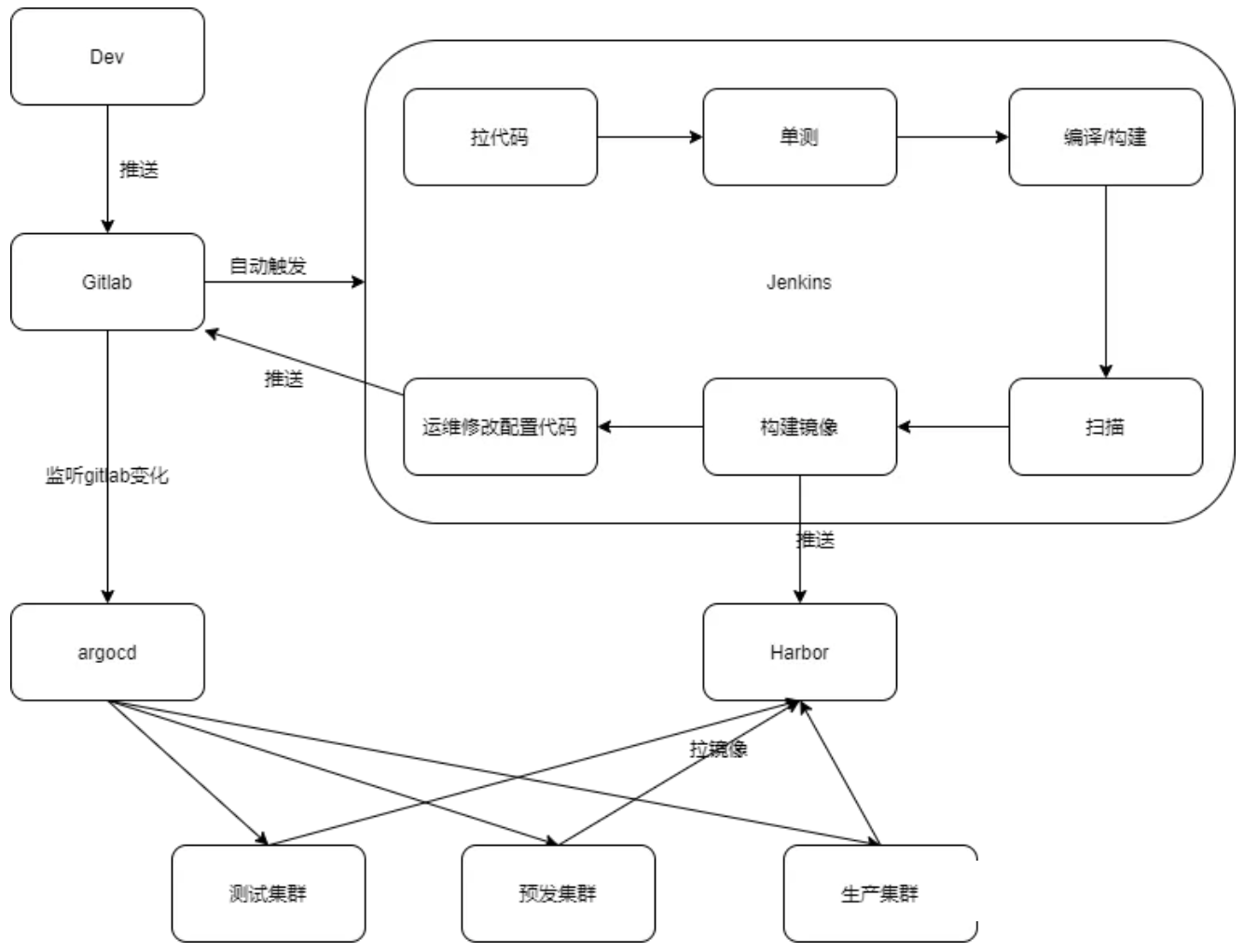
CI/CD 流水线由几个主要步骤组成:代码提交、构建、测试、部署。对于 Jenkins、Kubernetes、ArgoCD 的组合,整体架构大致如下:
- 开发者提交代码到代码仓库(如 GitHub 或 GitLab)。
- Jenkins 监控代码变动,并在检测到新的提交时触发构建。
- Jenkins 使用 Docker 构建容器镜像,然后将镜像推送到容器镜像仓库(如 Docker Hub 或私有仓库)。
- ArgoCD 负责监控 Git 仓库,检测到部署配置文件变动后,自动同步变更到 Kubernetes 集群,执行应用部署。
Jenkins
Jenkinsfile 是 Jenkins 中用来描述流水线过程的脚本文件,它定义了从代码拉取、构建到测试的全部过程。在本例中,我们将编写一个 Jenkinsfile 文件,用于完成以下步骤:
- 拉取代码。
- 构建 Docker 镜像。
- 推送 Docker 镜像到镜像仓库。
- 通知 ArgoCD 更新配置文件。
pipeline {
    //Agent是实际执行任务的实例,主服务器触发 Jenkins 作业时,实际执行发生在作业中配置的代理节点上。Agent支持静态设置和动态设置,动态代理支持触发作业时,代理就会按需部署为虚拟机/容器,并在作业完成后被删除。
    agent any
    environment {
        REGISTRY = 'your-docker-registry'
        IMAGE_NAME = 'your-image-name'
        IMAGE_TAG = "${env.BUILD_NUMBER}"
    }
    stages {
        //代码拉取
        stage('Clone Repository') {
            steps {
                checkout scm
            }
        }
        //docker镜像构建
        stage('Build Docker Image') {
            steps {
                script {
                    dockerImage = docker.build("${REGISTRY}/${IMAGE_NAME}:${IMAGE_TAG}")
                }
            }
        }
        //docker镜像推送至harbor
        stage('Push Docker Image') {
            steps {
                script {
                    docker.withRegistry('https://your-docker-registry', 'docker-credentials-id') {
                        dockerImage.push()
                    }
                }
            }
        }
        //更新k8s应用部署文件
        stage('Update Deployment Config') {
            steps {
                sh 'git clone https://your-git-repo-url.git'
                dir('your-git-repo') {
                    sh "sed -i 's/tag:.*/tag: ${IMAGE_TAG}/' deployment.yaml"
                    sh 'git commit -am "Update deployment image tag"'
                    sh 'git push'
                }
            }
        }
    }
}
此处只涉及构建docker镜像,一般还涉及应用程序构建,如通过Maven构建Jar包。
stages {
      stage('Build') {
          steps {
              sh 'mvn -B -DskipTests clean package'
          }
      }
}
如果涉及测试,则增加测试阶段
stage('Test') {
    steps {
        sh 'mvn test'
    }
    post {
        always {
            junit 'target/surefire-reports/*.xml'
        }
    }
}
ArgoCD
ArgoCD 是一个 Kubernetes 的声明式 GitOps 工具,用于实现持续部署。通过 ArgoCD,我们可以使 Kubernetes 集群与 Git 仓库中的声明式配置保持一致。安装 ArgoCD 并配置为监控部署配置文件的变更,是实现持续部署的关键步骤。
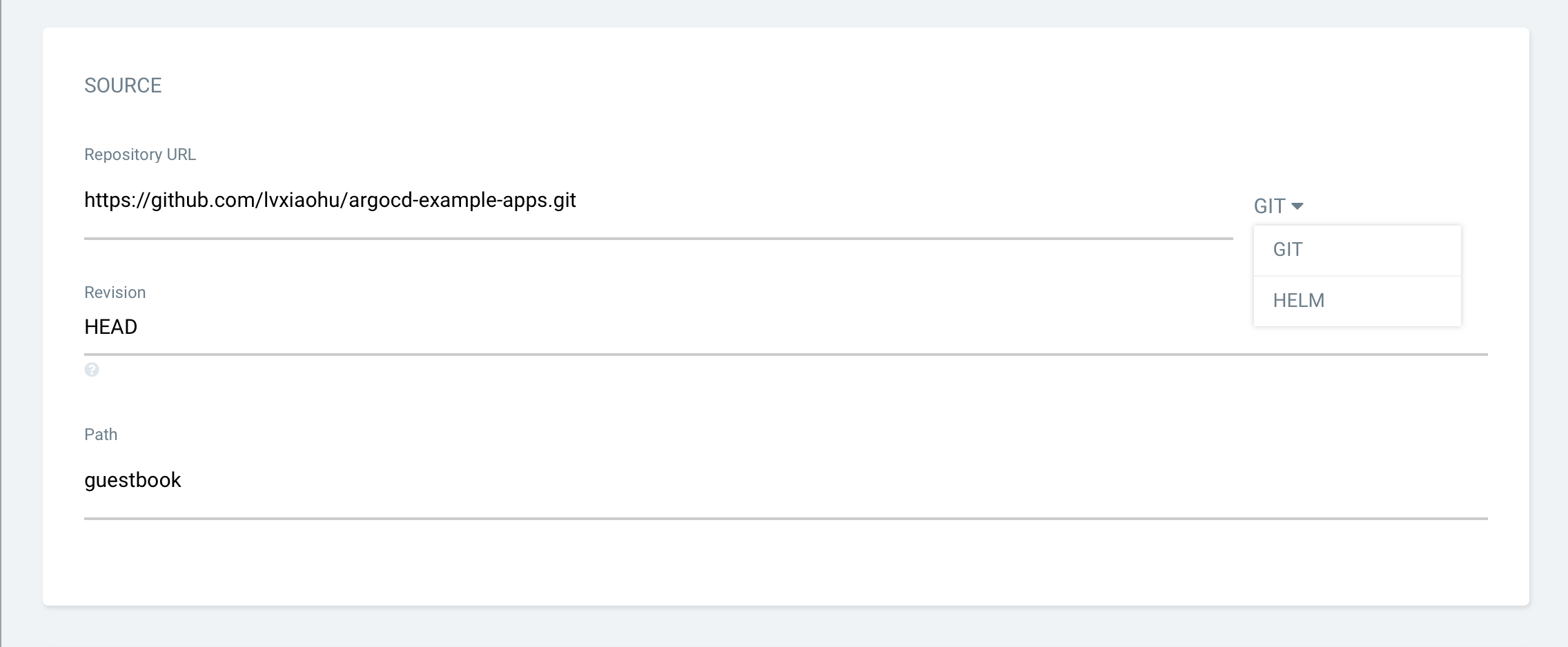
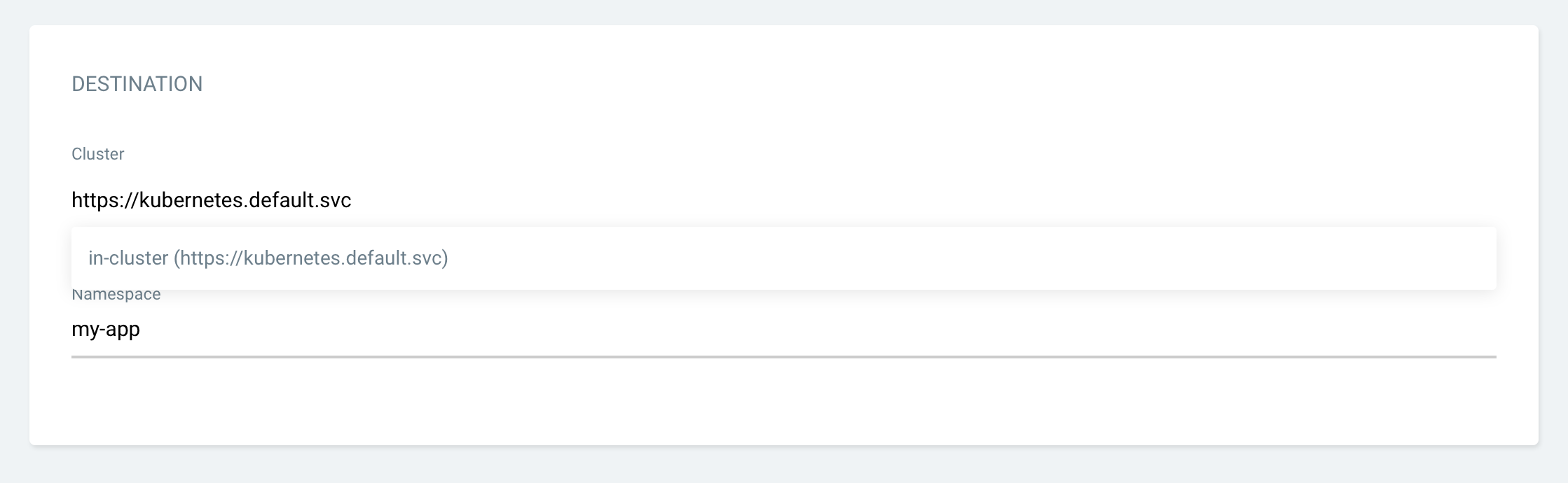
Jenkins将部署文件更新到git仓库中,ArgoCD的应用发布项目对接Git仓库和k8s集群,监听git仓库变更进行应用部署或升级。
Argo Workflow
概念
Argo Workflows是用于在 Kubernetes 上编排 Job 的开源云原生工作流引擎。可以轻松自动化和管理 Kubernetes 上的复杂工作流程。适用于各种场景,包括定时任务、机器学习、ETL 和数据分析、模型训练、数据流 pipline、CI/CD 等。
持续集成CI只是Argo Workflow重要应用领域之一。
Jenkins 作为 CI/CD 领域最常见的解决方案,其具有开源免费、插件丰富、社区成熟诸多优点,但它仍然存在一些问题,尤其是云原生大背景的当下:
- 非 kubernetes 原生;
- 随着 pipeline 和插件的增加,Jenkins 会面临性能瓶颈;
- 自动扩展能力不足,并发不足,运行时间长,空闲计算浪费成本;
- 维护成本方面,虽然 Jenkins 的插件生态系统丰富,但这也可能导致插件版本不兼容、更新不及时或安全漏洞等问题,管理插件更新和权限是一个持续的挑战;
- 项目隔离/权限分配方案的缺陷等。
Argo Workflows 构建在 Kubernetes 之上,使其具有 Kubernetes 经过时间考验的优势,其 Autoscaling 和并发等能力,使得 Argo Workflows 可以处理大规模的 pipelins,具有更快的运行速度,和更低的费用/使用成本;并且与 Argo 生态的 Argo CD、Argo Rollout、Argo Event 的无缝集成,为 CI 等场景提供更强大的能力。
Argo Workflow工作流中每一个步骤都是一个容器。
| Argo Workflow | Jenkins | |
|---|---|---|
| Kubernetes 原生 | kubernetes原生,因此也具有k8s的部分管理容器的优势,如: 容器故障后自动恢复 弹性伸缩 支持RBAC,配合Argo的集成SSO能力,很容易实现企业的多租隔离场景 |
非Kubernetes原生 |
| Autoscaling、并发、性能 | Argo被用来处理大规模pipeline,自动扩展 并发让运行更快,效率更高 |
Jenkins更适合规模较小的场景,在处理大量pipelines时,性能下降。自动扩展能力差。 并发不足,运行时间长 |
| 成本 | 自动伸缩,最小化成本 原生支持spot nodes(竞价型实例),降低成本 |
Jenkins空闲计算浪费成本 |
| 社区生态 | Argo社区不断壮大,与其生态的ArgoCD、Argo Rollout、Argo Eventl的无缝集成,为CI等场景提供更强大的能力 | Jenkins社区成熟、资源丰富,大量插件降低使用门槛,但随着时间推移,插件更新和权限管理极大增加运维成本,使开发者更多精力在维护插件,而非聚焦业务功能和为客户提供价值 |
Workflow流水线配置
精简标准Workflow
Workflow 是Argo中最重要的资源类型,具有工作流定义和工作流状态存储两大功能。
template是Workflow(和WorkflowTemplate)的最小组成单位,流水线由多个 template 组成,可以理解为流水线中的某一个步骤。
apiVersion: argoproj.io/v1alpha1
kind: Workflow
metadata:
  generateName: steps-
spec:
  entrypoint: hello           # 将 “hello” template作为流水线入口
  templates:
  - name: hello               # 流水线的第一个 template,被entrypoint引用
    steps:                    # 这个template的类型为steps
    - - name: hello
        template: whalesay    # 引用第二个template “whalesay”
        arguments:
          parameters: [{name: message, value: "hello"}]

  - name: whalesay             # 流水线的第二个template,被hello template引用
    inputs:
      parameters:
      - name: message
    container:                # 这个template的类型为container
      image: docker/whalesay
      command: [cowsay]
      args: ["{{inputs.parameters.message}}"]
整个 Workflow 对象核心内容分为以下三部分:
templates:模板列表,此处定义了流水线中的所有步骤以及步骤之间的先后顺序。entrypoint: 流水线入口,类似于代码中的 main 方法,此处一般引用某一个template invocators即可。parameters:流水线中用到的参数,包括 arguments 块中的全局参数和 inputs 块中的局部参数两种。
entrypoint
Workflow 中必须要指定 entrypoint,entrypoint 作为任务的执行起点,类似于程序中的 main 方法,每个 Workflow 中都必须要指定 entrypoint。
只有被 entrypoint 指定的任务才会运行,因此,entrypoint 一般只会指定 Steps 和 DAG 类型的 template,也就是template invocators(模板调用器)。然后由 Steps 中的 steps 或者 DAG中的 tasks 来指定多个任务。
templates
ArgoWorkflow 当前支持 6 种 template:
-
container:和
Kubernetes container spec是一致的,这个类型的 template 就是启动一个 container,用户可以指定image、command、args 等信息来控制具体执行的动作。- name: whalesay container: image: docker/whalesay command: [cowsay] args: ["hello world"] -
script:script 实际上是 container 的封装,spec 和 container 一致,同时增加了 source 字段,用于定义一个脚本,脚本的运行结果会记录到
{{tasks.<NAME>.outputs.result}}or{{steps.<NAME>.outputs.result}}。script 可以理解为简化了使用 container 来执行脚本的配置。- name: gen-random-int script: image: python:alpine3.6 command: [python] source: | import random i = random.randint(1, 100) print(i) -
resource:Resource 类型的 template 用于操作集群中的资源,action 参数表示具体的动作,支持 get, create, apply, delete, replace, patch。
- name: k8s-owner-reference resource: action: create manifest: | apiVersion: v1 kind: ConfigMap metadata: generateName: owned-eg- data: some: value -
suspend:Suspend 类型的 template 就是用于暂停流水线执行。默认会一直阻塞直到用户通过
argo resume命令手动恢复,或者通过duration参数指定暂停时间,到时间后会自动恢复。- name: delay suspend: duration: "20s" -
steps:用于处理模板之间的关系,包括哪些任务需要运行和按什么顺序运行。
- name: hello-hello-hello steps: # 定义要运行 step1、step2a、step2b 3 个 template。 - - name: step1 # 先运行step1 template: prepare-data - - name: step2a # 然后 step2a、step2b 并行运行 template: run-data-first-half - name: step2b template: run-data-second-half # yaml中,以 - 开头的行表示构成一个数组;steps是一个二维数组,steps1在一个数组中,step2a 和 step2b 在另一个、同一个元素中的 -
dag:dag和steps一样用于处理模板之间的关系,不同的是DAG 则可以自定义任务之间的依赖,由 argo 根据依赖自行生成最终的运行的先后顺序。DAG(Directed Acyclic Graph)叫做有向无环图,是一个没有有向循环的、有限的有向图。DAG 中新增了
dependencies字段,可以指定当前步骤依赖的依赖。- name: diamond dag: tasks: - name: A template: echo - name: B dependencies: [A] # B依赖于A,A运行完才会执行,与C同时执行 template: echo - name: C dependencies: [A] # C依赖于A,A运行完才会执行,与B同时执行 template: echo - name: D dependencies: [B, C] # D依赖于B和C,B和C都运行完才会执行 template: echo
template分类:ArgoWorkflow 中的 6 种 template,实际上可以按照具体作用将这 6 个 template 分为 template definitions(模板定义)以及 template invocators(模板调用器)两种。
- template definitions(模板定义):该类型 template 用于定义具体步骤要执行的内容包含
container,script,resource,suspend类型。 - template invocators(模板调用器):该类型 template 用于组合其他 template definitions(模版定义) ,定义步骤间的执行顺序等,包含
dag和steps两种类型,一般 entrypoint 指向的就是该类型的模板。
parameters
Workflow 中的参数可以分为以下两种:
-
形参:在 template(template definitions) 中通过 inputs 字段定义需要哪些参数,可以指定默认值
template 中可以使用
spec.templates[*].inputs字段来指定形式参数,在 template 中可以通过{{inputs.parameters.$name}}语法来引用参数。templates: - name: whalesay-template inputs: parameters: - name: message value: "default message" # 可以指定默认值,如果没有默认值,则调用该 template 时必须指定该参数,有默认值则可以不指定。 container: image: docker/whalesay command: [cowsay] args: ["{{inputs.parameters.message}}"] -
实参:在 template(template invocators) 中通过 arguments 字段为参数赋值,覆盖 inputs 中的默认值
- name: hello               # The first "template" in this Workflow, it is referenced by "entrypoint"
    steps:                    # The type of this "template" is "steps"
    - - name: hello
        template: whalesay    # We reference our second "template" here
        arguments:
          parameters: [{name: message, value: "hello"}]
参数复用:除了在 steps/dag 中指定 arguments,甚至可以直接在 Workflow 中指定,然后 steps/dag 中通过{{workflow.parameters.$name}} 语法进行引用。这样即可实现参数复用,Workflow 中定义一次,steps/dag 中可以多次引用。
apiVersion: argoproj.io/v1alpha1
kind: Workflow
metadata:
  generateName: example-
spec:
  entrypoint: main
  arguments:
    parameters:
    - name: workflow-param-1  # 直接在Workflow中指定,全局定义
      value: workflow-value-1
  templates:
  - name: main
    dag:
      tasks:
      - name: step-A
        template: step-template-A
        arguments:
          parameters:
          - name: template-param-1
            value: "{{workflow.parameters.workflow-param-1}}"  # 在dag的step-A中引用全局定义的参数

  - name: step-template-A
    inputs:
      parameters:
        - name: template-param-1
    script:
      image: alpine
      command: [/bin/sh]
      source: |
                    echo "{{inputs.parameters.template-param-1}}"
WorkflowTemplate和TemplateRef
WorkflowTemplate 就是 Workflow 的定义,WorkflowTemplate 描述了这个流水线的详细信息,包括有哪些任务,任务之间的先后顺序等等。
标准的Workflow包含所有template和parameter,Workflow 对象就会特别大,修改起来比较麻烦,template也无法共享。将 template 存到 WorkflowTemplate,Workflow 中只引用 Template 并提供参数即可。
ArgoWorkflow 中的工作流模板根据范围不同分为 WorkflowTemplate 和 ClusterWorkflowTemplate 两种。
- WorkflowTemplate:命名空间范围,只能在同一命名空间引用
- ClusterWorkflowTemplate:集群范围,任意命名空间都可以引用
WorkflowTemplate
WorkflowTemplate 和 Workflow 参数是一模一样的,只需要将 kind 由 Workflow 替换为 WorkflowTemplate 即可实现转换。
apiVersion: argoproj.io/v1alpha1
kind: WorkflowTemplate
metadata:
  name: workflow-template-submittable
  namespace: default
spec:
  entrypoint: whalesay-template
  arguments:
    parameters:
      - name: message
        value: tpl-argument-default
  templates:
    - name: whalesay-template
      inputs:
        parameters:
          - name: message
            value: tpl-input-default
      container:
        image: docker/whalesay
        command: [cowsay]
        args: ["{{inputs.parameters.message}}"]
在Template中有一个独特的字段,workflowMetadata ,主要用于存储元数据,后续由这个 Template 创建出的 Workflow 都会自动携带上这些信息。通过这些信息可以追踪到 Workflow 是由哪个 Template 创建的。
apiVersion: argoproj.io/v1alpha1
kind: WorkflowTemplate
metadata:
  name: workflow-template-submittable
spec:
  workflowMetadata:
    labels:
      example-label: example-value
ClusterWorkflowTemplate类似于 WorkflowTemplate,可以理解为 k8s 中的 Role 和 ClusterRole 的关系,作用域不同罢了。和 WorkflowTemplate 所有参数都一致,只是将 yaml 中的 kind 替换为 ClusterWorkflowTemplate 即可。
TemplateRef
创建好 WorkflowTemplate 之后就可以在 Workflow 中使用 TemplateRef 直接引用对应模板了,这样 Workflow 对象就会比较干净。
对于 WorkflowTemplate 的引用也有两种方式:
-
workflowTemplateRef:引用完整的 WorkflowTemplate,Workflow 中只需要指定全局参数即可
apiVersion: argoproj.io/v1alpha1 kind: Workflow metadata: generateName: workflow-template-hello-world- spec: arguments: # 对应Template中的spec.arguments,可以对Template的参数进行替换,如果在此不指定则使用Template中的默认参数。 parameters: - name: message value: "from workflow" workflowTemplateRef: name: workflow-template-submittableworkflowTemplateRef指定要引用的 Template 名字即可,这一句就相当于把对应 Template 中 spec 字段下的所有内容都搬过来了,包括 entrypoint、template 等。 -
templateRef:只引用某一个 template,Workflow 中还可以指定其他的 template、entrypoint 等信息。
apiVersion: argoproj.io/v1alpha1
kind: Workflow
metadata:
  generateName: workflow-template-hello-world-
spec:
  entrypoint: whalesay
  templates:
  - name: whalesay
    steps:                              # You should only reference external "templates" in a "steps" or "dag" "template".
      - - name: call-whalesay-template
          templateRef:                  # You can reference a "template" from another "WorkflowTemplate" using this field
            name: workflow-template-1   # This is the name of the "WorkflowTemplate" CRD that contains the "template" you want
            template: whalesay-template # This is the name of the "template" you want to reference
          arguments:                    # You can pass in arguments as normal
            parameters:
            - name: message
              value: "hello world"
name 指的是 WorkflowTemplate 名称,即 workflow-template-1 这个 WorkflowTemplat
template 指的就是 template 的名称 ,即 workflow-template-1 这个 WorkflowTemplat 中的名为 whalesay-template 的 template根据官方文档,最好不要在
steps和dag这两个template invocators(模板调用器)之外使用 templateRef 。如果要使用其他命令空间中的ClusterWorkflowTemplate,在templateRef时增加
clusterScope: true参数即可。templateRef: name: cluster-workflow-template-whalesay-template template: whalesay-template clusterScope: true # 指定为集群范围时,ArgoWorkflow 会去搜索 ClusterWorkflowTemplate 对象,否则会在当前命名空间搜索 WorkflowTemplate
触发模式
Argo Workflows 的流水线有多种触发方式:
- 手动触发:手动提交一个 Workflow,就会触发一次构建,理论上是 WorkflowTemplate 对象。
- 定时触发:
CronWorkflow,类似于 k8s 中的 job 和 cronjob,CronWorkflow 会定时创建 Workflow 来实现定时触发。 - Event 事件触发:比如通过git commit 触发,借助
argo-events可以实现此功能。
定时触发
CronWorkflow 本质上就是一个 Workflow + Cron Spec,设计上参考了 k8s 中的 CronJob。
apiVersion: argoproj.io/v1alpha1
kind: CronWorkflow
metadata:
  name: test-cron-wf
spec:
  schedule: "* * * * *"   # cron 表达式,* * * * * 每分钟创建一次
  concurrencyPolicy: "Replace"   # 并发模式,支持 Allow、Forbid、Replace,Allow:允许同时运行多个 Workflow,Forbid:禁止并发,有 Workflow 运行时,就不会再创建新的,Replace: 表示新创建 Workflow 替换掉旧的,不会同时运行多个 Workflow。
  startingDeadlineSeconds: 0  # Workflow 创建出来到第一个 Pod 启动的最大时间,超时后就会被标记为失败。
  workflowSpec:  # 后面都是标准的Workflow 的 Spec
    entrypoint: whalesay
    templates:
    - name: whalesay
      container:
        image: alpine:3.6
        command: [sh, -c]
        args: ["date; sleep 90"]
Event事件触发
argo 提供了一个 Event API:/api/v1/events/{namespace}/{discriminator},该 API 可以接受任意 json 数据。通过 event API 可以创建 Workflow ,类似于 Webhook。
curl https://localhost:2746/api/v1/events/argo/my-discriminator \
  -H "Authorization: $ARGO_TOKEN" \
  -d '{"message": "hello"}'
discriminator为鉴别器,用于寻找对应的WorkflowEvent
Event触发需要准备Token和WorkflowEventBinding,WorkflowEventBinding用于配置接收 event 以及收到 event 后创建的 Workflow 信息。
-
Token创建
创建 RBAC 相关对象,role、rolebinding、sa,其中 role 只需要提供最小权限即可。
首先创建role
apiVersion: rbac.authorization.k8s.io/v1
kind: Role
metadata:
  name: test
rules:
  - apiGroups:
      - argoproj.io
    resources:
      - workfloweventbindings
    verbs:
      - list
  - apiGroups:
      - argoproj.io
    resources:
      - workflowtemplates
    verbs:
      - get
  - apiGroups:
      - argoproj.io
    resources:
      - workflows
    verbs:
      - create
然后创建serviceaccount ,并rolebinding绑定 role
kubectl create sa test

kubectl create rolebinding test --role=test --serviceaccount=default:test
然后创建一个 Secret
apiVersion: v1
kind: Secret
metadata:
  name: test.service-account-token
  annotations:
    kubernetes.io/service-account.name: test
type: kubernetes.io/service-account-token
查询 Secret 解析 Token
ARGO_TOKEN="Bearer $(kubectl get secret test.service-account-token -o=jsonpath='{.data.token}' | base64 --decode)" echo $ARGO_TOKEN Bearer ZXlKaGJHY2lPaUpTVXpJMU5pSXNJbXRwWkNJNkltS... -
WorkflowEventBinding创建
为了接收 Event,可以创建 WorkflowEventBinding 对象,具体如下:
apiVersion: argoproj.io/v1alpha1
kind: WorkflowEventBinding
metadata:
  name: event-consumer
spec:
  event:
    # metadata header name must be lowercase to match in selector
    selector: payload.message != "" && metadata["x-argo-e2e"] == ["true"] && discriminator == "my-discriminator"
  submit:
    workflowTemplateRef:
      name: my-wf-tmple
    arguments:
      parameters:
      - name: message
        valueFrom:
          event: payload.message
spec.event.selector 指定了该 Binding 该如何匹配收到的 Event,比如这里的条件就是:
- 1)payload 中有一个 message 参数,值不为空
- 2)header 中包含 x-argo-e2e,且值为 true
- 注意:这里匹配的时候 header 都会被转为小写
- 3)最后就是 discriminator 名字为 my-discriminator
如果匹配则会使用 submit 下面指定的内容创建 Workflow:
- 1)使用 my-wf-tmple 这个 workflowTemplate 创建 Workflow
- 2)使用 payload.message 作为参数
workflowTemplate应事先创建好。
apiVersion: argoproj.io/v1alpha1 kind: WorkflowTemplate metadata: name: my-wf-tmple spec: templates: - name: main inputs: parameters: - name: message value: "{{workflow.parameters.message}}" container: image: docker/whalesay:latest command: [cowsay] args: ["{{inputs.parameters.message}}"] entrypoint: main -
事件触发
最后就可以发送 API 来触发 event 实现 Workflow 的创建
curl $ARGO_SERVER:2746/api/v1/events/default/my-discriminator \
    -H "Authorization: $ARGO_TOKEN" \
    -H "X-Argo-E2E: true" \
    -d '{"message": "hello events"}'
Webhook
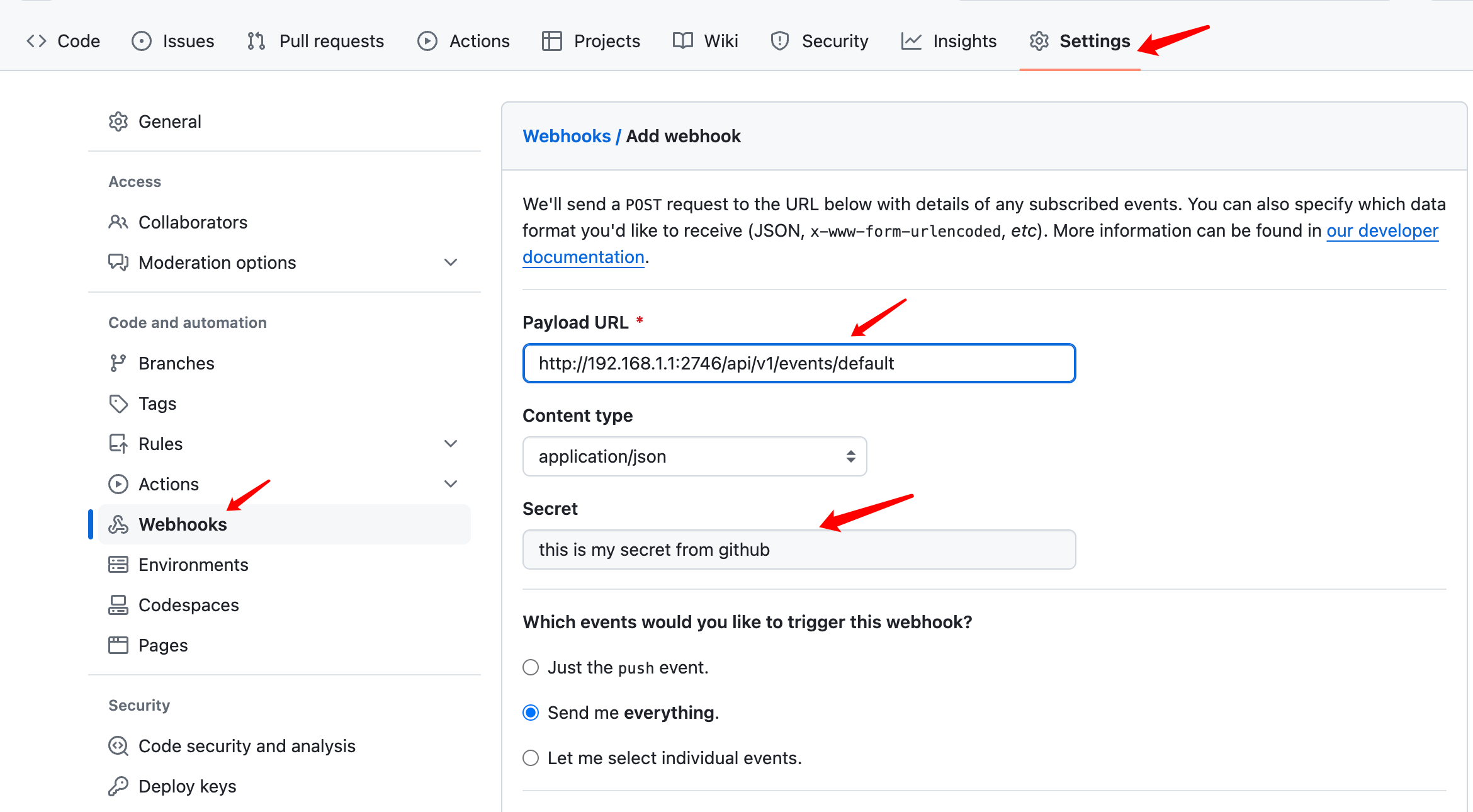
对于 Webhook 客户端来说(如Github、Gitlab 等 Git 仓库),是没办法这样指定 token 的,因此需要通过argo-workflows-webhook-clients 配置来告诉 argo,哪个 Webhook 使用哪个 Secret 中的 token。
kind: Secret
apiVersion: v1
metadata:
  name: argo-workflows-webhook-clients

stringData:
# The data keys must be the name of a service account.
# Value 则包含 type 和 secret 两部分。type:Webhook 来源,比如 github、gitlab;secret:一个字符串,非 k8s secret,一般在对应平台添加 Webhook 时进行配置
  # https://support.atlassian.com/bitbucket-cloud/docs/manage-webhooks/
  bitbucket.org: |
    type: bitbucket
    secret: "my-uuid"
  # https://confluence.atlassian.com/bitbucketserver/managing-webhooks-in-bitbucket-server-938025878.html
  bitbucketserver: |
    type: bitbucketserver
    secret: "shh!"
  # https://developer.github.com/webhooks/securing/
  github.com: |
    type: github
    secret: "shh!"
  # https://docs.gitlab.com/ee/user/project/integrations/webhooks.html
  gitlab.com: |
    type: gitlab
    secret: "shh!"
以 Github 具体,secret 配置如下:
Workflow CI流水线
CI是Workflow的重要功能,以Java应用为例,CI从拉取到部署全流程。
创建一个 WorkflowEventBinding,用于将 GitHub Webhook 事件与 Argo Workflow 模板绑定。webhook创建和Secret创建参考前面内容。
apiVersion: argoproj.io/v1alpha1
kind: WorkflowEventBinding
metadata:
  name: github-webhook-binding
spec:
  event:
    selector: payload.repository.name == "your-repo-name" && payload.ref == "refs/heads/main"
  submit:
    workflowTemplateRef:
      name: java-ci-workflow
    arguments:
      parameters:
        - name: repo-url
          valueFrom:
            event: payload.repository.clone_url
        - name: commit-sha
          valueFrom:
            event: payload.head_commit.id
创建一个 Argo Workflow 模板,定义 CI 流水线的各个步骤:
apiVersion: argoproj.io/v1alpha1
kind: WorkflowTemplate
metadata:
  name: java-ci-workflow
spec:
  entrypoint: main
  arguments:
    parameters:
      - name: repo-url
      - name: commit-sha
  volumeClaimTemplates:
    - metadata:
        name: shared-workdir
      spec:
        accessModes: ["ReadWriteMany"]
        resources:
          requests:
            storage: 1Gi
  templates:
    - name: main
      dag:
        tasks:
          - name: git-clone
            template: git-clone
          - name: build
            template: build
            depends: git-clone
          - name: deploy
            template: deploy
            depends: build

    - name: git-clone
      container:
        image: alpine/git:v2.26.2
        command: [sh, -c]
        args:
          - |
            git clone {{workflow.parameters.repo-url}} /src
            cd /src && git checkout {{workflow.parameters.commit-sha}}
        volumeMounts:
          - name: shared-workdir
            mountPath: /src

    - name: build
      container:
        image: maven:3.8.6-jdk-11-slim
        command: [sh, -c]
        args:
          - |
            cd /src && mvn clean package -DskipTests
        volumeMounts:
          - name: shared-workdir
            mountPath: /src

    - name: deploy
      container:
        image: openjdk:11-jre-slim
        command: [sh, -c]
        args:
          - |
            java -jar /src/target/your-java-app.jar
        volumeMounts:
          - name: shared-workdir
            mountPath: /src

 浙公网安备 33010602011771号