Vue - el-table 嵌套表
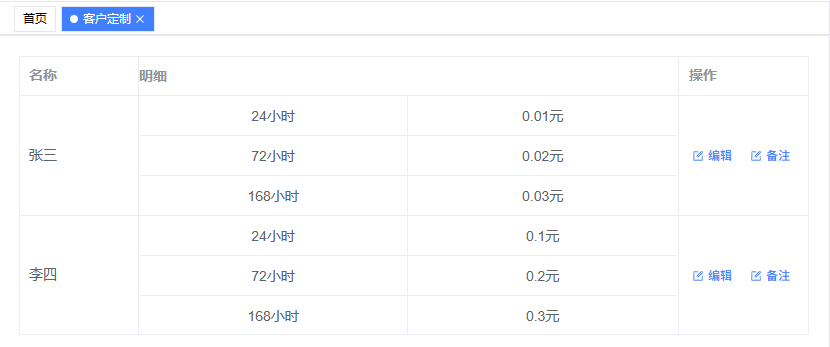
使用 el-table 实现表格嵌套效果
<template>
  <el-card shadow="never">
    <el-table :data="tableData" border class="detail-table">
      <el-table-column prop="ReportTitleName" label="名称" width="120" />
      <el-table-column prop="detail" label="明细" class-name="detail-column">
        <template #default="scope">
          <table class="inner-table">
            <tbody>
              <tr v-for="(item, index) in scope.row.Price" :key="index">
                <td class="inner-td">{{ item.MonitorHour }}小时</td>
                <td class="inner-td">{{ item.Price }}元</td>
              </tr>
            </tbody>
          </table>
        </template>
      </el-table-column>
      <el-table-column
        v-hasPerm="'DeviceAdd'"
        width="130"
        fixed="right"
        label="操作"
        prop="describe"
      >
        <template #default="scope">
          <el-button
            type="primary"
            icon="edit"
            link
            size="small"
            @click="handleOpenEditDialog(scope.row)"
          >
            编辑
          </el-button>
          <el-button
            type="primary"
            icon="edit"
            link
            size="small"
            @click="handleOpenRemarkDialog(scope.row)"
          >
            备注
          </el-button>
        </template>
      </el-table-column>
    </el-table>
  </el-card>
</template>

<script setup>
import { ref } from "vue";

const tableData = ref([
  {
    TitleLevel: 11,
    ReportTitleName: "张三",
    Price: [
      { MonitorHour: 24, Price: 0.01 },
      { MonitorHour: 72, Price: 0.02 },
      { MonitorHour: 168, Price: 0.03 },
    ],
  },
  {
    TitleLevel: 21,
    ReportTitleName: "李四",
    Price: [
      { MonitorHour: 24, Price: 0.1 },
      { MonitorHour: 72, Price: 0.2 },
      { MonitorHour: 168, Price: 0.3 },
    ],
  },
]);
</script>

<style scoped>
/* 只针对明细列的表头 */
:deep(.detail-column.is-leaf) {
  padding: 0 !important;
}

/* 只针对明细列的单元格 */
:deep(.detail-column) {
  padding: 0 !important;
}

/* 内部表格样式 */
.inner-table {
  width: 100%;
  border-collapse: collapse;
  margin: -1px; /* 消除双边框重叠 */
}

.inner-td {
  width: 50%;
  border: 1px solid #ebeef5;
  padding: 8px 10px;
  text-align: center;
  height: 40px;
  box-sizing: border-box;
}

/* 调整内部表格边框,避免重复 */
.inner-table tr:last-child td {
  border-bottom: none;
}

.inner-table td:last-child {
  border-right: none;
}

/* 确保明细列内容区域没有内边距 */
:deep(.detail-column .cell) {
  padding: 0 !important;
  line-height: normal;
}

/* 保持名称列的正常内边距 */
:deep(.el-table__cell:not(.detail-column)) {
  padding: 8px 0 !important; /* 正常的内边距 */
}

:deep(.el-table__cell:not(.detail-column) .cell) {
  padding: 0 10px !important; /* 正常的内边距 */
}
</style>
效果如下
本文来自博客园,作者:VipSoft 转载请注明原文链接:https://www.cnblogs.com/vipsoft/p/19460383

 浙公网安备 33010602011771号