Spring `@Scheduled` 中这些参数的区别、组合和应用场景
SpringBoot Scheduled 常见用法: https://www.cnblogs.com/vipsoft/p/15751660.html
import cn.hutool.core.date.DateUtil;
import org.slf4j.Logger;
import org.slf4j.LoggerFactory;
import org.springframework.scheduling.annotation.EnableScheduling;
import org.springframework.scheduling.annotation.Scheduled;
import org.springframework.stereotype.Component;

@Component
@EnableScheduling
public class TestJob {

    Logger logger = LoggerFactory.getLogger(this.getClass());

    @Scheduled(cron = "*/10 * * * * ?")
    public void crontabTask() throws InterruptedException {
        logger.info("这是基于 cron -- 按系统时钟算 开始: {}", DateUtil.now());
        Thread.sleep(2000);
        logger.info("这是基于 cron -- 按系统时钟算 结束: {}", DateUtil.now());
    }

    @Scheduled(fixedRate = 10 * 1000)
    public void fixedRateTask() throws InterruptedException {
        logger.info("这是基于 fixedRate -- 从上一次启动开始算 开始: {}", DateUtil.now());
        Thread.sleep(2000);
        logger.info("这是基于 fixedRate -- 从上一次启动开始算 结束: {}", DateUtil.now());
    }

    @Scheduled(fixedDelay = 10 * 1000)
    public void fixedDelayTask() throws InterruptedException {
        logger.info("这是基于 fixedDelay -- 从上一次结束开始算 开始: {}", DateUtil.now());
        Thread.sleep(2000);
        logger.info("这是基于 fixedDelay -- 从上一次结束开始算 结束: {}", DateUtil.now());
    }
}
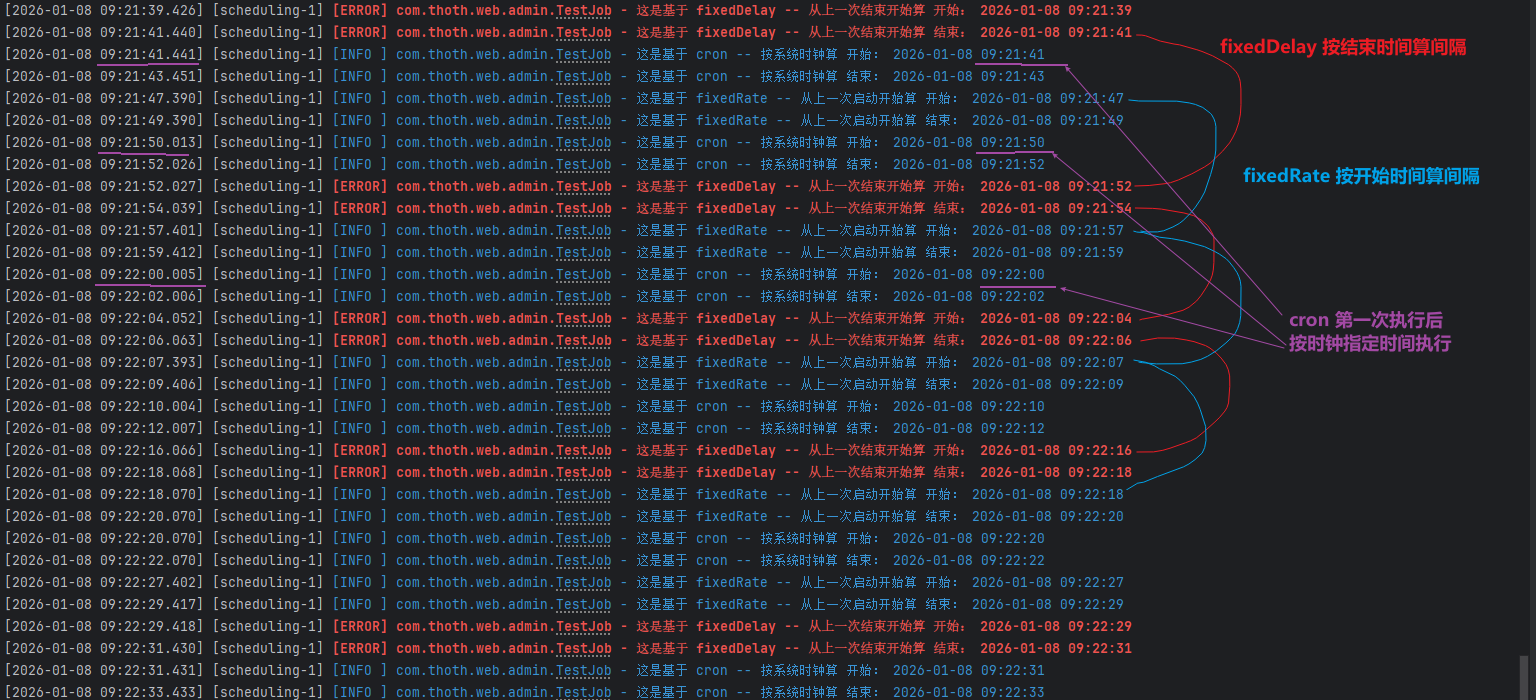
1. 基本概念对比
cron
- 定义:使用 Unix/Linux 风格的 cron 表达式
- 语法:
秒 分 时 日 月 周 年(可选) - 特点:
- 基于日历的调度
- 执行时间固定
- 适合在特定时间点执行任务
// 每天凌晨1点执行
@Scheduled(cron = "0 0 1 * * ?")

// 每5分钟执行(在每分钟的0秒执行)
@Scheduled(cron = "0 */5 * * * ?")

// 每小时的10分、30分、50分执行
@Scheduled(cron = "0 10,30,50 * * * ?")
fixedRate
- 定义:固定频率执行,从上一次开始时间开始计算间隔
- 特点:
- 固定频率,不关心任务执行时间
- 如果任务执行时间超过间隔,会立即开始下一次执行
- 可能造成任务重叠
// 每5分钟执行一次(从上次开始算起)
@Scheduled(fixedRate = 5 * 60 * 1000)
fixedDelay
- 定义:固定延迟执行,从上一次结束时间开始计算间隔
- 特点:
- 保证任务执行间隔
- 不会出现任务重叠
- 适合需要保证任务串行执行的场景
// 上次执行结束后,等待5分钟再执行下次
@Scheduled(fixedDelay = 5 * 60 * 1000)
initialDelay
- 定义:首次执行延迟时间
- 特点:
- 只在第一次执行前等待
- 可以与 fixedRate 或 fixedDelay 组合使用
- 不影响后续执行间隔
// 应用启动后等待10分钟,然后每5分钟执行一次
@Scheduled(initialDelay = 10 * 60 * 1000, fixedRate = 5 * 60 * 1000)
2. 执行行为对比
假设任务执行需要2分钟:
// 情况1:fixedRate = 5分钟
// 时间线:0分开始→2分结束→5分开始→7分结束→10分开始...
// 实际间隔:3分钟(5-2)

// 情况2:fixedDelay = 5分钟
// 时间线:0分开始→2分结束→7分开始→9分结束→14分开始...
// 实际间隔:7分钟(2+5)

// 情况3:cron = "0 */5 * * * ?"
// 时间线:0分开始→2分结束→5分开始→7分结束→10分开始...
// 实际间隔:3分钟,但开始时间固定在0、5、10分
3. 组合使用场景
组合1:initialDelay + fixedRate
@Component
public class DataSyncScheduler {

    // 应用启动后等待2小时(让其他服务就绪),然后每30分钟同步一次
    @Scheduled(initialDelay = 2 * 60 * 60 * 1000,
               fixedRate = 30 * 60 * 1000)
    public void syncData() {
        // 数据同步任务,执行时间较短
    }
}
适用场景:
- 系统启动后需要等待依赖服务就绪
- 定时数据同步
- 缓存刷新
组合2:initialDelay + fixedDelay
@Component
public class ReportGenerator {

    // 应用启动后等待5分钟,然后每次执行结束后等待1小时再执行
    @Scheduled(initialDelay = 5 * 60 * 1000,
               fixedDelay = 60 * 60 * 1000)
    public void generateReport() {
        // 生成报表,执行时间较长(约10-20分钟)
        // 保证每次生成完成后,休息1小时再开始
    }
}
适用场景:
- 执行时间较长的任务
- 需要保证任务不重叠
- 资源密集型操作
组合3:动态计算 initialDelay
@Component
public class MaintenanceTask {

    @PostConstruct
    public void init() {
        // 计算到下一个整点的延迟
    }

    @Scheduled(cron = "0 0 */2 * * ?", zone = "Asia/Shanghai")
    public void maintenance() {
        // 每2小时在整点执行系统维护
    }
}
4. 具体应用场景推荐
使用 cron 的场景:
- 每日定时任务:每天凌晨备份数据库
- 工作日特定时间:工作日9:00发送日报
- 复杂时间规则:每月最后一天23:30执行
- 需要固定执行时刻:整点、半点执行
// 工作日早上9点执行
@Scheduled(cron = "0 0 9 * * MON-FRI")

// 每小时的第5分钟执行
@Scheduled(cron = "0 5 * * * ?")

// 每月1号凌晨2点执行
@Scheduled(cron = "0 0 2 1 * ?")
使用 fixedRate 的场景:
- 监控类任务:每30秒检查系统状态
- 实时数据拉取:每5分钟从API获取最新数据
- 心跳检测:每10秒发送心跳包
- 缓存刷新:定期刷新缓存,不关心执行时长
// 实时监控,频率优先
@Scheduled(fixedRate = 30 * 1000)  // 每30秒

// 频繁的小任务
@Scheduled(fixedRate = 5 * 1000)   // 每5秒
使用 fixedDelay 的场景:
- 批处理任务:数据处理完成后需要冷却
- 文件处理:处理完一个文件再处理下一个
- API调用限制:避免触发API频率限制
- 数据库操作:大数据量操作需要间隔
// 处理大量数据,需要间隔
@Scheduled(fixedDelay = 10 * 60 * 1000)  // 每次间隔10分钟

// 调用有限制的第三方API
@Scheduled(fixedDelay = 2 * 1000)  // 每次间隔2秒,避免限流
使用 initialDelay 的场景:
- 应用启动延迟:等待配置加载完成
- 服务发现延迟:等待注册中心就绪
- 数据预热:等待缓存加载
- 避开启动高峰:应用启动后不立即执行任务
// Spring Cloud 配置,等待配置中心就绪
@Scheduled(initialDelay = 30 * 1000, fixedRate = 60 * 1000)

// 缓存预热后再执行
@Scheduled(initialDelay = 2 * 60 * 1000, cron = "0 */15 * * * ?")
5. 实际项目中的最佳实践
场景:你的需求(8:37启动,8:42执行)
@Component
public class CustodySyncService {

    @PostConstruct
    public void init() {
        // 可以在这里计算动态的 initialDelay
    }

    // 方案1:使用 cron + 动态初始延迟(需要自己实现)
    // 方案2:使用 fixedRate + 计算的 initialDelay

    // 如果坚持要整点开始,建议:
    @Scheduled(cron = "0 */5 * * * ?")
    public void syncCustody() {
        // 这种会固定在 :00, :05, :10 执行
    }

    // 如果要从启动时间算,每5分钟:
    @Scheduled(fixedRate = 5 * 60 * 1000)
    public void syncCustody2() {
        // 从启动开始算,每5分钟执行
        // 首次执行是启动后立即执行,除非配合 initialDelay
    }
}
配置建议:
# application.yml
scheduling:
  tasks:
    custody-sync:
      # 从配置读取,方便不同环境调整
      fixed-rate: 300000  # 5分钟
      initial-delay: ${SYNC_INITIAL_DELAY:120000}  # 默认2分钟
      enabled: true
6. 注意事项
-
时区问题:cron 表达式默认使用服务器时区,建议显式指定
@Scheduled(cron = "0 0 9 * * ?", zone = "Asia/Shanghai") -
任务重叠问题:
fixedRate可能重叠,使用@Async或调整线程池fixedDelay保证不重叠
-
异常处理:
- 任务异常不会影响后续调度
- 建议在方法内部处理异常
-
应用集群部署:
- 所有节点都会执行定时任务
- 需要使用分布式锁或任务调度中间件(如XXL-JOB)
根据你的具体需求,我建议:
- 如果需要严格的固定时间点 → 用 cron
- 如果需要固定频率且不关心重叠 → 用 fixedRate
- 如果需要保证任务串行 → 用 fixedDelay
- 如果需要延迟启动 → 配合 initialDelay
是否需要加 @Async 取决于你的具体需求:
情况1:不加 @Async(默认单线程)
@Component
@EnableScheduling
public class CronTask3 {
    @Scheduled(fixedDelay = 10000)  // 不加 @Async
    public void first() throws InterruptedException {
        taskLogger.info("任务开始执行,线程: " + Thread.currentThread().getName());
        Thread.sleep(5000);  // 模拟任务执行5秒
        taskLogger.info("任务执行结束");
    }
}
执行效果:
10:00:00 任务开始执行,线程: scheduling-1
10:00:05 任务执行结束
10:00:15 任务开始执行,线程: scheduling-1  ← 等待了10秒(5+5)
情况2:加 @Async(多线程异步执行)
@Component
@EnableScheduling
@EnableAsync
public class CronTask3 {
    @Async
    @Scheduled(fixedDelay = 10000)  // 加了 @Async
    public void first() throws InterruptedException {
        taskLogger.info("任务开始执行,线程: " + Thread.currentThread().getName());
        Thread.sleep(5000);  // 模拟任务执行5秒
        taskLogger.info("任务执行结束");
    }
}
执行效果:
10:00:00 任务开始执行,线程: task-1
10:00:05 任务执行结束
10:00:10 任务开始执行,线程: task-2  ← 等待了5秒(不是10秒!)
🚨 重要发现:fixedDelay + @Async 的行为变化
当你使用 fixedDelay = 10000 时:
- 不加
@Async:从上一次方法结束开始算,10秒后执行下一次 - 加了
@Async:从上一次方法调用开始算,10秒后执行下一次
这是因为 @Async 使方法立即返回(实际在另一个线程执行),Spring 认为方法"结束"了。
🔧 正确组合方案
方案1:真正想要 fixedDelay 效果 + 异步执行
@Component
@EnableScheduling
@EnableAsync
public class CronTask3 {

    @Async
    @Scheduled(fixedDelay = 10000)  // 注意:这里的 fixedDelay 行为变了!
    public void first() throws InterruptedException {
        // 实际行为类似 fixedRate,不是真正的 fixedDelay
    }
}
方案2:保持 fixedDelay 特性 + 异步执行(需要手动控制)
@Component
@EnableScheduling
@EnableAsync
public class CronTask3 {

    @Async
    @Scheduled(fixedDelay = 10000)
    public CompletableFuture<Void> first() throws InterruptedException {
        return CompletableFuture.runAsync(() -> {
            try {
                taskLogger.info("任务开始执行");
                Thread.sleep(5000);
                taskLogger.info("任务执行结束");
            } catch (InterruptedException e) {
                Thread.currentThread().interrupt();
            }
        });
    }
}
方案3:使用 fixedRate + @Async(更常见)
@Component
@EnableScheduling
@EnableAsync
public class CronTask3 {

    @Async
    @Scheduled(fixedRate = 10000)  // 建议使用 fixedRate
    public void first() throws InterruptedException {
        taskLogger.info("任务开始执行");
        Thread.sleep(5000);
        taskLogger.info("任务执行结束");
    }
}
📊 对比表格
| 组合方式 | 行为特点 | 是否重叠 | 适用场景 |
|---|---|---|---|
fixedDelay |
上次结束 → 间隔 → 下次开始 | ❌ 不重叠 | 串行任务,避免并发 |
fixedRate |
上次开始 → 间隔 → 下次开始 | ✅ 可能重叠 | 固定频率,不关心执行时长 |
fixedDelay + @Async |
行为类似 fixedRate | ✅ 可能重叠 | 需要异步但误解了行为 |
fixedRate + @Async |
真正的异步固定频率 | ✅ 可能重叠 | 高并发,短任务,需要异步 |
🎯 建议
不要加 @Async 的情况:
- 任务必须串行执行,不能并发
- 任务执行时间超过间隔,且需要等待
- 任务有状态依赖,不能并行
- 使用
fixedDelay保证间隔
应该加 @Async 的情况:
- 任务执行时间长,但需要按时调度
- 需要并行处理多个定时任务
- 任务相互独立,无状态依赖
- 使用
fixedRate保持固定频率
针对你的代码:
@Component
@EnableScheduling
public class CronTask3 {
    Logger taskLogger = LoggerFactory.getLogger("crontabTask_3");

    // 如果任务执行时间 < 10秒,且需要严格间隔10秒
    // 不要加 @Async
    @Scheduled(fixedDelay = 10000)
    public void first() throws InterruptedException {
        // 你的逻辑
    }

    // 如果任务执行时间不确定,需要异步并行
    // 可以加 @Async,但要改用 fixedRate
    @Async
    @Scheduled(fixedRate = 10000)
    public void second() throws InterruptedException {
        // 你的逻辑
    }
}
⚠️ 注意事项
- 线程池配置:使用
@Async需要配置线程池,否则默认线程池可能不够用 - 异常处理:异步任务的异常不会传播到调用者
- 事务问题:
@Async方法的事务边界需要注意 - 资源竞争:异步执行可能引起资源竞争,需要同步控制
@Configuration
@EnableAsync
public class AsyncConfig {

    @Bean("taskExecutor")
    public TaskExecutor taskExecutor() {
        ThreadPoolTaskExecutor executor = new ThreadPoolTaskExecutor();
        executor.setCorePoolSize(10);
        executor.setMaxPoolSize(50);
        executor.setQueueCapacity(100);
        executor.setThreadNamePrefix("async-task-");
        executor.initialize();
        return executor;
    }
}
✅ 总结建议
对于你的代码 @Scheduled(fixedDelay = 10000):
- 如果任务执行很快(< 10秒)→ 不加
@Async - 如果任务可能阻塞 → 加
@Async,但考虑改用fixedRate - 如果必须严格间隔10秒 → 不加
@Async,保持fixedDelay - 如果需要并行处理 → 加
@Async,改用fixedRate
本文来自博客园,作者:VipSoft 转载请注明原文链接:https://www.cnblogs.com/vipsoft/p/19454894

 浙公网安备 33010602011771号