
批量爬取10000张百度图片
1.分析网页
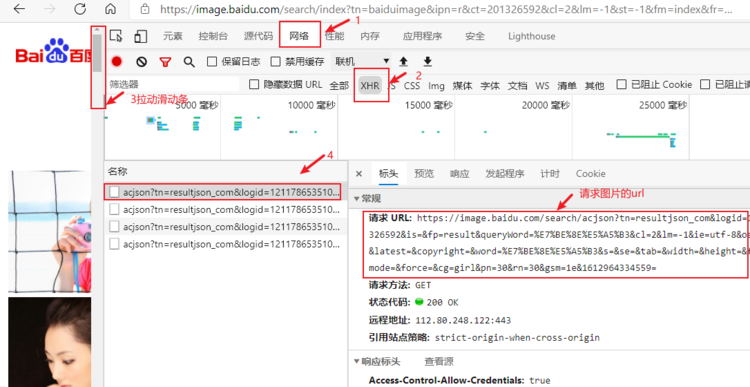
按F12打开开发者模式。

import urllib.request
import urllib.parse
import re
import os
x = 1 # 文件名字起始
def Imgpath(word):
"""
:param word: 传入搜索关键字
:return: 下载文件夹路径
"""
file_path = os.getcwd()[:-4] + word # 获得当前的文件路径后创建带有关键词的路径
if not os.path.exists(file_path): # 判断新建路径是否已经存在
os.makedirs(file_path) # 不存在,创建文件夹
else:
file_path = file_path + '1' # 存在,给文件夹重新命名
os.makedirs(file_path ) # 创建文件夹
return file_path
# 在遍历地址中下载图片
def Imgurl(word):
"""
:param word: 搜索关键字
:return: 图片真实地址
"""
global x # 文件名计数
img_path = Imgpath(word) # 创建文件夹
rep_list = [] # 创建地址列表
# 模拟浏览器,需要用到浏览器的信息和目标url
header = {
'User-Agent': 'Mozilla/5.0 (Windows NT 10.0; Win64; x64) AppleWebKit/537.36 (KHTML, like Gecko) Chrome/56.0.2924.87 Safari/537.36',
"referer": "https://image.baidu.com"
}
# 将中文关键字加密成浏览器能识别的乱码
content= urllib.parse.quote(word,encoding='utf-8')
# 依据pn的规律从30到121循环4次,间隔为30
for num in range(30,10000,30):
gsm = hex(num)[2:] # 将十进制数num转换成16进制数并取后两位
# url = 'https://image.baidu.com/search/acjson?tn=resultjson_com&ipn=rj&ct=201326592&is=&fp=result&queryWord='+content+'&cl=2&lm=-1&ie=utf-8&oe=utf-8&adpicid=&st=&z=&ic=&word='+content+'&s=&se=&tab=&width=&height=&face=&istype=&qc=&nc=&fr=&pn='+str(num)+'&rn=30&gsm='+ gsm #根据规律每次循环生成正确的请求地址
# ===========================================重要=====================================================
# >>>>>>>>>>>>>>>>>>>>>>>>>>>>>>>>>>>找出规律格式化字符串生成url下面是例子<<<<<<<<<<<<<<<<<<<<<<<<<<<<<<<<<<<<
url = 'https://image.baidu.com/search/acjson?tn=resultjson_com&logid=10921846348672786587&ipn=rj&ct=201326592&is=&fp=result&queryWord='+content+'&cl=2&lm=-1&ie=utf-8&oe=utf-8&adpicid=&st=-1&z=&ic=&hd=&latest=©right=&word='+content+'&s=&se=&tab=&width=&height=&face=0&istype=2&qc=&nc=1&fr=&expermode=&force=&cg=star&pn='+str(num)+'&rn=30&gsm='+gsm
# bbb = 'https://image.baidu.com/search/acjson?tn=resultjson_com&logid=10921846348672786587&ipn=rj&ct=201326592&is=&fp=result&queryWord=%E5%88%98%E4%BA%A6%E8%8F%B2&cl=2&lm=-1&ie=utf-8&oe=utf-8&adpicid=&st=-1&z=&ic=&hd=&latest=©right=&word=%E5%88%98%E4%BA%A6%E8%8F%B2&s=&se=&tab=&width=&height=&face=0&istype=2&qc=&nc=1&fr=&expermode=&force=&cg=star&pn=60&rn=30&gsm=3c&1615259916338='
# ccc = 'https://image.baidu.com/search/acjson?tn=resultjson_com&logid=10921846348672786587&ipn=rj&ct=201326592&is=&fp=result&queryWord=%E5%88%98%E4%BA%A6%E8%8F%B2&cl=2&lm=-1&ie=utf-8&oe=utf-8&adpicid=&st=-1&z=&ic=&hd=&latest=©right=&word=%E5%88%98%E4%BA%A6%E8%8F%B2&s=&se=&tab=&width=&height=&face=0&istype=2&qc=&nc=1&fr=&expermode=&force=&cg=star&pn=90&rn=30&gsm=5a&1615259926072='
# ddd = 'https://image.baidu.com/search/acjson?tn=resultjson_com&logid=10921846348672786587&ipn=rj&ct=201326592&is=&fp=result&queryWord=%E5%88%98%E4%BA%A6%E8%8F%B2&cl=2&lm=-1&ie=utf-8&oe=utf-8&adpicid=&st=-1&z=&ic=&hd=&latest=©right=&word=%E5%88%98%E4%BA%A6%E8%8F%B2&s=&se=&tab=&width=&height=&face=0&istype=2&qc=&nc=1&fr=&expermode=&force=&cg=star&pn=120&rn=30&gsm=78&1615259926281='
# eee = 'https://image.baidu.com/search/acjson?tn=resultjson_com&logid=10921846348672786587&ipn=rj&ct=201326592&is=&fp=result&queryWord=%E5%88%98%E4%BA%A6%E8%8F%B2&cl=2&lm=-1&ie=utf-8&oe=utf-8&adpicid=&st=-1&z=&ic=&hd=&latest=©right=&word=%E5%88%98%E4%BA%A6%E8%8F%B2&s=&se=&tab=&width=&height=&face=0&istype=2&qc=&nc=1&fr=&expermode=&force=&cg=star&pn=150&rn=30&gsm=96&1615260040473='
# fff = 'https://image.baidu.com/search/acjson?tn=resultjson_com&logid=10921846348672786587&ipn=rj&ct=201326592&is=&fp=result&queryWord=%E5%88%98%E4%BA%A6%E8%8F%B2&cl=2&lm=-1&ie=utf-8&oe=utf-8&adpicid=&st=-1&z=&ic=&hd=&latest=©right=&word=%E5%88%98%E4%BA%A6%E8%8F%B2&s=&se=&tab=&width=&height=&face=0&istype=2&qc=&nc=1&fr=&expermode=&force=&cg=star&pn=180&rn=30&gsm=b4&1615260040625='
req = urllib.request.Request(url=url,headers=header) # 获得请求对象
page = urllib.request.urlopen(req).read() # 请求并读取返回信息
try: # 如果返回信息遇到不在utf-8范围内的字符,跳过
response = page.decode('utf-8') # 解码返回的信息
imgpattern = re.compile(r'"thumbURL":"(.*?)\.jpg') # 编写正则
rsp_data = re.findall(imgpattern, response) # 通过正则匹配
rep_list += rsp_data # 加入每个地址
# 拿到地址就开始下载了
for url in rep_list[:100]: # 循环提取Imgurl列表中的前100个字符串
pngurl = url.replace(r'"thumbURL":"', " ") # 获得字符串里面的url
path = img_path + '\\' + word + str(x) + '.png' # 下载图片的路径
pngdata = urllib.request.urlopen(pngurl).read() # 下载图片数据
f = open(path, 'wb') # 必须用二进制写入
f.write(pngdata) # 下载图片
f.close()
x += 1 # 张数计数
print('第%s张'%x)
except UnicodeDecodeError:
pass
if __name__ == '__main__':
word = input("请输入中文关键词:")
Imgurl(word)

 浙公网安备 33010602011771号