
HCNA Routing&Switching之vrp基础
什么是vrp?
vrp是Versatile Routing Platform的缩写,翻译成中文就是通用路由平台,该平台是华为公司具有完全自主知识产权的网络操作系统。可以运行在多种硬件平台之上。拥有一致的网络界面、用户界面和管理界面,提供了灵活丰富的应用解决方案,集成了路由交换技术、QoS技术、安全技术和IP语音技术等数据通信功能。
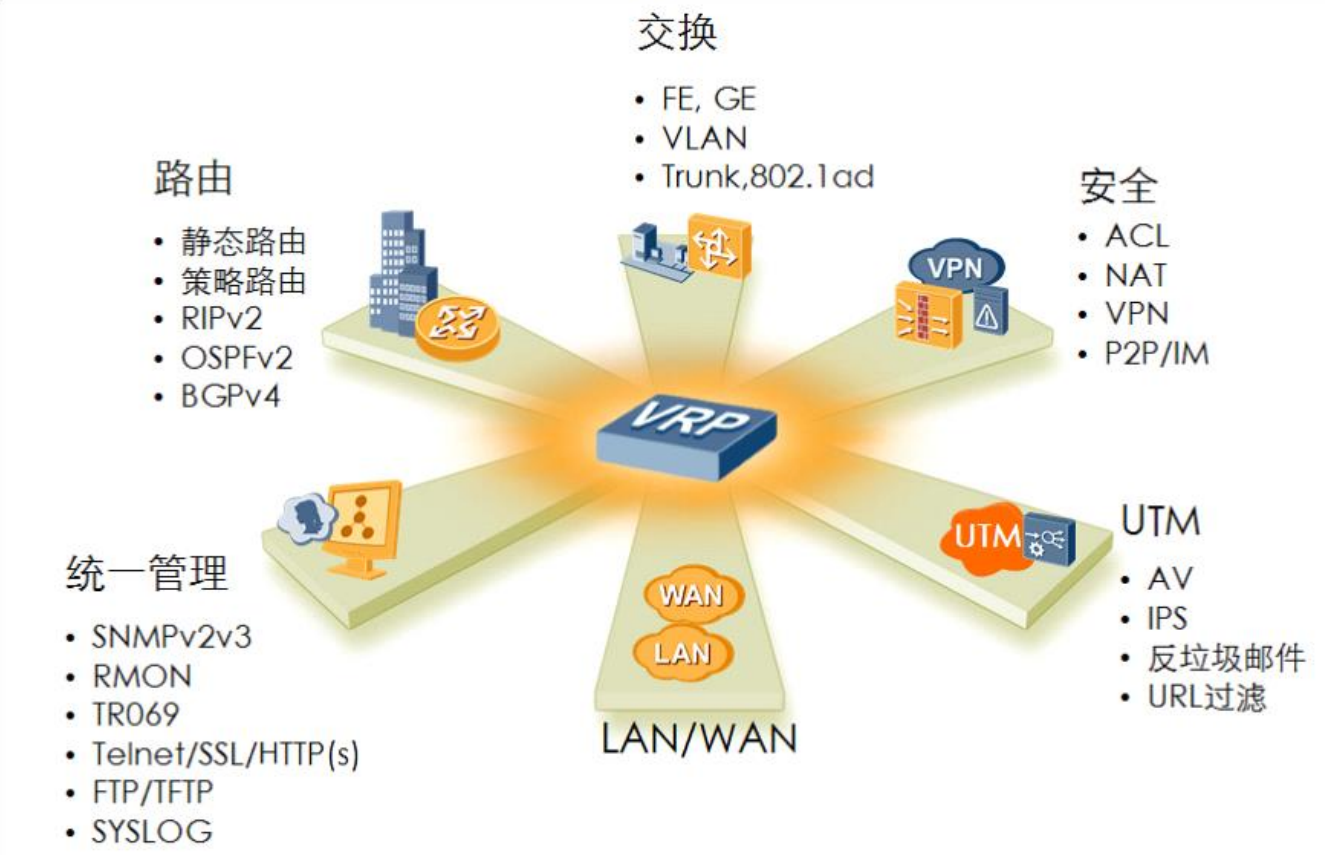
vrp的历史版本

常用的管理vrp系统的方式,以及各种方式的优缺点及应用场景
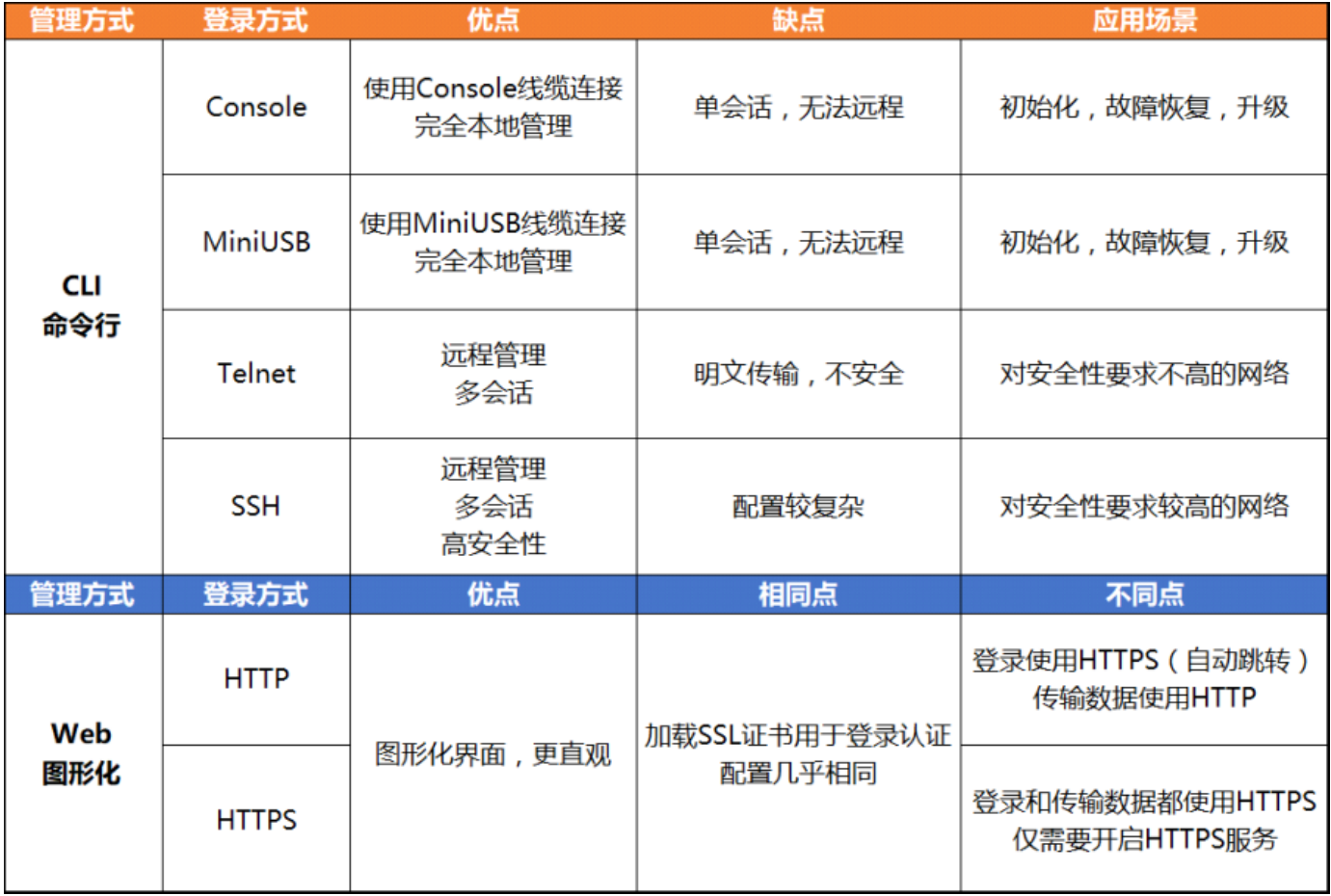
提示:通常管理vrp的方式有两种,一种是本地管理,本地管理通常需要用console线连接设备的console口,然后通过终端使用serial协议管理vrp;使用场景:适合初始化,故障恢复,系统升级,同时只能支持一个会话;另外一种就是通过IP地址或域名连接虚拟VTY口,使用Telnet或SSH协议,远程连接vrp进行管理;使用场景:适合后期维护、异地管理,同时可以支持多个会话;
VRP基础配置
在开始聊vrp的基础配置之前,我们先补充一点命令行视图的概念;什么是视图呢?我们可以理解为界面,每个界面配置的东西不一样,比如我们要配置vlan就得先进入vlan的界面才可以配置,我们要配置某接口的参数,得进入到该接口才可以配置;默认情况设备启动进入到视图是用户视图,该视图下用户可以操作的命令很少,多为一些查询类的命令和一些不改变系统配置的命令;我们要做配置首先要进入到系统视图,系统视图中又有各种视图,具体如下图

视图切换
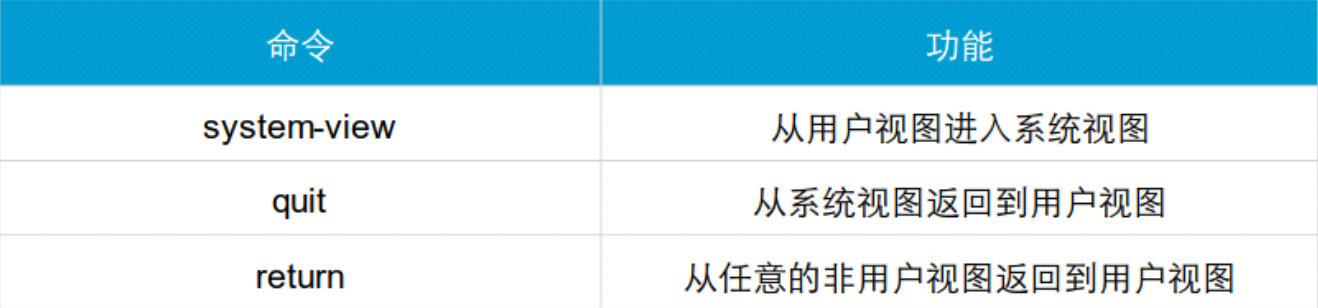
示例:从用户视图切换到系统视图
|
1
2
3
4
|
<Huawei>sys <Huawei>system-viewEnter system view, return user view with Ctrl+Z.[Huawei] |
提示:vrp是支持命令补全的,我们可以敲TAB键即可;
示例:从系统视图切换至用户视图
|
1
2
3
4
5
|
[Huawei]q<Huawei>sysEnter system view, return user view with Ctrl+Z.[Huawei]<Huawei> |
提示:从系统视图切换至用户视图我们可以使用quit命令,简写q;也可以使用快捷键Ctrl+z键直接从系统视图退出到用户视图;
示例:从任意非用户视图返回到用户视图
|
1
2
3
4
5
6
7
8
9
10
|
<Huawei>sysEnter system view, return user view with Ctrl+Z.[Huawei]int g0/0/0[Huawei-GigabitEthernet0/0/0]quit[Huawei]quit<Huawei>sysEnter system view, return user view with Ctrl+Z.[Huawei]int g0/0/0[Huawei-GigabitEthernet0/0/0]return<Huawei> |
提示:return可以从任意非用户视图直接返回到用户视图;quit只能一级一级的退出视图;
命令行帮助

提示:问号的作用就是告诉我们能够运行的命令,或者满足以我们敲打打字串开头的命令,或者是完全帮助里的能够运行的命令,或者命令后面能够接到子命令或参数等;
示例:
|
1
2
3
4
5
6
7
8
9
10
11
12
13
14
15
16
17
18
19
20
21
|
<Huawei>d? debugging <Group> debugging command group delete Delete a file dialer Dialer dir List files on a filesystem display Display information<Huawei>dis <Huawei>display h? hdlc Information of HDLC health System health information history-command Configuration information about history commands hotkey Hotkey status and configuration information http HTTP hwtacacs-server HWTACACS server information<Huawei>display ip? ip <Group> ip command group ipsec Specify IPSec(IP Security) configuration information ipv6 <Group> ipv6 command group<Huawei>display ip rou? routing-table Routing table<Huawei>display ip rou |
历史命令查询和调用
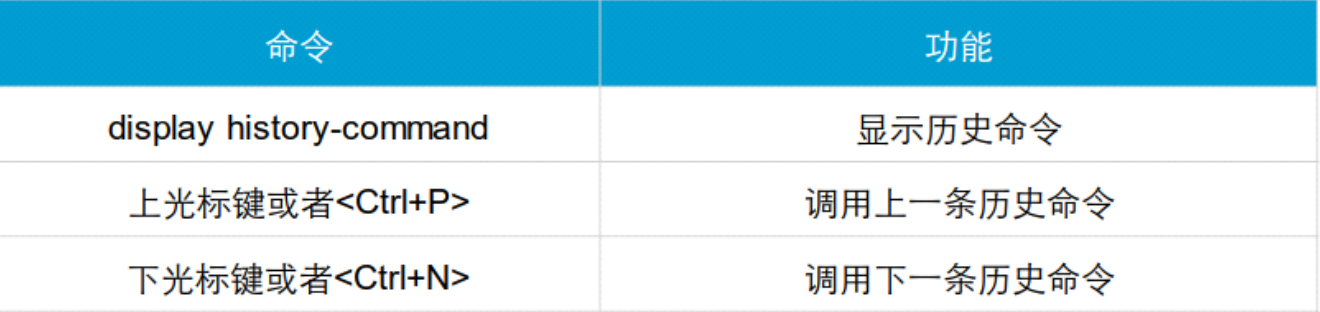
示例:查看历史命令列表
|
1
2
3
4
5
6
7
8
9
10
11
|
<Huawei>dis his <Huawei>dis history-command display ip rou display ip rout return int g0/0/0 sys quit q system-view<Huawei> |
提示:默认历史命令只会保存最近10条命令;当然我们可以通过命令去设置显示的历史命令条目数量;
设置命令历史显示条目数量
|
1
2
3
4
5
6
|
[Huawei]user-int [Huawei]user-interface con [Huawei]user-interface console 0[Huawei-ui-console0]hist [Huawei-ui-console0]history-command ma [Huawei-ui-console0]history-command max-size 20 |
vrp基础配置
设置设备名称

示例:修改设备名称为R1
|
1
2
3
4
5
6
7
|
<Huawei>sysEnter system view, return user view with Ctrl+Z.[Huawei]sysna [Huawei]sysname R1[R1][R1][R1] |
配置系统日期时间

示例:修改系统时区为北京时间,东八区
|
1
2
3
4
5
6
7
8
9
10
11
12
13
14
15
|
[R1]clock [R1]clock tim [R1]clock timz [R1]clock time [R1]clock timez[R1]q<R1>cloc <R1>clock timez <R1>clock timezone BJ add 08:00:00<R1>dis clo <R1>dis clock2021-06-20 06:48:42SundayTime Zone(BJ) : UTC+08:00<R1> |
提示:设置时区需要在用户视图下设置,系统视图没法设置;
示例:设置当前时间和日期
|
1
2
3
4
5
6
7
8
9
10
11
12
13
14
15
16
17
|
<R1>dis clock2021-06-20 06:50:35SundayTime Zone(BJ) : UTC+08:00<R1>clo <R1>clock da <R1>clock datetime ? HH:MM:SS Specify the time<R1>clock datetime 22:51:22 ? YYYY-MM-DD Specify the date from 2000 to 2099<R1>clock datetime 22:51:22 2021-06-20<R1>dis clo <R1>dis clock2021-06-20 22:51:25SundayTime Zone(BJ) : UTC+08:00<R1> |
配置标题消息

示例:设置用户登录前和登录后的标题消息
|
1
2
3
4
5
6
7
8
9
10
11
12
13
14
15
16
17
18
19
20
21
22
23
24
25
26
27
28
29
30
|
<R1>sysEnter system view, return user view with Ctrl+Z.[R1]head [R1]header lo [R1]header login ? file Specify filename of banner information Specify information of banner[R1]header login inf [R1]header login information "welcome to R1"[R1]head [R1]header lo [R1]header she [R1]header shell ? file Specify filename of banner information Specify information of banner[R1]header shell in[R1]header shell information "have a good time"……<R1>q Configuration console exit, please press any key to log onwelcome to R1Login authenticationPassword:have a good time<R1> |
配置用户界面命令

示例:配置console口超时时间
|
1
2
3
4
5
6
7
8
9
|
<R1>sysEnter system view, return user view with Ctrl+Z.[R1]use[R1]user-bind[R1]user-group[R1]user-interface con [R1]user-interface console 0[R1-ui-console0]idl[R1-ui-console0]idle-timeout 5 12 |
提示:上述设置表示设置console口的超时时间为5分12秒;这里还需要注意一点console口的编号是从0开始的,默认情况下一台设备只有一个console口,所以我们设置的都是0口;进入到console 需要用user-interface 命令;该命令后面可以通常都是跟终端类型;常见的终端类型有console,vty;vty就是虚拟的终端,一般远程用到都是vty类型的终端;默认vty的接口编号范围最大可以支持到4,即总共支持5个远程用户使用vty,当然这个vty的数量是可以更改的,最大支持15个用户;
示例:进入到vty
|
1
2
3
4
5
6
7
8
9
10
|
<R1>sysEnter system view, return user view with Ctrl+Z.[R1]user-int [R1]user-interface vty ? INTEGER<0-4,16-20> The first user terminal interface to be configured[R1]user-interface vty 0 ? INTEGER<1-4> Specify a last user terminal interface number to be configured <cr> Please press ENTER to execute command[R1]user-interface vty 0 4[R1-ui-vty0-4] |
配置登录权限和设置密码

示例:设置console口登录密码为admin123.com
|
1
2
3
4
5
6
7
8
9
10
11
12
13
14
15
16
17
18
19
20
21
22
23
24
25
26
27
28
29
30
31
32
33
34
35
36
37
38
39
|
<R1>sysEnter system view, return user view with Ctrl+Z.[R1]user-int [R1]user-interface con [R1]user-interface console 0[R1-ui-console0]set[R1-ui-console0]set au [R1-ui-console0]set authentication pa [R1-ui-console0]set authentication password ? cipher Set the password with cipher text[R1-ui-console0]set authentication password ci [R1-ui-console0]set authentication password cipher admin123.com[R1-ui-console0]dis this[V200R003C00]#user-interface con 0 authentication-mode password set authentication password cipher %$%$W~Nm5vbJ{S0yS@K}!JAF,(BD.-9:#x[ak!f@{wX%h"*C(BG,%$%$ history-command max-size 20 idle-timeout 5 12user-interface vty 0 4user-interface vty 16 20#return[R1-ui-console0]q[R1]q<R1>q Configuration console exit, please press any key to log onwelcome to R1Login authenticationPassword:have a good time<R1> |
提示:password后面的cipher表示回显加密,即在配置里面看到的都是加密处理后端字符串;
示例:配置vty登录密码
|
1
2
3
4
5
6
7
8
9
10
11
12
13
14
15
16
17
18
19
20
21
22
23
24
25
|
<R1>sysEnter system view, return user view with Ctrl+Z.[R1]user-interface [R1]user-interface vty 0 4[R1-ui-vty0-4]set au [R1-ui-vty0-4]set authentication pa[R1-ui-vty0-4]set authentication password ci [R1-ui-vty0-4]set authentication password cipher admin123.com[R1-ui-vty0-4]dis this[V200R003C00]#user-interface con 0 authentication-mode password set authentication password cipher %$%$"<Kf/[6KRFvztj2q~J'(,(hM.!O.+tL7{XXS5}P:t-)P(hP,%$%$ history-command max-size 20 idle-timeout 5 12user-interface vty 0 4 authentication-mode password set authentication password cipher %$%$"<Kf/[6KRFvztj2q~J'(,(hM.!O.+tL7{XXS5}P:t-)P(hP,%$%$user-interface vty 16 20#return[R1-ui-vty0-4] |
示例:设置远程登录用户的权限为3
|
1
2
3
4
5
6
7
8
9
10
11
12
13
14
15
16
17
18
19
20
21
|
[R1-ui-vty0-4]user pri [R1-ui-vty0-4]user privilege le[R1-ui-vty0-4]user privilege level 3[R1-ui-vty0-4]d th[V200R003C00]#user-interface con 0 authentication-mode password set authentication password cipher %$%$.gtX'!_=\OGX:pJ5f*u6,(2wvE#v<y(fe57<FiMri>X9(2z,%$%$ history-command max-size 20 idle-timeout 5 12user-interface vty 0 4 authentication-mode password user privilege level 3 set authentication password cipher %$%$.gtX'!_=\OGX:pJ5f*u6,(2wvE#v<y(fe57<FiMri>X9(2z,%$%$user-interface vty 16 20#return[R1-ui-vty0-4] |
提示:如果不设置用户权限级别默认是0,0的权限很小,只能执行网络诊断工具命令(ping、tracert)、从本设备出发访问外部设备的命令(Telnet客户端)、部分display命令等。权限级别分类如下表
| 用户级别 | 命令级别 | 级别名称 | 说明 |
| 0 | 0 | 访问级 |
网络诊断工具命令(ping、tracert)、从本设备出发访问 |
| 1 | 0、1 | 监控级 |
用于系统维护,包括display等命令。 |
| 2 | 0、1、2 | 配置级 |
业务配置命令,包括路由、各个网络层次的命令,向用户 |
| 3~15 | 0、1、2、3 | 管理级 |
用于系统基本运行的命令,对业务提供支撑作用,包括文 |
接口配置地址
|
1
2
3
4
5
6
7
8
9
10
11
12
13
|
<R1>sysEnter system view, return user view with Ctrl+Z.[R1]int g0/0/0[R1-GigabitEthernet0/0/0]ip add[R1-GigabitEthernet0/0/0]ip address 192.168.0.111 24[R1-GigabitEthernet0/0/0]d th[V200R003C00]#interface GigabitEthernet0/0/0 ip address 192.168.0.111 255.255.255.0#return[R1-GigabitEthernet0/0/0] |
开启telnet 远程访问
|
1
2
3
4
5
6
7
|
[R1-GigabitEthernet0/0/0]q[R1]telne [R1]telnet se [R1]telnet server e[R1]telnet server enable Error: TELNET server has been enabled[R1] |
提示:默认华为模拟器ensp上模拟的路由器上开启了telnet,所以在此开启会报错;
实验:使用r2远程访问r1
实验top
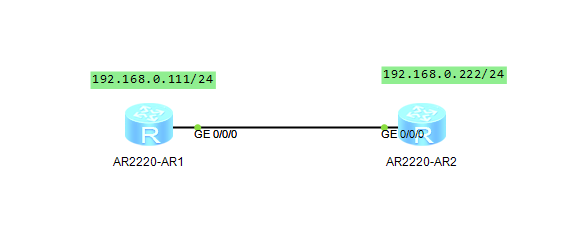
在r2上配置地址,然后使用telnet客户端连接r1
|
1
2
3
4
5
6
7
8
9
10
11
12
13
14
15
16
17
18
19
20
21
22
23
24
25
|
<Huawei>Jun 20 2021 23:44:30-08:00 Huawei %%01IFPDT/4/IF_STATE(l)[0]:Interface GigabitEthernet0/0/0 has turned into UP state.<Huawei>sysEnter system view, return user view with Ctrl+Z.[Huawei]sys R2[R2]int g0/0/0[R2-GigabitEthernet0/0/0]ip add 192.168.0.222 24Jun 20 2021 23:44:55-08:00 R2 %%01IFNET/4/LINK_STATE(l)[1]:The line protocol IPon the interface GigabitEthernet0/0/0 has entered the UP state.[R2-GigabitEthernet0/0/0]q[R2]q<R2>tel <R2>telnet 192.168.0.111 Press CTRL_] to quit telnet mode Trying 192.168.0.111 ... Connected to 192.168.0.111 ...welcome to R1Login authenticationPassword:have a good time<R1> |
查看接口摘要信息

示例:查看r1设备的接口摘要信息
|
1
2
3
4
5
6
7
8
9
10
11
12
13
14
15
16
17
18
19
20
21
22
23
24
25
26
27
28
29
30
31
|
<R1>dis ip int brief*down: administratively down^down: standby(l): loopback(s): spoofingThe number of interface that is UP in Physical is 2The number of interface that is DOWN in Physical is 2The number of interface that is UP in Protocol is 2The number of interface that is DOWN in Protocol is 2Interface IP Address/Mask Physical Protocol GigabitEthernet0/0/0 192.168.0.111/24 up up GigabitEthernet0/0/1 unassigned down down GigabitEthernet0/0/2 unassigned down down NULL0 unassigned up up(s) <R1>dis int briefPHY: Physical*down: administratively down(l): loopback(s): spoofing(b): BFD down^down: standby(e): ETHOAM down(d): Dampening SuppressedInUti/OutUti: input utility/output utilityInterface PHY Protocol InUti OutUti inErrors outErrorsGigabitEthernet0/0/0 up up 0% 0% 0 0GigabitEthernet0/0/1 down down 0% 0% 0 0GigabitEthernet0/0/2 down down 0% 0% 0 0NULL0 up up(s) 0% 0% 0 0<R1> |
提示:dis ip int brief 和dis int brief的区别是,dis ip int brief 一般用于查看三层接口的简要信息,所谓三层一般就是可以配置ip地址信息的接口;dis int brief 一般多用于查看二层接口简要信息;
状态信息查询
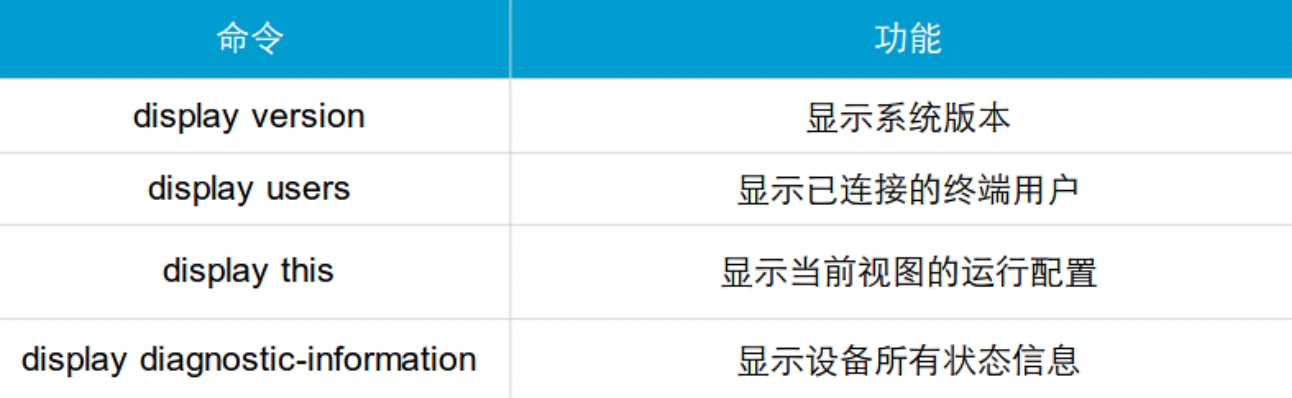
示例:查看vrp版本信息
|
1
2
3
4
5
6
7
8
9
10
11
12
13
14
15
16
17
18
19
20
21
22
|
<R1>dis <R1>display ver <R1>display versionHuawei Versatile Routing Platform SoftwareVRP (R) software, Version 5.130 (AR2200 V200R003C00)Copyright (C) 2011-2012 HUAWEI TECH CO., LTDHuawei AR2220 Router uptime is 0 week, 0 day, 1 hour, 55 minutesBKP 0 version information:1. PCB Version : AR01BAK2A VER.NC2. If Supporting PoE : No3. Board Type : AR22204. MPU Slot Quantity : 15. LPU Slot Quantity : 6MPU 0(Master) : uptime is 0 week, 0 day, 1 hour, 55 minutesMPU version information :1. PCB Version : AR01SRU2A VER.A2. MAB Version : 03. Board Type : AR22204. BootROM Version : 0<R1> |
示例:查看当前视图的配置
|
1
2
3
4
5
6
7
8
9
10
11
12
13
14
15
16
17
18
19
20
21
22
23
24
25
26
27
|
<R1>dis <R1>display this#return<R1>sysEnter system view, return user view with Ctrl+Z.[R1]user-int [R1]user-interface con [R1]user-interface console 0[R1-ui-console0]dis this[V200R003C00]#user-interface con 0 authentication-mode password set authentication password cipher %$%$)i3~%MGAQ,00KSWe|";E,+jWV+l97J2A9'P]E[=}CA"9+jZ,%$%$ history-command max-size 20 idle-timeout 5 12user-interface vty 0 4 authentication-mode password user privilege level 3 set authentication password cipher %$%$)i3~%MGAQ,00KSWe|";E,+jWV+l97J2A9'P]E[=}CA"9+jZ,%$%$user-interface vty 16 20#return[R1-ui-console0] |

 浙公网安备 33010602011771号