
gcc生成静态库.a和动态库.so
一、用 gcc 生成静态库和动态库
函数库分为静态库和动态库。
静态库
在程序编译时会被连接到目标代码中,程序运行是则不需要静态库的存在。
动态库
在程序编译时不会被连接到目标代码中,而是程序运行时载入的。
两者区别:前者是编译连接的,后者是程序运行载入的。
(一)hello 实例使用库
1.准备过程
(1). 创建一个目录
(2). hello 代码
hello.h
#ifndef HELLO_H
#define HELLO_H
void hello(const char *name);
#endif//HELLO_H
hello.c
#include<stdio.h>
void hello(const char *name)
{
printf("Hello %s\n",name);
}
main2.c
#include"hello.h"
int main2()
{
hello("everyone");
return 0;
}
(3). gcc 编译得到.o 文件
gcc -c hello.c

2. 静态库使用
(1)创建静态库
创建静态库的工具:ar
静态库文件命名规范:以 lib 作为前缀,是.a 文件

ar -crv libmyhello.a hello.o
(2)程序中使用静态库
gcc -o hello main.c -L. -lmyhello

注意:对于自定义的静态库,main.c 还可以放在-L.和-lmyhello 之间,否则 myhello 没有定义。
-L.:表示连接的库在当前目录
(3)验证静态库的特点
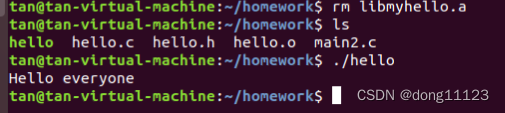
在删掉静态库的情况下,运行可执行文件,发现程序仍旧正常运行,表明静态库跟程序执行没有联系。同时,也表明静态库是在程序编译的时候被连接到代码中的。
3.动态库的使用
(1). 创建动态库
创建动态库的工具:gcc
动态库文件命名规范:以 lib 作为前缀,是.so 文件
gcc -shared -fPIC -o libmyhello.so hello.o
shared:表示指定生成动态链接库,不可省略
-fPIC:表示编译为位置独立的代码,不可省略

命令中的-o 一定不能够被省略
(2). 在程序中执行动态库
gcc -o hello main.c -L. -lmyhello 或 gcc main.c libmyhello.so -o hello
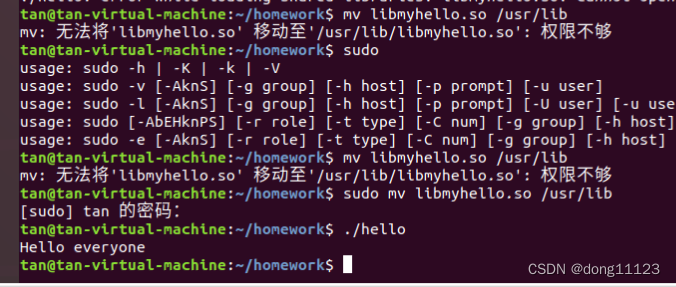
再运行可执行文件 hello,会出现错误

问题的解决方法:将 libmyhello.so 复制到目录/usr/lib 中。由于运行时,是在/usr/lib 中找库文件的。
mv libmyhello.so /usr/lib
4.静态库与动态库比较
gcc 编译得到.o 文件 gcc -c hello.c
创建静态库 ar -crv libmyhello.a hello.o
创建动态库 gcc -shared -fPIC -o libmyhello.so hello.o
使用库生成可执行文件 gcc -o hello main.c -L. -lmyhello
执行可执行文件 ./hello
(二)实例 1 使用库
详细过程可参照 hello 程序过程
1.代码
A1.c
#include<stdio.h>
void print1(int arg)
{
printf("A1 print arg:%d\n",arg);
}
A2.c
#include<stdio.h>
void print2(char *arg)
{
printf("A2 printf arg:%s\n",arg);
}
A.h
#ifndef A_H
#define A_H
void print1(int);
void print2(char *);
#endif
test.c
#include<stdio.h>
#include"A.h"
int main()
{
print1(1);
print2("test");
return 0;
}
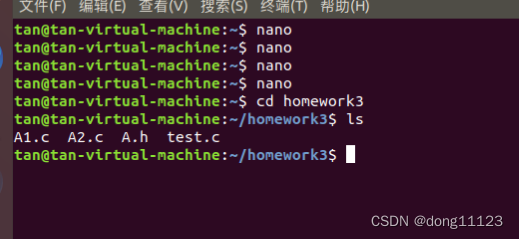
操作步骤:
- 程序中使用静态库
ar crv libA .a A1.o A2.o
gcc test.c libA.a -o test
![]()
- 动态库的使用
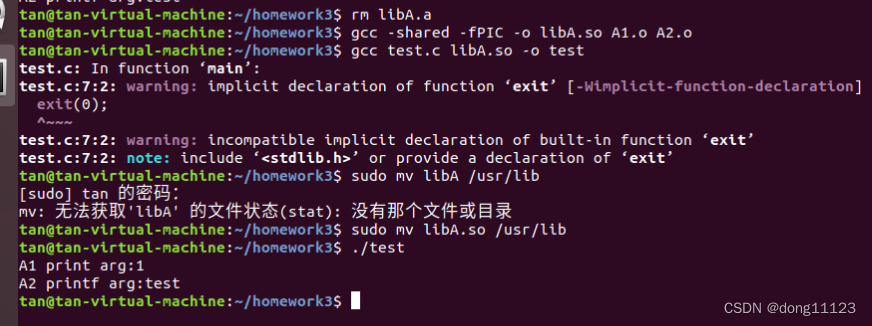
gcc -shared -fPIC -o libA.so A1.o A2.o
gcc test.c libA.so -o test
![]()
(三)实例 2 使用库

详细过程可参照 hello 程序过程
代码
sub1.c
#include"sub1.h"
float x2x(int a,int b)
{
float c=(float)a;
float d=(float)b;
return c/d;
}
sub2.c
#include"sub2.h"
float x2y(int a,int b)
{
float c=(float)a;
float d=(float)b;
return c*d;
}
sub1.h
#include"stdio.h"
float x2x(int a,int b);
float x2y(int a,int b);
main.c
#include"stdio.h"
#include"sub1.h"
float x2x(int a,int b);
float x2y(int a,int b);
int main()
{
int a=3;
int b=4;
printf("sum is:, %f",x2x(a,b));
printf("sum2 is: , %f2",x2y(a,b));
return 0;
}
静态库
ar crv libsub.a sub1.o sub2.o

gcc main.c libsub.a -o main
动态库
gcc -shared -fPIC -o libsub.so sub1.o sub2.o

gcc main.c libsub.so -o main

静态库与动态库的生成文件的比较
静态库

动态库

通过比较发现静态库要比动态库要小很多,生成的可执行文件大小也存在较小的差别。
二、总结
通过三个程序用 gcc 生成静态库和动态库的练习过程,基本上能够熟练的生成静态库和动态库。在两种库的比较中,能够明显看出两者的差别。虽然,过程中,遇到一些小问题,但是很快就解决了。只要慢慢多练几遍,便很快能够掌握。可执行文件是通过编译链接获取得到的,利用工具将源码编译得到.o 文件,接下来就是将.o 文件链接得到可执行文件。
引用--https://blog.csdn.net/dong11123/article/details/133615612

 浙公网安备 33010602011771号