
C#操作csv文件
CSV文件简介
待补充
读写CSV文件
以下代码实现datatable和CSV文件转换
 1         /// <summary>
 2         /// 以csv文件格式导入datatable(csv必须是逗号分隔符形式)
 3         /// </summary>
 4         /// <param name="filePath"></param>
 5         /// <returns></returns>
 6         public static DataTable CSVToDataTable(string filePath)
 7         {
 8             DataTable table = new DataTable();
 9
10             //if (rowIndex < 0)
11             //    throw new ArgumentException("rowIndex");
12             using (StreamReader reader = new StreamReader(filePath, Encoding.GetEncoding("gb2312"), false))
13             {
14                 int i = 0;
15                 reader.Peek();
16                 while (reader.Peek() > 0)
17                 {
18                     i++;
19                     string line = reader.ReadLine();
20                     string[] split = line.Split(',');
21
22                     if (split.Length == 0)
23                     {
24                         continue;
25                     }
26
27                     if (i == 1)
28                     {
29                         foreach (string str in split)
30                         {
31                             table.Columns.Add(str);
32                         }
33
34                         continue;
35                     }
36                     DataRow newRow = table.NewRow();
37                     for (int j = 0; j < split.Length; j++)
38                     {
39                         newRow[j] = split[j];
40                     }
41                     table.Rows.Add(newRow);
42                 }
43                 return table;
44             }
45         }
46
47         /// <summary>
48         /// 导出文件,使用文件流。该方法使用的数据源为DataTable,实际导出为csv格式,可强制为xls。
49         /// </summary>
50         /// <param name="dt"></param>
51         public static string ExportToCsv(System.Data.DataTable dt, string path)
52         {
53             //KillSpecialExcel();
54             string result = string.Empty;
55             try
56             {
57                 // 实例化流对象,以特定的编码向流中写入字符。
58                 StreamWriter sw = new StreamWriter(path, false, Encoding.GetEncoding("gb2312"));
59
60                 StringBuilder sb = new StringBuilder();
61                 for (int k = 0; k < dt.Columns.Count; k++)
62                 {
63                     // 添加列名称
64                     sb.Append(dt.Columns[k].ColumnName.ToString() + ",");
65                 }
66                 sb.Remove(sb.Length - 1, 1);
67                 sb.Append(Environment.NewLine);
68                 // 添加行数据
69                 for (int i = 0; i < dt.Rows.Count; i++)
70                 {
71                     DataRow row = dt.Rows[i];
72                     for (int j = 0; j < dt.Columns.Count; j++)
73                     {
74                         // 根据列数追加行数据
75                         sb.Append(row[j].ToString() + ",");
76                     }
77                     sb.Remove(sb.Length - 1, 1);
78                     sb.Append(Environment.NewLine);
79                 }
80                 sw.Write(sb.ToString());
81                 sw.Flush();
82                 sw.Close();
83                 sw.Dispose();
84
85                 // 导出成功后打开
86                 //System.Diagnostics.Process.Start(path);
87             }
88             catch (Exception ex)
89             {
90                 result = "请保存或关闭可能已打开的Excel文件";
91             }
92             finally
93             {
94                 dt.Dispose();
95             }
96             return result;
97         }
CSV读写效率
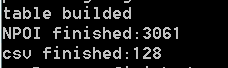
写文件方面,经测试,csv较NPOI更快,测试代码通过构建一个有65535行的datatable,用两种方式导出实现,构建表如下:
 1             DataTable dt = new DataTable();
 2             dt.TableName = "aaa";
 3
 4
 5             dt.Columns.Add("RowName", typeof(string));
 6             dt.Columns.Add("ColumnA", typeof(int));
 7             dt.Columns.Add("ColumnB", typeof(double));
 8             dt.Columns.Add("ColumnC", typeof(string));
 9
10             for (int i = 0; i < 65535; i++)
11             {
12                 dt.Rows.Add(new object[] {$"Row{i}", i, (double)i, $"String{i}"});
13             }
14
15             return dt;
测试结果(毫秒):

 浙公网安备 33010602011771号