
NPOI操作Excel表格
NPOI简介
NPOI操作
引用NPOI
在NuGet管理中直接安装,如图:
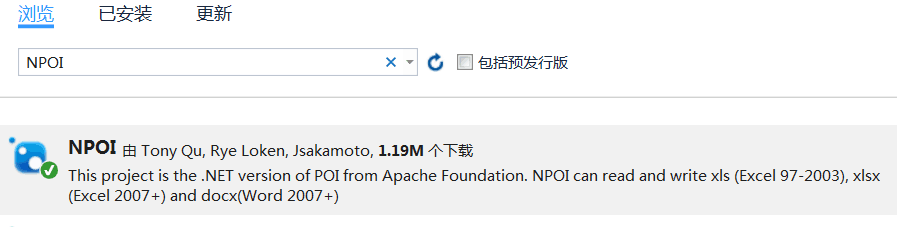
在代码中引用:
1 using NPOI;
2 using NPOI.POIFS;
3 using NPOI.HSSF;
4 using NPOI.Util;
5 using NPOI.HSSF.UserModel;
6 using NPOI.SS.UserModel;
7 using NPOI.POIFS.FileSystem;
8 using NPOI.HPSF;
9 using NPOI.XSSF.UserModel;
读写Excel文件
以下代码实现从内存datatable、dataset中导出excel文件,以及从外部excel表导入datatable
  1         /// <summary>
  2         /// 导出单个datatable
  3         /// </summary>
  4         /// <param name="fileFullName"></param>
  5         /// <param name="dt"></param>
  6         /// <returns></returns>
  7         public static bool ExportFromDataTable(string fileFullName, DataTable dt,string sheetName = "sheet1")
  8         {
  9             HSSFWorkbook workbook = new HSSFWorkbook();
 10             ISheet sheet = workbook.CreateSheet(sheetName);
 11
 12             //创建文档信息
 13             DocumentSummaryInformation dsi = PropertySetFactory.CreateDocumentSummaryInformation();
 14             dsi.Company = "DocumentSummaryInformation";
 15             SummaryInformation si = PropertySetFactory.CreateSummaryInformation();
 16             si.Subject = "SummaryInformation";
 17             workbook.DocumentSummaryInformation = dsi;
 18             workbook.SummaryInformation = si;
 19
 20             //写入表头
 21             //IRow headerRow = sheet.CreateRow(0);//行从0开始
 22             sheet.CreateRow(0);
 23             for (int i = 0; i < dt.Columns.Count; i++)
 24             {
 25                 //ICell cell = headerRow.CreateCell(i);
 26                 //cell.SetCellValue(dt.Columns[i].ColumnName);
 27
 28                 sheet.GetRow(0).CreateCell(i).SetCellValue(dt.Columns[i].ColumnName);
 29             }
 30
 31             //写入数据
 32             for (int i = 0; i < dt.Rows.Count; i++)
 33             {
 34
 35                 //IRow dataRow = sheet.CreateRow(i + 1);
 36                 sheet.CreateRow(i + 1);
 37
 38                 for (int j = 0; j < dt.Columns.Count; j++)
 39                 {
 40                     //ICell cell = dataRow.CreateCell(j);
 41                     //cell.SetCellValue(dt.Rows[i][j].ToString());//SetCellValue支持多种数据类型重载
 42
 43                     sheet.GetRow(i + 1).CreateCell(j).SetCellValue(dt.Rows[i][j].ToString());
 44                 }
 45             }
 46
 47             MemoryStream ms = new MemoryStream();
 48             //workbook.Write(ms);
 49             FileStream file = new FileStream(fileFullName, FileMode.Create);
 50             workbook.Write(file);
 51             file.Close();
 52             //workbook = null;
 53             ms.Close();
 54             ms.Dispose();
 55             return true;
 56         }
 57
 58         /// <summary>
 59         /// 导出DataSet至一个xls文件中
 60         /// </summary>
 61         /// <param name="fileFullName"></param>
 62         /// <param name="ds"></param>
 63         /// <returns></returns>
 64         public static bool ExportFromDataSet(string fileFullName, DataSet ds)
 65         {
 66             HSSFWorkbook workbook = new HSSFWorkbook();
 67             ISheet sheet;
 68
 69             foreach (DataTable dt in ds.Tables)
 70             {
 71                 sheet = workbook.CreateSheet(string.IsNullOrEmpty(dt.TableName)?$"sheet{ds.Tables.IndexOf(dt)}":dt.TableName);//tablename不可为空
 72
 73                 //写入表头
 74                 //IRow headerRow = sheet.CreateRow(0);//行从0开始
 75                 sheet.CreateRow(0);
 76                 for (int i = 0; i < dt.Columns.Count; i++)
 77                 {
 78                     //ICell cell = headerRow.CreateCell(i);
 79                     //cell.SetCellValue(dt.Columns[i].ColumnName);
 80                     sheet.GetRow(0).CreateCell(i).SetCellValue(dt.Columns[i].ColumnName);
 81                 }
 82
 83                 //写入数据
 84                 for (int i = 0; i < dt.Rows.Count; i++)
 85                 {
 86                     //IRow dataRow = sheet.CreateRow(i + 1);
 87                     sheet.CreateRow(i + 1);
 88
 89                     for (int j = 0; j < dt.Columns.Count; j++)
 90                     {
 91                         //ICell cell = dataRow.CreateCell(j);
 92                         //cell.SetCellValue(dt.Rows[i][j].ToString());//SetCellValue支持多种数据类型重载
 93                         sheet.GetRow(i + 1).CreateCell(j).SetCellValue(dt.Rows[i][j].ToString());
 94                     }
 95                 }
 96             }
 97
 98             MemoryStream ms = new MemoryStream();
 99             //workbook.Write(ms);
100             FileStream file = new FileStream(fileFullName, FileMode.Create);
101             workbook.Write(file);
102             file.Close();
103             //workbook = null;
104             ms.Close();
105             ms.Dispose();
106             return true;
107         }
108
109         /// <summary>
110         /// 批量导出多个datatable至一个excel中
111         /// </summary>
112         /// <param name="fileFullName"></param>
113         /// <param name="dtList"></param>
114         /// <returns></returns>
115         public static bool ExportFromDataTableList(string fileFullName, List<DataTable> dtList)
116         {
117             HSSFWorkbook workbook = new HSSFWorkbook();
118             ISheet sheet;
119
120             foreach (DataTable dt in dtList)
121             {
122                 sheet = workbook.CreateSheet(dt.TableName);//tablename不可为空
123
124                 //写入表头
125                 //IRow headerRow = sheet.CreateRow(0);//行从0开始
126                 sheet.CreateRow(0);
127                 for (int i = 0; i < dt.Columns.Count; i++)
128                 {
129                     //ICell cell = headerRow.CreateCell(i);
130                     //cell.SetCellValue(dt.Columns[i].ColumnName);
131                     sheet.GetRow(0).CreateCell(i).SetCellValue(dt.Columns[i].ColumnName);
132                 }
133
134                 //写入数据
135                 for (int i = 0; i < dt.Rows.Count; i++)
136                 {
137                     //IRow dataRow = sheet.CreateRow(i + 1);
138                     sheet.CreateRow(i + 1);
139
140                     for (int j = 0; j < dt.Columns.Count; j++)
141                     {
142                         //ICell cell = dataRow.CreateCell(j);
143                         //cell.SetCellValue(dt.Rows[i][j].ToString());//SetCellValue支持多种数据类型重载
144                         sheet.GetRow(i + 1).CreateCell(j).SetCellValue(dt.Rows[i][j].ToString());
145                     }
146                 }
147             }
148
149             MemoryStream ms = new MemoryStream();
150             //workbook.Write(ms);
151             FileStream file = new FileStream(fileFullName, FileMode.Create);
152             workbook.Write(file);
153             file.Close();
154             //workbook = null;
155             ms.Close();
156             ms.Dispose();
157             return true;
158         }
159
160         // <summary>
161         /// 将excel中的数据导入到DataTable中
162         /// </summary>
163         /// <param name="sheetName">excel工作薄sheet的名称</param>
164         /// <param name="isFirstRowColumn">第一行是否是DataTable的列名</param>
165         /// <returns>返回的DataTable</returns>
166         public static DataTable ExcelToDataTable(string fileName, string sheetName = "sheet1", bool isFirstRowColumn = true)
167         {
168             ISheet sheet = null;
169             DataTable data = new DataTable();
170             int startRow = 0;
171             FileStream fs;
172             try
173             {
174                 fs = new FileStream(fileName, FileMode.Open, FileAccess.Read);
175                 if (fileName.IndexOf(".xlsx") > 0)
176                 {
177                     XSSFWorkbook workbook = new XSSFWorkbook(fs);// 2007版本
178                     if (sheetName != null)
179                     {
180                         sheet = workbook.GetSheet(sheetName);
181                         if (sheet == null) //如果没有找到指定的sheetName对应的sheet,则尝试获取第一个sheet
182                         {
183                             sheet = workbook.GetSheetAt(0);
184                         }
185                     }
186                     else
187                     {
188                         sheet = workbook.GetSheetAt(0);
189                     }
190                 }
191
192                 else if (fileName.IndexOf(".xls") > 0) // 2003版本
193                 {
194                     HSSFWorkbook workbook = new HSSFWorkbook(fs);
195                     if (sheetName != null)
196                     {
197                         sheet = workbook.GetSheet(sheetName);
198                         if (sheet == null) //如果没有找到指定的sheetName对应的sheet,则尝试获取第一个sheet
199                         {
200                             sheet = workbook.GetSheetAt(0);
201                         }
202                     }
203                     else
204                     {
205                         sheet = workbook.GetSheetAt(0);
206                     }
207                 }
208
209
210
211                 if (sheet != null)
212                 {
213                     IRow firstRow = sheet.GetRow(0);
214                     int cellCount = firstRow.LastCellNum; //一行最后一个cell的编号 即总的列数
215
216                     if (isFirstRowColumn)
217                     {
218                         for (int i = firstRow.FirstCellNum; i < cellCount; ++i)
219                         {
220                             ICell cell = firstRow.GetCell(i);
221                             if (cell != null)
222                             {
223                                 string cellValue = cell.StringCellValue;
224                                 if (cellValue != null)
225                                 {
226                                     DataColumn column = new DataColumn(cellValue);
227                                     data.Columns.Add(column);
228                                 }
229                             }
230                         }
231                         startRow = sheet.FirstRowNum + 1;
232                     }
233                     else
234                     {
235                         startRow = sheet.FirstRowNum;
236                     }
237
238                     //最后一列的标号
239                     int rowCount = sheet.LastRowNum;
240                     for (int i = startRow; i <= rowCount; ++i)
241                     {
242                         IRow row = sheet.GetRow(i);
243                         if (row == null) continue; //没有数据的行默认是null
244
245                         DataRow dataRow = data.NewRow();
246                         for (int j = row.FirstCellNum; j < cellCount; ++j)
247                         {
248                             if (row.GetCell(j) != null) //同理,没有数据的单元格都默认是null
249                                 dataRow[j] = row.GetCell(j).ToString();
250                         }
251                         data.Rows.Add(dataRow);
252                     }
253                 }
254
255                 return data;
256             }
257             catch (Exception ex)
258             {
259                 Console.WriteLine("Exception: " + ex.Message);
260                 return null;
261             }
262         }
Excel格式
使用NPOI导出Excel可对表和单元格格式及外观进行设置,待补充。

 浙公网安备 33010602011771号