
系统调用
1. 实验内容
- 找一个系统调用,系统调用号为学号最后2位相同的系统调用
- 通过汇编指令触发该系统调用
- 通过gdb跟踪该系统调用的内核处理过程
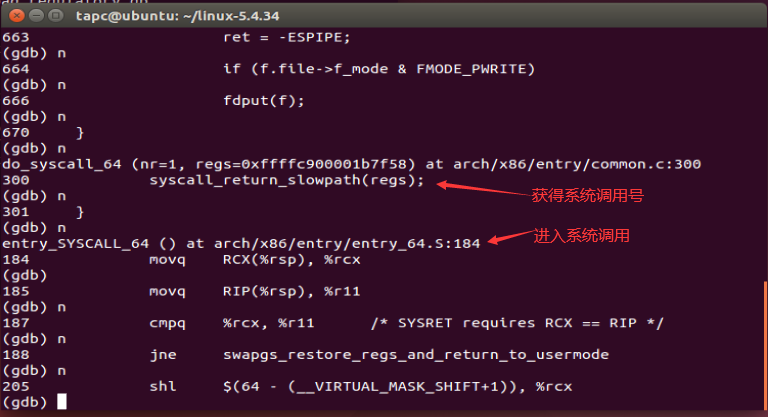
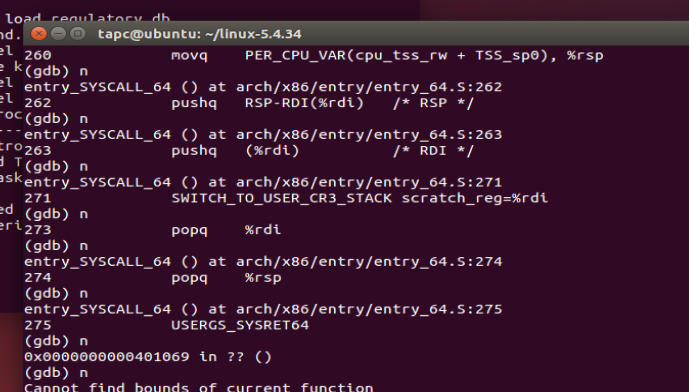
- 重点阅读分析系统调用入口的保存现场、恢复现场和系统调用返回,以及重点关注系统调用过程中内核堆栈状态的变化
我的学号后两位是18所以调用18号系统调用
2. 实验步骤
2.1 实验准备
- 安装开发工具
sudo apt install build-essential
sudo apt install qemu # install QEMU
sudo apt install libncurses5-dev bison flex libssl-dev libelf-dev
- 下载内核源码
sudo apt install axel
axel -n 20 https://mirrors.edge.kernel.org/pub/linux/kernel/v5.x/ linux-5.4.34.tar.xz
xz -d linux-5.4.34.tar.xz
tar -xvf linux-5.4.34.tar cd linux-5.4.34
- 配置内核编译选项
make defconfig # Default configuration is based on 'x86_64_defconfig'
make menuconfig
# 打开debug相关选项
Kernel hacking  --->
    Compile-time checks and compiler options  --->
       [*] Compile the kernel with debug info
       [*]   Provide GDB scripts for kernel debugging
 [*] Kernel debugging
# 关闭KASLR,否则会导致打断点失败
Processor type and features ---->
   [] Randomize the address of the kernel image (KASLR)

make -j$(nproc) # nproc gives the number of CPU cores/threads available
# 测试⼀下内核能不能正常加载运⾏,因为没有⽂件系统终会kernel panic
qemu-system-x86_64 -kernel arch/x86/boot/bzImage  #  此时应该不能正常运行
- 制作根文件系统
axel -n 20 https://busybox.net/downloads/busybox-1.31.1.tar.bz2
tar -jxvf busybox-1.31.1.tar.bz2
cd busybox-1.31.1

make menuconfig
#记得要编译成静态链接,不⽤动态链接库。
Settings  --->
    [*] Build static binary (no shared libs)
#然后编译安装,默认会安装到源码⽬录下的 _install ⽬录中。
make -j$(nproc) && make install
- 制作内核文件系统镜像
mkdir rootfs
cd rootfs
cp ../busybox-1.31.1/_install/* ./ -rf
mkdir dev proc sys home
sudo cp -a /dev/{null,console,tty,tty1,tty2,tty3,tty4} dev/
- 准备init脚本⽂件放在根⽂件系统跟⽬录下(rootfs/init),添加如下内容到init⽂件
#!/bin/sh
mount -t proc none /proc
mount -t sysfs none /sys
echo "Welcome My OS!"
echo "-------------------"
cd home
/bin/sh
- 给init脚本增加可执行权限
chmod +x init
- 输入下面代码查看qemu运行情况
#打包成内存根⽂件系统镜像
find . -print0 | cpio --null -ov --format=newc | gzip -9 > ../rootfs.cpio.gz
#测试挂载根⽂件系统,看内核启动完成后是否执⾏init脚本
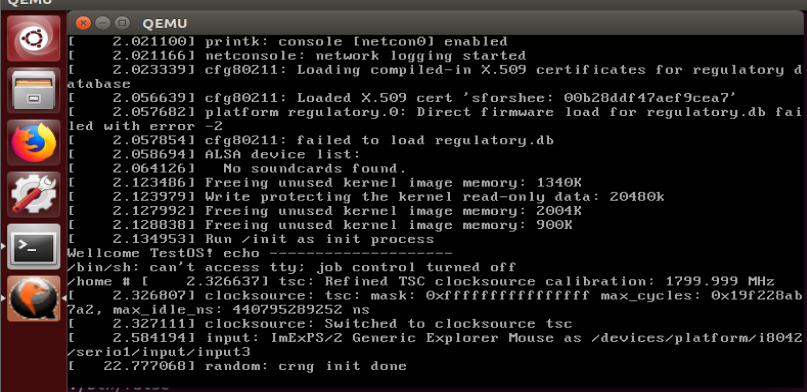
qemu-system-x86_64 -kernel linux-5.4.34/arch/x86/boot/bzImage -initrd rootfs.cpio.gz
内核启动
2.2 实验内容
-
首先安装好gdb用于进行代码调试,安装步骤见 https://blog.csdn.net/chengsi101/article/details/79424083
-
编写脚本用于进行代码调试
int main() {
        asm volatile(
                "movl $0x12,%eax\n\t"
                "syscall\n\t"
        );
        printf("Hello test_ccc");
        return 0;
}
- 使用gcc进行编译
gcc test_ccc.c -o test_ccc -static
- 重新制作根文件系
find . -print0 | cpio --null -ov --format=newc | gzip -9 > ../rootfs.cpio.gz
2.3 GDB调试
- 纯命令启动qemu
1 qemu-system-x86_64 -kernel linux-5.4.34/arch/x86/boot/bzImage -initrd rootfs.cpio.gz -S -s -nographic -append "console=ttyS0"

- 启动gdb
cd linux-5.4.34
# 启动
gdb vmlinux
target remote:1234
# 在semctl调用处打断点
b __x64_sys_pwrite64
- 输入c(continue)继续运行
- 运行编写好的系统调用的代码
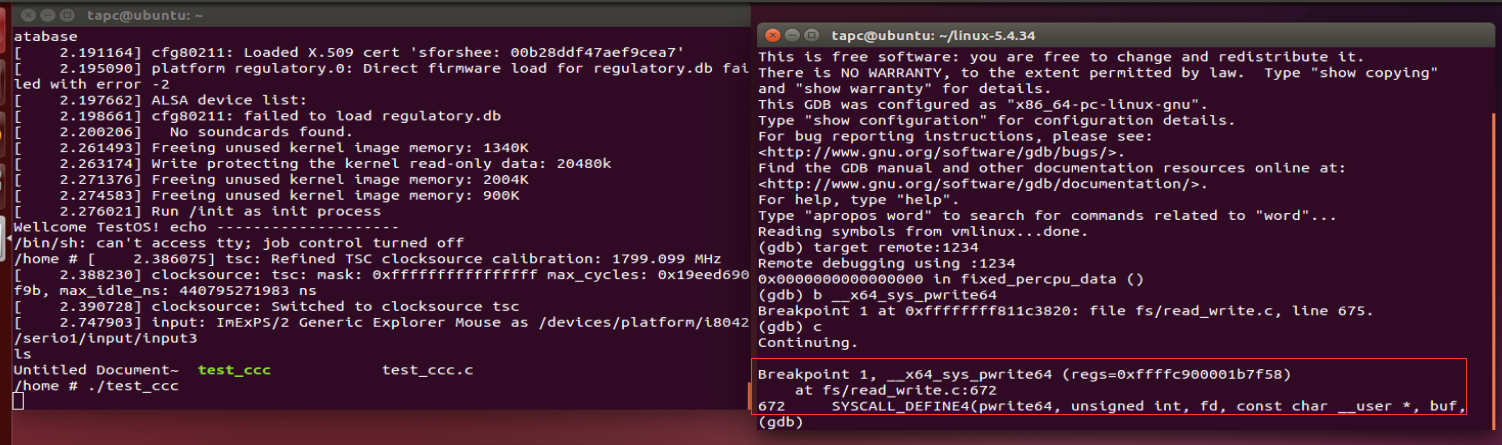
这里有一个坑,就是可能会报乱码出现错误Remote ‘g’ packet reply is too long
解决办法在[https://blog.csdn.net/superking3188/article/details/8477574](Remote ‘g’ packet reply is too long解决办法)
- gdb单步调试
- 运行结束返回
3. 总结
系统调用的执行,是用户程序触发系统调用之后,CPU以及内核执行调用的过程。在调用之前首先进行一些压栈操作,保存快照,然后在执行切换。当执行完成以后根据快照信息,在重新恢复现场,继续之前的执行。

 浙公网安备 33010602011771号