
学习记录(4.3)
学习时长:4h
代码行数:约240行
今天进行了团队项目原型展示,通过所有团队的原型展示,让我意识到了我和其他团队的差距,让我有了更多努力学习的动力,而建敏老师的软件应该更考虑它的使用环境的思想让我很有感悟,所以我准备和团队成员一起好好搞图像识别垃圾分类系统,来制作一个有用的软件。
package com.example.photo;

import androidx.appcompat.app.AppCompatActivity;

import android.os.Bundle;

public class History extends AppCompatActivity {

    @Override
    protected void onCreate(Bundle savedInstanceState) {
        super.onCreate(savedInstanceState);
        setContentView(R.layout.activity_history);
    }
}
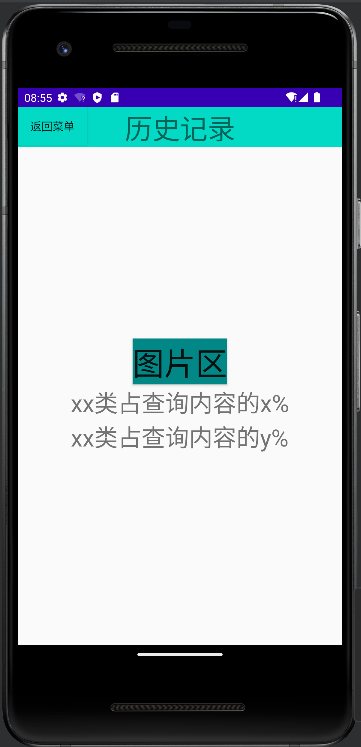
<?xml version="1.0" encoding="utf-8"?>
<LinearLayout
    xmlns:android="http://schemas.android.com/apk/res/android"
    android:layout_width="match_parent"
    android:layout_height="match_parent"
    android:orientation="vertical"
    android:gravity="center">
    <RelativeLayout
        android:layout_width="wrap_content"
        android:layout_height="wrap_content">
        <Button
        android:id="@+id/btn_tg"
        android:layout_width="wrap_content"
        android:layout_height="wrap_content"
        android:layout_alignParentLeft="true"
        android:text="返回菜单"
        android:background="@color/teal_200"/>
        <TextView
            android:layout_width="match_parent"
            android:layout_height="wrap_content"
            android:textSize="35dp"
            android:gravity="center"
            android:text="历史记录"
            android:background="@color/teal_200"/>
    </RelativeLayout>
    <LinearLayout
        xmlns:android="http://schemas.android.com/apk/res/android"
        android:layout_width="match_parent"
        android:layout_height="match_parent"
        android:orientation="vertical"
        android:gravity="center">
        <Button
            android:id="@+id/button"
            android:layout_width="wrap_content"
            android:background="@color/teal_700"
            android:layout_height="wrap_content"
            android:text="图片区"
            android:textSize="40dp"/>
        <LinearLayout
        android:layout_width="wrap_content"
        android:layout_height="wrap_content">
        <TextView
            android:layout_width="wrap_content"
            android:layout_height="wrap_content"
            android:text="xx类占查询内容的x%\nxx类占查询内容的y%"
            android:textSize="30dp"/>
        </LinearLayout>
    </LinearLayout>

</LinearLayout>
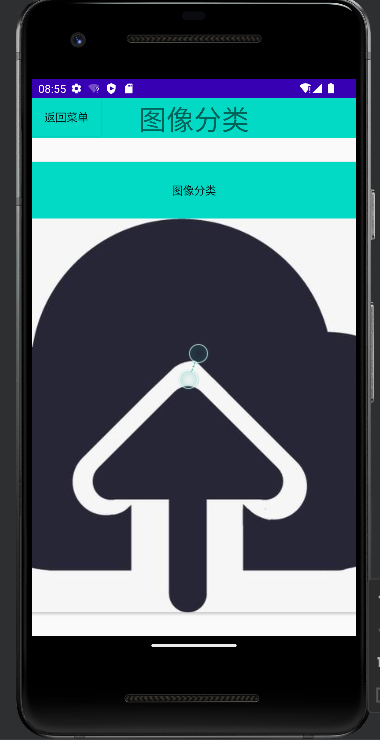
<?xml version="1.0" encoding="utf-8"?>
<LinearLayout
    xmlns:android="http://schemas.android.com/apk/res/android"
    android:layout_width="match_parent"
    android:layout_height="match_parent"
    android:orientation="vertical"
    android:gravity="center">
    <RelativeLayout
        android:layout_width="wrap_content"
        android:layout_height="wrap_content">
        <Button
            android:id="@+id/btn_tg"
            android:layout_width="wrap_content"
            android:layout_height="wrap_content"
            android:layout_alignParentLeft="true"
            android:text="返回菜单"
            android:background="@color/teal_200"/>
        <TextView
            android:layout_width="match_parent"
            android:layout_height="wrap_content"
            android:textSize="35dp"
            android:gravity="center"
            android:text="图像分类"
            android:background="@color/teal_200"/>
    </RelativeLayout>
    <LinearLayout
        android:layout_width="match_parent"
        android:layout_height="match_parent"
        android:orientation="vertical"
        android:gravity="center">

        <Button
            android:id="@+id/button"
            android:layout_width="wrap_content"
            android:layout_height="572dp"
            android:text="图像分类"
            android:background="@color/teal_200"
            android:drawableBottom="@drawable/shangchuan"/>
    </LinearLayout>
</LinearLayout>
package com.example.photo;

import androidx.appcompat.app.AppCompatActivity;

import android.os.Bundle;

public class Fenlei extends AppCompatActivity {

    @Override
    protected void onCreate(Bundle savedInstanceState) {
        super.onCreate(savedInstanceState);
        setContentView(R.layout.activity_fenlei);
    }
}
package com.example.photo;

import androidx.appcompat.app.AppCompatActivity;

import android.os.Bundle;

public class Chengfen extends AppCompatActivity {

    @Override
    protected void onCreate(Bundle savedInstanceState) {
        super.onCreate(savedInstanceState);
        setContentView(R.layout.activity_chengfen);
    }
}
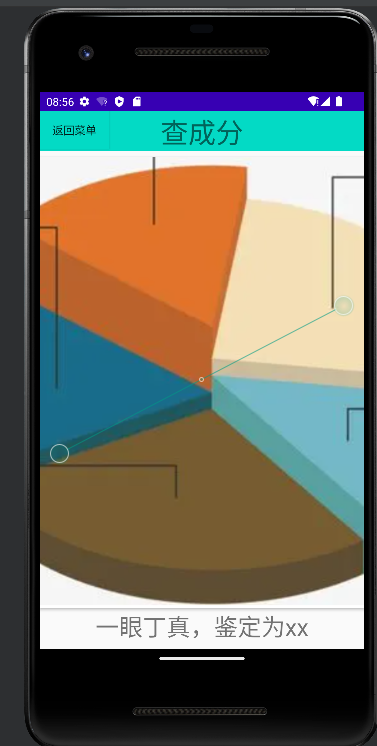
<?xml version="1.0" encoding="utf-8"?>
<LinearLayout
    xmlns:android="http://schemas.android.com/apk/res/android"
    android:layout_width="match_parent"
    android:layout_height="match_parent"
    android:orientation="vertical"
    android:gravity="center">
    <RelativeLayout
        android:layout_width="wrap_content"
        android:layout_height="wrap_content">
        <Button
            android:id="@+id/btn_tg"
            android:layout_width="wrap_content"
            android:layout_height="wrap_content"
            android:layout_alignParentLeft="true"
            android:text="返回菜单"
            android:background="@color/teal_200"/>
        <TextView
            android:layout_width="match_parent"
            android:layout_height="wrap_content"
            android:textSize="35dp"
            android:gravity="center"
            android:text="查成分"
            android:background="@color/teal_200"/>
    </RelativeLayout>
    <LinearLayout
        android:layout_width="match_parent"
        android:layout_height="match_parent"
        android:orientation="vertical"
        android:gravity="center">

        <Button
            android:id="@+id/button"
            android:layout_width="wrap_content"
            android:layout_height="573dp"
            android:background="@color/teal_700"
            android:drawableBottom="@drawable/bingtu" />
        <LinearLayout
            android:layout_width="wrap_content"
            android:layout_height="wrap_content">
            <TextView
                android:layout_width="wrap_content"
                android:layout_height="wrap_content"
                android:text="一眼丁真,鉴定为xx"
                android:textSize="30dp"/>
        </LinearLayout>
    </LinearLayout>

</LinearLayout>

 浙公网安备 33010602011771号