
深度学习的介绍与tersorflow基础
深度学习的介绍
深度学习(DL, Deep Learning)是机器学习(ML, Machine Learning)领域中一个新的研究方向,它被引入机器学习使其更接近于最初的目标——人工智能(AI, Artificial Intelligence)。
深度学习是学习样本数据的内在规律和表示层次,这些学习过程中获得的信息对诸如文字,图像和声音等数据的解释有很大的帮助。它的最终目标是让机器能够像人一样具有分析学习能力,能够识别文字、图像和声音等数据。 深度学习是一个复杂的机器学习算法,在语音和图像识别方面取得的效果,远远超过先前相关技术。
深度学习在搜索技术,数据挖掘,机器学习,机器翻译,自然语言处理,多媒体学习,语音,推荐和个性化技术,以及其他相关领域都取得了很多成果。深度学习使机器模仿视听和思考等人类的活动,解决了很多复杂的模式识别难题,使得人工智能相关技术取得了很大进步。
深度学习是机器学习的一种,而机器学习是实现人工智能的必经路径。深度学习的概念源于人工神经网络的研究,含多个隐藏层的多层感知器就是一种深度学习结构。深度学习通过组合低层特征形成更加抽象的高层表示属性类别或特征,以发现数据的分布式特征表示。研究深度学习的动机在于建立模拟人脑进行分析学习的神经网络,它模仿人脑的机制来解释数据,例如图像,声音和文本等。
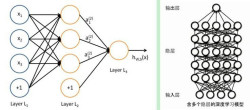 含多个隐层的深度学习模型
从一个输入中产生一个输出所涉及的计算可以通过一个流向图(flow graph)来表示:流向图是一种能够表示计算的图,在这种图中每一个节点表示一个基本的计算以及一个计算的值,计算的结果被应用到这个节点的子节点的值。考虑这样一个计算集合,它可以被允许在每一个节点和可能的图结构中,并定义了一个函数族。输入节点没有父节点,输出节点没有子节点。

这种流向图的一个特别属性是深度(depth):从一个输入到一个输出的最长路径的长度。
传统的前馈神经网络能够被看作拥有等于层数的深度(比如对于输出层为隐层数加1)。SVMs有深度2(一个对应于核输出或者特征空间,另一个对应于所产生输出的线性混合)。 [4]
人工智能研究的方向之一,是以所谓 “专家系统” 为代表的,用大量 “如果-就”(If - Then)规则定义的,自上而下的思路。人工神经网络(Artificial Neural Network),标志着另外一种自下而上的思路。神经网络没有一个严格的正式定义。它的基本特点,是试图模仿大脑的神经元之间传递,处理信息的模式。
深度学习的特点
(1)强调了模型结构的深度,通常有5层、6层,甚至10多层的隐层节点; [4]
(2)明确了特征学习的重要性。也就是说,通过逐层特征变换,将样本在原空间的特征表示变换到一个新特征空间,从而使分类或预测更容易。与人工规则构造特征的方法相比,利用大数据来学习特征,更能够刻画数据丰富的内在信息。
深度学习典型模型
典型的深度学习模型有卷积神经网络( convolutional neural network)、DBN和堆栈自编码网络(stacked auto-encoder network)模型等,下面对这些模型进行描述。
卷积神经网络模型
在无监督预训练出现之前,训练深度神经网络通常非常困难,而其中一个特例是卷积神经网络。卷积神经网
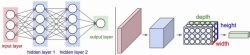
络受视觉系统的结构启发而产生。第一个卷积神经网络计算模型是在Fukushima(D的神经认知机中提出的,基于神经元之间的局部连接和分层组织图像转换,将有相同参数的神经元应用于前一层神经网络的不同位置,得到一种平移不变神经网络结构形式。后来,Le Cun等人在该思想的基础上,用误差梯度设计并训练卷积神经网络,在一些模式识别任务上得到优越的性能。至今,基于卷积神经网络的模式识别系统是最好的实现系统之一,尤其在手写体字符识别任务上表现出非凡的性能。
深度信任网络模型
DBN可以解释为贝叶斯概率生成模型,由多层随机隐变量组成,上面的两层具有无向对称连接,下面的层得到来自上一层的自顶向下的有向连接,最底层单元的状态为可见输入数据向量。DBN由若2F结构单元堆栈组成,结构单元通常为RBM(RestIlcted Boltzmann Machine,受限玻尔兹曼机)。堆栈中每个RBM单元的可视层神经元数量等于前一RBM单元的隐层神经元数量。根据深度学习机制,采用输入样例训练第一层RBM单元,并利用其输出训练第二层RBM模型,将RBM模型进行堆栈通过增加层来改善模型性能。在无监督预训练过程中,DBN编码输入到顶层RBM后,解码顶层的状态到最底层的单元,实现输入的重构。RBM作为DBN的结构单元,与每一层DBN共享参数。
堆栈自编码网络模型
堆栈自编码网络的结构与DBN类似,由若干结构单元堆栈组成,不同之处在于其结构单元为自编码模型( auto-en-coder)而不是RBM。自编码模型是一个两层的神经网络,第一层称为编码层,第二层称为解码层。
深度学习训练过程
2006年,Hinton提出了在非监督数据上建立多层神经网络的一个有效方法,具体分为两步:首先逐层构建单层神经元,这样每次都是训练一个单层网络;当所有层训练完后,使用wake-sleep算法进行调优。
将除最顶层的其他层间的权重变为双向的,这样最顶层仍然是一个单层神经网络,而其他层则变为了图模型。向上的权重用于“认知”,向下的权重用于“生成”。然后使用wake-sleep算法调整所有的权重。让认知和生成达成一致,也就是保证生成的最顶层表示能够尽可能正确的复原底层的节点。比如顶层的一个节点表示人脸,那么所有人脸的图像应该激活这个节点,并且这个结果向下生成的图像应该能够表现为一个大概的人脸图像。wake-sleep算法分为醒( wake)和睡(sleep)两个部分。
wake阶段:认知过程,通过外界的特征和向上的权重产生每一层的抽象表示,并且使用梯度下降修改层间的下行权重。
sleep阶段:生成过程,通过顶层表示和向下权重,生成底层的状态,同时修改层间向上的权重。
自下上升的非监督学习
就是从底层开始,一层一层地往顶层训练。采用无标定数据(有标定数据也可)分层训练各层参数,这一步可以看作是一个无监督训练过程,这也是和传统神经网络区别最大的部分,可以看作是特征学习过程。具体的,先用无标定数据训练第一层,训练时先学习第一层的参数,这层可以看作是得到一个使得输出和输入差别最小的三层神经网络的隐层,由于模型容量的限制以及稀疏性约束,使得得到的模型能够学习到数据本身的结构,从而得到比输入更具有表示能力的特征;在学习得到n-l层后,将n-l层的输出作为第n层的输入,训练第n层,由此分别得到各层的参数。
自顶向下的监督学习
就是通过带标签的数据去训练,误差自顶向下传输,对网络进行微调。基于第一步得到的各层参数进一步优调整个多层模型的参数,这一步是一个有监督训练过程。第一步类似神经网络的随机初始化初值过程,由于第一步不是随机初始化,而是通过学习输入数据的结构得到的,因而这个初值更接近全局最优,从而能够取得更好的效果。所以深度学习的良好效果在很大程度上归功于第一步的特征学习的过程。


1.为什么我们学习深度学习要使用Tensorflow
Caffe  paddlepaddle  kears  tf-learn 。。。。

2.静态图和动态图
(1)定义
静态图:提前建立好计算的顺序和逻辑,然后写入到内存中,实际计算的时候,
直接传入数据,相当于if else 形式进行处理
动态图:计算顺序和逻辑也是写好的,但是实际计算的时候,他会和数据一起传入
内存。数据长短不一的时候,这个图的结构会相应的进行动态修改。
(2)实际的区别
静态图好处,计算速度快,且所需要的内存空间不会很大
缺点,如果数据一个批次batch中,数据长度不一致,就会出现问题。

动态图好处,一个批次的数据,可以数据长度不一致。
缺点:每次都会加载这个图,会占据一定的内存空间。

Tensorflow 1.x大部分的图,都是静态图,存在一部分动态图(RNN)

3.深度学习产品设计思路
训练出来一个模型->打包成.so(或者dll)文件->spark(分布式计算框架)调用so文件
实现分布式计算->建一个api供移动端或者Web端或者客户端调用(安全、稳定、兼容性)

tensorflow分布式计算

4.机器学习/深度学习项目
数据采集+数据清洗->特征工程->构建模型->模型训练及调参->持久化
(1)如果你做的是一个别人已经完成的事情。
项目的核心就不在于构建模型,而是考虑怎么做好特征工程和数据清洗,
来提高准确率等等评估指标

(2)如果你做的是一个新的问题
项目核心就在模型构建上面,特征工程只需要简单处理
重点考虑如何优化模型,来提高准确率等等评估指标

5.定理:深度学习不可解释
(1)不可解释体现在哪里?
不是说神经网络结构设计不能解释,而是说每一个神经元计算的结果不可以解释
PS:大部分的神经元算出来的结果,都是可以找到类似的数学结论(CNN中)

第一波人工智能(跳棋比赛)
第二波人工智能(国际象棋,深蓝)
第三波人工智能(围棋,阿法狗-》自我学习)
现在人工智能火起来的原因
1.大数据环境,给训练提供大量数据
2.芯片算力提高,缩减了计算时间
**3.深度学习的理论不断完备,但是也让黑匣子越来越黑
人机耦合:电脑给人类决策提供参考指标

ImportError:DLL load failed:找不到指定的程序
原因:VC++库缺失,缺少一些c文件
解决方案:VS2015。。。。

tensorflow   pip install protobuf==3.6.0
tensorflow的介绍
官网:https://tensorflow.google.cn/
GitHub:https://github.com/tensorflow/tensorflow
官方案例直观理解:http://playground.tensorflow.org
TensorFlow™ 是一个采用数据流图(data flow graphs),用于数值计算的开源软件库。 TensorFlow 最初由Google大脑小组(隶属于Google机器智能研究机构)的研究员和 工程师们开发出来,用于机器学习和深度神经网络方面的研究,但这个系统的通用性使 其也可广泛用于其他计算领域。它是谷歌基于DistBelief进行研发的第二代人工智能学习 系统。2015年11月9日,Google发布人工智能系统TensorFlow并宣布开源。 • 其命名来源于本身的原理,Tensor(张量)意味着N维数组,Flow(流)意味着基于数 据流图的计算。Tensorflow运行过程就是张量从图的一端流动到另一端的计算过程。张 量从图中流过的直观图像是其取名为“TensorFlow”的原因。
TensorFlow的关键点是:“Data Flow Graphs” ,表示TensorFlow是一种基于图的 计算框架,其中节点(Nodes)在图中表示数学操作,线(Edges)则表示在节点间相 互联系的多维数据数组,即张量(Tensor),这种基于流的架构让TensorFlow具有非 常高的灵活性,该灵活性也让TensorFlow框架可以在多个平台上进行计算,例如:台式 计算机、服务器、移动设备等。
备注:TensorFlow的开发过程中,重点在于构建执行流图。
数据流图使用节点(Node)和线(Edges)的有向图描述数学计 算;节点一般用来表示施加的数学操作,也可以表示数据输入 (feed in)的起点和输出(push out)的终点,或者是读取/写入持久 变量(persistent variable)的终点。线表示的是节点之间的输入/输 出关系,这些线可以输运“size可动态调整”的多维数组,即张量 (Tensor)。
一旦输入端的所有张量准备好,节点将被分配到各种计算设备完 成异步并行地执行运算。
tesorflow的特性
高度的灵活性:只要能够将计算表示成为一个数据流图,那么就可以使用TensorFlow。
可移植性:TensorFlow支持CPU和GPU的运算,并且可以运行在台式机、服务器、手机移 动端设备等等。
自动求微分:TensorFlow内部实现了自动对于各种给定目标函数求导的方式。
多种语言支持:Python、C++ • 性能高度优化
TensorFlow安装
TensorFlow GPU版本安装: • 环境:Python 3.6、NVIDIA显卡
安装过程:
- 安装CUDA SDK(默认会将bin文件夹添 加到PATH环境变量中,即安装CUDA和 cuDNN) • 安装TensorFlow GPU
- 安装命令:pip install tensorflow- gpu==1.4.0
备注:TensorFlow-GPU要求机器的显卡必须是NVidia的显卡。
备注:授课TensorFlow版本选择1.14.0
CUDA下载安装链接:https://developer.nvidia.com/cuda-toolkit-archive
cuDNN下载安装链接:https://developer.nvidia.com/rdp/cudnn-archive
备注:具体的CUDA版本根据导入tensorflow时提示的异常来选择;即先安装tensorflow- gpu,然后在python的命令行执行:import tensorflow,会出现如下异常,则表示我们需要安装的是CUDA 10.0版本,至于cuDNN选择和CUDA对应版本即可。
除了安装CUDA外,还需要安装对应版本的cuDNN,将cuDNN的压缩包解压,然后将压 缩包中的三个文件夹全部放到CUDA对应的根目录下,根据环境变量找到对应的根目录: C:\Program Files\NVIDIA GPU Computing Toolkit\CUDA\v10.0;
Python                             3.6.5
tensorflow-gpu                     1.14.0
cuda                               v10.0

图(Graph):图描述了计算的过程,TensorFlow使用图来表示计算任务。
张量(Tensor):TensorFlow使用tensor表示数据。每个Tensor是一个类型化的多维数 组。
操作(op):图中的节点被称为op(opearation的缩写),一个op获得/输入0个或多个 Tensor,执行计算,产生0个或多个Tensor。
会话(Session):图必须在称之为“会话”的上下文中执行。会话将图的op分发到诸如 CPU或GPU之类的设备上执行。
变量(Variable):运行过程中可以被改变,用于维护状态。
TensorFlow的边即有两种连接关系:
- 数据依赖
- 控制依赖
实线边表示数据依赖,代表数据,即张量。任意维度的数据统称为张量。在机器学习算法中,张量在数据流图中从前往后流动一遍就完成一次前向传播,而残差从后向前流动一遍 就完成一次反向传播。
虚线边表示控制依赖,可以用于控制操作的运行,这被用来确保happens-before关系, 这类边上没有数据流过,但源节点必须在目的节点开始执行前完成。
TensorFlow基础
数据属性

节点
节点又称为算子,它代表一个操作,一般用来表示施加的数字运算,也可以表示数据输入的起点以及输出的重点,或者是读取/写出持久化变量的终点。

TensorFlow基本用法
TensorFlow可以认为是一种编程工具,使用TensorFlow来实现具体的业务需求,所以我们可以认为 TensorFlow就是一个“工具箱”,然后我们使用TensorFlow这个“工具箱”中的各种“工具”(方法 /API)来实现各种功能,比如使用TensorFlow实现基本的数值计算、机器学习、深度学习等;使用 TensorFlow必须理解下列概念:
- 使用图(graph)来表示计算任务;
- 在会话(session)的上下文中执行图;
- 使用tensor表示数据;
- 通过变量(Variable)来维护状态 ;
- 使用feed和fetch可以为任意的操作(Operation/op)赋值或者从其中获取数据。
TensorFlow程序结构
TensorFlow的程序一般分为两个阶段:构建阶段和执行阶段;
- 构建阶段:op的执行步骤被描述称为一个图,然后使用TensorFlow提供的API构建这个图。
- 执行阶段:将构建好的执行图(Operation Graph)在给定的会话中执行,并得到执行结果。
TensorFlow图
TensorFlow编程的重点是根据业务需求,使用TensorFlow的API将业务转换为执行图(有向无环图);图中的节点是Tensor,节点之间的连线是节点之间的操作,连线前的节点可 以认为是操作的输入,连线后的节点可以认为操作的输出;根据节点的特性(是否有输入 输出),可以将节点分为源节点、中间节点和最终的结果节点。
图构建的第一步就是创建源op(source op); 源op不需要任何的输入。op构造器的返回值 代表被构造出的op的输出,这些返回值可以传递给其它op构造器作为输入或者直接获取结 果。
TensorFlow库中有一个默认图(default graph),op构造器可以直接为其添加节点,一般 情况下,使用默认的Graph即可完成程序代码的实现。不过TensorFlow也支持通过Graph 类管理多个图。
import tensorflow as tf
import os
os.environ['TF_CPP_MIN_LOG_LEVEL']='3'
# 默认显示等级,1为所有信息   2 为'Error'和’warning'   3  为'Error'

'''tersorflow的默认图'''
# 一、构建一个计算操作(图)
# np.dot(a,b)
# a->[[3,3]]   b [[2],[2]]
# shape (1,2)   shape(2,1)

# 1.构建a这个张量
#constant 常量,构建完,数据不会修改
a=tf.constant([3,3],dtype=tf.float32,shape=[1,2])

# 2.构建b这个张量
b=tf.constant([2,2],dtype=tf.float32,shape=[2,1])

# 3.a和b做dot
result=tf.matmul(a,b)
print('tersorflow的默认图:{}'.format(tf.compat.v1.get_default_graph()))

'''新建图,不使用默认图(Graph),使用多个图来进行编程;但是注意:操作必须属于同一个图,不
同图中的节点不能相连。不同图之间的操作,不可以跨越图计算。'''
graph1 = tf.Graph()
with graph1.as_default():
    c = tf.constant([1,2],dtype=tf.float32,shape=[1,2])
    # d = tf.Variable(initial_value=[[8, 8]], dtype=tf.float32, shape=[1, 2])
    # print(d.initialized_value())

graph2 = tf.Graph()
with graph2.as_default():

    e = tf.constant([5,6],dtype=tf.float32,shape=[1,2])
    print('a变量是否在graph2:{}'.format(a.graph is graph2))
    print('e变量是否在graph2:{}'.format(e.graph is graph2))
    # f = tf.add(a,e) #错误代码,a属于在默认图里,而e属于graph2图里,不同图之间的操作,不可以跨越图计算

print('a变量是否在默认图:{}'.format(a.graph is tf.compat.v1.get_default_graph()))
TensorFlow会话
当执行图构建完成后,才能给启动图,进入到执行阶段;启动图的第一步就是创建一个 Session对象,如果无任何参数的情况下,会话构造器将启动默认图。tf.Session(1.14.0以后的版本替换为tf.compat.v1.Session)在构建会话的时候,如果不给定任何参数,那么构建出来Session对应的内部的 Graph其实就是默认Graph,不过我们可以通过参数给定具体对应的是那一个Graph以及 当前Session对应的配合参数。Session的构造主要有三个参数,作用如下:
- target:给定连接的url,只有当分布式运行的时候需要给定(后面分布式运行讲);
- graph:给定当前Session对应的图,默认为TensorFlow中的默认图;
- config:给定当前Session的相关参数。
在TensorFlow中,除了可以使用Session表示这个会话外,还 可以通过InteractiveSession来表示会话,InteractiveSession 的意思是:交互式会话,使用交互式会话可以降低代码的复杂 度,使用Tensor.eval()或者Operation.run()来代替 Session.run()方法,这样可以避免一个变量来维持会话;备注: Session也可以使用Tensor.eval()和Operation.run()获取数据/ 执行操作(只要明确当前会话)。
import tensorflow as tf
import os
os.environ['TF_CPP_MIN_LOG_LEVEL']='3'
# 默认显示等级,1为所有信息   2 为'Error'和’warning'   3  为'Error'

'''tersorflow的默认图'''
# 一、构建一个计算操作(图)
# np.dot(a,b)
# a->[[3,3]]   b [[2],[2]]
# shape (1,2)   shape(2,1)

# 1.构建a这个张量
#constant 常量,构建完,数据不会修改
a=tf.constant([3,3],dtype=tf.float32,shape=[1,2])

# 2.构建b这个张量
b=tf.constant([2,2],dtype=tf.float32,shape=[2,1])

# 3.a和b做dot
result=tf.matmul(a,b)
print('tersorflow的默认图:{}'.format(tf.compat.v1.get_default_graph()))

'''新建图,不使用默认图(Graph),使用多个图来进行编程;但是注意:操作必须属于同一个图,不
同图中的节点不能相连。不同图之间的操作,不可以跨越图计算。'''
graph1 = tf.Graph()
with graph1.as_default():
    c = tf.constant([1,2],dtype=tf.float32,shape=[1,2])
    d = tf.Variable(initial_value=[[8, 8]], dtype=tf.float32, shape=[1, 2])
    c_d = tf.add(c,d)
    # print(d.initialized_value())

graph2 = tf.Graph()
with graph2.as_default():
    e = tf.constant([5,6],dtype=tf.float32,shape=[1,2])
    f = tf.compat.v1.placeholder(dtype=tf.float32)
    print('a变量是否在graph2:{}'.format(a.graph is graph2))
    print('e变量是否在graph2:{}'.format(e.graph is graph2))
    # f = tf.add(a,e) #错误代码,a属于在默认图里,而e属于graph2图里,不同图之间的操作,不可以跨越图计算
    e_f = tf.add(e,f)


print('a变量是否在默认图:{}'.format(a.graph is tf.compat.v1.get_default_graph()))


'''会话'''
# 二、运行
# # 4.输出运行结果
# sess=tf.compat.v1.Session()
# print(sess.run(result))
# print(result.eval(session=sess))

#交互式会话
# with tf.compat.v1.Session() as sess:
#     print(result.eval())
#     print(c_d.eval()) #错误代码,因为c_d不在默认图里,而是在graph1。

#交互式会话
# sess = tf.compat.v1.InteractiveSession()
# print(result.eval())

#与图graph1会话
with tf.compat.v1.Session(graph=graph1) as sess1:
    sess1.run(tf.compat.v1.global_variables_initializer()) #如果图中有变量必须执行这个初始化函数。
    print(sess1.run(d))
    print(sess1.run(c_d))
    res = c_d.eval()

'''两个图会话之后的结果可以相互传递'''
with tf.compat.v1.Session(graph=graph2) as sess2:
    print(sess2.run(e_f,feed_dict={f:res}))
TensorFlow Fetch
为了取回操作的输出内容,可以在使用Session对象的run方法调用执行图的时候,传入一 些tensor,通过run方法就可以获取这些tensor对应的结果值。
如果需要获取多个tensor的值,那么尽量一次运行就获取所有的结果值,而不是采用逐个获取的方式。
TensorFlow Feed
Tensorflow还提供了填充机制(feed),可以在构建图时使用placeholder类型的API临时替 代任意操作的张量(占位符),在调用Session对象的run()方法去执行图时,使用填充数据作 为调用的参数,调用结束后,填充数据就消失了。
feed使用一个tensor值临时替换一个操作的输出结果,在获取数据的时候必须给定对应的 feed数据作为参数。feed只有在调用它的方法内有效,方法结束,feed就消失了。
feed可以使用placeholder类型的API创建占位符,常见API:tf.placeholder、 tf.placeholder_with_default。
import tensorflow as tf
import os

os.environ['TF_CPP_MIN_LOG_LEVEL'] = '3'
# 0.1*x+0.2
w = tf.constant(0.1)
b = tf.constant(0.2)
x = tf.compat.v1.placeholder(tf.float32)  #
y1 = tf.add(tf.multiply(w, x), b)
y2 = tf.add(tf.multiply(w, y1), b)
y3 = tf.add(tf.multiply(w, b), 1)
with tf.compat.v1.Session() as sess:
    x_input = int(input('请输入一个数值:'))
    # y1=0.1*10+0.2=1.2
    # y2=0.1*1.2+0.2=0.32
    # y_result=sess.run(y2,feed_dict={x:x_input})
    # print(y_result)
    # print(sess.run(y3, feed_dict={x: x_input}))
    print(sess.run(y2,feed_dict={x:x_input})) #只要操作与x有联系,无论是直接或间接都需要给它传递下x。

    #一次获取多个结果
    _, res2, res3 = sess.run([y1,y2,y3],feed_dict={x:x_input}) # '_' 表示返回的结果不需要时,可以用它接受。给fecths传递列表获取多个值时,需要注意列表里操作的依赖顺序。
    print(res2)
通过Session的config参数可以对TensorFlow的应用的执行进行一些优化调整,主要涉及 到的参数如下:

import tensorflow as tf
import os
os.environ['TF_CPP_MIN_LOG_LEVEL'] = '3'
a = tf.Variable(5.0)
b=tf.constant(2.0)
c=tf.constant(3.0)
ad=tf.add(a,c)
mul = tf.multiply(a,b)
div = tf.divide(c,b)
sub = tf.subtract(b,c)
with tf.compat.v1.Session(config=tf.compat.v1.ConfigProto(allow_soft_placement=True,log_device_placement=True)) as sess:
    sess.run(tf.compat.v1.global_variables_initializer())
    print(sess.run([ad,mul,div,sub]))
Tensor张量与TensorFlow变量
Tensor张量
TensorFlow使用Tensor数据结构来代表所有数据,计算图中,操作间传递的数据都是 Tensor。Tensor可以看作是一个n维的数组或者列表,一个Tensor主要由一个静态数据类 型和动态类型的维数(Rank、Shape)组成。Tensor可以在图中的节点之间流通。
TensorFlow变量
变量(Variables)是维护图执行过程中的状态信息。在训练模型过程中,可以通过变量来存 储和更新参数。变量包含张量(Tensor)存放于内存的缓存区。建模的时候变量必须被明确 的初始化,模型训练后变量必须被存储到磁盘。这些变量的值可以在之后的模型训练和分 析中被加载。
在构建变量的时候,必须将一个张量或者可以转化为张量的Python对象作为初始值传入构 造函数Variable中。
特别注意:变量的全局初始化(tf.initialize_all_variables())是并行执行的,如果存在变量之 间的依赖关系的时候,再进行初始化的时候要特别注意。(1.4版本之后该问题就不存在了)
import tensorflow as tf
import os
os.environ['TF_CPP_MIN_LOG_LEVEL'] = '3'

# 定义变量a
a=tf.Variable([[3.0,5.0]],dtype=tf.float32,shape=[1,2])
# 定义常量b
b=tf.constant([[2.0,8.0]],dtype=tf.float32,shape=[1,2])

# op(操作)
mul = tf.multiply(a,b)
ad = tf.add(a,b)
div = tf.divide(a,b)
sub = tf.subtract(a,b)
# print(type(a))
# print(type(b))
# print(type(mul))
# print(type(ad))
# print(type(div))
# print(type(sub))

# print(a)
# print(b)
# print(mul)
# print(ad)
# print(div)
# print(sub)


'''变量(RefVariable/Variable)有一个更新的方法,而张量(Tensor)没有'''
# print('*'*10)
a_op1 = a.assign(tf.add(a,1)) #类似python的 a+=1
# print(type(a_op1))
# print(type(a))
a_op2 = tf.compat.v1.assign(ref=a,value=tf.add(a,1))
# print(type(a_op2))
# print(type(a))

with tf.compat.v1.Session() as sess:
    sess.run(tf.compat.v1.global_variables_initializer())
    print(type(a))
    print(type(sess.run(mul)))
    print(type(sess.run(ad)))
    print('*'*10)
    res1 = sess.run(a_op1)
    print(res1)
    print(type(res1))
    print('*'*10)
    print(a)
    a_result1 = sess.run(a)
    print(a_result1)
    print(type(a_result1))
    print('*'*15)

    res2 = sess.run(a_op2)
    print(res2)
    print(type(res2))
    print('*' * 10)
    print(a)
    a_result2 = sess.run(a)
    print(a_result2)
    print(type(a_result2))
TensorFlow控制依赖
我们可以通过Variable和assign完成变量的定义和更新,但是如果在更新变量之前需要更 新其它变量,那么会导致一个比较严重的问题:也就是需要多次调用sess.run方法来进行变量的更新。通过这种方式,代码复杂程度上升,同时也没有执行效率。
解决该问题的方案就是:控制依赖。通过TensorFlow中提供的一组函数来处理不完全依赖 的情况下的操作排序问题(即给定哪个操作先执行的问题), 通过tf.control_dependencies API完成。
import tensorflow as tf
import os
import sys
os.environ['TF_CPP_MIN_LOG_LEVEL'] = '3'
# 1.定义一个初始值sum,值为1
sum=tf.Variable(1,dtype=tf.int32)

# 2.定义一个占位符,表示传入的数据,x
x=tf.compat.v1.placeholder(dtype=tf.int32)

# 3.乘法操作,实现sum的更新
tmp_sum=tf.multiply(sum,x)

# 如果你要输出sum的话,请你先执行op_sum操作,更新sum
op_sum=tf.compat.v1.assign(ref=sum,value=tmp_sum)

with tf.control_dependencies([op_sum]): #需要做完op_sum操作,才会做下面的操作
    sum1=tf.print('sum:',sum,output_stream=sys.stdout) #要做sum1操作之前必须先执行op_sum操作。

# 4.操作,更新操作执行x次
with tf.compat.v1.Session() as sess:
    sess.run(tf.compat.v1.global_variables_initializer())
    num=input('请输入要算的阶乘的数:')
    result=0
    for i in range(1,int(num)+1):
        _, result=sess.run([sum1,sum],feed_dict={x:i})
    print('{}!={}'.format(num,result))
TensorFlow设备
设备是指一块可以用来运算并且拥有自己的地址空间的硬件,如CPU和GPU。Tensorflow 为了在执行操作的时候,充分利用计算资源,可以明确指定操作在哪个设备上执行。
一般情况下,不需要显示指定使用CPU还是GPU,TensorFlow会自动检测。如果检测到 GPU,TensorFlow会尽可能地利用第一个GPU来执行操作。注意:如果机器上有超过一个 可用的GPU,那么除了第一个外其它GPU默认是不参与计算的。所以,在实际TensorFlow 编程中,经常需要明确给定使用的CPU和GPU。
- “/cpu:0”:表示使用机器CPU运算
- “/gpu:0”:表示使用第一个GPU运算,如果有的话
- “/gpu:1”:表示使用第二个GPU运算,以此类推
import tensorflow as tf
import os
os.environ['TF_CPP_MIN_LOG_LEVEL'] = '3'
def net():
    # a+b=c ->/cpu:0
    with tf.device('/cpu:0'):
        a=tf.constant(1.0)
        b=tf.constant(2.0)
        c=tf.add(a,b)

    # d+e=f ->/gpu:0
    with tf.device('/gpu:0'):
        d = tf.Variable(3.0)
        e = tf.constant(4.0)
        f = tf.add(d.initialized_value(), e)
    return c,f

with tf.compat.v1.Session(config=tf.compat.v1.ConfigProto(log_device_placement=True)) as sess:
    sess.run(tf.compat.v1.global_variables_initializer())
    c_op,f_op=net()
    print(sess.run([c_op,f_op]))
TensorFlow变量作用域
通过tf.Variable我们可以创建变量,但是当模型复杂的时候,需要构建大量的变量集,这 样会导致我们对于变量管理的复杂性,而且没法共享变量(存在多个相似的变量)。针对这个 问题,可以通过TensorFlow提供的变量作用域机制来解决,在构建一个图的时候,就可以 非常容易的使用共享命名过的变量。
Tensorflow中有两个作用域,一个是name_scope,另一个是variable_scope。
变量作用域机制在TensorFlow中主要通过两部分组成:
- tf.get_variable:通过所给定的名字创建或者返回一个对应的变量
- tf.variable_scope:为通过创建的变量或者操作Operation指定命名空间
使用TensorFlow的变量作用域,体现简化变量数量的案例代码:
import tensorflow as tf
import os
os.environ['TF_CPP_MIN_LOG_LEVEL'] = '3'

def my_func():
    weight1 = tf.Variable(initial_value=tf.random.normal([1]))
    bias1 = tf.Variable(initial_value=tf.random.normal([1]))
    op1 = weight1[0]*bias1[0]

    weight2 = tf.Variable(initial_value=tf.random.normal([1]))
    bias2 = tf.Variable(initial_value=tf.random.normal([1]))
    op2 = weight2[0]*bias2[0]

    return op1,op2

# with tf.compat.v1.Session() as sess:
#     result = my_func()
#     sess.run(tf.compat.v1.global_variables_initializer()) #初始化全局变量这一步,必须在所有变量加载之后,即某个函数存在变量,则这个函数应在这个步骤的前面执行,否则会报错。
#     res1, res2 = sess.run(result)
#     print(res1)
#     print('*'*10)
#     print(res2)

'''用变量作用域来实现代码简化'''
def func():
    # get_variable():如果存在名为'weight'的变量则直接获取,否则创建一个。initializer参数接收是初始化器。
    weight = tf.compat.v1.get_variable('weight',[1],initializer=tf.random_normal_initializer())
    bias = tf.compat.v1.get_variable('bias',[1],initializer=tf.random_normal_initializer())
    op = tf.multiply(weight[0],bias[0])
    return weight,op

with tf.compat.v1.variable_scope('op1') as op1: #创建变量空间,可以防止变量名重复而产生的冲突
    weight1,result1 = func()

with tf.compat.v1.variable_scope('op2') as op2:
    weight2,result2 = func()
print(weight1.name)
print(result1.name)
print(weight2.name)
print(result2.name)
tf.get_variable常用的initializer初始化器:

tf.variable_score方法的作用就是定义一个作用域,定义在variable_score作用域中的变量和操作,会将variable score的名称作为前缀添加到变量/操作名称前,支持嵌套的作用域, 添加前缀规则和文件目录路径的规则类似。
tf.variable_score参数如果给定的是一个已经存在的作用域对象的时候,那么构建变量的时候表示直接跳过当前作用域前缀,直接成为一个完全不同与现在的作用域(直接创建给定 作用域下的变量)。但是构建操作的时候,还是和嵌套的方式一样,直接添加子作用域。
tf.variable_score参数中,可以给定当前作用域中默认的初始化器initializer,并且子作用域会直接继承父作用域的相关参数(是否重用、默认初始化器等)
TensorFlow中的name_score和variable_score是两个不同的东西,name_score的主要作用是为op_name前加前缀,variable_score是为get_variable创建的变量的名字加前缀。 简单来讲:使用tf.Variable创建的变量受name_score和variable_score的的效果,会给变量添加前缀,但是使用tf.get_variable创建变量只受variable_score的效果。
name_score的主要作用就是:Tensorflow中常常会有数以千计的节点,在可视化的过程 中很难一下子展示出来,因此用name_scope为变量划分范围,在可视化中,这表示在计 算图中的一个层级。name_scope会影响op_name,不会影响用get_variable()创建的变量, 而会影响通过Variable()创建的变量。
作用域嵌套测试:
import tensorflow as tf
import os
os.environ['TF_CPP_MIN_LOG_LEVEL'] = '3'
with tf.compat.v1.name_scope('name1') as name1:
    g = tf.compat.v1.get_variable('g',[1],initializer=tf.constant_initializer(0.0))
    with tf.compat.v1.variable_scope('variable1'):
        a = tf.Variable(1.0,name='a')
        b = tf.compat.v1.get_variable('b',shape=[1],initializer=tf.constant_initializer(2.0))
        c = tf.add(a,b)
        with tf.compat.v1.name_scope(name1):
            d = tf.Variable(4.0,name='d')
            e = tf.compat.v1.get_variable('e',shape=[1],initializer=tf.constant_initializer(5.0))
            f = tf.add(d,e)

with tf.compat.v1.variable_scope('variable2',initializer=tf.constant_initializer(0.3)) as variable2_scope:
    with tf.compat.v1.name_scope('name2'):
        h = tf.compat.v1.get_variable('h',[1])
        i = tf.compat.v1.get_variable('i',[1],initializer=tf.constant_initializer(0.2))
        with tf.compat.v1.variable_scope('variable3'):
            j = tf.compat.v1.get_variable('j',[2])
            with tf.compat.v1.variable_scope(variable2_scope):
                k = tf.compat.v1.get_variable('k',[1])
                n = tf.Variable(9.0)
                r = tf.add(tf.add(i,j[0]),k)

with tf.compat.v1.Session() as sess:
    sess.run(tf.compat.v1.global_variables_initializer())
    print('name:{}, value:{}'.format(g.name,g.eval()))
    print('name:{}, value:{}'.format(a.name,a.eval()))
    print('name:{}, value:{}'.format(b.name,b.eval()))
    print('name:{}, value:{}'.format(c.name,c.eval()))
    print('name:{}, value:{}'.format(d.name,d.eval()))
    print('name:{}, value:{}'.format(e.name,e.eval()))
    print('name:{}, value:{}'.format(f.name,f.eval()))
    print('*'*15)
    print('name:{}, value:{}'.format(h.name,h.eval()))
    print('name:{}, value:{}'.format(i.name,i.eval()))
    print('name:{}, value:{}'.format(j.name,j.eval()))
    print('name:{}, value:{}'.format(k.name,k.eval()))
    print('name:{}, value:{}'.format(n.name,n.eval()))
    print('name:{}, value:{}'.format(r.name,r.eval()))
import tensorflow as tf
import os
os.environ['TF_CPP_MIN_LOG_LEVEL']='3'

'''一.实现一个累加器,并且每一步均输出累加器的结果值'''
# # 1.变量a,初始化为1
# a=tf.Variable(0,dtype=tf.int8)
# # 2.累加操作
# # assign 变量更新
# op_x=tf.compat.v1.assign(ref=a,value=tf.add(a,1))
# b = tf.add(a,1)
# 3.会话执行
# sess=tf.compat.v1.Session()
# sess.run(tf.compat.v1.global_variables_initializer())
# for i in range(5):
#     a=sess.run(op_x)
#     print(a)


''' 二、编写一段代码,实现动态的更新变量的维度数目'''
# # 1.变量b,初始化为一个空数组
# b=tf.Variable(
#     initial_value=[],# 输出一个空值
#     validate_shape=False,# 设置为True的话,表示在变量更新的时候,进行shape检查
#     trainable=False#不加载到内存空间中去
# )
# # 2.合并数组的操作 b合并[0,0]
# # []=>[0,0]
# # [0,0]=>[0,0,0,0]
# #....
# concat=tf.concat([b,[0.,0.]],axis=0)
# op_b=tf.compat.v1.assign(ref=b,value=concat,validate_shape=False)
# # 3.运行
# with tf.compat.v1.Session() as sess:
#     sess.run(tf.compat.v1.global_variables_initializer())
#     for i in range(5):
#         print(sess.run(op_b))


'''实现一个求解阶乘的代码'''
# 1.定义一个初始值sum,值为1
sum=tf.Variable(1,dtype=tf.int32)

# 2.定义一个占位符,表示传入的数据,x
x=tf.compat.v1.placeholder(dtype=tf.int32)

# 3.乘法操作,实现sum的更新
tmp_sum=tf.multiply(sum,x)
op_sum=tf.compat.v1.assign(ref=sum,value=tmp_sum)

# 4.操作,更新操作执行x次
with tf.compat.v1.Session() as sess:
    sess.run(tf.compat.v1.global_variables_initializer())
    num=input('请输入要算的阶乘的数:')
    result=0
    for i in range(1,int(num)+1):
        result=sess.run(op_sum,feed_dict={x:i})
    print('{}!={}'.format(num,result))
TensorFlow可视化
TensorFlow提供了一套可视化工具:TensorBoard,在通过pip安装TensorFlow的情况下, 默认也会安装TensorBoard。通过TensorBoard可以展示TensorFlow的图像、绘制图像生 成的定量指标以及附加数据等信息。
TensorBoard通过读取TensorFlow的事件文件来运行,TensorFlow的事件文件包括了在 TensorFlow运行中涉及到的主要数据,比如:scalar、image、audio、histogram和 graph等。
通过tf.summary相关API,将数据添加summary中,然后在Session中执行这些操作得到 一个序列化Summary protobuf对象,然后使用FileWriter对象将汇总的序列数据写入到磁 盘,然后使用tensorboard命令进行图标展示,默认访问端口是:6006
TensorBoard中支持结构视图和设备视图。

#信息可视化的命令
tensorboard --logdir summary信息的存放目录
注意:执行该命令的当前盘符必须切换至summay信息的存放目录的所在盘符
import argparse# python命令行解析
import tensorflow as tf
import os
os.environ['TF_CPP_MIN_LOG_LEVEL'] = '3'

from tensorflow.examples.tutorials.mnist import input_data# mnist 手写数字数据
mnist=input_data.read_data_sets('mnist',one_hot=True)
train_image=mnist.train.images
#train_image [?,784]
# train_label [?,10]

# 定义一个简短的wx+b的嵌套的结构
with tf.name_scope('input'):
    input_x=tf.compat.v1.placeholder(tf.float32,[None,784],name='input_x')
    out_y=tf.compat.v1.placeholder(tf.float32,[None,10],name='label_y')

# 输入input处理
with tf.name_scope('input_reshape'):
    img_shaped_input=tf.reshape(input_x,[-1,28,28,1])
    tf.compat.v1.summary.image('input',img_shaped_input)# 查看输入的图片数据

# 生成权重
def set_weight_variable(shape):
    return tf.Variable(tf.random.normal(shape),name='weight')

# 生成截距
def set_biast_variable(shape):
    return tf.Variable(tf.constant(0.1,shape=shape),name='bias')

# 记录变量的状态
def variable_summaries(var):
    # 平均值
    mean=tf.reduce_mean(var)

    # 标准差
    stddev=tf.sqrt(tf.reduce_mean((tf.square(var-mean))))
    # 最大值
    max = tf.reduce_max(var)
    # 最小值
    min = tf.reduce_min(var)
    tf.compat.v1.summary.scalar('mean',mean)
    tf.compat.v1.summary.scalar('stddev', stddev)
    tf.compat.v1.summary.scalar('max', max)
    tf.compat.v1.summary.scalar('min', min)
    tf.compat.v1.summary.histogram('histogram',var)

# 定义网络
def net(input_tensor,input_dim,out_dim):
    # d1.构建网络
    with tf.name_scope('layer1'):
        weights=set_weight_variable([input_dim,20])
        # 784 -> 10
        # [100,784] * [784,20]-> [100,20]  W
        # b ->[20]
        bias=set_biast_variable([20])
        variable_summaries(weights)
        variable_summaries(bias)
        with tf.name_scope('wx_add_b'):
            layer_out=tf.add(tf.matmul(input_tensor,weights),bias)
            tf.compat.v1.summary.histogram('layer_out',layer_out)
    with tf.name_scope('layer2'):
        weights=set_weight_variable([20,out_dim])
        bias=set_biast_variable([out_dim])
        variable_summaries(weights)
        variable_summaries(bias)
        with tf.name_scope('wx_add_b'):
            pre=tf.add(tf.matmul(layer_out,weights),bias)
            tf.compat.v1.summary.histogram('pre',pre)
    return pre

with tf.compat.v1.Session() as sess:
    pre=net(input_x,784,10)
    merged = tf.compat.v1.summary.merge_all()  # 收集所有summary信息,scalar,image,audio,
    summary_writer = tf.compat.v1.summary.FileWriter('summary', sess.graph)  # summary信息写入文件
    # 初始化
    sess.run(tf.compat.v1.global_variables_initializer())
    for i in range(100):
        _,summary_result=sess.run([pre,merged],feed_dict={input_x:train_image})
        summary_writer.add_summary(summary_result,i)
    summary_writer.close()
案例:编写一个累加器;定义一个变量x(初值随机给定),定义一个占位符y,迭代4次,每 个迭代返回x*y的值,并且在计算x*y乘积前,先对x进行累加操作。并且将这个程序信息输 出到文件以TensorBoard展示。
import tensorflow as tf

import os
os.environ['TF_CPP_MIN_LOG_LEVEL'] = '3'
with tf.name_scope('y_mult_x'):
    # 1.定义一个变量x
    x=tf.compat.v1.get_variable('input_x',[1],initializer=tf.constant_initializer(9.0))
    # 2.定义一个占位符y

    y=tf.compat.v1.placeholder(tf.float32,name='y')
    # 3.操作:控制依赖:先对x进行累加操作,每个迭代返回x*y的值
    op_x=tf.compat.v1.assign(ref=x,value=tf.add(x,1))
    with tf.compat.v1.control_dependencies([op_x]):
        op_y = tf.multiply(x,y,name='x_y')
        tf.compat.v1.summary.scalar('x',x[0])
        tf.compat.v1.summary.scalar('y',op_y[0])


# 4.运行
with tf.compat.v1.Session() as sess:
    # 定义一个记录summary文件
    merged = tf.compat.v1.summary.merge_all()  # 收集所有summary信息,scalar,image,audio,
    summary_writer = tf.compat.v1.summary.FileWriter('./summary',sess.graph)# summary信息写入文件
    # 初始化
    sess.run(tf.compat.v1.global_variables_initializer())
    # 5.迭代4次
    for i in range(4):
        # 收集run数据的操作
        # run_meta=tf.compat.v1.RunMetadata()
        result,summary_result=sess.run([op_y,merged],feed_dict={y:float(i)})
        # summary_writer.add_run_metadata(run_meta,'step%d'%i)
        #summary_writer.add_graph(sess.graph,i)
        summary_writer.add_summary(summary_result,i)
        # .....
        print(result)
    summary_writer.close()
TensorFlow线程和队列
在TensorFlow进行异步计算的时候,队列是一种强大的机制。和TensorFlow中的其它组件一样,队列就是TensorFlow图中的节点。这是一种有状态的节点,和变量一样。其它节点可以修改它的内容,比如:将新元素添加到队列后端,也可以把队列前端的元素删除。
TensorFlow常见队列:
- FIFOQueue:先进先出队列
- RandomShuffleQueue:随机混淆队列
队列使用的常见结构:
- 多个线程准备训练数据,并将这些数据推入队列中
- 一个训练线程执行一个训练操作,此操作会从队列中移除最小批次的数据(mini batches)
TensorFlow的Session对象是支持多线程的,因此多个线程可以比较方便的使用同一个Session并且并行的执行操作。但是,在Python程序实现这样的并行运算并不容易,所有线程必须被同步的终止,异常必须被正确的捕获并报告,会话终止的时候,队列必须对正确的关闭。
针对这个问题,TensorFlow提供了两个类来帮助多线程的实现:tf.Coordinator和 tf.QueueRunner。
- Coordinator类可以用来停止多个工作线程并且向那个在等待所有工作线程终止的线程发送异常报告
- QueueRunner类用来协调多个工作线程同时将多个张量推入一个队列中
Coordinator类的主要方法如下:
- should_stop():如果线程应该停止则返回True
- request_stop():请求线程停止
- join():等待被指定的线程终止
Coordinator类的操作过程主要如下:
- 首先创建Coordinator对象,然后建立一些使用Coordinator对象的线程
- 这些线程都是一直运行的,直到should_stop返回True时候停止。
- 任意线程都可以显示的调用的request_stop方法来停止线程,同时其它线程的should_stop会返回True
QueueRunner类可以创建一组线程,这些线程可以重复的执行Qnquene操作,同时使用Coordinator来处理线程同步终止,此外QueueRunner内部维护了一个closer thread,当 Coordinator收到异常报告时,这个线程会自动关闭队列。
# 之前打包好的.tfrecords文件(使用tensorflow打包的一种数据集)

import tensorflow as tf
'''以下的代码不能正常运行'''
# 文件队列
filename_queue=tf.train.string_input_producer(['train.tfrecords'])
reader=tf.TFRecordReader()

# 读取数据,提取数据集
_,serialized_example=reader.read(filename_queue)

# 解析数据集
features=tf.parse_single_example(serialized_example,
                                 features={
                                     'images':tf.FixedLenFeature([],tf.string),
                                     'labels':tf.FixedLenFeature([],tf.int8)
                                 })
# 读取字节流的文件,使用tf.decode_raw还原成图片矩阵
images=tf.decode_raw(features['images'],tf.uint8)
images=tf.reshape(images,[100,100,3])# 还原为图片,100只是举例,表明图片的宽高

# 修改数据的数据类型
# 类似于numpy中astype
labels=tf.cast(features['labels'],dtype=tf.int32)

input=tf.placeholder(dtype=tf.uint8,shape=[None,100,100,3])
out_y=tf.placeholder(dtype=tf.uint8,shape=[None,1])
op=input*1

# 队列读取
with tf.Session() as sess:
    # 1.建立coord
    coord=tf.train.Coordinator()
    # 2.建立quene_runner机制
    theards=tf.train.start_queue_runners(sess,coord)
    for i in range(20):
        input_x,output_y=sess.run([images,labels])
        sess.run(op,feed_dict={input:input_x})
    #coord.join(theards)
    # theaders关闭
    theards.close()
    # coord管理关闭
    coord.request_stop()

#tf.data.TFRecordDataset('filename')这个方法也可以读取数据。
TensorFlow数据读取
TensorFlow提供了三种方式来读取数据:
- 供给数据(Feeding):在TensorFlow程序运行的每一步,让Python代码来供给数据
- 从文件读取数据(深度学习中主要应用):在TensorFlow图的起始,让一个输入管线从文件中读取数据
- 预加载数据:在TensorFlow图中定义常量或变量来保存所有数据(仅适合小规模数据集的情况)
读取tensorflow官方网上提供的训练数据
import tensorflow as tf
import tensorflow_datasets as tfds
from sklearn.preprocessing import OneHotEncoder
import matplotlib.pyplot as plt
import numpy as np
oneh = OneHotEncoder()
tr = oneh.fit_transform(np.array([i for i in range(10)]).reshape(-1,1))

import os
os.environ['TF_CPP_MIN_LOG_LEVEL'] = '3'

# tf.compat.v1.enable_eager_execution() #启动eager模式(动态图模式)

# 安装: pip install tensorflow-datasets
# print(tfds.list_builders()) #查看官方中可加载的数据集的名称

#加载数据,如果给定data_dir路径中有数据则就不需要从网上下载了,否则下载到给定的data_dir目录中,
#如果没有给定路径,默认路径为
# mnist_train = tfds.load(name="mnist", split="train")
# # mnist_builder = tfds.builder("mnist")
# # mnist_builder.download_and_prepare()
# # mnist_train = mnist_builder.as_dataset(split="train")


# mnist_data = tfds.load("mnist")
# mnist_train, mnist_test = mnist_data["train"], mnist_data["test"]
# assert isinstance(mnist_train, tf.data.Dataset)

# # 直接获取数据集
# mnist = tfds.image.MNIST()
# # or by string name
# mnist = tfds.builder('mnist')
#
# # 使用DatasetInfo描述数据集
# assert mnist.info.features['image'].shape == (28, 28, 1)
# assert mnist.info.features['label'].num_classes == 10
# assert mnist.info.splits['train'].num_examples == 60000
#
# # 下载数据,准备数据,并将其写入磁盘
# mnist.download_and_prepare()
#
# # Load data from disk as tf.data.Datasets
# datasets = mnist.as_dataset()
# train_dataset, test_dataset = datasets['train'], datasets['test']
# assert isinstance(train_dataset, tf.data.Dataset)
#
# # 如果您愿意,还可以将数据集转换为NumPy数组
# for example in tfds.as_numpy(train_dataset):
#   image, label = example['image'], example['label']
#   assert isinstance(image, np.array)


'''动态模式下'''
# for mnist_example in mnist_train.take(1):  # 只取一个样本
#     #启动eager模式才能运行以下代码
#     image, label = mnist_example["image"], mnist_example["label"]
#     plt.imshow(image.numpy()[:, :, 0].astype(np.float32), cmap=plt.get_cmap("gray"))
#     plt.show()
#     print("Label: %d" % label.numpy())


'''静态模式下'''
# with tf.compat.v1.Session() as sess:
#     # mnist_train = mnist_train.batch(1)
#     # # prefetch 将使输入流水线可以在模型训练时异步获取批处理。
#     # mnist_train = mnist_train.prefetch(tf.data.experimental.AUTOTUNE)
#     # mnist_train_iterator = tf.compat.v1.data.make_one_shot_iterator(mnist_train).get_next()
#     # mnist_example = sess.run(mnist_train_iterator)
#     # image, label = mnist_example["image"], mnist_example["label"]
#     # plt.imshow(image.reshape(28,28).astype(np.float32), cmap=plt.get_cmap("gray"))
#     # plt.show()
#     # print("Label: %d" % label)


#     for example in tfds.as_numpy(mnist_train): #tfds.as_numpy生成一个有numpy数组的迭代器,返回的是一个字典。
#         image, label = example['image'], example['label']
#         plt.imshow(image.reshape(28, 28).astype(np.float32), cmap=plt.get_cmap("gray"))
#         plt.show()
#         print("Label: %d" % label)
#         break


mnist = tfds.load('mnist')
mnist_train = mnist['train']

mnist_train = mnist_train.repeat().batch(5)
# prefetch 将使输入流水线可以在模型训练时异步获取批处理。
mnist_train = mnist_train.prefetch(tf.data.experimental.AUTOTUNE)

# iterator = tf.compat.v1.data.make_one_shot_iterator(mnist_train).get_next()
import pandas as pd
with tf.compat.v1.Session() as sess:
    for batch_example in tfds.as_numpy(mnist_train):
        batch_image, batch_label = batch_example['image'], batch_example['label']
        print(batch_label)
        break
TFRecords文件的生成
TFRecords是一种tensorflow的内定标准文件格式,其实质是二进制文件,遵循protocol buffer(PB)协议(百度百科给的定义:protocol buffer(以下简称PB)是google 的一种数据交换的格式,它独立于语言,独立于平台),其后缀一般为tfrecord。TFRecords文件方便复制和移动,能够很好的利用内存,无需单独标记文件,适用于大量数据的顺序读取,是tensorflow“从文件里读取数据”的一种官方推荐方法!本篇文章,我将整理tensorflow TFRecords文件生成和读取的方法,分为两个部分,每个部分分别介绍并附带例程!
其源代码主要位于文件tensorflow/python/lib/io/tf_record.py
官方例程tensorflow/examples/how_tos/reading_data/convert_to_records.py
第一步,生成TFRecord Writer
writer = tf.io.TFRecordWriter(path, options=None)
path:TFRecord文件的存放路径;
option:TFRecordOptions对象,定义TFRecord文件保存的压缩格式;
有三种文件压缩格式可选,分别为TFRecordCompressionType.ZLIB、TFRecordCompressionType.GZIP以及TFRecordCompressionType.NONE,默认为最后一种,即不做任何压缩,定义方法如下:
options_gzip = tf.io.TFRecordOptions(tf.compat.v1.python_io.TFRecordCompressionType.GZIP)
第二步,tf.train.Feature生成协议信息
一个协议信息特征(这里翻译可能不准确)是将原始数据编码成特定的格式,一般是features中又包含feature,内层feature是一个字典值,它是将某个类型列表编码成特定的feature格式,而该字典键用于读取TFRecords文件时索引得到不同的数据,某个类型列表可能包含零个或多个值,列表类型一般有BytesList, FloatList, Int64List,通常用如下方法来生成某个列表类型再送给内层的tf.train.Feature编码:
tf.train.BytesList(value=[value]) # value转化为字符串(二进制)列表
tf.train.FloatList(value=[value]) # value转化为浮点型列表
tf.train.Int64List(value=[value]) # value转化为整型列表
其中,value是你要保存的数据。
内层feature编码方式:
feature_internal = {
"width":tf.train.Feature(int64_list=tf.train.Int64List(value=[width])),
"weights":tf.train.Feature(float_list=tf.train.FloatList(value=[weights])),
"image_raw":tf.train.Feature(bytes_list=tf.train.BytesList(value=[image_raw]))
}
外层features再将内层字典编码:
features_extern = tf.train.Features(feature_internal)
看起来,tf.train.Feature这个接口可以编码封装列表类型和字典类型,但注意用的接口是不一样的,内层用的是tf.train.Feature而外层用的是tf.train.Features,一个是对单一数据编码成单元feature,而另一个是将包含多个单元feature的字典数据再编码为集成的features。
第三步,使用tf.train.Example将features编码数据封装成特定的PB协议格式
example = tf.train.Example(features_extern)
第四步,将example数据系列化为字符串
example_str = example.SerializeToString()
第五步,将系列化为字符串的example数据写入协议缓冲区
writer.write(example_str)
TFRecordWriter拥有类似python文件操作的接口,如writer.flush()立即将内存数据刷新到磁盘文件里,writer.close()关闭TFRecordWriter,在写完数据到协议缓冲区后通常需要调用writer.close()主动关闭TFRecords文件操作接口。
import tensorflow as tf
import os
os.environ['TF_CPP_MIN_LOG_LEVEL'] = '3'

filename = "./test_data/cat.0.jpg"

from PIL import Image
import numpy as np
img = Image.open(filename)
# print('图片原始的大小{}'.format(np.asarray(img).shape))

# 使用tf.io.read_file读进图片数据
image = tf.io.read_file(filename)

# 主要是为了获取图片的宽高
image_jpeg = tf.image.decode_jpeg(image, channels=3, name="decode_jpeg_picture")

# # reshape图片到原始大小2500x2000x3
image_jpeg = tf.reshape(image_jpeg, shape=(374,500,3))

# 获取图片shape数据
img_shape = image_jpeg.shape
width = img_shape[0]
height = img_shape[1]

# 将原图片tensor生成bytes对象, image将保存到tfrecord
sess = tf.compat.v1.Session()
image = sess.run(image)
sess.close()

# 定义TFRecords文件的保存路径及其文件名
path_none = "./test_model/img_compress_none.tfrecord"
path_zlib = "./test_model/img_compress_zlib.tfrecord"
path_gzip = "./test_model/img_compress_gzip.tfrecord"
#
# TFRecords文件的压缩选项
options_zlib = tf.io.TFRecordOptions(tf.compat.v1.python_io.TFRecordCompressionType.ZLIB)
options_gzip = tf.io.TFRecordOptions(tf.compat.v1.python_io.TFRecordCompressionType.GZIP)

# 定义不同压缩选项的TFRecordWriter
writer_none = tf.io.TFRecordWriter(path_none, options=None)
writer_zlib = tf.io.TFRecordWriter(path_zlib, options=options_zlib)
writer_gzip = tf.io.TFRecordWriter(path_gzip, options=options_gzip)

# 编码数据,将数据生成特定类型列表后再编码为feature格式,再生成字典形式
feature_internal_none = {
"float_val":tf.train.Feature(float_list=tf.train.FloatList(value=[9.99])),
"width":tf.train.Feature(int64_list=tf.train.Int64List(value=[width])),
"height":tf.train.Feature(int64_list=tf.train.Int64List(value=[height])),
"image_raw":tf.train.Feature(bytes_list=tf.train.BytesList(value=[image]))
}
feature_internal_zlib = {
"float_val":tf.train.Feature(float_list=tf.train.FloatList(value=[8.88])),
"width":tf.train.Feature(int64_list=tf.train.Int64List(value=[width])),
"height":tf.train.Feature(int64_list=tf.train.Int64List(value=[height])),
"image_raw":tf.train.Feature(bytes_list=tf.train.BytesList(value=[image]))
}
feature_internal_gzip = {
"float_val":tf.train.Feature(float_list=tf.train.FloatList(value=[6.66])),
"width":tf.train.Feature(int64_list=tf.train.Int64List(value=[width])),
"height":tf.train.Feature(int64_list=tf.train.Int64List(value=[height])),
"image_raw":tf.train.Feature(bytes_list=tf.train.BytesList(value=[image]))
}

# 编码内层字典形式数据
features_extern_none = tf.train.Features(feature=feature_internal_none)
features_extern_zlib = tf.train.Features(feature=feature_internal_zlib)
features_extern_gzip = tf.train.Features(feature=feature_internal_gzip)

# 将外层features生成特定格式的example
example_none = tf.train.Example(features=features_extern_none)
example_zlib = tf.train.Example(features=features_extern_zlib)
example_gzip = tf.train.Example(features=features_extern_gzip)

# example系列化字符串
example_str_none = example_none.SerializeToString()
example_str_zlib = example_zlib.SerializeToString()
example_str_gzip = example_gzip.SerializeToString()

# 将系列化字符串写入协议缓冲区
writer_none.write(example_str_none)
writer_zlib.write(example_str_zlib)
writer_gzip.write(example_str_gzip)

# 关闭TFRecords文件操作接口
writer_none.close()
writer_zlib.close()
writer_gzip.close()
print("finish to write data to tfrecord file!")
TFRecords文件的读取
TFRecords文件的读取主要是使用tf.TFRecordReader和tf.compat.v1.python_io.tf_record_iterator
其源代码位于tensorflow/python/ops/io_ops.py和tensorflow/python/lib/io/tf_record.py
第一步,使用tf.train.string_input_producer生成文件队列
filename_queues = tf.train.string_input_producer([tfrecord_path_none,tfrecord_path_zlib,tfrecord_path_gzip])
第二步,生成TFRecord Reader
reader = tf.TFRecordReader(name=None, options=None)
options是tfrecord文件存储时的压缩方式,与tf.io.TFRecordWriter保存时一致,是一个TFRecordOptions对象。
第三步,读取tfrecord文件
_,serialized_example = reader.read(filename)
filename是tf.train.string_input_producer得到的文件队列名,读取得到的是一个系列化的example。
第四步,使用tf.parse_single_example解析得到的系列化example
features = tf.io.parse_single_example(
serialized_example,
features={
"float_val":tf.io.FixedLenFeature([], tf.float),
"width":tf.io.FixedLenFeature([], tf.int64),
"height":tf.io.FixedLenFeature([], tf.int64),
"image_raw":tf.io.FixedLenFeature([], tf.string)
}
)
需要按照存储时的格式还原features,必须写明features内的字典的键索引得到特定的数据!
第五步,处理得到的数据
features是一个字典,要使用特定数据,需要用字典的key来索引得到相应的数据,如要得到的width的值,则可以以features['width']得到,对于得到的数据还需要做一些处理的,比如features['image_raw']需要decode才能显示整个图片。
注意:1.4版本后的建议使用tf.data.TFRecordDataset读取。
import tensorflow as tf
import os
os.environ['TF_CPP_MIN_LOG_LEVEL'] = '3'
import matplotlib.pyplot as plt

tfrecord_path_none = "./test_model/img_compress_none.tfrecord"
tfrecord_path_zlib = "./test_model/img_compress_zlib.tfrecord"
tfrecord_path_gzip = "./test_model/img_compress_gzip.tfrecord"

# 定义不同压缩选项的TFRecordDataset
dataset_none = tf.data.TFRecordDataset([tfrecord_path_none])
dataset_zlib = tf.data.TFRecordDataset([tfrecord_path_zlib],compression_type='ZLIB')
dataset_gzip = tf.data.TFRecordDataset([tfrecord_path_gzip],compression_type='GZIP')

#定义TFRecordDataset的迭代操作
dataset_none_iter_op = tf.compat.v1.data.make_one_shot_iterator(dataset_none).get_next()
dataset_zlib_iter_op = tf.compat.v1.data.make_one_shot_iterator(dataset_zlib).get_next()
dataset_gzip_iter_op = tf.compat.v1.data.make_one_shot_iterator(dataset_gzip).get_next()

with tf.compat.v1.Session() as sess:
    serialized_example_none, serialized_example_zlib, serialized_example_gzip = sess.run([dataset_none_iter_op,dataset_zlib_iter_op,dataset_gzip_iter_op])

    # 根据key名字得到保存的features字典
    features_none = tf.io.parse_single_example(serialized_example_none,
    features={
    "float_val":tf.io.FixedLenFeature([], tf.float32),
    "width":tf.io.FixedLenFeature([], tf.int64),
    "height":tf.io.FixedLenFeature([], tf.int64),
    "image_raw":tf.io.FixedLenFeature([], tf.string)
    })

    features_zlib = tf.io.parse_single_example(serialized_example_zlib,
    features={
    "float_val":tf.io.FixedLenFeature([], tf.float32),
    "width":tf.io.FixedLenFeature([], tf.int64),
    "height":tf.io.FixedLenFeature([], tf.int64),
    "image_raw":tf.io.FixedLenFeature([], tf.string)
    })

    features_gzip = tf.io.parse_single_example(serialized_example_gzip,
    features={
    "float_val":tf.io.FixedLenFeature([], tf.float32),
    "width":tf.io.FixedLenFeature([], tf.int64),
    "height":tf.io.FixedLenFeature([], tf.int64),
    "image_raw":tf.io.FixedLenFeature([], tf.string)
    })

    # 保存时是以image原始格式数据,读出来后,还需要解码,只显示features_gzip的图片即可
    image = tf.image.decode_jpeg(features_gzip['image_raw'], channels=3) #返回的是张量

    # 获取不同tfrecord文件保存的float_val的值,正确的值应该是9.99/8.88/6.66
    image,float_val_none,float_val_zlib,float_val_gzip = sess.run([image,
                                                                   features_none['float_val'],
                                                                   features_zlib['float_val'],
                                                                   features_gzip['float_val']]) #把张量变成array数组

    # 打印获取到不同tfrecord文件里的float_val,以验证正确性
    print(float_val_none)
    print(float_val_zlib)
    print(float_val_gzip)

    # 显示读取到的图片
    plt.imshow(image)
    plt.title("beautiful view")
    plt.axis('off')
    plt.show()
    print("finish to read data from tfrecord file!")
import tensorflow as tf
import os
import tensorflow_datasets as tfds
import matplotlib.pyplot as plt
import numpy as np
import glob
os.environ['TF_CPP_MIN_LOG_LEVEL'] = '3'
from PIL import Image

def create_record(inpath, outpath, size):  # inpath:原始数据路径 outpath:TFRecord文件输出路径 size:统一图片尺寸,如[256,256]
    writer = tf.io.TFRecordWriter(outpath)
    dirs = os.listdir(inpath)
    for index, name in enumerate(dirs):
        class_path = inpath + "/" + name + "/"
        for img_name in os.listdir(class_path):
            img_path = class_path + img_name
            img = Image.open(img_path)
            img = img.resize((size[1], size[0]), Image.ANTIALIAS)  # 将图片按照指定的size进行缩放,统一图片大小,注意resize方法的参数将长度放在前,宽度放在后
            img_raw = img.tobytes()  # 将图片转化为原生bytes
            example = tf.compat.v1.train.Example(
                features=tf.compat.v1.train.Features(feature={
                    'label': tf.compat.v1.train.Feature(int64_list=tf.train.Int64List(value=[index])),
                    'img_raw': tf.compat.v1.train.Feature(bytes_list=tf.train.BytesList(value=[img_raw]))
                }))
            writer.write(example.SerializeToString())
    writer.close()

# create_record('./test_data','./test_model/tst.tfrecord',[100,100])


'''获取批量数据1'''
def read_and_decode(filename,size): # filename:TFRecord文件路径 size:图片尺寸,如[256,256,1],最后一位表示颜色通道,1表示为灰度图像
    filename_queue = tf.compat.v1.data.TFRecordDataset([filename])
    file_iterator = tf.compat.v1.data.make_one_shot_iterator(filename_queue).get_next()

    session = tf.compat.v1.Session()
    serialized_example = session.run(file_iterator)

    features = tf.io.parse_single_example(serialized_example,
                                       features={
                                           'label': tf.FixedLenFeature([], tf.int64),
                                           'img_raw' : tf.FixedLenFeature([], tf.string),
                                           })
    img = tf.decode_raw(features['img_raw'], tf.uint8)
    img = tf.reshape(img, size)
    # img = tf.cast(img, tf.float32) * (1. / 255) - 0.5 # 图像数据
    img = tf.cast(img, tf.uint8) # 图像数据
    label = tf.cast(features['label'], tf.int32) # 标签
    return img,label

def get_train_batch(filename,img_shape,min_after_dequeue,batch_size,capacity):
    """
        # 获取批量的训练数据
        # filename TFRecord文件路径
        # size 图像大小
        # min_after_dequeue 队列中最小样本数,这个数字越大表示一个batch的数据越乱
        # batch_size 一个batch的大小
        # capacity 队列的大小,应该大于batch_size
    """
    image,label = read_and_decode(filename,img_shape)
    image_batch, label_batch = tf.compat.v1.train.shuffle_batch(
        [image, label], batch_size=batch_size, capacity=capacity, min_after_dequeue=min_after_dequeue)
    return image_batch,label_batch


# batch_imgage,batch_label = get_train_batch('./test_model/tst.tfrecord',(100,100,3),2,2,3)
# with tf.compat.v1.Session() as sess:
#     coord = tf.compat.v1.train.Coordinator()
#     threads = tf.compat.v1.train.start_queue_runners(coord=coord)
#     batch_img,batch_l = sess.run([batch_imgage,batch_label])
#     print(batch_l)
#     print(batch_img.shape)
#     for img_example in batch_img:
#         plt.imshow(img_example)
#         plt.show()
#     coord.request_stop()
#     coord.join(threads)


'''获取批量数据2'''
batch_size = 5
data_set = tf.compat.v1.data.TFRecordDataset(['./test_model/tst.tfrecord'])
data_set
batch_data = data_set.repeat().shuffle(1024).batch(batch_size,drop_remainder=True)
data_batch_iter = tf.compat.v1.data.make_one_shot_iterator(batch_data).get_next()
def get_batch(data_iterator,batch_img_shape): # inpath:TFRecord文件路径 outpath:输出的图片路径 size:图片大小,如[256,256] num:图片个数
    session = tf.compat.v1.Session()
    batch_serialized_example = session.run(data_iterator)
    features = tf.io.parse_example(batch_serialized_example,
                                   features={
                                       'label': tf.io.FixedLenFeature([], tf.int64),
                                       'img_raw' : tf.io.FixedLenFeature([], tf.string),
                                   })
    image_data = tf.decode_raw(features['img_raw'], tf.uint8)
    batch_image = tf.reshape(image_data, batch_img_shape)
    batch_label = tf.cast(features['label'], tf.int32)
    return batch_image,batch_label

batch_imgage,batch_label = get_batch(data_batch_iter,[batch_size,100,100,3])
with tf.compat.v1.Session() as sess:
    batch_img,batch_l = sess.run([batch_imgage,batch_label])
    print(batch_l)
    print(batch_img.shape)
    for img_example in batch_img:
        plt.imshow(img_example)
        plt.show()
TensorFlow模型保存、提取
TensorFlow使用tf.train.Saver类实现模型的保存和提取。Saver对象的saver方法将TensorFlow模型保存到指定路径中。
通过Saver对象的restore方法可以加载模型,并通过保存好的模型变量相关值重新加载完全加载进来。
如果不希望重复定义计算图上的运算,可以直接加载已经持久化的图,通过tf.train.import_meta_graph方法直接加载。
备注:在加载的时候,可以在Saver对象构建的时候,明确给定变量名之间的映射关系。

Meta图:
Meta图是一个协议缓冲区(protocol buffer),它保存了完整的Tensorflow图;比如所有的变量、运算、集合等。这个文件的扩展名是.meta。
假设在训练过程中,我们要每1000次迭代保存我们的模型,因此.meta文件会在第一次(1000次迭代)时创建,我们并不需要之后每1000次迭代都保存一遍这个文件(我们在2000,3000…迭代时都不需要保存这个文件,因为这个文件始终不变)。我们只需要保存这个模型供以后使用,因为模型图不会变化。所以,当我们不想重写meta图的时候,我们这样写:
saver.save(sess, "my-model", write_meta_graph=False)
Checkpoint文件 :
这是一个二进制文件,它保存了权重、偏置项、梯度以及其他所有的变量的取值,扩展名为.ckpt。但是, 从0.11版本开始,Tensorflow对改文件做了点修改,checkpoint文件不再是单个.ckpt文件,其中, .data文件包含了我们的训练变量,.index是参数的索引。除此之外,还有一个叫checkpoint的文件,它保留了最新的checkpoint文件的记录。
import tensorflow as tf
w1 = tf.Variable(tf.random_normal(shape=[2]), name='w1')
w2 = tf.Variable(tf.random_normal(shape=[5]), name='w2')
''' tf.train.Saver(): 参数
 max_to_keep:最多保留多少个模型文件,默认为5。超过数目后自动删除旧的参数文件,保留新保存的文件。
 keep_checkpoint_every_n_hours:每几个小时保存一次checkpoint。默认为10000hours,可以设置为2,每两小时保存一次。
'''
saver = tf.train.Saver()

'''
如果我们在tf.train.Saver()中不指定任何东西,它将保存所有的变量。要是我们不想保存所有的变量而只是一部分变量。
 我们可以指定我们想要保存的变量/集合。当创建tf.train.Saver()对象的时候,我们给它传递一个我们想要保存的变量的字典列表。
'''
# tf.train.Saver([w1,w2])

sess = tf.Session()
sess.run(tf.global_variables_initializer())
saver.save(sess, './model/my_test_model')
import tensorflow as tf
import os
os.environ['TF_CPP_MIN_LOG_LEVEL'] = '3'

def model_save():
    # Prepare to feed input, i.e. feed_dict and placeholders
    w1 = tf.compat.v1.placeholder("float", name="w1")
    w2 = tf.compat.v1.placeholder("float", name="w2")
    b1 = tf.compat.v1.Variable(2.0, name="bias")
    feed_dict = {w1: 4, w2: 8}

    # Define a test operation that we will restore
    w3 = tf.add(w1, w2)
    w4 = tf.multiply(w3, b1, name="op_to_restore")
    sess = tf.compat.v1.Session()
    sess.run(tf.compat.v1.global_variables_initializer())

    # Create a saver object which will save all the variables
    saver = tf.compat.v1.train.Saver()

    # Run the operation by feeding input
    print(sess.run(w4, feed_dict))
    # Prints 24 which is sum of (w1+w2)*b1

    # Now, save the graph
    saver.save(sess, './model_dir/my_test_model')

def model_load():
    sess = tf.compat.v1.Session()
    # First let's load meta graph and restore weights
    saver = tf.compat.v1.train.import_meta_graph('./model_dir/my_test_model.meta')
    saver.restore(sess, tf.compat.v1.train.latest_checkpoint('./model_dir'))

    # Now, let's access and create placeholders variables and
    # create feed-dict to feed new data

    graph = tf.compat.v1.get_default_graph()
    w1 = graph.get_tensor_by_name("w1:0")
    w2 = graph.get_tensor_by_name("w2:0")
    feed_dict = {w1: 13.0, w2: 17.0}

    # Now, access the op that you want to run.
    op_to_restore = graph.get_tensor_by_name("op_to_restore:0")
    print(sess.run(op_to_restore, feed_dict))

    '''要是你想在原来的计算图中通过添加更多的层来增加更多的运算并且训练'''
    op_mul = tf.multiply(op_to_restore,2)
    print(sess.run(op_mul, feed_dict))

model_load()

'''
我们能够只恢复原来图中的一部分然后添加一些其它层来微调吗?当然可以,
只要通过graph.get_tensor_by_name()方法来获取原网络的部分计算图并在上面继续建立新计算图。这里给出了一个实际的例子。
我们用meta图导入了一个预训练的vgg网络,然后将最后一层的输出个数改成2用于微调新的数据。
'''
def code_demo():
    saver = tf.train.import_meta_graph('vgg.meta')
    # Access the graph
    graph = tf.get_default_graph()
    ## Prepare the feed_dict for feeding data for fine-tuning

    # Access the appropriate output for fine-tuning
    fc7 = graph.get_tensor_by_name('fc7:0')

    # use this if you only want to change gradients of the last layer
    fc7 = tf.stop_gradient(fc7)  # It's an identity function
    fc7_shape = fc7.get_shape().as_list()

    num_outputs = 2
    weights = tf.Variable(tf.truncated_normal([fc7_shape[3], num_outputs], stddev=0.05))
    biases = tf.Variable(tf.constant(0.05, shape=[num_outputs]))
    output = tf.matmul(fc7, weights) + biases
    pred = tf.nn.softmax(output)
a=tf.Variable(1.0,name='x')
sum_add = a.assign(tf.add(a,1.0))
# ........
# 断点续训
saver=tf.compat.v1.train.Saver()
with tf.compat.v1.Session() as sess:
    sess.run(tf.compat.v1.global_variables_initializer()) #先初始化变量,再加载模型参数

    '''方法一'''
    # #查找一下model存储的文件夹下面有没有模型文件
    # last_model = tf.compat.v1.train.latest_checkpoint('./test_model')
    # if last_model:
    #     saver.restore(sess, last_model) #加载模型参数
    #     from tensorflow.python.tools.inspect_checkpoint import print_tensors_in_checkpoint_file
    #     print_tensors_in_checkpoint_file(last_model, None, True)
    # print(sess.run(a))

    '方法二:官方推荐'
    ckpt = tf.compat.v1.train.get_checkpoint_state('./test_model')  # 获取checkpoints对象
    if ckpt and ckpt.model_checkpoint_path:  ##判断ckpt是否为空,若不为空,才进行模型的加载,否则从头开始训练
        saver.restore(sess, ckpt.model_checkpoint_path)  # 恢复保存的神经网络结构,实现断点续训
        from tensorflow.python.tools.inspect_checkpoint import print_tensors_in_checkpoint_file
        print_tensors_in_checkpoint_file(ckpt.model_checkpoint_path,None,True)
    print(sess.run(a))

    for i in range(100):
        sess.run(sum_add)
        saver.save(sess,'test_model/model.ckpt',global_step=i)
        print(sess.run(a))
TensorFlow分布式训练
使用单台机器或者单个GPU/CPU来进行模型训练,训练速度会受资源的影响,因为毕竟 单个的设备的计算能力和存储能力具有一定的上限的,针对这个问题,TensorFlow支持分 布式模型运算,支持多机器、多GPU、多CPU各种模型的组合运行方案的设计。(默认情况 下,TensorFlow程序会将程序运行在第一个GPU上<如果有GPU,并且安装的TensorFlow 支持GPU运行>)
TensorFlow的分布式支持单机多GPU、单机GPU+CPU、多机GPU等结构,不过所有结构 的构建方式基本类似。
除了TensorFlow外,Caffe、DeepLearning4j等也支持分布式训练,并且其中 DeepLearning4j的分布式效果相对比较成熟。
TensorFlow中的集群(Cluster)指的是一系列能够 对TensorFlow中的图(graph)进行分布式计算的任 务(task)。每个任务是同服务(server)相关联的。 TensorFlow中的服务会包含一个用于创建session 的主节点和至少一个用于图运算的工作节点。另外 在TensorFlow中,一个集群可以被拆分为一个或者 多个作业(job),每个作业可以包含至少一个任务。
TensorFlow分布式集群的构建主要通过代码实现,主要步骤如下:
- 创建一个tf.train.ClusterSpec用于对集群中的所有任务进行描述,该描述内容对于所有内容应该是相同的。
- 创建tf.train.Server并将tf.train.ClusterSpec中参数传入构造函数, 使用tf.device API指定运算的设备,构建计 算图,最后提交运算
- 备注:TensorFlow负责内部作业之间的数据传输
TensorFlow中主要包含两个方面,第一:对不同数据大小进行计算的任务(work作业),第 二:用于不停更新共享参数的任务(ps作业)。这样任务都可以运行不同在机器上,在 TensorFlow中,主要实现方式如下:
- 图内的拷贝(In-Graph Replication)
- 图间的拷贝(Between-Graph Replication)
- 异步训练(Asynchronous Training)
- 同步训练(Synchronous Training)
在In-Graph Replication模式中,指定整个集群由一个客户端来构建图,并且这个客户端 来提交图到集群中,worker只负责处理执行任务。In-Graph模式的好处在于解耦了 TensorFlow集群和训练应用之间的关系,这样可以提前构建好参数服务器和计算服务器, 而这些角色本身不需要额外的逻辑代码,只需要使用join等待即可,真正的训练逻辑全部 位于客户端,具有足够高的灵活性。
在Between-Graph Replication模式中,每个客户端会构建一个相似的图结构,该结构中 的参数均通过ps作业进行声明并使用tf.train.replica_device_setter方法将参数映射到不同 的任务作业中。
备注:在小规模数据集的情况下,In-Graph Replication经常使用。在海量数据的训练过 程中,不建议使用该方式,建议使用Between-Graph Replication模式。
Synchronous Training:在同步训练中,每个graph的副本读取相同的parameter值, 并行的计算,然后将计算完的结果放到一起处理。在TensorFlow中,如果是Between- graph replication的情况下,可以通过tf.train.SyncReplicasOptimizer来处理,如果是In- graph replication情况下,直接对结果进行处理即可(比如平均).
Asynchronous Training:在异步训练中,每个任务计算完后,就会直接使用计算出的 结果更新parameter值。不同的任务之间不存在协调进度。
同步训练需要等待最慢的一个任务执行完后,才可用更新参数;异步训练中,可以每执行完一个任务,就更新一次参数。一般情况下,建议使用异步训练。

import tensorflow as tf
import argparse
import os
# os.environ['TF_CPP_MIN_LOG_LEVEL'] = '3'
# ps 变量/张量初始化,存储相关节点
ps_host=['127.0.0.1:33330','127.0.0.1:33331']
# work 变量/张量计算的相关节点
work_host=['127.0.0.1:33332','127.0.0.1:33333','127.0.0.1:33334']
# 构建集群
cluster=tf.train.ClusterSpec({'ps':ps_host,'work':work_host})

# 构建Sever,job和task建立起来
# job=ps  task 0
#job=ps  task 1
# job=work   task 0
#job=work    task 1
# job=work   task 2
# python tf_code_sever.py --job_name=ps --task_index=0
# python tf_code_sever.py --job_name=ps --task_index=1
# python tf_code_sever.py --job_name=work --task_index=0
# python tf_code_sever.py --job_name=work --task_index=1
# python tf_code_sever.py --job_name=work --task_index=2

parser = argparse.ArgumentParser()
'''
parser.add_argument('file', type=argparser.FileType('r')) # 读取文件 args = parser.parse_args()
for line in args.file:
    print line.strip()
'''
parser.add_argument('--job_name',type=str,default='work',help='One of "ps" or "work"')
parser.add_argument('--task_index',type=int,default=0,help='Index of task within the job')

# tf.app.flags.DEFINE_string('job_name',default_value='work',docstring='One of "ps" or "work"')
# tf.app.flags.DEFINE_integer('task_index',default_value=0,docstring='Index of task within the job')

def main(_):
    # 启动服务
    # 创建Sever
    # FLAGS = tf.app.flags.FLAGS
    # server=tf.train.Server(cluster,job_name=FLAGS.job_name,task_index=FLAGS.task_index)

    args = parser.parse_args()
    server=tf.distribute.Server(cluster,job_name=args.job_name,task_index=args.task_index)
    # 加载服务
    server.join()

if __name__=='__main__':
    tf.compat.v1.app.run() # 底层默认执行main函数
import tensorflow as tf
import numpy as np
with tf.device('/job:ps/task:0'):
    x=tf.Variable(np.random.rand(1000000).astype(np.float32))
    #x1 = tf.Variable(np.random.rand(1000000).astype(np.float32))

with tf.device('/job:work/task:1'):
    op_x=tf.assign(ref=x,value=tf.multiply(x,x))
    with tf.control_dependencies([op_x]):
        y=tf.add(tf.multiply(x,0.1),0.2)

with tf.device('/job:work/task:0'):
    op_x1 = tf.assign(ref=x, value=tf.div(x,10))
    with tf.control_dependencies([op_x1]):
        y2=tf.add(tf.multiply(x,0.4),0.5)


with tf.Session(target='grpc://localhost:33334',config=tf.ConfigProto(log_device_placement=True)) as sess:
    sess.run(tf.global_variables_initializer())
    for i in range(100):
        print(i)
        print(sess.run([y,y2]))
Logistic回顾


Softmax回顾


激活函数
激活函数运行时激活神经网络中某一部分神经元,将激活信息向后传入下一层的神经网络。神经网 络值所以能解决非线性问题,本质上就是激活函数加入非线性因素,弥补了线性模型的表达力,把 “激活的神经元的特征”通过函数保留并映射到下一层。
因为神经网络的数学基础是处处可微的,所以选取的激活函数要把保证数据输入与输出也是可微的。
常见的激活函数:
- sigmoid
- tanh
- relu
- dropout
分类函数
sigmoid_cross_entropy_with_logits
softmax_cross_entropy_with_logits
sparse_softmax_cross_entropy_with_logits
weighted_cross_entropy_with_logits
softmax
log_softmax
优化方法
目前加速训练的优化方法基本都基于梯度下降的。只是细节上有差异。
优化方法:
梯度下降法(BGD、SGD)
- Adadelta
- Adagrad(Adagrad、AdagradDAO)
- Momentum(Momentum\Nesterov Momentum)
- Adam
- Ftrl
- RMSprop
TensorFlow实现机器学习
构建过程:
- 加载数据及定义超参数
- 构建网络
- 训练模型
- 评估模型和进行预测
# 引入mnist数据集
from tensorflow.contrib.learn.python.learn.datasets.mnist import read_data_sets
import tensorflow as tf
import os
os.environ['TF_CPP_MIN_LOG_LEVEL'] = '3'

# 读取数据,存储到mnist中,one_hot设置为True表示,label使用哑变量编码
mnist=read_data_sets('data',one_hot=True)
train,validation,test=mnist.train,mnist.validation,mnist.test
# 一般这数据我们只是用train和test
# 训练数据
train_img=train.images
# 55000条数据,每条数据有784条特征
#print(train_img.shape)
train_label=train.labels
# 55000条数据,每条数据有10个标签值(one_hot)
print(train_label.shape)
# 测试数据
test_img=test.images
test_label=test.labels
print('Mnist loaded')

# 一、构建图
# 1.构建(网络)模型结构
# (1)建立超参数
# 批量数据
batch_size=100
# 每多少次迭代显示一下损失
train_display=10
# 训练迭代多少次
train_epochs=100

# (2)变量和占位符
# W 和 b
W=tf.compat.v1.get_variable('W',[784,10])
b=tf.compat.v1.get_variable('b',[10])
# x  和 y
# x*w+b
# 784代表特征数,None表示无限多
x=tf.compat.v1.placeholder(tf.float32,[None,784])
y=tf.compat.v1.placeholder(tf.float32,[None,10])

# (3)构建结构
# softmax
y_pre=tf.add(tf.matmul(x,W),b)
actv=tf.nn.softmax(y_pre)

# 2.构建损失函数和优化器
#(1)一般情况,softmax使用交叉熵作为损失函数
# -sum(y*log(y_))
# reduction_indices 指沿着tensor的哪个维度进行求和(axis)
cost=tf.reduce_mean(-tf.reduce_sum(y*tf.math.log(actv),reduction_indices=1))
#cost=tf.nn.softmax_cross_entropy_with_logits(label=y,logitic=y_pre)
#softmax_cross_entropy_with_logits 只针对一个图的一个分类
# (2)一般交叉熵会使用adam优化器
# 优势:1.高效计算   2.所需内存少   3.梯度对角缩放的不变性   4.适合解决大规模数据和参数的优化
# 简单原理:通过计算梯度的一阶矩估计(来源于RMSProp)和二阶矩估计而为不同的参数设计独立的自适应性学习率
# 一般学习率1e-5到1e-8
opt=tf.compat.v1.train.AdamOptimizer(learning_rate=1e-5).minimize(cost)


# 3.构建准确率计算函数
# (1)构建真实值和预测值,相等的Bool矩阵
arg_acc=tf.equal(tf.argmax(actv,1),tf.argmax(y,1))
# (2)转换数据类型,统计平均值
accr=tf.reduce_mean(tf.cast(arg_acc,tf.float32))

#二、运行图
# 1.新建Sesssion并且初始化变量
sess=tf.compat.v1.Session()
init=tf.compat.v1.global_variables_initializer()
sess.run(init)
# 2.运行优化器操作,feed数据,一般使用循环迭代的方式
for epoch in range(train_epochs):
    # 数据总量去除以每次训练的batch,得到一个数据集要取完,我们需要提取多少次
    train_img_shape=train_img.shape
    num_batch=train_img_shape[0]//batch_size
    # print(num_batch)
    avg_cost=[]
    # (1)数据集循环读取batch
    for i in range(num_batch):
        # 取数据
        batch_img,batch_label=train.next_batch(batch_size)
        #batch_img, batch_label = train_img[batch_size*i:batch_size*(i+1)],train_label[batch_size*i:batch_size*(i+1)]
        # 优化器执行,模型训练
        feed_dict={x:batch_img,y:batch_label}
        _,loss=sess.run([opt,cost],feed_dict=feed_dict)
        avg_cost.append(loss)
    # (2)每过50步,看一下train损失、准确率和test损失、准确率
    if epoch%train_display==0:
        batch_img, batch_label = train.next_batch(batch_size)
        feed_train={x:batch_img,y:batch_label}
        feed_test={x:test_img,y:test_label}
        train_acc=sess.run(accr,feed_dict=feed_train)
        test_acc=sess.run(accr,feed_dict=feed_test)
        print('Epoch:{0}/{1} avg_cost:{2},train_acc:{3},test_acc:{4}'.format(epoch,train_epochs,sum(avg_cost)/num_batch,train_acc,test_acc))
TensorFlow常见API


数据类型转换相关API

Tensor Shape获取以及设置相关API

Tensor合并、分割相关API

Error相关类API

常量类型的Tensor对象相关API

序列和随机Tensor对象相关API

Session相关API

逻辑运算符相关API

比较运算符相关API

调试相关API

图像处理-编码解码相关API

图像处理-调整大小相关API

图像处理-图像裁剪相关API

图像处理-翻转换位相关API

图像处理-图像调整相关API

矩阵乘法相关API

神经网络相关API


优化相关API


 浙公网安备 33010602011771号