
Java学习笔记@IO流知识梳理与部分源码解读
笔者:unirithe
日期:11/16/2021
注:以下部分内容是来自笔者的个人理解,若网友认为其中有不对的地方,望不吝赐教!
前言
实现输出一个Hello, world的程序:
public class Main (){
	public static void main(String[] args){
		System.out.println("hello, world!");
	}
}
它调用了System对象的out的成员变量的prinln方法来实现输出内容到控制台.
读取输入的数据:
Scanner in = new Scanner(System.in);
int a = in.nextInt();
这时又用到了 Scanner对象,而且在创建这个对象时传了System.in这个参数 , 那么是否意味着还可以传入其他的同类型参数呢?
针对以上最常见的输入、输出问题,展开本次对IO流的学习.
1. Java IO 概述
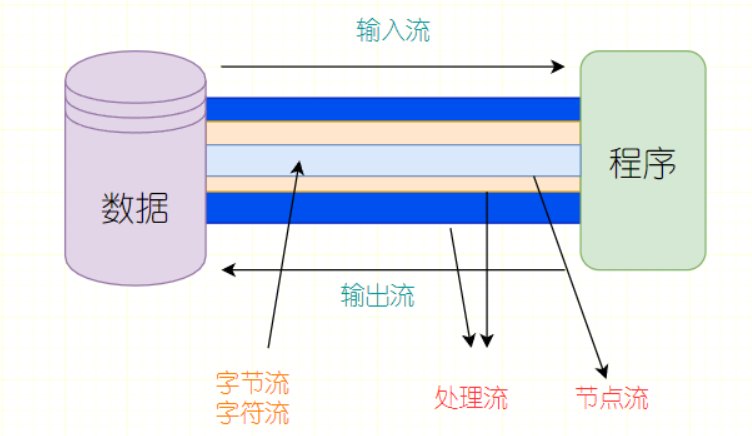
I/O 是 Input / Output 的缩写,IO技术用于处理设备之间的数据传输,如读写文件,网络通讯等
Java程序,对数据的输入输出操作以流(stream)的方式进行
输入 input:读取外部数据(磁盘、光盘等存储设备的数据)到程序(内存)中
输出 output:将程序(内存)数据输出到磁盘、光盘等存储设备中
流则是 I / O 技术的统称
2. 流的分类
-
按操作数据单位不同:字节流(8 bit)、字符流(16 bit)
-
按数据流的流向不同:输入流、输出流
-
按流的角色不同:节点流、处理流
IO 流常见类体系(空表示没有对应的流)
| 分类 | 字节输入流 | 字节输出流 | 字符输入流 | 字符输出流 |
|---|---|---|---|---|
| 抽象基类 | InputStream | OutputStream | Reader | Writer |
| 访问文件 | FileInputStream | FileOutputStream | FileReader | FileWriter |
| 缓存访问 | BufferedInputStream | BufferOutputStream | BufferedReader | BufferedWriter |
| 转换流 | InputStreamReader | OutputStreamWriter | ||
| 打印流 | PrintStream | PrintWriter | ||
| 数据流 | DataInputStream | DataOutputStream |
简化后的表格
| 抽象基类 | 节点流(或文件流) | 缓冲流(处理流的一种) |
|---|---|---|
| InputStream | FileInputStream | BufferedInputStream |
| OutputStream | FileOutputStream | BufferesOutputStream |
| Reader | FileReader | BufferedReader |
| Writer | FileWriter | BufferedWriter |
最关键的四个类(抽象的基类)
| 抽象基类 | 字节流 | 字符流 |
|---|---|---|
| 输入流 | InputStream | Reader |
| 输出流 | OutputStream | Writer |
由这四个类派生出的子类名称都是以其父类名作为子类名后缀.
关于IO流的理解图
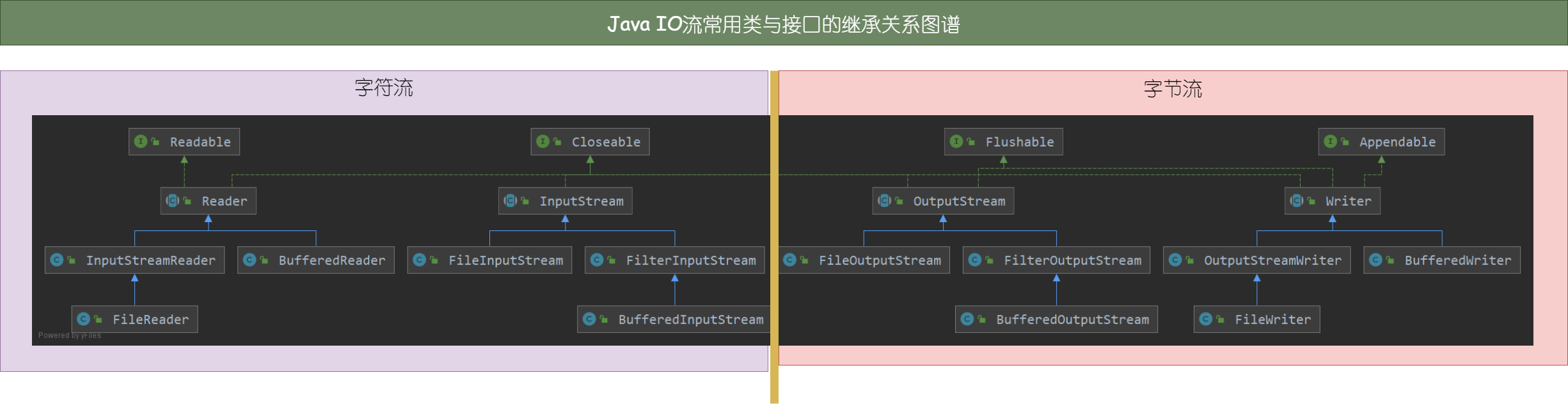
java.io.*包中常用的类以及接口的关系图谱 (图形工具:IDEA)
3. 字节流
字节流分为两大类输出流OutputStream和输入流IntputStream,其他的字节流类(除了转换类)都是它们的子类.
在Java中保存字节流处理的中间结果是通过 byte类型的变量,一般是byte[], 字节数组.
通过源码查看其特点:
public abstract class InputStream implements Closeable{};
public abstract class OutputStream implements Closeable, Flushable {};
首先都是抽象类,所以它们无法被实例化,只能通过子类来进行实例化,相当于挖了一个坑来交给子类去填.
各自有实现的接口,closeable接口本质就是一个close的空方法,这体现两个类都必须有关闭流的功能.
而字节输出流多实现了一个 Flushable 接口,则意味着它的子类都得实现flush方法的功能.
底层源码对flush()方法的解释
Flushable是可以刷新的数据的目标, 调用flush方法将任何缓冲输出写入底层流.
这里提到了缓存的概念,正好有一个类 Buffre开头的类是它们的缓存类实现.
经过上面的分析,那么字节流到底有什么用呢?
最简单的理解就是它是用来读写文件数据的.
系统里所有的软件其本质都是二进制的代码,字节流就是实现在软件和Java程序两者之间进行转换的Java对象.
比如当我们想写一个Java程序来读取txt文本文件,或者是用Java程序实现文件的复制、移动、删除等操作,都会用到字节流.
接下来是常用的几个字节流类的介绍.
3.1 字节流
字节输入流是将外部软件转化成Java程序的媒介,常见的类有 FileInputStream ,BufferedInputStream,DataInputStream
3.1.1 FileInputStream & FileOutputStream
文件字节输入流与文件字节输出流
定义类的底层源码
public class FileInputStream extends InputStream{};
public class FileOutputStream extends OutputStream{};
这两个类方法类似,以下就以其中一个展开叙述.
FileInputStream 类提供 read()方法 ,可以从一个地址读取文件的内容, 在读取前则需要创建对象,它的创建对象方法有
public FileInputStream(File file) throws FileNotFoundException {};
public FileInputStream(FileDescriptor fdObj) {};
public FileInputStream(String name) throws FileNotFoundException {};
第一个构造方法:传入一个 File 实例 , File类的常用构造方法为 new File(String url) , 其中的url为操作文件的位置.
第二个构造方法:传入FileDescriptor实例,应用比较少,这里就不展开讨论了.
第三个构造方法:直接通过文件位置创建 FileInputStream对象,是第一个构造方法的简写.
接下来关键的就是两个类对应的read()和write()方法
read方法 源码
public int read(byte b[]) throws IOException {
	return readBytes(b, 0, b.length);
}

public int read(byte b[], int off, int len) throws IOException {
	return readBytes(b, off, len);
}
write方法 源码
public void write(int b) throws IOException {
	write(b, append);
}
public void write(byte b[]) throws IOException {
	writeBytes(b, 0, b.length, append);
}
public void write(byte b[], int off, int len) throws IOException {
	writeBytes(b, off, len, append);
}
简单总结就是,read(byte a[]) , 将流数据读取到字节数组里,同时可以指定存储的初、末位置
write(int b), 将整型变量b(即ASCII码) 写到对应的FileOutputStream对象中, 即写到文件中去, 同时也可以写入多个字节的数据, 和read()方法一样,它可以指定字节数组的范围
比较奇怪的是,笔者在查找 readBytes() 和 writeBytes() 方法具体实现时,都只找到下面的一句话,这里使用到了navice关键字,应该是调用到同一个包下的方法,这里先留个坑,以后在回头看看到底是从哪里实现的这个方法...
private native void writeBytes(byte b[], int off, int len, boolean append) throws IOException;

private native int readBytes(byte b[], int off, int len) throws IOException;
使用案例
读取文件
未使用缓冲流,性能稍差
注:该类适用于非文本文件的读取,比如图片、视频、ppt等
而文本文件,比如txt则建议使用FileReader类处理,否则容易因字节数组大小不足而会出现乱码
File file = new File("...");
FileInputStream fs = new FileInputStream(file);
byte cbuf = new byte[1025];
int len = -1;
while( (len = fs.read()) != -1) {
    String str = new String(cbuf, 0, len);
    System.out.print(str);
}
文件复制
实现步骤:
- 根据读写位置创建读写的File对象
- 根据File对象创建对应的字节输入、字节输出流
- 根据字节输入、输出流创建对应的缓冲输入、输出流
- 使用字节数组循环读取缓冲输入流对象,同时将字节数组的数据保存到缓冲输出流对象中
public void copyFile(String srcPath, String destPath) throws IOException{
    FileInputStream  fs = new FileInputStream(new File(srcPath));
    FileOutputStream  fo = new FileInputStream(new File(destPath));
    char []cbuf = new char[1025];
    int len = -1;
    while( (len = fs.read(cbuf, 0, 1024)) != -1)
        fo.write(cbuf, 0, len);
    fo.close();
    fs.close();
}
加密与解密图片文件
原理:
-
加密:使用字节流读取文件,将读取到的数据流进行异或操作之后保存到输出流,完成加密
-
解密:使用字节流读取文件,同样是异或操作,完成解密
-
异或定理:a ^ b ^ b = a
void encode(String srcUrl, String destUrl) throws IOException {
    FileInputStream fis = new FileInputStream(srcUrl);
    FileOutputStream fos = new FileOutputStream(destUrl);

    byte [] cbuf = new byte[1025];
    int len = -1;
    while((len = fis.read(cbuf)) != -1){
        for (int i = 0; i < len; i++) {
            cbuf[i] = (byte) (cbuf[i] ^ 2);
        }
        fos.write(cbuf, 0, len);
    }

    fis.close();
    fos.close();
}
3.1.2 BufferedInputStream & BufferedOutputStream
概念:提供缓存机制的字节输入输出流的类
作用:在进行字节流操作的处理时,使用缓存机制提高读写速度
声明方法
public class BufferedOutputStream extends FilterOutputStream{};
public class BufferedInputStream extends FilterInputStream {};
其中 FilerOutputStream 是 OutputStream的子类,因为应用较少,所以不展开叙述.
`构造方法(以其中一个为例)``
public BufferedInputStream(InputStream in){};
public BufferedInputStream(InputStream in, int size) {};
构造该对象都需传入InputStream实例对象,InputStream的所有子类都能用来创建缓冲字节流类(多态机制),可以理解成包装,在一个字节流外面再嵌套一层缓存的机制, 其中size是指定缓存区的大小,默认值是 DEFAULT_BUFFER_SIZE变量,值为 8192,单位: Byte. 即提供4Kb大小的缓存区.
read方法 底层源码
public synchronized int read() throws IOException
public synchronized int read(byte b[], int off, int len)
write方法 底层源码
public synchronized void write(int b) throws IOException {}
public synchronized void write(byte b[], int off, int len) throws IOException {}
缓冲流的类方法read和write都用到了synchronized 关键字,提供了更安全的机制
使用案例
文件复制
- 根据读写位置创建读写的File对象
- 根据File对象创建对应的字节输入、字节输出流
- 根据字节输入、输出流创建对应的缓冲输入、输出流
- 使用字节数组循环读取缓冲输入流对象,同时将字节数组的数据保存到缓冲输出流对象中
public void copyFile(String src, String dest) throws IOException{
    File srcFile = new File(src);
    File destFile = new File(dest);

    FileInputStream fis = new FileInputStream(srcFile);
    FileOutputStream fos = new FileOutputStream(destFile);

    BufferedInputStream bis = new BufferedInputStream(fis);
    BufferedOutputStream bos = new BufferedOutputStream(fos);

    byte[] buffer = new byte[1025];
    int len = -1;
    while((len=bis.read(buffer))!=-1){
        bos.write(buffer, 0, len);
    }
    bis.close();  bos.close();	// 必须先关闭缓冲流
    //fis.close(); fos.close();  外层缓冲流关闭后,内层流会自动关闭
}
3.1.3 总结
字节流 用于数据传输, 使用byte型变量存储, 由于是文件处理,对于文本操作会有一定的局限性
比如在处理中文时,可能因为获取到的字节数据缺失而无法正常显示
File前缀的字节流类适合文件数据处理,包括读取图片、复制图片,媒体文件等
Buffered前缀的缓存流是在 File前缀字节流的基础上再嵌套一层,缓存区默认大小为4kb
4. 转换流
IO流按操作的数据单位可分为字节流和字符流,前者是二进制位表示数据,而后者则是二进制位表示字符从而表示数据
字节流转换到字符流的过程视为 编码,因为字符是可以用肉眼理解的
字符流转换到字节流的过程视为 解码
编码使用 InputStreamReader 类,它的作用是将 InputStream的子类对象 转化为 Reader的子类对象
解码则用OutputStreamWriter类,它的作用是将OutputStream的子类对象转化为Writer的子类对象
4.1 InputStreamReader
将字节输入流转化为字符输入流
定义类的底层源码
public class InputStreamReader extends Reader {}
构造方法的源码
public InputStreamReader(InputStream in) {}
public InputStreamReader(InputStream in, String charsetName){}
public InputStreamReader(InputStream in, Charset cs)
public InputStreamReader(InputStream in, CharsetDecoder dec) {}
read方法的源码
public int read(char cbuf[], int offset, int length) throws IOException {}
public int read() throws IOException {}
该类在构造时除了需要字节输入流实例以外,还可以传入第二个参数,比如常用的是charsetName,这个可以设置编码格式,比如读取文本时,选择保存到Java对象里的文本编码格式,一般是UTF-8,其他的两个构造方法没有用过,则略过.
4.2 OutputStreamWriter
将字节输出流转化为字符输出流
定义类的底层源码
public class OutputStreamWriter extends Writer{}
构造方法的源码
public OutputStreamWriter(OutputStream out, String charsetName){}
public OutputStreamWriter(OutputStream out) {}
public OutputStreamWriter(OutputStream out, Charset cs){}
public OutputStreamWriter(OutputStream out, CharsetEncoder enc) {}
public OutputStreamWriter(OutputStream out, String charsetName){}
write方法的源码
public void write(int c) throws IOException{}
public void write(char cbuf[], int off, int len) throws IOException {}
该类的构造方法和输入转换流类似,说明它可以用来进行文件类型转化的相关操作
4.3 使用案例
4.3.1 案例:指定读取文本的格式
public String read(String url) throws IOException {
    String data = "";
    FileInputStream fis = new FileInputStream(url);
    InputStreamReader isr = new InputStreamReader(fis, "UTF-8");
    char [] cbuf = new char[1025];
    int len = -1;
    while((len = isr.read(cbuf)) != -1){
        data += new String(cbuf, 0, len);
    }
    isr.close();
    return data;
}s
4.3.2 案例:更改文本的编码格式
public void exchange(String srcUrl, String destUrl) throws IOException{
    FileInputStream fis = new FileInputStream(srcUrl);
    FileOutputStream fos = new FileOutputStream(destUrl);

    InputStreamReader isr = new InputStreamReader(fis, "UTF-8");
    OutputStreamWriter osw = new OutputStreamWriter(fos, "gbk");

    char [] cbuf = new char[1024];
    int len = -1;
    while((len = isr.read(cbuf)) != -1){
        osw.write(cbuf, 0, len);
    }

    isr.close();
    osw.close();
}
5. 字符流
相比于字节流的byte传输,字符流的String传输处理文本文件会更加方便.
两个主要的抽象基类
public abstract class Reader implements Readable, Closeable{}
public abstract class Writer implements Appendable, Closeable, Flushable {}
接口Readable、Closeable 、Flushable 分别是提供read方法重写、close方法重写和append方法
5.1 FileReader
字符文件输入流,用于存储将外部软件转化为Java内部对象的媒介
定义类的底层源码
public class FileReader extends InputStreamReader {}
该类是转换输入流的直接子类,也是字符输入流的Reader的间接子类
构造方法的底层源码
public FileReader(String fileName) throws FileNotFoundException {
    super(new FileInputStream(fileName));
}
public FileReader(File file) throws FileNotFoundException {
    super(new FileInputStream(file));
}
public FileReader(FileDescriptor fd) {
    super(new FileInputStream(fd));
}
在构建字符文件输入流对象时,可以传入File对象,也可以直接传入文件的位置
其本质是: 先创建一个字节文件输入流对象,然后再才调用父类(即转换输入流)的构造方法
在 FileReader类的里源码中并不直接提供额外的 read方法,所以它的read方法均来自父类InputStreamReader
使用案例 文本读操作
实现步骤
- 根据文件地址实例化 File
- 根据File对象实例化 文件输入流对象
- 读取数据
- 关闭流
public String read(String url) throws IOException{
    File file = new File(url);
    FileReader fr = new FileReader(file);
    int data = -1;
    while((data = fr.read()) != -1){
        System.out.println((char) data);
        data = fr.read();
    }
    fr.close();
}
5.2 FileWriter
字符文件输出流, 用于将Java内部对象的数据转化成外部文件的媒介
定义类的底层源码
public class FileWriter extends OutputStreamWriter {}
构造方法的底层源码
public FileWriter(String fileName) throws IOException {
    super(new FileOutputStream(fileName));
}

public FileWriter(String fileName, boolean append) throws IOException {
    super(new FileOutputStream(fileName, append));
}

public FileWriter(File file) throws IOException {
    super(new FileOutputStream(file));
}

public FileWriter(File file, boolean append) throws IOException {
    super(new FileOutputStream(file, append));
}
public FileWriter(FileDescriptor fd) {
    super(new FileOutputStream(fd));
}
和字符文件输入流一样,该类也可以通过文件位置直接创建,它也是转换流对应类OutputStreamWriter的直接子类。
不同于FileReader的是它在构造方法中多了一个参数append,简单理解就是对文件的修改模式,是否追加,默认为false
如果改为true,每次write操作都将在原先文件内容的基础上添加新的内容,相反,为false的情况下就会直接覆盖原文件数据内容
5.3 案例: 文本复制
实现步骤:
- 根据文件地址创建读写的File对象
- 根据File对象创建对应的文件输入流、输出流对象
- 使用字节数组循环读取文件输入流对象,同时将字节数组的数据保存到文件输出流对象中
- 关闭流
public void copyFile(String src, String dest) throws IOException{
    File rfile = new File(src);
    File wfile = new File(dest);
    FileReader fr = new FileReader(rfile);
    FileWriter fw = new FileWriter(wfile);
    char []cbuf = new char[1025];
    int len = -1;
    while( (len = fr.read(cbuf, 0, 1024)) != -1)
        fw.write(cbuf, 0, len);
    fw.close();
    fr.close();
5.4 BuffredReader
缓存字符文件输入流,在原先的基础上设置一个缓存区(默认大小: 8192 Byte) 存放数据
定义类的底层源码
public class BufferedReader extends Reader {}
构造方法的底层源码
public BufferedReader(Reader in, int sz){}
public BufferedReader(Reader in){}
read方法的底层源码
String readLine(boolean ignoreLF) throws IOException{}
public String readLine() throws IOException {return readLine(false);}
public int read() throws IOException {}
private int read1(char[] cbuf, int off, int len) throws IOException {}
public int read(char cbuf[], int off, int len) throws IOException {} // 调用到了read1
通过源码可以发现,字符流的操作对象变成了字符数组,而之前的字节流是byte数组,它除了基本的read方法外,还提供了readLine方法,该方法传入一个boolean型参数,它的作用是设置读取数据时是否跳过换行符,默认为false不跳过,所以readLine()的作用就是读取文本数据中的一行数据.
5.5 BufferedWriter
缓存字符文件输出流,缓冲区默认大小也是8192 Byte
定义类的底层源码
public class BufferedWriter extends Writer {}
构造方法的底层源码
public BufferedWriter(Writer out, int sz) {}
write方法的底层源码
public void write(int c) throws IOException {}
public void write(char cbuf[], int off, int len) throws IOException {}
public void write(String s, int off, int len) throws IOException {}
public void newLine() throws IOException {}
该类的写入方式有多种,既可以是int型的Ascii码,也可以是字符数组,还可以直接是字符串
另外提供的newLine() 方法的作用是输出一个换行符在文件中
5.6 案例: 词频统计
涉及知识: IO流处理、Map创建与遍历 、Set集合
public void wordCount(String srcUrl, String destUrl) throws IOException {
    FileReader fr = new FileReader(srcUrl);
    BufferedWriter bw = new BufferedWriter(new FileWriter(destUrl));

    Map<Character, Integer> map = new HashMap<>(); // 存储词频统计结果

    // 词频统计
    int c = 0;
    while((c = fr.read()) != -1){
        char ch = (char) c;
        if(map.get(ch) == null)
            map.put(ch, 1);
        else
            map.put(ch, map.get(ch) + 1);
    }

    // 特殊字符处理
    Map<Character, String> special = new HashMap<>();
    special.put(' ', "空格=");
    special.put('\t', "tab键=");
    special.put('\r', "回车=");
    special.put('\n',"换行=");
    Set<Map.Entry<Character, Integer>> entrySet = map.entrySet();
    for (Map.Entry<Character, Integer> entry : entrySet) {

        String spec = special.get(entry.getKey());
        if (spec != null)
            bw.write(special.get(entry.getKey()) + entry.getValue());
        else
            bw.write(entry.getKey() + "=" + entry.getValue());
        bw.newLine();       // 换行
    }

    bw.close();
    fr.close();
}
5. 数据流
数据流类是字节数据流间接子类,正如命名一样,该类对于数据的读写类型有着极高的限制,比如:
在调用read方法时候可以指定类型,最简单的有readBoolean()这样就会读取一个Boolean类型,若文件当前行不是boolean类型的话,程序将会报错.
读写操作的类型都必须一一对应,包括顺序.
定义类的底层源码
public class DataInputStream extends FilterInputStream implements DataInput {}
public class DataOutputStream extends FilterOutputStream implements DataOutput {}
构造方法的底层源码
public DataInputStream(InputStream in){}
public DataOutputStream(OutputStream out) {super(out);}
public final boolean readBoolean() throws IOException {}
读写的底层源码
public final int read(byte b[]) throws IOException {}
public final int read(byte b[], int off, int len) throws IOException {}
public final String readLine() throws IOException {}
public final boolean readBoolean() throws IOException {}

public synchronized void write(int b) throws IOException {}
public synchronized void write(byte b[], int off, int len)throws IOException {}
public final void writeBoolean(boolean v) throws IOException{}
public final void writeByte(int v) throws IOException {}
public final void writeInt(int v) throws IOException {}
数据流和缓冲流一样可有整行的操作.
案例:读写文本
public void write(String url) throws IOException{
    DataOutputStream dos = new DataOutputStream( new FileOutputStream(url));
    dos.writeUTF("测试");
    dos.flush();
    dos.writeInt(123);
    // ... More write?() and flush()
    dos.close();
}
public void read(String url) throws IOException{
    DataInputStream dis = new DataInputStream(new FileInputStream(url));
    System.out.println(dis.readUTF());
    System.out.println(dis.readInt());
}
6.打印流
作用:实现将基本数据类型的数据格式转化为字符串输出
主要分为PrintStream 和 PrintWriter两个类
定义类的底层编码
public class PrintWriter extends Writer {
     private PrintStream psOut = null;
    //...
}
public class PrintStream extends FilterOutputStream implements Appendable, Closeable{
     private BufferedWriter textOut;
     private OutputStreamWriter charOut;
    //...
}
构造方法的底层编码
public PrintWriter (Writer out) {this(out, false);}
public PrintWriter(Writer out, boolean autoFlush) {}
public PrintWriter(String fileName){}
private PrintWriter(Charset charset, File file){}
public PrintWriter(String fileName, String csn){}
public PrintWriter(File file){}
public PrintWriter(File file, String csn){}


private PrintStream(boolean autoFlush, OutputStream out) {}
private PrintStream(boolean autoFlush, OutputStream out, Charset charset) {}
private PrintStream(boolean autoFlush, Charset charset, OutputStream out) {}
public PrintStream(OutputStream out) {this(out, false);}
public PrintStream(OutputStream out, boolean autoFlush) {}
public PrintStream(OutputStream out, boolean autoFlush, String encoding){}  // 本质上是调用12行的构造方法
public PrintStream(String fileName){}
public PrintStream(String fileName, String csn){}
public PrintStream(File file){}
打印方法的底层源码
PrintStream.java
public void write(int b) {}
public void write(byte buf[], int off, int len) {}
private void write(char buf[]) {}
private void write(String s) {}

public void print(char c) {
    write(String.valueOf(c));
}
// more... print 、 println
PrintWriter.java
public void write(int c) {}
public void write(char buf[], int off, int len) {}
public void write(char buf[]){}
public void write(String s, int off, int len) {}
// more... print 、 println
总结
PrintStream 和 PrintWriter的 对比
-
提供了一系列重载的
print()和println()的方法,用于多种数据类型的输出 -
PrintStream和PrintWriter的输出不会抛出IOException异常 -
PrintStream和PrintWriter有自动flush功能 -
PrintStream打印的所有字符都使用平台的默认字符编码转换为字节。在需要写入字符而不是写入字节的情况下,应使用
PrintWriter类
PrintStream 内部是 缓冲输出流和转换输入流两个对象,提供了固定编码读取功能
PrintWriter 内部是 PrintStream对象,没有提供固定编码,但是可读取指定范围的字符串内容
案例:修改程序输出的位置
FileOutputStream fos = new FileOutputStream(new File("log.txt"));
PrintStream ps = new PrintStream(fos, true);
System.setOut(ps);
System.out.println("直接输出内容到log.txt");
7. 标准输入输出流
终于回归正题了,本篇博文开头讨论了Java读取的操作,这里则做简单地讲解.
Sytem.in : 标准的输入流, 默认从键盘输入
System.out: 标准的输出流,默认从控制台输出
System类的setIn(InputStream is) / setOut(PrintStream ps) 方式重新指定输入和输出的流
public static void setIn(InputStream in)public static void setOut(PrintStream out)
System.in 类型为 InputStream 字节输入流
System.out 类型为PrintStream 打印流
综上,控制台输原理是程序启动时创建了一个绑定到控制台的PrintStream打印输出流对象
该对象作为字节输出流的间接子类,其中println、print则是它提供的方法,其本质是调用内部的OutputStream输出流进行数据传送,将Java内部的对象转化到外部,只是此时控制台作为外部软件的媒介.
也就是说简简单单一句的System.out.println("hello, world"); 程序就完成了流数据的操作,根据源码定位,它的操作步骤如下:
// PrintStream.java
private BufferedWriter textOut;


public void println(String x) {
    synchronized (this) {
        print(x);
        newLine();
    }
}

public void print(String s) {
    if (s == null) {
        s = "null";
    }
    write(s);
}

private void write(String s) {
    //...
    textOut.write(s);	// BufferedWriter 缓冲字符输出流
    //...
}

private void newLine() {
    //...
    textOut.newLine(); // BufferedWriter 缓冲字符输出流
    //...
}
关于 Scanner 获取控制台信息
JDK源代码中的注释内容:
一个简单的文本扫描器,可以使用正则表达式解析原语类型和字符串。
扫描器使用定界符模式将其输入拆分为标记,默认情况下,定界符模式匹配空白。然后,可以使用各种后续方法将生成的令牌转换为不同类型的值。
Scanner 对象的构造方法 中有一个是接收一个 InputStream 字节输入流对象,它的本质是调用另一个构造器
private static Pattern WHITESPACE_PATTERN = Pattern.compile(
    "\\p{javaWhitespace}+");

public Scanner(InputStream source) {
    this(new InputStreamReader(source), WHITESPACE_PATTERN);
}
public Scanner(InputStream source, String charsetName) {
    this(makeReadable(Objects.requireNonNull(source, "source"), toCharset(charsetName)),
         WHITESPACE_PATTERN);
}

private static Readable makeReadable(InputStream source, Charset charset) {
    return new InputStreamReader(source, charset);
}

private Scanner(Readable source, Pattern pattern) {
    assert source != null : "source should not be null";
    assert pattern != null : "pattern should not be null";
    this.source = source;
    delimPattern = pattern;
    buf = CharBuffer.allocate(BUFFER_SIZE);
    buf.limit(0);
    matcher = delimPattern.matcher(buf);
    matcher.useTransparentBounds(true);
    matcher.useAnchoringBounds(false);
    useLocale(Locale.getDefault(Locale.Category.FORMAT));
}
如果是通过 new Scanner(System.in) 来创建Scanner对象,最终会根据System.in这个 字节输入流对象经过两个构造方法和一个接口的创建方法生成一个扫描器的来源,即Readable接口和pattern扫描模式(这里是默认的常量 WHITESPACE_PATTERN)
案例:控制台在线转换字符大小写
实现步骤:
-
根据标准输入流System.in 转化成转换输入流
-
使用转换输入流创建缓冲输入流对象
-
根据缓冲输入流读取每行的数据,即控制台输入的内容
-
获取内容后,更改其大小写,再使用标准输出流,打印到控制台
InputStreamReader isr = new InputStreamReader(System.in);
BufferedReader br = new BufferedReader(isr);

while(true){
    System.out.println("请输入字符串:");
    String data = br.readLine();
    if(data.equalsIgnoreCase("e") ||
       data.equalsIgnoreCase("exit")) {
        System.out.println("程序结束");
        break;
    }
    String res = data.toUpperCase();
    System.out.println(res);
}
br.close();
至此,我们大概能知道在Java语言中hello, world的输出以及数据的读取实现的原因大概是怎样的了,文章中大部分是对源码、读写方法的拷贝、阅读、分析,有部分内容是个人理解,可能有误,若有任何建议,欢迎留言指正.

 浙公网安备 33010602011771号