
pytest简易教程(28):pytest常用插件 - 重复测试(pytest-repeat)
pytest简易教程汇总,详见:https://www.cnblogs.com/uncleyong/p/17982846
使用场景
某功能不稳定,重复执行多次,以便复现问题。
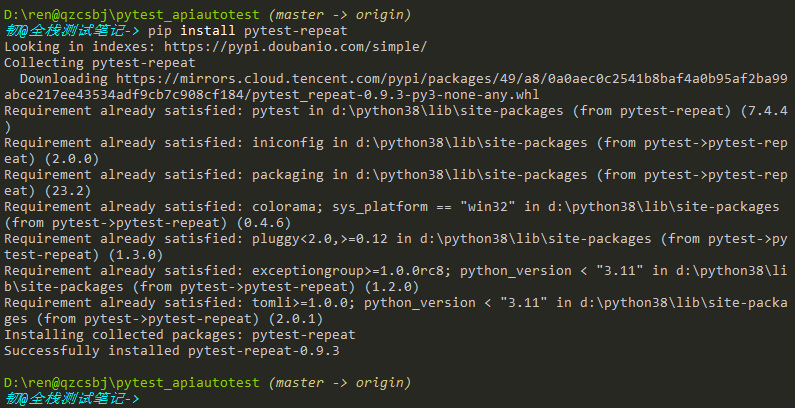
插件安装
安装:pip install pytest-repeat
使用方式一:命令行参数
参数:
- --count:重复运行次数,必填
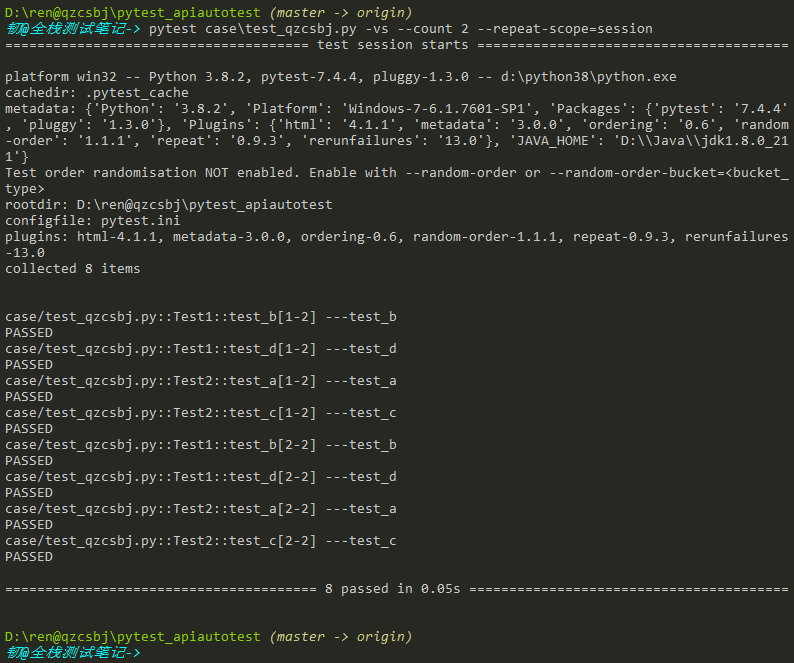
- --repeat-scope:默认function,还可以是class、module、session,表示重复运行的维度,比如session,表示所有用例执行完一次,然后再执行第二次;选填
命令:
pytest --count=count --repeat-scope=function
或者:pytest --count count --repeat-scope function
参数也可以放配置文件中:
[pytest]
addopts = -vs --count 3 --repeat-scope function
示例:
#!/usr/bin/env python
# -*- coding: utf-8 -*-
# @Author : 韧
# @wx :ren168632201
# @Blog :https://www.cnblogs.com/uncleyong/


# def test_d():
#     print("---test_d")
#
# def test_c():
#     print("---test_c")

def test_b():
    print("---test_b")

def test_a():
    print("---test_a")
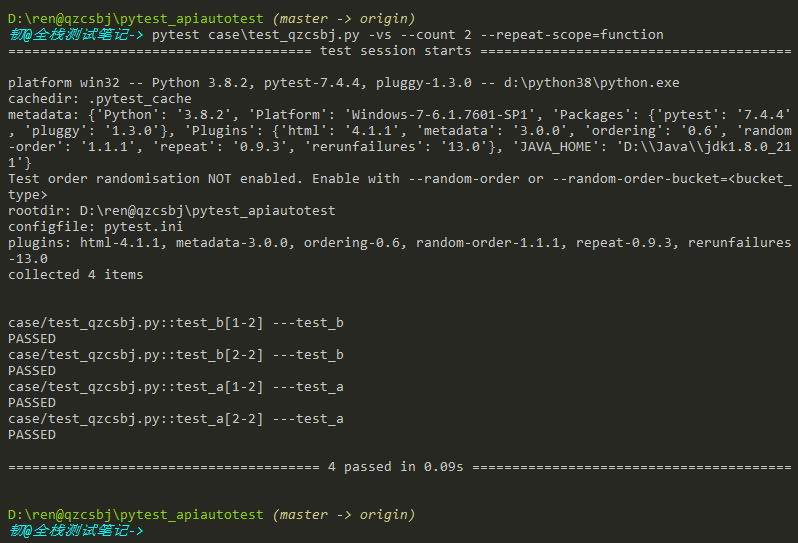
--repeat-scope=function
运行结果:

结果:和上面一样,说明默认是function
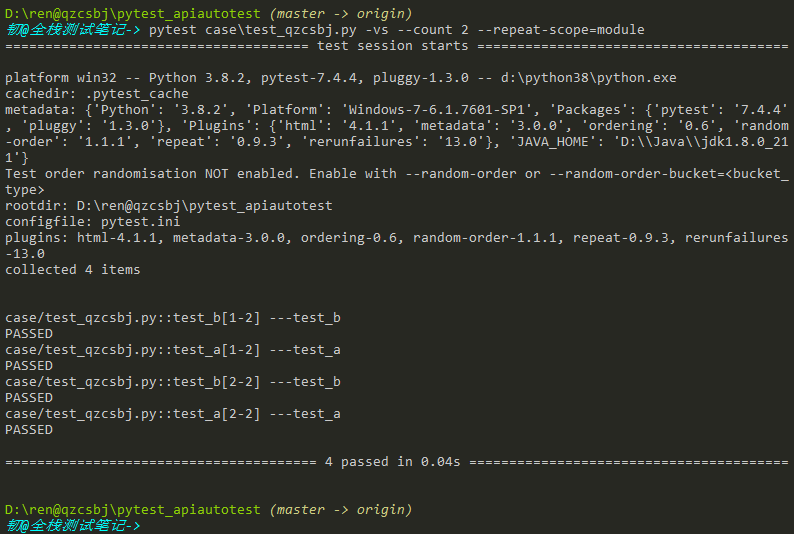
--repeat-scope=module
运行结果:
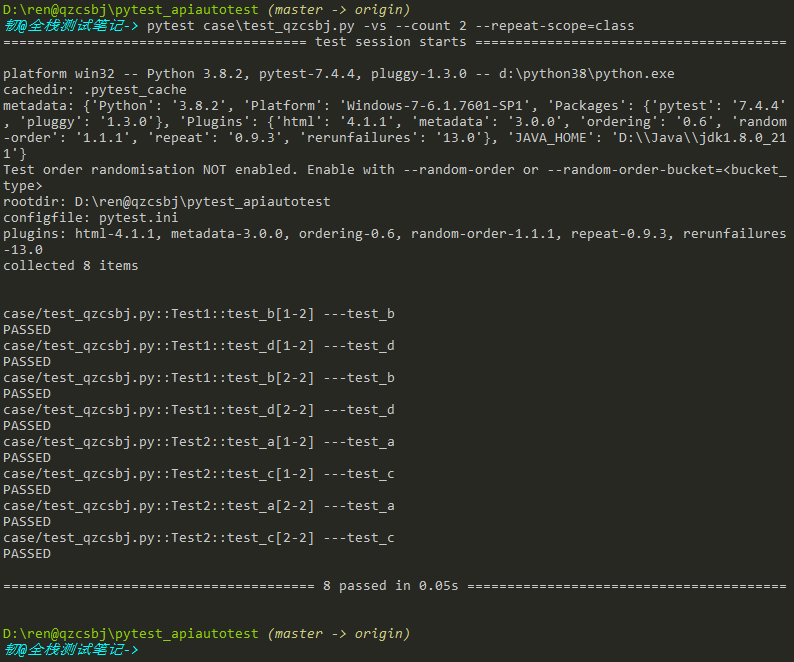
--repeat-scope=class
#!/usr/bin/env python
# -*- coding: utf-8 -*-
# @Author : 韧
# @wx :ren168632201
# @Blog :https://www.cnblogs.com/uncleyong/


# def test_d():
#     print("---test_d")
#
# def test_c():
#     print("---test_c")

class Test1:
    def test_b(self):
        print("---test_b")
    def test_d(self):
        print("---test_d")
class Test2:
    def test_a(self):
        print("---test_a")
    def test_c(self):
        print("---test_c")
运行结果:
--repeat-scope=session
运行结果:
使用方式二:修饰器
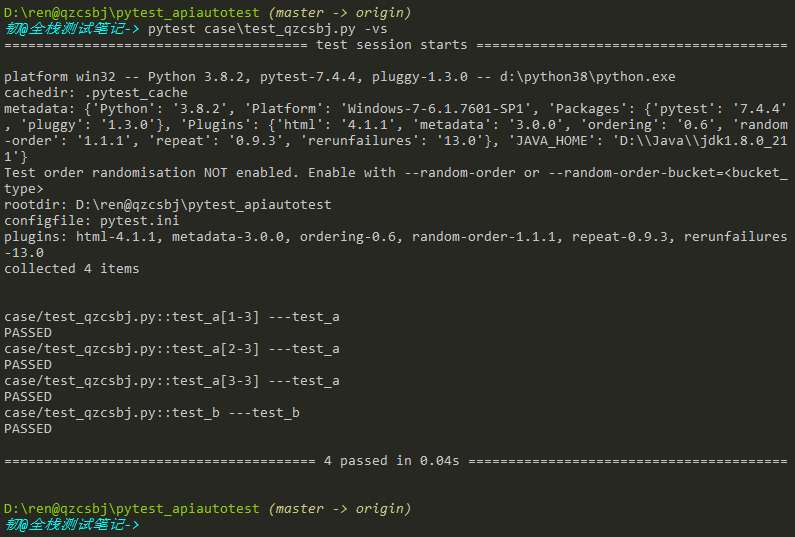
@pytest.mark.repeat(count)
#!/usr/bin/env python
# -*- coding: utf-8 -*-
# @Author : 韧
# @wx :ren168632201
# @Blog :https://www.cnblogs.com/uncleyong/

import pytest

@pytest.mark.repeat(3)
def test_a():
    print("---test_a")
def test_b():
    print("---test_b")
运行结果:
__EOF__

本文作者:持之以恒(韧)
关于博主:擅长性能、全链路、自动化、企业级自动化持续集成(DevTestOps)、测开等
面试必备:项目实战(性能、自动化)、简历笔试,https://www.cnblogs.com/uncleyong/p/15777706.html
测试提升:从测试小白到高级测试修炼之路,https://www.cnblogs.com/uncleyong/p/10530261.html
欢迎分享:如果您觉得文章对您有帮助,欢迎转载、分享,也可以点击文章右下角【推荐】一下!
关于博主:擅长性能、全链路、自动化、企业级自动化持续集成(DevTestOps)、测开等
面试必备:项目实战(性能、自动化)、简历笔试,https://www.cnblogs.com/uncleyong/p/15777706.html
测试提升:从测试小白到高级测试修炼之路,https://www.cnblogs.com/uncleyong/p/10530261.html
欢迎分享:如果您觉得文章对您有帮助,欢迎转载、分享,也可以点击文章右下角【推荐】一下!

 浙公网安备 33010602011771号