
pytest简易教程(04):fixture简介及调用
pytest简易教程汇总,详见:https://www.cnblogs.com/uncleyong/p/17982846
前言
上一篇我们介绍了固件,通过示例可以看到,一个模块中,固件会对其作用范围内的所有用例起作用;
其实这样很不灵活,比如我们只希望部分测试用例执行某个固件,通过setup和teardown是实现不了的;
但是,通过fixture就可以根据需要自定义测试用例的前置、后置操作;
fixture是通过yield来区分前后置的,前后置均可以单独存在,fixture如果有后置,前置不报错就都会执行,前置报错后置就不会执行。
fixture的优势
1、与setup、teardown类似,fixture提供了测试执行前和测试执行后的处理,但是又比setup、teardown更灵活好用,比如:fixture命名更加灵活,不局限于setup和teardown
2、conftest.py配置里可以实现数据共享,可以方便管理、修改和查看fixture函数,并且不需要import就能自动找到fixture
3、fixture可用于封装数据,也可用于封逻辑动作,使用范围非常广
fixture介绍
fixture装饰器来标记固定的工厂函数,在其他函数、类、模块或整个工程调用它时会被激活并优先执行,通常会被用于完成预置处理和重复操作。
源码:
def fixture(  # noqa: F811
    fixture_function: Optional[FixtureFunction] = None,
    *,
    scope: "Union[_ScopeName, Callable[[str, Config], _ScopeName]]" = "function",
    params: Optional[Iterable[object]] = None,
    autouse: bool = False,
    ids: Optional[
        Union[Sequence[Optional[object]], Callable[[Any], Optional[object]]]
    ] = None,
    name: Optional[str] = None,
) -> Union[FixtureFunctionMarker, FixtureFunction]:
方法:fixture(scope="function", params=None, autouse=False, ids=None, name=None)
常用参数:
- scope:被@pytest.fixture标记的方法的作用域,默认是function,还可以是class、module、package、session。(注:下一篇详解)
- params:用于给fixture传参,可实现数据基于fixture的数据驱动,接收一个可以迭代的对象,比如列表[]、元组()、字典列表{[],[],[]}、字典元组{(),(),()},提供参数数据供调用fixture的用例使用;传进去的参数,可以用request.param调用
- autouse:是否自动运行,是一个布尔值,默认为False不会自动执行,需要手动调用;当它为True时,作用域内的测试用例都会自动调用该fixture
- ids:用例标识id,每个ids和params一一对应,如果没有id,将从params自动产生
- name:给被@pytest.fixture标记的方法取一个别名,如果使用了name,那只能将name传入,函数名不再生效
fixture的调用
测试用例如何调用fixture呢?
函数引用/参数引用
将fixture名称作为测试用例函数/方法的参数;另外,如果fixture有返回值,必须用这种方式,否则获取不到返回值(比如:@pytest.mark.usefixtures()这种方式就获取不到返回值,详见:https://www.cnblogs.com/uncleyong/p/17957896)
函数引用:测试类中测试方法形参是测试类外被@pytest.fixture()标记的测试函数,也就是说,fixture标记的函数可以应用于测试类内部
参数引用:测试类中测试方法形参是当前测试类中被@pytest.fixture()标记的方法
#!/usr/bin/env python
# -*- coding: utf-8 -*-
# @Author : 韧
# @wx :ren168632201
# @Blog :https://www.cnblogs.com/uncleyong/
import pytest

@pytest.fixture()
def fun():
    print("---fixture")

@pytest.fixture()
def fun2():
    print("---fixture2")

def test_a(fun):
    print("--------------test_a")

class Test01:
    def test_b(self, fun2):
        print("--------------test_b")

    def test_c(self, fun3):
        print("--------------test_c")

    @pytest.fixture()
    def fun3(self):
        print("---fixture3")
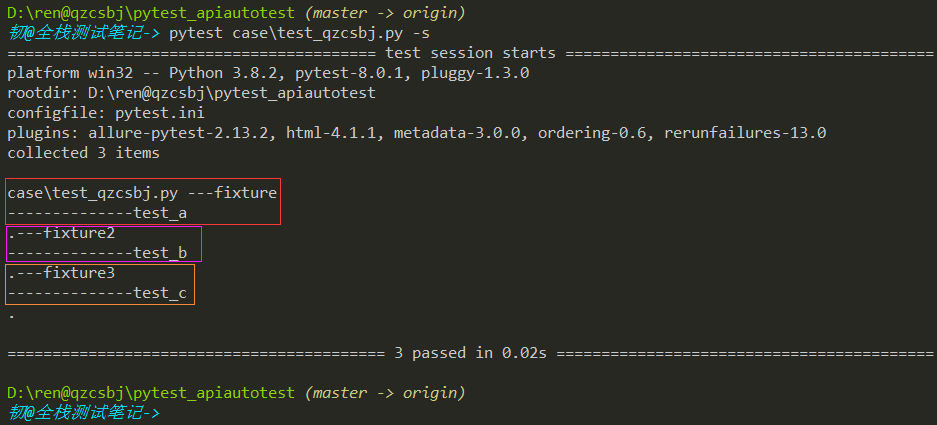
结果:
加装饰器:@pytest.mark.usefixtures(fixture_name, ...)
测试用例上加装饰器
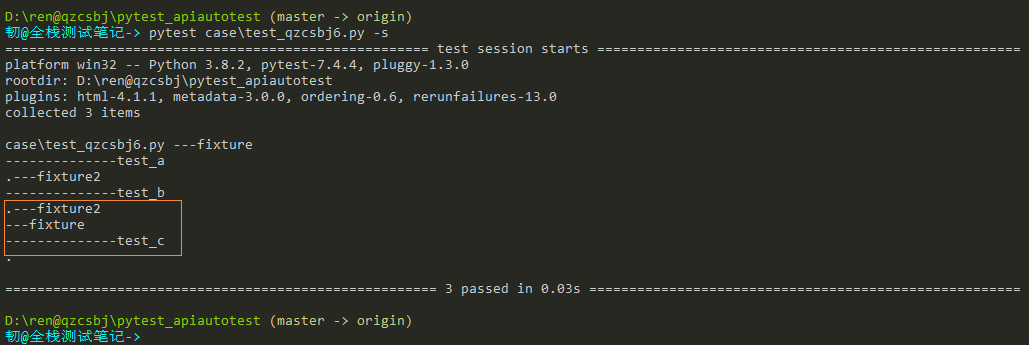
可以多个fixture参数,放前面的先执行,放后面的后执行,也就是说,执行顺序和usefixtures后面引用顺序对应
示例一:
#!/usr/bin/env python
# -*- coding: utf-8 -*-
# @Author : 韧
# @wx :ren168632201
# @Blog :https://www.cnblogs.com/uncleyong/
import pytest

@pytest.fixture()
def fun():
    print("---fixture")

@pytest.fixture()
def fun2():
    print("---fixture2")

def test_a(fun):
    print("--------------test_a")

class Test01:
    def test_b(self, fun2):
        print("--------------test_b")
    @pytest.mark.usefixtures('fun2','fun')
    def test_c(self):
        print("--------------test_c")
结果:先调用fun2,然后调用fun
示例二:
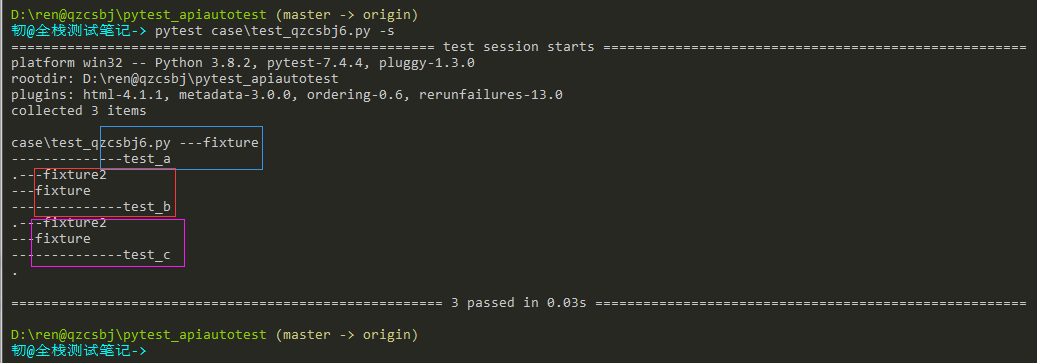
可以多个装饰器,先执行的放底层,后执行的放上层
#!/usr/bin/env python
# -*- coding: utf-8 -*-
# @Author : 韧
# @wx :ren168632201
# @Blog :https://www.cnblogs.com/uncleyong/
import pytest

@pytest.fixture()
def fun():
    print("---fixture")

@pytest.fixture()
def fun2():
    print("---fixture2")

def test_a(fun):
    print("--------------test_a")

@pytest.mark.usefixtures('fun')
@pytest.mark.usefixtures('fun2')
class Test01:
    def test_b(self):
        print("--------------test_b")

    def test_c(self):
        print("--------------test_c")
结果
示例三:
#!/usr/bin/env python
# -*- coding: utf-8 -*-
# @Author : 韧
# @wx :ren168632201
# @Blog :https://www.cnblogs.com/uncleyong/
import pytest

@pytest.fixture()
def fun():
    print("---fixture")

@pytest.fixture()
def fun2():
    print("---fixture2")

def test_a(fun):
    print("--------------test_a")

class Test01:
    def test_b(self):
        print("--------------test_b")

    @pytest.mark.usefixtures('fun')
    def test_c(self, fun2):
        print("--------------test_c")
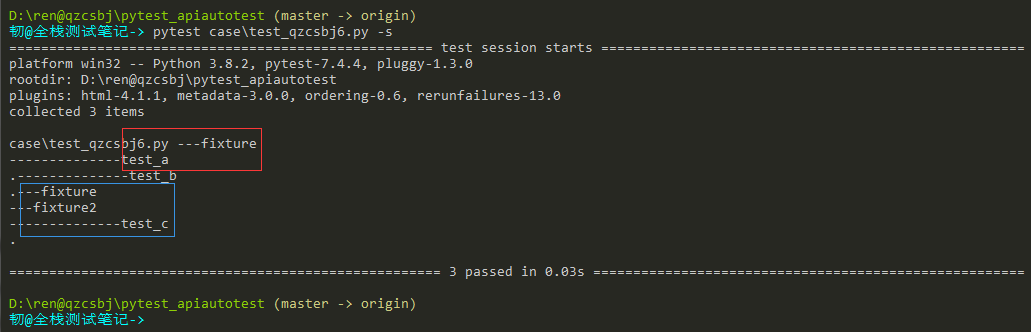
结果:同时有装饰器和引用,装饰器先执行
测试类上加装饰器
类中所有测试用例都会调用该fixture
示例一:
#!/usr/bin/env python
# -*- coding: utf-8 -*-
# @Author : 韧
# @wx :ren168632201
# @Blog :https://www.cnblogs.com/uncleyong/
import pytest

@pytest.fixture()
def fun():
    print("---fixture")

@pytest.fixture()
def fun2():
    print("---fixture2")

def test_a(fun):
    print("--------------test_a")

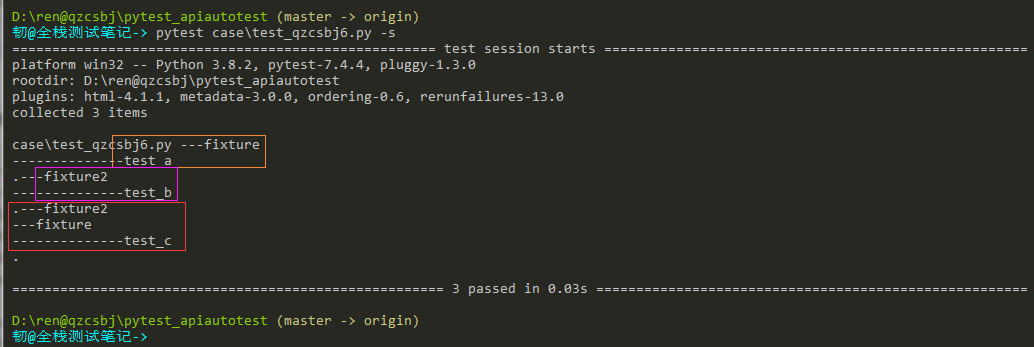
@pytest.mark.usefixtures('fun2')
class Test01:
    def test_b(self):
        print("--------------test_b")
    def test_c(self, fun):
        print("--------------test_c")
结果:同时有装饰器和引用,装饰器先执行
示例二:
#!/usr/bin/env python
# -*- coding: utf-8 -*-
# @Author : 韧
# @wx :ren168632201
# @Blog :https://www.cnblogs.com/uncleyong/
import pytest

@pytest.fixture()
def fun():
    print("---fixture")

@pytest.fixture()
def fun2():
    print("---fixture2")

def test_a(fun):
    print("--------------test_a")

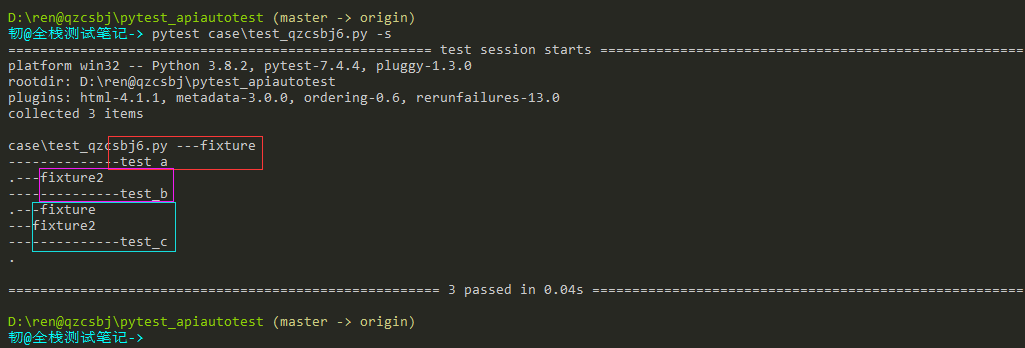
@pytest.mark.usefixtures('fun2')
class Test01:
    def test_b(self):
        print("--------------test_b")

    @pytest.mark.usefixtures('fun')
    def test_c(self):
        print("--------------test_c")
结果:方法和类上都有装饰器,方法上装饰器优先执行
总结:
@pytest.mark.usefixtures('fun2')
@pytest.mark.usefixtures('fun')
等价于:
@pytest.mark.usefixtures('fun','fun2')
自动适配:fixture设置autouse=True
影响作用域内所有用例
#!/usr/bin/env python
# -*- coding: utf-8 -*-
# @Author : 韧
# @wx :ren168632201
# @Blog :https://www.cnblogs.com/uncleyong/
import pytest

@pytest.fixture()
def fun():
    print("---fixture")

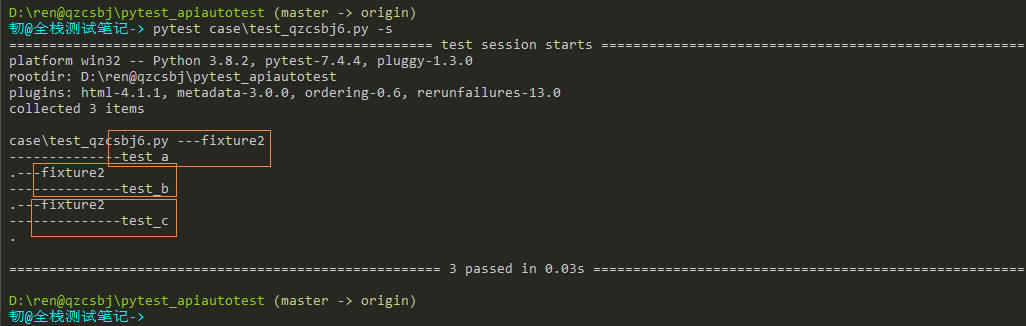
@pytest.fixture(autouse=True)
def fun2():
    print("---fixture2")

def test_a():
    print("--------------test_a")

class Test01:
    def test_b(self):
        print("--------------test_b")
    def test_c(self):
        print("--------------test_c")
结果:每个测试用例都执行了fun2
fixture嵌套
不能用@pytest.mark.usefixtures
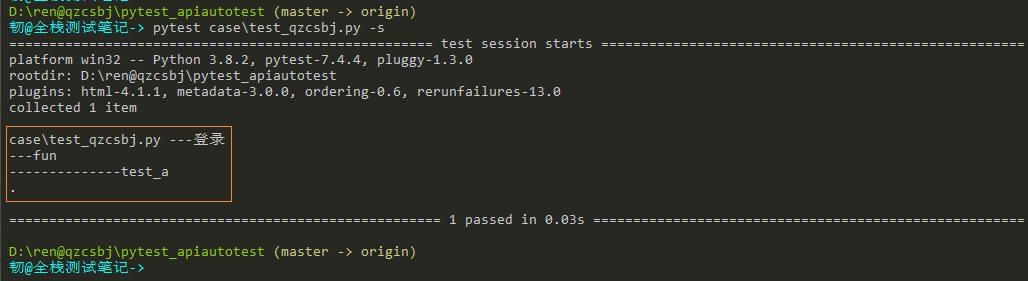
示例:两个fixture,fun依赖login
#!/usr/bin/env python
# -*- coding: utf-8 -*-
# @Author : 韧
# @wx :ren168632201
# @Blog :https://www.cnblogs.com/uncleyong/
import pytest

@pytest.fixture()
def login():
    print("---登录")

@pytest.fixture()
def fun(login):
    print("---fun")

# 下面写法报错
# @pytest.fixture()
# @pytest.mark.usefixtures(login)
# def fun():
#     print("---fun")

# @pytest.mark.usefixtures(fun)  # 报错
def test_a(fun):
    print("--------------test_a")
结果:
__EOF__

关于博主:擅长性能、全链路、自动化、企业级自动化持续集成(DevTestOps)、测开等
面试必备:项目实战(性能、自动化)、简历笔试,https://www.cnblogs.com/uncleyong/p/15777706.html
测试提升:从测试小白到高级测试修炼之路,https://www.cnblogs.com/uncleyong/p/10530261.html
欢迎分享:如果您觉得文章对您有帮助,欢迎转载、分享,也可以点击文章右下角【推荐】一下!

 浙公网安备 33010602011771号