
MySQL四
-
操作表的SQL语句补充
-
表查询关键字
-
多表查询思路 # 操作表的SQL语句补充
1.修改表名
	alter table 表名 rename 新表名;
	alter table t1 rename user_info;
2.新增字段
	alter table 表名 add 字段名 字段类型(数字) 约束条件;
	alter table user_info add  age int(12) not null unique;
	alter table 表名 add 字段名 字段类型(数字) 约束条件 after 已经存在的字段;
	alter table usen_info add gender varchar(32) defaul 'male' after age;
	alter table 表名 add 字段名 字段类型(数字) 约束条件 first;
	alter table user_info add id int primary key auto_increment first;
3.修改字段
	alter table 表名 change 旧字段 新字段 字段类型(数字) 约束条件;
	alter table user_info change name username varchar(32);
 	alter table 表名 modify 字段名 新的字段类型(数字) 约束条件;
	alter table user_info modify username varchar(12);
4.删除字段
	alter table 表名 drop 字段名;
	alter table user_info drop gender;
表查询关键字select * from table
"""
SQL语句的关键字编写顺序与执行顺序是不一致的!!!
	eg:  select name from emp;
		肯定是先支持from确定表 之后执行select确定字段
编写SQL语句针对select和from可以先写个固定模板
	select * from 表名 其他操作
select后的字段可能是实际的 也可能是通过SQL动态产生的 所以可以先用*占位最后再修改
"""
select
	自定义查询表中字段对应的数据
from
	指定操作的对象(到底是哪张表 也可能是多张)
查询关键字之where筛选
# 1.查询id大于等于3小于等于6的数据
select id,name from emp where id >= 3 and id <= 6;
select *  from emp where id between 3 and 6;

# 2.查询薪资是20000或者18000或者17000的数据
select * from emp where salary = 20000 or salary = 18000 or salary = 17000;
select * from emp where salary in (20000,18000,17000);  # 简写

# 3.查询员工姓名中包含o字母的员工姓名和薪资
# 在你刚开始接触mysql查询的时候,建议你按照查询的优先级顺序拼写出你的sql语句
"""
先是查哪张表 from emp
再是根据什么条件去查 where name like ‘%o%’
再是对查询出来的数据筛选展示部分 select name,salary
"""
select name,salary from emp where name like '%o%';

# 4.查询员工姓名是由四个字符组成的员工姓名与其薪资
select name,salary from emp where name like '____';
select name,salary from emp where char_length(name) = 4;

# 5.查询id小于3或者大于6的数据
select *  from emp where id not between 3 and 6;

# 6.查询薪资不在20000,18000,17000范围的数据
select * from emp where salary not in (20000,18000,17000);

# 7.查询岗位描述为空的员工名与岗位名  针对null不能用等号,只能用is
select name,post from emp where post_comment = NULL;  # 查询为空!
select name,post from emp where post_comment is NULL;
select name,post from emp where post_comment is not NULL;
查询关键字之group by分组
分组:按照一些指定的条件将单个单个的数据分为一个个整体
"""
分组之后我们研究的对象应该是以组为单位 不应该再直接获取单个数据项 如果获取了应该直接报错 select后面可以直接填写的字段名只能是分组的依据(其他字段需要借助于一些方法才可以获取)
	set global sql_mode='strict_trans_tables,only_full_group_by';

"""
select post from emp group by post;
"""

"""
我们写SQL是否需要使用分组 可以在题目中得到答案
	每个、平均、最大、最小

配合分组常见使用的有聚合函数
	max			最大值
	min 		最小值
	sum 		总和
	count 		计数
	avg			平均
"""

select post,max(salary) from emp group by post;
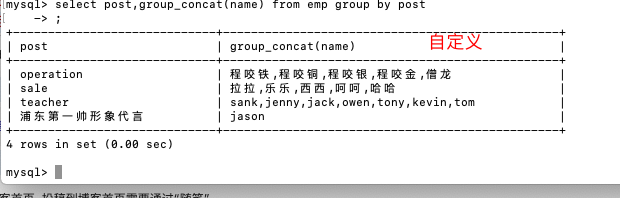
select post,group_concat('!',name,'!') from emp group by post;
此方法可以获取分组之后的数据
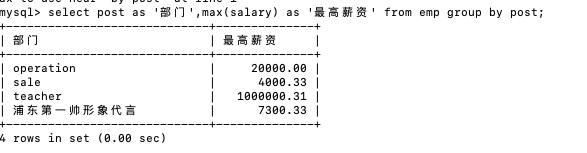
select post as '部门',max(salary) as '最高薪资' from emp group by post;

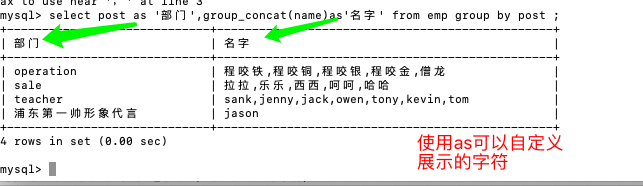
select post as '部门',group_concat(name)as'名字' from emp group by post ;
查询关键字之having过滤
where与having的功能其实是一样的 都是用来筛选数据
只不过where用于分组之前的筛选 而having用于分组之后的筛选
为了人为的区分 所以叫where是筛选 having是过滤

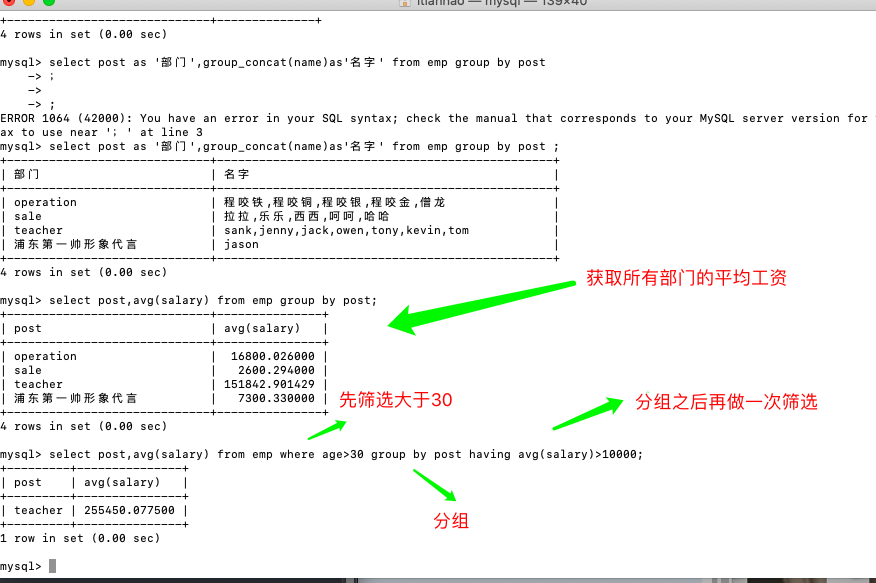
1、统计各部门年龄在30岁以上的员工平均工资,并且保留平均工资大于10000的部门
select post,avg(salary) from emp
        where age >= 30
        group by post
        having avg(salary) > 10000;
查询关键字之distinct去重
去重的前提是数据必须一模一样
select distinct age from emp;
查询关键字之order by排序
select * from emp order by salary asc; #默认升序排
select * from emp order by salary desc; #降序排

select * from emp order by age desc; #降序排

#先按照age降序排,在年轻相同的情况下再按照薪资升序排
select * from emp order by age desc,salary asc;
查询关键字之limit分页
# 限制展示条数
select * from emp limit 3;

# 查询工资最高的人的详细信息
select * from emp order by salary desc limit 1;


# 分页显示
select * from emp limit 0,5;  # 第一个参数表示起始位置,第二个参数表示的是条数,不是索引位置
查询关键字之regexp正则
select * from emp where name regexp '^j.*(n|y)$';
多表查询思路
子查询
	将一张表的查询结果括号括起来当做另外一条SQL语句的条件
        eg:类似以日常生活中解决问题的方式
                第一步干什么
               第二步基于第一步的结果在做操作 ...
连表操作
	先将所有涉及到结果的表全部拼接到一起形成一张大表 然后从大表中查询数据

 #建表
create table dep1(
    id int primary key auto_increment,
    name varchar(20)
);

create table emp1(
    id int primary key auto_increment,
    name varchar(20),
    gender enum('male','female') not null default 'male',
    age int,
    dep_id int
);

#插入数据
insert into dep1 values
(200,'技术'),
(201,'人力资源'),
(202,'销售'),
(203,'运营'),
(205,'安保')
;

insert into emp1(name,gender,age,dep_id) values
('jason','male',18,200),
('dragon','female',48,201),
('kevin','male',18,201),
('nick','male',28,202),
('owen','male',18,203),
('jerry','female',18,204);
子查询
# 查询jason的部门名称
	1.先获取jason的部门编号
		select dep_id from emp1 where name = 'jason';  # 200
	2.根据部门编号获取部门名称
    	select name from dep1 where id = 200;
 	子查询
    	select name from dep1 where id = (select dep_id from emp1 where name = 'jason');
连表操作
select * from emp1,dep1;  # 笛卡尔积
'''我们不会使用笛卡尔积来求数据 效率太低  连表有专门的语法'''


select * from dep1,emp1 where emp1.dep_id = dep1.id;
select emp1.name,dep1.name from emp1,dep1 where emp1.dep_id = dep1.id;

inner join		内连接
	只拼接两边都有的字段数据
left join		左连接
	以左表为基准 展示所有的数据 没有对应则NULL填充
right join		右连接
	以右表为基准 展示所有的数据 没有对应则NULL填充
union		   全连接
	select * from emp1 left join dep1 on emp1.dep_id = dep1.id
   	union
	select * from emp1 right join dep1 on emp1.dep_id = dep1.id;

 浙公网安备 33010602011771号