
二、搭建Apache服务器
于2022年4月2日重新编辑
一、安装环境准备
1.1 卸载自带的Apache
rpm -qa | grep httpd #会出现两个软件包,都卸载掉
httpd-tools-2.4.6-67.el7.centos.7.x86_64
httpd-2.4.6.el7.centos.7.x86_64

rpm -e --nodeps httpd-tools-2.4.6-67.el7.centos.7.x86_64
rpm -e --nodeps httpd-2.4.6.el7.centos.7.x86_64
1.2 下载地址
https://dlcdn.apache.org/httpd/httpd-2.4.46.tar.gz
https://dlcdn.apache.org/apr/apr-1.7.0.tar.gz
https://dlcdn.apache.org/apr/apr-util-1.6.1.tar.gz
二、安装Apache
1、安装依赖包
yum -y install gcc autoconf automake make \
pcre pcre-devel openssl openssl-devel expat-devel*
2、解压软件包
tar -xzf httpd-2.4.46.tar.gz -C /usr/src/ &&
tar -xzf apr-util-1.6.1.tar.gz -C /usr/src/ &&
tar -xzf apr-1.7.0.tar.gz -C /usr/src/
3、编译安装
cd /usr/src/apr-1.7.0/
./configure --prefix=/usr/local/apr &&
make && make install

cd /usr/src/apr-util-1.6.1/
./configure --prefix=/usr/local/apr-util --with-apr=/usr/local/apr/bin/apr-1-config &&
make && make install

cd /usr/src/httpd-2.4.46/
./configure \
--prefix=/usr/local/apache2 \
--with-apr=/usr/local/apr \
--with-apr-util=/usr/local/apr-util \
--enable-so \
--enable-mpms-shared=all \
--enable-cgi \
--with-zlib \
--with-pcre \
--with-mpm=prefork \
--enable-ssl \
--enable-rewrite
make && make install
echo $? #返回0表示已正确安装,返回非0表示出错
注意:如果编译发生错误,请检查选项是否正确,然后再make clean,之后再编译。
4、创建apache用户跟组,修改目录权限
groupadd apache
useradd -M -s /sbin/nologin -r -g apache apache
chown -R apache:apache /usr/local/apache2/
5、设置环境变量
echo 'export PATH=/usr/local/apache2/bin:$PATH' >> /etc/profile
source /etc/profile
6、修改配置文件
vim /usr/local/apache2/conf/httpd.conf
#去掉195行注释并改成如下所示
ServerName localhost:80
#修改173行174行
User apache
Group apache
如果不修改ServerName localhost:80会报如下错误

7、启动apache
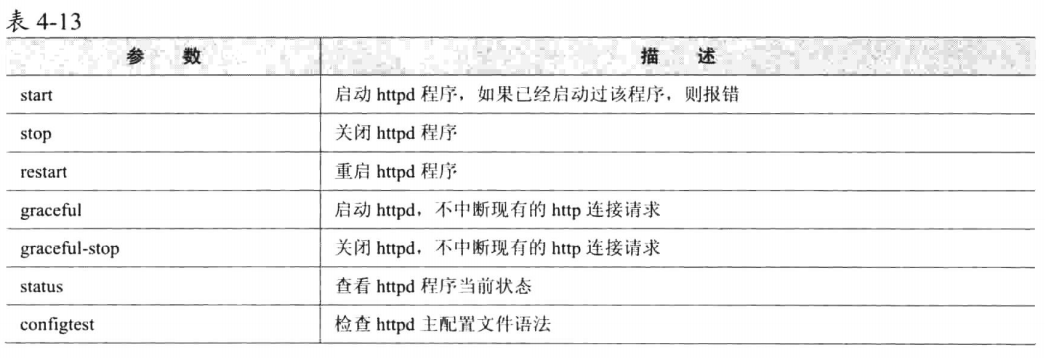
#启动、重启、停止、看状态
apachectl start
apachectl restart
apachectl stop
apachectl status

#重新加载配置文件不重启服务
apachectl graceful

#查看http服务是否启动
netstat -ntulp | grep http

#放通防火墙访问
firewall-cmd --permanent --add-port=80/tcp
firewall-cmd --reload

#检查配置文件语法
apachectl -t

#查看常见的模块(包括动态和静态)
apachectl -M
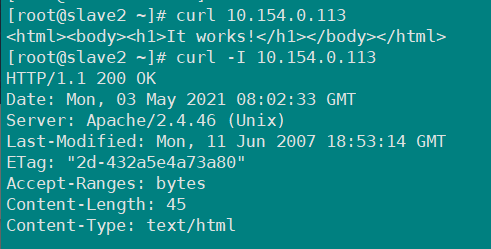
8、访问页面,如下图所示为搭建成功

使用curl命令访问
三、参数说明
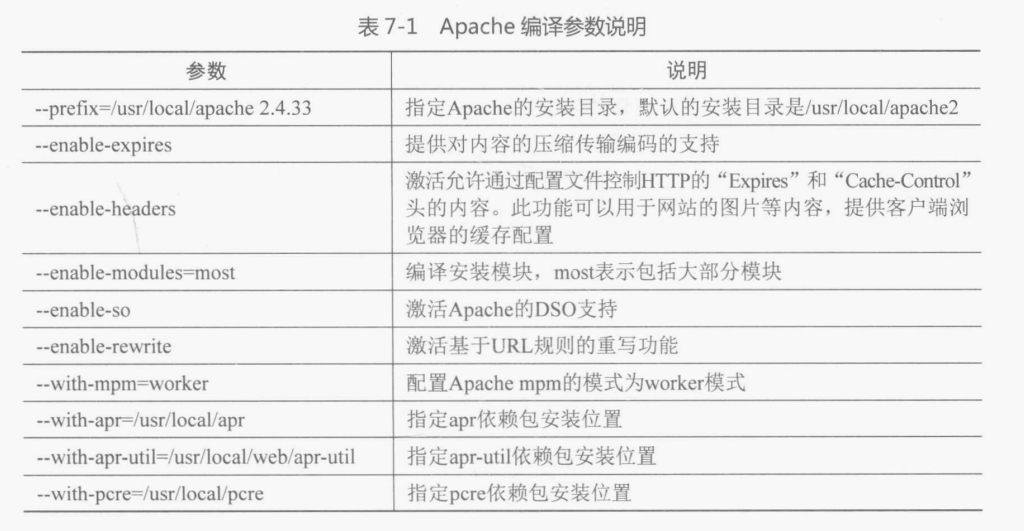
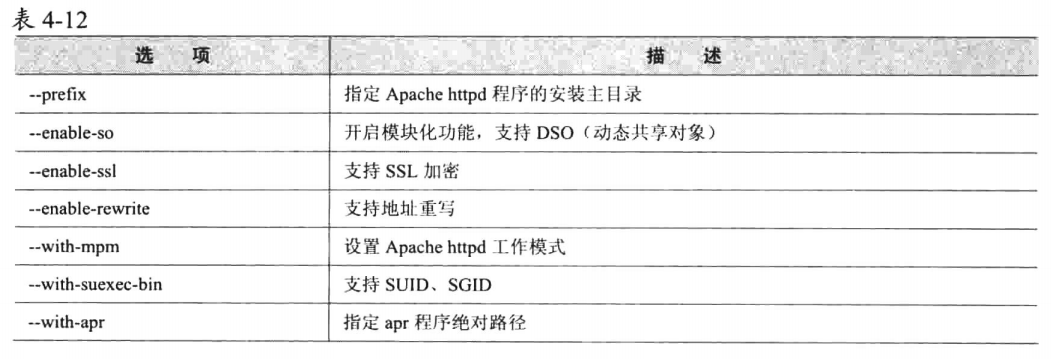
3.1 编译参数说明
configure脚本使用参数说明
来自《Linux系统运维指南》
来自《Linux运维之道》
3.2 apachectl参数说明
四、官网下载图示
官网下载
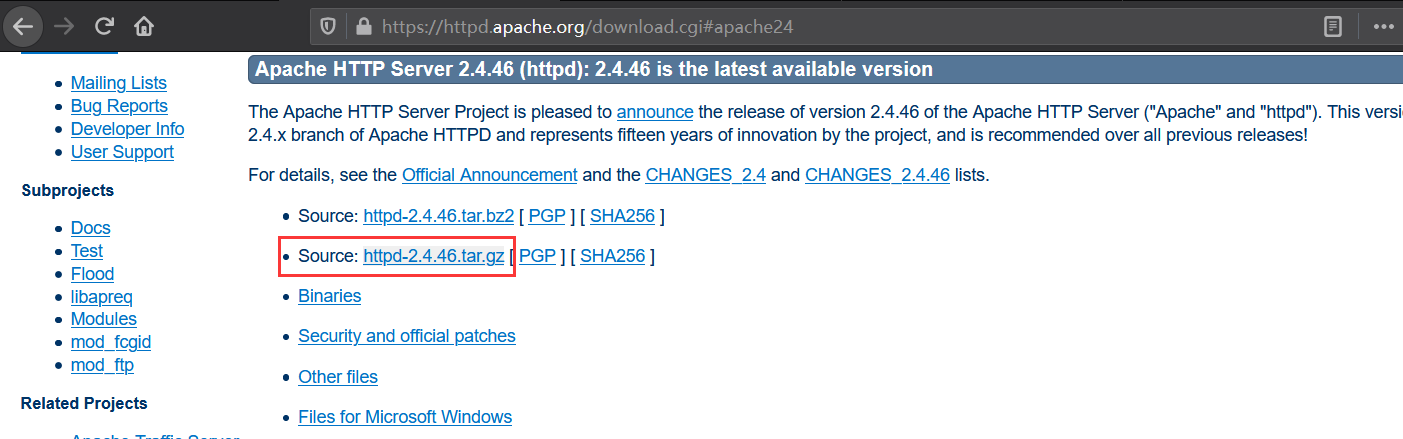
目前最新版本为httpd-2.4.46
apr跟apr-util软件:官网下载
目前最新版本为apr-1.7.0,apr-util-1.6.1
五、参考资料
- 《Linux运维之道》第2版 第四章
- 《Linux系统运维指南》
- 安装Apache跟php
- Apache三种工作模式
- Apache编译参数说明
今天的学习是为了以后的工作更加的轻松!

 浙公网安备 33010602011771号