
使用VSTO插件将excel数据和图片导出word文档
B站视频演示:https://www.bilibili.com/video/BV1iN4y1w7A7/
插件下载地址:
链接: https://pan.baidu.com/s/1rN9WP9jOgIUXEG8Cp7TroQ
提取码: 26dg
主要界面如图:

准备工作:
1、首先需要提供一个word模板,并且标记好您要插入蓝色部分,用类似“{}“括号的符号标记出来,插件默认提供了5种标记方法
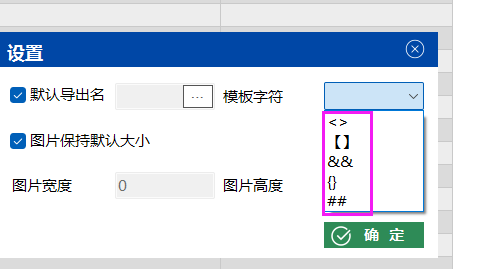
如图:
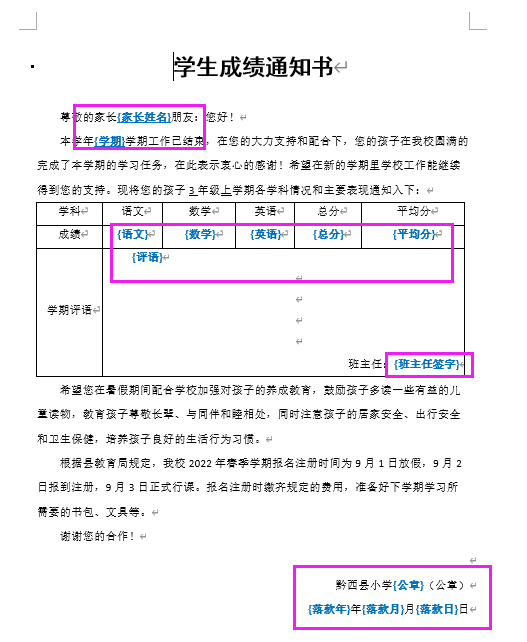
2、开始操作,打开excel插件创建模板,读取word文档的标记字符写入excel,选择是否为图片

3、将要插入的值,录入到原值列后对应的位置
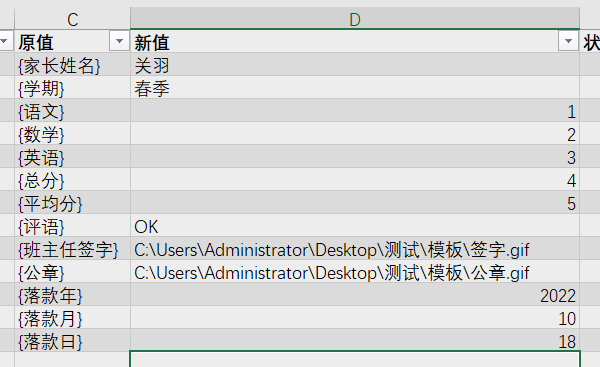
4、点击插件,导出文档即可

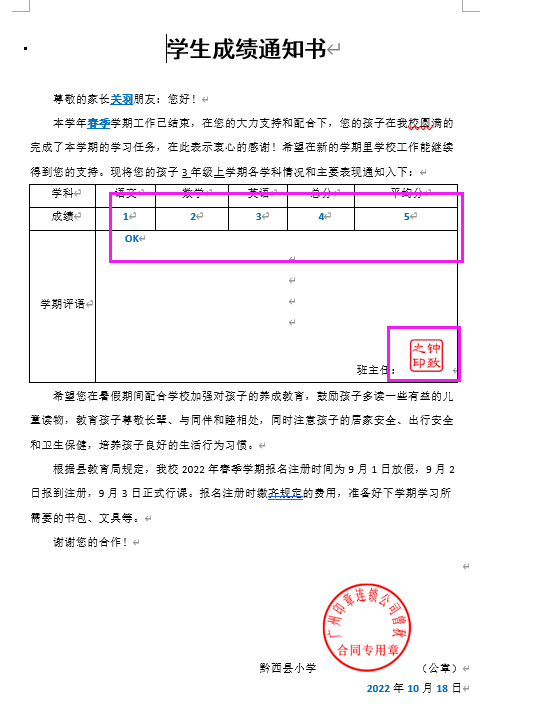
5、打开导出的文档,可以看到标记的字符和图片都插入之前指定的位置。
      public void OutWord_docx()
        {
            try
            {
                Pulic.app = Globals.ThisAddIn.Application;
                excel.Worksheet wst = Pulic.app.ActiveWorkbook.Worksheets["bookmark"];
                //定义word模板所在路径
                string filename = Pulic.docxPath;
                using (var document = DocX.Load(filename))
                {
                    int maxRow = wst.Range["a1"].get_End(excel.XlDirection.xlDown).Row + 1;
                    for (int i = 2; i < maxRow; i++)
                    {
                        //先要选择类型值,才能继续插入
                        if ((String)wst.Cells[i, "b"].Text == "" || (String)wst.Cells[i, "d"].Text == "")
                        {
                            wst.Cells[i, "e"].Value2 = "未选择类型或新值,失败";
                        }
                        else
                        {
                            if ((String)wst.Cells[i, "c"].Text != "" && wst.Cells[i, "b"].value2 == "值")
                            {
                                document.ReplaceText(wst.Cells[i, "c"].Text.ToString(), wst.Cells[i, "d"].Text.ToString(), false, RegexOptions.None, null, null, MatchFormattingOptions.ExactMatch);
                                wst.Cells[i, "e"].Value2 = "成功";
                            }
                            else
                            {
                                string strPIC = wst.Cells[i, "d"].Text.ToString();
                                if (File.Exists(strPIC))
                                {
                                    //插入图
                                    var image = document.AddImage(strPIC);
                                    //Properties.Settings.Default.picH, Properties.Settings.Default.picW
                                    //判断图片插入原始尺寸还是自定义尺寸
                                    if (Properties.Settings.Default.PicdefaultSize)
                                    {
                                        var picture = image.CreatePicture();//112.5f, 112.5f
                                        document.ReplaceTextWithObject(wst.Cells[i, "c"].Text.ToString(), picture, false, RegexOptions.IgnoreCase);
                                        wst.Cells[i, "e"].Value2 = "成功";
                                    }
                                    else
                                    {
                                        var picture = image.CreatePicture(Properties.Settings.Default.picH, Properties.Settings.Default.picW);//112.5f, 112.5f
                                        document.ReplaceTextWithObject(wst.Cells[i, "c"].Text.ToString(), picture, false, RegexOptions.IgnoreCase);
                                        wst.Cells[i, "e"].Value2 = "成功";
                                    }
                                    //pictures.SetPictureShape(BasicShapes.);
                                    //pictures.Rotation = 0;//旋转角度
                                    //var pp = document.Bookmarks[wst.Cells[i, "c"].Text.ToString()].Paragraph;
                                    //pp.AppendPicture(pictures);
                                    // Do the replacement of all the found tags with the specified image and ignore the case when searching for the tags.
                                }
                                else
                                {
                                    wst.Cells[i, "e"].Value2 = "非法路径";
                                }
                            }
                        }
                    }
                    //for (int i = 2; i < rowMax; i++)
                    //{
                    //    string bookmark = wst.Cells[i, 1].Value2;
                    //    document.Bookmarks[bookmark].SetText((string)wst.Cells[i, 2].Text);
                    //    document.Bookmarks[bookmark].Paragraph.FontSize(16);
                    //    document.Bookmarks[bookmark].Paragraph.Font("仿宋");
                    //}
                    string time = DateTime.Now.ToString("yyyyMMddHHmmss");
                    string wordName;
                    if (Properties.Settings.Default.outPutdocxName)
                    {
                        wordName = time;
                    }
                    else
                    {
                        wordName = wst.Cells[Properties.Settings.Default.outPutdocxRow, Properties.Settings.Default.outPutdocxCol].Value2; /* Properties.Settings.Default.outPutdocx.ToString()*/;
                    }
                    SaveFileDialog sfd = new SaveFileDialog
                    {
                        Title = "请选择要保存文档的路径",
                        Filter = "Word Document(*.docx)|*.docx",
                        DefaultExt = "Word Document(*.docx)|*.docx",
                        FileName = wordName
                    };
                    if (sfd.ShowDialog() == DialogResult.OK)
                    {
                        string file_name = sfd.FileName;
                        document.SaveAs(file_name);
                        Pulic.CloseMessage("\r\r     文档已导出!", Color.Green);
                    };
                };

            }
            catch (Exception ex)
            {
                Pulic.CloseMessage(ex.Message, Color.Red);
            }
        }

 浙公网安备 33010602011771号