
安卓app_sl_4_14询问是否退出的对话框-关闭程序-退出程序
安卓app_sl_4_14询问是否退出的对话框-关闭程序-退出程序
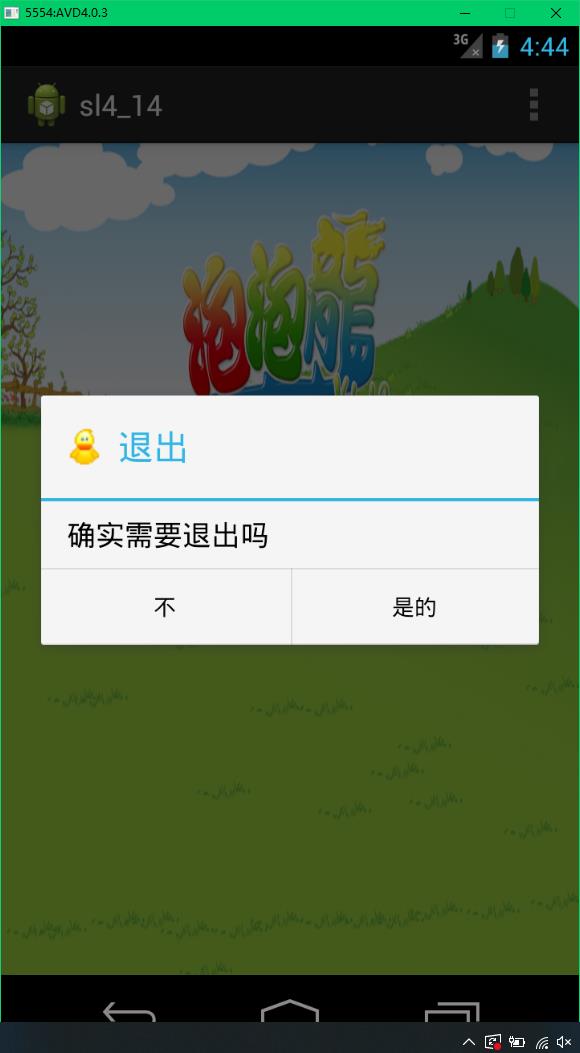
<LinearLayout xmlns:android="http://schemas.android.com/apk/res/android"
    xmlns:tools="http://schemas.android.com/tools"
    android:layout_width="match_parent"
    android:layout_height="match_parent"
    android:background="@drawable/background"
    android:orientation="vertical"
    android:gravity="center"

    tools:context="com.example.sl4_14.MainActivity" >

    <TextView
        android:layout_width="wrap_content"
        android:layout_height="wrap_content"
        android:text="@string/hello_world" />

    <ImageButton
        android:id="@+id/imageButton1"
        android:layout_width="wrap_content"
        android:layout_height="wrap_content"
        android:background="#0000"
        android:src="@drawable/exit" />

</LinearLayout>
package com.example.sl4_14;
/*
 * 范例1:询问是否退出的对话框,图像按钮_带图片的按钮,程序退出功能,结束程序
 */
import android.app.Activity;
import android.app.AlertDialog;
import android.content.DialogInterface;
import android.content.DialogInterface.OnClickListener;
import android.os.Bundle;
import android.view.Menu;
import android.view.MenuItem;
import android.view.View;
import android.widget.ImageButton;

public class MainActivity extends Activity {

    @Override
    protected void onCreate(Bundle savedInstanceState) {
        super.onCreate(savedInstanceState);
        setContentView(R.layout.activity_main);
        ImageButton button1=(ImageButton) findViewById(R.id.imageButton1);
        button1.setOnClickListener(new View.OnClickListener() {

            @Override
            public void onClick(View v) {
                // TODO Auto-generated method stub
                AlertDialog alert = new AlertDialog.Builder(MainActivity.this).create();
                alert.setIcon(R.drawable.advise);
                alert.setTitle("退出");
                alert.setMessage("确实需要退出吗");
                alert.setButton(DialogInterface.BUTTON_NEGATIVE, "不",new OnClickListener(){

                    @Override
                    public void onClick(DialogInterface dialog, int which) {
                        // TODO Auto-generated method stub

                    }

                });
                alert.setButton(DialogInterface.BUTTON_POSITIVE, "是的",new OnClickListener(){

                    @Override
                    public void onClick(DialogInterface dialog, int which) {
                        // TODO Auto-generated method stub
                        finish();

                    }

                });
                alert.show();

            }
        });

    }

    @Override
    public boolean onCreateOptionsMenu(Menu menu) {
        // Inflate the menu; this adds items to the action bar if it is present.
        getMenuInflater().inflate(R.menu.main, menu);
        return true;
    }

    @Override
    public boolean onOptionsItemSelected(MenuItem item) {
        // Handle action bar item clicks here. The action bar will
        // automatically handle clicks on the Home/Up button, so long
        // as you specify a parent activity in AndroidManifest.xml.
        int id = item.getItemId();
        if (id == R.id.action_settings) {
            return true;
        }
        return super.onOptionsItemSelected(item);
    }
}
欢迎讨论,相互学习。
cdtxw@foxmail.com

 浙公网安备 33010602011771号