
H3C Three-Layer Aggregation
1. Configuration steps
-
The switch needs to enter the interface and change the interface to Layer 3 mode. (Routers do not need to change, the default router mode)
-
Create an aggregated interface group
-
Add the interface to the aggregation group
-
Enter the aggregation group view to configure the ip
Note: The switch interface default layer two mode, you need to change the interface to layer three
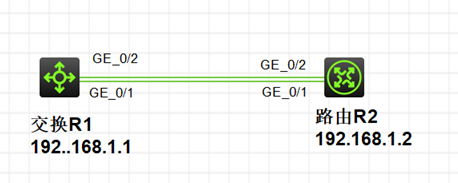
2. Configuration commands
2.1 R1 switch configuration
[R1] int range GigabitEthernet 1/0/1 #Enter interface 1
[R1-GigabitEthernet1/0/1]port link-mode route #Change the switch interface mode to Layer 3 mode
[R1]Int route-aggration 3 #Create Layer 3 aggregation interface group 3
[R1-if-range]port link-aggregation group 3 #Add interface 3 to the aggregation group
[R1]Int route-aggration 3 #Enter aggregation group view
[R1-Route-Aggregation3]Ip address 192.168.1.1 24 #Configure IP for the aggregation group
2.2 R2 routing configuration
<H3C>sys #Enter configuration view
[H3C]sys R2 #Change the name
[R2]int route-aggration 3 #Create Layer 3 aggregation interface group 3
[R2]quit
[R2]int range GigabitEthernet 0/1 #Enter interface 1
[R2-if-range]port link-aggregation group 3 #Add interface 1 to aggregation group 3
[R2]quit
[R2]int range GigabitEthernet 0/2 #Enter interface 2
[R2-if-range]port link-aggregation group 3 #Add interface 2 to aggregation group 3
[R2]quit
[R2]Int route-aggration 3 #Enter aggregation group view
[R2-Route-Aggregation3]Ip address 192.168.1.1 24 #Configure the aggregation group IP and mask (24 is 255.255.255.0)

 浙公网安备 33010602011771号