


记录Swagger2的使用
------------恢复内容开始------------
一、前言
关于SWGGER2的简介和作用就不赘述了,详情参见官方文档 https://swagger.io/,主要记录整合swgger的过程,其中一部分内容是参照网上的一些教程结合自己使用上遇到的问题。
二、依赖注入
在项目的pom文件注入swgger2对应的依赖,相关的pom文件可以在mvnrepository中搜索相关的包。
    <!--swagger2的jar包-->
        <dependency>
            <groupId>io.springfox</groupId>
            <artifactId>springfox-swagger2</artifactId>
            <version>2.9.2</version>
        </dependency>
        <!--引入视觉的样式的UI-->
        <dependency>
            <groupId>io.springfox</groupId>
            <artifactId>springfox-swagger-ui</artifactId>
            <version>2.9.2</version>
        </dependency>
三、创建swgger2配置类
@Configuration
@EnableSwagger2
public class SwaggerConfig {
    @Bean
    public Docket createRestApi() {
        return new Docket(DocumentationType.SWAGGER_2)
                .useDefaultResponseMessages(false)
                .apiInfo(apiInfo())
                .select()
//              扫描类名(不需要的代码直接删掉)
//              .apis(RequestHandlerSelectors.withClassAnnotation(Api.class))
//              扫描该包下的所有需要在Swagger中展示的API,@ApiIgnore注解标注的除外
                .apis(RequestHandlerSelectors.basePackage("com.demo")
//              指定路径处理PathSelectors.any()代表所有的路径
//              .apis(RequestHandlerSelectors.any())
//              错误路径不监控,swgger默认会显示basic error Controller如果有强迫症且不需要显示的同学可以去掉
//              .paths(PathSelectors.regex("(?!/error.*).*")))
                .paths(PathSelectors.any())
                .build());
    }


    private ApiInfo apiInfo() {
        return new ApiInfoBuilder()
                .title("利用swagger构建api文档")
                .description("简单使用swagger2")
                .version("1.0")
                .build();
    }
}
四、swagger的基础注解介绍(这个直接复制了)
swagger通过注解生成接口文档,包括接口名、请求方法、参数、返回信息的等等。
@Api:修饰整个类,描述Controller的作用
@ApiOperation:描述一个类的一个方法,或者说一个接口
@ApiParam:单个参数描述
@ApiModel:用对象实体来作为入参
@ApiProperty:用对象接实体收参数时,描述对象的一个字段
@ApiResponse:HTTP响应其中1个描述
@ApiResponses:HTTP响应整体描述
@ApiIgnore:使用该注解忽略这个API
@ApiError :发生错误返回的信息
@ApiImplicitParam:一个请求参数
@ApiImplicitParams: 多个请求参数
4.1、@Api修饰整个类,描述Controller的作用
4.2、@ApiOperation
用于描述一个方法或者接口
可以添加的参数形式:@ApiOperation(value = “接口说明”, httpMethod = “接口请求方式”, response = “接口返回参数类型”, notes = “接口发布说明”)
4.3、@ApiParam单个参数描述
@ApiParam(required = “是否必须参数”, name = “参数名称”, value = “参数具体描述”,dateType="变量类型”,paramType="请求方式”)
4.4、@ApiImplicitParam 一个请求参数
@ApiImplicitParam(required = “是否必须参数”, name = “参数名称”, value = “参数具体描述”,dateType="变量类型”,paramType="请求方式”)
@ApiOperation(value = “根据用户名获取用户的信息”,notes = “查询数据库中的记录”,httpMethod = “POST”,response = String.class)
@ApiImplicitParam(name = “userName”,value = “用户名”,required = true,dataType = “String”,paramType = “query”)
4.5、@ApiImplicitParams 多个请求参数
参数和@ApiImplicitParam一致,只是这个注解可以添加多个参数而已
复制代码
@ApiImplicitParams({
@ApiImplicitParam(name = “nickName”,value = “用户的昵称”,paramType = “query”,dataType = “String”,required = true),
@ApiImplicitParam(name = “id”,value = “用户的ID”,paramType = “query”,dataType = “Integer”,required = true)
})
public String getUserInfoByNickName(String nickName, Integer id) {
return “1234”;
}
复制代码
其余的都类似。
五、创建Controller
@RestController
@RequestMapping("/swagger")
@Api(value = "swagger2的demo例子")
public class SwaggerController {

    @RequestMapping("/getUserByName")
    @ResponseBody
    @ApiOperation(value = "根据姓名获取用户的信息",notes = "查询数据库中的记录",httpMethod = "POST",response = String.class)
    @ApiImplicitParam(name = "name",value = "姓名",required = true,dataType = "String",paramType = "query")
    public String getUserInfo(String name) {
        return "张三";
    }

    @RequestMapping(value = "/userregister",method = {RequestMethod.GET,RequestMethod.POST})
    @ResponseBody
    @ApiOperation(value = "user",notes = "用户实体类")
    public User userRegister(User user) {
        return user;
    }
}
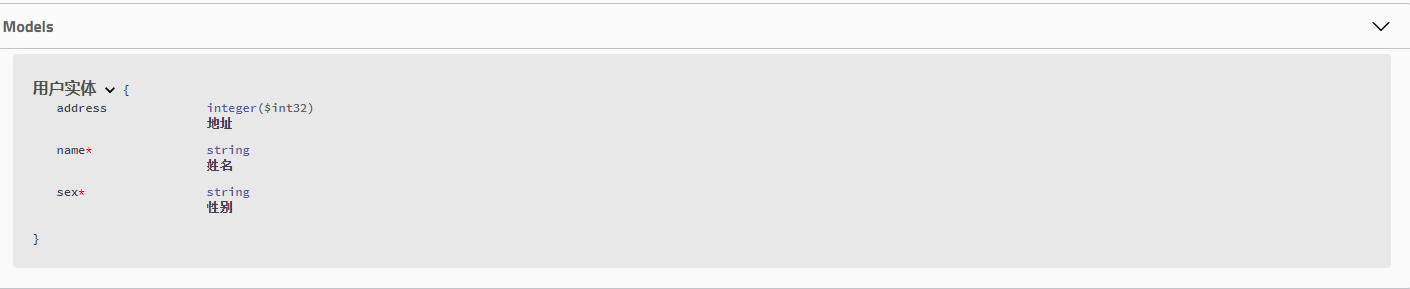
实体(用了lombok插件)
@Data
@ApiModel(value = "用户实体")
public class User {

    @ApiModelProperty(name = "name",notes = "姓名",dataType = "String",required = true)
    private String name;
    @ApiModelProperty(name = "sex",notes = "性别",dataType = "String",required = true)
    private String sex;
    @ApiModelProperty(name = "address",notes = "地址",dataType = "String",required = false)
    private String address;
}
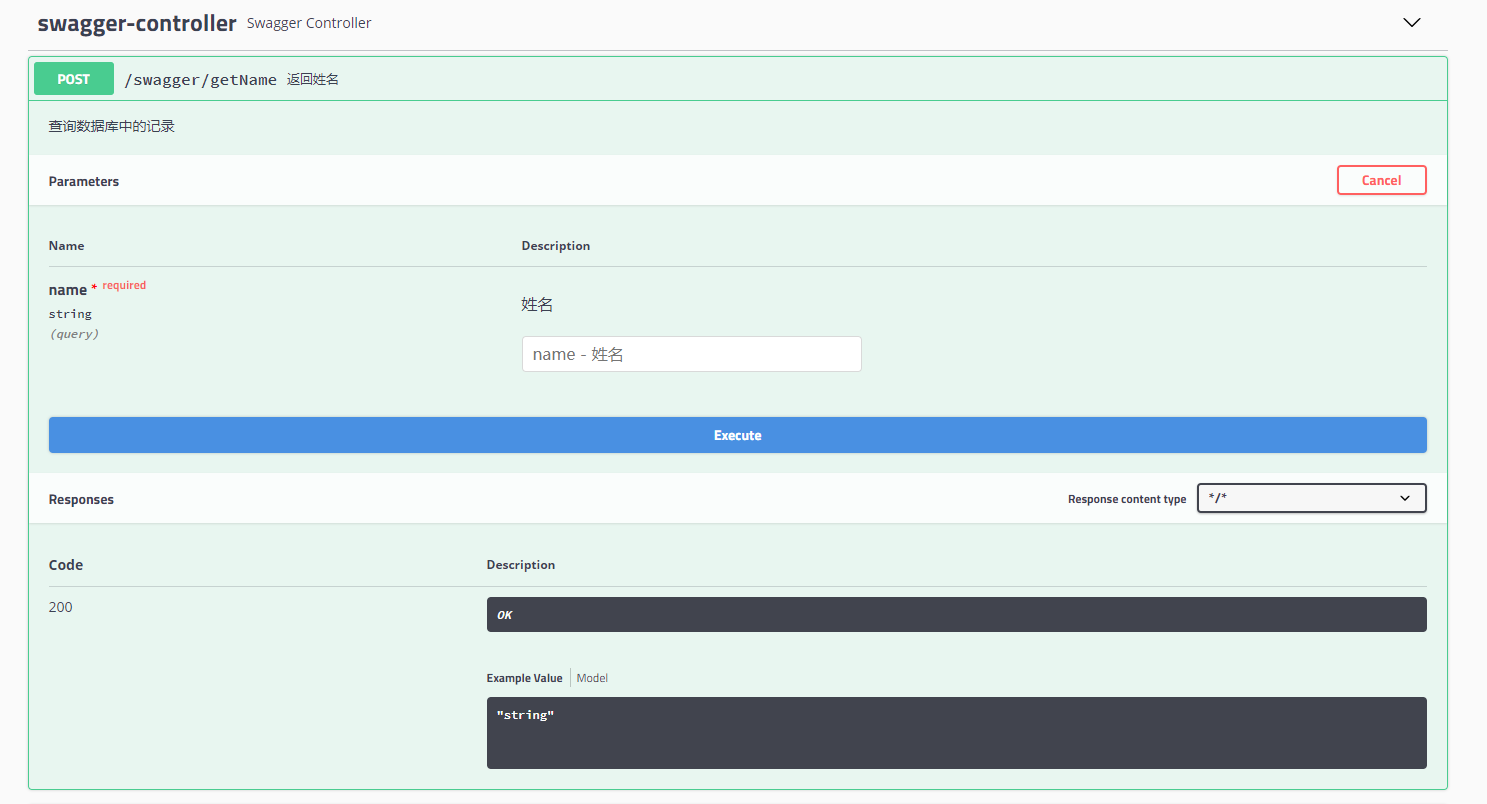
六、测试

 浙公网安备 33010602011771号