
Android+sqlite增删改查练习
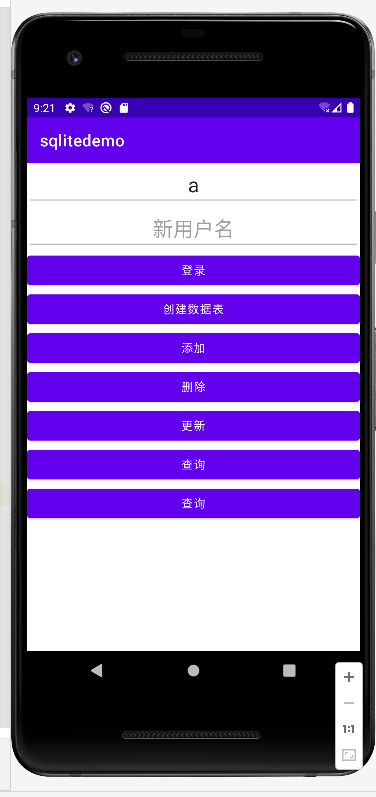
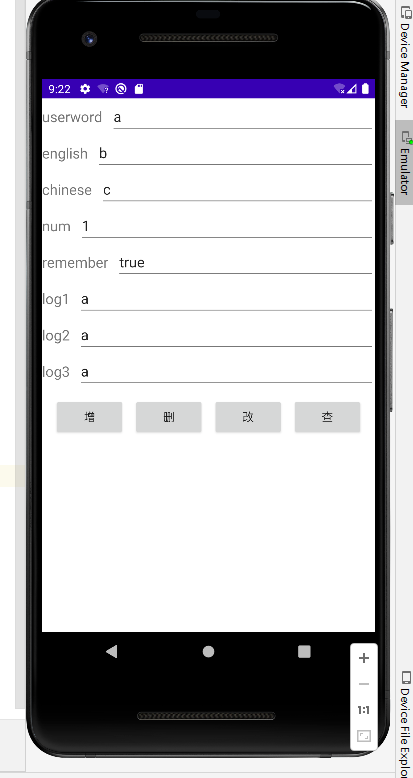
1.先看界面:首页为用户表得增删改查,跳转页为单词表得增删改查;
2.代码目录结构:
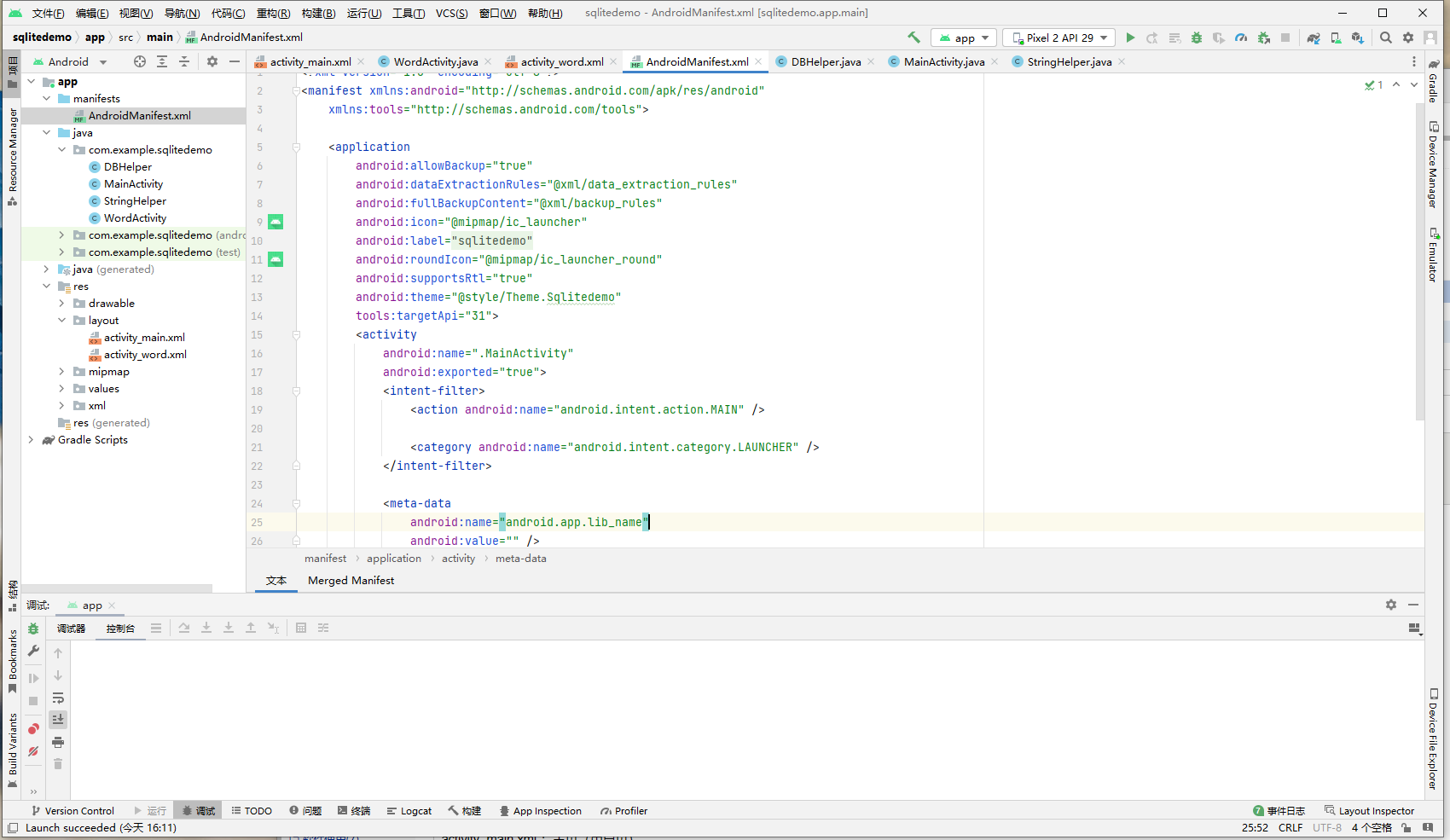
2.1 java 下
DBHelper:数据库处理类
放置数据库得一些操作:数据库得创建,以及增删改查得一些公共方法,
本例子中针对设计分别写了 用户表 和 单词表 数据库数据操作的 增删改查 方法;使用时可以按需要拷贝,一次性写好最好,省的之后添加。
MainActivity:首页处理类
StringHelper:string字符串处理得一些公共方法
WordActivity:单词表得处理方法
2.2 layout 下
activity_main.xml :主页(用户页)
activity_word.xml : 单词页
3.开始写代码吧
3.1先写个数据库 增、删、改、查 得代码 DBHelper
package com.example.sqlitedemo;

import android.content.ContentValues;
import android.content.Context;
import android.content.Intent;
import android.database.Cursor;
import android.database.sqlite.SQLiteDatabase;
import android.database.sqlite.SQLiteOpenHelper;
import android.util.Log;
import android.widget.Toast;

import java.time.DayOfWeek;
import java.util.ArrayList;
import java.util.List;

public class DBHelper extends SQLiteOpenHelper {
    //在这个数据库中新建一张 用户表,表中有 id(主键)、用户名、密码、日志1、日志2
    private static final String CREATE_USER = "create table user("
            +"id integer primary key autoincrement,"
            +"username text,"
            +"password text,"
            +"tag1 text,"
            +"tag2 text)";


    //在这个数据库中新建一张 单词表,表中有 id(主键)、用户名、英语、汉语、背到第几个、是否记住、日志1-3
    private static final String CREATE_WORD = "create table word("
            +"id integer primary key autoincrement,"
            +"userword text,"
            +"english text,"
            +"chinese text,"
            +"num integer,"
            +"remember bool,"
            +"log1 text,"
            +"log2 text,"
            +"log3 text)";

    private Context mContext;//至于为什么我们要使用下面这段代码以及为什么要定义这个私有的变量,书上并没有写我也不知道

    /**
     * 构造方法
     * @param context
     * @param name 数据库名
     * @param factory 允许我们在查询数据的时候返回一个自定义的 Cursor,一般都是传入 null
     * @param version 当前数据库的版本号,可用于对数据库进行升级操作
     */
    public DBHelper(Context context, String name, SQLiteDatabase.CursorFactory factory, int version) {
        super(context, name, factory, version);
        mContext = context;
    }

    /**
     * 创建数据库
     * @param db
     */
    @Override
    public void onCreate(SQLiteDatabase db) {
    //SQLiteDatabase这个数据库是本身就存在的,并不需要我们自己去写,因为在前面的代码当中我们已经进行了import操作
        // 执行建表语句
        db.execSQL(CREATE_USER);
        Toast.makeText(mContext,"用户表创建数据库功",Toast.LENGTH_LONG).show();
        Log.v("用户表","创建成功");

        //添加数据表
        db.execSQL(CREATE_WORD);
        Toast.makeText(mContext,"单词表创建数据库功",Toast.LENGTH_LONG).show();
        Log.v("单词表","创建成功");
    }

    /**
     * 升级数据库
     * @param db
     * @param oldVersion
     * @param newVersion
     */
    @Override
    public void onUpgrade(SQLiteDatabase db, int oldVersion, int newVersion) {
        db.execSQL("drop table if exists user");
        db.execSQL("drop table if exists word");
        onCreate(db);
    }

    /**
     * 增
     */
    //添加新用户
    public boolean AddUser(String username,String userpwd,String tag1,String tag2)
    {
        try
        {
            ContentValues values = new ContentValues();
            values.put("username",username);
            values.put("password",userpwd);
            values.put("tag1",tag1);
            values.put("tag2",tag2);
            this.getWritableDatabase().insert("user",null,values);
            values.clear();
            return true;
        }
        catch(Exception ex)
        {
            return false;
        }
    }

    //添加单词信息
    public boolean AddWord(String userword,String english,String chinese,int num,boolean remember,String log1,String log2,String log3)
    {
        try
        {
            ContentValues values = new ContentValues();
        //已下if判断是针对用户没有输入修改项内容的时候就不做修改
            if (!StringHelper.StringNullOrEmpty(userword))
                values.put("userword",userword);
            if (!StringHelper.StringNullOrEmpty(english))
                values.put("english",english);
            if (!StringHelper.StringNullOrEmpty(chinese))
                values.put("chinese",chinese);
            if (num != 0)
                values.put("num",num);
            values.put("remember",remember);
            if (!StringHelper.StringNullOrEmpty(log1))
                values.put("log1",log1);
            if (!StringHelper.StringNullOrEmpty(log2))
                values.put("log2",log2);
            if (!StringHelper.StringNullOrEmpty(log3))
                values.put("log3",log3);
            this.getWritableDatabase().insert("word",null,values);
            values.clear();
            return true;
        }
        catch(Exception ex)
        {
            return false;
        }
    }

    /**
     * 删除
     */
    //删除用户信息
    public boolean DeleteUser(String username){
        try
        {
            this.getWritableDatabase().delete("user","username=?",new String[]{username});
            return true;
        }
        catch(Exception ex)
        {
            return false;
        }
    }

    //删除单词
    public boolean DeteleWord(String english)
    {
        try
        {
            this.getWritableDatabase().delete("word","english=?",new String[]{english});
            /* 一些多条件方法记录一下啊

            //删除 id > 5 && age <= 18 的数据
            getWritableDatabase().delete(TABLE_NAME_PERSON,VALUE_ID+">?"+" and "+VALUE_AGE +"<=?",new String[]{"5","18"});

            //删除 id > 5 || age <= 18 的数据
            getWritableDatabase().delete(TABLE_NAME_PERSON,VALUE_ID+">?"+" or "+VALUE_AGE +"<=?",new String[]{"5","18"});

            //删除数据库里 _id != 1 的数据
            getWritableDatabase().delete(TABLE_NAME_PERSON,VALUE_ID+"!=?",new String[]{"1"});

            //删除所有 _id >= 7 的男生
            getWritableDatabase().delete(TABLE_NAME_PERSON,VALUE_ISBOY+"=?"+" and "+VALUE_ID+">=?",new String[]{"1","7"});

            //删除所有 _id >= 7 和 _id = 3 的数据
            getWritableDatabase().delete(TABLE_NAME_PERSON,VALUE_ID+">=?"+" or "+VALUE_ID+"=?",new String[]{"7","3"});
            */
            return true;
        }
        catch(Exception ex)
        {
            return false;
        }
    }


    /**
     * 更新
     */
    //更新用户信息
    public boolean UpdateUser(String username,String userpwd,String tag1,String tag2,String oldname){
        try
        {
            ContentValues values = new ContentValues();
            if (!StringHelper.StringNullOrEmpty(username))
                values.put("username",username);
            if (!StringHelper.StringNullOrEmpty((userpwd)))
                values.put("password",userpwd);
            if (!StringHelper.StringNullOrEmpty(tag1))
                values.put("tag1",tag1);
            if (!StringHelper.StringNullOrEmpty(tag2))
                values.put("tag2",tag2);
            this.getWritableDatabase().update("user",values,"username=?",new String[]{oldname});
            values.clear();
            return true;
        }
        catch(Exception ex)
        {
            return false;
        }
    }

    //更新单词表
    public boolean UpdateWord(String userword,String english,String chinese,String num,String remember,String log1,String log2,String log3,String oldenglish)
    {
        try
        {
            ContentValues values = new ContentValues();
            if (!StringHelper.StringNullOrEmpty(userword))
                values.put("userword",userword);
            if (!StringHelper.StringNullOrEmpty(english))
                values.put("english",english);
            if (!StringHelper.StringNullOrEmpty(chinese))
                values.put("chinese",chinese);
            if (!StringHelper.StringNullOrEmpty(num))
                values.put("num",num);
            if (!StringHelper.StringNullOrEmpty(remember))
                values.put("remember",remember);
            if (!StringHelper.StringNullOrEmpty(log1))
                values.put("log1",log1);
            if (!StringHelper.StringNullOrEmpty(log2))
                values.put("log2",log2);
            if (!StringHelper.StringNullOrEmpty(log3))
                values.put("log3",log3);

            this.getWritableDatabase().update("word",values,"english=?",new String[]{oldenglish});
            values.clear();
            return true;
        }
        catch(Exception ex)
        {
            return false;
        }
    }


    /**
     * 查
     */
    //查用户信息,主要用于修改密码用
    public List<userModel> QueryUser(String username){

        /*
        *  //查询全部数据
        getWritableDatabase().query(TABLE_NAME_PERSON,null,null,null,null,null,null);
        //查询 _id = 1 的数据
        getWritableDatabase().query(TABLE_NAME_PERSON,null,VALUE_ID+"=?",new String[]{"1"},null,null,null);

        //查询 name = 张三 并且 age > 23 的数据
        getWritableDatabase().query(TABLE_NAME_PERSON,null,VALUE_NAME+"=?"+" and "+VALUE_AGE+">?",new String[]{"张三","23"},null,null,null);

        //查询 name = 张三 并且 age > 23 的数据  并按照id 降序排列
        getWritableDatabase().query(TABLE_NAME_PERSON,null,VALUE_NAME+"=?"+" and "+VALUE_AGE+">?",new String[]{"张三","23"},null,null,VALUE_ID+" desc");

        //查询数据按_id降序排列 并且只取前4条。
        getWritableDatabase().query(TABLE_NAME_PERSON,null,null,null,null,null,VALUE_ID+" desc","0,4");
        *
        * */

        //查询全部数据
        Cursor cursor = getWritableDatabase().query("user",null,"username=?",new String[]{username},null,null,null,null);
        List<userModel> list = new ArrayList<>();
        if(cursor.getCount() > 0)
        {
            //移动到首位
            cursor.moveToFirst();
            for (int i = 0; i < cursor.getCount(); i++) {

                userModel model = new userModel();
                model.id = cursor.getInt(0);
                model.username = cursor.getString(1);
                model.password = cursor.getString(2);
                model.tag1 = cursor.getString(3);
                model.tag2 = cursor.getString(4);

                list.add(model);
                //移动到下一位
                cursor.moveToNext();
            }
        }
        cursor.close();
        getWritableDatabase().close();
        return list;
    }

    public class userModel{
        public int id;
        public String username;
        public String password;
        public String tag1 ;
        public String tag2 ;
    }

    //查单词信息,主要用于单词用
    public List<wordModel> QueryWord(String itemName1,String itemValue1,String itemName2,String itemValue2){

        /*
        *  //查询全部数据
        getWritableDatabase().query(TABLE_NAME_PERSON,null,null,null,null,null,null);
        //查询 _id = 1 的数据
        getWritableDatabase().query(TABLE_NAME_PERSON,null,VALUE_ID+"=?",new String[]{"1"},null,null,null);

        //查询 name = 张三 并且 age > 23 的数据
        getWritableDatabase().query(TABLE_NAME_PERSON,null,VALUE_NAME+"=?"+" and "+VALUE_AGE+">?",new String[]{"张三","23"},null,null,null);

        //查询 name = 张三 并且 age > 23 的数据  并按照id 降序排列
        getWritableDatabase().query(TABLE_NAME_PERSON,null,VALUE_NAME+"=?"+" and "+VALUE_AGE+">?",new String[]{"张三","23"},null,null,VALUE_ID+" desc");

        //查询数据按_id降序排列 并且只取前4条。
        getWritableDatabase().query(TABLE_NAME_PERSON,null,null,null,null,null,VALUE_ID+" desc","0,4");
        *
        * */
        String ITM = itemName1+"=?"+" and "+itemName2+"=?";
        Cursor cursor = null;

        //无条件,查询全部
        if (itemName1 == null && itemName2 == null)
            cursor = getWritableDatabase().query("word",null,null,null,null,null,null,null);
        //一个条件
        if (itemName1 != null && itemName2 == null)
            cursor = getWritableDatabase().query("word",null,itemName1+"=?",new String[]{itemValue1},null,null,null,null);
        //两个条件
        if (itemName1 != null && itemName2 != null)
            cursor = getWritableDatabase().query("word",null,itemName1+"=?"+" and "+itemName2+"=?",new String[]{itemValue1,itemValue2},null,null,null,null);
        //模糊查询
        if (itemName1 == null && itemName2 != null)
        {
            String current_sql_sel = "SELECT * FROM word" + " where "+itemName2+" like '%"+itemValue2+"%'";
            cursor = getWritableDatabase().rawQuery(current_sql_sel, null);
        }

        /*拣选机器上,远程服务器,调度程序:*/
        List<wordModel> list = new ArrayList<>();
        if(cursor.getCount() > 0)
        {
            //移动到首位
            cursor.moveToFirst();
            for (int i = 0; i < cursor.getCount(); i++) {
                wordModel model = new wordModel();
                model.id = cursor.getInt(0);
                String ddd = cursor.getString(1);
                model.userword = cursor.getString(1);
                model.english = cursor.getString(2);
                model.chinese = cursor.getString(3);
                model.num = cursor.getString(4);
                model.remember = cursor.getString(5);
                model.log1 = cursor.getString(6);
                model.log2 = cursor.getString(7);
                model.log3 = cursor.getString(8);

                list.add(model);
                //移动到下一位
                cursor.moveToNext();
            }
        }
        cursor.close();
        getWritableDatabase().close();
        return list;
    }

    public class wordModel{
        public  int id;
        public String userword;
        public String english;
        public String chinese;
        public String num;
        public String remember;
        public String log1;
        public String log2;
        public String log3;
    }

}
3.2再写个主页得代码 MainActivity
package com.example.sqlitedemo;

import androidx.appcompat.app.AppCompatActivity;

import android.content.ContentValues;
import android.content.Intent;
import android.database.sqlite.SQLiteDatabase;
import android.os.Bundle;
import android.util.Log;
import android.view.View;
import android.widget.Button;
import android.widget.EditText;
import android.widget.Toast;

import java.util.ArrayList;
import java.util.List;

public class MainActivity extends AppCompatActivity {

    private DBHelper dbHelper;//数据库表
    EditText edtext;
    @Override
    protected void onCreate(Bundle savedInstanceState) {
        super.onCreate(savedInstanceState);
        setContentView(R.layout.activity_main);


        // 构建MyDatabaseHelper对象,指定数据库名为"newWordApp.db、版本号为3,如果修改了DBHelper的数据库字段后请跟新版本号
        dbHelper = new DBHelper(this, "newWordApp.db", null, 3);

        //创建数据库
        Button btn_create_database = findViewById(R.id.btn_registe);
        btn_create_database.setOnClickListener(new View.OnClickListener() {
            @Override
            public void onClick(View view) {
                // 创建或打开一个现有的数据库(已存在则打开,否则创建一个新的)虽然这很显然,但是我们怎么创建或者打开自己所指定的数据库呢?难道就只能够打开我们刚刚创建的这一个数据库吗?
                dbHelper.getWritableDatabase();
            }
        });

        //增
        Button btn_add = findViewById(R.id.btn_add);
        btn_add.setOnClickListener(new View.OnClickListener() {
            @Override
            public void onClick(View view) {
                edtext=(EditText)findViewById(R.id.tv_username);////获取 用户名 对象
                String username = edtext.getText().toString();  //转化为字符串
                if(dbHelper.AddUser(username,"1","账号","密码"))//将用户名为 输入框内容,密码为 1,日志1为 账号,日志2为 密码 内容插入数据库
                {
                    //插入成功弹出提示
                    Toast.makeText(MainActivity.this,"用户"+ username +"创建成功",Toast.LENGTH_SHORT).show();
                    return;//跳出
                }
                //失败则弹出提示
                Toast.makeText(MainActivity.this,"用户"+ username +"创建失败",Toast.LENGTH_LONG).show();
            }
        });

        //删
        Button btn_delete = findViewById(R.id.btn_delete);
        btn_delete.setOnClickListener(new View.OnClickListener() {
            @Override
            public void onClick(View view) {

                edtext=(EditText)findViewById(R.id.tv_username);////获取 用户名 对象
                String username = edtext.getText().toString();//转化为字符串

                if(dbHelper.DeleteUser(username))//根据用户名去查找删除
                {
                    //弹出提示
                    Toast.makeText(MainActivity.this,username+"删除成功!",Toast.LENGTH_SHORT).show();
                    return;
                }
                Toast.makeText(MainActivity.this,username+"删除失败!",Toast.LENGTH_LONG).show();
            }
        });

        //改
        Button btn_update = findViewById(R.id.btn_update);
        btn_update.setOnClickListener(new View.OnClickListener() {
            @Override
            public void onClick(View view) {
                edtext=(EditText)findViewById(R.id.tv_username);  ////获取 用户名 对象
                String usernameOld = edtext.getText().toString(); //转化为字符串

                EditText edtextnew=(EditText)findViewById(R.id.tv_username);//获取“新用户名”文本框输入的用户名
                String usernameNew = edtextnew.getText().toString();//转化为字符串

                //这里只修改名字,密码日志等信息如需修改,填入要修的的内容即可;修改原理也是通过找到用户名对应的那条信息去修改
                if(dbHelper.UpdateUser(usernameNew,null,null,null,usernameOld))
                {
                    //弹出提示
                    Toast.makeText(MainActivity.this,usernameOld+"修改为"+usernameNew,Toast.LENGTH_SHORT).show();
                    return;
                }
                Toast.makeText(MainActivity.this,usernameOld +"修改失败!",Toast.LENGTH_LONG).show();

            }
        });

        //查
        Button btn_query = findViewById(R.id.btn_query);
        btn_query.setOnClickListener(new View.OnClickListener() {
            @Override
            public void onClick(View view) {
                edtext=(EditText)findViewById(R.id.tv_username);////获取 用户名 对象
                String username = edtext.getText().toString();//转化为字符串

                //new一个存储查出来信息的list
                List<DBHelper.userModel> list = new ArrayList<>();
                list = dbHelper.QueryUser(username);//通过 “用户名” 查询出来写入list

                //如果没查到,则弹出提示
                if (list.size() <= 0){
                    Toast.makeText(MainActivity.this,"未查询到信息!",Toast.LENGTH_LONG).show();
                    return;
                }

                //查到了就 一条一条给弹出提示
                for (int i = 0; i < list.size(); i++) {
                    String psw = list.get(i).password;
                    Toast.makeText(MainActivity.this,i + "密码:"+ psw,Toast.LENGTH_SHORT).show();
//                    System.out.println(list.get(i).id);
//                    System.out.println(list.get(i).username);
//                    System.out.println(list.get(i).password);
//                    System.out.println(list.get(i).tag1);
//                    System.out.println(list.get(i).tag2);
                }
            }
        });

        //页面跳转

        Button btn_gotopage = findViewById(R.id.btn_gotopage);
        btn_gotopage.setOnClickListener(new View.OnClickListener() {
            @Override
            public void onClick(View view) {
                Intent intent=new Intent();
                intent.setClass(MainActivity.this, WordActivity.class);

                //传 用户名 值去 WordActivity
                edtext=(EditText)findViewById(R.id.tv_username);////获取 用户名 对象
                String username = edtext.getText().toString();//转化为字符串
                intent.putExtra("userword",username);
                //intent.putExtra("user","value");

                startActivity(intent);
            }
        });
    }
}
3.3activity_main 主页画个界面
<?xml version="1.0" encoding="utf-8"?>
<LinearLayout xmlns:android="http://schemas.android.com/apk/res/android"
    xmlns:app="http://schemas.android.com/apk/res-auto"
    xmlns:tools="http://schemas.android.com/tools"
    android:layout_width="match_parent"
    android:layout_height="match_parent"
    tools:context=".MainActivity"
    android:orientation="vertical">

    <EditText
        android:id="@+id/tv_username"
        android:layout_width="match_parent"
        android:layout_height="wrap_content"
        android:hint="用户名"
        android:text="a"
        android:textSize="25dp"
        android:gravity="center"
         />
    <EditText
        android:id="@+id/tv_usernamenew"
        android:layout_width="match_parent"
        android:layout_height="wrap_content"
        android:hint="新用户名"
        android:textSize="25dp"
        android:gravity="center"
        />

    <!--    注册-->
    <Button
        android:id="@+id/btn_login"
        android:layout_width="match_parent"
        android:layout_height="wrap_content"
        android:text="登录"/>
<!--    创建数据表-->
    <Button
        android:id="@+id/btn_registe"
        android:layout_width="match_parent"
        android:layout_height="wrap_content"
        android:text="创建数据表"/>
<!--    添加用户-->
    <Button
        android:id="@+id/btn_add"
        android:layout_width="match_parent"
        android:layout_height="wrap_content"
        android:text="添加"/>

<!--    删除-->
    <Button
        android:id="@+id/btn_delete"
        android:layout_width="match_parent"
        android:layout_height="wrap_content"
        android:text="删除"/>

<!--    更新用户-->
    <Button
        android:id="@+id/btn_update"
        android:layout_width="match_parent"
        android:layout_height="wrap_content"
        android:text="更新"/>

<!--    查询用户-->
    <Button
        android:id="@+id/btn_query"
        android:layout_width="match_parent"
        android:layout_height="wrap_content"
        android:text="查询"/>
<!--跳转-->
    <Button
        android:id="@+id/btn_gotopage"
        android:layout_width="match_parent"
        android:layout_height="wrap_content"
        android:text="查询"/>

</LinearLayout>
3.4 单词页代码 WordActivity
package com.example.sqlitedemo;

import android.app.Activity;
import android.content.Context;
import android.content.Intent;
import android.database.Cursor;
import android.os.Bundle;
import android.view.View;
import android.widget.Button;
import android.widget.EditText;
import android.widget.Toast;

import androidx.annotation.Nullable;

import java.util.ArrayList;
import java.util.List;

public class WordActivity extends Activity {
    private DBHelper dbHelper;//数据库表
    EditText edtext_userword;
    String stringValue_userword;
    @Override
    protected void onCreate(@Nullable Bundle savedInstanceState) {
        super.onCreate(savedInstanceState);
        setContentView(R.layout.activity_word);

        // 构建MyDatabaseHelper对象,指定数据库名为"newWordApp.db、版本号为3,如果修改了DBHelper的数据库字段后请跟新版本号
        dbHelper = new DBHelper(this, "newWordApp.db", null, 3);

        Intent intent = getIntent();//获取界面传过来的值
        stringValue_userword=intent.getStringExtra("userword");//将值转为字符串赋给stringValue

        edtext_userword =(EditText)findViewById(R.id.ed_userword);//获取 用户名 对象
        edtext_userword.setText(stringValue_userword);//赋值
        System.out.println(stringValue_userword);//打印到控制台

        //增
        Button btn_addword = findViewById(R.id.btn_addword);
        btn_addword.setOnClickListener(new View.OnClickListener() {
            @Override
            public void onClick(View view) {
                addWord();
            }
        });

        //删
        Button btn_deleteword = findViewById(R.id.btn_deleteword);
        btn_deleteword.setOnClickListener(new View.OnClickListener() {
            @Override
            public void onClick(View view) {
                String english = ((EditText)findViewById(R.id.ed_english)).getText().toString();
                if(dbHelper.DeteleWord(english) )//根据用户名去查找删除
                {
                    //弹出提示
                    Toast.makeText(WordActivity.this,english+"删除成功!",Toast.LENGTH_SHORT).show();
                    return;
                }
                Toast.makeText(WordActivity.this,english+"删除失败!",Toast.LENGTH_LONG).show();
            }
        });

        //改
        Button btn_updateword = findViewById(R.id.btn_updateword);
        btn_updateword.setOnClickListener(new View.OnClickListener() {
            @Override
            public void onClick(View view) {
                String english = ((EditText)findViewById(R.id.ed_english)).getText().toString();
                String chinese = ((EditText)findViewById(R.id.ed_chinese)).getText().toString();  //汉语
                String num = ((EditText)findViewById(R.id.ed_num)).getText().toString();  //计数
                String remember = ((EditText)findViewById(R.id.ed_remember)).getText().toString();  //是否记住
                String log1 = ((EditText)findViewById(R.id.ed_log1)).getText().toString();  //备用1
                String log2 = ((EditText)findViewById(R.id.ed_log2)).getText().toString();  //备用2
                String log3 = ((EditText)findViewById(R.id.ed_log3)).getText().toString();  //备用3

                //将用户名为 输入框内容,密码为 1,日志1为 账号,日志2为 密码 内容插入数据库
                boolean addWord = dbHelper.UpdateWord(stringValue_userword,english,chinese,num,remember,log1,log2,log3,stringValue_userword);
                if(addWord)
                {
                    //插入成功弹出提示
                    Toast.makeText(WordActivity.this,english +"插入成功",Toast.LENGTH_SHORT).show();
                    return;//跳出
                }
                //失败则弹出提示
                Toast.makeText(WordActivity.this,english +"插入失败",Toast.LENGTH_LONG).show();
            }
        });

        //查
        Button btn_queryword = findViewById(R.id.btn_queryword);
        btn_queryword.setOnClickListener(new View.OnClickListener() {
            @Override
            public void onClick(View view) {
                queryWord();
            }
        });
    }

    public void addWord()
    {
        String english = ((EditText)findViewById(R.id.ed_english)).getText().toString();

        String chinese = ((EditText)findViewById(R.id.ed_chinese)).getText().toString();  //汉语

        String numS = ((EditText)findViewById(R.id.ed_num)).getText().toString();  //计数
        int num = 0;
        if (!StringHelper.StringNullOrEmpty(numS))
            num = Integer.parseInt(numS);

        String rememberB = ((EditText)findViewById(R.id.ed_remember)).getText().toString();  //是否记住
        Boolean remember = false;
        if (!StringHelper.StringNullOrEmpty(rememberB))
            remember = Boolean.parseBoolean(rememberB);

        String log1 = ((EditText)findViewById(R.id.ed_log1)).getText().toString();  //备用1

        String log2 = ((EditText)findViewById(R.id.ed_log2)).getText().toString();  //备用2

        String log3 = ((EditText)findViewById(R.id.ed_log3)).getText().toString();  //备用3

        //将用户名为 输入框内容,密码为 1,日志1为 账号,日志2为 密码 内容插入数据库
        boolean addWord = dbHelper.AddWord("a",english,chinese,num,remember,log1,log2,log3);
        if(addWord)
        {
            //插入成功弹出提示
            Toast.makeText(WordActivity.this,english +"插入成功",Toast.LENGTH_SHORT).show();
            return;//跳出
        }
        //失败则弹出提示
        Toast.makeText(WordActivity.this,english +"插入失败",Toast.LENGTH_LONG).show();
    }
    public void queryWord()
    {
        String english = ((EditText)findViewById(R.id.ed_english)).getText().toString();
        String chinese = ((EditText)findViewById(R.id.ed_chinese)).getText().toString();

        //new一个存储查出来信息的list
        List<DBHelper.wordModel> list = new ArrayList<>();

        /*以下查询方法根据实际使用需要4选1*/
        //1.查所有
        //list = dbHelper.QueryWord(null,null,null,null);//通过 “用户名” 查询出来写入list

        //2.单条件查询
        //list = dbHelper.QueryWord("english",english,null,null);//通过 “用户名” 查询出来写入list

        //3.双条件查询
        //list = dbHelper.QueryWord("english",english,"chinese",chinese);//通过 “用户名” 查询出来写入list

        //4.模糊查询
        list = dbHelper.QueryWord(null,null,"english",english);//通过 “用户名” 查询出来写入list


        //如果没查到,则弹出提示
        if (list.size() <= 0){
            Toast.makeText(WordActivity.this,"未查询到信息!",Toast.LENGTH_LONG).show();
            return;
        }

        //查到了就 一条一条给弹出提示
        for (int i = 0; i < list.size(); i++) {
            String psw = list.get(i).chinese;
            Toast.makeText(WordActivity.this,i + "密码:"+ psw,Toast.LENGTH_SHORT).show();
            System.out.println("id:"+list.get(i).id);
            System.out.println("用户名:"+list.get(i).userword);
            System.out.println("英语:"+list.get(i).english);
            System.out.println("汉语:"+list.get(i).chinese);
            System.out.println("计数:"+list.get(i).num);
            System.out.println("是否记住:"+list.get(i).remember);
            System.out.println("log1:"+list.get(i).log1);
            System.out.println("log2:"+list.get(i).log2);
            System.out.println("log3:"+list.get(i).log3);
        }
    }
}
3.5 activity_word 前台页面
<?xml version="1.0" encoding="utf-8"?> <RelativeLayout xmlns:android="http://schemas.android.com/apk/res/android" android:layout_width="match_parent" android:layout_height="match_parent" android:orientation="vertical"> <LinearLayout android:layout_width="fill_parent" android:layout_height="wrap_content" android:layout_alignParentTop="true" android:layout_centerHorizontal="true" android:orientation="vertical" > <!-- <LinearLayout--> <!-- android:layout_width="match_parent"--> <!-- android:layout_height="wrap_content"--> <!-- android:layout_gravity="center"--> <!-- android:gravity="left"--> <!-- android:orientation="horizontal" >--> <!-- <TextView--> <!-- android:id="@+id/tv_id"--> <!-- android:layout_width="wrap_content"--> <!-- android:layout_height="match_parent"--> <!-- android:layout_gravity="center"--> <!-- android:gravity="center"--> <!-- android:text="id"--> <!-- android:textSize="18sp" />--> <!-- <EditText--> <!-- android:id="@+id/ed_id"--> <!-- android:layout_width="match_parent"--> <!-- android:layout_height="match_parent"--> <!-- android:layout_marginLeft="10dp"--> <!-- android:inputType="text"--> <!-- android:textSize="18sp"--> <!-- android:textStyle="normal"--> <!-- android:typeface="normal" >--> <!-- <!–光标定位到此–>--> <!-- <requestFocus />--> <!-- </EditText>--> <!-- </LinearLayout>--> <LinearLayout android:layout_width="match_parent" android:layout_height="wrap_content" android:layout_gravity="center" android:gravity="left" android:orientation="horizontal" > <TextView android:id="@+id/tv_userword" android:layout_width="wrap_content" android:layout_height="match_parent" android:layout_gravity="center" android:gravity="center" android:text="userword" android:textSize="18sp" /> <EditText android:id="@+id/ed_userword" android:layout_width="match_parent" android:layout_height="match_parent" android:layout_marginLeft="10dp" android:inputType="text" android:textSize="18sp" android:textStyle="normal" android:typeface="normal" > </EditText> </LinearLayout> <LinearLayout android:layout_width="match_parent" android:layout_height="wrap_content" android:layout_gravity="center" android:gravity="left" android:orientation="horizontal" > <TextView android:id="@+id/tv_english" android:layout_width="wrap_content" android:layout_height="match_parent" android:layout_gravity="center" android:gravity="center" android:text="english" android:textSize="18sp" /> <EditText android:id="@+id/ed_english" android:layout_width="match_parent" android:layout_height="match_parent" android:layout_marginLeft="10dp" android:text="b" android:textStyle="normal" android:typeface="normal" > </EditText> </LinearLayout> <LinearLayout android:layout_width="match_parent" android:layout_height="wrap_content" android:layout_gravity="center" android:gravity="left" android:orientation="horizontal" > <TextView android:id="@+id/tv_chinese" android:layout_width="wrap_content" android:layout_height="match_parent" android:layout_gravity="center" android:gravity="center" android:text="chinese" android:textSize="18sp" /> <EditText android:id="@+id/ed_chinese" android:layout_width="match_parent" android:layout_height="match_parent" android:layout_marginLeft="10dp" android:textSize="18sp" android:text="c" android:textStyle="normal" android:typeface="normal" > </EditText> </LinearLayout> <LinearLayout android:layout_width="match_parent" android:layout_height="wrap_content" android:layout_gravity="center" android:gravity="left" android:orientation="horizontal" > <TextView android:id="@+id/tv_num" android:layout_width="wrap_content" android:layout_height="match_parent" android:layout_gravity="center" android:gravity="center" android:text="num" android:textSize="18sp" /> <EditText android:id="@+id/ed_num" android:layout_width="match_parent" android:layout_height="match_parent" android:layout_marginLeft="10dp" android:inputType="number" android:textSize="18sp" android:text="1" android:textStyle="normal" android:typeface="normal" > </EditText> </LinearLayout> <LinearLayout android:layout_width="match_parent" android:layout_height="wrap_content" android:layout_gravity="center" android:gravity="left" android:orientation="horizontal" > <TextView android:id="@+id/tv_remember" android:layout_width="wrap_content" android:layout_height="match_parent" android:layout_gravity="center" android:gravity="center" android:text="remember" android:textSize="18sp" /> <EditText android:id="@+id/ed_remember" android:layout_width="match_parent" android:layout_height="match_parent" android:layout_marginLeft="10dp" android:textSize="18sp" android:text="true" android:textStyle="normal" android:typeface="normal" > </EditText> </LinearLayout> <LinearLayout android:layout_width="match_parent" android:layout_height="wrap_content" android:layout_gravity="center" android:gravity="left" android:orientation="horizontal" > <TextView android:id="@+id/tv_log1" android:layout_width="wrap_content" android:layout_height="match_parent" android:layout_gravity="center" android:gravity="center" android:text="log1" android:textSize="18sp" /> <EditText android:id="@+id/ed_log1" android:layout_width="match_parent" android:layout_height="match_parent" android:layout_marginLeft="10dp" android:text="a" android:textSize="18sp" android:textStyle="normal" android:typeface="normal" > </EditText> </LinearLayout> <LinearLayout android:layout_width="match_parent" android:layout_height="wrap_content" android:layout_gravity="center" android:gravity="left" android:orientation="horizontal" > <TextView android:id="@+id/tv_log2" android:layout_width="wrap_content" android:layout_height="match_parent" android:layout_gravity="center" android:gravity="center" android:text="log2" android:textSize="18sp" /> <EditText android:id="@+id/ed_log2" android:layout_width="match_parent" android:layout_height="match_parent" android:layout_marginLeft="10dp" android:text="a" android:textSize="18sp" android:textStyle="normal" android:typeface="normal" > </EditText> </LinearLayout> <LinearLayout android:layout_width="match_parent" android:layout_height="wrap_content" android:layout_gravity="center" android:gravity="left" android:orientation="horizontal" > <TextView android:id="@+id/tv_log3" android:layout_width="wrap_content" android:layout_height="match_parent" android:layout_gravity="center" android:gravity="center" android:text="log3" android:textSize="18sp" /> <EditText android:id="@+id/ed_log3" android:layout_width="match_parent" android:layout_height="match_parent" android:text="a" android:layout_marginLeft="10dp" android:textSize="18sp" android:textStyle="normal" android:typeface="normal" > </EditText> </LinearLayout> <!--两个按钮:登录、注册--> <LinearLayout android:layout_width="match_parent" android:layout_height="wrap_content" android:layout_gravity="center" android:layout_marginTop="10dp" android:gravity="center" android:orientation="horizontal" > <Button android:id="@+id/btn_addword" android:layout_width="wrap_content" android:layout_height="match_parent" android:text="增" android:layout_marginRight="10dp"/> <Button android:id="@+id/btn_deleteword" android:layout_width="wrap_content" android:layout_height="match_parent" android:text="删" android:layout_marginRight="10dp"/> <Button android:id="@+id/btn_updateword" android:layout_width="wrap_content" android:layout_height="match_parent" android:text="改" android:layout_marginRight="10dp"/> <Button android:id="@+id/btn_queryword" android:layout_width="wrap_content" android:layout_height="match_parent" android:text="查" /> </LinearLayout> </LinearLayout> </RelativeLayout>
3.6 最后添加页面 AndroidMainifest.xml
<?xml version="1.0" encoding="utf-8"?>
<manifest xmlns:android="http://schemas.android.com/apk/res/android"
    xmlns:tools="http://schemas.android.com/tools">

    <application
        android:allowBackup="true"
        android:dataExtractionRules="@xml/data_extraction_rules"
        android:fullBackupContent="@xml/backup_rules"
        android:icon="@mipmap/ic_launcher"
        android:label="@string/app_name"
        android:roundIcon="@mipmap/ic_launcher_round"
        android:supportsRtl="true"
        android:theme="@style/Theme.Sqlitedemo"
        tools:targetApi="31">
        <activity
            android:name=".MainActivity"
            android:exported="true">
            <intent-filter>
                <action android:name="android.intent.action.MAIN" />

                <category android:name="android.intent.category.LAUNCHER" />
            </intent-filter>

            <meta-data
                android:name="android.app.lib_name"
                android:value="" />
        </activity>
        <activity android:name=".WordActivity" />
    </application>

</manifest>

 浙公网安备 33010602011771号