
DEV_XAF_添加按钮
1.代码添加
using System;
using System.Linq;
using System.Text;
using DevExpress.Xpo;
using DevExpress.ExpressApp;
using System.ComponentModel;
using DevExpress.ExpressApp.DC;
using DevExpress.Data.Filtering;
using DevExpress.Persistent.Base;
using System.Collections.Generic;
using DevExpress.ExpressApp.Model;
using DevExpress.Persistent.BaseImpl;
using DevExpress.Persistent.Validation;

namespace BKYDemo.Module.BusinessObjects
{
    [DefaultClassOptions]
    //[ImageName("BO_Contact")]
    [XafDisplayName("添加按钮")]
    [DefaultProperty("姓名")]
    //[DefaultListViewOptions(MasterDetailMode.ListViewOnly, false, NewItemRowPosition.None)]
    //[Persistent("DatabaseTableName")]
    // Specify more UI options using a declarative approach (https://documentation.devexpress.com/#eXpressAppFramework/CustomDocument112701).
    public class 员工信息 : BaseObject
    { // Inherit from a different class to provide a custom primary key, concurrency and deletion behavior, etc. (https://documentation.devexpress.com/eXpressAppFramework/CustomDocument113146.aspx).
        public 员工信息(Session session)
            : base(session)
        {
        }
        public override void AfterConstruction()
        {
            base.AfterConstruction();
            // Place your initialization code here (https://documentation.devexpress.com/eXpressAppFramework/CustomDocument112834.aspx).
        }

        //添加按钮 (在类上写)
        // 添加为空的时候才可以点击 TargetObjectsCriteria = "IsNullOrEmpty([婚否])"
        //添加一次只能选择一行  SelectionDependencyType = MethodActionSelectionDependencyType.RequireSingleObject
        [Action(Caption = "标记为已婚", AutoCommit = true, ConfirmationMessage = "是否确认?", TargetObjectsCriteria = "IsNullOrEmpty([婚否])",SelectionDependencyType = MethodActionSelectionDependencyType.RequireSingleObject)]
        public void 查询客户明细() {
            婚否 = "已婚";
            IObjectSpace os = DevExpress.ExpressApp.Xpo.XPObjectSpace.FindObjectSpaceByObject(this);
            os.CommitChanges();
        }


        private string _姓名;
        public string 姓名
        {
            get { return _姓名; }
            set { SetPropertyValue("姓名", ref _姓名, value); }
        }

        private string _婚否;
        public string 婚否
        {
            get { return _婚否; }
            set { SetPropertyValue("婚否", ref _婚否, value); }
        }

    }
}
2.添加Controlers添加
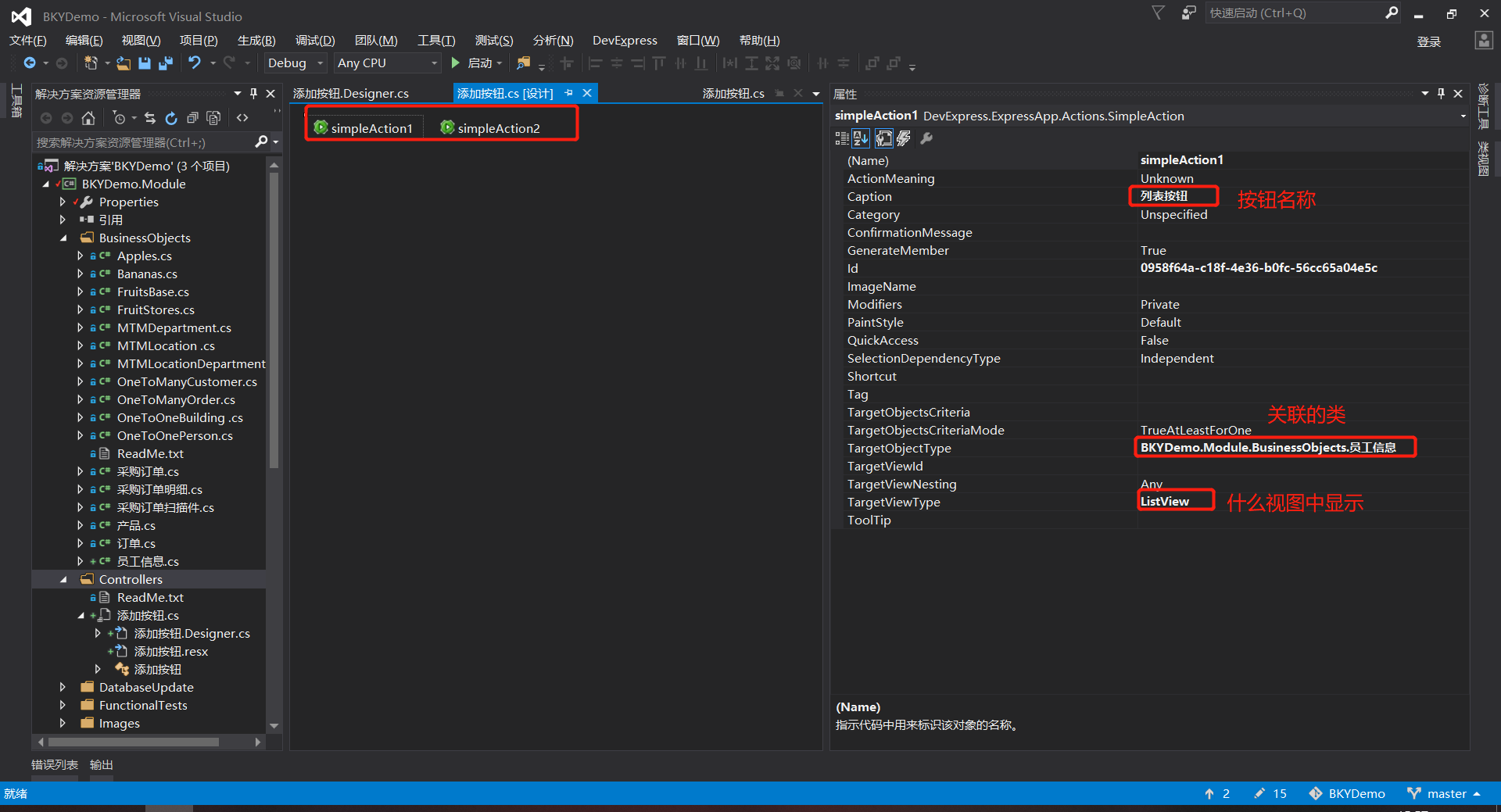
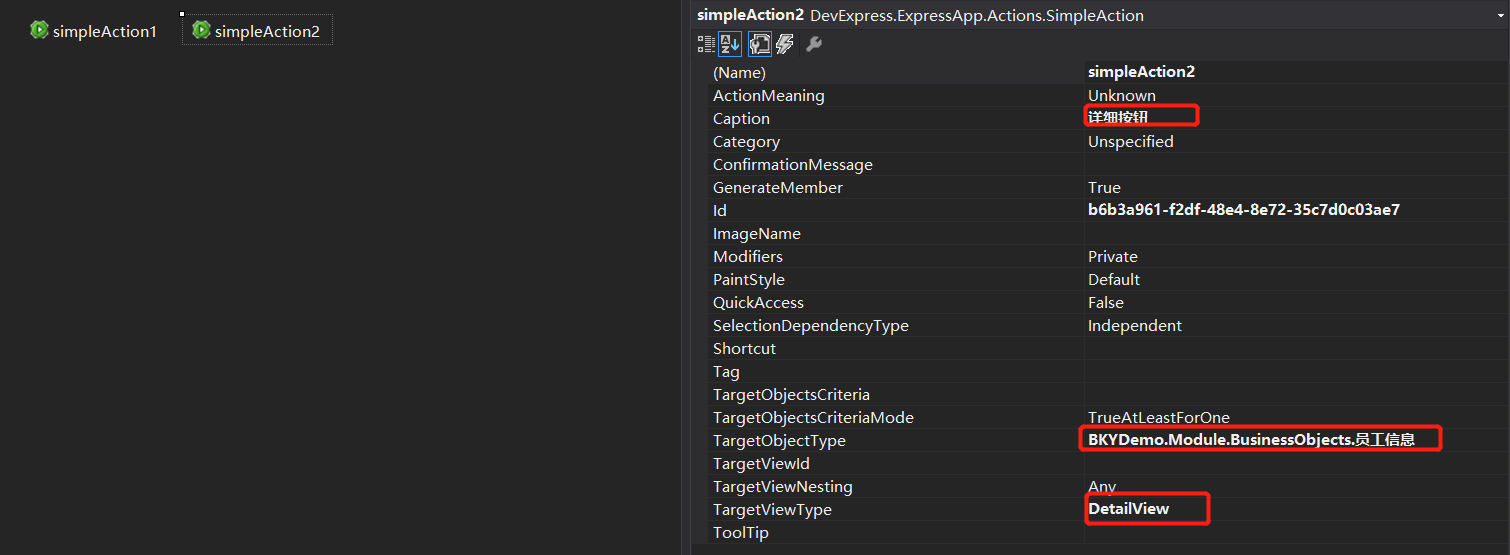
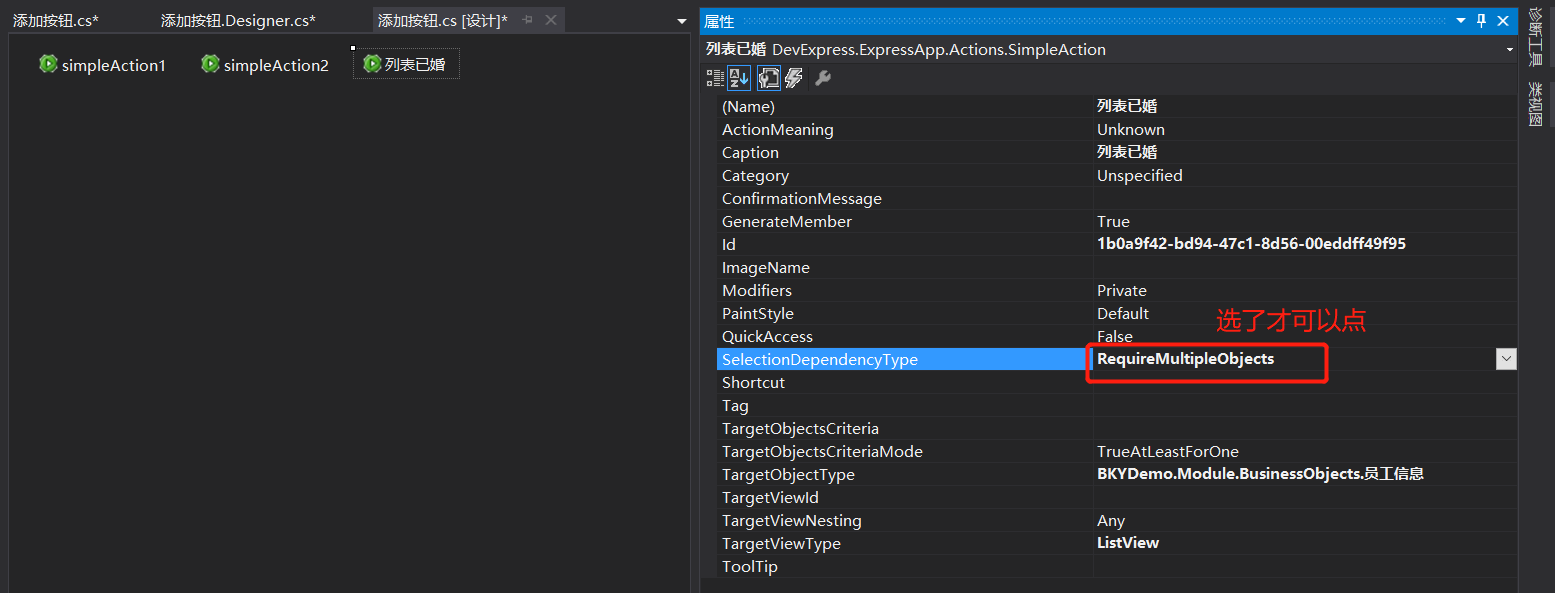
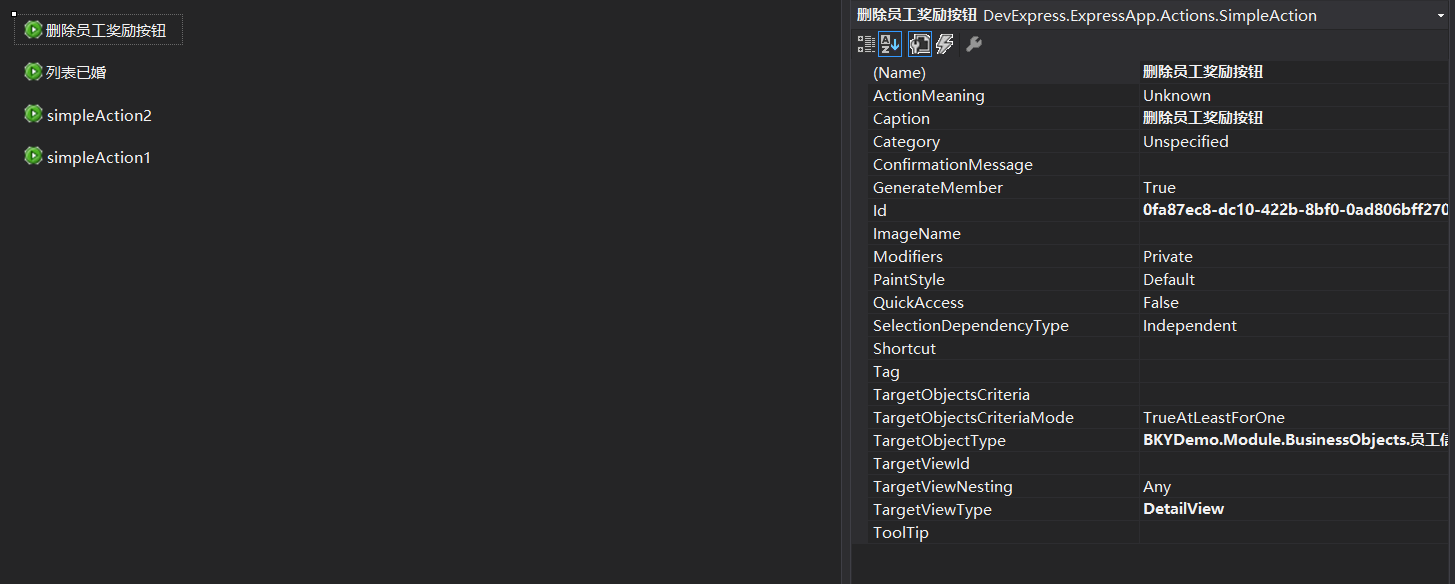
找到Controlers文件夹——添加View Controller类 —— 在工具箱中拖simpleAction如下图
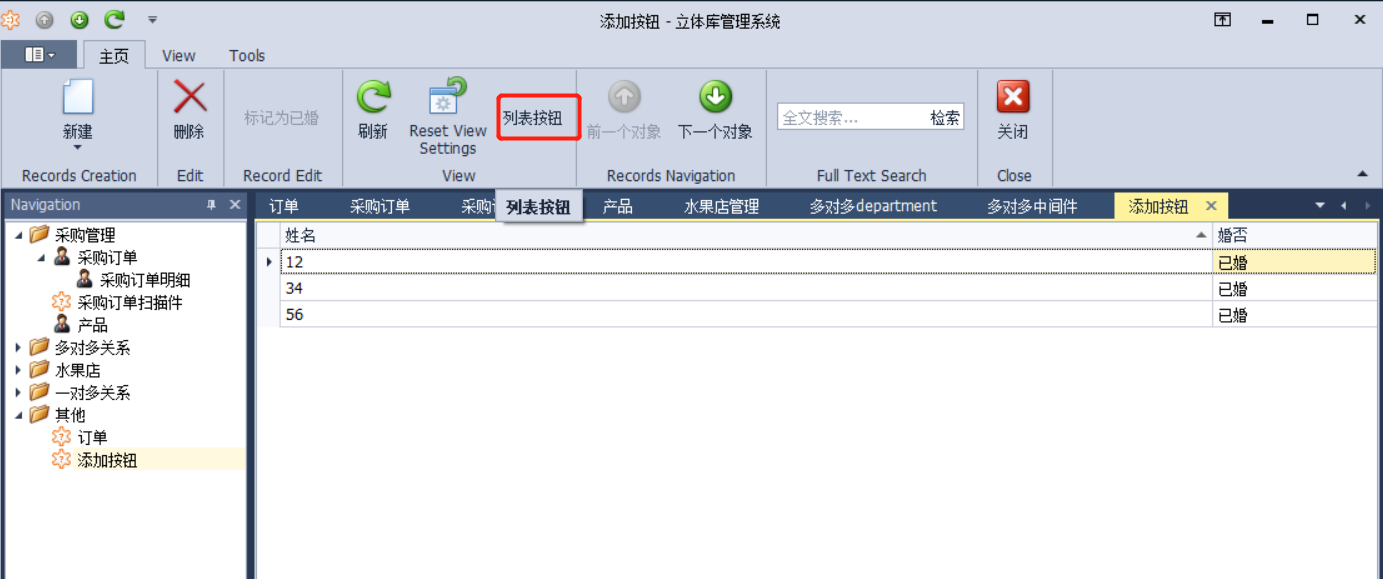
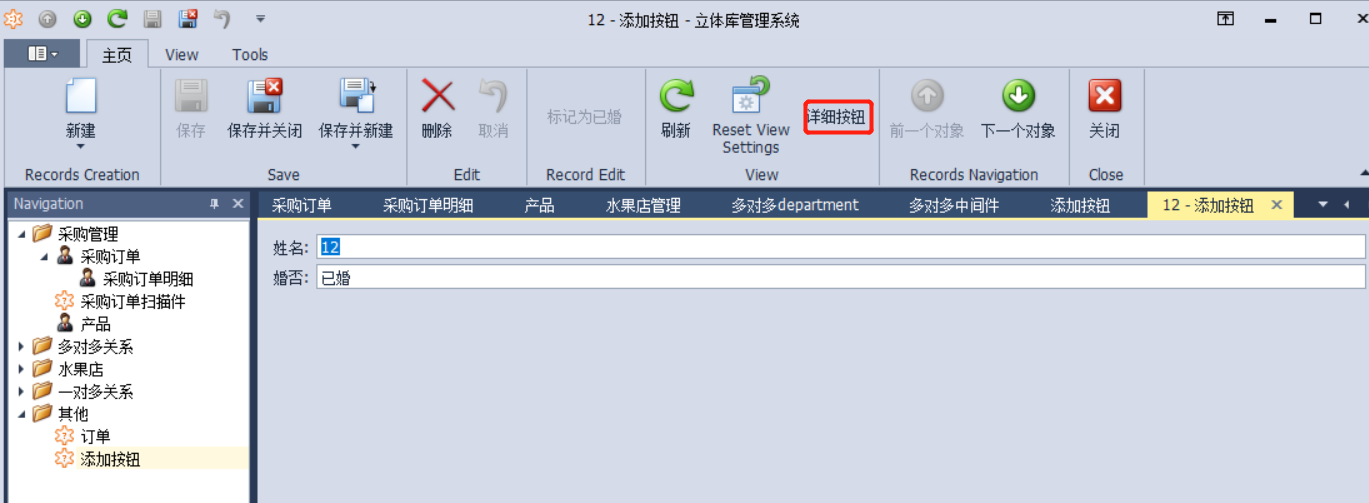
结果:
3.为空或者是未婚的时候才可以点
using System;
using System.Collections.Generic;
using System.Linq;
using System.Text;
using DevExpress.Data.Filtering;
using DevExpress.ExpressApp;
using DevExpress.ExpressApp.Actions;
using DevExpress.ExpressApp.Editors;
using DevExpress.ExpressApp.Layout;
using DevExpress.ExpressApp.Model.NodeGenerators;
using DevExpress.ExpressApp.SystemModule;
using DevExpress.ExpressApp.Templates;
using DevExpress.ExpressApp.Utils;
using DevExpress.Persistent.Base;
using DevExpress.Persistent.Validation;
using BKYDemo.Module.BusinessObjects;

namespace BKYDemo.Module.Controllers
{
    // For more typical usage scenarios, be sure to check out https://documentation.devexpress.com/eXpressAppFramework/clsDevExpressExpressAppViewControllertopic.aspx.
    public partial class 添加按钮 : ViewController
    {
        public 添加按钮()
        {
            InitializeComponent();
            // Target required Views (via the TargetXXX properties) and create their Actions.
        }
        protected override void OnActivated()
        {
            View.SelectionChanged += new EventHandler(View_SelectionChanged);
            base.OnActivated();
            // Perform various tasks depending on the target View.
        }
        protected override void OnViewControlsCreated()
        {
            base.OnViewControlsCreated();
            // Access and customize the target View control.
        }
        protected override void OnDeactivated()
        {
            // Unsubscribe from previously subscribed events and release other references and resources.
            base.OnDeactivated();
            View.SelectionChanged -= new EventHandler(View_SelectionChanged);
        }
        //判断按钮让不让点
        void View_SelectionChanged(object sender, EventArgs e)
        {
            bool unKnow = true;

            for (int i = 0; i < View.SelectedObjects.Count; i++)
            {
                员工信息 owl = View.SelectedObjects[i] as 员工信息;
                if (owl != null)
                {
                    if (owl.婚否 == "已婚")
                    {
                        unKnow = false;
                        break;
                    }
                }

            }
            列表已婚.Enabled.SetItemValue("ObjectsCriteris",unKnow);

        }

        //写点击的逻辑
        private void 列表已婚_Execute(object sender, SimpleActionExecuteEventArgs e)
        {
            IObjectSpace os = View.ObjectSpace;
            var personInfor = View.SelectedObjects;
            foreach (员工信息 yg in personInfor)
            {
                yg.婚否 = "已婚";
            }
            os.CommitChanges();
        }
    }
}
4.所有代码
4.1 员工信息.cs
using System;
using System.Linq;
using System.Text;
using DevExpress.Xpo;
using DevExpress.ExpressApp;
using System.ComponentModel;
using DevExpress.ExpressApp.DC;
using DevExpress.Data.Filtering;
using DevExpress.Persistent.Base;
using System.Collections.Generic;
using DevExpress.ExpressApp.Model;
using DevExpress.Persistent.BaseImpl;
using DevExpress.Persistent.Validation;

namespace BKYDemo.Module.BusinessObjects
{
    [DefaultClassOptions]
    //[ImageName("BO_Contact")]
    [XafDisplayName("添加按钮")]
    [DefaultProperty("姓名")]
    //[DefaultListViewOptions(MasterDetailMode.ListViewOnly, false, NewItemRowPosition.None)]
    //[Persistent("DatabaseTableName")]
    // Specify more UI options using a declarative approach (https://documentation.devexpress.com/#eXpressAppFramework/CustomDocument112701).
    public class 员工信息 : BaseObject
    { // Inherit from a different class to provide a custom primary key, concurrency and deletion behavior, etc. (https://documentation.devexpress.com/eXpressAppFramework/CustomDocument113146.aspx).
        public 员工信息(Session session)
            : base(session)
        {
        }
        public override void AfterConstruction()
        {
            base.AfterConstruction();
            // Place your initialization code here (https://documentation.devexpress.com/eXpressAppFramework/CustomDocument112834.aspx).
        }

        //添加按钮 (在类上写)
        // 添加为空的时候才可以点击 TargetObjectsCriteria = "IsNullOrEmpty([婚否])"
        //添加一次只能选择一行  SelectionDependencyType = MethodActionSelectionDependencyType.RequireSingleObject
        [Action(Caption = "标记为已婚", AutoCommit = true, ConfirmationMessage = "是否确认?", TargetObjectsCriteria = "IsNullOrEmpty([婚否])",SelectionDependencyType = MethodActionSelectionDependencyType.RequireSingleObject)]
        public void 查询客户明细() {
            婚否 = "已婚";
            IObjectSpace os = DevExpress.ExpressApp.Xpo.XPObjectSpace.FindObjectSpaceByObject(this);
            os.CommitChanges();
        }

        //删除奖励记录
        //添加一次只能选择一行  SelectionDependencyType = MethodActionSelectionDependencyType.RequireSingleObject
        [Action(Caption = "删除奖励记录")]
        public void 删除奖励记录()
        {
            Session.Delete(员工奖励记录);
            IObjectSpace os = DevExpress.ExpressApp.Xpo.XPObjectSpace.FindObjectSpaceByObject(this);
            os.CommitChanges();
        }


        private string _姓名;
        public string 姓名
        {
            get { return _姓名; }
            set { SetPropertyValue("姓名", ref _姓名, value); }
        }

        private string _婚否;
        public string 婚否
        {
            get { return _婚否; }
            set { SetPropertyValue("婚否", ref _婚否, value); }
        }

        //聚集
        [DevExpress.Xpo.Aggregated]
        [Association("员工信息—员工奖励记录")]
        public XPCollection<员工奖励记录> 员工奖励记录
        {
            get
            {
                return GetCollection<员工奖励记录>("员工奖励记录");
            }
        }

    }
}
4.2 员工奖励记录.cs
using System;
using System.Linq;
using System.Text;
using DevExpress.Xpo;
using DevExpress.ExpressApp;
using System.ComponentModel;
using DevExpress.ExpressApp.DC;
using DevExpress.Data.Filtering;
using DevExpress.Persistent.Base;
using System.Collections.Generic;
using DevExpress.ExpressApp.Model;
using DevExpress.Persistent.BaseImpl;
using DevExpress.Persistent.Validation;

namespace BKYDemo.Module.BusinessObjects
{
    [DefaultClassOptions]
    //[ImageName("BO_Contact")]
    //[DefaultProperty("DisplayMemberNameForLookupEditorsOfThisType")]
    //[DefaultListViewOptions(MasterDetailMode.ListViewOnly, false, NewItemRowPosition.None)]
    //[Persistent("DatabaseTableName")]
    // Specify more UI options using a declarative approach (https://documentation.devexpress.com/#eXpressAppFramework/CustomDocument112701).
    public class 员工奖励记录 : BaseObject
    { // Inherit from a different class to provide a custom primary key, concurrency and deletion behavior, etc. (https://documentation.devexpress.com/eXpressAppFramework/CustomDocument113146.aspx).
        public 员工奖励记录(Session session)
            : base(session)
        {
        }
        public override void AfterConstruction()
        {
            base.AfterConstruction();
            // Place your initialization code here (https://documentation.devexpress.com/eXpressAppFramework/CustomDocument112834.aspx).
        }

        private 员工信息 _员工信息;
        [Association("员工信息—员工奖励记录")]
        public 员工信息 员工信息
        {
            get { return _员工信息; }
            set { SetPropertyValue("员工信息", ref _员工信息, value); }
        }

        private DateTime _奖励日期;
        public DateTime 奖励日期
        {
            get { return _奖励日期; }
            set { SetPropertyValue("奖励日期", ref _奖励日期, value); }
        }

        private string _奖励形式;
        public string 奖励形式
        {
            get { return _奖励形式; }
            set { SetPropertyValue("奖励形式", ref _奖励形式, value); }
        }

        private decimal _奖励金额;
        public decimal 奖励金额
        {
            get { return _奖励金额; }
            set { SetPropertyValue("奖励金额", ref _奖励金额, value); }
        }

    }
}
4.3 控制类
using System;
using System.Collections.Generic;
using System.Linq;
using System.Text;
using DevExpress.Data.Filtering;
using DevExpress.ExpressApp;
using DevExpress.ExpressApp.Actions;
using DevExpress.ExpressApp.Editors;
using DevExpress.ExpressApp.Layout;
using DevExpress.ExpressApp.Model.NodeGenerators;
using DevExpress.ExpressApp.SystemModule;
using DevExpress.ExpressApp.Templates;
using DevExpress.ExpressApp.Utils;
using DevExpress.Persistent.Base;
using DevExpress.Persistent.Validation;
using BKYDemo.Module.BusinessObjects;

namespace BKYDemo.Module.Controllers
{
    // For more typical usage scenarios, be sure to check out https://documentation.devexpress.com/eXpressAppFramework/clsDevExpressExpressAppViewControllertopic.aspx.
    public partial class 添加按钮 : ViewController
    {
        public 添加按钮()
        {
            InitializeComponent();
            // Target required Views (via the TargetXXX properties) and create their Actions.
        }
        protected override void OnActivated()
        {
            View.SelectionChanged += new EventHandler(View_SelectionChanged);
            base.OnActivated();
            // Perform various tasks depending on the target View.
        }
        protected override void OnViewControlsCreated()
        {
            base.OnViewControlsCreated();
            // Access and customize the target View control.
        }
        protected override void OnDeactivated()
        {
            // Unsubscribe from previously subscribed events and release other references and resources.
            base.OnDeactivated();
            View.SelectionChanged -= new EventHandler(View_SelectionChanged);
        }
        //判断按钮让不让点
        void View_SelectionChanged(object sender, EventArgs e)
        {
            bool unKnow = true;

            for (int i = 0; i < View.SelectedObjects.Count; i++)
            {
                员工信息 owl = View.SelectedObjects[i] as 员工信息;
                if (owl != null)
                {
                    if (owl.婚否 == "已婚")
                    {
                        unKnow = false;
                        break;
                    }
                }

            }
            列表已婚.Enabled.SetItemValue("ObjectsCriteris",unKnow);

        }

        //写点击的逻辑
        private void 列表已婚_Execute(object sender, SimpleActionExecuteEventArgs e)
        {
            IObjectSpace os = View.ObjectSpace;
            var personInfor = View.SelectedObjects;
            foreach (员工信息 yg in personInfor)
            {
                yg.婚否 = "已婚";
            }
            os.CommitChanges();
        }

        private void 删除员工奖励按钮_Execute(object sender, SimpleActionExecuteEventArgs e)
        {
            员工信息 yg = View.CurrentObject as 员工信息;
            yg.Session.Delete(yg.员工奖励记录);
            View.ObjectSpace.CommitChanges();
        }
    }
}

 浙公网安备 33010602011771号