python3开发环境安装
1.在linux上使用rpm/yum方式安装
2.在linux上使用源码编译安装
安装python3.6
#yum install wget
#yum install zlib-devel bzip2-devel openssl-devel ncurses-devel sqlite-devel readline-devel tk-devel

#cd /usr/local/src
#wget https://www.python.org/ftp/python/3.6.0/Python-3.6.0.tgz
#tar -zxf /usr/local/src/Python-3.6.0.tgz && cd Python-3.6.0

#mkdir /usr/local/python3
# ./configure --prefix=/usr/local/python3.6 --enable-optimizations
make && make altinstall
For example, if you want to install Python 2.7, 3.6, and 3.7 with 3.7 being the
primary version, you would execute ``make install`` in your 3.7 build directory
and ``make altinstall`` in the others.
编译安装python3.7.7 有报错???
Python build finished successfully!
The necessary bits to build these optional modules were not found:
_lzma                 _ssl                  _uuid
To find the necessary bits, look in setup.py in detect_modules() for the module's name.


The following modules found by detect_modules() in setup.py, have been
built by the Makefile instead, as configured by the Setup files:
_abc                  atexit                pwd
time


Failed to build these modules:
_ctypes               _xxtestfuzz


Could not build the ssl module!
Python requires an OpenSSL 1.0.2 or 1.1 compatible libssl with X509_VERIFY_PARAM_set1_host().
LibreSSL 2.6.4 and earlier do not provide the necessary APIs, https://github.com/libressl-portable/portable/issues/381

running build_scripts
copying and adjusting /root/zlz/Python-3.7.7/Tools/scripts/pydoc3 -> build/scripts-3.7
copying and adjusting /root/zlz/Python-3.7.7/Tools/scripts/idle3 -> build/scripts-3.7
copying and adjusting /root/zlz/Python-3.7.7/Tools/scripts/2to3 -> build/scripts-3.7
copying and adjusting /root/zlz/Python-3.7.7/Tools/scripts/pyvenv -> build/scripts-3.7
changing mode of build/scripts-3.7/pydoc3 from 644 to 755
changing mode of build/scripts-3.7/idle3 from 644 to 755
changing mode of build/scripts-3.7/2to3 from 644 to 755
changing mode of build/scripts-3.7/pyvenv from 644 to 755
renaming build/scripts-3.7/pydoc3 to build/scripts-3.7/pydoc3.7
renaming build/scripts-3.7/idle3 to build/scripts-3.7/idle3.7
renaming build/scripts-3.7/2to3 to build/scripts-3.7/2to3-3.7
renaming build/scripts-3.7/pyvenv to build/scripts-3.7/pyvenv-3.7
gcc -pthread -c -Wno-unused-result -Wsign-compare -DNDEBUG -g -fwrapv -O3 -Wall    -std=c99 -Wextra -Wno-unused-result -Wno-unused-parameter -Wno-missing-field-initializers -Werror=implicit-function-declaration -fprofile-use -fprofile-correction  -I. -I./Include    -DPy_BUILD_CORE -o Programs/_testembed.o ./Programs/_testembed.c
gcc -pthread     -Xlinker -export-dynamic -o Programs/_testembed Programs/_testembed.o libpython3.7m.a -lcrypt -lpthread -ldl  -lutil   -lm
make[1]: Leaving directory `/root/zlz/Python-3.7.7'
[root@station75 Python-3.7.7]#
编译安装好
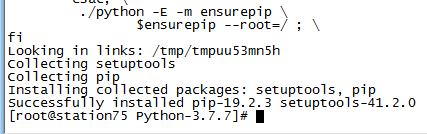
# 关键一步,建立链接
#ln -s /usr/local/python3/bin/python3.6 /usr/bin/python3          # 可直接使用 "python3"
#ln -s /usr/local/python3/bin/pip3.6  /usr/bin/pip3               # 可直接使用 "pip3"

# 最后测试下
#python3
#pip3
安装ipython模块,提供tab键补全功能
# ln -sv  /usr/local/python3.6/bin/pip3 /usr/bin/
# pip3 install traitlets pygments pexpect pickleshare prompt_toolkit simplegeneric
# /usr/local/python3.6/bin/python3.6 setup.py  build
# /usr/local/python3.6/bin/python3.6 setup.py  install
#ln  -sv  /usr/local/python3.6/bin/python3.6  /usr/bin/python36
#ln  -sv  /usr/local/python3.6/bin/ipython    /usr/bin
3.在aix上通过二进制方式安装
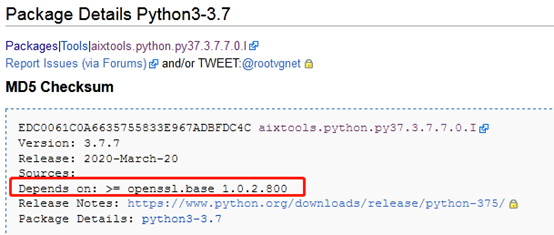
AIX binary packages for Python3 and Python2 are provided by AIXTOOLS for no-charge. The packages are supplied in installp format (not RPM format). There are no pre-requisites other than a recent version of openssl.base.
python在aix平台上的安装包是以installp方式提供的,除了对系统的openssl版本要求新一点以为,没有其的依赖关系.
下载地址
See the AIXTOOLS wiki for additional details.
The download page for Python 3 is at http://www.aixtools.net/index.php/python3 and the download page for Python 2 is at http://www.aixtools.net/index.php/python2
安装命令
# installp -d aixtools.python3.3.6.5.0.64bit.I -a all

 浙公网安备 33010602011771号