CXF 简介
SOA实现方式之一:使用Apache CXF 框架
一、服务端
1、配置xml
you simply need to provide the class name and an address
<?xml version="1.0" encoding="UTF-8"?>
<beans xmlns="http://www.springframework.org/schema/beans"
	xmlns:xsi="http://www.w3.org/2001/XMLSchema-instance"
	xmlns:jaxws="http://cxf.apache.org/jaxws"
	xsi:schemaLocation="
 http://www.springframework.org/schema/beans
 http://www.springframework.org/schema/beans/spring-beans.xsd
 http://cxf.apache.org/jaxws http://cxf.apache.org/schemas/jaxws.xsd">

	<jaxws:endpoint id="yuen" implementor="#GreetingServiceImpl"  address="/helloworld" />
</beans>
几点说明:
address:The service publish address 对应:<soap:address location="http://localhost:8080/CXFWS/webservice/helloworld"/>
implementor:The implementor of jaxws endpoint. You can specify the implementor class name here, or just the ref bean name in the format of "#REF_BEAN_NAME"
2、配置实现类
如果没有实现,则也会生成wsdl,但也是没有实现。建议采用面向接口编程,服务通过接口暴露,我们一使用 接口+实现方式部署,当然也可以没有接口,但是定义接口更符合服务开发范式。
@WebService( targetNamespace="ws.test.gary.com")
public interface GreetingService {
   public String greeting(String userName);
}
targetNamespace是命名空间,将来会是客户端默认包结构。接口必须给接口加上@WebService ,否则会报 Service endpoint interface does not have a @WebService annotation.
实现:必须有 endpointInterface 声明
@Service("GreetingServiceImpl")
@WebService(serviceName = "hello",portName="GreetingServicePort", endpointInterface = "com.gary.test.ws.service.GreetingService", targetNamespace = "ws.test.gary.com")
public class GreetingServiceImpl implements GreetingService {

	public String greeting(String userName) {
		return "Hello " + userName + ", currentTime is "
				+ Calendar.getInstance().getTime();
	}

	public GreetingServiceImpl() {
		super();
	}
}
serviceName,portName对应 :

endpointInterface 对应:
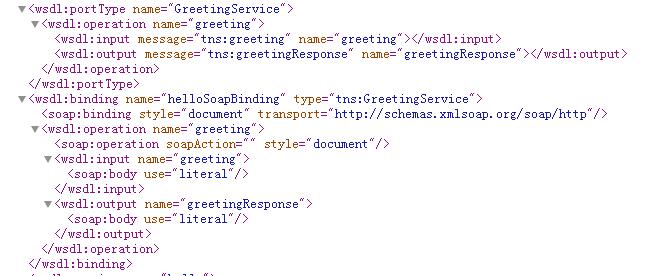
最后生成的WSDL为:


<wsdl:definitions xmlns:xsd="http://www.w3.org/2001/XMLSchema" xmlns:wsdl="http://schemas.xmlsoap.org/wsdl/" xmlns:tns="ws.test.gary.com" xmlns:soap="http://schemas.xmlsoap.org/wsdl/soap/" xmlns:ns1="http://schemas.xmlsoap.org/soap/http" name="hello" targetNamespace="ws.test.gary.com">
<wsdl:types>
<xs:schema xmlns:xs="http://www.w3.org/2001/XMLSchema" xmlns:tns="ws.test.gary.com" elementFormDefault="unqualified" targetNamespace="ws.test.gary.com" version="1.0">
<xs:element name="greeting" type="tns:greeting"/>
<xs:element name="greetingResponse" type="tns:greetingResponse"/>
<xs:complexType name="greeting">
<xs:sequence>
<xs:element minOccurs="0" name="arg0" type="xs:string"/>
</xs:sequence>
</xs:complexType>
<xs:complexType name="greetingResponse">
<xs:sequence>
<xs:element minOccurs="0" name="return" type="xs:string"/>
</xs:sequence>
</xs:complexType>
</xs:schema>
</wsdl:types>
<wsdl:message name="greeting">
<wsdl:part element="tns:greeting" name="parameters"></wsdl:part>
</wsdl:message>
<wsdl:message name="greetingResponse">
<wsdl:part element="tns:greetingResponse" name="parameters"></wsdl:part>
</wsdl:message>
<wsdl:portType name="GreetingService">
<wsdl:operation name="greeting">
<wsdl:input message="tns:greeting" name="greeting"></wsdl:input>
<wsdl:output message="tns:greetingResponse" name="greetingResponse"></wsdl:output>
</wsdl:operation>
</wsdl:portType>
<wsdl:binding name="helloSoapBinding" type="tns:GreetingService">
<soap:binding style="document" transport="http://schemas.xmlsoap.org/soap/http"/>
<wsdl:operation name="greeting">
<soap:operation soapAction="" style="document"/>
<wsdl:input name="greeting">
<soap:body use="literal"/>
</wsdl:input>
<wsdl:output name="greetingResponse">
<soap:body use="literal"/>
</wsdl:output>
</wsdl:operation>
</wsdl:binding>
<wsdl:service name="hello">
<wsdl:port binding="tns:helloSoapBinding" name="GreetingServicePort">
<soap:address location="http://localhost:8080/CXFWS/webservice/helloworld"/>
</wsdl:port>
</wsdl:service>
</wsdl:definitions>
注意:如果不配置serviceName,portName 则默认生成:服务名:类名+Service, 接口:类名+Port

二、CXF 客户端
生成代码:tns 命名空间的倒叙。
F:\Cxf\apache-cxf-3.0.4\bin>wsdl2java -d D:\temp\src -client http://localhost:8080/CXFWS/webservice/helloworld?wsdl
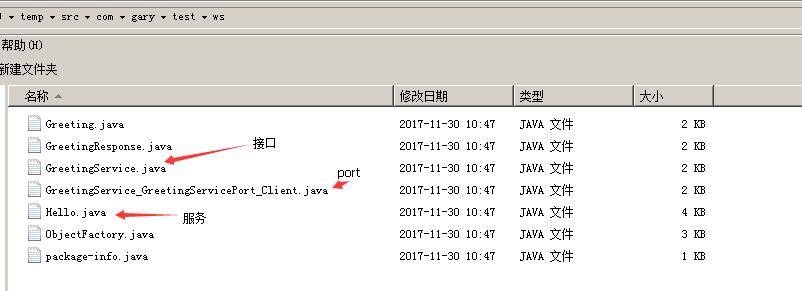
其中 GreetingService_GreetingServicePort_Client 便是CXF自动生成的测试类,稍作修改便可调用:
public class Test {
	private static final QName SERVICE_NAME = new QName("ws.test.gary.com",
			"hello");

	public static void main(String[] args) {
		URL wsdlURL = Hello.WSDL_LOCATION;
		Hello ss = new Hello(wsdlURL, SERVICE_NAME);
		GreetingService port = ss.getGreetingServicePort();
		{
			System.out.println("Invoking greeting...");
			String res = port.greeting("Bob");
			System.out.println("greeting.result=" + res);
		}
	}
}
三、wsimport 客户端
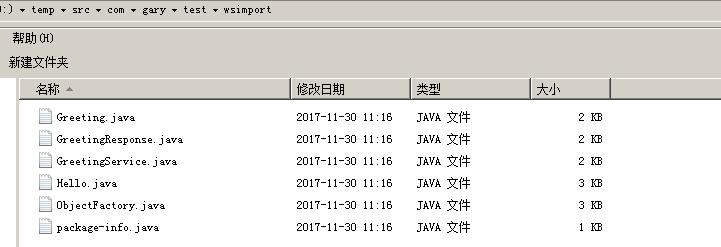
JDK自带工具生成代码:可以指定包结构,命令为:
wsimport -s D:\temp\src -p com.aisino.dz.sbsj.webservice -keep http://localhost:8080/CXFWS/webservice/helloworld?wsdl
生成的代码结构:
调用方式:
public class Test {
	public static void main(String[] args) {
		 //创建要访问的服务的对象
		Hello service = new Hello();
        //通过getXxxPort方法获得代理类
        GreetingService port = service.getGreetingServicePort();
        //调用方法
        String res = port.greeting("Andy");
        System.out.println(res);
	}
}
附注:http://cxf.apache.org/docs/jax-ws-configuration.html
posted on 2017-11-30 11:20 TrustNature 阅读(181) 评论(0) 收藏 举报

 浙公网安备 33010602011771号