
733. 图像渲染(floodFill)
有一幅以 m x n 的二维整数数组表示的图画 image ,其中 image[i][j] 表示该图画的像素值大小。
你也被给予三个整数 sr , sc 和 newColor 。你应该从像素 image[sr][sc] 开始对图像进行 上色填充 。
为了完成 上色工作 ,从初始像素开始,记录初始坐标的 上下左右四个方向上 像素值与初始坐标相同的相连像素点,接着再记录这四个方向上符合条件的像素点与他们对应 四个方向上 像素值与初始坐标相同的相连像素点,……,重复该过程。将所有有记录的像素点的颜色值改为 newColor 。
最后返回 经过上色渲染后的图像 。
示例 1:
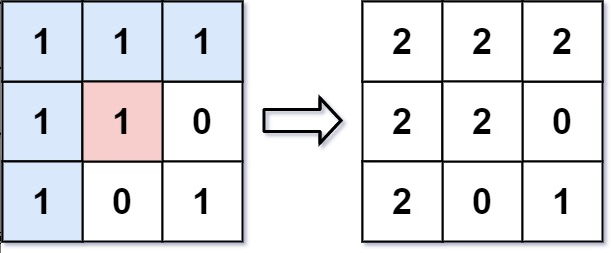
输入: image = [[1,1,1],[1,1,0],[1,0,1]],sr = 1, sc = 1, newColor = 2
输出: [[2,2,2],[2,2,0],[2,0,1]]
解析: 在图像的正中间,(坐标(sr,sc)=(1,1)),在路径上所有符合条件的像素点的颜色都被更改成2。
注意,右下角的像素没有更改为2,因为它不是在上下左右四个方向上与初始点相连的像素点。
示例 2:
输入: image = [[0,0,0],[0,0,0]], sr = 0, sc = 0, newColor = 2
输出: [[2,2,2],[2,2,2]]
来源:力扣(LeetCode)
链接:https://leetcode.cn/problems/flood-fill
著作权归领扣网络所有。商业转载请联系官方授权,非商业转载请注明出处。
题解:
执行用时:40 ms, 在所有 Python 提交中击败了8.01% 的用户
内存消耗:12.9 MB, 在所有 Python 提交中击败了98.56% 的用户
通过测试用例:277 / 277
查看代码
class Solution(object):
    maxX = 0
    maxY = 0
    val = 0
    arr = None

    def floodFill(self, image, sr, sc, color):
        """
        :type image: List[List[int]]
        :type sr: int
        :type sc: int
        :type color: int
        :rtype: List[List[int]]
        """
        self.maxY = len(image[0]) - 1
        self.maxX = len(image) - 1
        self.val = image[sr][sc]
        self.arr = [[0]*len(image[0]) for _ in range(len(image))]
        self.change(image, sr, sc, color)
        return image

    def change(self, image, x, y, color):
        if x<0 or y<0 or x>self.maxX or y>self.maxY or image[x][y] != self.val or 1 == self.arr[x][y]:
            return
        image[x][y] = color
        self.arr[x][y] = 1
        self.change(image, x-1,y,color)
        self.change(image, x+1,y,color)
        self.change(image, x,y-1,color)
self.change(image, x,y+1,color)本文来自博客园,作者:tros,转载请注明原文链接:https://www.cnblogs.com/tros/p/16453051.html

 浙公网安备 33010602011771号