
Claude Code 必备神器:oh-my-claudecode 及其 Team Mode 实践
oh-my-claudecode 快速入门
仓库地址:https://github.com/Yeachan-Heo/oh-my-claudecode/
官方手册:https://yeachan-heo.github.io/oh-my-claudecode-website/docs.html
WHY OMC
- 零配置——开箱即用,智能默认设置即可使用
- 团队优先编排——团队是规范的多智能体表面(群组/超飞行员是兼容性的表象)
- 自然语言界面——无需记忆命令,只需描述你想要的内容
- 自动并行化——复杂任务分布在专业代理之间
- 持久执行——直到任务被验证为完成才会放弃
- 成本优化——智能模型路由可节省30-50%的代币
- 从经验中学习——自动提取并重复使用解决问题的模式
- 实时可视化——HUD状态显示引擎盖下的动态


安装/设置/更新omc方法
关于设置的详情,请参考:官方指引
步骤1:安装
/plugin marketplace add https://github.com/Yeachan-Heo/oh-my-claudecode
/plugin install oh-my-claudecode
很不错,官方提供的卸载方法是:
curl -fsSL https://raw.githubusercontent.com/Yeachan-Heo/oh-my-claudecode/main/scripts/uninstall.sh | bash
Update omc
/plugin marketplace update omc
(备用)或这两个命令,手动升级:
在终端中(Claude Code 之外)执行:
方法 1: 直接运行安装脚本
curl -fsSL https://raw.githubusercontent.com/Yeachan-Heo/oh-my-claudecode/main/install.sh | bash
或方法 2: 使用 npx
npx github:Yeachan-Heo/oh-my-claudecode
步骤2:设置
配置一次要10-15分钟左右
/omc-setup
一定要先设置,再使用,如果你刚更新过,也要再设置一下,把版本对齐。

● OMC 设置完成!
  您不需要学习任何命令。我现在具有自动激活的智能行为。
  自动发生的事情:
  - 复杂任务 → 我会并行化并委托给专家
  - "计划这个" → 我开始规划访谈
  - "不要停止直到完成" → 我会持续工作直到验证完成
  - "停止"或"取消" → 我会智能地停止当前操作

  魔法关键词(可选的高级用户快捷方式):
  只需在您的请求中自然地包含这些词:
  ┌─────────┬────────────┬─────────────────────────────┐
  │ 关键词   │    效果    │            示例             │
  ├─────────┼────────────┼─────────────────────────────┤
  │ ralph   │ 持久模式    │ "ralph: 修复认证 bug"       │
  ├─────────┼────────────┼─────────────────────────────┤
  │ ralplan │ 迭代规划    │ "ralplan 这个功能"          │
  ├─────────┼────────────┼─────────────────────────────┤
  │ ulw     │ 最大并行度  │ "ulw 重构 API"              │
  ├─────────┼────────────┼─────────────────────────────┤
  │ plan    │ 规划访谈    │ "plan 新的端点"             │
  ├─────────┼────────────┼─────────────────────────────┤
  │ team    │ 协调代理    │ "/team 4:executor 修复错误" │
  └─────────┴────────────┴─────────────────────────────┘

  ralph 包含 ultrawork:当您激活 ralph 模式时,它会自动包含 ultrawork 的并行执行。无需组合关键词。
  TEAMS:
  生成具有共享任务列表和实时消息传递的协调代理:
  - /oh-my-claudecode:team 4:executor "修复所有 TypeScript 错误"
  - /oh-my-claudecode:team 2:executor 1:build-fixer 1:designer "重构前端"
  - Teams 使用 Claude Code 原生工具(TeamCreate/SendMessage/TaskCreate)

  MCP 服务器配置完成:
  - ✅ Context7 - 已配置(文档和代码上下文)
  - ✅ Exa Web Search - 已配置(增强的网络搜索)
  - ✅ Filesystem - 已存在(扩展文件系统访问)
  - ✅ GitHub - 已配置(GitHub API 集成)

  重启 Claude Code 以使 MCP 服务器生效
  HUD 状态栏:
  状态栏现在显示 OMC 状态。重启 Claude Code 即可看到。

  CLI 分析工具(已安装):
  - omc - 完整仪表板(统计 + 代理 + 成本)
  - omc stats - 查看 token 使用和成本
  - omc agents - 按成本查看代理细分
  - omc tui - 启动交互式 TUI 仪表板

  支持项目:
  如果您喜欢 oh-my-claudecode,请考虑为仓库加星:
  https://github.com/Yeachan-Heo/oh-my-claudecode
  就这样!正常使用 Claude Code 即可
What Configuration Enables

Configuration Precedence
If both configurations exist, project-scoped takes precedence over global:
./.claude/CLAUDE.md (project) → Overrides → ~/.claude/CLAUDE.md (global)
Environment Variables

When to Re-run Setup
First time: Run after installation (choose project or global)
After updates: Re-run to get the latest configuration
Different machines: Run on each machine where you use Claude Code
New projects: Run /oh-my-claudecode:omc-setup --local in each project that needs omc
NOTE: After updating the plugin (via npm update, git pull, or Claude Code's plugin update), you MUST re-run /oh-my-claudecode:omc-setup to apply the latest CLAUDE.md changes.
步骤3:更新
# 1. 更新 marketplace 克隆
/plugin marketplace update omc
# 2. 重新运行设置以刷新配置
/omc-setup

注意: 如果 marketplace 自动更新未启用,您需要在运行设置之前手动执行 /plugin marketplace update omc 来同步最新版本。
如果更新后遇到问题,清除旧的插件缓存:/omc-doctor
步骤4:开始写代码

# In Claude Code:

# Maximum parallelism
ultrawork implement user authentication with OAuth

# Token-efficient parallelism
eco fix all TypeScript errors

# Enhanced search
find all files that import the utils module

# Deep analysis
analyze why the tests are failing

# Autonomous execution
autopilot: build a todo app with React

# Parallel autonomous execution (use team instead of deprecated ultrapilot)
team 3:deep-executor "build a fullstack todo app"

# Persistence mode
ralph: refactor the authentication module

# Planning session
plan this feature

# TDD workflow
tdd: implement password validation

# Coordinated team agents
team 5:executor fix all lint errors
就这样。其他一切都是自动的。
Team Mode (推荐)
从 v4.1.7 开始,Team 成为 OMC 中的规范编排表面。像 Swarm 和 Ultrapilot 这样的传统入口仍然被支持,但它们现在在底层路由到 Team。
/team 3:executor "fix all TypeScript errors"
Team 按阶段化流水线运行:
team-plan → team-prd → team-exec → team-verify → team-fix (loop)
在 ~/.claude/settings.json 中启用 Claude Code 原生团队:
如果你运行过/omc-setup,那这个设置就不用手工设置了
{
  "env": {
    "CLAUDE_CODE_EXPERIMENTAL_AGENT_TEAMS": "1"
  }
}
如果团队被禁用,OMC 会发出警告并在可能的情况下回退到非 Team 执行模式。
tmux CLI 工作者 — Codex & Gemini (v4.4.0+)
v4.4.0 移除了 Codex/Gemini MCP 服务器(x、g 提供商)。请改用 /omc-teams 在 tmux 分屏中启动真实的 CLI 进程:
/omc-teams 2:codex   "review auth module for security issues"
/omc-teams 2:gemini  "redesign UI components for accessibility"
/omc-teams 1:claude  "implement the payment flow"
如需在一个命令中混合使用 Codex + Gemini,请使用 /ccg 技能:
/ccg Review this PR — architecture (Codex) and UI components (Gemini)
技能 工作者 最适合
/omc-teams N:codex 	N 个 Codex CLI 窗格 	代码审查、安全分析、架构
/omc-teams N:gemini 	N 个 Gemini CLI 窗格 	UI/UX 设计、文档、大上下文任务
/omc-teams N:claude 	N 个 Claude CLI 窗格 	通过 tmux 中的 Claude CLI 处理通用任务
/ccg 	1 个 Codex + 1 个 Gemini 	并行三模型编排
工作者按需生成,任务完成后自动退出 — 无空闲资源浪费。需要安装 codex / gemini CLI 并有活跃的 tmux 会话。
注意:包命名 — 项目品牌名为 oh-my-claudecode(仓库、插件、命令),但 npm 包以 oh-my-claude-sisyphus 发布。通过 npm/bun 安装 CLI 工具时,请使用 npm install -g oh-my-claude-sisyphus。
常见问题
Ralph 循环停不下来 (已解决)
我提了ISSUE:https://github.com/Yeachan-Heo/oh-my-claudecode/issues/1299
PS:没想到6个小时官方就回复我并且解决了:
https://github.com/Yeachan-Heo/oh-my-claudecode/pull/1306
https://github.com/Yeachan-Heo/oh-my-claudecode/pull/1306/changes/a2aa7b03e4a97d39f4ca7e5f0ba30435356d9db9
然后,我自己更新了:

我用Claude Code时, CLI发现的问题是:


处理:我使用codex+gpt-5.3-codex来分析,使用以下prompt:
› 请协助检查claude code中的hooks配置,尤其是omc的配置,为什么会出现:● Ran 7 stop hooks (ctrl+o to expand)
⎿  Stop hook error: [RALPH LOOP - ITERATION 49/100] Work is NOT done. Continue working.
When FULLY complete (after Architect verification), run /oh-my-claudecode:cancel to cleanly exit ralph mode and clean up all state files. If
cancel fails, retry with /oh-my-claudecode:cancel --force.
简单来说就是由oh-my-claudecode发起的ralph loop停不下来,就算我用了命令/oh-my-claudecode:cancel它也没停。
Coding Plan和中转API (通过推荐链接买有折扣)
**
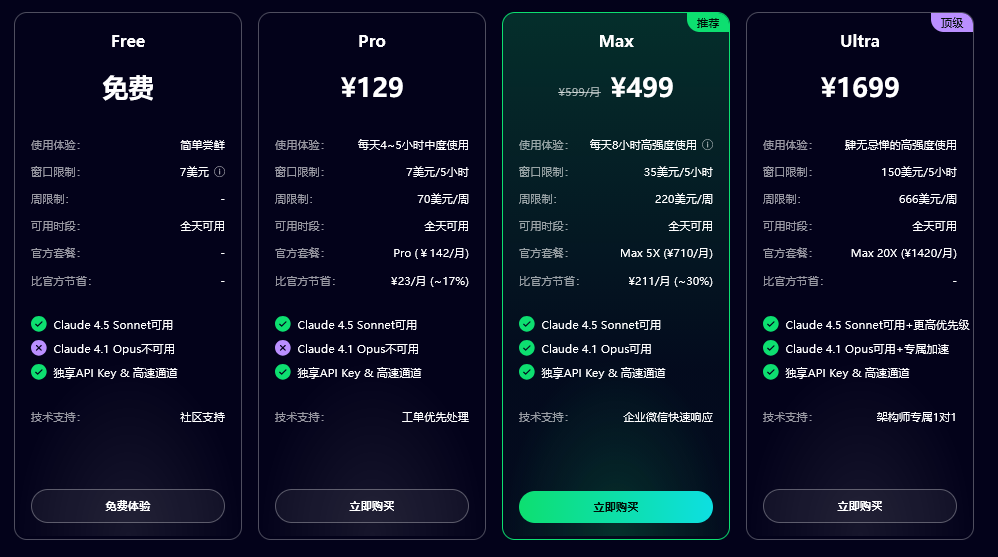
AI中转平台 -- 强烈推荐Claude Code (官方安装 + 中转API + 本地使用无飞机)
首选方法(最快最具性价比,还可以免费试用):claude-code club
注册和试用网址: https://academy.claude-code.club/ )
国内:智谱 GLM Coding
🚀 速来拼好模,智谱 GLM Coding 超值订阅,邀你一起薅羊毛!Claude Code、Cline 等 10+ 大编程工具无缝支持,“码力”全开,越拼越爽!立即开拼,享限时惊喜价!
链接:https://www.bigmodel.cn/

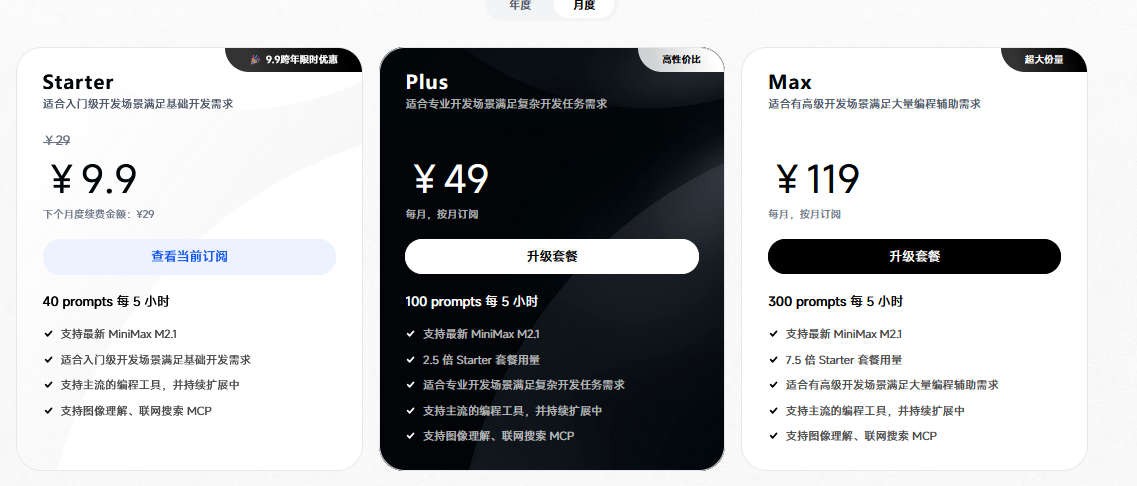
国内:MinMax2.1
🎁 MiniMax 跨年福利来袭!邀好友享 Coding Plan 双重好礼,助力开发体验!
好友立享 9折 专属优惠 + Builder 权益,你赢返利 + 社区特权!
👉 立即参与:https://www.minimaxi.com/

 浙公网安备 33010602011771号