
AI CLI / Plugins / Extension 应用从小白到大师
CLI 是 Command-Line Interface 的简称,也就是 命令行界面,通俗来讲就是用输入命令的方式与计算机交互。可能大部分人都看到命令行很头疼,感觉这些东西复杂又难记,不过其实还好啦,大部分选项参数设计的都蛮合理的,只要稍微理解它,你也可以成为 CLI 大师。
AI编程常用的CLI:
按我用过的顺序:
Claude Code
进入命令行界面,安装 Claude Code
npm install -g @anthropic-ai/claude-code
CC API Manager
ccma - Claude Code Manager -- (强烈推荐,一个它就够了)
https://zoeblow.github.io/ccma/
https://github.com/zoeblow/ccma
一个强大的 CLI 工具,用于管理多个 Claude Code 配置和 API 端点。轻松在不同的 Claude Code 环境之间切换!
npm version License: MIT Node.js
✨ 特性
🔧 多配置管理 - 存储和管理多个 Claude Code 配置
🚀 快速切换 - 一键切换不同的 API 端点和认证令牌
🌍 跨平台支持 - 支持 Windows、macOS 和 Linux
💡 简单易用 - 直观的命令行界面
🔒 安全存储 - 本地安全存储敏感配置信息
⚡ 即时生效 - 配置更改立即生效,无需重启
npm install -g ccma
完整命令参考
| 命令 | 描述 | 示例 |
|---|---|---|
| ccma add |
添加新配置 | ccma add prod https://api.anthropic.com sk-xxx claude-3-5-sonnet |
| ccma del |
删除配置 | ccma del old-config |
| ccma use [name] | 切换配置 | ccma use production |
| ccma list / ccma ls | 列出所有配置 | ccma ls |
| ccma current | 显示当前配置 | ccma current |
| ccma clear | 清除所有配置 | ccma clear |
| ccma --version / ccma -V | 显示版本 | ccma -V |
| ccma --help / ccma -h | 显示帮助 | ccma -h |
Claude Code API Manager
ccapi(全称为 Claude Code API Manager)是一款专门用于管理 Claude Code 相关 API 配置(如 Anthropic API 密钥、基础 URL、多环境切换)的命令行工具,能简化 API 密钥的存储、切换和验证流程。以下是完整的 安装步骤 和 核心使用方法,适配 Linux(含 WSL)、macOS 环境(Windows 需通过 WSL 或 Git Bash 运行):
一、前提条件
使用 ccapi 前需确保:
已安装 Node.js(v16+) 和 npm(v8+)(Claude Code 依赖 Node.js,通常已满足;可通过 node -v 和 npm -v 验证版本);
已安装 Claude Code(全局安装,即 npm install -g @anthropic-ai/claude-code,若未安装需先完成);
拥有 Anthropic API 密钥(格式为 sk-ant-xxx,需从 Anthropic 官网 申请)。
二、安装 ccapi
ccapi 目前主要通过 npm 全局安装 或 手动克隆仓库编译,推荐 npm 安装(简单高效):
方法 1:npm 全局安装(推荐)
打开终端(WSL 终端、Linux 终端或 macOS 终端),执行以下命令:
bash
# 全局安装 ccapi(依赖 npm,确保已安装 Node.js)
npm install -g @anthropic-ai/ccapi
cc-switch
https://github.com/farion1231/cc-switch
https://github.com/Linuxdazhao/cc_auto_switch # https://www.xmsumi.com/detail/1302
2个用于管理和切换 Claude Code 和 Codex 不同供应商配置的桌面应用
claude-code-router(还没搞清咋用)
https://github.com/musistudio/claude-code-router
claude-proxy
https://github.com/BenedictKing/claude-proxy
cccs - Claude Code Configuration Switcher
https://github.com/breakstring/cccs/
Task Manager
Spec Kit (Claude Code绝配)
https://github.com/github/spec-kit
Taskmaster AI - 通过AI任务管理来提升开发效率
https://gitcode.com/GitHub_Trending/cl/claude-task-master
claude-task-master
主页:https://www.task-master.dev/
github: https://github.com/eyaltoledano/claude-task-master
npm: https://www.npmjs.com/package/task-master-ai
Claude-Code-Multi-Agent
https://github.com/Prorise-cool/Claude-Code-Multi-Agent/
多层智能代理协调系统
- Context Engineering 驱动的新一代AI编程助手生态系统
- 基于Claude Code构建的智能代理协调平台,实现从需求到交付的全流程自动化开发
Vibe Kanban
https://github.com/BloopAI/vibe-kanban
https://www.vibekanban.com/
安装命令:npx vibe-kanban
Claude Code: npx -y @anthropic-ai/claude-code
https://www.vibekanban.com/docs/agents/claude-code
Coding Agent(如 Claude Code、Gemini CLI、Amp 等)在工程开发中的作用愈发重要。团队发现现在花在规划、审查、协调这些人类工作上的时间,已经超过了写代码本身。
Vibe Kanban https://github.com/BloopAI/vibe-kanban ,正是一款专注解决这类协作流程问题的新工具。它通过 Kanban 板界面,让你可以:
快速切换编码 Agent(Claude、Gemini、Amp 等);
并行或串行调用多个 Agent,自动执行任务;
以可视化方式查看 task 状态、代码审查、Dev Server 快速启动;
集中管理 Agent 的 MPC 配置,提升整体协作效率;
未来还能通过 MCP 服务器让 coding agent 自动创建 task ticket。
CC Extension
cclsp
CCManager
https://github.com/kbwo/ccmanager
Coding Agent Session Manager for Claude Code / Gemini CLI / Codex CLI / Cursor Agent / Copilot CLI
claude-squad
https://github.com/smtg-ai/claude-squad
CC UI 开发工具
Claudable
https://github.com/opactorai/Claudable
Claudable is an open-source web builder that leverages local CLI agents, such as Claude Code, Codex, Gemini CLI, Qwen Code, and Cursor Agent, to build and deploy products effortlessly.
Claudable 是一款功能强大的基于 Next.js 的 Web 应用程序构建器,它结合了 Claude Code(也支持 Cursor CLI)的高级 AI 代理功能与 Lovable 简单直观的应用程序构建体验。只需描述您的应用程序创意 - “我想要一个具有深色模式的任务管理应用程序” - 然后观看 Claudable 立即生成代码并向您展示工作应用程序的实时预览。您可以将您的应用程序部署到 Vercel 并免费将数据库与 Supabase 集成。
这个开源项目使您能够免费轻松构建和部署专业的 Web 应用程序。
script-server
https://github.com/bugy/script-server
Shadcn/ui (支持CC)
https://ui.shadcn.com/
A set of beautifully-designed, accessible components and a code distribution platform. Works with your favorite frameworks. Open Source. Open Code.
Quick Start
Select your MCP client and follow the instructions to configure the shadcn MCP server. If you'd like to do it manually, see the Configuration section.
Claude Code
pnpm dlx shadcn@latest mcp init --client claude
Restart Claude Code and try the following prompts:
- Show me all available components in the shadcn registry
- Add the button, dialog and card components to my project
- Create a contact form using components from the shadcn registry
Note: You can use /mcp command in Claude Code to debug the MCP server.

Tools for shadcn (7 tools)
│ ❯ 1. get_project_registries
│ 2. list_items_in_registries
│ 3. search_items_in_registries
│ 4. view_items_in_registries
│ 5. get_item_examples_from_registries
│ 6. get_add_command_for_items
│ ❯ 7. get_audit_checklist
Prisma
https://www.prisma.io/
https://github.com/prisma/prisma
Ship at lightning speed, and scale to a global audience effortlessly with our next-gen serverless Postgres database.
安装:npx prisma@latest init --db
安装MCP:npx -y mcp-remote https://mcp.prisma.io/mcp
CC安装MCP:claude mcp add prisma-local npx prisma mcp
图像生视频
https://github.com/comfyanonymous/ComfyUI
https://www.comfy.org/zh-cn/download
https://github.com/Tencent/HunyuanVideo-I2V
https://runwayml.com/
Claude Code 对话记录
记录 Claude Code 对话记录的库有多个,以下是一些常见的:
ClaudX
https://github.com/kunwar-shah/claudex/
Claudex - A friendly viewer, Browse and explore your Claude conversations.
claude-trace
项目地址:https://github.com/mariozechner/claude-trace
一条命令即可安装:
npm install -g @mariozechner/claude-trace
它可以记录与 Claude Code 的所有交互,包括系统提示、工具输出和原始 API 数据等。安装命令为npm install -g @mario zechner/claude - trace,可以使用claude - trace命令启动记录。
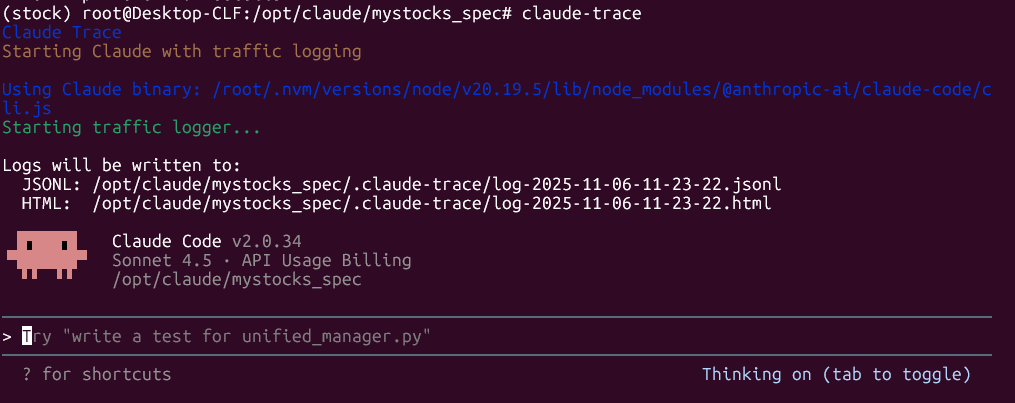
使用 claude-trace,你可以在生成的 HTML 页面中看到:
✅ Claude 的 system prompt(隐藏指令)
✅ 所有 API 请求与响应原始数据
✅ 工具定义与输出(如搜索/文件读取)
✅ Claude 的“思考过程”块
✅ Token 使用统计(含缓存命中情况)
✅ 可交互 HTML 视图 + 搜索索引
✅ JSONL 原始日志(保存在 .claude-trace/ 文件夹)
每次运行将生成自包含的 HTML 文件,无需服务器即可本地浏览,非常适合团队回顾、调试与归档。
通过 claude-trace --index 命令,你还能自动生成:
所有日志的 AI 总结标题和概要
带索引的 index.html 文件
可点击跳转的历史会话列表
cc trace
https://github.com/jimmc414/cctrace
它能够完整记录 Claude Code 交互过程中的每一个提示输入、LLM 输出和文件变化,还支持智能回放、数据分析等功能,使用本地 SQLite 存储,无需额外服务。
- Automatically detect your current session
- Export all conversation data
- Display a summary directly in Claude Code
Claude Historian
https://github.com/Vvkmnn/claude-historian
https://www.npmjs.com/package/claude-historian
这是一个用于存储和管理 Claude Code 对话历史的工具,它作为一个 MCP 服务器,提供了一个用户友好的 API 来访问过去的对话,方便用户查找特定的解决方案或代码片段。
Claude Conversation Logger MCP server
这是一个容器化的对话记录器,它将 Claude Code 会话数据捕获并存储在 MongoDB 中,并使用 Redis 进行缓存,还提供了一个可视化仪表板用于对话分析、令牌指标跟踪以及 API 访问,以进行调试和集成工作流程。
ccusage - Claude Code token usage
https://github.com/ryoppippi/ccusage
是由开源开发者 ryoppippi 创建的一款命令行工具,用于分析 Claude Code 本地生成的 JSONL 文件,通过可视化表格方式展示你的 token 使用情况及对应成本,帮助你更好地管理使用习惯和成本结构。
- 功能简洁:只需一行命令即可获得每日、每月、会话和账单区块(5 小时)级别的 token 使用及成本分布。
- 实时监控:支持 blocks --live 实时监控当前账单区块内的消耗速率和项目进度。
- 轻量高效:体积极小(npm 包 ~1 MB),无需依赖安装,适合快速分析。
CLI
iFlow (国产,心流)
https://platform.iflow.cn/cli/quickstart/index.html
OpenCode
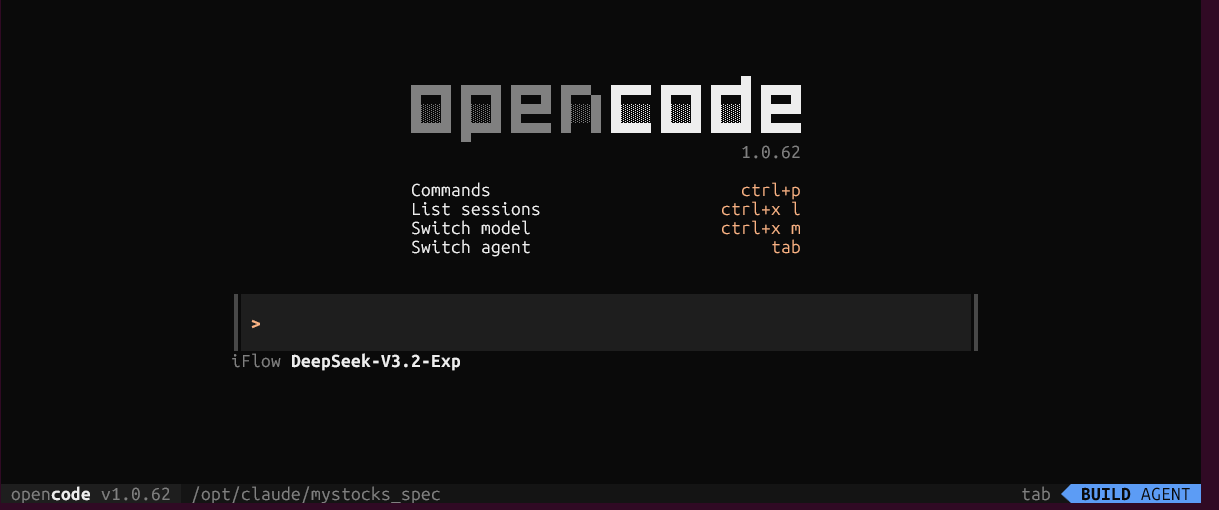
https://opencode.ai/
安装命令
curl -fsSL https://opencode.ai/install | bash
或
npm i -g opencode-ai
运行方式:
opencode  #正常运行
opencode auth login  #使用其它方式运行,这里可以选 Anthropic, 连接到Claude Code,  或者 iFlow,太强了
Google Gemini CLI
https://makersuite.google.com/app/apikey
GitHub Copilot CLI
https://github.com/features/copilot/cli/
简介:由 GitHub 推出,与 Copilot 插件同源,可在终端通过自然语言生成命令行指令、解释复杂命令,甚至生成代码片段。支持直接将自然语言转换为 Bash、PowerShell 等命令,适合开发者快速编写和理解终端命令。
CodeX
https://github.com/openai/codex
About: Lightweight coding agent that runs in your terminal
npm install -g @openai/codex
Junie
https://www.jetbrains.com/junie/

Lobe-chat
https://lobehub.com/zh
https://github.com/lobehub/lobe-chat/
Lobe Chat - an open-source, modern design AI chat framework. Supports multiple AI providers (OpenAI / Claude 4 / Gemini / DeepSeek / Ollama / Qwen), Knowledge Base (file upload / RAG ), one click install MCP Marketplace and Artifacts / Thinking. One-click FREE deployment of your private AI Agent application.
费用:https://lobehub.com/zh/pricing
Kat-coder (快手 Kwaipilot 团队)
https://streamlake.com/product/kat-coder
快手 Kwaipilot 团队的官方技术 Blog:https://kwaipilot.github.io/KAT-Coder/
KAT-Dev-32B 模型开源地址:https://huggingface.co/Kwaipilot/KAT-Dev
KAT-Coder 开发工具接入指南:https://www.streamlake.com/document/WANQING/me6ymdjrqv8lp4iq0o9
KAT-Coder API Key 申请:https://console.streamlake.com/console/wanqing/api-key
KIRO (Amazon.com)
codeFlicker
Droids (所说这里有大量免费API)
OK Computer (这地址看着不对劲)
https://kuleem2nugt64.ok.kimi.link/
AI编程常用的GUI:
Cursor
Cursor 相关工具
Fly Cursor
https://github.com/liqiang-xxfy/fly-cursor-free
https://docs.qq.com/aio/DUGd6V2t5WUVoQUdG?p=nUOs9ro4dA2OpuiU5UJclO
MCP
ZAi MCP
https://www.npmjs.com/package/@z_ai/mcp-server
AI Workflow
n8n
开源地址:https://github.com/Zie619/n8n-workflows
三方平台
智谱AI:BigModel
anyrouter
aicodeditor
CC Club
privnode.com
streamlake
https://console.streamlake.com
https://gptapi.asia
https://cn.gptapi.asia
https://gptapi.asia
使用感受
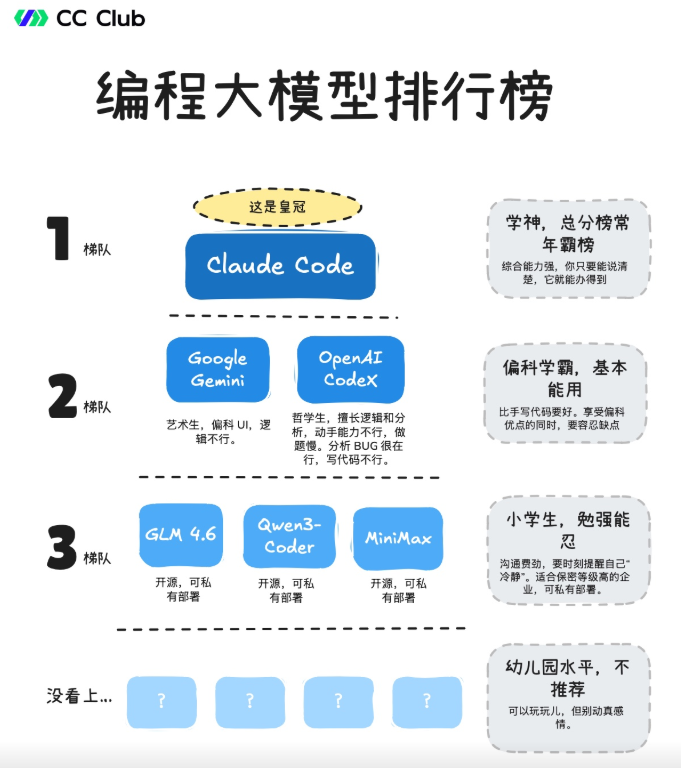
首选,claude-sonnet-4-5
其次,gemini3
再次,bigmodel(智谱) GLM-4.6, minimax
其他,Qwen3-coder
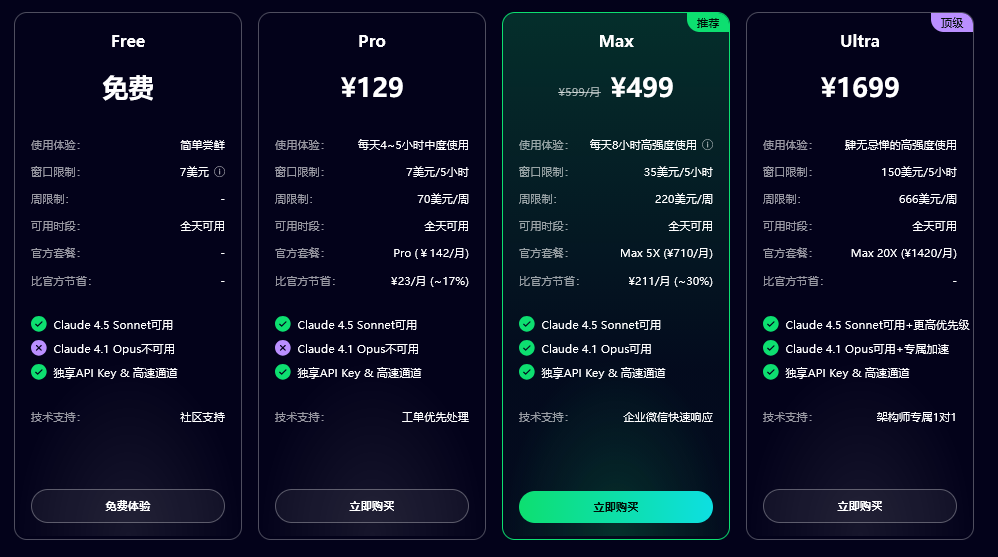
AI中转平台 -- 强烈推荐Claude Code (官方安装 + 中转API + 本地使用无飞机)
首选方法(最快最具性价比,还可以免费试用):claude-code club
注册和试用网址: https://academy.claude-code.club/ )
国内:智谱 GLM Coding
🚀 速来拼好模,智谱 GLM Coding 超值订阅,邀你一起薅羊毛!Claude Code、Cline 等 10+ 大编程工具无缝支持,“码力”全开,越拼越爽!立即开拼,享限时惊喜价!
链接:https://www.bigmodel.cn/

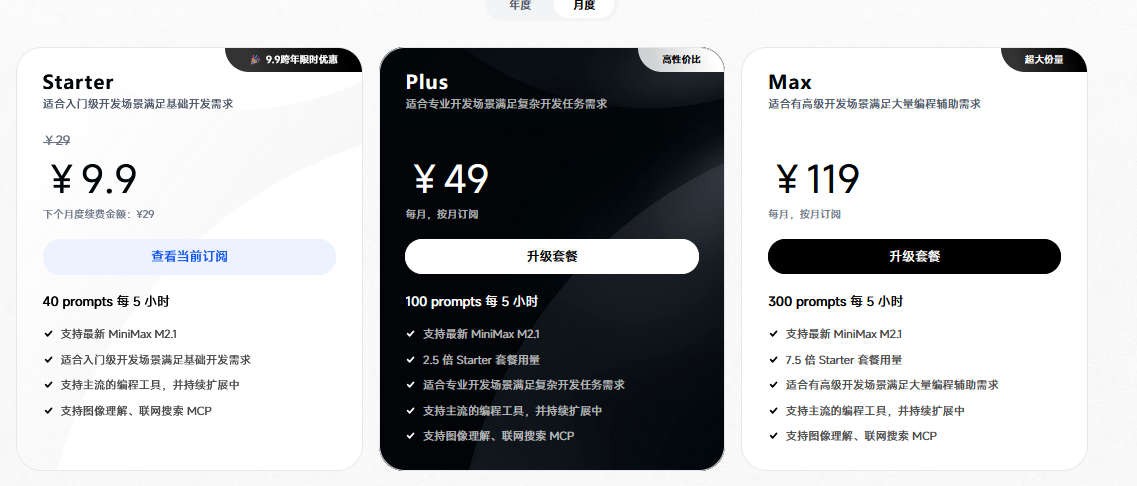
国内:MinMax2.1
🎁 MiniMax 跨年福利来袭!邀好友享 Coding Plan 双重好礼,助力开发体验!
好友立享 9折 专属优惠 + Builder 权益,你赢返利 + 社区特权!
👉 立即参与:https://www.minimaxi.com/
其它AI聚合/中转平台
https://wolfai.top/
https://aicodeditor.com/
https://openrouter.ai/
https://www.moonshot.cn/
https://open.bigmodel.cn/
https://gaccode.com/
其他工具
自助升级 ChatGPT Plus 工具
https://getgpt.pro/
国内自助升级 ChatGPT Plus 工具: getplus.app , 详细教程:国内升级 ChatGPT 手把手教程
教程:https://csguide.cn/private/chatgpt-plus-tutorial.html
ChatGPT 账户注册工具
如果你还没 ChatGPT 账户,可以去用谷歌邮箱、微软邮箱等注册一个,或者直接在这里几块钱购买一个成品账号登录都可以:https://chatgptzh.com.cn/gpt
https://sk.i6ls.com//links/584D744D
学习资源
相关网站
https://ai-bot.cn/
https://academy.claude-code.club/

 浙公网安备 33010602011771号