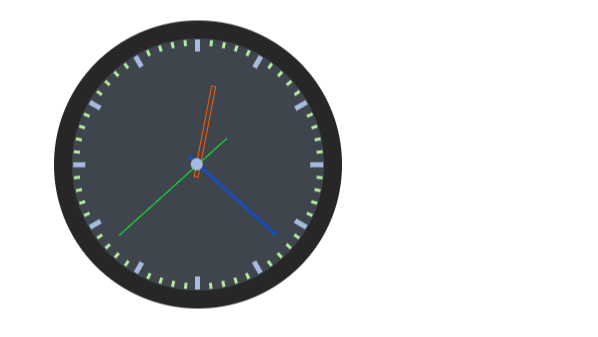
使用原生 HTML + CSS + JavaScript 写一个简单的时钟
时钟效果
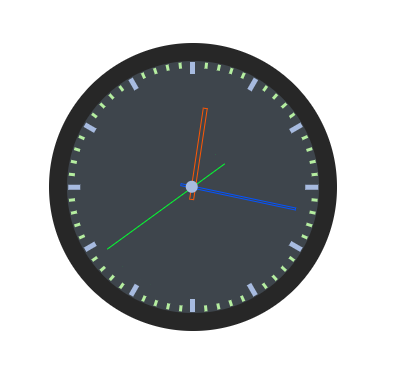
目录结构

HTML 代码
<!DOCTYPE html>
<html lang="en">
<head>
    <meta charset="UTF-8">
    <meta http-equiv="X-UA-Compatible" content="IE=edge">
    <meta name="viewport" content="width=device-width, initial-scale=1.0">
    <title>时钟</title>
    <!-- 引入 css 文件 -->
    <link rel="stylesheet" href="./css/clock.css">
</head>
<body>
    <!-- 钟表 -->
    <div class="clock">
        <div id="scale" class="scaleCon"></div>
        <div class="pointerCon">
            <div id="hour_pointer" class="pointer ph"></div>
            <div id="minute_pointer" class="pointer pm"></div>
            <div id="second_pointer" class="pointer ps"></div>
            <div class="core"></div>
        </div>
    </div>
    <!-- 引入 js 文件 -->
    <script src="./js/clock.js"></script>
</body>
</html>
CSS 代码
.clock {
    position: relative;
    top: 0;
    left: 0;
    margin: 36px;
    padding: 0;
    border: 15px solid #272727;
    border-radius: 50%;
    width: 200px;
    height: 200px;
    background-color: #3e454c;
}
/* .scaleCon | 刻度容器, .pointerCon | 指针容器*/
.scaleCon,.pointerCon {
    position: absolute;
    top: 0;
    left: -1px;
    width: 100%;
    height: 100%;
}
/* .secale 刻度公共样式*/
.scale {
    position: absolute;
    top: 0;
    left: 50%;
    width: 2px;
    height: 100%;
    transform: translate(0,-50%);
}

.scale::before {
    top: 0;
}
.scale::after {
    bottom: 0;
}

.scale::before, .scale::after {
    display: block;
    position: absolute;
    content: '';
}

/* .crude 时钟刻度 */
.crude::before, .crude::after {
    left: -1px;
    width: 4px;
    height: 10px;
    background-color: #a7bbe0;
}

/* .fine 分钟刻度 */
.fine::before, .fine::after {
    left: 0;
    width: 2px;
    height: 5px;
    background-color: #b5eea0;
}

/* 指针公共样式 */
.pointer {
    position: absolute;
    top: 0;
    left: 50%;
    width: 2px;
    height: 100%;
    transform: translate(-50%, 0);
}

/* 时针样式 */
.ph::after {
    content: '';
    display: block;
    position: absolute;
    left: -0.8px;
    top: 36px;
    border: 1px solid #fe5704;
    width: 2px;
    height: 36%;
}

/* 分针样式 */
.pm::after {
    content: '';
    display: block;
    position: absolute;
    top: 16px;
    left: -0.25px;
    border: 1px solid #0453fe;
    width: 1px;
    height: 46%;
}

/* 秒针样式 */
.ps::after {
    content: '';
    display: block;
    position: absolute;
    left: 1px;
    top: 15px;
    width: 0.25px;
    height: 58%;
    background-color: #04fe32;
}

/* 指针中心 */
.core {
    position: absolute;
    top: 50%;
    left: 50%;
    border-radius: 50%;
    width: 10px;
    height: 10px;
    background-color: #a7bbe0;
    transform: translate(-50%, -50%);
}
JS 代码
/* 定义一个时钟类 */
class Clock {
    /* 类入口:可用于接收外部参数,函数内部代码将在实例化对象的时候自动执行 */
    constructor() {
        this.scaleElem = [];
        this.fnInit();
    }

    /* 初始化 */
    fnInit() {
        this.fnNowTimer();
        this.fnCreateScale();
        this.fnCreatePointer();
        this.fnRotate();
    }

    /* 获取当前时间 */
    fnNowTimer() {
        let d = new Date();
        let h = d.getHours();
        let m = d.getMinutes();
        let s = d.getSeconds();
        this.secondDeg = (360/60)*s;
        this.minuteDeg = (360/60)*m;
        this.hourDeg = (360/12)*h + m*6/12;
    }

    /* 建立时钟刻度 */
    fnCreateScale() {
        let parentElem = document.getElementById('scale');
        let deg = 360/60;
        for (let i=0; i<30; i++) {
            this.scaleElem[i] = document.createElement('div');
            if (i%5==0) {
                this.scaleElem[i].className = 'scale crude';
            } else {
                this.scaleElem[i].className = 'scale fine';
            }
            this.scaleElem[i].style.transform = 'rotate('+ i*deg +'deg)';
            parentElem.appendChild(this.scaleElem[i]);
        }
    }

    /* 建立时钟指针并初始化位置 */
    fnCreatePointer() {
        this.hourPointerElem = document.getElementById('hour_pointer');
        this.minutePointerElem = document.getElementById('minute_pointer');
        this.secondPointerElem = document.getElementById('second_pointer');
        this.hourPointerElem.style.transform = 'rotate(' + this.hourDeg + 'deg)';
        this.minutePointerElem.style.transform = 'rotate(' + this.minuteDeg + 'deg)';
        this.secondPointerElem.style.transform = 'rotate(' + this.secondDeg + 'deg)';
    }

    /* 转动指针:1秒一次 */
    fnRotate() {
        this.setIntervalTimer = setInterval(()=>{
            this.fnNowTimer();
            this.hourPointerElem.style.transform = 'rotate(' + this.hourDeg + 'deg)';
            this.minutePointerElem.style.transform = 'rotate(' + this.minuteDeg + 'deg)';
            this.secondPointerElem.style.transform = 'rotate(' + this.secondDeg + 'deg)';
        },1000);
    }
}

/* 实例化时钟对象 */
let clock = new Clock();


 浙公网安备 33010602011771号