
使用react书写简单购物车
<!DOCTYPE html>
<html lang="en">
<head>
    <meta charset="UTF-8">
    <meta http-equiv="X-UA-Compatible" content="IE=edge">
    <meta name="viewport" content="width=device-width, initial-scale=1.0">
    <title>购物车</title>
    <link href="https://cdn.bootcdn.net/ajax/libs/twitter-bootstrap/3.4.1/css/bootstrap.min.css" rel="stylesheet">
    <style>
        #app{
            width: 600px;
            margin: auto;
        }
        .test{
            background-color: rgb(134, 236, 231);
        }
    </style>

</head>
<body>
    <div id='app'></div>
    <!-- 引入 React 核心库 -->
    <script src="https://cdn.staticfile.org/react/16.4.0/umd/react.development.js"></script>
    <!-- 提供与 DOM 相关的功能 -->
    <script src="https://cdn.staticfile.org/react-dom/16.4.0/umd/react-dom.development.js"></script>
    <!-- Babel 可以将 ES6 代码转为 ES5 代码,这样我们就能在目前不支持 ES6 浏览器上执行 React 代码。Babel 内嵌了对 JSX 的支持。 -->
    <script src="https://cdn.staticfile.org/babel-standalone/6.26.0/babel.min.js"></script>

    <script type='text/babel'>
   class Shop extends React.Component{
       state={
           fruits:[
               {id:1,name:'apple',price:3,num:9,total:27},
               {id:2,name:'pear',price:4,num:7,total:28},
               {id:3,name:'banner',price:5,num:4,total:20}
           ]
       }
       //减
       minus=(n,i)=>{
        //    console.log(n,'num')
        //    console.log(i,'index');
        if(this.state.fruits[i].num > 0){
            this.setState({
               num:--this.state.fruits[i].num
           })
           console.log(this.state.fruits[i].num);
        }else{
            alert('数量不能为负')
        }

       }
       //加
       plus=(n,i)=>{
        this.setState({
               num:++this.state.fruits[i].num
           })
           console.log(this.state.fruits[i].num);
       }
       //渲染计算
       render(){
           let lis = this.state.fruits.map((item,index)=>{
               return(
                   <tr key={index}>
                    <td>{item.id}</td>
                    <td>{item.name}</td>
                    <td>{item.price}</td>
                    <td>
                        <button onClick={this.minus.bind(this,item.num,index)}>-</button>
                        {item.num}
                        <button onClick={this.plus.bind(this,item.num,index)}>+</button>
                        </td>
                    <td>{item.price*item.num}</td>
                   </tr>
               )
           })
           //计算总价
           let sum = 0
            for(let item of this.state.fruits){
                //不能直接使用item.total 值为真实数据 没有进行数据操作
                 sum += item.num*item.price
            }
           return(
                <table className="table table-bordered">
                    <thead>
                        <tr>
                            <td>编号</td>
                            <td>名称</td>
                            <td>单价</td>
                            <td>数量</td>
                            <td>总价</td>
                        </tr>
                    </thead>
                    <tbody>
                        {lis}
                    </tbody>
                    <tfoot className='test'>
                        <tr>
                            <td colspan="5">共计:{sum}元</td>
                        </tr>
                    </tfoot>
                </table>
           )
       }
   }
   ReactDOM.render(<Shop/>, document.getElementById("app"));


    </script>
</body>
</html>
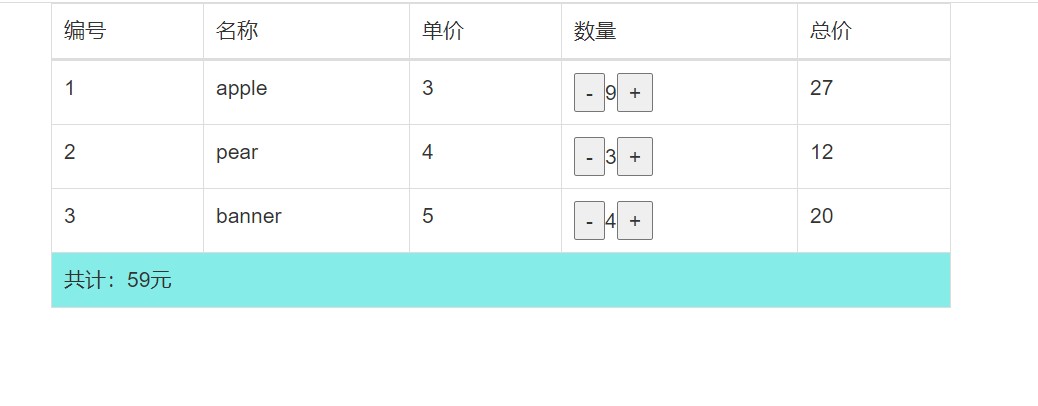
效果如图

 浙公网安备 33010602011771号