

写Swift用Cocoapods兼容IOS7
在Medium上写了篇文章(原文)转到这里,想来也不会有人读,索性就不翻译了。
This is for Swift cocoapods with IOS 7, if you don’t need to support IOS 7, you can close this page now.
About half year ago, I started working on an iOS project writing in Swift language. One problem I was facing is swift pods with iOS 7. (Although I didn’t even want to drop support of iOS 6)
Of course, there’re already some solutions on google search. This one I like it most: https://medium.com/ios-os-x-development/how-to-use-swift-cocoapods-and-still-support-ios-7-0-f9dc29b3628b, and I agree with his words: ‘git submodules are serious pain’. (that’s the solution I was using before I found this) For who don’t want to click the link, I give briefly summarise: (I suggest you to read it though)
The idea is separate main cocoapods into main pods and swift pods, put swift pods into a dump project (I call it SwiftLibrariesPods) inside your main project folder.
Purpose:
The idea is good but I think I can refine it for automation.
- I don’t need to manually copy the files from SwiftLibrariesPods to main project, error friendly
- Saving time, build process friendly
What need to do:
- run ‘pod update’ in SwiftLibrariesPods project
- filter and copy groups
- filter and copy files
- add files to build targets
Steps:
- Create a project SwiftLibrariesPods inside your main project folder, choose add to your main workspace (you can drag to your workspace as well).
- Run ‘pod int’, ‘pod install’ in your SwiftLibrariesPods project
- Add Pods folder to your SwiftLibrariesPods project
- add platform :ios, ‘8.0’, use_frameworks! to your Podfile inside your SwiftLibrariesPods project
- add a Swift pod to your SwiftLibrariesPods Podfile (For example: pod ‘AlamofireDomain’, ‘= 1.3.2’)
- Run ‘pod update’ inside your SwiftLibrariesPods folder
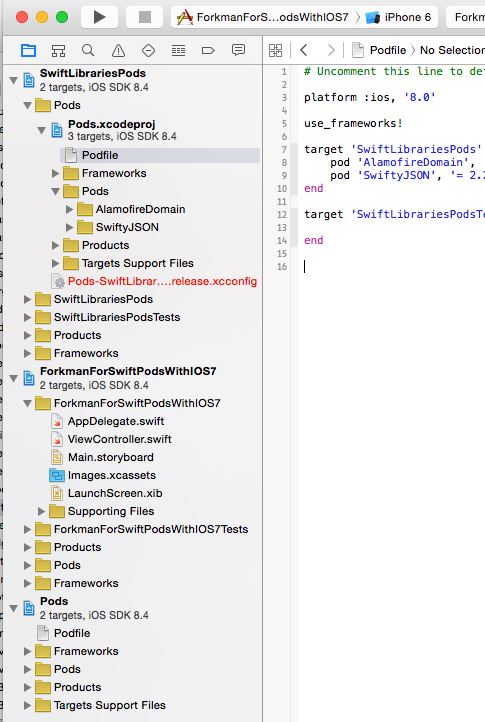
now your project should looks like this:
Continue steps:
- Add Update.sh and Forkman.rb to SwiftLibrariesPods project root folder
- Add new group ‘SwiftPodsLibraries’ to your main project
- Make sure you install Xcodeproj $ [sudo] gem install xcodeproj
- Configs for Forkman.rb:
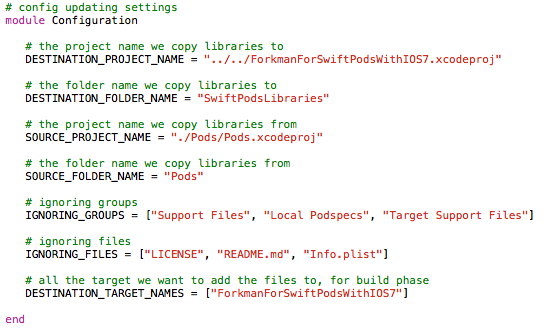
Now open terminal go SwiftLibrariesPods project root folder run:
sh Update.sh
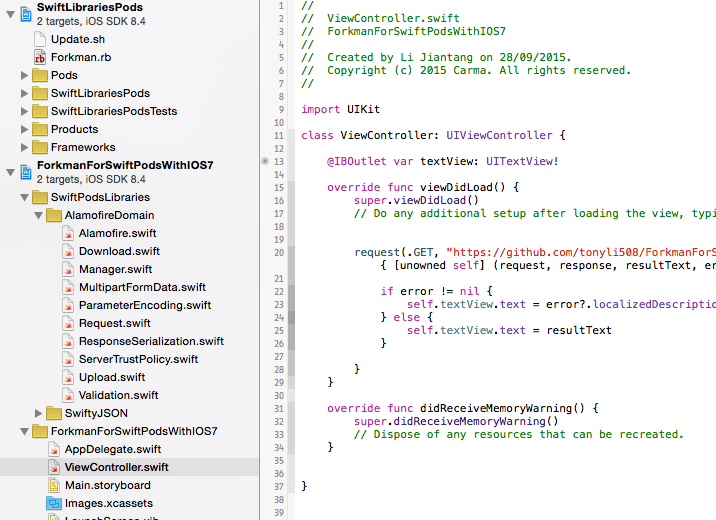
Now Forkman copied all Swift pods source code to your main project.
At last:
You can create your own pod to add namespace to Alamofire. Change Forkman parameters to work on your existing projects. Full project at https://github.com/tonyli508/ForkmanForSwiftPodsWithIOS7.

 浙公网安备 33010602011771号